1
Configuring your Firewall
If you
cannot
see see
your
server
in the
shared
server
dialogue
box,
If you
cannot
your
server
in the
shared
server
dialogue
box,
youyou
maymay
need
to
adjust
the
Firewall
configuration.
need to adjust the Firewall configuration.
Note:
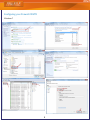
Windows 7 Advanced Firewall rules are similar to
commercial firewalls with Inbound/Outbound settings
that may need to have profiledbservice.exe added.
If the Firewall is set up to prompt you each time a program needs
If the Firewall is set up to prompt you each time a program needs
to access your network or the Internet, you must give ProFile perto access your network or the Internet, you must give ProFile permission to access your network.
mission to access your network.
If your Firewdoes not prompt you, you must configure the firewall
If the
Firewall does not prompt you, you must configure the firewall
manually:
manually:
•
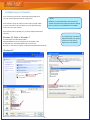
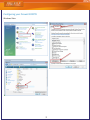
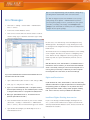
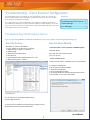
Windows XP, Vista, or Windows 7
In Control Panel, find Windows Firewall.
Add profiledbservice.exe as an exception to the Firewall rules.
(In Windows XP, click the Exceptions Tab; for Vista and
Windows 7, click Allow a Program or Feature Through Windows Firewall.)
Windows XP
2
To configure your Commercial
Software Firewall rules, please
consult your user manual,
help file or vendor website.