1
Error Messages CONT’D
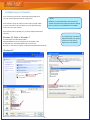
Insufficient Rights to Modify Service
Unable to create shared directory
This is an access rights issue. Services are special programs written for Windows NT, 2000, and XP that have no visual interface
and can run even when a user is not logged in. The ProFile Server
(serverinstall.exe) installs as a service under these operating systems (it can’t under Windows™ 95 or 98 which do not support services, so the install works differently on those systems). Contact a
network administrator for assistance.
After the Wizard shuts down all services/servers, it installs default
folders in: ‘C:\Shared Profile Data’ for the database and ‘C:\Shared
Profile Data\Datafiles’ for shared client files. This is not configurable. This makes the wizard simpler. If you are installing to a
server with no C drive (an unusual situation), it will be necessary
to use the stand-alone Server Install (serverinstall.exe on the CD or
Virtual CD) which allows configuration of that path. Alternately,
there may be another reason that the Wizard is unable to create
those folders.
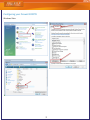
Unable to query service
If you see the message “Unable to query service”, the Wizard has
failed to shut down the service as required, due to insufficient
rights or an operating system error. Contact a network administrator for assistance.
Unable to shut down service
If you see the message “Unable to shut down service”, the ProFile
database service will not accept the Wizard’s command to shut
down. This is likely an access rights issue. Contact a network administrator for assistance.
Unable to shut down service (2)
The ProFile database service received the message to shut down
but did not respond in a timely manner. Click the [Back] button in
the Wizard and try again.
Unable toJDLQORFDOVHUYHUDGGUHVV
Firewall issue, see page 2.
If you try to install the ProFile Database Server on an operating
system that is NOT Windows NT, 2000, or XP, you will not be able
to install services. The Wizard will try and install the executable
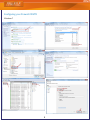
The path to the executable (profiledbservice.exe) is
called profiledbserver.exe. If you have previously installed this
incorrect. Confirm in Start > Settings > Control Panel >
server and it is running, the Wizard must shut it down in order
Administrative Tools > Services > double-click
to configure it. The “unable to shut downserver” error is a result
Greenpoint ProFile Database Service Ver. 1.00 and view
of a failed attempt to programmatically shut down that running
Path to Executable. Changing this path requires modifying
server. downserver” error is a result of a failed attempt to shut
the Windows Registry. Call 1-800-452-9970 for assistance.
down the server.
Insufficient Rights: Starting service
Could not create script
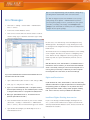
ProFile configures the server on start up by using a command
script that the Wizard creates and stores in the ProFile folder.
This directory is usually C:\Program Files\Profile; the script is
called PROFILEDB.GDS. This script contains the default alias
which associates the name by default, PROFILEDB and the
folder that contains the database files (file extension of FF2).
The default association looks like this: PROFILEDB=C:\Shared
Profile Data. A user at a workstation who connects to the
standalone Shared Database Server will see that association in
their Client Explorer > Options as a “Database”.
To correct this error, search for and delete the script file (PROFILEDB.GDS) created during an earlier install.This script is
only used to initialize a shared server; this will not affect the
prior ProFile Server installation.
‘8QDEOHWRUHVWDUWVHUYLFH’
You have sufficient rights, but the service did not re-start. Try
manually reinstalling the service:
1 Select Start > Run and type <directory name>\profiledbservice.exe /i. Or, reinstall the ProFile application software.
You don't have sufficient rights to initiate the service.
Contact your network administrator.
With Windows XP, Vista, or Windows 7 the Wizard will attempt
If you are running Windows NT, 2000, or XP the Wizard will atto start the ProFile Database service (profiledbservice.exe). If it
tempt to start the ProFile Database service (profiledbservice.exe).
fails is is often because the user has insufficient rights to start a
If it fails it is often because the user has insufficient rights to start
service. Contact a network administrator for assistance.
a service. Contact a network administrator for assistance.
profile.intuit.ca
6
7008 Roper Road NW
Edmonton, AB T6B 3H2
Phone: 1.800.452.9970
Fax: 1.888.829.1724