1
GB
Product presentation
Ad
va
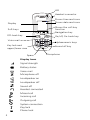
Local phonebook (250 contacts)
Central phonebook*
Company phonebook (500 contacts)
Voice mail access*
Vibrator
Headset connector
Microphone on/off during call
Loudspeaking function
Mini messaging* (12 characters)
Centralized management*
Easy replacement
B as
ic
Functions
nce
d
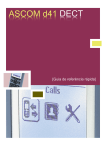
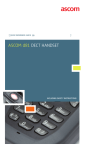
The d41 Handset is designed to be used in office environment. It is
intended for telephony and has high quality voice. For detailed
information, see User Manual, Ascom d41, TD92582GB.
X
X
X
X
X
X
X
X
X
X
X
X
X
X
X
X
X
X
* System dependent
Note: Your unit may have more functions than described here, see
User Manual, Ascom d41.
Basic functions
Switch on the handset
Press and hold
lights up.
until the handset vibrates and the display
Switch off the handset
Press and hold
until the dialogue window “Switch off?” is
displayed, press “Yes”.
Make a call
Dialling can be made in the following ways:
• In standby mode, dial the number and press
“Call”.
, or the Soft key
3