1
1.
Overview
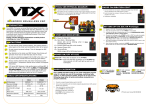
Power Input: (Figure 3)
Control Data: (Figure 4)
The new Chroma-Q® Inspire™ Terminal Strip LED house light features a single light engine with 36 high powered LEDs
(RGBW), a fully homogenized optic and controlled via the Inspire™ External Control Box. Through the Inspire External
Control Box, the fixture can be controlled remotely through the ANSI E1.11 USITT DMX 512-A protocol.
2.
Safety
1. This product is for professional use only. It is NOT intended for domestic or outdoor use.
2. The bright flash of light during power-up & continuous strobe may cause epileptic seizure.
Caution
3.
3. This product must be used with a safety cable.
Cabling
System Diagram: (Figure 1)
Maximum DMX cable
length from Data Out
1/2/3 to the 1st fixture
must not exceed
500’/152m.
To connect the wiring for power and control data:
•
Remove the cover plate for power input.
•
Insert the AC power cable with strain relief through the cover plate and connect to the Terminal Block Plug and
into the Terminal Block header in the fixture. (Figure 2 & 3)
•
Put back and fasten the cover plate
•
Connect the DMX control data cables from the Inspire External Control Box to the Terminal Block Plug and plug
into the Terminal Block headers at the rear of the fixture (Figure 2 & 4)
4.
Mounting
A mounting bracket is built into the enclosure for overhead applications. Secure the fixture with a safety bond. A fixing
hold is built into the enclosure.
5.
Optics
The Inspire can be built with either Narrow, Medium or Wide lens. The beam angles are:
Narrow: ~32°; Medium: ~42°; Wide: ~65°
6.
Control
The control functions are accessed through the Touch Screen display at the front panel of the Inspire External Control
Box. The features of the Touch Screen Display are:
Power & Data Connections: (Figure 2)
Note: The DMX cable
connected to the first Terminal
Strip fixture from each Data
Output of the External Control
Box must be terminated with a
120 ohm resistor. See Inspire
Terminal Strip User Manual
for details.
Control Menu
Inspire Terminal Strip Quick Start Guide V1.01
Main Menu
Displays the model name, DMX information, AC and Emergency power input and Command buttons
Address
Sets the DMX start address for each output: Output 1, Output 2, Output 3
Inspire Terminal Strip Quick Start Guide V1.01