1
Configuring NPort Server
(1) NPort Server Lite (applies to firmware v. 2.00 or above for DE-301/302/304/331/332/334)
1-1 Telnet NPort Server Lite’s IP address (default = 192.168.127.254) to access the Telnet console
. Note: The LCD panel can be used to change the IP address & netmask to fit your network
scheme. Refer to Appendix B of the User’s Manual for more details.)
1-2 Choose the VT-100 console terminal type by pressing 1.
1-3 Use the arrow key to move the cursor to “serverConfig” and then press Enter. (Make sure
“VT100 Arrows” is enabled. From the Telnet main menu, access TerminalàPreferences…)
1-4 Move the cursor to Operating mode, press Enter, and then select “RAW Connection Mode”.
1-5 Press ESC, move the cursor to Restart, and then press Enter to reboot the system.
(2) NPort Server Pro (applies to firmware v. 1.10 or above for DE-303/308)
2-1 Telnet NPort Server Pro’s IP address (default = 192.168.127.254) to access the Telnet console.
2-2 Choose the VT-100 console terminal type by pressing 1.
2-3 Move the cursor to “Server” and then press Enter to configure IP address, nestmask, DHCP, and
gateway.
2-4 Press ESC, move the cursor to “OP_mode”, press Enter, and then select RAW connection mode.
2-5 Press Enter to set the serial port(s) to RAW connection.
2-6 Move the cursor to “Pure raw data mode” and then press enter for more settings, including TCP
port No., etc.
2-7 Press ESC, move the cursor to “Save” to save the configuration, and then move to Restart to
reboot the system.
. Notes:
Destination IP: Keep blank to allow access for all hosts, or enter an IP address to allow
access to only one host.
Inactivity time: (0-99 min.) the serial port will be reset if there is no transmission during this time.
TCP alive check time: (0-99 min.) the TCP connection will be reset if there is no activity for a
length of time equal to tcp_time_out.
Introduction of socket interface
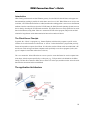
This interface provides easy-to-use commands for building up customized applications. When using the
Socket Interface, connections are established with an IP address and port number. The IP address identifies
a remote host and the port number identifies an application process (e.g., 80 for www browser service). The
combination of <IP address : port number> allows the user to access the desired application process
running on the remote host.
NPort Server will launch the bi-directional serial transmission service and then listen for requests from the
Client via NPort server’s IP and TCP port 4001 (the manufacturer’s default value) after the user starts up
the raw connection service. (The request is commonly made by application software built in or installed on
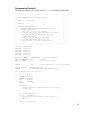
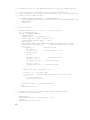
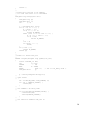
the user interface PC or terminal—refer to the Programming Example given below for more details on how
to use this operation mode.)
2/8