1
Document Composer
Document Composer
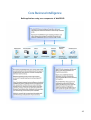
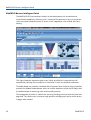
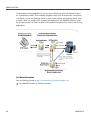
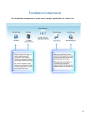
Document Composer enables you to design reports and to coordinate and distribute layouts,
made up of multiple reports and graphs in a single document.
You can position reports and graphs anywhere on a single page, or combine a series of layouts
within a single document.
When creating compound reports from Document Composer, PDF, HTML, active report,
PowerPoint, Excel, Excel 2007, active PDF, active Flash, and User output formats are available.
Uses for Document Composer
When creating a document with Document Composer, you can:
Design complex reports.
Build compound reports.
Coordinate and distribute various free-form layouts, made up of multiple reports and graphs,
in a single output file.
Precisely position reports and graphs anywhere on a single page, or combine a series of
layouts.
Link reports together by a common sort field so that multiple reports and graphs can be
burst into individual page layouts.
For More Information
See the following manual at http://documentation.informationbuilders.com:
Creating Compound Reports With Document Composer
Report Painter
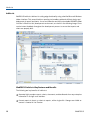
Report Painter enables you to create and style complex reports using data sources. These
reports can be run on their own or inserted into an HTML page or document. Report Painter
provides you with many powerful reporting features, such as:
Inclusion of calculated values in reports.
Options for creating section subtotals, subheadings, and subfootings.
Control of column formatting.
Support for hyperlinking (or drill-down functionality).
20
WebFOCUS