1
Logic Studio
Effects
Copyright © 2009 Apple Inc. All rights reserved.
Your rights to the software are governed by the
accompanying software license agreement. The owner or
authorized user of a valid copy of Logic Studio software
may reproduce this publication for the purpose of learning
to use such software. No part of this publication may be
reproduced or transmitted for commercial purposes, such
as selling copies of this publication or for providing paid
for support services.
The Apple logo is a trademark of Apple Inc., registered in
the U.S. and other countries. Use of the “keyboard” Apple
logo (Shift-Option-K) for commercial purposes without
the prior written consent of Apple may constitute
trademark infringement and unfair competition in violation
of federal and state laws.
Every effort has been made to ensure that the information
in this manual is accurate. Apple is not responsible for
printing or clerical errors.
Note: Because Apple frequently releases new versions
and updates to its system software, applications, and
Internet sites, images shown in this manual may be slightly
different from what you see on your screen.
Apple
1 Infinite Loop
Cupertino, CA 95014
408-996-1010
www.apple.com
Apple, the Apple logo, GarageBand, Logic, Logic Studio,
Macintosh, MainStage, and WaveBurner are trademarks
of Apple Inc., registered in the U.S. and other countries.
Finder is a trademark of Apple Inc.
Other company and product names mentioned herein
are trademarks of their respective companies. Mention of
third-party products is for informational purposes only
and constitutes neither an endorsement nor a
recommendation. Apple assumes no responsibility with
regard to the performance or use of these products.
Contents
Preface
7
8
11
11
An Introduction to the Logic Studio Effects
About the Logic Studio Effects
About the Logic Studio Documentation
Additional Resources
Chapter 1
13
13
30
31
37
Amps and Pedals
Amp Designer
Bass Amp
Guitar Amp Pro
Pedalboard
Chapter 2
53
53
74
74
75
77
Delay Effects
Delay Designer
Echo
Sample Delay
Stereo Delay
Tape Delay
Chapter 3
79
80
81
82
83
83
84
Distortion Effects
Bitcrusher
Clip Distortion
Distortion Effect
Distortion II
Overdrive
Phase Distortion
Chapter 4
87
88
89
90
94
96
98
100
Dynamics Processors
Types of Dynamics Processors
Adaptive Limiter
Compressor
DeEsser
Ducker
Enveloper
Expander
3
4
101
102
105
108
109
109
Limiter
Multipressor
Noise Gate
Silver Compressor
Silver Gate
Surround Compressor
Chapter 5
113
114
117
118
119
123
129
131
Equalizers
Channel EQ
DJ EQ
Fat EQ
Linear Phase EQ
Match EQ
Single-Band EQs
Silver EQ
Chapter 6
133
133
139
143
155
159
Filter Effects
AutoFilter
EVOC 20 Filterbank
EVOC 20 TrackOscillator
Fuzz-Wah
Spectral Gate
Chapter 7
163
163
164
167
Imaging Processors
Binaural Post-Processing
Direction Mixer
Stereo Spread
Chapter 8
169
169
170
170
171
176
182
Metering Tools
BPM Counter
Correlation Meter
Level Meter Plug-in
MultiMeter
Surround MultiMeter
Tuner
Chapter 9
185
186
186
188
189
189
192
193
Modulation Effects
Chorus Effect
Ensemble Effect
Flanger Effect
Microphaser
Modulation Delay
Phaser Effect
Ringshifter
Contents
199
201
203
204
Rotor Cabinet Effect
Scanner Vibrato Effect
Spreader
Tremolo Effect
Chapter 10
205
205
209
210
Pitch Effects
Pitch Correction Effect
Pitch Shifter II
Vocal Transformer
Chapter 11
215
216
216
217
220
223
227
Reverb Effects
Plates, Digital Reverb Effects, and Convolution Reverb
AVerb
EnVerb
GoldVerb
PlatinumVerb
SilverVerb
Chapter 12
229
230
231
235
241
243
249
Space Designer Convolution Reverb
Getting to Know the Space Designer Interface
Working with Space Designer’s Impulse Response Parameters
Working with Space Designer’s Envelope and EQ Parameters
Working with Space Designer’s Filter
Working with Space Designer’s Global Parameters
Automating Space Designer
Chapter 13
251
251
253
254
255
257
258
Specialized Effects and Utilities
Denoiser
Enhance Timing
Exciter
Grooveshifter
Speech Enhancer
SubBass
Chapter 14
261
261
262
263
265
265
Utilities and Tools
Down Mixer
Gain Plug-in
I/O Utility
Multichannel Gain
Test Oscillator
Contents
5
Preface
An Introduction to the
Logic Studio Effects
Logic Studio has an extensive range of digital signal processing (DSP) effects and
processors that are used to color or tonally shape existing audio recordings, software
instruments, and external audio sources—in real time. These will cover almost every audio
processing and manipulation need you will encounter in your day-to-day work.
The most common processing options include EQs, dynamic processors, modulations,
distortions, reverbs, and delays.
Less common are simulations of amplifiers and speaker cabinets, which enable you to
“play” your instruments or other signals through a range of vintage and modern sound
reproduction systems. Guitarists will also benefit from a number of classic pedal effect
emulations.
Further advanced features include precise signal meters and analyzers, a test tone
generator, noise reduction, pitch correction, imaging, bass enhancement, and time-altering
processors and utilities.
As you can see, many of the included processors and utilities don’t really fall into the
“effects” category, but they may prove to be invaluable in your studio.
All effects, processors, and utilities provide an intuitive interface that simplifies operation,
enabling you to work quickly. Outstanding audio quality is assured when needed, or—at
the other end of the spectrum—extreme processing is possible when you need to radically
alter your audio. All effects and processors are highly optimized for efficient CPU usage.
This preface covers the following:
• About the Logic Studio Effects (p. 8)
• About the Logic Studio Documentation (p. 11)
• Additional Resources (p. 11)
7
About the Logic Studio Effects
The Logic Studio applications are designed for particular types of audio or music work.
Similarly, the Logic Studio effects are also designed for specific uses. Given these unique
properties and uses, each application provides a custom collection of suitable effects and
utilities.
Some points to note:
• Surround versions of effects, and surround-related parameters that are documented
in this manual, are only available in Logic Pro.
• Channel strip settings that include effects not available in some applications are not
compatible with those applications.
• MainStage is a live application, and therefore, does not include effects that introduce
audible latency.
• WaveBurner does not provide a project tempo, and therefore, does not support
tempo-based effect parameters (such as sync).
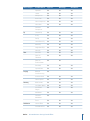
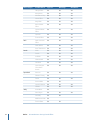
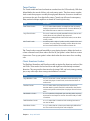
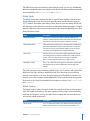
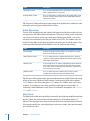
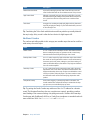
Effect category
Included effects
Logic Pro
MainStage
WaveBurner
Amp Modeling
Amp Designer
Yes
Yes
Yes
Bass Amp
Yes
Yes
Yes
Guitar Amp Pro
Yes
Yes
Yes
Pedalboard
Yes
Yes
Yes
Delay Designer
Yes
Yes
Yes
Echo
Yes
Yes
Sample Delay
Yes
Yes
Yes
Stereo Delay
Yes
Yes
Yes
Tape Delay
Yes
Yes
Yes
Bitcrusher
Yes
Yes
Yes
Clip Distortion
Yes
Yes
Yes
Distortion Effect
Yes
Yes
Yes
Distortion II
Yes
Yes
Yes
Overdrive
Yes
Yes
Yes
Phase Distortion
Yes
Yes
Yes
Adaptive Limiter
Yes
Yes
Yes
Compressor
Yes
Yes
Yes
DeEsser
Yes
Yes
Yes
Ducker
Yes
Enveloper
Yes
Yes
Yes
Delay
Distortion
Dynamics
8
Preface
An Introduction to the Logic Studio Effects
Effect category
EQ
Filter
Imaging
Metering
Modulation
Preface
Included effects
Logic Pro
MainStage
WaveBurner
Expander
Yes
Yes
Yes
Limiter
Yes
Yes
Yes
Multipressor
Yes
Yes
Yes
Noise Gate
Yes
Yes
Yes
Silver Compressor
Yes
Yes
Yes
Silver Gate
Yes
Yes
Yes
Surround
Compressor
Yes
Channel EQ
Yes
Yes
Yes
DJ EQ
Yes
Yes
Yes
Fat EQ
Yes
Yes
Yes
Linear Phase EQ
Yes
Yes
Yes
Match EQ
Yes
Yes
Yes
Single-Band EQs
Yes
Yes
Yes
Silver EQ
Yes
Yes
Yes
AutoFilter
Yes
Yes
Yes
EVOC 20
Filterbank
Yes
Yes
Yes
EVOC 20
TrackOscillator
Yes
Yes
Fuzz-Wah
Yes
Yes
Yes
Spectral Gate
Yes
Yes
Yes
Binaural
Post-Processing
Yes
Direction Mixer
Yes
Yes
Yes
Stereo Spread
Yes
Yes
Yes
BPM Counter
Yes
Yes
Yes
Correlation Meter
Yes
Yes
Yes
Level Meter
Plug-in
Yes
Yes
Yes
MultiMeter
Yes
Yes
Yes
Surround
MultiMeter
Yes
Tuner
Yes
Yes
Yes
Chorus Effect
Yes
Yes
Yes
Ensemble Effect
Yes
Yes
Yes
An Introduction to the Logic Studio Effects
9
Effect category
Pitch
Reverb
Specialized
Utility
10
Preface
Included effects
Logic Pro
MainStage
WaveBurner
Flanger Effect
Yes
Yes
Yes
Microphaser
Yes
Yes
Yes
Modulation Delay
Yes
Yes
Yes
Phaser Effect
Yes
Yes
Yes
Ringshifter
Yes
Yes
Yes
Rotor Cabinet
Effect
Yes
Yes
Yes
Scanner Vibrato
Effect
Yes
Yes
Yes
Spreader
Yes
Yes
Yes
Tremolo Effect
Yes
Yes
Yes
Pitch Correction
Effect
Yes
Yes
Yes
Pitch Shifter II
Yes
Yes
Yes
Vocal Transformer
Yes
Yes
Yes
AVerb
Yes
Yes
Yes
EnVerb
Yes
Yes
Yes
GoldVerb
Yes
Yes
Yes
PlatinumVerb
Yes
Yes
Yes
SilverVerb
Yes
Yes
Yes
Space Designer
Convolution
Reverb
Yes
Yes
Yes
Denoiser
Yes
Yes
Yes
Enhance Timing
Yes
Exciter
Yes
Yes
Yes
Grooveshifter
Yes
Yes
Speech Enhancer
Yes
Yes
Yes
SubBass
Yes
Yes
Yes
Down Mixer
Yes
Gain Plug-in
Yes
Yes
Yes
I/O Utility
Yes
Yes
Multichannel Gain
Yes
Test Oscillator
Yes
An Introduction to the Logic Studio Effects
Yes
About the Logic Studio Documentation
Logic Studio comes with various documents that will help you get started as well as
provide detailed information about the included applications.
• Logic Pro User Manual: This onscreen manual provides comprehensive instructions for
using Logic Pro to set up a recording system, compose music, edit audio and MIDI files,
and output audio for CD productions.
• Exploring Logic Pro: This booklet provides a fast-paced introduction to the main features
and tasks in Logic Pro, encouraging hands-on exploration for new users.
• Logic Pro Control Surfaces Support: This onscreen manual describes the configuration
and use of control surfaces with Logic Pro.
• Logic Studio Instruments: This onscreen manual provides comprehensive instructions
for using the powerful collection of instruments included with Logic Pro and MainStage.
• Logic Studio Effects: This onscreen manual provides comprehensive instructions for
using the powerful collection of effects included with Logic Pro, MainStage, and
WaveBurner.
• Logic Studio Working with Apogee Hardware: This onscreen manual describes the use
of Apogee hardware with Logic Pro and MainStage.
• Logic Pro TDM Guide: This onscreen manual describes the essential aspects of using
TDM in Logic Pro.
• MainStage User Manual: This onscreen manual provides comprehensive instructions
for creating MainStage concerts and using MainStage with your instruments,
microphones, and other music gear when you perform live.
• Exploring MainStage: This booklet provides a fast-paced introduction to the main
features and tasks in MainStage, encouraging hands-on exploration for new users.
• Waveburner User Manual: This onscreen manual provides comprehensive instructions
for using WaveBurner to create professional-quality audio CDs.
• Impulse Response Utility User Manual: This onscreen document provides comprehensive
instructions for using Impulse Response Utility to create your own mono, stereo, and
surround impulse responses for Space Designer, the Logic Studio convolution-based
reverb effect.
Additional Resources
In addition to the documentation that comes with Logic Studio, there are a variety of
other resources you can use to find out more.
Preface
An Introduction to the Logic Studio Effects
11
Release Notes and New Features Documents
Each application offers detailed documentation that covers new or changed features and
functions. This documentation can be accessed in the following way:
• Open the application Help menu and choose Release Notes or New Features.
Logic Studio Website
For general information and updates, as well as the latest news on Logic Studio, go to:
• http://www.apple.com/logicstudio
Apple Service and Support Websites
For software updates and answers to the most frequently asked questions for all Apple
products, go to the general Apple Support webpage. You’ll also have access to product
specifications, reference documentation, and technical articles about Apple products and
products from other companies.
• http://www.apple.com/support
For software updates, documentation, discussion forums, and answers to the most
frequently asked questions for Logic Studio, go to:
• http://www.apple.com/support/logicstudio
For discussion forums for all Apple products from around the world, where you can search
for an answer, post your question, or answer other users’ questions, go to:
• http://discussions.apple.com
12
Preface
An Introduction to the Logic Studio Effects
Amps and Pedals
1
Logic Studio features an extensive collection of guitar and bass amplifiers and classic
pedal effects. You can play live—or process recorded audio and software instrument
parts—through these amps and effects.
The amplifier models re-create vintage and modern tube and solid-state amps. Built-in
effect units, such as reverb, tremolo, or vibrato, are also reproduced. Accompanying the
amplifiers are a variety of emulated speaker cabinets, which can be used as a matching
set or combined in different ways to create interesting hybrids.
Also emulated are a number of “classic” foot pedal effects—or stompboxes—that were,
and remain, popular with guitarists and keyboardists. As with their real-world counterparts,
you can freely chain pedals in any order to create the perfect sound.
This chapter covers the following:
• Amp Designer (p. 13)
• Bass Amp (p. 30)
• Guitar Amp Pro (p. 31)
• Pedalboard (p. 37)
Amp Designer
Amp Designer emulates the sound of over 20 famous guitar amplifiers and the speaker
cabinets used with them. Each preconfigured model combines an amp, cabinet, and EQ
that re-creates a well-known guitar amplifier sound. You can process guitar signals directly,
which allows you to reproduce the sound of your guitar played through these amplification
systems. Amp Designer can also be used for experimental sound design and processing.
You are free to use it with other instruments, applying the sonic character of a guitar amp
to a trumpet or vocal part, for example.
The amplifiers, cabinets, and EQs emulated by Amp Designer can be combined in a
number of ways to radically or subtly alter the tone. Virtual microphones are used to pick
up the signal of the emulated amplifier and cabinet. You can choose from three different
microphone types, and you can reposition them.
13
Amp Designer also emulates classic guitar amplifier effects, including spring reverb,
vibrato, and tremolo.
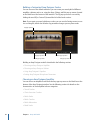
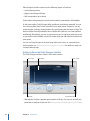
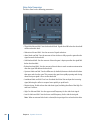
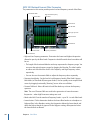
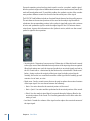
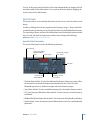
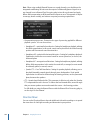
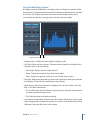
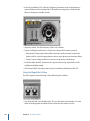
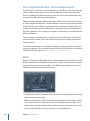
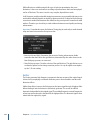
The Amp Designer interface can be broken down into four general sections in terms of
different kinds of parameters.
Amp parameters
Effects parameters
Amp parameters
Microphone parameters
• Model parameters: The Model pop-up menu is found at the left of the black bar at the
bottom. It is used to choose a preconfigured model, consisting of an amplifier, a cabinet,
an EQ type, and a microphone type. See Choosing an Amp Designer Model. The
model-customizing parameters on the black bar allow you to independently choose
the type of amplifier and cabinet. See Building a Customized Amp Designer Combo.
The EQ type is chosen from the EQ pop-up menu above the Bass, Mids, and Treble
knobs in the knobs section. See Using Amp Designer’s Equalizer.
• Amp parameters: Located at each end of the knobs section, these parameters are used
to set an amp’s input gain, presence, and output level. See Using Amp Designer’s Gain,
Presence, and Master Controls.
• Effects parameters: Located in the center of the knobs section, these parameters allow
you to control the integrated guitar effects. See Getting to Know Amp Designer’s Effects
Parameters.
• Microphone parameters: Located slightly above the right end of the black bar at the
bottom, these parameters are used to set the type and position of the microphone
that captures the amplifier and cabinet sound. See Setting Amp Designer Microphone
Parameters.
14
Chapter 1 Amps and Pedals
µ
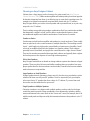
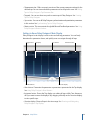
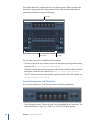
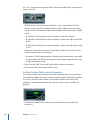
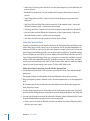
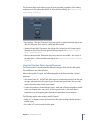
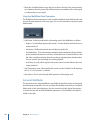
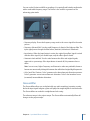
To switch between full and smaller versions of the interface
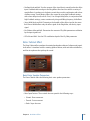
Click the disclosure triangle between the Cabinet and Mic pop-up menus in the full
interface to switch to the smaller version. To switch back to the full interface, click the
disclosure triangle beside the Output field in the small interface. You can access all the
parameters, with the exception of microphone selection and positioning, in the small
interface.
Click here in
full interface.
Click here in
small interface.
Choosing an Amp Designer Model
You can choose a preconfigured model—consisting of an amplifier, a cabinet, an EQ type,
and a microphone type—from the Model pop-up menu at the left end of the black bar
at the bottom of the Amp Designer interface. Your choices include several combinations
in each of the following categories:
• Tweed Combos
• Classic American Combos
• British Stacks
• British Combos
• British Alternatives
• Metal Stacks
• Additional Combos
Chapter 1 Amps and Pedals
15
Tweed Combos
The Tweed models are based on American combos from the 1950s and early 1960s that
helped define the sounds of blues, rock, and country music. They have warm, complex,
clean sounds that progress smoothly through gentle distortion to raucous overdrive as
you increase the gain. Even after half a century, Tweeds can still sound contemporary.
Many modern boutique amplifiers are based on Tweed-style circuitry.
Model
Description
Small Tweed Combo
A 1 x 12" combo that transitions smoothly from clean to crunchy,
making it a great choice for blues and rock. For extra definition, set
the Treble and Presence controls to a value around 7.
Large Tweed Combo
This 4 x 10" combo was originally intended for bassists, but was also
used by blues and rock guitarists. More open and
transparent-sounding than the Small Tweed Combo, but can deliver
crunchy sounds.
Mini Tweed Combo
A small amp with a single 10" speaker, used by countless blues and
rock artists. It is quite punchy-sounding, and can deliver the clean
and crunch tones that the Tweed combos are known for.
Tip: Tweed combos respond beautifully to your playing dynamics. Adjust the knobs to
create a distorted sound, then reduce the level of your guitar’s volume knob to create a
cleaner tone. Turn up your guitar’s volume knob when the time comes for a scorching
solo.
Classic American Combos
The Blackface, Brownface, and Silverface models are inspired by American combos of the
mid 1960s. These tend to be loud and clean with tight lows and relatively restrained
distortion. They are great for clean-toned rock, vintage R & B, surf music, twangy country,
jazz, or any other style where strong note definition is essential.
16
Model
Description
Large Blackface Combo
A 4 x 10" combo with a sweet, well-balanced tone favored by rock,
surf, and R & B players. Great for lush, reverb-drenched chords or
strident solos.
Silverface Combo
A 2 x 12" combo with a loud, ultra-clean tone. Its percussive,
articulate attack is great for funk, R & B, and intricate chord work. It
can be crunchy when overdriven, but most players favor it for clean
tones.
Mini Blackface Combo
A 1 x 10" combo that is bright and open-sounding, with a surprising
amount of low-end impact. It excels at clean tones with just a hint
of overdrive.
Small Brownface Combo
A 1 x 12" combo that is smooth and rich-sounding, but retains a
nice level of detail.
Blues Blaster Combo
A 1 x 15" combo that has a clear top end with a tight, defined low
end. This model is favored by blues and rock players.
Chapter 1 Amps and Pedals
Tip: While these amps tend toward a clean and tight sound, you can use a Pedalboard
distortion stompbox to attain hard-edged crunch sounds with a biting treble and extended
low-end definition. See Distortion Pedals and Pedalboard.
British Stacks
The British Stack models are based on the 50- and 100-watt amplifier heads that have
largely defined the sound of heavy rock, especially when paired with their signature
4 x 12" cabinets. At medium gain settings, these amps are great for chunky chords and
riffs. Raising the gain yields lyrical solo tones and powerful rhythm guitar parts. Complex
peaks and dips across the tonal spectrum keep the tones clear and appealing, even when
heavy distortion is used.
Model
Description
Vintage British Stack
Captures the sound of a late 1960s 50-watt amp famed for its
powerful, smooth distortion. Notes retain clarity, even at maximum
gain. After four decades this remains a definitive rock tone.
Modern British Stack
1980s and 1990s descendants of the Vintage British amplifier head,
which were optimized for hard rock and metal styles of the time.
The tones are deeper on the bottom, brighter on top, and more
“scooped” in the middle than the Vintage British amp.
Brown Stack
Unique tones can be coaxed from a British head by running it at
lower voltages than its designers intended. The resulting “brown”
sound—often more distorted and loose than the standard
tone—can add interesting thickness to a guitar sound.
British Blues Combo
This 2 x 12" combo has a loud, aggressive tone that is cleaner than
the British heads, yet delivers fat distortion tones at high-gain
settings.
Tip: You’ll rarely go wrong combining a British head, a 4 x 12" cabinet, and a great riff at
high levels. But don’t hesitate to break that mold. These heads can sound stunning
through small cabinets, or at clean, low-gain settings. If the British Blues Combo is too
clean for your needs, combine it with Pedalboard’s Hi Drive stompbox for an aggressive
blues tone, or the Candy Fuzz stompbox for an explosive rock tone. See Distortion Pedals
and Pedalboard.
British Combos
The British Combos capture the brash, treble-rich sound that will forever be associated
with 1960s British rock and pop. The sonic signature of these amps is characterized by
their high-end response, yet they are rarely harsh-sounding due to a sweet distortion
and smooth natural compression.
Model
Description
British Combo
A 2 x 12" combo based on the early 1960s amps that powered the
British Invasion. Perfect for chiming chords and stabbing solos.
Chapter 1 Amps and Pedals
17
Model
Description
Small British Combo
A 1 x 12" combo with half the power of the British Combo, this amp
offers a slightly darker, less open tone.
Boutique British Combo
A 2 x 12" combo that is a modern take on the original 1960s sound.
The tone is thicker, with stronger lows and milder highs than the
other British Combos.
Tip: Using high Treble and Presence knob settings that might become strident on other
amp types can sound great with the British Combos.
British Alternatives
The late 1960s amplifier heads and combos that inspired the Sunshine models are loud
and aggressive, with full-bodied mid frequencies. These amps are not just for single note
solos and power chords, as they can sound great with big, open chords—one reason
why they were embraced by the “Brit-pop” bands of the 1990s. The Stadium amps are
famed for their ability to play ultra-loud without dissolving into mushy distortion. They
retain crisp treble and superb note definition, even at maximum gain settings.
Model
Description
Sunshine Stack
A robust-sounding head paired with a 4 x 12" cabinet. It’s a great
choice for powerful pop-rock chords.
Small Sunshine Combo
A 1 x 12" combo based on a modern amp known for a “big amp”
sound. It is brighter than the Sunshine Stack head, with a touch of
1960s British Combo flavor.
Stadium Stack
A classic head and 4 x 12" cabinet configuration popular with 1970s
arena rock bands. Its tones are cleaner than other Amp Designer
4 x 12" stacks, while still retaining body and impact. A good choice
if you need power and clarity.
Stadium Combo
A 2 x 12" combo based on a modern amp. The tone is a little
smoother and rounder than that of the Stadium Stack.
Tip: The tone of the Sunshine Stack can seem dark at times, but a high Treble knob setting
opens up the sound. While the Small Sunshine Combo sounds great with its default
1 x 12" cabinet, it also shines through a 4 x 12" cabinet. The Stadium amps can be slow
to distort, so most famous users have paired them with aggressive fuzz pedals. Try
combining it with Pedalboard’s Candy Fuzz or Fuzz Machine stompboxes. See Distortion
Pedals and Pedalboard.
Metal Stacks
The Metal Stack models are inspired by the powerful, ultra-high gain amplifier heads that
put the “chunk” into modern hard rock and metal music. All are paired with 4 x 12"
cabinets. Their signature tones range from heavy distortion to extremely heavy distortion.
If you want powerful lows, razor-edged highs, and serious sustain, these are the models
you should look to first.
18
Chapter 1 Amps and Pedals
Model
Description
Modern American Stack
A powerful, ultra-high gain amp that is ideal for heavy rock and
metal. Use the Mids knob to set an ideal amount of scoop or boost.
High Octane Stack
Although a powerful, high-gain amp, this model offers a smooth
transition between gain settings and excellent natural compression.
It is a great choice for fast soloing and for two- and three-note
chords.
Turbo Stack
An aggressive-sounding amp with spiky highs and noisy harmonics,
especially at high gain settings. Try the Turbo Stack when you need
to slice through a mix.
Tip: Combining the Turbo Stack with distortion and fuzz pedals may actually diminish
the amp’s edge. A dry sound is often the best choice for high-impact riffs.
Additional Combos
The combos and utility models in this category are versatile amps that can be used for a
wide variety of musical styles.
Model
Description
Studio Combo
A 1 x 12" combo based on boutique combos of the 1980s and 1990s
that use multiple gain stages to generate smooth, sustain-heavy
distortion without sacrificing bold, bright, clean sounds.
Boutique Retro Combo
A 2 x 12" combo inspired by high-end modern amps that combine
the sounds of several great 1960s combos. It excels at shimmering
clean tones and crunch tones, making it a good choice when you
want an old-fashioned flavor, but with the crisp highs and defined
lows of a modern amplifier.
Pawnshop Combo
A 1 x 8" combo based on the inexpensive amps sold in American
department stores in the 1960s. Despite their limited features and
budget workmanship, these amps are the secret behind the sound
of many rock, blues, and punk players. The clean sounds are warm,
and distorted sounds are thick and satisfying, despite the small
speaker.
Transparent Preamp
As the name suggests, a preamp stage with no coloration. You
should note that the Transparent Preamp is activated in the Amp
pop-up menu, not in the Model pop-up menu.
Tip: Try pairing the Studio Combo amp with one of the 4 x 12" cabinets for a heavier
sound. The Boutique Retro Amp has very sensitive tone controls, providing countless
tonal shadings. Even extreme settings can yield great results. Combine the Pawnshop
Combo amp with Pedalboard’s Hi Drive or Candy Fuzz stompboxes to emulate hard rock
tones of the late 1960s. See Distortion Pedals and Pedalboard.
Chapter 1 Amps and Pedals
19
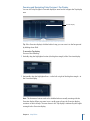
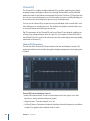
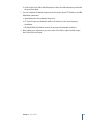
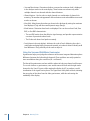
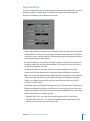
Building a Customized Amp Designer Combo
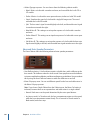
You can use one of the default models or you can create your own hybrid of different
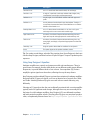
amplifiers, cabinets, and so on, using the Amp, Cabinet, and Mic pop-up menus, located
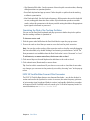
on the black bar at the bottom of the interface. The EQ pop-up menu is accessed by
clicking the word EQ or Custom EQ toward the left of the knobs section.
Note: If you create your own hybrid amp combo, you can use the Settings menu to save
it as a setting file, which also includes any parameter changes you may have made.
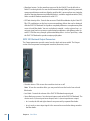
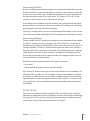
EQ pop-up menu
Amp pop-up menu
Cabinet pop-up menu
Model pop-up menu
Mic pop-up menu
Building an Amp Designer model is described in the following sections:
• Choosing an Amp Designer Amplifier
• Choosing an Amp Designer Cabinet
• Using Amp Designer’s Equalizer
• Setting Amp Designer Microphone Parameters
Choosing an Amp Designer Amplifier
You can choose an amplifier model from the Amp pop-up menu on the black bar at the
bottom of the Amp Designer interface. See the following sections for details on the
characteristics of each amplifier in these categories:
• Tweed Combos
• Classic American Combos
• British Stacks
• British Combos
• British Alternatives
• Metal Stacks
20
Chapter 1 Amps and Pedals
• Additional Combos
Choosing an Amp Designer Cabinet
Cabinets have a huge impact on the character of a guitar sound (see Amp Designer
Cabinet Reference Table). While certain amplifier and cabinet pairings have been popular
for decades, departing from them is an effective way to create fresh-sounding tones. For
example, most players automatically associate British heads with 4 x 12" cabinets.
Amp Designer allows you to drive a small speaker with a powerful head, or to pair a tiny
amp with a 4 x 12" cabinet.
There’s nothing wrong with trying random combinations. But if you consider the variables
that determine a cabinet’s sound, you’ll be able to make educated guesses about
non-traditional amplifier and cabinet combinations. Some factors to consider:
Combos or Stacks
Combo amps include both an amplifier and speakers in a single enclosure. These usually
have an open back, so the sound resonates in multiple directions. The resulting sound is
“open”—with bright, airy highs and a general feeling of spaciousness. Amplifier “stacks”
consist of an amplifier head, with the speakers in a separate cabinet. These cabinets
generally have a closed back, and project the sound forward in a tight, focused “beam.”
They tend to sound more powerful than open-back cabinets, and typically have a tighter
low-end response at the expense of some high-end transparency.
Old or New Speakers
Amp Designer models that are based on vintage cabinets capture the character of aged
speakers. These may be a bit looser and duller-sounding than new speakers, but many
players prefer them for their smoothness and musicality. Sounds based on new cabinets
tend to have more snap and bite.
Large Speakers or Small Speakers
A larger speaker doesn’t guarantee a larger sound. In fact, the most popular bass guitar
cabinet of all time uses only small 8" speakers. Don’t be surprised if you get a deeper,
richer tone from a 10" speaker than from a large 4 x 12" cabinet. Try several sizes and
choose the one that works best for your music.
Single Speakers or Multiple Speakers
Guitarists sometimes use cabinets with multiple speakers, and not only for the larger
sound they tend to provide. Phase cancellations occur between the speakers, adding
texture and interest to the tone. Much of the “classic rock” sound, for example, has to do
with the tonal peaks and dips caused by this interaction between the speakers in a 4 x 12"
cabinet.
Chapter 1 Amps and Pedals
21
Amp Designer Cabinet Reference Table
You can choose a cabinet model from the Cabinet pop-up menu on the black bar at the
bottom of Amp Designer’s interface. The table below covers the properties of each cabinet
model available in Amp Designer.
22
Cabinet
Description
Tweed 1 x 12
A 12" open-back cabinet from the 1950s with a warm and smooth
tone.
Tweed 4 x 10
A 4 x 10" open-back cabinet that was originally conceived for
bassists, but guitarists love its sparkling presence. An authentic late
1950s sound.
Tweed 1 x 10
A single 10" open-back combo amp cabinet from the 1950s with a
smooth sound.
Blackface 4 x 10
Classic open-back cabinet with four 10" speakers. Its tone is deeper
and darker than the Tweed 4 x 10.
Silverface 2 x 12
An open-back model from the 1960s that provides great low-end
punch.
Blackface 1 x 10
An open-back 1960s cabinet with glistening highs and surprising
low-mid body.
Brownface 1 x 12
A beautifully balanced 1960s open-back cabinet. It is smooth and
rich-sounding, but with nice transparency.
Brownface 1 x 15
This early 1960s open-back cabinet houses the largest speaker
emulated by Amp Designer. Its highs are clear and glassy, and its
lows are tight and focused.
Vintage British 4 x 12
This late 1960s closed-back cabinet is synonymous with classic rock.
The tone is big and thick, yet also bright and lively, thanks to the
complex phase cancellations between the four 30-watt speakers.
Modern British 4 x 12
A closed-back 4 x 12" cabinet that is brighter, and has a better
low-end than the Vintage British 4 x 12, with less mid-range
emphasis.
Brown 4 x 12
A closed-back 4 x 12" cabinet with a great bottom end and complex
mid-range.
British Blues 2 x 12
A bright-sounding open-back cabinet with solid lows, and highs
that maintain their edge even at high gain settings.
Modern American 4 x 12
A closed-back 4 x 12" cabinet that has a full sound. The low-mids
are denser than the British 4 x 12" cabinets.
Studio 1 x 12
A compact-sounding open-back cabinet with full mids and
shimmering highs.
British 2 x 12
A mid 1960s open-back cabinet with an open, smooth tone.
British 1 x 12
A small open-back cabinet with crisp highs and nice low-mid
transparency.
Boutique British 2 x 12
A 2 x 12" cabinet based on the British 2 x 12. It has a richer mid-range
and is more assertive in the treble range.
Chapter 1 Amps and Pedals
Cabinet
Description
Sunshine 4 x 12
A 4 x 12" closed-back cabinet with a thick, rich mid-range.
Sunshine 1 x 12
A single 12" open-back combo amp cabinet with a bright, lively
sound that has sweet highs, and transparent mids.
Stadium 4 x 12
A tight, bright, closed-back British cabinet with bold upper-mid
peaks.
Stadium 2 x 12
A nicely balanced modern British open-back cabinet. Tonally, it is
a compromise between the fatness of the Blackface 4 x 10 and the
brilliance of the British 2 x 12.
Boutique Retro 2 x 12
A 2 x 12" cabinet based on the British 2 x 12. It has a rich, open
mid-range and is more assertive in the treble range.
High Octane 4 x 12
A modern, closed-back European cabinet with strong lows and
highs and scooped mids appropriate for metal and heavy rock.
Turbo 4 x 12
A modern, closed-back European cabinet with strong lows, very
strong highs, and deeply scooped mids appropriate for metal and
heavy rock.
Pawnshop 1 x 8
Single 8" speaker cabinet that has excellent low-end punch.
Direct
This option bypasses the speaker emulation section.
Tip: For creative sound design, select the Direct option, place Space Designer in the Insert
slot after Amp Designer, and then load one of Space Designer’s “warped” speaker impulse
responses.
Using Amp Designer’s Equalizer
Hardware amplifier tone controls vary between models and manufacturers. There’s a
good chance, for example, that the treble knobs on two different models target different
frequencies, or provide different levels of cut or boost. Some equalizer (EQ) sections
amplify the guitar signal more than others, affecting the way the amp distorts.
Amp Designer provides multiple EQ types to mirror these variations in hardware amplifiers.
No matter which EQ type you choose, you’ll see an identical set of controls: Bass, Mids,
and Treble. Switching between EQ types can result in these controls behaving very
differently.
Selecting an EQ type other than the one traditionally associated with a certain amplifier
typically results in significant tonal changes, although these may not necessarily be for
the better. As with hardware amplifiers, Amp Designer’s EQs are calibrated to perform
well with particular amplifier sounds. Choosing other EQ types can sometimes produce
a thin, or unpleasantly distorted tone. See Amp Designer Equalizer Type Reference Table.
Chapter 1 Amps and Pedals
23
Despite these less pleasant-sounding possibilities, you should experiment with different
amplifier and EQ combinations because many will sound great together.
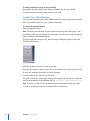
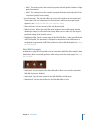
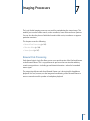
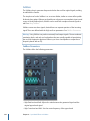
EQ pop-up menu
Bass, Mids, and Treble
knobs
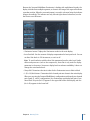
The EQ parameters include the EQ pop-up menu and the Bass, Mids, and Treble knobs.
These parameters are found toward the left-end of the knobs section.
• EQ pop-up menu: Click the word EQ or CUSTOM EQ above the Bass, Mids, and Treble
knobs to open the EQ pop-up menu, which contains the following EQ models: British
Bright, Vintage, U.S. Classic, Modern, and Boutique. Each EQ model has unique tonal
qualities that affect the way the Bass, Mids, and Treble knobs respond. See Amp Designer
Equalizer Type Reference Table.
• Bass, Mids, and Treble knobs: Adjust the frequency ranges of the EQ models, similar to
the tone knobs on a hardware guitar amplifier. The behavior and response of these
knobs changes when different EQ models are chosen.
Amp Designer Equalizer Type Reference Table
You can choose an Equalizer type by clicking the word EQ or CUSTOM EQ above the Bass,
Mids, and Treble knobs in the knobs section. The table below covers the properties of
each EQ type available in Amp Designer.
24
EQ type
Description
British Bright
Inspired by the EQ of British combo amps of the 1960s. It is loud
and aggressive, with even bolder highs than the Vintage EQ. This
EQ is useful if you want more treble definition without an overly
clean sound.
Vintage
Emulates the EQ response of American Tweed-style amps and the
vintage British stack amps that used a very similar circuit. It is loud
and somewhat distortion-prone. This EQ is useful if you want to
roughen the sound.
U.S. Classic
Derived from the EQ circuit of the American Blackface-style amps.
The tone is of higher fidelity than the Vintage EQ, with tighter lows
and crisper highs. This EQ is useful if you want to brighten your
tone and reduce distortion.
Chapter 1 Amps and Pedals
EQ type
Description
Modern
Based on a digital EQ unit popular in the 1980s and 1990s. This EQ
is useful for sculpting the hyped highs, booming lows, and scooped
mids associated with the era’s rock and metal music styles.
Boutique
Replicates the tone section of a “retro modern” boutique amp. It
excels at precise EQ adjustments, though its tone may be cleaner
than desired when used with vintage amplifiers. This EQ is a good
choice if you want a cleaner, brighter sound.
Using Amp Designer’s Gain, Presence, and Master Controls
The amp parameters include controls for the input gain, presence, and master output.
The Gain knob is found to the left in the knobs section and the Presence and Master
knobs are to the right.
Gain
Presence
Master
• Gain knob: Sets the amount of pre-amplification applied to the input signal. This control
affects various amp models differently. For example, when you are using the British
Amp, the maximum gain setting produces a powerful crunch sound. When you are
using the Vintage British Head or Modern British Head, the same gain setting produces
heavy distortion, suitable for lead solos.
• Presence knob: Adjusts the high-frequency range—above the range of the Treble
control. The Presence parameter affects only the output (Master) stage.
• Master knob: Sets the output volume of the amplifier going to the cabinet. For tube
amplifiers, increasing the Master level typically produces a somewhat compressed and
saturated sound, resulting in a more distorted and powerful—that is, louder—signal.
High Master settings can produce an extremely loud output that can damage your
speakers or hearing, so ramp this up slowly. The final output level of Amp Designer is
set with the Output slider at the lower-right edge of the interface. See Setting Amp
Designer’s Output Level.
Chapter 1 Amps and Pedals
25
Getting to Know Amp Designer’s Effects Parameters
The effects parameters include Tremolo, Vibrato, and Reverb, which emulate the processors
found on many amplifiers. these controls are found in the center of the knobs section.
You can use the switch toward the right to select either Tremolo (TREM), which modulates
the amplitude or volume of the sound, or Vibrato (VIB), which modulates the pitch.
Reverb, which is controlled by a switch in the middle, can be added to either of these
effects, or used independently.
Note: The Effects section is placed before the Presence and Master controls in the signal
flow, and receives the pre-amplified, pre-Master signal.
Reverb, Tremolo, and Vibrato are described in the following sections:
• Using Amp Designer’s Reverb Effect
• Using Amp Designer’s Tremolo and Vibrato Effects
Using Amp Designer’s Reverb Effect
Reverb is always available in Amp Designer, even when using a model that is based on
an amplifier that provides no reverb function. Reverb is controlled by an On/Off switch
and a Level knob in the middle, above which is the Reverb pop-up menu. Reverb can be
added to either the Tremolo or Vibrato effect, or used independently.
• On/Off switch: Enables or disables the reverb effect.
• Reverb pop-up menu: Click the word Reverb to choose one of the following reverb types
from the pop-up menu: Vintage Spring, Simple Spring, Mellow Spring, Bright Spring,
Dark Spring, Resonant Spring, Boutique Spring, Sweet Reverb, Rich Reverb, and Warm
Reverb. See Amp Designer Reverb Type Reference Table for information on these reverb
types.
26
Chapter 1 Amps and Pedals
• Level knob: Sets the amount of reverb applied to the pre-amplified signal.
Amp Designer Reverb Type Reference Table
You can choose a reverb type by clicking the Reverb label in the center of the Amp section.
The table below covers the properties of each reverb type available in Amp Designer.
Reverb type
Description
Vintage Spring
This bright, splashy sound has largely defined combo amp reverb
since the early 1960s.
Simple Spring
A darker, subtler spring sound.
Mellow Spring
An even darker, somewhat low-fidelity spring sound.
Bright Spring
Has some of the brilliance of Vintage Spring, but with less surf-style
splash.
Dark Spring
A moody-sounding spring. More restrained than Mellow Spring.
Resonant Spring
Another 1960s-style spring with a strong, slightly distorted
mid-range emphasis.
Boutique Spring
A modernized version of the classic Vintage Spring with a richer
tone in the bass and mids.
Sweet Reverb
A smooth modern reverb with rich lows and restrained highs.
Rich Reverb
A bold, well-balanced modern reverb.
Warm Reverb
A lush modern reverb with rich low-mids and understated highs.
Using Amp Designer’s Tremolo and Vibrato Effects
Tremolo and vibrato are controlled by several switches and two knobs in the Effects
section found toward the right of the knobs section. Tremolo modulates the amplitude
or volume of the sound, and vibrato modulates the pitch.
• On/Off switch: Enables or disables the tremolo or vibrato effect.
• Trem/Vib switch: Choose either tremolo or vibrato.
• Depth knob: Sets the intensity of the modulation (tremolo or vibrato).
• Speed knob: Sets the speed of the modulation in Hertz. Lower settings produce a
smooth, floating sound. Higher settings produce a rotor-like effect.
Chapter 1 Amps and Pedals
27
• Sync/Free switch: When the switch is set to Sync, the modulation speed is synchronized
with the host application tempo. The Speed knob lets you select different bar, beat,
and musical note values (1/8, 1/16, and so on, including triplet and dotted-note values).
When the switch is set to Free, the modulation speed can be set to any available value
with the Speed knob.
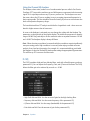
Setting Amp Designer Microphone Parameters
Amp Designer offers a choice between three different virtual microphones. As with every
other component in the tone chain, different selections yield very different results. After
choosing a cabinet, you can set the type of microphone you want to be emulated, and
where the microphone is placed in relation to the cabinet. The Mic pop-up menu is
available near the right end of the black bar at the bottom, and the speaker-adjustment
graphic appears when you move your mouse to the area above the Mic pop-up menu.
Note: The parameters described in this section are accessible only in the full Amp Designer
interface. If you are in the small interface, click the disclosure triangle to the right of the
Output field at the bottom-right edge of the interface to switch back to the full interface.
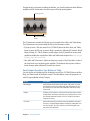
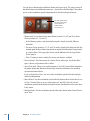
Move your mouse
above the Mic pop-up
menu to display the
speaker-adjustment
graphic.
• Cabinet and speaker-adjustment graphic: By default, the microphone is placed in the
center of the speaker cone (on-axis). This placement produces a fuller, more powerful
sound, suitable for blues or jazz guitar tones. If you place the microphone on the rim
of the speaker (off-axis), you obtain a brighter, thinner tone, making it suitable for
cutting rock or R & B guitar parts. Moving the microphone closer to the speaker
emphasizes bass response.
The microphone position is shown on the cabinet and indicated by the white dot in
the speaker-adjustment graphic. Drag the white dot to change the microphone position
and distance, relative to the cabinet. Placement is limited to near-field positioning.
28
Chapter 1 Amps and Pedals
• Mic pop-up menu: You can choose one of the Microphone models from the pop-up
menu:
• Condenser: Emulates the sound of a high-end German studio condenser microphone.
The sound of condenser microphones is fine, transparent, and well-balanced.
• Dynamic: Emulates the sound of popular American dynamic cardioid microphones.
This microphone type sounds brighter and more cutting than the Condenser model.
The mid-range is boosted, with lower-mid frequencies being less pronounced, making
it a good choice for miking rock guitar tones. It is especially useful if you want your
guitar part to cut through other tracks in a mix.
• Ribbon: Emulates the sound of a ribbon microphone. A ribbon microphone is a type
of dynamic microphone that captures a sound often described as bright or brittle,
yet still warm. It is useful for rock, crunch, and clean tones.
Tip: Combining multiple microphone types can produce an interesting sound. Duplicate
the guitar track, and insert Amp Designer on both tracks. Select different microphones
in each Amp Designer instance while retaining identical settings for all other parameters,
and set track signal levels to taste.
Setting Amp Designer’s Output Level
The Output slider (or the Output field, in the small interface) is found at the lower-right
corner of the Amp Designer interface. It serves as the final level control for Amp Designer
and can be thought of as a “behind the speaker” volume control that sets the level of the
output that is fed to the ensuing Insert slots in the channel strip, or directly to the channel
strip output.
Note: This parameter is different from the Master control, which serves the dual purpose
of sound design as well as controlling the level of the Amp section.
Chapter 1 Amps and Pedals
29
Bass Amp
Bass Amp simulates the sound of several famous bass amplifiers. You can route bass
guitar and other signals directly through the Bass Amp, reproducing the sound of your
musical part played through a number of high-quality bass guitar amplification systems.
Bass Amp offers the following parameters.
• Model pop-up menu: Includes the following amplifier models:
• American Basic: 1970s-era American bass amp, equipped with eight 10" speakers.
Well-suited for blues and rock recordings.
• American Deep: Based on the American Basic amp, but with strong lower-mid
frequency (from 500 Hz on) emphasis. Well-suited for reggae and pop recordings.
• American Scoop: Based on the American Basic amp, but combines the frequency
characteristics of the American Deep and American Bright, with both low-mid (from
500 Hz) and upper-mid (from 4.5 kHz) frequencies emphasized. Well-suited for funk
and fusion recordings.
• American Bright: Based on the American Basic amp, this model emphasizes the
upper-mid frequencies (from 4.5 kHz upward).
• New American Basic: 1980s-era American bass amp, well-suited for blues and rock
recordings.
• New American Bright: Based on the New American Basic amp, this model strongly
emphasizes the frequency range above 2 kHz. Well-suited for rock and heavy metal.
30
Chapter 1 Amps and Pedals
• Top Class DI Warm: Famous DI box simulation, well-suited for reggae and pop
recordings. Mid frequencies, in the range between 500 and 5000 Hz, are
de-emphasized.
• Top Class DI Deep: Based on the Top Class DI Warm, this model is well-suited for funk
and fusion. The mid frequency range is strongest around 700 Hz.
• Top Class DI Mid: Based on the Top Class DI Warm, this model features an almost
linear frequency range, with no frequencies emphasized. It is suitable for blues, rock,
and jazz recordings.
• Pre Gain slider: Sets the pre-amplification level of the input signal.
• Bass, Mid, and Treble sliders: Adjusts the bass, mid, and treble levels.
• Mid Freq slider: Sets the center frequency of the mid band (between 200 Hz and 3000 Hz).
• Output Level slider: Sets the final output level for Bass Amp.
Guitar Amp Pro
Guitar Amp Pro can simulate the sound of popular guitar amplifiers and the speakers
used with them. You can process guitar signals directly, which enables you to reproduce
the sound of your guitar through a number of high-quality guitar amplification systems.
Guitar Amp Pro can also be used for experimental sound design and processing. You can
freely use it with other instruments, applying the sonic character of a guitar amp to a
trumpet or vocal part, for example.
The amplifier, speaker, and EQ models emulated by Guitar Amp Pro can be combined in
a number of ways to radically or subtly alter the tone. Virtual microphones are used to
pick up the signal of the emulated amplifier and cabinet. You can choose from two
different microphone types, and you can reposition them. Guitar Amp Pro also emulates
classic guitar amplifier effects, including reverb, vibrato, and tremolo.
Chapter 1 Amps and Pedals
31
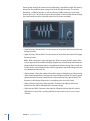
The Guitar Amp Pro window is organized into sections according to different kinds of
parameters.
Amp section
Microphone Position section
Effects section
Microphone Type section
• Amp section: The model parameters at the top are used to choose the type of amp,
EQ model, and speaker. See Building Your Guitar Amp Pro Model.
Farther down in the Amp section, the knobs in the V-shaped formation are used to set
tone, gain, and level. See Using Guitar Amp Pro’s Gain, Tone, Presence, and Master
Controls.
• Effects section: Provides parameters to control the built-in tremolo, vibrato, and reverb
effects. See Using Guitar Amp Pro’s Reverb Effect and Using Guitar Amp Pro’s Tremolo
and Vibrato Effects.
• Microphone Position and Type sections: These sections enable you to set the position
and type of the microphone. See Setting Guitar Amp Pro Microphone Parameters.
Building Your Guitar Amp Pro Model
An amplifier “model” consists of an amplifier, speaker cabinet, EQ type, and microphone
type. You can create your own hybrids of different amplifiers, cabinets, and so on—using
the pop-up menus at the top center of the interface. You choose the microphone position
and type in the yellow areas to the left and right.
You can use the Settings menu to save your new hybrid amp combos as setting files,
which also include any parameter changes you may have made.
How to build your amplifier model is described in the following sections:
• Choosing a Guitar Amp Pro Amplifier
• Choosing a Guitar Amp Pro Speaker Cabinet
32
Chapter 1 Amps and Pedals
• Choosing a Guitar Amp Pro Equalizer
• Setting Guitar Amp Pro Microphone Parameters
Choosing a Guitar Amp Pro Amplifier
You can choose an amplifier model from the Amp pop-up menu near the top of the
interface.
• UK Combo 30W: Neutral-sounding amp, well-suited for clean or crunchy rhythm parts.
• UK Top 50W: Quite aggressive in the high frequency range, well-suited for classical rock
sounds.
• US Combo 40W: Clean sounding amp model, well-suited for funk and jazz sounds.
• US Hot Combo 40W: Emphasizes the high mid-frequency range, making this model
ideal for solo sounds.
• US Hot Top 100W: This amp produces very fat sounds, even at low Master settings, that
result in broad sounds with a lot of “oomph.”
• Custom 50W: With the Presence parameter set to 0, this amp model is well-suited for
smooth fusion lead sounds.
• British Clean (GarageBand): Simulates the classic British Class A combos used
continuously since the 1960s for rock music, without any significant modification. This
model is ideally suited for clean or crunchy rhythm parts.
• British Gain (GarageBand): Emulates the sound of a British tube head and is synonymous
with rocking, powerful rhythm parts and lead guitars with a rich sustain.
• American Clean (GarageBand): Emulates the traditional full tube combos used for clean
and crunchy sounds.
• American Gain (GarageBand): Emulates a modern Hi-Gain head, making it suitable for
distorted rhythm and lead parts.
• Clean Tube Amp: Emulates a tube amp model with very low gain (distortion only when
using very high input levels or Gain/Master settings).
Choosing a Guitar Amp Pro Speaker Cabinet
The speaker cabinet can have a huge bearing on the type of tones you can extract from
your chosen amplifier. The speaker parameters are found near the top of the interface.
• Speaker pop-up menu: You can choose one of the 15 speaker models:
• UK 1 x 12 open back: Classic open enclosure with one 12" speaker, neutral,
well-balanced, multifunctional.
• UK 2 x 12 open back: Classic open enclosure with two 12" speakers, neutral,
well-balanced, multifunctional.
• UK 2 x 12 closed: Loads of resonance in the low frequency range, therefore well-suited
for Combos: crunchy sounds are also possible with low Bass control settings.
Chapter 1 Amps and Pedals
33
• UK 4 x 12 closed slanted: when used in combination with off-center miking, you will
get an interesting mid frequency range; therefore, this model works well when
combined with High Gain amps.
• US 1 x 10 open back: Not much resonance in the low frequency range. Suitable for
use with blues harmonicas.
• US 1 x 12 open back 1: Open enclosure of an American lead combo with a single 12"
speaker.
• US 1 x 12 open back 2: Open enclosure of an American clean/crunch combo with a
single 12" speaker.
• US 1 x 12 open back 3: Open enclosure of another American clean/crunch combo
with a single 12" speaker.
• US broad range: Simulation of a classic electric piano speaker.
• Analog simulation: Internal speaker simulation of a well-known British tube
preamplifier.
• UK 1 x 12 (GarageBand): A British Class A tube open back with a single 12" speaker.
• UK 4 x 12 (GarageBand): Classic closed enclosure with four 12" speakers (black series),
suitable for rock.
• US 1 x 12 open back (GarageBand): Open enclosure of an American lead combo with
a single 12" speaker.
• US 1 x 12 bass reflex (GarageBand): Closed bass reflex cabinet with a single 12" speaker.
• DI Box: This option allows you to bypass the speaker simulation section.
• Amp-Speaker Link button: Located between the Amp and Speaker pop-up menus, links
these pop-up menus so that when you change the amp model, the speaker associated
with that amp is loaded automatically.
Choosing a Guitar Amp Pro Equalizer
The EQ pop-up menu and the Amp-EQ Link button are near the top of the interface.
• EQ pop-up menu: Contains the following EQ models: British1, British2, American, and
Modern. Each EQ model has unique tonal qualities that affect the way the Bass, Mids,
and Treble knobs in the Amp section respond.
• Amp-EQ Link button: Located between the Amp and EQ pop-up menus, links these
pop-up menus so that when you change the amp model, the EQ model associated
with that amp is loaded automatically.
Each amp model has a speaker and EQ model associated with it. The default
combinations of amp, speaker, and EQ settings recreate a well-known guitar sound.
You are, of course, free to combine any speaker or EQ model with any amp by turning
off the two Link buttons.
34
Chapter 1 Amps and Pedals
Using Guitar Amp Pro’s Gain, Tone, Presence, and Master Controls
The Gain, Bass, Mids, Treble, Presence, and Master knobs run from left to right in the
V-shaped formation in the upper half of the interface.
• Gain knob: Sets the amount of pre-amplification applied to the input signal. This control
has different effects, depending on which Amp model is chosen. For example, when
you are using the British Clean amp model, the maximum Gain setting produces a
powerful crunch sound. If you use the British Gain or Modern Gain amps, the same
Gain setting produces heavy distortion, suitable for lead solos.
• Bass, Mids, and Treble knobs: Adjust the frequency range levels of the EQ models, similar
to the tone knobs on a hardware guitar amplifier.
• Presence knob: Adjusts the high frequency range level. The Presence parameter affects
only the output (Master) stage of Guitar Amp Pro.
• Master knob: Sets the output volume of the amplifier—going to the speaker. For tube
amplifiers, increasing the Master level typically produces a more compressed and
saturated sound, resulting in a more distorted and powerful—that is, louder—signal.
High Master settings can produce an extremely loud output that can damage your
speakers or hearing, so ramp this up slowly. In Guitar Amp Pro, the Master parameter
modifies the sonic character, and the final output level is set using the Output parameter
at the bottom of the interface. See Setting the Guitar Amp Pro Output Level.
Getting to Know Guitar Amp Pro’s Effects Section
The effects parameters include Tremolo, Vibrato, and Reverb, which emulate the processors
found on many amplifiers.
You can use the pop-up menu to choose either Tremolo, which modulates the amplitude
or volume of the sound, or Vibrato, which modulates the pitch.
Reverb can be added to either of these effects, or used independently.
To use or adjust an effect, you must first enable it by clicking the corresponding On button
to the left. The On button is red when active.
Note: The Effects section is placed before the Presence and Master controls in the signal
flow, and receives the preamplified, pre-Master signal.
Tremolo, Vibrato, and Reverb are described in the following sections:
• Using Guitar Amp Pro’s Tremolo and Vibrato Effects
• Using Guitar Amp Pro’s Reverb Effect
Chapter 1 Amps and Pedals
35
Using Guitar Amp Pro’s Tremolo and Vibrato Effects
Tremolo and vibrato are controlled by an On button, the FX pop-up menu, the Depth
and Speed knobs, and the Sync button in the Effects section. Tremolo modulates the
amplitude or volume of the sound, and vibrato modulates the pitch.
• FX pop-up menu: You can choose either Tremolo or Vibrato.
• Depth knob: Sets the intensity of the modulation.
• Speed knob: Sets the speed of the modulation in Hertz. Lower settings produce a smooth
and floating sound, while higher settings produce a rotor-like effect.
• Sync button: When the Sync button is turned on, the modulation speed is synchronized
to the project tempo. You can adjust the Speed knob to select bar, beat, and musical
note values (including triplet and dotted notes). When the Sync button is turned off,
the modulation speed can be set to any available value with the Speed knob.
Using Guitar Amp Pro’s Reverb Effect
Reverb is controlled by an On button, the Reverb pop-up menu, and a Level knob in the
Reverb section near the bottom. Reverb can be added to either the Tremolo or Vibrato
effect, or used independently.
• Reverb pop-up menu: Choose one of the three types of spring reverb.
• Level knob: Sets the amount of reverb applied to the pre-amplified amp signal.
Setting Guitar Amp Pro Microphone Parameters
After choosing a speaker cabinet from the Speaker menu, you can set the type of
microphone you want to be emulated, and where the microphone is placed in relation
to the speaker. The Microphone Position parameters are available in the yellow area to
the left, and the Microphone Type parameters in the yellow area to the right.
Microphone Position Parameters
• Centered button: Places the microphone in the center of the speaker cone, also called
on-axis. This placement produces a fuller, more powerful sound, suitable for blues or
jazz guitar tones.
• Off-Center button: Places the microphone on the edge of the speaker, also referred to
as off-axis. This placement produces a tone that is brighter and sharper, but also
thinner—suitable for cutting rock or R & B guitar parts.
When you select either button, the graphic speaker display reflects your choice.
Microphone Type Parameters
• Condenser button: Emulates the sound of a studio condenser microphone. The sound
of condenser microphones is fine, transparent, and well-balanced.
36
Chapter 1 Amps and Pedals
• Dynamic button: Emulates the sound of a dynamic cardioid microphone. This
microphone type sounds brighter and more cutting than the Condenser model. At the
same time, the lower-mid frequency range is less pronounced, making this model more
suitable for miking rock guitar tones.
Tip: Combining both microphone types can sound quite interesting. Duplicate the
guitar track, and insert Guitar Amp Pro as an insert effect on both tracks. Select different
microphone types in each Guitar Amp Pro instance, while retaining identical settings
for all other parameters, and mix the track signal levels. You can, of course, choose to
vary any other parameters.
Setting the Guitar Amp Pro Output Level
The Output slider is found at the bottom, below the Effects section. It serves as the final
level control for Guitar Amp Pro and can be thought of as a “behind the speaker” volume
control that is used to set the level fed to the ensuing plug-in slots on the channel strip
or to Output channel strips.
Note: This parameter is different from the Master control, which serves the dual purpose
of sound design as well as controlling the level of the Amp section.
Pedalboard
The Pedalboard simulates the sound of a number of well-loved and famous “stompbox”
pedal effects. You can process any audio signal with a combination of stompboxes.
You can add, remove, and reorder pedals. The signal flow runs from left to right in the
Pedal area. The addition of two discrete busses, coupled with splitter and mixer units,
enables you to experiment with sound design and precisely control the signal at any
point in the signal chain.
Chapter 1 Amps and Pedals
37
All stompbox knobs, switches, and sliders can be automated. Eight Macro controls enable
real time changes to any pedal parameter with a MIDI controller.
Routing area
Macro Controls area
Pedal area
Pedal Browser
• The Pedal Browser shows all pedal effects and utilities. These can be dragged into the
Pedal area as part of the signal chain. See Using Pedalboard’s Pedal Browser. This
interface area is also used for the alternative import mode. See Using Pedalboard’s
Import Mode.
• The Pedal area is where you determine the order of effects and set effect parameters.
You can add, replace, and remove stompboxes here. See Using Pedalboard’s Pedal
Area.
• The Routing area is used to control signal flow in the two effects busses (Bus A and
Bus B) available in Pedalboard. See Using Pedalboard’s Routing Area.
• The Macro Controls area is used to assign eight MIDI controllers, which can be used to
control any stompbox parameter in real time. See Using Pedalboard’s Macro Controls
Area.
• The effect and utility pedals are described in the following sections:
• Distortion Pedals
• Modulation Pedals
• Delay Pedals
• Filter Pedals
• Dynamics Pedals
• Utility Pedals
38
Chapter 1 Amps and Pedals
Using Pedalboard’s Pedal Browser
Pedalboard offers dozens of pedal effects and utilities in the Pedal Browser on the right
side of the interface. Each effect and utility is grouped into a category, such as distortion,
modulation, and so on. For information about these types of stompboxes, see Distortion
Pedals, Modulation Pedals, Delay Pedals, Filter Pedals, Dynamics Pedals, and Utility Pedals.
View pop-up menu
µ
µ
Import Mode button
To hide or show the Pedal Browser
Click the disclosure triangle in the lower-right corner of the Pedal area.
To show only specific pedal groups in the Pedal Browser
Open the View pop-up menu and choose Distortion, Modulation, Delay, Filter, Dynamics,
or Utility. The Pedal Browser shows only the stompboxes within the category you choose.
To show all the pedal groups, choose Show All from the View pop-up menu.
To add a stompbox to the Pedal area
Do one of the following:
µ
Drag the effect that you want to insert from the Pedal Browser to the appropriate Pedal
area position. This can be to the left, to the right, or in-between existing pedals.
µ
Double-click an effect in the Pedal Browser to add it to the right of all existing stompboxes
in the Pedal area.
Chapter 1 Amps and Pedals
39
Note: Double-clicking a stompbox in the Pedal Browser when a stompbox is selected in
the Pedal area will replace the selected pedal.
Using Pedalboard’s Import Mode
Pedalboard has a feature you can use to import parameter settings for each type of pedal.
In contrast to the plug-in window Settings menu, which you use to load a setting for the
entire Pedalboard plug-in, this feature can be used to load a setting for a specific stompbox
type.
µ
To activate or deactivate import mode
Click the Import Mode button to show all pedals used in the most recent Pedalboard
setting. When the Import Mode button is active, the Pedal Browser switches to an alternate
view mode that displays imported settings. When import mode is inactive, the normal
Pedal Browser view is shown.
To import pedal settings into the Pedal Browser
1 Click the Import Mode button to activate import mode. Note that the View menu changes
to the Select Setting button.
Note: If this is your first attempt to import settings, a dialog opens where you can select
a setting to import.
40
Chapter 1 Amps and Pedals
2 Click the Select Setting button and select a setting, then click Open. Dependent on the
chosen setting, one or more stompboxes appear in the Pedal Browser. The name of the
imported setting is shown at the bottom of the Pedal Browser.
To add an imported pedal to the Pedal area
Do one of the following:
µ
Drag the stompbox that you want to add from the Pedal Browser to the appropriate
Pedal area position. This can be to the left, to the right, or in-between existing pedals.
µ
Ensure that no pedal is selected in the Pedal area, then double-click a stompbox in the
Pedal Browser to add it to the right of all existing effects in the Pedal area.
Note: The parameter settings of pedals added in import mode are also imported.
To replace a pedal setting in the Pedal area with an imported pedal setting
1 Click the pedal you want to replace in the Pedal area. It becomes highlighted with a blue
outline.
2 Click the stompbox in the Pedal Browser to replace the selected pedal (or pedal setting)
in the Pedal area. The blue outlines of the selected pedal in the Pedal area and Pedal
Browser blink on and off to indicate an imported setting. The setting name area at the
bottom of the Pedal Browser displays “Click selected item again to revert.”
Note: If you want to make your replacement permanent, click the background in the
Pedal Browser, or click the Import Mode button.
3 To restore the selected pedal’s previous setting, click the highlighted stompbox in the
Pedal Browser. The Import Mode button and the outline of the selected pedal (in the
Pedal area) become solidly highlighted, indicating that the original setting has been
restored.
Using Pedalboard’s Pedal Area
Pedalboard’s stompbox effect pedals not only resemble their physical counterparts; they
are also used in much the same way—without the inconvenience of patch cords, power
supplies, and screws or locking mechanisms. The Pedal area layout mirrors a traditional
pedalboard, with signals running from left to right.
Chapter 1 Amps and Pedals
41
To add a pedal to the Pedal area
Do one of the following:
µ
Drag the stompbox that you want to insert from the Pedal Browser to the appropriate
Pedal area position. This can be to the left, to the right, or in-between existing pedals.
µ
Ensure that no pedal is selected in the Pedal area, then double-click a stompbox in the
Pedal Browser to add it to the right of all existing effects in the Pedal area.
Note: You insert Mixer and Splitter utility pedals in a different way. See Using Pedalboard’s
Routing Area.
µ
To change an effect pedal position in the Pedal area
Drag the stompbox to a new position, either to the right or the left. Automation and bus
routings, if active, are moved with the effect pedal. For information about automation
and bus routings, see Using Pedalboard’s Routing Area.
Note: There are two exceptions to the bus routing rule: If the dragged pedal is the only
pedal between a Splitter and Mixer utility, both utility pedals are automatically removed.
If the second Bus (“B”) is not active at the destination, the pedal is inserted into Bus A.
µ
To change a Mixer utility position in the Pedal area
Drag the Mixer utility to a new position, either to the left or the right.
When moved to the left: The “downmix” of Bus A and B will occur at the earlier insertion
point. Relevant effect pedals are moved to the right and are inserted into Bus A.
When moved to the right: The “downmix” of Bus A and B will occur at the later insertion
point. Relevant effect pedals are moved to the left and are inserted into Bus A.
Note: A Mixer pedal cannot be moved to a position directly after (or to the left of ) a
corresponding split point or Splitter utility.
µ
To change a Splitter utility position in the Pedal area
Drag the Splitter utility to a new position, either to the right or the left.
When moved to the left: The split between Bus A and B will occur at the earlier insertion
point. Relevant effect pedals are moved to the right and are inserted into Bus A.
When moved to the right: The split between Bus A and B will occur at the later insertion
point. Relevant effect pedals are moved to the left and are inserted into Bus A.
Note: A Splitter pedal cannot be moved to a position directly preceding (or to the right
of ) a corresponding Mixer utility.
To replace a pedal in the Pedal area
Do one of the following:
µ
42
Drag the stompbox from the Pedal Browser directly over the pedal you want to replace
in the Pedal area.
Chapter 1 Amps and Pedals
µ
Click to select the stompbox you want to replace in the Pedal area, then double-click the
appropriate pedal in the Pedal Browser.
Note: You can only replace “effect” pedals, not the Mixer or Splitter utilities. Bus routings,
if active, are not changed when an effect pedal is replaced.
To remove a pedal from the Pedal area
Do one of the following:
µ
µ
Drag the pedal out of the Pedal area.
Click the pedal to select it and press the Delete key.
Using Pedalboard’s Routing Area
Pedalboard has two discrete signal buses—Bus A and Bus B—that are found in the Routing
area above the Pedal area. These busses provide a great deal of flexibility when you are
setting up signal processing chains. All stompboxes that you drag into the Pedal area are
inserted into Bus A, by default.
Note: The Routing area appears when you move your pointer to a position immediately
above the Pedal area, and it disappears when you move the pointer away. When you
create a second bus routing, the Routing area remains open even when your pointer is
not over it. You can close the Routing area by clicking the small latch button at the top,
and then the Routing area will open or close automatically when you move your pointer
over it.
To create a second bus routing
Do one of the following:
µ
Move your pointer immediately above the Pedal area to open the Routing area, and click
the name of a stompbox in the Routing area. The pedal name moves upward, and the
chosen stompbox is routed to Bus B. Two gray lines appear in the Routing area, which
represent Bus A and Bus B. A Mixer utility pedal is automatically added to the end of the
signal chain.
µ
Drag a Splitter utility pedal into the Pedal area when more than one pedal is inserted.
This also inserts a Mixer at the end of the signal chain if one doesn’t already exist.
To remove the second bus routing
Do one of the following:
µ
Remove the Mixer and Splitter utility pedals from the Pedal area.
Chapter 1 Amps and Pedals
43
µ
µ
Remove all stompboxes from the Pedal area. This automatically removes an existing Mixer
utility.
To remove an effect from the second bus
Click the name of the pedal (or on either of the gray lines) in the Routing area.
Note: The removal of all effects from Bus B does not remove the second bus. The Mixer
utility pedal remains in the Pedal area, even when a single stompbox (effect) is in the
Pedal area. This allows parallel routing of wet and dry signals. Only when all pedal effects
are removed from the Pedal area is the Mixer utility (and second bus) removed.
µ
To determine the split point between busses
When more than one bus is active, a number of dots appear along the “cables” (gray
lines) in the Routing area. These represent the output (the socket) of the pedal to the
lower left of the dot. Click the appropriate dot to determine where the split point—where
the signal is routed between busses. A cable appears between the busses when you click
a dot.
Note: You can not create a split point directly before, or after, the Mixer utility.
µ
µ
To switch between a Splitter utility and bus split point
Double-click a bus split point dot in the Routing area to replace it with a Splitter utility.
The Splitter utility is shown in the Pedal area.
Double-click the Splitter label in the Routing area to replace the Splitter utility with a bus
split point dot. The Splitter utility is removed from the Pedal area.
Notes on Splitter and Mixer Utility Use
Dragging a Splitter utility into the Pedal area automatically inserts a Mixer utility to the
far right of all inserted pedals.
You cannot drag a Splitter utility to the far right of all inserted pedals, to directly after
an inserted Splitter utility, to directly in front of an inserted Mixer utility, or to an empty
space in the Pedal area.
Dragging a Mixer utility into the Pedal area automatically creates a split point at the
earliest possible (the leftmost) point within the signal chain.
You cannot drag a Mixer utility to the first slot in the Pedal area, to between an inserted
Splitter and Mixer utility combo, or directly to the right of an inserted Mixer utility.
Using Pedalboard’s Macro Controls Area
Pedalboard provides eight Macro Targets—A through H—which are found in the Macro
Controls area below the Pedal area. These enable you to map any parameter of an inserted
stompbox as a Macro A–H target. You can save different mappings with each Pedalboard
setting.
44
Chapter 1 Amps and Pedals
In Logic Pro and MainStage, you use a controller assignment or create a Workspace knob
for “Macro A–H Value.” MIDI hardware switches, sliders, or knobs can then be used to
control the mapped Pedalboard Macro A–H target parameters in real time. See the
Logic Pro User Manual or the MainStage User Manual for details.
Click the triangle at the bottom left to hide or show the Macro Controls area.
Note: The Macro Controls area is only available in Logic Pro and MainStage.
• Macro A–H Target pop-up menus: Determine the parameter that you want to control
with a MIDI controller.
• Macro A–H Value sliders and fields: Set, and display, the current value for the parameter
chosen in the corresponding Macro Target pop-up menu.
To assign a Macro A–H Target
Do one of the following:
µ
Click any of the Macro A–H Target pop-up menus, and choose the parameter that you
want to control.
Each stompbox parameter is shown in the following way: “Slot number—Pedal
Name—Parameter”. As examples: “Slot 1—Blue Echo—Time”, or “Slot 2—Roswell
Ringer—Feedback”. The “slot” number refers to the pedal position, as they appear from
left to right in the Pedal area.
µ
Choose the “-Auto assign-” item in any Macro A–H Target pop-up menu, then click the
appropriate parameter in any inserted pedal.
Note: The chosen parameter is displayed in the Macro A–H Target pop-up menu.
Distortion Pedals
This section describes the distortion effects pedals.
Stompbox
Description
Candy Fuzz
A bright, “nasty” distortion effect. Drive controls the input signal
gain. Level sets the effect volume.
Chapter 1 Amps and Pedals
45
46
Stompbox
Description
Double Dragon
A deluxe distortion effect. It offers independent level controls for
input (Input) and output (Level). Drive controls the amount of
saturation applied to the input signal. The Tone knob sets the cutoff
frequency. The Squash knob sets the threshold for the internal
compression circuit. Contour sets the amount of nonlinear distortion
applied to the signal. Mix sets the ratio between the source and
distorted signals. The Bright/Fat switch changes between two fixed
high shelving filter frequencies. Blue and red LEDs indicate each
switch position, respectively.
Fuzz Machine
An American “fuzz” distortion effect. Fuzz controls the input gain.
Overall output gain is set with Level. The Tone knob increases treble,
while simultaneously rolling-off low frequencies, as you move it to
higher values.
Grinder
Grinder is a lo-fi, dirty “metal” distortion. Grind sets the amount of
drive applied to the input signal. Tone is controlled with the Filter
knob, making the sound harsher and more crunchy at higher values.
The Full/Scoop switch alternates between two fixed Gain/Q filter
settings. At the Full position, filtering is less pronounced than at
the Scoop position. Overall output level is controlled with the Level
knob.
Happy Face Fuzz
A softer, full-sounding distortion effect. Fuzz sets the amount of
saturation applied to the input signal. Volume sets the output level.
Hi-Drive
An overdrive effect that can emphasize high frequency content in
the signal. Level controls the effect output. The Treble/Full switch
sets a fixed shelving frequency, allowing either the treble portion
or the full range input signal to be processed.
Monster Fuzz
A saturated, somewhat harsh distortion. Roar sets the amount of
gain applied to the input signal. Growl sets the amount of saturation.
Tone sets the overall color of the distortion. Higher Tone values
increase the treble content of the signal, but there is a
corresponding decrease in overall volume. Texture can smooth out
or roughen up the distortion. Grain sets the amount of nonlinear
distortion applied to the signal. The effect output is controlled with
the Level knob.
Octafuzz
A fat fuzz effect, that can deliver a soft, saturated distortion. Fuzz
controls the input gain. Level sets the ratio between the distorted
and source signals. The Tone knob sets the cutoff frequency of the
highpass filter.
Rawk! Distortion
A metal/hard rock distortion effect. Crunch sets the amount of
saturation applied to the input signal. Output gain is set with Level.
Tonal color is set with the Tone knob, making the sound brighter
at higher values.
Chapter 1 Amps and Pedals
Stompbox
Description
Vintage Drive
Overdrive effect that emulates the distortion produced by a field
effect transistor (FET), which is commonly used in solid-state
amplifiers. When saturated, FETs generate a warmer sounding
distortion than bipolar transistors (such as those emulated by
Grinder). Drive sets the saturation amount for the input signal. Tone
sets the frequency for the high cut filter, resulting in a softer or
harsher tone. The Fat switch, when at the top position, enhances
lower frequency content in the signal. Level sets the overall output
level of the effect.
Modulation Pedals
This section describes the modulation effects pedals.
Stompbox
Description
Heavenly Chorus
A rich, sweet-sounding chorus effect that can significantly thicken
the sound. Rate sets the modulation speed and can run freely, or
be synchronized with the host application tempo by enabling the
Sync button. When synchronized, you can specify bar, beat and
note values (including triplets and dotted notes). Depth sets the
strength of the effect. Feedback sends the output of the effect back
in to the input, further thickening the sound, or leading to
intermodulations. Delay sets the ratio between the original and
effect signals. The upper Bright switch position applies a fixed
frequency internal EQ to the signal. At the bottom position, the EQ
is bypassed.
Phase Tripper
A simple phasing effect. Rate sets the modulation speed and can
run freely, or be synchronized with the host application tempo by
enabling the Sync button. When synchronized, you can specify bar,
beat and note values (including triplets and dotted notes). Depth
sets the strength of the effect. Feedback determines the amount
of the effect signal that is routed back into the input. This can
change the tonal color, can make the sweeping effect more
pronounced, or can do both.
Phaze 2
A very flexible dual-phaser effect. LFO 1 and LFO2 Rate sets the
modulation speed and can run freely, or be synchronized with the
host application tempo by enabling the Sync button. Ceiling and
Floor determine the frequency range that is swept. Order switches
between different algorithms, with higher (even) numbers resulting
in a heavier phasing effect. Odd order numbers result in more subtle
comb-filtering effects. Feedback determines the amount of the
effect signal that is routed back into the input. This can change the
tonal color, can make the phasing effect more pronounced, or can
do both. Tone works from the center position; turn it to the left to
increase the amount of lowpass filtering, or turn it to the right to
increase the amount of highpass filtering. Mix sets the level ratio
between each phaser.
Chapter 1 Amps and Pedals
47
48
Stompbox
Description
Retro Chorus
A subtle, vintage chorus effect. Rate sets the modulation speed and
can run freely, or be synchronized with the host application tempo
by enabling the Sync button. When synchronized, you can specify
bar, beat and note values (including triplets and dotted notes).
Depth sets the strength of the effect.
Robo Flanger
Flexible flanging effect. Rate sets the modulation speed and can
run freely, or be synchronized with the host application tempo by
enabling the Sync button. When synchronized, you can specify bar,
beat and note values (including triplets and dotted notes). Depth
sets the strength of the effect. Feedback determines the amount
of the effect signal that is routed back into the input. This can
change the tonal color, can make the flanging effect more
pronounced, or can do both. The Manual knob sets a delay time
between the source and effect signals. This can result in
flanger-chorus effects, or in metallic-sounding modulations,
particularly when used with high Feedback values.
Roswell Ringer
A ring modulation effect that can make incoming audio sound
metallic (or unrecognizable), can deliver tremolos, brighten up
signals and more. The Freq knob sets the core filter cutoff frequency.
Fine is a fine tuning knob for the filter frequency. The Lin/Exp switch
determines if the frequency curve is linear (12 notes per octave) or
exponential. FB (feedback) determines the amount of the effect
signal that is routed back into the input. This can change the tonal
color, can make the effect more pronounced, or can do both.
Balance between the original and effect signals is set with the Mix
knob. See Ringshifter for background information on ring
modulation.
Roto Phase
A phaser effect that adds movement to, and alters the phase of, the
signal. Rate sets the modulation speed and can run freely, or be
synchronized with the host application tempo by enabling the Sync
button. When synchronized, you can specify bar, beat and note
values (including triplets and dotted notes) with the Rate knob.
Intensity sets the strength of the effect. The Vintage/Modern switch
activates a fixed-frequency internal EQ when switched to Vintage,
and deactivates it when switched to Modern.
Spin Box
Emulation of a Leslie rotor speaker cabinet, commonly used with
the Hammond B3 organ. Cabinet sets the type of speaker box. Fast
Rate sets the maximum modulation speed (only applies when Fast
button is active). Response determines the amount of time required
for the rotor to reach its maximum and minimum speed. Drive
increases the input gain, introducing distortion to the signal. The
Bright switch activates a high shelving filter when turned on. The
Slow, Brake and Fast buttons determine how the “speaker”
behaves: Slow rotates the speaker slowly. Fast rotates the speaker
quickly (up to the maximum speed determined by the Fast Rate
knob). Brake stops the speaker rotation. See Rotor Cabinet Effect
for background information on the Leslie effect.
Chapter 1 Amps and Pedals
Stompbox
Description
Total Tremolo
A flexible tremolo effect (modulation of the signal level). Rate sets
the modulation speed and can run freely, or be synchronized with
the host application tempo by enabling the Sync button. When
synchronized, you can specify bar, beat and note values (including
triplets and dotted notes). Depth sets the strength of the effect.
Wave and Smooth work in combination to alter the waveform shape
of the LFO. This enables you to create floating changes in level, or
abrupt steps. Volume determines the output level of the effect. The
1/2 and 2 x Speed buttons immediately halve or double the current
Rate value. Hold down the Speed Up and Slow Down buttons to
gradually accelerate or reduce the current Rate value to the
maximum or minimum possible values.
Trem-o-Tone
A tremolo effect (modulation of the signal level). Rate sets the
modulation speed and can run freely, or be synchronized with the
host application tempo by enabling the Sync button. When
synchronized, you can specify bar, beat and note values (including
triplets and dotted notes). Depth sets the strength of the effect.
Level sets the post-tremolo gain.
the Vibe
A vibrato/chorus effect based on the Scanner Vibrato unit found in
the Hammond B3 organ. You can choose from three vibrato (V1–3)
or chorus (C1–3) variations with the Type knob. Rate sets the
modulation speed and can run freely, or be synchronized with the
host application tempo by enabling the Sync button. When
synchronized, you can specify bar, beat and note values (including
triplets and dotted notes). Depth sets the strength of the effect. See
Scanner Vibrato Effect for background information on this effect.
Delay Pedals
This section describes the Delay effects pedals.
Stompbox
Description
Blue Echo
A delay effect. Time sets the modulation speed and can run freely,
or be synchronized with the host application tempo by enabling
the Sync button. When synchronized, you can specify bar, beat and
note values (including triplets and dotted notes). The Repeats knob
determines the number of delay repeats. Mix sets the balance
between the delayed and source signals. The Tone Cut switch
controls a fixed frequency internal filter circuit that allows more low
(Lo) or high (Hi) frequency content to be heard. You can also disable
this filter circuit by choosing Off.
Spring Box
A spring reverb pedal. Time sets the length of the reverberation to
short, medium, or long values. Tone controls the cutoff frequency,
making the effect brighter or darker. Style switches between
algorithms, each with different characteristics. You can choose
from: Boutique, Simple, Vintage, Bright, and Resonant. Mix sets the
ratio between the source and effect signals.
Chapter 1 Amps and Pedals
49
Stompbox
Description
Tru-Tape Delay
A vintage tape delay effect. The Norm/Reverse switch changes the
delay playback direction. Reverse mode is indicated by a blue LED
and Normal mode is indicated by a red LED. Hi Cut and Lo Cut
activate a fixed frequency filter. Dirt sets the amount of input signal
gain, which can introduce an overdriven, saturated quality. Flutter
emulates speed fluctuations in the tape transport mechanism. Time
sets the modulation speed and can run freely, or be synchronized
with the host application tempo by enabling the Sync button. When
synchronized, you can specify bar, beat and note values (including
triplets and dotted notes). Feedback determines the amount of the
effect signal that is routed back into the input. The buildup of
repeating signals can be used creatively for dub-delay and other
effects by adjusting Feedback in real time. Mix sets the balance
between the source and effect signals.
Filter Pedals
This section describes the filter effects pedals.
Stompbox
Description
Auto-Funk
An auto-wah (filter) effect. Sensitivity sets a threshold which
determines how the filter responds to incoming signal levels. Cutoff
sets the center frequency for the filter. The BP/LP switch enables
either a bandpass or lowpass filter circuit. Signal frequencies just
above and below the cutoff point are filtered when the BP switch
position is chosen. When the LP switch position is active, only signals
below the cutoff point are allowed through the filter. The Hi/Lo
switch chooses one of two preset (filter) resonance settings. The
Up/Down switch activates a positive or negative modulation
direction (the “wah” filtering occurs above or below the source
signal frequency).
Classic Wah
A funky wah effect, straight from 1970’s TV police show soundtracks.
You control it by dragging the pedal.
Modern Wah
A more aggressive wah effect. You control it by dragging the pedal.
Mode enables you to choose from the following: Retro Wah, Modern
Wah, Opto Wah 1, Opto Wah 2, Volume. Each has a different tonal
quality. The Q knob determines the resonant characteristics. Low Q
values affect a wider frequency range, resulting in softer resonances.
High Q values affect a narrower frequency range, resulting in more
pronounced emphasis.
Dynamics Pedals
This section describes the dynamics pedals.
50
Chapter 1 Amps and Pedals
Stompbox
Description
Squash Compressor
A simple compressor. Sustain sets the threshold level. Signals above
this are reduced in level. Level determines the output gain. The
Attack switch can be set to Fast for signals with fast attack transients,
such as drums, or to Slow for signals with slow attack phases, such
as strings.
Utility Pedals
This section describes the parameters of the Mixer and Splitter pedals.
Stompbox
Description
Mixer
A utility that is used to control the level relationship between Bus A
and Bus B signals. It can be inserted anywhere in the signal chain,
but is typically used at the end of the chain (at the extreme right
of the Pedal area). See Using Pedalboard’s Routing Area for details
on use. The A/Mix/B switch solos the “A” signal, mixes the “A” and
“B” signals, or solos the “B” signal. The level setting of the Mix fader
is relevant for all A/Mix/B switch positions.
In stereo instances, the Mixer utility also provides discrete Pan
controls for each bus.
Splitter
A utility that can be inserted anywhere in the signal chain. Splitter
can be used in two ways;
When set to Freq, it works as a frequency-dependent signal splitter
that divides the incoming signal. Signals above the frequency set
with the Frequency knob are sent to Bus B. Signals below this
frequency are sent to Bus A.
When set to Split, the incoming signal is routed equally to both
buses. The Frequency knob has no impact in this mode.
See Using Pedalboard’s Routing Area for details on use.
Chapter 1 Amps and Pedals
51
Delay Effects
2
Delay effects store the input signal—and hold it for a short time—before sending it to
the effect input or output.
The held, and delayed, signal is repeated after a given time period, creating a repeating
echo effect. Each subsequent repeat is a little quieter than the previous one. Most delays
also allow you to feed a percentage of the delayed signal back to the input. This can result
in a subtle, chorus-like effect or cascading, chaotic audio output.
The delay time can often be synchronized to the project tempo by matching the grid
resolution of the project, usually in note values or milliseconds.
You can use delays to double individual sounds to resemble a group of instruments
playing the same melody, to create echo effects, to place the sound in a large “space”,
to generate rhythmic effects, or to enhance the stereo position of tracks in a mix.
Delay effects are generally used as channel insert or bussed effects. They are rarely used
on an overall mix (in an output channel), unless you’re trying to achieve an unusual effect.
This chapter covers the following:
• Delay Designer (p. 53)
• Echo (p. 74)
• Sample Delay (p. 74)
• Stereo Delay (p. 75)
• Tape Delay (p. 77)
Delay Designer
Delay Designer is a multitap delay. Unlike traditional delay units that offer only one or
two delays (or taps), that may or may not be fed back into the circuit, Delay Designer
provides up to 26 individual taps. These taps are all fed from the source signal and can
be freely edited to create delay effects that have never been heard before.
53
Delay Designer provides control over the following aspects of each tap:
• Level and pan position
• Highpass and lowpass filtering
• Pitch transposition (up or down)
Further effect-wide parameters include synchronization, quantization, and feedback.
As the name implies, Delay Designer offers significant sound design potential. You can
use it for everything from a basic echo effect to an audio pattern sequencer. You can
create complex, evolving, moving rhythms by synchronizing the placement of taps. This
leads to further musical possibilities when coupled with judicious use of transposition
and filtering. Alternatively, you can set up numerous taps as repeats of other taps, much
as you would use the feedback control of a simple delay, but with individual control over
each repeat.
You can use Delay Designer on channel strips with mono, stereo, or surround inputs
and/or outputs. See Working with Delay Designer in Surround for details on using it in
surround channel strips.
Getting to Know the Delay Designer Interface
The Delay Designer interface consists of five main sections:
Sync section
Tap pads
Main display
Master section
Tap parameter bar
• Main display: Provides a graphic representation of all taps. You can see, and edit, the
parameters of each tap in this area. See Getting to Know Delay Designer’s Main Display.
54
Chapter 2 Delay Effects
• Tap parameter bar: Offers a numeric overview of the current parameter settings for the
selected tap. You can view and edit the parameters of each tap in this area. See Editing
Taps in Delay Designer’s Tap Parameter Bar.
• Tap pads: You can use these two pads to create taps in Delay Designer. See Creating
Taps in Delay Designer.
• Sync section: You can set all Delay Designer synchronization and quantization parameters
in this section. See Synchronizing Taps in Delay Designer.
• Master section: This area contains the global Mix and Feedback parameters. See Using
Delay Designer’s Master Section.
Getting to Know Delay Designer’s Main Display
Delay Designer’s main display is used to view and edit tap parameters. You can freely
determine the parameter shown, and quickly zoom or navigate through all taps.
Toggle buttons
Tap display
Identification bar
View buttons
Autozoom button
Overview display
• View buttons: Determine the parameter or parameters represented in the Tap display.
See Using Delay Designer’s View Buttons.
• Autozoom button: Zooms the Tap display out, making all taps visible. Turn Autozoom
off if you want to zoom the display in (by dragging vertically on the Overview display)
to view specific taps.
• Overview display: Shows all taps in the time range. See Zooming and Navigating
Delay Designer’s Tap Display.
Chapter 2 Delay Effects
55
• Toggle buttons: Click to enable or disable the parameters of a particular tap. The
parameter being toggled is chosen with the view buttons. The label at the left of the
toggle bar always indicates the parameter being toggled. For more information, see
Using Delay Designer’s Tap Toggle Buttons.
• Tap display: Represents each tap as a shaded line. Each tap contains a bright bar (or
dot for stereo panning) that indicates the value of the parameter. You can directly edit
tap parameters in the Tap display area. For more details, see Editing Parameters in
Delay Designer’s Tap Display.
• Identification bar: Shows an identification letter for each tap. It also serves as a time
position indicator for each tap. You may freely move taps backward or forward in time
along this bar/timeline. See Moving and Deleting Taps in Delay Designer.
Using Delay Designer’s View Buttons
The view buttons determine which parameter is represented in Delay Designer’s Tap
display.
• Cutoff button: Shows the highpass and lowpass filter cutoff frequencies of taps.
• Reso(nance) button: Shows the filter resonance value of each tap.
• Transp(ose) button: Shows the pitch transposition of each tap.
• Pan button: Shows the pan parameter of each tap.
• For mono to stereo channels, each tap contains a line showing its pan position.
• For stereo to stereo channels, each tap contains a dot showing its stereo balance. A
line extending outwards from the dot indicates the tap’s stereo spread.
• For surround channels, each tap contains a line representing its surround angle (for
details, see Working with Delay Designer in Surround).
• Level button: Shows the relative volume level of each tap.
Tip: You can temporarily switch the Tap display to Level view from one of the other
view modes by pressing Command-Option.
56
Chapter 2 Delay Effects
Zooming and Navigating Delay Designer’s Tap Display
You can use Delay Designer’s Overview display to zoom and to navigate the Tap display
area.
Overview display
Tip: If the Overview display is hidden behind a tap, you can move it to the foreground
by holding down Shift.
To zoom the Tap display
Do one of the following:
µ
Vertically drag the highlighted section (the bright rectangle) of the Overview display.
µ
Horizontally drag the highlighted bars—to the left or right of the bright rectangle—in
the Overview display.
Note: The Autozoom button needs to be disabled when manually zooming with the
Overview display. When you zoom in on a small group of taps, the Overview display
continues to show all taps. The area shown in the Tap display is indicated by the bright
rectangle in the Overview display.
Chapter 2 Delay Effects
57
µ
To move to different sections of the Tap display
Horizontally drag the (middle of the) bright rectangle in the Overview display.
The zoomed view in the Tap display updates as you drag.
Creating Taps in Delay Designer
You can create new delay taps in three different ways: by using the Tap pads, by creating
them in the Identification bar, or by copying existing taps.
To create taps with the Tap pad
1 Click the upper pad (Start).
Note: Whenever you click the Start pad, it automatically erases all existing taps. Given
this behavior, after you have created your initial taps, you will want to create subsequent
taps by clicking in the Identification bar.
The upper pad label changes to Tap, and a red tap recording bar appears in the strip
below the view buttons.
2 Click the Tap button to begin recording new taps.
3 Click the Tap button to create new taps. These are created at the exact moments in time
of each click, adopting the rhythm of your click pattern.
4 To finish creating taps, click the Last Tap button.
This adds the final tap, ending tap recording, and assigning the last tap as the feedback
tap (for an explanation of the feedback tap, see Using Delay Designer’s Master Section).
Note: If you do not click the Last Tap button, tap recording automatically stops after
10 seconds or when the 26th tap is created, whichever comes first.
58
Chapter 2 Delay Effects
µ
To create taps in the Identification bar
Click at the appropriate position.
µ
To copy taps in the Identification bar
Option-drag a selection of one or more taps to the appropriate position.
The delay time of copied taps is set to the drag position.
Delay Designer Tap Creation Suggestions
The fastest way to create multiple taps is to use the Tap pads. If you have a specific rhythm
in mind, you might find it easier to tap out your rhythm on dedicated hardware controller
buttons, instead of using mouse clicks. If you have a MIDI controller, you can assign the
Tap pads to buttons on your device. For information about assigning controllers, see the
Control Surfaces Support manual.
Note: Whenever you click the Start Tap pad, it automatically erases all existing taps. Given
this behavior, after you create your initial taps you will want to create subsequent taps
by clicking in the Identification bar.
After a tap has been created, you can freely adjust its position, or you can remove it if it
was created accidentally. For details, see Moving and Deleting Taps in Delay Designer.
Identifying Taps in Delay Designer
Taps are assigned letters, based on their order of creation. The first tap to be created is
assigned as Tap A, the second tap is assigned as Tap B, and so on. Once assigned, each
tap is always identified by the same letter, even when moved in time, and therefore
reordered. For example, if you initially create three taps they will be named Tap A, Tap B,
and Tap C. If you then change the delay time of Tap B so that it precedes Tap A, it will
still be called Tap B.
Chapter 2 Delay Effects
59
The Identification bar shows the letter of each visible tap. The Tap Delay field of the Tap
parameter bar displays the letter of the currently selected tap, or the letter of the tap
being edited when multiple taps are selected (for details, see Selecting Taps in
Delay Designer).
Selecting Taps in Delay Designer
There will always be at least one selected tap. You can easily distinguish selected taps by
color—the toggle bar icons and the Identification bar letters of selected taps are white.
To select a tap
Do one of the following:
µ
µ
µ
60
Click a tap in the Tap display.
Click the appropriate tap letter in the Identification bar.
Click one of the arrows to the left of the Tap name to select the next or previous tap.
Chapter 2 Delay Effects
µ
Open the pop-up menu to the right of the Tap name, and choose the appropriate tap
letter.
To select multiple taps
Do one of the following:
µ
µ
Drag across the background of the Tap display to select multiple taps.
Shift-click specific taps in the Tap display to select multiple nonadjacent taps.
Moving and Deleting Taps in Delay Designer
You can move a tap backward or forward in time, or completely remove it.
Note: When you move a tap, you are actually editing its delay time.
µ
To move a selected tap in time
Select the tap in the Identification bar, and drag it to the left to go forward in time, or to
the right to go backward in time.
This method also works when more than one tap is selected.
Note: Editing the Delay Time parameter in the Tap Delay field of the Tap parameter bar
also moves a tap in time. For more details about the Tap Delay field and editing taps, see
Editing Taps in Delay Designer’s Tap Parameter Bar.
To delete a tap
Do one of the following:
µ
Select it and press the Delete or Backspace key.
Chapter 2 Delay Effects
61
µ
Select a tap letter in the Identification bar and drag it downward, out of the Tap display.
This method also works when more than one tap is selected.
µ
To delete all selected taps
Control-click (or right-click) a tap, and choose “Delete tap(s)” from the shortcut menu.
Using Delay Designer’s Tap Toggle Buttons
Each tap has its own toggle button in the Toggle bar. These buttons offer you a quick
way to graphically activate and deactivate parameters. The specific parameter being
toggled by the toggle buttons depends on the current view button selection:
• Cutoff view: Toggle buttons turn the filter on or off.
• Reso view: Toggle buttons switch the filter slope between 6 dB and 12 dB.
• Pitch view: Toggle buttons switch pitch transposition on or off.
• Pan view: Toggle buttons switch between the Flip modes.
• Level view: Toggle buttons mute or unmute the tap.
µ
To temporarily switch the mute state of taps
Command-Option-click a toggle button, regardless of the current view mode.
When you release the Command and Option keys, the toggle buttons return to their
standard functionality in the active View mode.
62
Chapter 2 Delay Effects
Note: The first time you edit a filter or pitch transpose parameter, the respective module
automatically turns on. This saves you the effort of manually turning on the filter or pitch
transposition module before editing. After you manually turn either of these modules
off, however, you need to manually switch it back on.
Editing Parameters in Delay Designer’s Tap Display
You can graphically edit any tap parameter that is represented as a vertical line in
Delay Designer’s Tap display. The Tap display is ideal if you want to edit the parameters
of one tap relative to other taps, or when you need to edit multiple taps simultaneously.
To edit a tap parameter in the Tap display
1 Click the view button of the parameter you want to edit.
2 Vertically drag the bright line of the tap you wish to edit (or one of the selected taps, if
multiple taps are selected).
If you have chosen multiple taps, the values of all selected taps will be changed relative
to each other.
Note: The method outlined above is slightly different for the Filter Cutoff and Pan
parameters. See Editing Filter Cutoff in Delay Designer’s Tap Display and Editing Pan in
Delay Designer’s Tap Display.
µ
To set the values of multiple taps
Command-drag horizontally and vertically across several taps in the Tap display.
Chapter 2 Delay Effects
63
Parameter values change to match the mouse position as you drag across the taps.
Command-dragging across several taps allows you to draw value curves, much like using
a pencil to create a curved line on a piece of paper.
Aligning Delay Designer Tap Values
You can use Delay Designer’s Tap display to graphically align tap parameter values that
are represented as vertical lines.
To align the values of several taps
1 Command-click in the Tap display, and move the pointer while holding down the
Command key. This will result in a line trailing behind the pointer.
2 Click the appropriate position to mark the end point of the line.
64
Chapter 2 Delay Effects
The values of taps that fall between the start and end points are aligned along the line.
Editing Filter Cutoff in Delay Designer’s Tap Display
Whereas the steps outlined in Editing Parameters in Delay Designer’s Tap Display apply
to most graphically editable parameters, the Cutoff and Pan parameters work in a slightly
different fashion.
In Cutoff view, each tap actually shows two parameters: highpass and lowpass filter cutoff
frequency. The filter cutoff values can be adjusted independently by dragging the specific
cutoff frequency line—the upper line is lowpass and the lower line is highpass—or both
cutoff frequencies can be adjusted by dragging between them.
When the highpass filter cutoff frequency value is lower than that of the lowpass cutoff
frequency, only one line is shown. This line represents the frequency band that passes
through the filters—in other words, the filters act as a bandpass filter. In this configuration,
the two filters operate serially, meaning that the tap passes through one filter first, then
the other.
Chapter 2 Delay Effects
65
If the highpass filter’s cutoff frequency value is above that of the lowpass filter cutoff
frequency, the filter switches from serial operation to parallel operation, meaning that
the tap passes through both filters simultaneously. In this case, the space between the
two cutoff frequencies represents the frequency band being rejected—in other words,
the filters act as a band-rejection filter.
Editing Pan in Delay Designer’s Tap Display
The way the Pan parameter is represented in the Pan view is entirely dependent on the
input channel configuration—mono to stereo, stereo to stereo, or surround.
Note: Pan is not available in mono configurations.
In mono input/stereo output configurations, all taps are initially panned to the center.
To edit the pan position, drag vertically from the center of the tap in the direction you
wish to pan the tap, or taps. A white line extends outward from the center in the direction
you have dragged, reflecting the pan position of the tap, or taps.
66
Chapter 2 Delay Effects
Lines above the center position indicate pans to the left, and lines below the center
position denote pans to the right. Left (blue) and right (green) channels are easily
identified.
In stereo input/stereo output configurations, the Pan parameter adjusts the stereo balance,
not the position of the tap in the stereo field. The Pan parameter appears as a dot on the
tap, which represents stereo balance. Drag the dot up or down the tap to adjust the
stereo balance.
By default, stereo spread is set to 100%. To adjust this, drag either side of the dot. As you
do so, the width of the line extending outwards from the dot changes. Keep an eye on
the Spread parameter in the Tap parameter bar while you are adjusting.
In surround configurations, the bright line represents the surround angle. For more
information, see Working with Delay Designer in Surround.
Chapter 2 Delay Effects
67
Editing Taps in Delay Designer’s Tap Parameter Bar
The Tap parameter bar provides instant access to all parameters of the chosen tap. The
Tap parameter bar also provides access to several parameters that are not available in
the Tap display, such as Transpose and Flip.
Editing in the Tap parameter bar is fast and precise when you want to edit the parameters
of a single tap. All parameters of the selected tap are available, with no need to switch
display views or estimate values with vertical lines. If you choose multiple taps in the Tap
display, the values of all selected taps are changed relative to each other.
Option-click a parameter value to reset it to the default setting. If multiple taps are selected,
Option-clicking a parameter of any tap resets all selected taps to the default value for
that parameter.
• Filter On/Off button: Enables or disables the highpass and lowpass filters for the selected
tap.
• HP-Cutoff-LP fields: Sets the cutoff frequencies (in Hz) for the highpass and lowpass
filters.
• Slope buttons: Determines the steepness of the highpass and lowpass filter slope. Click
the 6 dB button for a gentler filter slope, or click the 12 dB button for a steeper, more
pronounced filtering effect.
Note: You cannot set the slope of the highpass and lowpass filters independently.
• Reso(nance) field: Sets the amount of filter resonance for both filters.
• Tap Delay fields: Shows the number and name of the selected tap in the upper section
and the delay time in the lower section.
• Pitch On/Off button: Enables or disables pitch transposition for the selected tap.
• Transp(ose) fields: The left field sets the amount of pitch transposition in semitones.
The right field fine-tunes each semitone step in cents (1/100th of a semitone).
• Flip buttons: Swaps the left and right side of the stereo or surround image. Clicking
these buttons reverses the tap position from left to right, or vice versa. For example, if
a tap is set to 55% left, clicking the flip button will swap it to 55% right.
68
Chapter 2 Delay Effects
• Pan field: Controls the pan position for mono input signals, stereo balance for stereo
input signals, and surround angle when used in surround configurations.
• Pan displays a percentage between 100% (full left) and −100% (full right), which
represents the pan position or balance of the tap. A value of 0% represents the center
panorama position.
• When used in surround, a surround panner replaces the percentage representation.
For more information, see Working with Delay Designer in Surround.
• Spread field: When a stereo-to-stereo or stereo-to-surround instance of Delay Designer
is used, Spread sets the width of the stereo spread for the selected tap.
• Mute button: Mutes or unmutes the selected tap.
• Level field: Determines the output level for the selected tap.
Editing Delay Designer Taps with the Shortcut Menu
Control-click (or right-click) a tap in Delay Designer’s Tap display to open a shortcut menu
containing the following commands:
• Copy sound parameters: Copies all parameters (except the delay time) of the selected
tap or taps into the Clipboard.
• Paste sound parameters: Pastes the tap parameters from the Clipboard into the selected
tap or taps. If there are more taps in the Clipboard than are selected in the Tap display,
the extra taps in the Clipboard are ignored.
• Reset sound parameters to default values: Resets all parameters of all selected taps (except
the delay time) to the default values.
• 2 x delay time: Doubles the delay time of all selected taps. For example, the delay times
of three taps are set as follows: Tap A = 250 ms, Tap B = 500 ms, Tap C = 750 ms. If you
select these three taps and choose the “2 x delay time” shortcut menu command, the
taps will be changed as follows: Tap A = 500 ms, Tap B = 1000 ms, Tap C = 1500 ms.
In other words, a rhythmic delay pattern will unfold half as fast. (In musical terms, it
will be played in half time.)
• 1/2 x delay time: Halves the delay time of all selected taps. Using the example above,
use of the “1/2 x delay time” shortcut menu command changes the taps as follows: Tap A
= 125 ms, Tap B = 250 ms, Tap C = 375 ms. In other words, a rhythmic delay pattern
will unfold twice as fast. (In musical terms, it will be played in double time.)
• Delete tap(s): Deletes all selected taps.
Resetting Delay Designer Tap Values
You can use Delay Designer’s Tap display and Tap parameter bar to reset tap parameters
to their default values.
Chapter 2 Delay Effects
69
To reset the value of a tap
Do one of the following:
µ
In the Tap display, Option-click a tap to reset the chosen parameter to its default setting.
If multiple taps are selected, Option-clicking any tap will reset the chosen parameter to
its default value for all selected taps.
µ
In the Tap parameter bar, Option-click a parameter value to reset it to the default setting.
If multiple taps are selected, Option-clicking a parameter of any tap resets all selected
taps to the default value for that parameter.
Synchronizing Taps in Delay Designer
Delay Designer can either synchronize to the project tempo or run independently. When
you are in synchronized mode (Sync mode), taps snap to a grid of musically relevant
positions, based on note durations. You can also set a Swing value in Sync mode, which
varies the precise timing of the grid, resulting in a more laid-back, less robotic feel for
each tap. When you are not in Sync mode, taps don’t snap to a grid, nor can you apply
the Swing value.
When Sync mode is on, a grid that matches the chosen Grid parameter value is shown
in the Identification bar. All taps are moved towards the closest delay time value on the
grid. Subsequently created or moved taps are snapped to positions on the grid.
When you save a Delay Designer setting, the Sync mode status, Grid, and Swing values
are all saved. When you save a setting with Sync mode on, the grid position of each tap
is also stored. This ensures that a setting loaded into a project with a different tempo to
that of the project the setting was created in will retain the relative positions, and rhythm,
of all taps—at the new tempo.
70
Chapter 2 Delay Effects
Note: Delay Designer offers a maximum delay time of 10 seconds. This means that if you
load a setting into a project with a slower tempo than the tempo at which it was created,
some taps may fall outside the 10-second limit. In such cases, these taps will not be played
but will be retained as part of the setting.
• Sync button: Enables or disables synchronized mode.
• Grid pop-up menu: Provides several grid resolutions, which correspond to musical note
durations. The grid resolution, along with the project tempo, determines the length of
each grid increment. As you change grid resolutions, the increments shown in the
Identification bar change accordingly. This also determines a step limitation for all taps.
As an example, imagine a project with the current tempo set to 120 beats per minute.
The Grid pop-up menu value is set to 1/16 notes. At this tempo and grid resolution,
each grid increment is 125 milliseconds (ms) apart. If Tap A is currently set to 380 ms,
turning on Sync mode would immediately shift Tap A to 375 ms. If you subsequently
moved Tap A forward in time, it would snap to 500 ms, 625 ms, 750 ms, and so on. At
a resolution of 1/8 notes, the steps are 250 milliseconds apart, so Tap A would
automatically snap to the nearest division (500 ms), and could be moved to 750 ms,
1000 ms, 1250 ms, and so on.
• Swing field: Determines how close to the absolute grid position every second grid
increment will be. A Swing setting of 50% means that every grid increment has the
same value. Settings below 50% result in every second increment being shorter in time.
Settings above 50% result in every second grid increment being longer in time.
Chapter 2 Delay Effects
71
Use subtle variations of the grid position of every second increment (values between
45% and 55%) to create a less rigid rhythmic feel. This can deliver very human timing
variations. Use of extremely high Swing values are unsubtle as they place every second
increment directly beside the subsequent increment. Make use of higher values to
create interesting and intricate double rhythms with some taps, while retaining the
grid to lock other taps into more rigid synchronization with the project tempo.
Using Delay Designer’s Master Section
The Master section incorporates two global functions: delay feedback and dry/wet mix.
In simple delays, the only way for the delay to repeat is to use feedback. Because
Delay Designer offers 26 taps, you can use these taps to create repeats, rather than
requiring discreet feedback controls for each tap.
Delay Designer’s global Feedback parameter does, however, allow you to send the output
of one user-defined tap back through the effect input, to create a self-sustaining rhythm
or pattern. This tap is known as the feedback tap.
• Feedback button: Enables or disables the feedback tap.
• Feedback Tap pop-up menu: Used to choose a tap as the feedback tap.
• Feedback Level knob: Sets the feedback level. You can vary the feedback tap output
level before it is routed back into Delay Designer’s input.
• A value of 0% equals no feedback.
• A value of 100% sends the feedback tap back into Delay Designer’s input at full
volume.
72
Chapter 2 Delay Effects
Note: If Feedback is enabled and you begin creating taps with the Tap pads, Feedback
is automatically turned off. When you stop creating taps with the Tap pads, Feedback
is automatically re-enabled.
• Mix sliders: Independently set the levels of the dry input signal and the post-processing
wet signal.
Working with Delay Designer in Surround
Delay Designer’s design is optimized for use in surround configurations. With 26 taps that
can be freely positioned in the surround field, you can create some truly amazing rhythmic
and spatial effects.
Delay Designer always processes each input channel independently.
• In a mono/stereo input and surround output configuration, Delay Designer processes
the two stereo channels independently, and the surround panner lets you place each
delay around the surround field.
• In a surround input and surround output configuration, Delay Designer processes each
surround channel independently, and the surround panner lets you adjust the surround
balance of each tap in the surround field.
When you instantiate Delay Designer in any surround configuration, the Pan parameter
on the Tap parameter bar is replaced with a surround panner, allowing you to determine
the surround position of each tap.
Note: In the Tap display’s Pan view mode, you can only adjust the angle of taps. You must
use the surround panner on the Tap Parameter bar to adjust diversity.
To easily move the surround position, you can:
• Command-drag to adjust diversity.
• Command-Option-drag to adjust the angle.
• Option-click the blue dot to reset the angle and diversity.
Note: Delay Designer generates separate automation data for stereo pan and surround
pan operations. This means that when you use it in surround channels, it will not react
to existing stereo pan automation data, and vice versa.
Chapter 2 Delay Effects
73
Echo
This simple echo effect always synchronizes the delay time to the project tempo, allowing
you to quickly create echo effects that run in time with your composition.
• Time pop-up menu: Sets the grid resolution of the delay time in musical note durations,
based on the project tempo.
• “T” values represent triplets.
• “.” values represent dotted notes.
• Repeat slider and field: Determines how often the delay effect is repeated.
• Color slider and field: Sets the harmonic content (color) of the delay signal.
• Dry and Wet sliders and fields: Control the amount of original and effect signal.
Sample Delay
Sample Delay is more a utility than an effect—you can use it to delay a channel by single
sample values.
When used in conjunction with the phase inversion capabilities of the Gain effect, Sample
Delay is useful for correction of timing problems that may occur with multichannel
microphones. It can also be used creatively, to emulate stereo microphone channel
separation.
74
Chapter 2 Delay Effects
Every sample at a frequency of 44.1 kHz is equivalent to the time taken for a sound wave
to travel 7.76 millimeters. If you delay one channel of a stereo microphone by 13 samples,
this will emulate an acoustic (microphone) separation of 10 centimeters.
• Delay slider and field (L and R in stereo version): Determines the number of samples that
the incoming signal will be delayed by.
• Link L & R button (only in stereo version): Ensures that the number of samples is identical
for both channels. Adjusting one channel value will adjust the other.
Stereo Delay
The Stereo Delay works much like the Tape Delay (see Tape Delay), but allows you to set
the Delay, Feedback, and Mix parameters separately for the left and right channels. The
Crossfeed knob for each stereo side determines the feedback intensity or the level at
which each signal is routed to the opposite stereo side. You can freely use the Stereo
Delay on mono tracks or busses when you want to create independent delays for the
two stereo sides.
Chapter 2 Delay Effects
75
Note: If you use the effect on mono channel strips, the track or bus will have two channels
from the point of insertion—all Insert slots after the chosen slot will be stereo.
As the parameters for the left and right delays are identical, the descriptions below only
cover the left channel—the right channel information is provided in brackets, if named
differently. Parameters that are common to both channels are shown separately.
Channel Parameters
• Left (Right) Input pop-up menu: Choose the input signal for the two stereo sides. Options
include OFF, Left, Right, L + R, L − R.
• Left (Right) Delay field: Sets the current delay time in milliseconds (this parameter is
dimmed when you synchronize the delay time to the project tempo).
• Groove slider and field: Determines the proximity of every second delay repeat to the
absolute grid position—in other words, how close every second delay repeat is.
• Note buttons: Set the grid resolution for the delay time. These are shown as note
durations (these are dimmed when the delay time is not synchronized with the project
tempo).
• Left (Right) Feedback knob and field: Set the amount of feedback for the left and right
delay signals.
• Crossfeed Left to Right (Crossfeed Right to Left) knob and field: Transfer the feedback signal
of the left channel to the right channel, and vice versa.
• Feedback Phase button: Use to invert the phase of the corresponding channel’s feedback
signal.
• Crossfeed Phase button: Use to invert the phase of the crossfed feedback signals.
76
Chapter 2 Delay Effects
Common Parameters
• Beat Sync button: Synchronizes delay repeats to the project tempo, including tempo
changes.
• Output Mix (Left and Right) sliders and fields: Independently control the left and right
channel signals.
• Low Cut and High Cut sliders and fields: Frequencies below the Low Cut value and above
the High Cut value are filtered out of the source signal.
Tape Delay
Tape Delay simulates the warm sound of vintage tape echo machines, with the
convenience of easy delay time synchronization to your project tempo. The effect is
equipped with a highpass and lowpass filter in the feedback loop, simplifying the creation
of authentic dub echo effects. Tape Delay also includes an LFO for delay time modulation,
which can be used to produce pleasant or unusual chorus effects, even on long delays.
• Feedback slider: Determines the amount of delayed and filtered signal that is routed
back to the input of the Tape Delay. Set the Feedback slider to the lowest possible
value to generate a single echo. Turn Feedback all the way up to endlessly repeat the
signal. The levels of the original signal and its taps (echo repeats) tend to accumulate,
and may cause distortion. You can use the internal tape saturation circuit to ensure
that these overdriven signals continue to sound good.
• Freeze button: Captures the current delay repeats and sustains them until the Freeze
button is turned off.
• Delay field: Sets the current delay time in milliseconds (this parameter is dimmed when
you synchronize the delay time to the project tempo).
• Sync button: Synchronizes delay repeats to the project tempo (including tempo changes).
• Tempo field: Sets the current delay time in beats per minute (this parameter is dimmed
when you synchronize the delay time to the project tempo).
Chapter 2 Delay Effects
77
• Groove slider and field: Determines the proximity of every second delay repeat to the
absolute grid position—in other words, how close every second delay repeat is. A
Groove setting of 50% means that every delay has the same delay time. Settings below
50% result in every second delay being played earlier in time. Settings above 50% result
in every second delay being played later in time. When you want to create dotted note
values, move the Groove slider all the way to the right (to 75%). For triplets, select the
33.33% setting.
• Note buttons: Set the grid resolution for the delay time. These are shown as note
durations.
• Low Cut and High Cut sliders and fields: Frequencies below the Low Cut value and above
the High Cut value are filtered out of the source signal. You can shape the sound of
the echoes with the highpass and lowpass filters. The filters are located in the feedback
circuit, which means that the filtering effect increases in intensity with each delay
repeat. If you want an increasingly muddy and confused tone, move the High Cut slider
towards the left. For ever thinner echoes, move the Low Cut slider towards the right.
If you’re unable to hear the effect even though you seem to have a suitable
configuration, be sure to check out both the Dry and Wet controls and the filter
settings—move the High Cut slider to the far right, and the Low Cut slider to the far
left.
• Smooth slider and field: Evens out the LFO and flutter effect.
• LFO Rate knob and field: Sets the frequency of the LFO.
• LFO Depth knob and field: Sets the amount of LFO modulation. A value of 0 turns delay
modulation off.
• Flutter Rate and Intensity sliders and fields: Simulate the speed irregularities of the tape
transports used in analog tape delay units.
• Flutter Rate: Sets the speed variation.
• Flutter Intensity: Determines how pronounced the effect is.
• Dry and Wet sliders and fields: Independently control the amount of original and effect
signal.
• Distortion Level slider and field (Extended Parameters area): Determines the level of the
distorted (tape saturation) signal.
78
Chapter 2 Delay Effects
Distortion Effects
3
You can use Distortion effects to recreate the sound of analog or digital distortion and
to radically transform your audio.
Distortion effects simulate the distortion created by vacuum tubes, transistors, or digital
circuits. Vacuum tubes were used in audio amplifiers before the development of digital
audio technology, and they are still used in musical instrument amplifiers today. When
overdriven, they produce a type of distortion that many people find musically pleasing,
and which has become a familiar part of the sound of rock and pop music. Analog tube
distortion adds a distinctive warmth and bite to the signal.
There are also distortion effects that intentionally cause clipping and digital distortion of
the signal. These can be used to modify vocal, music, and other tracks to produce an
intense, unnatural effect, or to create sound effects.
Distortion effects include parameters for tone, which let you shape the way the distortion
alters the signal (often as a frequency-based filter), and for gain, which let you control
how much the distortion alters the output level of the signal.
Warning: When set to high output levels, distortion effects can damage your
hearing—and your speakers. When you adjust effect settings, it is recommended that
you lower the output level of the track, and raise the level gradually when you are
finished.
This chapter covers the following:
• Bitcrusher (p. 80)
• Clip Distortion (p. 81)
• Distortion Effect (p. 82)
• Distortion II (p. 83)
• Overdrive (p. 83)
• Phase Distortion (p. 84)
79
Bitcrusher
Bitcrusher is a low-resolution digital distortion effect. You can use it to emulate the sound
of early digital audio devices, to create artificial aliasing by dividing the sample rate, or
to distort signals until they are unrecognizable.
• Drive slider and field: Sets the amount of gain in decibels applied to the input signal.
Note: Raising the Drive level tends to increase the amount of clipping at the output of
the Bitcrusher as well.
• Resolution slider and field: Sets the bit rate (between 1 and 24 bits). This alters the
calculation precision of the process. Lowering the value increases the number of
sampling errors, generating more distortion. At extremely low bit rates, the amount of
distortion can be greater than the level of the usable signal.
• Waveform display: Shows the impact of parameters on the distortion process.
• Downsampling slider and field: Reduces the sample rate. A value of 1 x leaves the signal
unchanged, a value of 2 x halves the sample rate, and a value of 10 x reduces the
sample rate to one-tenth of the original signal. (For example, if you set Downsampling
to 10 x , a 44.1 kHz signal is sampled at just 4.41 kHz.)
Note: Downsampling has no impact on the playback speed or pitch of the signal.
• Mode buttons: Set the distortion mode to Folded, Cut, or Displaced. Signal peaks that
exceed the clip level are processed.
Note: The Clip Level parameter has a significant impact on the behavior of all three
modes. This is reflected in the Waveform display, so try each mode button and adjust
the Clip Level slider to get a feel for how this works.
• Folded: The start and end levels of the clipped signal are unchanged, but the center
portion is effectively folded in half (halved in the level above the threshold), resulting
in a softer distortion.
• Cut: The signal is abruptly distorted when the clipping threshold is exceeded. Clipping
that occurs in most digital systems is closest to Cut mode.
80
Chapter 3 Distortion Effects
• Displaced: The start, center and end levels of the signal (above the threshold) are
offset, resulting in a distortion which is less severe as signal levels cross the threshold.
The center portion of the clipped signal is also softer than in Cut mode.
• Clip Level slider and field: Sets the point (below the clipping threshold of the channel
strip) at which the signal starts clipping.
• Mix slider and field (Extended Parameters area): Sets the balance between dry (original)
and wet (effect) signals.
Clip Distortion
Clip Distortion is a nonlinear distortion effect that produces unpredictable spectra. It can
simulate warm, overdriven tube sounds and can also generate drastic distortions.
Clip Distortion features an unusual combination of serially connected filters. The incoming
signal is amplified by the Drive value, passes through a highpass filter, and is then
subjected to nonlinear distortion. Following the distortion, the signal passes through a
lowpass filter. The effect signal is then recombined with the original signal and this mixed
signal is sent through a further lowpass filter. All three filters have a slope of 6 dB/octave.
This unique combination of filters allows for gaps in the frequency spectra that can sound
quite good with this sort of nonlinear distortion.
• Drive slider and field: Sets the amount of gain applied to the input signal. After being
amplified by the Drive value, the signal passes through a highpass filter.
• Tone slider and field: Sets the cutoff frequency (in Hertz) of the highpass filter.
• Clip Circuit display: Shows the impact of all parameters, with the exception of the High
Shelving filter parameters.
• Symmetry slider and field: Sets the amount of nonlinear (asymmetrical) distortion applied
to the signal.
• Clip Filter slider and field: Sets the cutoff frequency (in Hertz) of the first lowpass filter.
Chapter 3 Distortion Effects
81
• Mix slider and field: Sets the ratio between the effect (wet) signal and original (dry)
signals, following the Clip Filter.
• Sum LPF knob and field: Sets the cutoff frequency (in Hertz) of the lowpass filter. This
processes the mixed signal.
• (High Shelving) Frequency knob and field: Sets the frequency (in Hertz) of the high
shelving filter. If you set the High Shelving Frequency to around 12 kHz, you can use it
like the treble control on a mixer channel strip or a stereo hi-fi amplifier. Unlike these
types of treble controls, however, you can boost or cut the signal by up to ±30 dB with
the Gain parameter.
• (High Shelving) Gain knob and field: Sets the amount of gain applied to the output signal.
• Input Gain field and slider (Extended Parameters area): Sets the amount of gain applied
to the input signal.
• Output Gain field and slider (Extended Parameters area): Sets the amount of gain applied
to the output signal.
Distortion Effect
The Distortion effect simulates the lo-fi, dirty distortion generated by a bipolar transistor.
You can use it to simulate playing a musical instrument through a highly overdriven
amplifier, or to create unique distorted sounds.
• Drive slider and field: Sets the amount of saturation applied to the signal.
• Display: Shows the impact of parameters on the signal.
• Tone knob and field: Sets the frequency for the high cut filter. Filtering the harmonically
rich distorted signal produces a softer tone.
• Output slider and field: Sets the output level. This allows you to compensate for increases
in loudness caused by adding distortion.
82
Chapter 3 Distortion Effects
Distortion II
Distortion II emulates the distortion circuit of a Hammond B3 organ. You can use it on
musical instruments to recreate this classic effect, or use it creatively when designing
new sounds.
• PreGain knob: Sets the amount of gain applied to the input signal.
• Drive knob: Sets the amount of saturation applied to the signal.
• Tone knob: Sets the frequency of the highpass filter. Filtering the harmonically rich
distorted signal produces a softer tone.
• Type pop-up menu: Choose the type of distortion you want to apply:
• Growl: Emulates a two-stage tube amplifier similar to the type found in a Leslie 122
speaker cabinet, which is often used with the Hammond B3 organ.
• Bity: Emulates the sound of a bluesy (overdriven) guitar amp.
• Nasty: Produces hard distortion, suitable for creating very aggressive sounds.
Overdrive
Overdrive emulates the distortion produced by a field effect transistor (FET), which is
commonly used in solid-state musical instrument amplifiers and hardware effects devices.
When saturated, FETs generate a warmer-sounding distortion than bipolar transistors,
such as those emulated by the Distortion effect.
• Drive slider and field: Sets the saturation amount for the simulated transistor.
Chapter 3 Distortion Effects
83
• Display: Shows the impact of parameters on the signal.
• Tone knob and field: Sets the frequency for the high cut filter. Filtering the harmonically
rich distorted signal produces a softer tone.
• Output slider and field: Sets the output level. This allows you to compensate for increases
in loudness caused by using Overdrive.
Phase Distortion
The Phase Distortion effect is based on a modulated delay line, similar to a chorus or
flanger effect (see Modulation Effects). Unlike these effects, however, the delay time is
not modulated by a low frequency oscillator (LFO), but rather by a lowpass-filtered version
of the input signal itself, using an internal sidechain. This means that the incoming signal
modulates its own phase position.
The input signal only passes the delay line and is not affected by any other process. The
Mix parameter blends the effect signal with the original signal.
• Monitor button: Enable to hear the input signal in isolation. Disable to hear the mixed
signal.
• Cutoff knob and field: Sets the (center) cutoff frequency of the lowpass filter.
• Resonance knob and field: Emphasizes frequencies surrounding the cutoff frequency.
• Display: Shows the impact of parameters on the signal.
• Mix slider and field: Adjusts the percentage of the effect signal mixed with the original
signal.
• Max Modulation slider and field: Sets the maximum delay time.
• Intensity slider and field: Sets the amount of modulation applied to the signal.
84
Chapter 3 Distortion Effects
• Phase Reverse checkbox (Extended Parameters area): Enable to reduce the delay time on
the right channel when input signals that exceed the cutoff frequency are received.
Available only for stereo instances of the Phase Distortion effect.
Chapter 3 Distortion Effects
85
Dynamics Processors
4
The Dynamics processors control the perceived loudness of your audio, add focus and
punch to tracks and projects, and optimize the sound for playback in different situations.
The dynamic range of an audio signal is the range between the softest and loudest parts
of the signal—technically, between the lowest and highest amplitudes. Dynamics
processors enable you to adjust the dynamic range of individual audio files, tracks, or an
overall project. This can be to increase the perceived loudness and/or to highlight the
most important sounds, while ensuring that softer sounds are not lost in the mix.
This chapter covers the following:
• Types of Dynamics Processors (p. 88)
• Adaptive Limiter (p. 89)
• Compressor (p. 90)
• DeEsser (p. 94)
• Ducker (p. 96)
• Enveloper (p. 98)
• Expander (p. 100)
• Limiter (p. 101)
• Multipressor (p. 102)
• Noise Gate (p. 105)
• Silver Compressor (p. 108)
• Silver Gate (p. 109)
• Surround Compressor (p. 109)
87
Types of Dynamics Processors
There are four types of dynamics processors included in Logic Studio. These are each
used for different audio processing tasks.
• Compressors: Logic Studio features a number of downward compressors. These behave
like an automatic volume control, lowering the volume whenever it rises above a certain
level, called the threshold. So, why would you want to reduce the dynamic level?
By reducing the highest parts of the signal, called peaks, a compressor raises the overall
level of the signal, increasing the perceived volume. This gives the signal more focus
by making the louder (foreground) parts stand out, while keeping the softer background
parts from becoming inaudible. Compression also tends to make sounds tighter or
punchier because transients are emphasized, depending on attack and release settings,
and because the maximum volume is reached more swiftly.
In addition, compression can make a project sound better when played back in different
audio environments. For example, the speakers of a television set or in a car typically
have a narrower dynamic range than the sound system in a cinema. Compressing the
overall mix can help make the sound fuller and clearer in lower-fidelity playback
situations.
Compressors are typically used on vocal tracks to make the singing prominent in an
overall mix. They are also commonly used on music and sound effect tracks, but they
are rarely used on ambience tracks.
Some compressors—multiband compressors—can divide the incoming signal into
different frequency bands and apply different compression settings to each band. This
helps to achieve the maximum level without introducing compression artifacts.
Multiband compression is typically used on an overall mix.
• Expanders: Expanders are similar to compressors, except that they raise, rather than
lower, the signal when it exceeds the threshold. Expanders are used to add life to audio
signals.
• Limiters: Limiters—also called peak limiters—work in a similar way to compressors in
that they reduce the audio signal when it exceeds a set threshold. The difference is
that whereas a compressor gradually lowers signal levels that exceed the threshold, a
limiter quickly reduces any signal that is louder than the threshold, to the threshold
level. The main use of a limiter is to prevent clipping while preserving the maximum
overall signal level.
• Noise gates: Noise gates alter the signal in a way that is opposite to that used by
compressors or limiters. Whereas a compressor lowers the level when the signal is
louder than the threshold, a noise gate lowers the signal level whenever it falls below
the threshold. Louder sounds pass through unchanged, but softer sounds, such as
ambient noise or the decay of a sustained instrument, are cut off. Noise gates are often
used to eliminate low-level noise or hum from an audio signal.
88
Chapter 4 Dynamics Processors
Adaptive Limiter
The Adaptive Limiter is a versatile tool for controlling the perceived loudness of sounds.
It works by rounding and smoothing peaks in the signal, producing an effect similar to
an analog amplifier being driven hard. Like an amplifier, it can slightly color the sound
of the signal. You can use the Adaptive Limiter to achieve maximum gain, without
introducing generally unwanted distortion and clipping, which can occur when the signal
exceeds 0 dBFS.
The Adaptive Limiter is typically used on the final mix, where it may be placed after a
compressor, such as the Multipressor, and before a final gain control, resulting in a mix
of maximum loudness. The Adaptive Limiter can produce a louder-sounding mix than
can be achieved by normalizing the signal.
Note: Using the Adaptive Limiter adds latency when the Lookahead parameter is active.
Usually it should be used for mixing and mastering previously recorded tracks, not while
recording.
• Input meters (to the left): Show the input levels in real time as the file or project plays.
The Margin field shows the highest input level. You can reset the Margin field by clicking
it.
• Input Scale knob and field: Scales the input level. Scaling is useful for handling very
high-level or low-level input signals. It essentially squeezes the higher and lower signal
levels into a range that allows the Gain knob to work effectively. In general, the input
level should never exceed 0 dBFS, which can result in unwanted distortion.
• Gain knob and field: Sets the amount of gain after input scaling.
Chapter 4 Dynamics Processors
89
• Out Ceiling knob and field: Sets the maximum output level, or ceiling. The signal will
not rise above this.
• Output meters (to the right): Show output levels, allowing you to see the results of the
limiting process. The Margin field shows the highest output level. You can reset the
Margin field by clicking it.
• Mode buttons (Extended Parameters area): Choose the type of peak smoothing:
• OptFit: Limiting follows a linear curve, which allows signal peaks above 0 dB.
• NoOver: Avoids distortion artifacts from the output hardware by ensuring that the
signal does not exceed 0 dB.
• Lookahead field and slider (Extended Parameters area): Adjusts how far ahead the Adaptive
Limiter analyzes the file for peaks.
• Remove DC checkbox (Extended Parameters area): Enable to activate a highpass filter
that removes direct current (DC) from the signal. DC can be introduced by lower-quality
audio hardware.
Compressor
The Compressor is designed to emulate the sound and response of a professional-level
analog (hardware) compressor. It tightens up your audio by reducing sounds that exceed
a certain threshold level, smoothing out the dynamics and increasing the overall
volume—the perceived loudness. Compression helps bring the key parts of a track or
mix into focus, while preventing softer parts from becoming inaudible. It is probably the
most versatile and widely used sound-shaping tool in mixing, next to EQ.
You can use the Compressor with individual tracks, including vocal, instrumental, and
effects tracks, as well as on the overall mix. Usually you insert the Compressor directly
into a channel strip.
90
Chapter 4 Dynamics Processors
Compressor Parameters
The Compressor offers the following parameters:
• Circuit Type pop-up menu: Choose the type of circuit emulated by the Compressor. The
choices are Platinum, Class(ic) A_R, Class(ic) A_U, VCA, FET, and Opto (optical).
• Side Chain Detection pop-up menu: Determines if the Compressor uses the maximum
level of each side-chained signal (Max) or the summed level of all side-chained signals
(Sum) to exceed or fall below the threshold.
• If either of the stereo channels exceeds or falls below the Threshold, both channels
are compressed.
• If Sum is chosen, the combined level of both channels must exceed the Threshold
before compression occurs.
• Gain Reduction meter: Shows the amount of compression in real time.
• Attack knob and field: Determines the amount of time it takes for the compressor to
react when the signal exceeds the threshold.
• Compression curve display: Shows the compression curve created by the combination
of Ratio and Knee parameter values. Input (level) is shown on the x-axis and output
(level) on the y-axis.
• Release knob and field: Determines the amount of time it takes for the compressor to
stop reducing the signal after the signal level falls below the threshold.
• Auto button: When the Auto button is active, the release time dynamically adjusts to
the audio material.
• Ratio slider and field: Sets the compression ratio—the ratio of signal reduction when
the threshold is exceeded.
• Knee slider and field: Determines the strength of compression at levels close to the
threshold. Lower values result in more severe/immediate compression (hard knee).
Higher values result in gentler compression (soft knee).
Chapter 4 Dynamics Processors
91
• Compressor Threshold slider and field: Sets the threshold level—signals above this
threshold value are reduced in level.
• Peak/RMS buttons: Determines whether signal analysis is with the Peak or RMS method,
when using the Platinum circuit type.
• Gain slider and field: Sets the amount of gain applied to the output signal.
• Auto Gain pop-up menu: Choose a value to compensate for volume reductions caused
by compression. The choices are Off, 0 dB, and −12 dB.
• Limiter Threshold slider and field: Sets the threshold level for the limiter.
• Limiter button: Turns the integrated limiter on or off.
• Output Distortion pop-up menu (Extended Parameters area): Choose whether to apply
clipping above 0 dB, and the type of clipping. Choices are: Off, Soft, Hard, and Clip.
• Activity pop-up menu (Extended Parameters area): Enables or disables the side chain.
Choices are: Off, Listen, and On.
• Mode pop-up menu (Extended Parameters area): Choose the type of filter used for the
side chain. Choices are: LP (lowpass), BP (bandpass), HP (highpass), ParEQ (parametric),
and HS (high shelving).
• Frequency slider and field (Extended Parameters area): Sets the center frequency for the
side-chain filter.
• Q slider and field (Extended Parameters area): Sets the width of the frequency band
affected by the side-chain filter.
• Gain slider and field (Extended Parameters area): Sets the amount of gain applied to the
side-chain signal.
• Mix slider and field (Extended Parameters area): Determines the balance between dry
(source) and wet (effect) signals.
Using the Compressor
The following section explains how to use the main Compressor parameters.
Setting the Compressor Threshold and Ratio
The most important Compressor parameters are Threshold and Ratio. The Threshold sets
the floor level in decibels. Signals that exceed this level are reduced by the amount set
as the Ratio.
The Ratio is a percentage of the overall level; the more the signal exceeds the threshold,
the more it is reduced. A ratio of 4:1 means that increasing the input by 4 dB results in
an increase of the output by 1 dB, if above the threshold.
As an example, with the Threshold set at −20 dB and the Ratio set to 4:1, a −16 dB peak
in the signal (4 dB louder than the threshold) is reduced by 3 dB, resulting in an output
level of −19 dB.
92
Chapter 4 Dynamics Processors
Setting Suitable Compressor Envelope Times
The Attack and Release parameters shape the dynamic response of the Compressor. The
Attack parameter determines the time it takes after the signal exceeds the threshold level
before the Compressor starts reducing the signal.
Many sounds, including voices and musical instruments, rely on the initial attack phase
to define the core timbre and characteristic of the sound. When compressing these types
of sounds, you should set higher Attack values to ensure that the attack transients of the
source signal aren’t lost or altered.
When attempting to maximize the level of an overall mix, it is best to set the Attack
parameter to a lower value, because higher values often result in no, or minimal,
compression.
The Release parameter determines how quickly the signal is restored to its original level
after it falls below the threshold level. Set a higher Release value to smooth out dynamic
differences in the signal. Set lower Release values if you want to emphasize dynamic
differences.
Important: The discussion above is highly reliant on not only the type of source material,
but also the compression ratio and threshold settings.
Setting the Compressor Knee
The Knee parameter determines whether the signal is slightly, or severely, compressed
as it approaches the threshold level.
Setting a Knee value close to 0 (zero) results in no compression of signal levels that fall
just below the threshold, while levels at the threshold are compressed by the full Ratio
amount. This is known as hard knee compression, which can cause abrupt and often
unwanted transitions as the signal reaches the threshold.
Increasing the Knee parameter value increases the amount of compression as the signal
approaches the threshold, creating a smoother transition. This is called soft knee
compression.
Setting Other Compressor Parameters
As the compressor reduces levels, the overall volume at its output is typically lower than
the input signal. You can adjust the output level with the Gain slider.
You can also use the Auto Gain parameter to compensate for the level reduction caused
by compression (choose either −12 dB or 0 dB).
When you use the Platinum circuit type, the Compressor can analyze the signal using
one of two methods: Peak or root mean square (RMS). While Peak is more technically
accurate, RMS provides a better indication of how people perceive the signal loudness.
Chapter 4 Dynamics Processors
93
Note: If you activate Auto Gain and RMS simultaneously, the signal may become
over-saturated. If you hear any distortion, switch Auto Gain off and adjust the Gain slider
until the distortion is inaudible.
Using a Side Chain with the Compressor
Use of a side chain with a compressor is common. This allows you to use the dynamics
(level changes) of another channel strip as a control source for compression. For example,
the dynamics of a drum groove can be used to rhythmically change the compression,
and therefore dynamics, of a guitar part.
Important: The side-chain signal is used only as a detector or trigger in this situation. The
side-chain source is used to control the Compressor, but the audio of the side-chain signal
is not actually routed through the Compressor.
To use a side chain with the Compressor
1 Insert the Compressor into a channel strip.
2 Select the channel strip that carries the desired signal (side-chain source) in the Side Chain
menu of the Compressor plug-in.
3 Choose the desired analysis method (Max or Sum) from the Side Chain Detection pop-up
menu.
4 Adjust the Compressor parameters.
DeEsser
The DeEsser is a frequency-specific compressor, designed to compress a particular
frequency band within a complex audio signal. It is used to eliminate hiss (also called
sibilance) from the signal.
The advantage of using the DeEsser rather than an EQ to cut high frequencies is that it
compresses the signal dynamically, rather than statically. This prevents the sound from
becoming darker when no sibilance is present in the signal. The DeEsser has extremely
fast attack and release times.
When using the DeEsser, you can set the frequency range being compressed (the
Suppressor frequency) independently of the frequency range being analyzed (the Detector
frequency). The two ranges can be easily compared in the DeEsser’s Detector and
Suppressor frequency range displays
The Suppressor frequency range is reduced in level for as long as the Detector frequency
threshold is exceeded.
The DeEsser does not use a frequency-dividing network—a crossover utilizing lowpass
and highpass filters. Rather, it isolates and subtracts the frequency band, resulting in no
alteration of the phase curve.
94
Chapter 4 Dynamics Processors
The Detector parameters are on the left side of the DeEsser window, and the Suppressor
parameters are on the right. The center section includes the Detector and Suppressor
displays and the Smoothing slider.
DeEsser Detector Section
• Detector Frequency knob and field: Sets the frequency range for analysis.
• Detector Sensitivity knob and field: Sets the degree of responsiveness to the input signal.
• Monitor pop-up menu: Choose Det(ector) to monitor the isolated Detector signal,
Sup(pressor) to monitor the filtered Suppressor signal, Sens(itivity) to remove the sound
from the input signal in response to the Sensitivity parameter, or Off to hear the DeEsser
output.
DeEsser Suppressor Section
• Suppressor Frequency knob and field: Sets the frequency band that is reduced when the
Detector sensitivity threshold is exceeded.
• Strength knob and field: Sets the amount of gain reduction for signals that surround
the Suppressor frequency.
• Activity LED: Indicates active suppression in real time.
DeEsser Center Section
• Detector and Suppressor frequency displays: The upper display shows the Detector
frequency range. The lower display shows the Suppressor frequency range (in Hz).
• Smoothing slider: Sets the reaction speed of the gain reduction start and end phases.
Smoothing controls both the attack and release times, as they are used by compressors.
Chapter 4 Dynamics Processors
95
Ducker
Ducking is a common technique used in radio and television broadcasting: When the DJ
or announcer speaks while music is playing, the music level is automatically reduced.
When the announcement has finished, the music is automatically raised to its original
volume level.
Ducker provides a simple means of achieving this result with existing recordings. It does
not work in real time.
Note: For technical reasons, Ducker can only be inserted in output and aux channel strips.
Ducker Parameters
The Ducker has the following parameters:
• Ducking On and Off buttons: Enable or disable ducking.
• Lookahead On and Off buttons: Enable to ensure that the Ducker reads the incoming
signal before processing. This results in no latency—it is primarily intended for slower
computers.
• Amount slider and field: Defines the amount of volume reduction of the music mix
channel strip, which is, in effect, the output signal.
• Threshold slider and field: Determines the lowest level that a side-chain signal must
attain before it begins to reduce the music mix output level—by the amount set with
the Intensity slider. If the side-chain signal level doesn’t reach the threshold, the music
mix channel strip volume is not affected.
96
Chapter 4 Dynamics Processors
• Attack slider and field: Controls how quickly the volume is reduced. If you want the
music mix signal to be gently faded out, set this slider to a high value.
This value also controls whether or not the signal level is reduced before the threshold
is reached. The earlier this occurs, the more latency is introduced.
Note: This only works if the ducking signal is not live—the ducking signal must be an
existing recording. The host application needs to analyze the signal level before it is
played back in order to predefine the point where ducking begins.
• Hold slider and field: Determines the duration for which the music mix channel strip
volume is reduced. This control prevents a chattering effect that can be caused by a
rapidly changing side-chain level. If the side-chain level hovers around the threshold
value rather than clearly exceeding or falling short of it, set the Hold parameter to a
high value to compensate for any rapid volume reductions.
• Release slider and field: Controls how quickly the volume returns to the original level.
Set it to a high value if you want the music mix to slowly fade up after the
announcement.
Using the Ducker
The steps below show how to use the Ducker on existing recordings.
Note: For technical reasons, the Ducker plug-in can be inserted only in output and aux
channel strips.
To use the Ducker plug-in
1 Insert the plug-in into an aux channel strip.
2 Assign all channel strip outputs that are supposed to “duck” (dynamically lower the volume
of the mix) to a bus—the aux channel strip chosen in step 1.
3 Choose the bus that carries the ducking (vocal) signal in the Side Chain menu of the
Ducker plug-in.
Note: Unlike all other side-chain-capable plug-ins, the Ducker side chain is mixed with
the output signal after passing through the plug-in. This ensures that the ducking
side-chain signal—the voice-over—is heard at the output.
4 Adjust the Ducker parameters.
Chapter 4 Dynamics Processors
97
Enveloper
The Enveloper is an unusual processor that lets you shape the attack and release phases
of a signal—the signal’s transients, in other words. This makes it a unique tool that can
be used to achieve results that differ from other dynamic processors.
• Threshold slider and field: Sets the threshold level. Signals that exceed the threshold
have their attack and release phase levels altered.
• (Attack) Gain slider and field: Boosts or attenuates the attack phase of the signal. When
the Gain slider is set to the center position—0%—the signal is unaffected.
• Lookahead slider and field: Sets the pre-read analysis time for the incoming signal. This
enables the Enveloper to know in advance what signals are coming, enabling accurate
and fast processing.
• (Attack) Time knob and field: Determines the amount of time it takes for the signal to
increase from the threshold level to the maximum Gain level.
• Display: Shows the attack and release curves applied to the signal.
• (Release) Time knob and field: Determines the amount of time it takes for the signal to
fall from the maximum gain level to the threshold level.
• (Release) Gain slider and field: Boosts or attenuates the release phase of the signal. When
the Gain slider is set to the center position—0%—the signal is unaffected.
• Out Level slider and field: Sets the level of the output signal.
Using the Enveloper
The most important parameters of the Enveloper are the two Gain sliders, one on each
side of the central display. These govern the Attack and Release levels of each respective
phase.
98
Chapter 4 Dynamics Processors
Boosting the attack phase can add snap to a drum sound, or it can amplify the initial
pluck or pick sound of a stringed instrument. Attenuating the attack causes percussive
signals to fade in more softly. You can also mute the attack, making it virtually inaudible.
A creative use for this effect is alteration of the attack transients to mask poor timing of
recorded instrument parts.
Boosting the release phase also accentuates any reverb applied to the affected channel
strip. Conversely, attenuating the release phase makes tracks originally drenched in reverb
sound drier. This is particularly useful when working with drum loops, but it has many
other applications as well. Let your imagination be your guide.
When using the Enveloper, set the Threshold to the minimum value and leave it there.
Only when you seriously raise the release phase, which boosts the noise level of the
original recording, should you raise the Threshold slider a little. This limits the Enveloper
to affecting only the useful part of the signal.
Drastic boosting or cutting of either the release or attack phase may change the overall
level of the signal. You can compensate for this by adjusting the Out Level slider.
Generally, you’ll find that Attack Time values of around 20 ms and Release Time values
of 1500 ms are good to start with. Then adjust them for the type of signal that you’re
processing.
The Lookahead slider defines how far into the future of the incoming signal the Enveloper
looks, in order to anticipate future events. You generally won’t need to use this feature,
except when processing signals with extremely sensitive transients. If you do raise the
Lookahead value, you may need to adjust the Attack Time to compensate.
In contrast to a compressor or expander, the Enveloper operates independently of the
absolute level of the input signal—but this works only if the Threshold slider is set to the
lowest possible value.
Chapter 4 Dynamics Processors
99
Expander
The Expander is similar in concept to a compressor, but increases, rather than reduces,
the dynamic range above the threshold level. You can use the Expander to add liveliness
and freshness to your audio signals.
• Threshold slider and field: Sets the threshold level. Signals above this level are expanded.
• Peak/RMS buttons: Determine whether the Peak or RMS method is used to analyze the
signal.
• Attack knob and field: Determines the time it takes for the Expander to respond to
signals that exceed the threshold level.
• Expansion display: Shows the expansion curve applied to the signal.
• Release knob and field: Sets the time it takes for the Expander to stop processing the
signal after it falls below the threshold level.
• Ratio slider and field: Sets the expansion ratio—the ratio of signal expansion when the
threshold is exceeded.
Note: As the Expander is a genuine upward expander—in contrast to a downward
expander, which increases the dynamic range below the Threshold—the Ratio slider
features a value range of 1:1 to 0.5:1.
• Knee slider and field: Determines the strength of expansion at levels close to the
threshold. Lower values result in more severe or immediate expansion—hard knee.
Higher values result in a gentler expansion—soft knee.
• Gain slider and field: Sets the amount of output gain.
• Auto Gain button: Compensates for the level increase caused by expansion. When
Auto Gain is active, the signal sounds softer, even when the peak level remains the
same.
Note: If you dramatically change the dynamics of a signal (with extreme Threshold and
Ratio values), you may need to reduce the Gain slider level to avoid distortion. In most
cases, turning on Auto Gain will adjust the signal appropriately.
100
Chapter 4 Dynamics Processors
Limiter
The Limiter works much like a compressor but with one important difference: where a
compressor proportionally reduces the signal when it exceeds the threshold, a limiter
reduces any peak above the threshold to the threshold level, effectively limiting the signal
to this level.
The Limiter is used primarily when mastering. Typically, you apply the Limiter as the very
last process in the mastering signal chain, where it raises the overall volume of the signal
so that it reaches, but does not exceed, 0 dB.
The Limiter is designed in such a way that if set to 0 dB Gain and 0 dB Output Level, it
has no effect on a normalized signal. If the signal clips, the Limiter reduces the level before
clipping can occur. The Limiter cannot, however, fix audio that is clipped during recording.
• Gain reduction meter: Shows the amount of limiting in real time.
• Gain slider and field: Sets the amount of gain applied to the input signal.
• Lookahead slider and field: Adjusts how far ahead in milliseconds the Limiter analyzes
the audio signal. This enables it to react earlier to peak volumes by adjusting the amount
of reduction.
Note: Lookahead causes latency, but this has no perceptible effect when you use the
Limiter as a mastering effect on prerecorded material. Set it to higher values if you
want the limiting effect to occur before the maximum level is reached, thus creating
a smoother transition.
• Release slider and field: Sets the amount of time, after the signal falls below the threshold
level, before the Limiter stops processing.
• Output Level knob and field: Sets the output level of the signal.
• Softknee button: When active, the signal is limited only when it reaches the threshold.
The transition to full limiting is nonlinear, producing a softer, less abrupt effect, and
reducing distortion artifacts that can be produced by hard limiting.
Chapter 4 Dynamics Processors
101
Multipressor
The Multipressor (an abbreviation for multiband compressor) is an extremely versatile
audio mastering tool. It splits the incoming signal into different frequency bands—up to
four—and enables you to independently compress each band. After compression is
applied, the bands are combined into a single output signal.
The advantage of compressing different frequency bands separately is that it allows you
to apply more compression to the bands that need it, without affecting other bands. This
avoids the pumping effect often associated with high amounts of compression.
As the Multipressor allows the use of higher compression ratios on specific frequency
bands, it can achieve a higher average volume without causing audible artifacts.
Raising the overall volume level can result in a corresponding increase in the existing
noise floor. Each frequency band features downward expansion, which allows you to
reduce or suppress this noise.
Downward expansion works as a counterpart to compression. Whereas the compressor
compresses the dynamic range of higher volume levels, the downward expander expands
the dynamic range of the lower volume levels. With downward expansion, the signal is
reduced in level when it falls below the threshold level. This works in a similar way to a
noise gate, but rather than abruptly cutting off the sound, it smoothly fades the volume
with an adjustable ratio.
102
Chapter 4 Dynamics Processors
Multipressor Parameters
The parameters in the Multipressor window are grouped into three main areas: the
graphic display in the upper section, the set of controls for each frequency band in the
lower section, and the output parameters on the right.
Graphic display section
Frequency band section
Output section
Multipressor Graphic Display Section
• Graphic display: Each frequency band is represented graphically. The amount of gain
change from 0 dB is indicated by blue bars. The band number appears in the center of
active bands. You can adjust each frequency band independently in the following ways:
• Drag the horizontal bar up or down to adjust the gain makeup for that band.
• Drag the vertical edges of a band to the left or right to set the crossover frequencies,
which adjusts the band’s frequency range.
• Crossover fields: Set the crossover frequency between adjacent bands.
• Gain Make-up fields: Set the amount of the gain make-up for each band.
Multipressor Frequency Band Section
• Compr(ession) Thrsh(old) fields: Set the compression threshold for the selected band.
Setting the parameter to 0 dB results in no compression of the band.
• Compr(ession) Ratio fields: Set the compression ratio for the selected band. Setting the
parameter to 1:1 results in no compression of the band.
Chapter 4 Dynamics Processors
103
• Expnd Thrsh(old) fields: Set the expansion threshold for the selected band. Setting the
parameter to its minimum value (−60 dB), means that only signals that fall below this
level are expanded.
• Expnd Ratio fields: Set the expansion ratio for the selected band.
• Expnd Reduction fields: Set the amount of downward expansion for the selected band.
• Peak/RMS fields: Enter a smaller value for shorter peak detection, or a larger value for
RMS detection, in milliseconds.
• Attack fields: Set the amount of time before compression starts for the selected band,
after the signal exceeds the threshold.
• Release fields: Set the time required before compression stops on the selected band,
after the signal falls below the threshold.
• Band on/off buttons (1, 2, 3, and 4): Enable/disable each band (1 to 4). When enabled,
the button is highlighted, and the corresponding band appears in the graphic display
area above.
• Byp(ass) buttons: Enable to bypass the selected frequency band.
• Solo buttons: Enable to hear compression on only the selected frequency band.
• Level meters: The bar on the left shows the input level, and the bar on the right shows
the output level.
• Threshold arrows: Two arrows appear to the left of each Level meter.
• The upper arrow adjusts the Compression Threshold (Compr Thrsh).
• The lower arrow adjusts the Expansion Threshold (Expnd Thrsh).
Multipressor Output Section
• Auto Gain pop-up menu: When you choose On, it references the overall processing of
the signal to 0 dB, making the output louder.
• Lookahead value field: Adjusts how far the effect looks forward in the incoming audio
signal, in order to react earlier to peak volumes, and therefore achieve smoother
transitions.
• Out slider: Sets the overall gain at the Multipressor output.
• Level meter: Shows the overall output level.
Using the Multipressor
In the graphic display, the blue bars show the gain change—not merely the gain
reduction—as with a standard compressor. The gain change display is a composite value
consisting of the compression reduction, plus the expander reduction, plus the auto gain
compensation, plus the gain make-up.
104
Chapter 4 Dynamics Processors
Setting Multipressor Compression Parameters
The Compression Threshold and Compression Ratio parameters are the key parameters
for controlling compression. Usually the most useful combinations of these two settings
are a low Compression Threshold with a low Compression Ratio, or a high Compression
Threshold with a high Compression Ratio.
Setting Multipressor Downward Expansion Parameters
The Expansion Threshold, Expansion Ratio, and Expansion Reduction parameters are the
key parameters for controlling downward expansion. They determine the strength of the
expansion applied to the chosen range.
Setting Multipressor Peak/RMS and Envelope Parameters
Adjusting the parameter between Peak (0 ms, minimum value) and RMS (root mean
square −200 ms, maximum value) is dependent on the type of signal you want to
compress. An extremely short Peak detection setting is suitable for compression of short
and high peaks of low power, which do not typically occur in music. The RMS detection
method measures the power of the audio material over time and thus works much more
musically. This is because human hearing is more responsive to the overall power of the
signal than to single peaks. As a basic setting for most applications, the centered position
is recommended.
Setting Multipressor Output Parameters
The Out slider sets the overall output level. Set Lookahead to higher values when the
Peak/RMS fields are set to higher values (farther towards RMS). Set Auto Gain to On to
reference the overall processing to 0 dB, making the output louder.
Noise Gate
The Noise Gate is commonly used to suppress unwanted noise that is audible when the
audio signal is at a low level. You can use it to remove background noise, crosstalk from
other signal sources, and low-level hum, among other uses.
The Noise Gate works by allowing signals above the threshold level to pass unimpeded,
while reducing signals below the threshold level. This effectively removes lower-level
parts of the signal, while allowing the desired parts of the audio to pass.
Chapter 4 Dynamics Processors
105
Noise Gate Parameters
The Noise Gate has the following parameters.
• Threshold slider and field: Sets the threshold level. Signals that fall below the threshold
will be reduced in level.
• Reduction slider and field: Sets the amount of signal reduction.
• Attack knob and field: Sets the amount of time it takes to fully open the gate after the
signal exceeds the threshold.
• Hold knob and field: Sets the amount of time the gate is kept open after the signal falls
below the threshold.
• Release knob and field: Sets the amount of time it takes to reach maximum attenuation
after the signal falls below the threshold.
• Hysteresis slider and field: Sets the difference (in decibels) between the threshold values
that open and close the gate. This prevents the gate from rapidly opening and closing
when the input signal is close to the threshold.
• Lookahead slider and field: Sets how far ahead the Noise Gate analyzes the incoming
signal, allowing the effect to respond more quickly to peak levels.
• Monitor button: Enable to hear the side-chain signal, including the effect of the High Cut
and Low Cut filters.
• High Cut slider and field: Sets the upper cutoff frequency for the side-chain signal.
• Low Cut slider and field: Sets the lower cutoff frequency for the side-chain signal.
Note: When no external side chain is selected, the input signal is used as the side chain.
106
Chapter 4 Dynamics Processors
Using the Noise Gate
In most situations, setting the Reduction slider to the lowest possible value ensures that
sounds below the Threshold value are completely suppressed. Setting Reduction to a
higher value attenuates low-level sounds but still allows them to pass. You can also use
Reduction to boost the signal by up to 20 dB, which is useful for ducking effects.
The Attack, Hold, and Release knobs modify the dynamic response of the Noise Gate. If
you want the gate to open extremely quickly, for percussive signals such as drums, set
the Attack knob to a lower value. For sounds with a slow attack phase, such as string
pads, set Attack to a higher value. Similarly, when working with signals that fade out
gradually or that have longer reverb tails, set a higher Release knob value that allows the
signal to fade out naturally.
The Hold knob determines the minimum amount of time that the gate stays open. You
can use the Hold knob to prevent abrupt level changes—known as chattering—caused
by rapid opening or closing of the gate.
The Hysteresis slider provides another option for preventing chattering, without needing
to define a minimum Hold time. Use it to set the range between the threshold values
that open and close the Noise Gate. This is useful when the signal level hovers around
the Threshold level, causing the Noise Gate to switch on and off repeatedly, producing
the undesirable chattering effect. The Hysteresis slider essentially sets the Noise Gate to
open at the Threshold level and remain open until the level drops below another, lower,
level. As long as the difference between these two values is large enough to accommodate
the fluctuating level of the incoming signal, the Noise Gate can function without creating
chatter. This value is always negative. Generally, −6 dB is a good place to start.
In some situations, you may find that the level of the signal you want to keep and the
level of the noise signal are close, making it difficult to separate them. For example, when
you are recording a drum kit and using the Noise Gate to isolate the sound of the snare
drum, the hi-hat may also open the gate in many cases. To remedy this, use the side-chain
controls to isolate the desired trigger signal with the High Cut and Low Cut filters.
Important: The side-chain signal is used only as a detector/trigger in this situation. The
filters are used to isolate particular trigger signals in the side-chain source, but they have
no influence on the actual gated signal—the audio being routed through the Noise Gate.
To use the side-chain filters
1 Click the Monitor button to hear how the High Cut and Low Cut filters will affect the
incoming trigger signal.
2 Drag the High Cut slider to set the upper frequency. Trigger signals above this are filtered.
3 Drag the Low Cut slider to set the lower frequency. Trigger signals below this are filtered.
Chapter 4 Dynamics Processors
107
The filters allow only very high (loud) signal peaks to pass. In the drum kit example, you
could remove the hi-hat signal, which is higher in frequency, with the High Cut filter and
allow the snare signal to pass. Turn monitoring off to set a suitable Threshold level more
easily.
Silver Compressor
The Silver Compressor is a simplified version of the Compressor (for usage tips, see Using
the Compressor).
• Gain Reduction meter: Shows the amount of compression in real time.
• Threshold slider and field: Sets the threshold level. Signals that exceed the threshold
are reduced in level.
• Attack knob and field: Sets the amount of time it takes for the compressor to react when
the signal exceeds the threshold.
• Release knob and field: Sets the amount of time it takes for the compressor to stop
reducing the signal, after the signal falls below the threshold.
• Ratio slider and field: Sets the ratio by which the signal is reduced, when it exceeds the
threshold.
108
Chapter 4 Dynamics Processors
Silver Gate
The Silver Gate is a simplified version of the Noise Gate (for usage tips, see Using the
Noise Gate).
• Lookahead slider and field: Sets how far ahead the noise gate analyzes the incoming
signal, allowing the Silver Gate to respond more quickly to peak levels.
• Threshold slider and field: Sets the threshold level. Signals that fall below the threshold
will be reduced in level.
• Attack knob and field: Sets the amount of time it takes to fully open the gate after the
signal exceeds the threshold.
• Hold knob and field: Sets the amount of time the gate is kept open after the signal falls
below the threshold.
• Release knob and field: Sets the amount of time it takes to fully close the gate after the
signal falls below the threshold.
Surround Compressor
The Surround Compressor, based on the Compressor, is specifically designed for
compression of complete surround mixes. It is commonly inserted in a surround output
channel strip, or in audio or aux channel strips—busses—that carry multichannel audio.
You can adjust the compression ratio, knee, attack, and release for the main, side, surround,
and LFE channels, depending on the chosen surround format. All channels include an
integrated limiter and provide independent threshold and output level controls.
Chapter 4 Dynamics Processors
109
You can link channels by assigning them to one of three groups. When you adjust the
threshold or output parameter of any grouped channel, the parameter adjustment is
mirrored by all channels assigned to the group.
Link section
Main section
LFE section
The Surround Compressor is divided into three sections:
• The Link section at the top contains a series of menus where you assign each channel
to a group. See Surround Compressor Link Parameters.
• The Main section includes controls common to all the main channels, and the threshold
and output controls for each channel. See Surround Compressor Main Parameters.
• The LFE section on the lower right includes separate controls for the LFE channel. See
Surround Compressor LFE Parameters.
Surround Compressor Link Parameters
The Surround Compressor’s Link section provides the following parameters:
• Circuit Type pop-up menu: Choose the type of circuit emulated by the Compressor. The
choices are Platinum, Classic A_R, Classic A_U, VCA, FET, and Opto (optical).
110
Chapter 4 Dynamics Processors
• Grp. (Group) pop-up menus: Set group membership for each channel (A, B, C, or no
group (indicated by -). Moving the Threshold or Output Level slider for any grouped
channel will move the sliders for all channels assigned to that group.
Tip: Press Command and Option while moving the Threshold or Output Level slider
of a grouped channel to temporarily unlink the channel from the group. This allows
you to make independent threshold settings while maintaining the side-chain detection
link necessary for a stable surround image.
• Byp (Bypass) buttons: Independently bypasses the corresponding channel unless
grouped. If the channel belongs to a group, all channels in the group are bypassed.
• Detection pop-up menu: Determines if the Surround Compressor uses the maximum
level of each signal (Max) or the summed level of all signals (Sum) to exceed or fall
below the threshold.
• If Max is chosen, and any of the surround channels exceeds or falls below the
Threshold, that channel (or grouped channels) is compressed.
• If Sum is chosen, the combined level of all channels must exceed the Threshold
before compression occurs.
Surround Compressor Main Parameters
The Surround Compressor’s Main section provides the following parameters:
• Ratio knob and field: Sets the ratio of signal reduction when the threshold is exceeded.
• Knee knob and field: Determines the ratio of compression at levels close to the threshold.
• Attack knob and field: Sets the amount of time it takes to reach full compression, after
the signal exceeds the threshold.
Chapter 4 Dynamics Processors
111
• Release knob and field: Sets the amount of time it takes to return to 0 compression,
after the signal falls below the threshold.
• Auto button: When the Auto button is enabled, the release time dynamically adjusts
to the audio material.
• Limiter button: Turns limiting for the main channels on or off.
• Threshold knob and field: Sets the threshold for the limiter on the main channels.
• Main Compressor Threshold sliders and fields: Set the threshold level for each
channel—including the LFE channel, which also has independent controls.
• Main Output Levels sliders and fields: Set the output level for each channel—including
the LFE channel, which has independent controls.
Surround Compressor LFE Parameters
The Surround Compressor’s LFE section provides the following parameters:
• Ratio knob and field: Sets the compression ratio for the LFE channel.
• Knee knob and field: Sets the knee for the LFE channel.
• Attack knob and field: Sets the attack time for the LFE channel.
• Release knob and field: Sets the release time for the LFE channel.
• Auto button: When the Auto button is enabled, the release time automatically adjusts
to the audio signal.
• Threshold knob and field: Sets the threshold for the limiter on the LFE channel.
• Limiter button: Enables and disables limiting for the LFE channel.
112
Chapter 4 Dynamics Processors
Equalizers
5
An equalizer (commonly abbreviated as EQ) shapes the sound of incoming audio by
changing the level of specific frequency bands.
Equalization is one of the most commonly used audio processes, both for music projects
and in post-production work for video. You can use EQ to subtly or significantly shape
the sound of an audio file, instrument, or project by adjusting specific frequencies or
frequency ranges.
All EQs are specialized filters that allow certain frequencies to pass through unchanged
while raising (boosting) or lowering (cutting) the level of other frequencies. Some EQs
can be used in a “broad-brush” fashion, to boost or cut a large range of frequencies. Other
EQs, particularly parametric and multiband EQs, can be used for more precise control.
The simplest types of EQs are single-band EQs, which include low cut and high cut,
lowpass and highpass, shelving, and parametric EQs.
Multiband EQs (such as the Channel EQ, Fat EQ, or Linear Phase EQ) combine several
filters in one unit, enabling you to control a large part of the frequency spectrum.
Multiband EQs allow you to independently set the frequency, bandwidth, and Q factor
of each frequency spectrum band. This provides extensive, and precise, tone-shaping on
any audio source, be it an individual audio signal or an overall mix.
Logic Studio includes a variety of single band and multiband EQs.
This chapter covers the following:
• Channel EQ (p. 114)
• DJ EQ (p. 117)
• Fat EQ (p. 118)
• Linear Phase EQ (p. 119)
• Match EQ (p. 123)
• Single-Band EQs (p. 129)
• Silver EQ (p. 131)
113
Channel EQ
The Channel EQ is a highly versatile multiband EQ. It provides eight frequency bands,
including lowpass and highpass filters, low and high shelving filters, and four flexible
parametric bands. It also features an integrated Fast Fourier Transform (FFT) Analyzer that
you can use to view the frequency curve of the audio you want to modify, allowing you
to see which parts of the frequency spectrum may need adjustment.
You can use the Channel EQ to shape the sound of individual tracks or audio files, or for
tone-shaping on an overall project mix. The Analyzer and graphic controls make it easy
to view and change the audio signal in real time.
Tip: The parameters of the Channel EQ and Linear Phase EQ are identical, enabling you
to freely copy settings between them. In Logic Pro, if you replace a Channel EQ with a
Linear Phase EQ (or vice versa) in the same Insert slot, the current settings are automatically
transferred to the new EQ.
Channel EQ Parameters
The left side of the Channel EQ window features the Gain and Analyzer controls. The
central area of the window includes the graphic display and parameters for shaping each
EQ band.
Channel EQ Gain and Analyzer Controls
• Master Gain slider and field: Sets the overall output level of the signal. Use it after
boosting or cutting individual frequency bands.
• Analyzer button: Turns the Analyzer on or off.
• Pre/Post EQ button: Determines whether the Analyzer shows the frequency curve before
or after EQ is applied, when Analyzer mode is active.
114
Chapter 5 Equalizers
• Resolution pop-up menu: Sets the sample resolution for the Analyzer, with the following
menu items: low (1024 points), medium (2048 points), and high (4096 points).
Channel EQ Graphic Display Section
• Band On/Off buttons: Click to turn the corresponding band on or off. Each button icon
indicates the filter type:
Band 1 is a highpass filter.
Band 2 is a low shelving filter.
Bands 3 through 6 are parametric bell filters.
Band 7 is a high shelving filter.
Band 8 is a lowpass filter.
• Graphic display: Shows the current curve of each EQ band.
• Drag horizontally in the section of the display that encompasses each band to adjust
the frequency of the band.
• Drag vertically in the section of the display that encompasses each band to adjust
the gain of each band (except bands 1 and 8). The display reflects your changes
immediately.
• Drag the pivot point in each band to adjust the Q factor. Q is shown beside the cursor
when it is moved over a pivot point.
Channel EQ Parameter Section
• Frequency fields: Adjust the frequency of each band.
• Gain/Slope fields: Set the amount of gain for each band. For bands 1 and 8, this changes
the slope of the filter.
• Q fields: Adjust the Q factor or resonance for each band—the range of frequencies
around the center frequency that are affected.
Note: The Q parameter of Band 1 and Band 8 has no effect when the slope is set to
6 dB/Oct. When the Q parameter is set to an extremely high value, such as 100, these
filters affect only a very narrow frequency band and can be used as notch filters.
• Link button: Activates Gain-Q coupling, which automatically adjusts the Q (bandwidth)
when you raise or lower the gain on any EQ band, to preserve the perceived bandwidth
of the bell curve.
• Analyzer Mode buttons (Extended Parameters area): Choose Peak or RMS.
• Analyzer Decay slider and field (Extended Parameters area): Adjust the decay rate (in dB
per second) of the Analyzer curve (peak decay in Peak mode or an averaged decay in
RMS mode).
Chapter 5 Equalizers
115
• Gain-Q Couple Strength pop-up menu (Extended Parameters area): Choose the amount
of Gain-Q coupling.
• Choose “strong” to preserve most of the perceived bandwidth.
• Choose “light” or “medium” to allow some change as you raise or lower the gain.
• The asymmetric settings feature a stronger coupling for negative gain values than
for positive values, so the perceived bandwidth is more closely preserved when you
cut, rather than boost, gain.
Note: If you play back automation of the Q parameter with a different Gain-Q Couple
setting, the actual Q values will be different than when the automation was recorded.
Using the Channel EQ
The way you use the Channel EQ is obviously dependent on the audio material and what
you intend to do with it, but a useful workflow for many situations is as follows: Set the
Channel EQ to a flat response (no frequencies boosted or cut), turn on the Analyzer and
play the audio signal. Keep an eye on the graphic display to see which parts of the
frequency spectrum have frequent peaks and which parts of the spectrum stay at a low
level. Pay particular attention to sections where the signal distorts or clips. Use the graphic
display or parameter controls to adjust the frequency bands as desired.
You can reduce or eliminate unwanted frequencies, and you can raise quieter frequencies
to make them more pronounced. You can adjust the center frequencies of bands 2
through 7 to affect a specific frequency—either one you want to emphasize, such as the
root note of the music, or one you want to eliminate, such as hum or other noise. While
doing so, change the Q parameter(s) so that only a narrow range of frequencies are
affected, or widen it to alter a broad area.
Each EQ band has a different color in the graphic display. You can graphically adjust the
frequency of a band by dragging horizontally. Drag vertically to adjust the amount of
gain for the band. For bands 1 and 8, the slope values can be changed only in the
parameter area below the graphic display. Each band has a pivot point (a small circle on
the curve) at the location of the band’s frequency; you can adjust the Q or width of the
band by dragging the pivot point vertically.
You can also adjust the decibel scale of the graphic display by vertically dragging either
the left or right edge of the display, where the dB scale is shown, when the Analyzer is
not active. When the Analyzer is active, dragging the left edge adjusts the linear dB scale,
and dragging the right edge adjusts the Analyzer dB scale.
To increase the resolution of the EQ curve display in the most interesting area around
the zero line, drag the dB scale, on the left side of the graphic display, upward. Drag
downward to decrease the resolution.
116
Chapter 5 Equalizers
Using the Channel EQ Analyzer
The Analyzer, when active, makes uses of a mathematical process called a Fast Fourier
Transform (FFT) to provide a real-time curve of all frequency components in the incoming
signal. This is superimposed over any EQ curves you have set. The Analyzer curve uses
the same scale as the EQ curves, making it easy to recognize important frequencies in
the incoming audio. This also simplifies the task of setting EQ curves to raise or lower the
levels of frequencies/frequency ranges.
The bands derived from FFT analysis are divided in a logarithmic scale—there are more
bands in higher octaves than in lower ones.
As soon as the Analyzer is activated, you can change the scaling with the Analyzer Top
parameter, on the right side of the graphic display. The visible area represents a dynamic
range of 60 dB. Drag vertically to set the maximum value to anywhere between +20 dB
and −80 dB. The Analyzer display is always dB-linear.
Note: When choosing a resolution, be aware that higher resolutions require significantly
more processing power. High resolution is necessary when trying to obtain accurate
analysis of very low bass frequencies, for example. It is recommended that you disable
the Analyzer or close the Channel EQ window after setting the appropriate EQ parameters.
This will free up CPU resources for other tasks.
DJ EQ
The DJ EQ combines high and low shelving filters, each with a fixed frequency, and one
parametric EQ. You can adjust the Frequency, Gain, and Q-Factor of the latter. The DJ EQ
allows the filter gain to be reduced by as much as −30 dB.
• High Shelf slider and field: Sets the amount of gain for the high shelving filter.
• Frequency slider and field: Sets the center frequency of the parametric EQ.
• Q-Factor slider and field: Sets the range (bandwidth) of the parametric EQ.
• Gain slider and field: Sets the amount of gain for the parametric EQ.
Chapter 5 Equalizers
117
• Low Shelf slider and field: Sets the amount of gain for the low shelving filter.
Fat EQ
The Fat EQ is a versatile multiband EQ which can be used on individual sources or overall
mixes. The Fat EQ provides up to five individual frequency bands, graphically displays
EQ curves, and includes a set of parameters for each band.
The Fat EQ offers the following parameters.
• Band Type buttons: Located above the graphic display. For bands 1–2 and 4–5, click
one of the paired buttons to select the EQ type for the corresponding band.
• Band 1: Click the highpass or low shelving button.
• Band 2: Click the low shelving or parametric button.
• Band 3: Always acts as a parametric EQ band.
• Band 4: Click the parametric or high shelving button.
• Band 5: Click the high shelving or lowpass button.
• Graphic display: Shows the EQ curve of each frequency band.
• Frequency fields: Sets the frequency for each band.
• Gain knobs: Set the amount of gain for each band.
118
Chapter 5 Equalizers
• Q fields: Sets the Q or bandwidth of each band—the range of frequencies around the
center frequency that are altered. At low Q factor values, the EQ covers a wider frequency
range. At high Q values, the effect of the EQ band is limited to a narrow frequency
range. The Q value can significantly influence how audible your changes are—if you’re
working with a narrow frequency band, you’ll generally need to cut or boost more
drastically to notice the difference.
Note: For bands 1 and 5, this changes the slope of the filter.
• Band On/Off buttons: Enables/disables the corresponding band.
• Master Gain slider and field: Sets the overall output level of the signal. Use it after
boosting or cutting individual frequency bands.
Linear Phase EQ
The high-quality Linear Phase EQ effect is similar to the Channel EQ, sharing the same
parameters and eight-band layout. The Linear Phase EQ uses a different underlying
technology, however, which perfectly preserves the phase of the audio signal. This phase
coherency is assured, even when you apply the wildest EQ curves to the sharpest signal
transients.
A further difference is that the Linear Phase EQ uses a fixed amount of CPU resources,
regardless of how many bands are active. The Linear Phase EQ also introduces greater
amounts of latency. Therefore, it is strongly recommended that you use it for mastering
previously recorded audio and avoid using it when you are playing software instruments
live, for example. The latency compensation feature of Logic Pro can be helpful when
you are using this effect.
Tip: The parameters of the Channel EQ and Linear Phase EQ are identical, enabling you
to freely copy settings between them. In Logic Pro, if you replace a Channel EQ with a
Linear Phase EQ (or vice versa) in the same insert slot, the current settings are automatically
transferred to the new EQ.
Chapter 5 Equalizers
119
Linear Phase EQ Parameters
The left side of the Channel EQ window includes the Gain and Analyzer controls. The
central area of the window includes the graphical display and parameters for shaping
each EQ band.
Linear Phase EQ Gain and Analyzer Controls
• Master Gain slider and field: Sets the overall output level of the signal. Use it after
boosting or cutting individual frequency bands.
• Analyzer button: Turns the Analyzer on or off.
• Pre/Post EQ button: Determines whether the Analyzer shows the frequency curve before
or after EQ is applied, when Analyzer mode is active.
• Resolution pop-up menu: Sets the sample resolution for the Analyzer, with the following
menu items: low (1024 points), medium (2048 points), and high (4096 points).
Linear Phase EQ Graphic Display Section
• Band On/Off buttons: Click to turn the corresponding band on or off. Each button icon
indicates the filter type:
Band 1 is a highpass filter.
Band 2 is a low shelving filter.
Bands 3 through 6 are parametric bell filters.
Band 7 is a high shelving filter.
Band 8 is a lowpass filter.
120
Chapter 5 Equalizers
• Graphic display: Shows the current curve of each EQ band.
• Drag horizontally in the section of the display that encompasses each band to adjust
the frequency of the band.
• Drag vertically in the section of the display that encompasses each band to adjust
the gain of each band (except bands 1 and 8). The display reflects your changes
immediately.
• Drag the pivot point in each band to adjust the Q factor. Q is shown beside the cursor
when the mouse is moved over a pivot point.
Linear Phase EQ Parameter Section
• Frequency fields: Adjust the frequency of each band.
• Gain/Slope fields: Set the amount of gain for each band. For bands 1 and 8, this changes
the slope of the filter.
• Q fields: Adjust the Q or resonance for each band—the range of frequencies around
the center frequency that are affected.
Note: The Q parameter of Band 1 and Band 8 has no effect when the slope is set to
6 dB/Oct. When the Q parameter is set to an extremely high value (such as 100), these
filters affect only a very narrow frequency band, and can be used as notch filters.
• Link button: Activates Gain-Q coupling, which automatically adjusts the Q (bandwidth)
when you raise or lower the gain on any EQ band, to preserve the perceived bandwidth
of the bell curve.
• Analyzer Mode buttons (Extended Parameters area): Choose Peak or RMS.
• Analyzer Decay slider and field (Extended Parameters area): Adjust the decay rate (in dB
per second) of the Analyzer curve (peak decay in Peak mode or an averaged decay in
RMS mode).
• Gain-Q Couple Strength pop-up menu (Extended Parameters area): Choose the amount
of Gain-Q coupling.
• Set Gain-Q Couple to strong to preserve most of the perceived bandwidth.
• Light and medium settings allow some change as you raise or lower the gain.
• The asymmetric settings feature a stronger coupling for negative gain values than
for positive values, so the perceived bandwidth is more closely preserved when you
cut, rather than boost, gain.
Note: If you play back automation of the Q parameter with a different Gain-Q Couple
setting, the actual Q values will be different than they were when the automation was
recorded.
Chapter 5 Equalizers
121
Using the Linear Phase EQ
The Linear Phase EQ is typically used as a mastering tool and is, therefore, generally
inserted into master or output channel strips. The way you use the Linear Phase EQ is
obviously dependent on the audio material and what you intend to do with it, but a
useful workflow for many situations is as follows: Set the Linear Phase EQ to a flat response
(no frequencies boosted or cut), turn on the Analyzer, and play the audio signal. Keep an
eye on the graphic display to see which parts of the frequency spectrum have frequent
peaks and which parts of the spectrum stay at a low level. Pay particular attention to
sections where the signal distorts or clips. Use the graphic display or parameter controls
to adjust the frequency bands as desired.
You can reduce or eliminate unwanted frequencies, and you can raise quieter frequencies
to make them more pronounced. You can adjust the center frequencies of bands 2
through 7 to affect a specific frequency—either one you want to emphasize, such as the
root note of the music, or one you want to eliminate, such as hum or other noise. While
doing so, change the Q parameter(s) so that only a narrow range of frequencies are
affected, or widen it to alter a broad area.
Each EQ band has a different color in the graphic display. You can graphically adjust the
frequency of a band by dragging horizontally. Drag vertically to adjust the amount of
gain for the band. For bands 1 and 8, the slope values can be changed only in the
parameter area below the graphic display. Each band has a pivot point (a small circle on
the curve) at the location of the band’s frequency; you can adjust the Q or width of the
band by dragging the pivot point vertically.
You can also adjust the decibel scale of the graphic display by vertically dragging either
the left or right edge of the display, where the dB scale is shown, when the Analyzer is
not active. When the Analyzer is active, dragging the left edge adjusts the linear dB scale,
and dragging the right edge adjusts the Analyzer dB scale.
To increase the resolution of the EQ curve display in the most interesting area around
the zero line, drag the dB scale, on the left side of the graphic display, upward. Drag
downward to decrease the resolution.
Using the Linear Phase EQ Analyzer
The Analyzer, when active, makes uses of a mathematical process called a Fast Fourier
Transform (FFT) to provide a real-time curve of all frequency components in the incoming
signal. This is superimposed over any EQ curves you have set. The Analyzer curve uses
the same scale as the EQ curves, making it easy to recognize important frequencies in
the incoming audio. This also simplifies the task of setting EQ curves to raise or lower the
levels of frequencies or frequency ranges.
The bands derived from FFT analysis are divided in accordance with the frequency linear
principle—there are more bands in higher octaves than in lower ones.
122
Chapter 5 Equalizers
As soon as the Analyzer is activated, you can change the scaling with the Analyzer Top
parameter, on the right side of the graphic display. The visible area represents a dynamic
range of 60 dB. Drag vertically to set the maximum value to anywhere between +20 dB
and −40 dB. The Analyzer display is always dB-linear.
Note: When choosing a resolution, be aware that higher resolutions require significantly
more processing power. High resolution is necessary when trying to obtain accurate
analysis of very low bass frequencies, for example. It is recommended that you disable
the Analyzer or close the Linear Phase EQ window after setting the appropriate
EQ parameters. This will free up CPU resources for other tasks.
Match EQ
The Match EQ allows you to store the average frequency spectrum of an audio file as a
template and apply the template to another audio signal so that it matches the spectrum
of the original file. This is also known as a fingerprint EQ, where one sonic fingerprint is
applied to another signal.
The Match EQ enables you to acoustically match the tonal quality or overall sound of
different songs you plan to include on an album, for example, or to impart the color of
any source recording to your own projects.
Match EQ is a learning equalizer that analyzes the frequency spectrum of an audio signal
such as an audio file, a channel strip input signal, or a template. The average frequency
spectrum of the source file (the template) and of the current material (this can be the
entire project or individual channel strips within it) is analyzed. These two spectra are
then matched, creating a filter curve. This filter curve adapts the frequency response of
the current material to match that of the template. Before applying the filter curve, you
can modify it by boosting or cutting any number of frequencies, or by inverting the curve.
The Analyzer allows you to visually compare the frequency spectrum of the source file
and the resulting curve, making it easier to make manual corrections at specific points
within the spectrum.
You can use the Match EQ in different ways, depending on your intended outcome and
the audio you’re working with. In general, you will want to make your mix sound similar
to an existing recording—either your own or that of another artist.
Note: Although the Match EQ acoustically matches the frequency curve of two audio
signals, it does not match any dynamic differences between the two signals.
Chapter 5 Equalizers
123
Match EQ Parameters
The Match EQ offers the following parameters.
Match EQ Analyzer Parameters
• Analyzer button: Turns the Analyzer function on or off.
• Pre/Post button: Determines whether the Analyzer looks at the signal before (Pre) or
after (Post) the filter curve is applied.
• View pop-up menu: Sets the information shown on the graphic display. Choices are:
• Automatic: Displays information for the current function, as determined by the active
button below the graphic display.
• Template: Displays the learned frequency curve template for the source file. This is
shown in red.
• Current Material: Displays the frequency curve for the audio learned as current
material. This is shown in green.
• Filter: Displays the filter curve created by matching the template and the current
material. This is shown in yellow.
• View button: Determines if separate curves are displayed by the Analyzer (L&R for stereo,
All Cha for surround) or the summed maximum level is shown (LR Max for stereo, Cha
Max for surround).
Note: The View parameters are disabled when using the effect on a mono channel.
• Select buttons: Determines if changes made to the filter curve (created by matching
the template with the current material) are applied to the left channel (L), the right
channel (R), or both channels (L+R).
Note: The Select parameters are disabled when using the effect on a mono channel.
124
Chapter 5 Equalizers
• Select menu (Surround instances only): The Select buttons are replaced by the Select
menu, enabling you to choose an individual channel or all channels. Changes to the
filter curve will affect the chosen channel when a single channel is selected.
• Channel Link slider and field: Refines the settings made with the Select buttons or Select
menu.
• When set to 100%, all channels (L and R for stereo, or all surround channels) are
represented by a common EQ curve.
• When set to 0%, a separate filter curve is displayed for each channel. Use the Select
buttons or Select menu to choose each channel.
• Settings between 0 and 100% allow you to blend these values with your filter curve
changes for each channel. This results in a hybrid curve.
Note: The Channel Link parameters are disabled when using the effect on a mono
channel.
• LFE Handling buttons (Extended Parameters area): In surround instances, allow you to
process or bypass the LFE channel.
Match EQ Display, Learn, and Match Parameters
• Graphic display: Displays the filter curve created by matching the template to the
current material. You can edit the filter curve (see Editing the Match EQ Filter Curve).
• Template Learn button: Click to start the process of learning the frequency spectrum
of the source file. Click again to stop the learning process.
• Current Material Learn button: Click to start the process of learning the frequency
spectrum of the project you want to match the source file. Click again to stop the
learning process.
• Current Material Match button: Matches the frequency spectrum of the current material
to that of the template (source) file.
Match EQ Processing Parameters
• Phase pop-up menu: Switches the operational principle of the filter curve.
• Linear prevents processing from altering the signal phase, but the latency of the
plug-in is increased.
• Minimal alters the signal phase (minimally), but latency is reduced.
• Minimal, Zero Latency adds no latency, but has a higher CPU demand than the other
options.
• Apply slider and field: Determines the impact of the filter curve on the signal.
• Values above 100% magnify the effect.
• Values below 100% reduce it.
• Negative values (−1% to −100%) invert the peaks and troughs in the filter curve.
Chapter 5 Equalizers
125
• A value of 100% has no impact on the filter curve.
• Smoothing slider and field: Sets the amount of smoothing for the filter curve, using a
constant bandwidth set in semitone steps. A value of 0.0 has no impact on the filter
curve. A value of 1.0 means a smoothing bandwidth of one semitone. A value of 4.0
means a smoothing bandwidth of four semitones (a major third). A value of 12.0 means
a smoothing bandwidth of one octave, and so on.
Note: Smoothing has no effect on any manual changes you make to the filter curve.
• Fade Extremes checkbox (Extended Parameters area): Select to smooth the filter curve
at the high and low extremes of the frequency spectrum.
Using the Match EQ
Following is a common usage example that you can adapt to your own workflow. In this
example, the frequency spectrum of a mix is matched with the spectrum of a source
audio file.
To learn or create a Match EQ template
Do one of the following:
µ
Drag an audio file from the finder onto the Template Learn button and select the source
channel strip as a sidechain. See below.
µ
Use the Match EQ on the source channel strip and save a setting. Import this setting into
the target Match EQ instance. See below
To match the EQ of a project mix to the EQ of a source audio file
1 In the project you want to match to the source audio file, instantiate a Match EQ (typically
on Output 1-2).
2 Drag the source audio file onto the Template Learn button.
3 Return to the start of your mix, click Current Material Learn, then play your mix (the current
material) from start to finish.
4 When you are done, click Current Material Match (this automatically disengages the
Current Material Learn button).
To use the matched EQ on a channel strip
1 Choose the channel strip that you want to match from the Sidechain menu of the Match EQ
window.
2 Click the Template Learn button.
3 Play the entire source audio file from start to finish, then click the Template Learn button
again (to stop the learn process).
4 Return to the start of your mix, click Current Material Learn, then play your mix (the current
material) from start to finish.
126
Chapter 5 Equalizers
5 When you are done, click Current Material Match (this automatically disengages the
Current Material Learn button).
Match EQ creates a filter curve based on the differences between the spectrum of the
template and the current material. This curve automatically compensates for differences
in gain between the template and the current material, with the resulting EQ curve
referenced to 0 dB. A yellow filter response curve appears in the graphic display, showing
the average spectrum of your mix. This curve approximates (mirrors) the average spectrum
of your source audio file.
You can drag an audio file onto the Template Learn or Current Material Learn buttons
for use as either the template or the current material. A progress bar appears while the
Match EQ is analyzing the file. You can also load a previously saved plug-in setting, or
you can import the settings of another unsaved Match EQ instance by copying and
pasting.
When you click either of the Learn buttons, the View parameter is set to Automatic and
the graphic display shows the frequency curve for the function. You can review any of
the frequency curves when no file is being processed by choosing one of the other View
options.
The filter curve is updated automatically each time a new template or current material
spectrum is learned or loaded when the Match button is enabled. You can alternate
between the matched (and possibly scaled and/or manually modified) filter curve and a
flat response by activating/deactivating the Match button.
Only one of the Learn buttons can be active at a time. For example, if the Learn button
in the Template section is active and you press the Learn button in the Current Material
section, the analysis of the template file stops, the current status is used as the spectral
template, and analysis of the incoming audio signal (Current Material) begins.
Note: Each time you match two audio signals, either by loading/learning a new spectrum
while Match is activated or by activating Match after a new spectrum has been loaded,
any existing changes to the filter curve are discarded, and Apply is set to 100%.
By default, the Apply slider is set to 100% when you learn the frequency curve of an audio
signal. In many cases you may want to lower it slightly to avoid extreme spectral changes
to your mix. It is also recommended that you use the Smoothing slider to adjust the
spectral detail of the generated EQ curve.
Using the Match EQ Shortcut Menu
Control-click (or right-click) either Learn button to open a shortcut menu. This offers
commands that can be applied to the spectrum of the template or the current material.
• Clear Current Material Spectrum: Clears the current spectrum.
Chapter 5 Equalizers
127
• Copy Current Spectrum: Copies the current spectrum to the Clipboard (this can be used
by any Match EQ instance in the current project).
• Paste Current Spectrum: Pastes the Clipboard contents to the current Match EQ instance.
• Load Current Material Spectrum from setting file: Loads the spectrum from a stored
setting file.
• Generate Current Material Spectrum from audio file: Generates a frequency spectrum for
an audio file that you have chosen.
Editing the Match EQ Filter Curve
You can graphically edit the filter curve in the graphic display by adjusting the various
points shown in each band. As you drag, the current values appear in a small box inside
the graphic display, allowing you to make precise adjustments.
µ
µ
µ
µ
To adjust Match EQ curve values
Drag horizontally to shift the peak frequency for the band (over the entire spectrum).
Drag vertically to adjust the gain of the band.
Shift-drag vertically to adjust the Q Factor.
Option-drag to reset the gain to 0 dB.
Note: If you manually modify the filter curve, you can restore it to the original (or flat)
curve by Option-clicking on the background of the Analyzer display. Option-click the
background again to restore the most recent curve.
The Q factor of the filter is determined (and set) by the vertical distance between the
clicked position and the curve.
µ
µ
To set the Match EQ Q factor
Click directly on the curve to set the maximum Q value of 10 (for notch-like filters).
Click above or below the curve to decrease the Q value. The farther you click from the
curve, the smaller the value (down to the minimum of 0.3).
The colors and modes of the dB scales on the left and right of the display are automatically
adapted to the active function. If the Analyzer is active, the left scale displays the average
spectrum in the signal, while the right scale serves as a reference for the peak values of
the Analyzer. A dynamic range of 60 dB is shown by default. If this is not precise enough
for your edits, you can increase the range.
128
µ
To change the Match EQ scale range
Drag either scale to set values of up to +20 dB and −100 dB.
µ
To change Match EQ gain with the scales
Drag either scale to adjust the overall gain of the filter curve from −30 to +30 dB.
Chapter 5 Equalizers
The left scale—and the right, if the Analyzer is inactive—shows the dB values for the filter
curve in an appropriate color.
Single-Band EQs
The sections below provide descriptions for the following Logic Studio single-band EQ
effects:
• Low Cut and High Cut Filter
• High Pass and Low Pass Filter
• High Shelving and Low Shelving EQ
• Parametric EQ
You can find these effects by opening the plug-in menu and choosing EQ > Single Band.
Low Cut and High Cut Filter
The Low Cut Filter attenuates the frequency range that falls below the selected frequency.
The High Cut Filter attenuates the frequency range above the selected frequency. Use
the Frequency slider and field to set the cutoff frequency.
High Pass and Low Pass Filter
The High Pass Filter affects the frequency range below the set frequency. Higher
frequencies pass through the filter. You can use the High Pass Filter to eliminate the bass
below a selectable frequency.
Chapter 5 Equalizers
129
In contrast, the Low Pass Filter affects the frequency range above the selected frequency.
• Frequency slider and field: Sets the cutoff frequency.
• Order slider and field: Sets the filter order. The more orders used, the stronger the filtering
effect.
• Smoothing slider and field: Adjusts the amount of smoothing, in milliseconds.
High Shelving and Low Shelving EQ
The Low Shelving EQ affects only the frequency range that falls below the selected
frequency. The High Shelving EQ affects only the frequency range above the selected
frequency.
• Gain slider and field: Sets the amount of cut or boost.
• Frequency slider and field: Sets the cutoff frequency.
130
Chapter 5 Equalizers
Parametric EQ
The Parametric EQ is a simple filter with a variable center frequency. It can be used to
boost or cut any frequency band in the audio spectrum, either with a wide frequency
range, or as a notch filter with a very narrow range. A symmetrical frequency range on
either side of the center frequency is boosted or cut.
• Gain slider and field: Sets the amount of cut or boost.
• Frequency slider and field: Sets the cutoff frequency.
• Q-Factor slider and field: Adjusts the Q (bandwidth).
Silver EQ
The Silver EQ includes three bands—a high shelving EQ, a parametric EQ, and a low
shelving EQ. You can adjust the cutoff frequencies for the high shelving and low shelving
EQs. You can adjust the center frequency, gain, and Q for the parametric EQ.
• High Shelf slider and field: Sets the level of the high shelving EQ.
• High Frequency slider and field: Sets the cutoff frequency for the high shelving EQ.
• Frequency slider and field: Sets the center frequency of the parametric EQ.
• Q-Factor slider and field: Adjusts the range (bandwidth) of the parametric EQ.
Chapter 5 Equalizers
131
• Gain slider and field: Sets the amount of cut or boost for the parametric EQ.
• Low Shelf slider and field: Sets the level of the low shelving EQ.
• Low Frequency slider and field: Sets the cutoff frequency for the low shelving EQ.
132
Chapter 5 Equalizers
Filter Effects
6
Filters are used to emphasize or suppress frequencies in an audio signal, resulting in a
change to the tonal color of the audio.
Logic Studio contains a variety of advanced filter-based effects that you can use to
creatively modify your audio. These effects are most often used to radically alter the
frequency spectrum of a sound or mix.
Note: Equalizers (EQs) are special types of filters. Typically, they are not used as “effects”
per-se, but as tools to refine the frequency spectrum of a sound or mix. See Equalizers.
This chapter covers the following:
• AutoFilter (p. 133)
• EVOC 20 Filterbank (p. 139)
• EVOC 20 TrackOscillator (p. 143)
• Fuzz-Wah (p. 155)
• Spectral Gate (p. 159)
AutoFilter
The AutoFilter is a versatile filter effect with several unique features. You can use it to
create classic, analog-style synthesizer effects, or as a tool for creative sound design.
The effect works by analyzing incoming signal levels through use of a threshold parameter.
Any signal level that exceeds the threshold is used as a trigger for a synthesizer-style
ADSR envelope or an LFO (low frequency oscillator). These control sources are used to
dynamically modulate the filter cutoff.
The AutoFilter allows you to choose between different filter types and slopes, control the
amount of resonance, add distortion for more aggressive sounds, and mix the original,
dry signal with the processed signal.
133
Getting to Know the AutoFilter Interface
The main areas of the AutoFilter window are the Threshold, Envelope, LFO, Filter, Distortion,
and Output parameter sections.
Threshold parameter
Envelope parameters
Filter parameters
Output parameters
LFO parameters
Distortion parameters
• Threshold parameter: Sets an input level that—if exceeded—triggers the envelope or
LFO, which are used to dynamically modulate the filter cutoff frequency. See AutoFilter
Threshold Parameter.
• Envelope parameters: Define how the filter cutoff frequency is modulated over time.
See AutoFilter Envelope Parameters.
• LFO parameters: Define how the filter cutoff frequency is modulated by the LFO. See
AutoFilter LFO Parameters.
• Filter parameters: Control the tonal color of the filtered sound. See AutoFilter Filter
Parameters.
• Distortion parameters: Distort the signal both before and after the filter. See AutoFilter
Distortion Parameters.
• Output parameters: Set the level of both the dry and effect signal. See AutoFilter Output
Parameters.
134
Chapter 6 Filter Effects
AutoFilter Threshold Parameter
The Threshold parameter analyzes the level of the input signal. If the input signal level
exceeds the set threshold level, the envelope and LFO are retriggered—this applies only
if the Retrigger button is active.
The envelope and LFO can be used to modulate the filter cutoff frequency.
AutoFilter Envelope Parameters
The envelope is used to shape the filter cutoff over time. When the input signal exceeds
the set threshold level, the envelope is triggered.
• Attack knob and field: Sets the attack time for the envelope.
• Decay knob and field: Sets the decay time for the envelope.
• Sustain knob and field: Sets the sustain time for the envelope. If the input signal falls
below the threshold level before the envelope sustain phase, the release phase is
triggered.
• Release knob and field: Sets the release time for the envelope (this is triggered as soon
as the input signal falls below the threshold).
• Dynamic knob and field: Determines the input signal modulation amount. You can
modulate the peak value of the envelope section by varying this control.
• Cutoff Mod. slider and field: Determines the impact of the envelope on the cutoff
frequency.
Chapter 6 Filter Effects
135
AutoFilter LFO Parameters
The LFO is used as a modulation source for filter cutoff.
• Coarse Rate knob, Fine Rate slider and field: Used to set the speed of LFO modulation.
Drag the Coarse Rate knob to set the LFO frequency in Hertz. Drag the Fine Rate slider
(the semicircular slider above the Coarse Rate knob) to fine-tune the frequency.
Note: The labels shown for the Rate knob, slider, and field change when you activate
Beat Sync. Only the Rate knob (and field) is available.
• Beat Sync button: Activate to synchronize the LFO to the host application tempo. You
can choose from bar values, triplet values, and more. These are determined by the Rate
knob or field.
• Phase knob and field: Shifts the phase relationship between the LFO rate and the host
application tempo—when Beat Sync is active. This parameter is grayed out when Beat
Sync is disabled.
• Decay/Delay knob and field: Sets the amount of time it takes for the LFO to go from 0
to its maximum value.
• Rate Mod. knob and field: Sets the rate of modulation for the LFO frequency, independent
of the input signal level. Typically, when the input signal exceeds the threshold, the
modulation width of the LFO increases from 0 to the Rate Mod. value. This parameter
allows you to override this behavior.
• Stereo Phase knob and field: In stereo instances of the AutoFilter, sets the phase
relationship of the LFO modulations between the two channels.
• Cutoff Mod. slider and field: Determines the impact of the LFO on the cutoff frequency.
• Retrigger button: When the Retrigger button is active, the waveform starts at 0 each
time the threshold is exceeded.
• Waveform buttons: Click one of the following buttons to set the shape of the LFO
waveform: descending sawtooth, ascending sawtooth, triangle, pulse wave, or random.
• Pulse Width slider and field: Shapes the curve of the selected waveform.
136
Chapter 6 Filter Effects
AutoFilter Filter Parameters
The Filter parameters allow you to precisely tailor the tonal color.
• Cutoff knob and field: Sets the cutoff frequency for the filter. Higher frequencies are
attenuated, whereas lower frequencies are allowed to pass through in a lowpass filter.
The reverse is true in a highpass filter. When the State Variable Filter is set to bandpass
(BP) mode, the filter cutoff determines the center frequency of the frequency band that
is allowed to pass.
• Resonance knob and field: Boosts or cuts the signals in the frequency band that surrounds
the cutoff frequency. Use of very high Resonance values causes the filter to begin
oscillating at the cutoff frequency. This self-oscillation occurs before you reach the
maximum Resonance value.
• Fatness slider and field: Boosts the level of low frequency content. When you set Fatness
to its maximum value, adjusting Resonance has no effect on frequencies below the
cutoff frequency. This parameter is used to compensate for a weak or “brittle” sound
caused by high resonance values, when in the lowpass filter mode.
• State Variable Filter buttons: Switch the filter between highpass (HP), bandpass (BP), or
lowpass (LP) modes.
• 4-Pole Lowpass Filter buttons: Set the slope of the filter to 6, 12, 18, or 24 dB per
octave—when the lowpass (LP) filter is chosen as the State Variable Filter.
Chapter 6 Filter Effects
137
AutoFilter Distortion Parameters
The Distortion parameters can be used to overdrive the filter input or filter output. The
distortion input and output modules are identical, but their respective positions in the
signal chain—before and after the filter, respectively—result in remarkably different
sounds.
• Input knob and field: Sets the amount of distortion applied before the filter section.
• Output knob and field: Sets the amount of distortion applied after the filter section.
AutoFilter Output Parameters
The Output parameters are used to set the wet/dry balance and overall level.
• Dry Signal slider and field: Sets the amount of the original dry signal added to the filtered
signal.
• Main Out slider and field: Sets the overall output level of the AutoFilter, allowing you
to compensate for higher levels caused by adding distortion—or by the filtering process
itself.
138
Chapter 6 Filter Effects
EVOC 20 Filterbank
The EVOC 20 Filterbank consists of two formant filter banks. The input signal passes
through the two filter banks in parallel. Each bank features level faders for up to 20
frequency bands, allowing independent level control of each band. Setting a level fader
to its minimum value completely suppresses the formants in that band. You can control
the position of the filter bands with the Formant Shift parameter. You can also crossfade
between the two filter banks.
A Short Primer on Formants
A formant is a peak in the frequency spectrum of a sound. When the term is used in
relation to human voices, formants are the key component that enables humans to
distinguish between different vowel sounds—based purely on the frequency of these
sounds. Formants in human speech and singing are produced by the vocal tract, with
most vowel sounds containing four or more formants.
Getting to Know the EVOC 20 Filterbank Interface
The EVOC 20 Filterbank interface is divided into three main sections: the Formant Filter
parameters section in the center of the window, the Modulation parameters section at
the bottom center, and the Output parameters section along the right side.
Formant Filter parameters
Output parameters
Modulation parameters
• Formant Filter parameters: Control the frequency bands in the two filter banks: Filter
Bank A (top, blue) and Filter Bank B (bottom, green). See EVOC 20 Filterbank Formant
Filter Parameters.
• Modulation parameters: Control how Formant Filter parameters are modulated. See
EVOC 20 Filterbank Modulation Parameters.
• Output parameters: Control the overall output level and panning of the EVOC 20
Filterbank. See EVOC 20 Filterbank Output Parameters.
Chapter 6 Filter Effects
139
EVOC 20 Filterbank Formant Filter Parameters
The parameters in this section provide precise level and frequency control of the filters.
Formant Shift knob
Lowest button
High and Low Frequency
parameters
Boost A knob
Fade AB slider
Slope pop-up menu
Highest button
Boost B knob
Resonance knob
Frequency band faders
Bands value field
• High and Low Frequency parameters: Determine the lowest and highest frequencies
allowed to pass by the filter banks. Frequencies that fall outside these boundaries will
be cut.
• The length of the horizontal blue bar at the top represents the frequency range. You
can move the entire frequency range by dragging the blue bar. The silver handles
on either end of the blue bar set the Low Frequency and High Frequency values,
respectively.
• You can also use the numeric fields to adjust the frequency values separately.
• Frequency band faders: Set the level of each frequency band in Filter Bank A (upper
blue faders) or Filter Bank B (lower green faders). You can quickly create complex level
curves by dragging horizontally (“drawing”) across either row of faders.
• Formant Shift knob: Moves all bands in both filter banks up or down the frequency
spectrum.
Note: The use of Formant Shift can result in the generation of unusual resonant
frequencies—when high Resonance settings are used.
• Bands value field: Sets the number of frequency bands—up to 20—in each filter bank.
• Lowest button: Click to determine whether the lowest filter band acts as bandpass or
highpass filter. In the Bandpass setting, the frequencies below the lowest bands and
above the highest bands are ignored. In the Highpass setting, all frequencies below
the lowest bands are filtered.
140
Chapter 6 Filter Effects
• Highest button: Click to determine whether the highest filter band acts as bandpass or
lowpass filter. In the Bandpass setting, the frequencies below the lowest bands and
above the highest bands are ignored. In the Lowpass setting, all frequencies above the
highest bands are filtered.
• Resonance knob: Determines the basic sonic character of both filter banks. Increasing
Resonance emphasizes the center frequency of each band. Low settings result in a
softer character; high settings result in a sharper, brighter character.
• Boost A and B knobs: Set the amount of boost—or cut—applied to the frequency bands
in Filter Bank A or B. This allows you to compensate for the reduction in volume caused
by lowering the level of one or more bands. If you use Boost to set the (level) mix
relationship between the filter banks, you can use Fade A/B (see “Fade AB slider” below)
to alter the tonal color, but not the levels.
• Slope pop-up menu: Sets the amount of filter attenuation applied to all filters in both
filter banks. Choices are 1 (6 dB/Oct.) and 2 (12 dB/Oct.). 1 sounds softer, 2 sounds
tighter.
• Fade AB slider: Crossfades between Filter Bank A and Filter Bank B. At the top position,
only Bank A is audible. At the bottom position, only Bank B is audible. In the middle
position, the signals passing through both banks are evenly mixed.
EVOC 20 Filterbank Modulation Parameters
The Modulation section offers two LFOs. The LFO Shift parameters on the left side control
the Formant Shift parameter. The LFO Fade parameters on the right side control the
Fade AB parameter.
• LFO Shift Intensity slider: Controls the amount of Formant Shift modulation by the Shift
LFO.
• Rate knobs and fields: Determine the speed of modulation. Values to the left of the
center positions are synchronized with the host application tempo and include bar
values, triplet values, and more. Values to the right of the center positions are non
synchronized and are displayed in Hertz (cycles per second).
Note: The ability to use synchronous bar values could be used to perform a formant
shift every four bars on a cycled one-bar percussion part, for example. Alternately, you
could perform the same formant shift on every eighth-note triplet within the same
part. Either method can generate interesting results, and can lead to new ideas, or add
new life to old audio material.
Chapter 6 Filter Effects
141
• Waveform buttons: Set the waveform type used by the Shift LFO on the left side or
Fade LFO on the right side. You can choose between triangle, falling and rising sawtooth,
square up and down around zero (bipolar, good for trills), square up from zero (unipolar,
good for changing between two definable pitches), a random stepped waveform (S&H),
and a smoothed random waveform for each LFO.
• LFO Fade Intensity slider: Controls the amount of Fade AB modulation by the Fade LFO.
Tip: LFO modulations are the key to some extraordinary effects that can be obtained
with the EVOC 20 Filterbank. Set up either completely different or complementary filter
curves in both filter banks. You can use rhythmic material—such as a drum loop—as
an input signal, and set up tempo-synchronized modulations, with different rates for
each LFO. Feel free to try a tempo-synchronized delay effect—such as Tape Delay—after
the EVOC 20 Filterbank to produce unique polyrhythms.
EVOC 20 Filterbank Output Parameters
The Output parameters provide control over the level and stereo width. The Output
section also incorporates an integrated overdrive (distortion) circuit.
• Overdrive button: Click to turn the overdrive circuit on or off.
Note: To hear the overdrive effect, you may need to boost the level of one or both
filter banks.
• Level slider: Controls the volume of the EVOC 20 Filterbank output signal.
• Stereo Mode pop-up menu: Sets the input/output mode of the EVOC 20 Filterbank. The
choices are m/s (mono input/stereo output) and s/s (stereo input/stereo output).
• In s/s mode, the left and right channels are processed by separate filter banks.
• In m/s mode, a stereo input signal is first summed to mono before being routed to
the filter banks.
142
Chapter 6 Filter Effects
• Stereo Width knob: Distributes the output signals of the filter bands in the stereo field.
• At the left position, the outputs of all bands are centered.
• At the centered position, the outputs of all bands ascend from left to right.
• At the right position, the bands are output—alternately—to the left and right
channels.
EVOC 20 TrackOscillator
The EVOC 20 TrackOscillator is a vocoder with a monophonic pitch tracking oscillator.
The tracking oscillator tracks, or follows, the pitch of a monophonic input signal. If the
input signal is a sung vocal melody, the individual note pitches are tracked and mirrored,
or played, by the synthesis engine.
The EVOC 20 TrackOscillator features two formant filter banks, an analysis bank, and a
synthesis filter bank. Each offers multiple input options.
You can capture an analysis signal source by using the audio arriving at the input of the
channel strip that the EVOC 20 TrackOscillator is inserted in, or by using a side chained
signal from another channel strip.
The synthesis source can be derived from the audio input of the channel strip that the
EVOC 20 TrackOscillator is inserted in, a side chain signal, or the tracking oscillator.
As you can freely select both the analysis and synthesis input signals, the EVOC 20
TrackOscillator is not limited to pitch tracking effects. It is extremely useful for unusual
filter effects. For example, you could filter an orchestral recording on one channel strip
with train noises side chained from another channel strip. Another great use is for
processing drum loops with side chained signals, such as other drum loops or rhythmic
guitar, clavinet and piano parts.
What Is a Vocoder?
The word vocoder is an abbreviation for VOice enCODER. A vocoder analyzes the sonic
character of the audio signal arriving at its analysis input and transfers it to the synthesizer’s
sound generators. The result of this process is heard at the output of the vocoder.
The classic vocoder sound uses speech as the analysis signal and a synthesizer sound as
the synthesis signal. This sound was popularized in the late 1970s and early 1980s. You’ll
probably know it from tracks such as “O Superman” by Laurie Anderson, “Funky Town”
by Lipps Inc., and numerous Kraftwerk pieces—such as “Autobahn,” “Europe Endless,”
“The Robots,” and “Computer World.”
In addition to these “singing robot” sounds, vocoding has also been used in many
films—such as with the Cylons in Battlestar Galactica, and most famously, with the voice
of Darth Vader from the Star Wars saga.
Chapter 6 Filter Effects
143
Vocoding, as a process, is not strictly limited to vocal performances. You could use a drum
loop as the analysis signal to shape a string ensemble sound arriving at the synthesis
input.
How Does a Vocoder Work?
The speech analyzer and synthesizer features of a vocoder are actually two bandpass
filter banks. Bandpass filters allow a frequency band—a slice—in the overall frequency
spectrum to pass through unchanged, and cut the frequencies that fall outside the band’s
range.
In the EVOC 20 plug-ins, these filter banks are named the Analysis and Synthesis sections.
Each filter bank has a matching number of corresponding bands—if the analysis filter
bank has five bands (1, 2, 3, 4, and 5), there will be a corresponding set of five bands in
the synthesis filter bank. Band 1 in the analysis bank is matched to Band 1 in the synthesis
bank, Band 2 to Band 2, and so on.
The audio signal arriving at the analysis input passes through the analysis filter bank,
where it is divided into bands.
An envelope follower is coupled to each filter band. The envelope follower of each band
tracks, or follows, any volume changes in the audio source—or, more specifically, the
portion of the audio that has been allowed to pass by the associated bandpass filter. In
this way, the envelope follower of each band generates dynamic control signals.
These control signals are then sent to the synthesis filter bank, where they control the
levels of the corresponding synthesis filter bands. This is done via voltage-controlled
amplifiers (VCAs) in analog vocoders. This allows any volume changes to the bands in
the analysis filter bank to be imposed on the matching bands in the synthesis filter bank.
These filter changes are heard as a synthetic reproduction of the original input signal—or
a mix of the two filter bank signals.
The more bands a vocoder offers, the more precisely the original sound’s character will
be remodeled. The EVOC plug-ins offer up to 20 bands per bank. To ensure their musical
usefulness, you have full control over the output level of each bandpass filter, facilitating
unique and dramatic changes to the frequency spectrum.
144
Chapter 6 Filter Effects
Getting to Know the EVOC 20 TrackOscillator Interface
The EVOC 20 TrackOscillator window is divided into several parameter sections.
Synthesis In parameters
Analysis In parameters Formant Filter parameters
Output parameters
Tracking Oscillator
parameters
LFO parameters
U/V Detection
parameters
• Analysis In parameters: Determine how the input signal is analyzed and used by the
analysis filter bank. See EVOC 20 TrackOscillator Analysis In Parameters.
• U/V Detection parameters: Detect the unvoiced portions of the sound in the analysis
signal, improving speech intelligibility. See EVOC 20 TrackOscillator U/V Detection
Parameters.
• Synthesis In parameters: Determine how the input signal is used by the synthesis filter
bank. See EVOC 20 TrackOscillator Synthesis In Parameters.
• Tracking Oscillator parameters: Determine how the analysis input signal is used by the
oscillator. See Basic Tracking Oscillator Parameters.
• Formant Filter parameters: Configure the analysis and synthesis filter banks. See EVOC 20
TrackOscillator Formant Filter Parameters.
• Modulation parameters: Modulate either the oscillator pitch or the Formant Shift
parameter. See EVOC 20 TrackOscillator Modulation Parameters.
• Output parameters: Configure the output signal of the EVOC 20 TrackOscillator. See
EVOC 20 TrackOscillator Output Parameters.
Chapter 6 Filter Effects
145
EVOC 20 TrackOscillator Analysis In Parameters
The parameters in the Analysis In section determine how the input signal is analyzed and
used by the EVOC 20 TrackOscillator. You should be as precise as possible with these
parameters, to ensure the best possible speech intelligibility and accurate tracking.
• Attack knob: Determines how quickly each envelope follower—coupled to each analysis
filter band—reacts to rising signals.
• Release knob: Determines how quickly each envelope follower—coupled to each analysis
filter band—reacts to falling signals.
• Freeze button: When enabled, holds—or freezes—the current analysis sound spectrum
indefinitely. While Freeze is enabled, the analysis filter bank ignores the input source,
and the Attack and Release knobs have no effect.
• Bands field: Determines the number—up to 20—of frequency bands used by the
EVOC 20 TrackOscillator.
• Analysis In pop-up menu: Sets the analysis signal source. The choices are:
• Track: Uses the input audio signal of the channel strip in which the EVOC 20
TrackOscillator is inserted as the analysis signal.
• Side Chain: Uses a side chain as the analysis signal. You choose the side chain source
channel strip from the Side Chain pop-up menu at the top of the plug-in window.
Note: If Side Chain is chosen and no Side Chain channel strip is assigned, the EVOC 20
TrackOscillator reverts to Track mode operation.
Using EVOC 20 TrackOscillator Analysis In Parameters
This section outlines some settings and approaches for the parameters of the Analysis In
section.
Setting the Attack Time
Longer attack times result in a slower tracking response to transients—level spikes—of
the analysis input signal. A long attack time on percussive input signals, such as a spoken
word or hi-hat part, will translate into a less articulated vocoder effect. Therefore, you
should set the Attack parameter to the lowest possible value to enhance articulation.
146
Chapter 6 Filter Effects
Setting the Release Time
Longer release times cause the analysis input signal transients to sustain for a longer
period, at the vocoder’s output. A long release time on percussive input signals, such as
a spoken word or hi-hat part, will translate into a less articulated vocoder effect. Use of
extremely short release times results in rough, grainy vocoder sounds. Release values of
around 8 to 10 ms are useful starting points.
Using Freeze
The frozen analysis signal can capture a particular characteristic of the source signal,
which is then imposed as a complex sustained filter shape on the Synthesis section. The
following are examples of when this could be useful:
If you are using a spoken word pattern as a source, the Freeze button could capture the
attack or tail phase of an individual word within the pattern—the vowel a, for example.
If you want to compensate for people’s inability to sustain sung notes for a long period,
without taking a breath, you can use the Freeze button: If the synthesis signal needs to
be sustained but the analysis source signal—a vocal part—is not sustained, use the Freeze
button to lock the current formant levels of a sung note, even during gaps in the vocal
part, between words in a vocal phrase. The Freeze parameter can be automated, which
may be useful in this situation.
Setting the Number of Bands
The greater the number of bands, the more precisely the sound can be reshaped. As the
number of bands is reduced, the source signal’s frequency range is divided up into fewer
bands—and the resulting sound will be formed with less precision by the synthesis
engine. You may find that a good compromise between sonic precision—allowing
incoming signals (speech and vocals, in particular) to remain intelligible—and resource
usage is around 10 to 15 bands.
Tip: To ensure the best possible pitch tracking, it is essential to use a mono signal with
no overlapping pitches. Ideally, the signal should be unprocessed and free of background
noises. Using a signal processed with even a slight amount of reverb, for example, will
produce strange and probably undesirable results. Even stranger results will result when
a signal with no audible pitch, such as drum loop, is used. In some situations, however,
the resulting artifacts might be perfect for your project.
EVOC 20 TrackOscillator U/V Detection Parameters
Human speech consists of a series of voiced sounds—tonal sounds or formants—and
unvoiced sounds—the nonformant nasal continuants, fricatives, and plosives, mentioned
in A Short Primer on Formants. The main distinction between voiced and unvoiced sounds
is that voiced sounds are produced by an oscillation of the vocal cords, whereas unvoiced
sounds are produced by blocking and restricting the air flow with lips, tongue, palate,
throat, and larynx.
Chapter 6 Filter Effects
147
If speech containing voiced and unvoiced sounds is used as a vocoder’s analysis signal,
but the synthesis engine doesn’t differentiate between voiced and unvoiced sounds, the
result will sound rather weak. To avoid this problem, the synthesis section of the vocoder
must produce different sounds for the voiced and unvoiced parts of the signal.
The EVOC 20 TrackOscillator includes an Unvoiced/Voiced detector for this specific purpose.
This unit detects the unvoiced portions of the sound in the analysis signal and then
substitutes the corresponding portions in the synthesis signal with noise, with a mixture
of noise and synthesizer signal, or with the original signal. If the U/V Detector detects
voiced parts, it passes this information to the Synthesis section, which uses the normal
synthesis signal for these portions.
• Sensitivity knob: Determines how responsive U/V detection is. When this knob is turned
to the right, more of the individual unvoiced portions of the input signal are recognized.
When high settings are used, the increased sensitivity to unvoiced signals can lead to
the U/V sound source—determined by the Mode menu, as described in “Mode menu”
below—being used on the majority of the input signal, including voiced signals.
Sonically, this results in a sound that resembles a radio signal that is breaking up and
contains a lot of static, or noise.
• Mode menu: Sets the sound sources that can be used to replace the unvoiced content
of the input signal. You can choose between the following:
• Noise: Uses noise alone for the unvoiced portions of the sound.
• Noise + Synth: Uses noise and the synthesizer for the unvoiced portions of the sound.
• Blend: Uses the analysis signal after it has passed through a highpass filter for the
unvoiced portions of the sound. The Sensitivity parameter has no effect when this
setting is used.
• Level knob: Controls the volume of the signal used to replace the unvoiced content of
the input signal.
148
Chapter 6 Filter Effects
Important: Take care with the Level knob, particularly when a high Sensitivity value is
used, to avoid internally overloading the EVOC 20 TrackOscillator.
EVOC 20 TrackOscillator Synthesis In Parameters
The Synthesis In section controls various aspects of the tracking signal for the synthesizer.
The tracking signal is used to trigger the internal synthesizer.
• Synthesis In pop-up menu: Sets the tracking signal source. The choices are:
• Oscillator (Osc.): Sets the tracking oscillator as the synthesis source. The oscillator
mirrors, or tracks, the pitch of the analysis input signal. Choosing Osc activates the
other parameters in the Synthesis section. If Osc is not chosen, the FM Ratio, FM Int,
and other parameters in this section have no effect.
• Track: Uses the input audio signal of the channel strip, in which the EVOC 20
TrackOscillator is inserted, as the synthesis signal, which drives the internal synthesizer.
• Side Chain: Uses a side chain as the synthesis signal. You choose the side chain source
channel from the Side Chain pop-up menu at the top of the EVOC 20 TrackOscillator
window.
Note: If you choose Side Chain and no Side Chain channel is assigned, the EVOC 20
TrackOscillator reverts to Track mode operation.
• Bands field: Determines the number of frequency bands used by the Synthesis In section.
Basic Tracking Oscillator Parameters
The tracking oscillator follows the pitch of incoming monophonic audio signals and
mirrors these pitches with a synthesized sound. The FM tone generator for the tracking
oscillator consists of two oscillators, each of which generates a sine wave. The frequency
of Oscillator 1 (the carrier) is modulated by Oscillator 2 (the modulator), which deforms
the sine wave of Oscillator 1. This results in a waveform with rich harmonic content.
Chapter 6 Filter Effects
149
Important: The parameters discussed in this section are available only if the Synthesis In
menu is set to Osc.
• FM Ratio field: Sets the ratio between Oscillators 1 and 2, which defines the basic
character of the sound. Even-numbered values or their multiples produce harmonic
sounds, whereas odd-numbered values or their multiples produce inharmonic, metallic
sounds.
• An FM Ratio of 1.000 produces results resembling a sawtooth waveform.
• An FM Ratio of 2.000 produces results resembling a square wave with a pulse width
of 50%.
• An FM Ratio of 3.000 produces results resembling a square wave with a pulse width
of 33%.
• FM Int knob: Determines the intensity of modulation. Higher values result in a more
complex waveform with more overtones.
• At a value of 0, the FM tone generator is disabled, and a sawtooth wave is generated.
• At values above 0, the FM tone generator is activated. Higher values result in a more
complex and brighter sound.
• Coarse Tune value field: Sets the pitch offset of the oscillator in semitones.
• Fine Tune value field: Sets the pitch offset in cents.
Tracking Oscillator Pitch Correction Parameters
The tracking oscillator pitch parameters control the automatic pitch correction feature
of the tracking oscillator. They can be used to constrain the pitch of the tracking oscillator
to a scale or chord. This allows subtle or savage pitch corrections and can be used
creatively on unpitched material with high harmonic content, such as cymbals and
high-hats.
• Pitch Quantize Strength slider: Determines how pronounced the automatic pitch
correction is.
150
Chapter 6 Filter Effects
• Pitch Quantize Glide slider: Sets the amount of time the pitch correction takes, allowing
sliding transitions to quantized pitches.
• Root/Scale keyboard and pop-up menu: Define the pitch or pitches that the tracking
oscillator is quantized to.
• Max Track value field: Sets the highest frequency. All frequencies above this threshold
are cut, making pitch detection more robust. If pitch detection produces unstable
results, reduce this parameter to the lowest possible setting that allows all appropriate
input signals to be heard or processed.
Quantizing the Pitch of the Tracking Oscillator
You can use the Root/Scale keyboard and pop-up menu to define the pitch or pitches
that the tracking oscillator is quantized to.
To choose a root or scale
1 Click the green value field below the Root/Scale label to open the pop-up menu.
2 Choose the scale or chord that you want to use as the basis for pitch correction.
Note: You can also set the root key of the respective scale or chord by vertically dragging
the Root value field, or by double-clicking it and entering a root between C and B. The
Root parameter is not available when the Root/Scale value is set to “chromatic” or “user.”
µ
µ
To add notes to, or remove notes from, the chosen scale or chord
Click unused keys on the small keyboard to add them to the scale or chord.
Click selected notes (illuminated) to remove them.
Tip: Your last edit is remembered. If you choose a new scale or chord but do not make
any changes, you can revert to the previously set scale by choosing “user” in the pop-up
menu.
EVOC 20 TrackOscillator Formant Filter Parameters
The EVOC 20 TrackOscillator features two formant filter banks—one for the Analysis In
section and one for the Synthesis In section. In essence, the entire frequency spectrum
of an incoming signal is analyzed (Analysis section), and equally divided into a number
of frequency bands. Each filter bank can control up to 20 of these frequency bands. For
more information, see How Does a Vocoder Work?.
Chapter 6 Filter Effects
151
The Formant Filter display is divided in two by a horizontal line. The upper half applies
to the Analysis section and the lower half to the Synthesis section. Parameter changes
are instantly reflected in the Formant Filter display, providing invaluable feedback on
what is happening to the signal as it is routed through the two formant filter banks.
• High and Low Frequency parameters: Determine the lowest and highest frequencies
allowed to pass by the filter section. Frequencies that fall outside these boundaries will
be cut.
• The length of the blue bar represents the frequency range for both analysis and
synthesis—unless Formant Stretch or Formant Shift are used, as discussed in “Formant
Stretch knob” and “Formant Shift knob” below. You can move the entire frequency
range by dragging the horizontal blue bar at the top. The silver handles on either
end of the blue bar set the Low Frequency and High Frequency values, respectively.
• You can also use the numeric fields to adjust the frequency values separately.
• Lowest button: Click to determine whether the lowest filter band acts as bandpass or
highpass filter. In the Bandpass setting, the frequencies below the lowest bands and
above the highest bands are ignored. In the Highpass setting, all frequencies below
the lowest bands are filtered.
• Highest button: Click to determine whether the highest filter band acts as bandpass or
lowpass filter. In the Bandpass setting, the frequencies below the lowest bands and
above the highest bands are ignored. In the Lowpass setting, all frequencies above the
highest bands are filtered.
• Formant Stretch knob: Alters the width and distribution of all bands in the synthesis
filter bank. This can be a broader or narrower frequency range than that defined by
the blue bar (see “High and Low Frequency parameters” above).
• Formant Shift knob: Moves all bands in the synthesis filter bank up and down the
frequency spectrum.
152
Chapter 6 Filter Effects
• Resonance knob: Resonance is responsible for the basic sonic character of the
vocoder—low settings result in a soft character, whereas high settings lead to a more
snarling, sharp character. Technically, increasing the Resonance value emphasizes the
middle frequency of each frequency band.
Using Formant Stretch and Formant Shift
Formant Stretch and Formant Shift are significant Formant Filter parameters that you can
use separately or in combination (see EVOC 20 TrackOscillator Formant Filter Parameters).
When Formant Stretch is set to 0, the width and distribution of the bands in the Synthesis
filter bank at the bottom matches the width of the bands in the Analysis filter bank at
the top. Low values narrow the width of each band in the Synthesis bank, whereas high
values widen the bands. The control range is expressed as a ratio of the overall bandwidth.
When Formant Shift is set to 0, the positions of the bands in the Synthesis filter bank
match the positions of the bands in the Analysis filter bank. Positive values move the
Synthesis filter bank bands up in frequency, whereas negative values move them down—in
respect to the Analysis filter bank band positions.
When combined, Formant Stretch and Formant Shift alter the formant structure of the
resulting vocoder sound, which can lead to some interesting timbre changes. For example,
using speech signals and tuning Formant Shift up results in “Mickey Mouse” effects.
Formant Stretch and Formant Shift are also useful if the frequency spectrum of the
synthesis signal does not complement the frequency spectrum of the analysis signal. You
could create a synthesis signal in the high frequency range from an analysis signal that
mainly modulates the sound in a lower frequency range, for example.
Note: The use of the Formant Stretch and the Formant Shift parameters can result in the
generation of unusual resonant frequencies, when high Resonance settings are used.
EVOC 20 TrackOscillator Modulation Parameters
The parameters in this section control the LFO, which can be used to modulate either
the frequency—the pitch—of the tracking oscillator, thus creating a vibrato, or the
Formant Shift parameter of the synthesis filter bank.
• Shift Intensity slider: Controls the amount of formant shift modulation by the LFO.
• Pitch Intensity slider: Controls the amount of pitch modulation—vibrato—by the LFO.
Chapter 6 Filter Effects
153
• Waveform buttons: Set the waveform type used by the LFO. You can choose between
triangle, falling and rising sawtooth, square up and down around zero (bipolar, good
for trills), square up from zero (unipolar, good for changing between two definable
pitches), a random stepped waveform (S&H), and a smoothed random waveform for
each LFO.
• LFO Rate knob and field: Determines the speed of modulation. Values to the left of the
center positions are synchronized with the host application tempo and include bar
values, triplet values, and more. Values to the right of the center positions are non
synchronized and are displayed in Hertz (cycles per second).
Note: The ability to use synchronous bar values could be used to perform a formant
shift every four bars on a cycled one-bar percussion part, for example. Alternatively,
you could perform the same formant shift on every eighth-note triplet within the same
part. Either method can generate interesting results and can lead to new ideas, or add
new life to old audio material.
EVOC 20 TrackOscillator Output Parameters
The Output section provides control over the type, stereo width, and level of signal that
is sent from the EVOC 20 TrackOscillator.
• Signal menu: Determines the signal that is sent to the EVOC 20 TrackOscillator main
outputs. You can choose among the following settings:
• Voc(oder): Choose to hear the vocoder effect.
• Syn(thesis): Choose to hear only the synthesizer signal.
• Ana(lysis): Choose to hear only the analysis signal.
Note: The last two settings are mainly useful for monitoring purposes.
• Level slider: Controls the volume of the EVOC 20 TrackOscillator output signal.
154
Chapter 6 Filter Effects
• Stereo Mode pop-up menu: Sets the input/output mode of the EVOC 20 Filterbank. The
choices are m/s (mono input to stereo output), and s/s (stereo input to stereo output).
Note: Set Stereo Mode to m/s if the input signal is mono, and to s/s if the input signal
is stereo. In s/s mode, the left and right stereo channels are processed by separate filter
banks. When you use m/s mode on a stereo input signal, the signal is first summed to
mono before it is passed to the filter banks.
• Stereo Width knob: Distributes the output signals of the Synthesis section’s filter bands
in the stereo field.
• At the left position, the outputs of all bands are centered.
• At the centered position, the outputs of all bands ascend from left to right.
• At the right position, the bands are output—alternately—to the left and right
channels.
Fuzz-Wah
The Fuzz-Wah plug-in emulates classic wah wah effects often used with a clavinet, and
it adds compression and fuzz distortion effects as well. The name wah wah comes from
the sound it produces. It has been a popular effect—usually a pedal effect—with electric
guitarists since the days of Jimi Hendrix. The pedal controls the cutoff frequency of a
bandpass, lowpass, or—less commonly—highpass filter.
Getting to Know the Fuzz-Wah Interface
The Fuzz-Wah interface is broken down into the following sections.
Effect Order buttons
Fuzz parameters
Wah parameters
Auto Wah parameters
• Effect Order buttons: Select whether the wah wah effect precedes the fuzz effect in the
signal chain—Wah-Fuzz—or vice versa—Fuzz-Wah. See Effect Order Buttons.
Chapter 6 Filter Effects
155
• Wah parameters: Provide control over the type and tone of the wah wah effect. See
Wah Parameters.
• Auto Wah parameters: Set the depth and envelope times for the automatic wah wah
effect. See Auto Wah Parameters.
• Fuzz parameters: Set the compression ratio, and control the tone and level of the
integrated distortion circuit. See Fuzz Parameters.
Effect Order Buttons
These buttons determine the signal flow of the Fuzz-Wah effect. Click Wah-Fuzz or
Fuzz-Wah to choose the desired flow.
Note that the Fuzz-Wah plug-in features an integrated compression circuit. The compressor
always precedes the fuzz effect. When Wah-Fuzz is selected, the compressor is positioned
between the wah wah and the fuzz effect. When Fuzz-Wah is selected, however, the
compressor is placed first in the signal chain.
Wah Parameters
This group of parameters controls the tone and behavior of the wah wah effect.
• Wah Mode pop-up menu: Includes the following Wah Wah effect settings:
• Off: Wah Wah effect is disabled.
• ResoLP (Resonating Lowpass Filter): In this mode, the Wah Wah works as a
resonance-capable lowpass filter. At the minimum pedal position, only low frequencies
can pass.
• ResoHP (Resonating Highpass Filter): In this mode, the Wah Wah works as a
resonance-capable highpass filter. At the maximum pedal position, only high
frequencies can pass.
• Peak: In this mode, the Wah Wah works as a peak, or bell, filter. Frequencies close to
the cutoff frequency are emphasized.
• CryB: This setting mimics the sound of the popular Cry Baby wah wah pedal.
156
Chapter 6 Filter Effects
• Morl1: This setting mimics the sound of a popular wah wah pedal. It features a slight
peak characteristic.
• Morl2: This setting mimics the sound of a popular distortion wah wah pedal. It has
a constant Q(uality) Factor setting.
• Auto Gain button: The wah wah effect can cause wide variations in the output level.
Turning Auto Gain on compensates for this behavior, and limits the output signal
dynamics (see Setting the Wah Wah Level with Auto Gain).
• Wah Level knob: Sets the amount of the wah-filtered signal.
• Relative Q slider: Adjusts the main filter peak, relative to the model setting, thereby
obtaining a sharper or softer wah wah sweep. When set to a value of 0, the original
peak level setting of the model is active.
• Pedal Range slider: Sets the sweep range of the Wah Wah filter—when controlled with
a MIDI foot pedal. This parameter is designed to compensate for the differences in
mechanical range between a MIDI foot pedal and a classic Wah Wah pedal (see Setting
the Pedal Range).
Auto Wah Parameters
In addition to using MIDI foot pedals, you can control the Wah Wah effect with the Auto
Wah feature, which continually performs a filter sweep across the entire range. See Using
the Fuzz-Wah.
• Depth knob: Sets the depth of the Auto Wah effect. When set to zero the automatic
Wah Wah function is disabled.
• Attack knob: Sets the time it takes for the Wah Wah filter to fully open.
• Release knob: Sets the time it takes for the Wah Wah filter to close.
Chapter 6 Filter Effects
157
Fuzz Parameters
These parameters control the integrated distortion and compression circuits. The
compressor always precedes the Fuzz effect.
• Comp (Compression) Ratio knob: Sets the compression ratio.
• Fuzz Gain knob: Sets the level of the Fuzz, or distortion, effect.
• Fuzz Tone knob: Adjusts the tonal color of the fuzz effect. Low settings tend to be
warmer, and high settings are brighter and harsher.
Using the Fuzz-Wah
The following section provides practical tips for the Fuzz-Wah parameters.
Setting the Wah Wah Level with Auto Gain
The Wah Wah effect can cause the output level to vary widely. Turning Auto Gain on
compensates for this tendency and keeps the output signal within a more stable range.
To hear the difference Auto Gain can make
1 Switch Auto Gain to on.
2 Raise the effect level to a value just below the mixer’s clipping limit.
3 Make a sweep with a high relative Q setting.
4 Switch Auto Gain to off, and repeat the sweep.
Important: Make sure to set a conservative master output level for your host application
before trying this. Failure to do so may result in damage to your hearing or speakers.
Setting the Pedal Range
Common MIDI foot pedals have a much larger mechanical range than most classic
Wah Wah pedals.
The sweep range of the Wah Wah filter is set with the Pedal Range parameters. The highest
and lowest possible values reached by a MIDI foot pedal are graphically represented by
a gray bracket around the Pedal Position slider (the slider represents the current position
of the Wah Wah pedal).
158
Chapter 6 Filter Effects
You can set the upper and lower limits of the range independently by dragging the left
and right handles of the slider bracket. You can move the entire range by dragging the
center section of the slider bracket.
Spectral Gate
The Spectral Gate is an unusual filter effect that can be used as a tool for creative sound
design.
It works by dividing the incoming signal into two frequency ranges—above and below
a central frequency band that you specify with the Center Freq and Bandwidth parameters.
The signal ranges above and below the defined band can be individually processed with
the Low Level and High Level parameters and the Super Energy and Sub Energy
parameters. See Using the Spectral Gate.
Spectral Gate Parameters
The Spectral Gate panel includes the following parameters:
Threshold slider
Speed, CF Modulation,
and BW Modulation
sliders
Graphic display
Super Energy and High
Level controls
Gain slider
Center Freq. and
Bandwidth knobs
Sub Energy and Low
Level controls
• Threshold slider and field: Sets the threshold level for division of frequency ranges. When
the threshold is exceeded, the frequency band defined by the Center Freq. and
Bandwidth parameters is divided into upper and lower frequency ranges.
• Speed slider and field: Sets the modulation frequency for the defined frequency band.
• CF (Center Frequency) Modulation slider and field: Sets the intensity of center frequency
modulation.
• BW (Band Width) Modulation slider and field: Sets the amount of bandwidth modulation.
• Graphic display: Shows the frequency band defined by the Center Freq. and Bandwidth
parameters.
Chapter 6 Filter Effects
159
• Center Freq. (Frequency) knob and field: Sets the center frequency of the band that you
want to process.
• Bandwidth knob and field: Sets the width of the frequency band that you want to
process.
• Super Energy knob and field: Controls the level of the frequency range above the
threshold.
• High Level slider and field: Blends the frequencies of the original signal—above the
selected frequency band—with the processed signal.
• Sub Energy and field: Controls the level of the frequency range below the threshold.
• Low Level slider and field: Blends the frequencies of the original signal—below the
selected frequency band—with the processed signal.
• Gain slider and field: Sets the output level of the Spectral Gate.
Using the Spectral Gate
One way to familiarize yourself with the operation of the Spectral Gate would be to start
with a drum loop. Set the Center Freq. to its minimum (20 Hz) and the Bandwidth to its
maximum (20,000 Hz) value so that the entire frequency range is processed. Turn up the
Super Energy and Sub Energy knobs, one at a time, then try different Threshold settings.
This should give you a good sense of how different Threshold levels affect the sound of
Super Energy and Sub Energy. When you come across a sound that you like or consider
useful, narrow the Bandwidth drastically, gradually increase the Center Freq., and then
use the Low Level and High Level sliders to mix in some treble and bass from the original
signal. At lower Speed settings, turn up the CF Mod. or BW Mod. knobs.
Follow these steps to acquaint yourself with the Spectral Gate
1 Set the frequency band you want to process by using the Center Freq. and Bandwidth
parameters.
The graphic display visually indicates the band defined by these two parameters.
2 After the frequency band is defined, use the Threshold parameter to set the appropriate
level.
All incoming signals above and below the threshold level are divided into upper and
lower frequency ranges.
3 Use the Super Energy knob to control the level of the frequencies above the Threshold,
and use the Sub Energy knob to control the level of the frequencies below the Threshold.
4 You can mix the frequencies that fall outside the frequency band (defined by the Center
Freq. and Bandwidth parameters) with the processed signal.
a Use the Low Level slider to blend the frequencies below the defined frequency band
with the processed signal.
160
Chapter 6 Filter Effects
b Use the High Level slider to blend frequencies above the defined frequency band with
the processed signal.
5 You can modulate the defined frequency band using the Speed, CF Modulation, and BW
Modulation parameters.
a Speed determines the modulation frequency.
b CF (Center Frequency) Modulation defines the intensity of the center frequency
modulation.
c BW (Band Width) Modulation controls the amount of bandwidth modulation.
6 After making your adjustments, you can use the Gain slider to adjust the final output
level of the processed signal.
Chapter 6 Filter Effects
161
Imaging Processors
7
The Logic Studio Imaging processors are tools for manipulating the stereo image. This
enables you to make certain sounds, or the overall mix, seem wider and more spacious.
You can also alter the phase of individual sounds within a mix, to enhance or suppress
particular transients.
This chapter covers the following:
• Binaural Post-Processing (p. 163)
• Direction Mixer (p. 164)
• Stereo Spread (p. 167)
Binaural Post-Processing
Each channel strip in Logic Pro allows you to use a special version of the Pan knob, known
as the Binaural Panner. This is a psychoacoustic processor that can simulate arbitrary
sound source positions—including up and down information—when fed a standard
stereo signal.
The output signal that results from Binaural Panner use is best suited for headphone
playback. You can, however, use the integrated conditioning of the Binaural Panner to
ensure a neutral sound for speaker or headphone playback.
163
Note: When using multiple Binaural Panners on several channels, you should turn the
integrated conditioning off and route the output of all binaurally panned signals to an
aux channel. Insert a Binaural Post-Processing plug-in into this aux channel and apply
diffuse-field compensation to all Binaural Panner outputs at once. This approach is simpler
to manage, better sonically, and reduces computer processing requirements.
• Compensation pop-up menu: Determines the type of processing applied for different
playback systems. You can choose from:
• Headphone FF—optimized for front direction: Setting for headphone playback, utilizing
free-field compensation. In this mode, sound sources placed in front of the listening
position will have neutral sound characteristics.
• Headphone HB—optimized for horizontal directions: Setting for headphone playback.
Optimized to deliver the most neutral sound for sources placed on, or close to, the
horizontal plane.
• Headphone DF—averaged over all directions: Setting for headphone playback, utilizing
diffuse-field compensation. In this mode, the sound will, on average, be most neutral
for arbitrarily placed, or moved, sources.
• Speaker CTC—Cross Talk Cancellation: Setting for speaker playback, allowing you to
play back binaurally panned signals through stereo loudspeakers. Good spatial
reproduction is restricted to a limited range of listening positions, on the symmetrical
plane, between the speakers.
• CTC—Speaker Angle field and slider: This parameter is effective only when the Speaker
CTC compensation mode is chosen. To achieve the best binaural effect, enter the angle
that your stereo speakers are turned towards the center—the listening position.
For full details on using the Binaural Panner with the Binaural Post-Processing plug-in,
see the Logic Pro User Manual.
Direction Mixer
You can use the Direction Mixer to decode middle and side audio recordings or to spread
the stereo base of a left/right recording and determine its pan position.
164
Chapter 7 Imaging Processors
The Direction Mixer works with any type of stereo recording, regardless of the miking
technique used. For information about XY, AB, and MS recordings, see Getting to Know
Stereo Miking Techniques.
• Input buttons: Click the LR button if the input signal is a standard left/right signal, and
click the MS button if the signal is middle and side encoded.
• Spread slider and field: Determines the spread of the stereo base in LR input signals.
Determines the level of the side signal in MS input signals. See Using the Direction
Mixer’s Spread Parameter.
• Direction knob and field: Determines the pan position for the middle—the center of
the stereo base—of the recorded stereo signal. See Using the Direction Mixer’s Direction
Parameter
Using the Direction Mixer’s Spread Parameter
The Direction Mixer’s Spread parameter behavior changes when fed LR or MS signals.
These differences are outlined below:
When working with LR signals, the following applies to the Direction Mixer’s Spread
parameter:
• At a neutral value of 1, the left side of the signal is positioned precisely to the left and
the right side precisely to the right. As you decrease the Spread value, the two sides
move toward the center of the stereo image.
• A value of 0 produces a summed mono signal—both sides of the input signal are routed
to the two outputs at the same level. At values greater than 1, the stereo base is
extended out to an imaginary point beyond the spatial limits of the speakers.
The following applies when working with MS signals:
• Values of 1 or higher increase the level of the side signal, making it louder than the
middle signal.
• At a value of 2, you hear only the side signal.
Chapter 7 Imaging Processors
165
Using the Direction Mixer’s Direction Parameter
When Direction is set to a value of 0, the midpoint of the stereo base in a stereo recording
is perfectly centered within the mix.
The following applies when working with LR signals:
• At 90°, the center of the stereo base is panned hard left.
• At −90°, the center of the stereo base is panned hard right.
• Higher values move the center of the stereo base back toward the center of the stereo
mix, but this also has the effect of swapping the stereo sides of the recording. For
example, at values of 180° or −180°, the center of the stereo base is dead center in the
mix, but the left and right sides of the recording are swapped.
The following applies when working with MS signals:
• At 90°, the middle signal is panned hard left.
• At −90°, the middle signal is panned hard right.
• Higher values move the middle signal back toward the center of the stereo mix, but
this also has the effect of swapping the side signals of the recording. For example, at
values of 180° or −180°, the middle signal is dead center in the mix, but the left and
right sides of the side signal are swapped.
Getting to Know Stereo Miking Techniques
There are three commonly used stereo miking variants used in recording: AB, XY, and
MS. A stereo recording, put simply, is one that contains two channel signals.
AB and XY recordings both record left and right channel signals, but the middle signal is
the result of combining both channels.
MS recordings record a real middle signal, but the left and right channels need to be
decoded from the side signal, which is the sum of both left and right channel signals.
Understanding AB Miking
In an AB recording, two microphones—commonly omnidirectional, but any polarity can
be used—are equally spaced from the center and pointed directly at the sound source.
Spacing between microphones is extremely important for the overall stereo width and
perceived positioning of instruments within the stereo field.
The AB technique is commonly used for recording one section of an orchestra, such as
the string section, or perhaps a small group of vocalists. It is also useful for recording
piano or acoustic guitar.
AB is not well suited to recording a full orchestra or group as it tends to smear the stereo
imaging/positioning of off-center instruments. It is also unsuitable for mixing down to
mono, as you run the risk of phase cancellations between channels.
166
Chapter 7 Imaging Processors
Understanding XY Miking
In an XY recording, two directional microphones are symmetrically angled, from the center
of the stereo field. The right-hand microphone is aimed at a point between the left side
and the center of the sound source. The left-hand microphone is aimed at a point between
the right side and the center of the sound source. This results in a 45° to 60° off-axis
recording on each channel (or 90° to 120° between channels).
XY recordings tend to be balanced in both channels, with good positional information
being encoded. It is commonly used for drum recording. XY recording is also suitable for
larger ensembles and many individual instruments.
Typically, XY recordings have a narrower sound field than AB recordings, so they can lack
a sense of perceived width when played back. XY recordings can be mixed down to mono.
Understanding MS Miking
To make a Middle Side (MS) recording, two microphones are positioned as closely together
as possible—usually on a stand or hung from the studio ceiling. One is a cardioid (or
omnidirectional) microphone that directly faces the sound source you want to record—in
a straight alignment. The other is a bidirectional microphone, with its axes pointing to
the left and right of the sound source at 90° angles. The cardioid microphone records the
middle signal to one side of a stereo recording. The bidirectional microphone records
the side signal to the other side of a stereo recording. MS recordings made in this way
can be decoded by the Direction Mixer.
When MS recordings are played back, the side signal is used twice:
• As recorded
• Panned hard left and phase reversed, panned hard right
MS is ideal for all situations where you need to retain absolute mono compatibility. The
advantage of MS recordings over XY recordings is that the stereo middle is positioned
on the main recording direction (on-axis) of the cardioid microphone. This means that
slight fluctuations in frequency response that occur off the on-axis—as is the case with
every microphone—are less troublesome, because the recording always retains mono
compatibility.
Stereo Spread
Stereo Spread is typically used when mastering. There are several ways to extend the
stereo base (or perception of space), including use of reverbs or other effects and altering
the signal’s phase. These options can all sound great, but may also weaken the overall
sound of your mix by ruining transient responses, for example.
Chapter 7 Imaging Processors
167
Stereo Spread extends the stereo base by distributing a selectable number of frequency
bands from the middle frequency range to the left and right channels. This is done
alternately—middle frequencies to the left channel, middle frequencies to the right
channel, and so on. This greatly increases the perception of stereo width without making
the sound totally unnatural, especially when used on mono recordings.
• Lower Int(ensity) slider and field: Sets the amount of stereo base extension for the lower
frequency bands.
• Upper Int(ensity) slider and field: Sets the amount of stereo base extension for the upper
frequency bands.
Note: When setting the Lower and Upper Int. sliders, be aware that the stereo effect
is most apparent in the middle and higher frequencies, so distributing low frequencies
between the left and right speakers can significantly alter the energy of the overall mix.
For this reason, use low values for the Lower Int. parameter, and avoid setting the Lower
Freq. parameter below 300 Hz.
• Graphic display: Shows the number of bands the signal is divided into, and the intensity
of the Stereo Spread effect in the upper and lower frequency bands. The upper section
represents the left channel, and the lower section represents the right channel. The
frequency scale displays frequencies in ascending order, from left to right.
• Upper and Lower Freq(uency) slider and fields: Determine the highest and lowest
frequencies that will be redistributed in the stereo image.
• Order knob and field: Determines the number of frequency bands that the signal is
divided into. A value of 8 is usually sufficient for most tasks, but you can use up to
12 bands.
168
Chapter 7 Imaging Processors
Metering Tools
8
You can use the Metering tools to analyze audio in a variety of ways. These plug-ins offer
different facilities to the meters shown in channel strips. They have no effect on the audio
signal and are designed for use as diagnostic aids.
Each meter is specifically designed to view different characteristics of an audio signal,
making each suitable for particular studio situations. As examples, the BPM Counter
displays the tempo, the Correlation Meter displays the phase relationship, and the Level
Meter displays the level of an incoming audio signal.
This chapter covers the following:
• BPM Counter (p. 169)
• Correlation Meter (p. 170)
• Level Meter Plug-in (p. 170)
• MultiMeter (p. 171)
• Surround MultiMeter (p. 176)
• Tuner (p. 182)
BPM Counter
The BPM Counter is used to analyze the tempo of incoming audio in beats per minute
(bpm). The detection circuit looks for any transients, also known as impulses, in the input
signal. Transients are very fast, non-periodic sound events in the attack portion of the
signal. The more obvious this impulse is, the easier it is for the BPM Counter to detect
the tempo. As a result, percussive drum and instrumental rhythm parts, such as basslines,
are suitable for tempo analysis. Pad sounds are a poor choice.
169
The LED shows the current analysis status. If the LED is flashing, a tempo measurement
is taking place. When the LED is continuously lit, analysis is complete, and the tempo is
displayed. The measurement ranges from 80 to 160 beats per minute. The measured
value is displayed with an accuracy of one decimal place. Click the LED to reset the
BPM Counter.
Note: The BPM Counter also detects tempo variations in the signal and tries to analyze
them accurately. If the LED starts flashing during playback, this indicates that the
BPM Counter has detected a tempo that has deviated from the last received (or set)
tempo. As soon as a new, constant tempo is recognized, the LED is solidly lit and the new
tempo displayed.
Correlation Meter
The Correlation Meter displays the phase relationship of a stereo signal.
• A correlation of +1 (the far right position) means that the left and right channels correlate
100%—they are completely in phase.
• A correlation of 0 (the center position) indicates the widest permissible left/right
divergence, often audible as an extremely wide stereo effect.
• Correlation values lower than 0 indicate that out-of-phase material is present, which
can lead to phase cancellations if the stereo signal is combined into a monaural signal.
Level Meter Plug-in
The Level Meter displays the current signal level on a decibel scale. The signal level for
each channel is represented by a blue bar. When the level exceeds 0 dB, the portion of
the bar to the right of the 0 dB point turns red.
170
Chapter 8 Metering Tools
Stereo instances of the Level Meter show independent left and right bars, whereas mono
instances display a single bar. Surround instances display a bar for each channel—in a
vertical rather than horizontal orientation.
The current peak values are displayed numerically, superimposed over the graphic display.
You can reset these values by clicking in the display.
The Level Meter can be set to display levels using Peak, RMS, or Peak & RMS characteristics.
Choose the appropriate setting in the pop-up menu below the graphic display. RMS levels
appear as dark blue bars. Peak levels appear as light blue bars. You can also choose to
view both Peak and RMS levels simultaneously.
Peak and RMS Explained
The peak value is the highest level that the signal will reach. The RMS (root mean square)
value is the effective value of the total signal. In other words, it is a measurement of the
continuous power of the signal.
Human hearing is optimized for capturing continuous signals, making our ears RMS
instruments, not peak reading instruments. Therefore, using RMS meters makes sense
most of the time. Alternatively, you can use both RMS and Peak meters.
MultiMeter
The MultiMeter provides a collection of professional gauge and analysis tools in a single
window. It includes:
• An Analyzer to view the level of each 1/3-octave frequency band
• A Goniometer for judging phase coherency in a stereo sound field
• A Correlation Meter to spot mono phase compatibility
• An integrated Level Meter to view the signal level for each channel
Chapter 8 Metering Tools
171
You can view either the Analyzer or Goniometer results in the main display area. You
switch the view and set other MultiMeter parameters with the controls on the left side
of the interface.
Main display in
Analyzer view
Analyzer parameters
Peak parameters
Goniometer parameters
Level Meter
Correlation Meter
While you can insert the MultiMeter directly into any channel strip, it is more commonly
used in the master channel strip of the host application—when you are working on the
overall mix.
There is also a surround version of the MultiMeter, with parameters for each channel and
a slightly different layout. See Surround MultiMeter.
172
Chapter 8 Metering Tools
Using the MultiMeter Analyzer
In Analyzer mode, the MultiMeter’s main display shows the frequency spectrum of the
input signal as 31 independent frequency bands. Each frequency band represents one-third
of an octave. The Analyzer parameters are used to activate Analyzer mode, and to
customize the way that the incoming signal is shown in the main display.
Analyzer parameters
Scale
• Analyzer button: Switches the main display to Analyzer mode.
• Left, Right, LRmax, and Mono buttons: Determine which channels are displayed in the
Analyzer results, in the main display.
• Left or Right: Displays the left or right channels.
• LRmax: Displays the maximum level of the stereo inputs.
• Mono: Displays the spectrum of the mono sum of both (stereo) inputs.
• View fields: Alter the way that values are shown in the Analyzer by setting the maximum
level displayed (Top) and the overall dynamic range (Range).
• Mode buttons: Determine how levels are displayed. You can choose from Peak, Slow
RMS, or Fast RMS characteristics.
• The two RMS modes show the effective signal average, and provide a representative
overview of perceived volume levels.
• The Peak mode shows level peaks accurately.
• Scale (shown in main display): Indicates the scale of levels. Adjusting the scale is useful
when analyzing highly compressed material, as it makes it easier to identify small level
differences. Drag vertically on the scale to adjust.
Chapter 8 Metering Tools
173
Using the MultiMeter Goniometer
A goniometer helps you to judge the coherence of the stereo image and determine phase
differences between the left and right channels. Phase problems are easily spotted as
trace cancellations along the center line (M—mid/mono).
The idea of the goniometer was born with the advent of early two-channel oscilloscopes.
To use such devices as goniometers, users would connect the left and the right stereo
channels to the X and Y inputs, while rotating the display by 45° to produce a useful
visualization of the signal’s stereo phase.
The signal trace slowly fades to black, imitating the retro glow of the tubes found in older
goniometers, while also enhancing the readability of the display.
• Goniometer button: Switches the main display to Goniometer mode.
• Auto Gain field: Sets the amount of display compensation for low input levels. You can
set Auto Gain levels in 10% increments, or set it to off.
Note: To avoid confusion with the Auto Gain parameter found in other Logic Studio
effects and processors (such as the compressors), Auto Gain is only used as a display
parameter in the meters. It increases display levels to enhance readability. It does not
change the actual audio levels.
• Decay field: Determines the time it takes for the Goniometer trace to fade to black.
174
Chapter 8 Metering Tools
Using the MultiMeter’s Level Meter
The Level Meter displays the current signal level on a logarithmic decibel scale. The signal
level for each channel is represented by a blue bar.
RMS and Peak levels are shown simultaneously, with RMS levels appearing as dark blue
bars and Peak levels appearing as light blue bars. When the level exceeds 0 dB, the portion
of the bar above the 0 dB mark turns red.
Current peak values are displayed numerically (in dB increments) above the Level Meter.
Click in the display to reset peak values.
Using the MultiMeter’s Correlation Meter
The Correlation Meter gauges the phase relationship of a stereo signal. The Correlation
Meter’s scale values indicate the following:
• A +1 correlation value indicates that the left and right channels correlate 100%. In other
words, the left and right signals are in phase and are the same shape.
• Correlation values in the blue zone (between +1 and the middle position) indicate that
the stereo signal is mono compatible.
• The middle position indicates the highest allowable amount of left/right divergence,
which is often audible as an extremely wide stereo effect.
Chapter 8 Metering Tools
175
• When the Correlation Meter moves into the red area to the left of the center position,
out-of-phase material is present. This will lead to phase cancellations if the stereo signal
is combined into a mono signal.
Using the MultiMeter Peak Parameters
The MultiMeter Peak parameters are used to enable/disable the peak hold function and
to reset the peak segments of all meter types. You can also determine a temporary peak
hold duration.
• Hold button: Activates peak hold for all metering tools in the MultiMeter, as follows:
• Analyzer: A small yellow segment above each 1/3 octave level bar indicates the most
recent peak level.
• Goniometer: All illuminated pixels are held during a peak hold.
• Correlation Meter: The horizontal area around the white correlation indicator denotes
phase correlation deviations in real time, in both directions. A vertical red line to the
left of the correlation indicator shows the maximum negative phase deviation value.
You can reset this line by clicking on it during playback.
• Level Meter: A small yellow segment above each stereo level bar indicates the most
recent peak level.
• Hold Time pop-up menu: When peak hold is active, sets the hold time for all metering
tools to 2, 4, or 6 seconds—or infinite.
• Reset button: Click to reset the peak hold segments of all metering tools.
Surround MultiMeter
The surround version of the MultiMeter is specifically designed for analysis and metering
of multichannel surround files. You can view either the Analyzer, Goniometer, or Correlation
Meter results in the main display area. Use the controls on the left side of the interface
to switch the view and set other MultiMeter parameters. The (Peak/RMS) Level Meter is
visible on the right.
176
Chapter 8 Metering Tools
Although you can insert the Surround MultiMeter directly into any channel strip, it is more
commonly used in the master channel strip of the host application—when you are working
on the overall surround mix.
Analyzer parameters
Goniometer parameters
Peak parameters
Balance/Correlation
button
Main display
(Goniometer shown)
Using the Surround MultiMeter Analyzer
In Analyzer mode, the MultiMeter’s main display shows the frequency spectrum of the
input signal as 31 independent frequency bands. Each frequency band represents one-third
of an octave. The Analyzer parameters are used to activate Analyzer mode, and to
customize the way that the incoming signal is shown in the main display.
Analyzer parameters
Scale
• Analyzer button: Switches the main display to Analyzer mode.
Chapter 8 Metering Tools
177
• Sum and Max buttons: Determine whether a summed or maximum level is displayed
in the Analyzer results in the main display. These buttons are relevant only when
multiple channels are selected with the channel buttons.
• Channel buttons: Used to select a single channel or a combination of channels for
metering. The number and appearance of these buttons varies when different surround
modes are chosen.
• View fields: Alter the way that values are shown in the Analyzer by setting the maximum
level displayed (Top) and the overall dynamic range (Range).
• Mode buttons: Determine how levels are displayed. You can choose from Peak, Slow
RMS, or Fast RMS characteristics.
• The two RMS modes show the effective signal average, and provide a representative
overview of perceived volume levels.
• The Peak mode shows level peaks accurately.
• Scale (shown in the main display): Indicates the scale of levels. Adjusting the scale is
useful when analyzing highly compressed material, as it makes it easier to identify small
level differences. Drag vertically on the scale to adjust it.
Using the Surround MultiMeter Goniometer
A goniometer helps you to judge the coherence of the stereo image and determine phase
differences between the left and right channels. Phase problems are easily spotted as
trace cancellations along the center line (M—mid/mono).
The idea of the goniometer was born with the advent of early two-channel oscilloscopes.
To use such devices as goniometers, users would connect the left and the right stereo
channels to the X and Y inputs, while rotating the display by 45° to produce a useful
visualization of the signal’s stereo phase. The signal trace slowly fades to black, imitating
the retro glow of the tubes found in older goniometers, while also enhancing the
readability of the display.
178
Chapter 8 Metering Tools
Because the Surround MultiMeter Goniometer is dealing with multichannel signals, the
display is divided into multiple segments, as shown in the image. Each segment indicates
a speaker position. When the surround panner is moved in a channel strip, the indicator
changes accordingly. This indicates not only left and right channel coherence, but also
the front-to-rear coherence.
• Goniometer button: Displays the Goniometer results in the main display.
• Auto Gain field: Sets the amount of display compensation for low input levels. You can
set Auto Gain levels in 10% increments, or set it to off.
Note: To avoid confusion with the Auto Gain parameter found in other Logic Studio
effects and processors (such as the compressors), Auto Gain is only used as a display
parameter in the meters. It increases display levels to enhance readability. It does not
change the actual audio levels.
• Decay field: Determines the time it takes for the Goniometer trace to fade to black.
• L–R, Ls–Rs, Both buttons: Determine which channel pairs are shown in the main display.
When you are using the Surround MultiMeter in configurations with exactly two channel
pairs (quad, 5.1, and 6.1 configurations), the Goniometer can display both pairs if you
select Both. One pair (for L-R) appears in the upper half of the main display, and one
(for Ls-Rs) appears in the lower half.
Chapter 8 Metering Tools
179
Using the Surround MultiMeter Level Meter
The Level Meter displays the current signal level on a logarithmic decibel scale. The signal
level for each channel is represented by a blue bar.
RMS and Peak levels are shown simultaneously, with RMS levels appearing as dark blue
bars, and Peak levels appearing as light blue bars. When the level exceeds 0 dB, the portion
of the bar above the 0 dB mark turns red.
Current peak values are displayed numerically (in dB increments) above the Level Meter.
Click in the display to reset peak values.
Using the Surround MultiMeter Balance/Correlation Parameters
The Surround MultiMeter’s Correlation Meter gauges the balance or sound placement
between all incoming signals. Strongly correlated signals are shown as sharp markers
and less strongly correlated signals as a blurred area. Activate the Surround MultiMeter’s
Balance/Correlation button to view the Correlation Meter in the main display.
180
Chapter 8 Metering Tools
Depending on the chosen surround format, a number of points that indicate speaker
positions are shown (L, R, C, Ls, Rs in a 5.1 configuration is displayed in the figure). Lines
connect these points. The center position of each connecting line is indicated by a blue
marker.
A gray ball indicates the surround field/sound placement. As you move the surround
panner of the channel strip, the ball in the Correlation Meter mirrors your movements.
The blue markers also move in real time, with shaded gray lines indicating the divergence
from the centered positions on each of the connecting lines.
The LFE channel Correlation Meter is shown at the bottom of the main display. The
horizontal area around the white correlation indicator denotes phase correlation deviations
in real time. This is shown in both directions. A vertical red line to the left of the correlation
indicator shows the maximum negative phase deviation value. You can reset this line by
clicking on it during playback.
The LFE Correlation Meter’s scale values indicate the following:
• A +1 correlation value indicates that the signal is balanced.
• Correlation values in the blue zone (between +1 and the middle position) indicate that
the signal is mono compatible.
• The middle position indicates the highest allowable amount of channel divergence.
• When the meter moves into the red area to the left of the center position, out-of-balance
material is present.
Surround MultiMeter Peak Parameters
The Surround MultiMeter offers the following Peak parameters:
• Hold button: Activates peak hold for all metering tools in the Surround MultiMeter, as
follows:
• Analyzer: A small yellow segment above each level bar indicates the most recent
peak level.
• Goniometer: All illuminated pixels are held during a peak hold.
• Level Meter: A small yellow segment above each level bar indicates the most recent
peak level.
• Balance/Correlation Meter: The horizontal area around the white correlation indicator
denotes phase correlation deviations in real time, in both directions.
Chapter 8 Metering Tools
181
Note: This meter must be manually opened by clicking on the Balance/Correlation
button.
• Hold Time pop-up menu: When peak hold is active, sets the hold time for all metering
tools to 2, 4, or 6 seconds—or infinite.
• Reset button: Click to reset the peak hold segments of all metering tools.
Tuner
You can tune instruments connected to your system with the Tuner utility. This ensures
that your external instrument recordings will be in tune with any software instruments,
samples, or existing recordings in your projects.
Precision button
Graphic tuning display
Keynote/Octave displays
Tuning adjustment slider
and field
• Precision button: In Logic, the Graphic tuning display defaults to a linear scale. Enable
the Precision button to change the scaling so that it stretches outwards from the center.
This parameter is not available in MainStage.
• Graphic tuning display: Indicates the pitch of the note in the semicircular area around
the Keynote/Octave displays. At the centered (12 o’clock) position, the note is correctly
tuned. If the indicator moves to the left of center, the note is flat. If the indicator moves
to the right of center, the note is sharp.
The numbers around the edge of the display show the variance, in cents, from the
target pitch. The range is marked in single semitone steps for the first 6 semitones
(sharp or flat). Thereafter, larger increments are shown.
182
Chapter 8 Metering Tools
• Keynote/Octave displays: The upper, Keynote display shows the target pitch of the note
being played (the closest tuned pitch). The lower, Octave display indicates the octave
that the incoming note falls into. This matches the MIDI octave scale, with the C above
middle C displayed as C4, and middle C displayed as C3.
• Tuning Adjustment slider and field: Sets the pitch of the note used as the basis for tuning.
By default, the Tuner is set to the project’s Tuning parameter value. Drag the knob to
the left to lower the pitch corresponding to A. Drag the knob to the right to raise the
pitch corresponding to A. The current value is displayed in the field.
To use the Tuner
1 Insert the Tuner into an audio channel strip.
2 Play a single note on the instrument and watch the display. If the note is flat or sharp (of
the Keynote), the segments to the left or right of center are illuminated, indicating how
far in cents the note is off pitch.
3 Adjust the tuning of your instrument until the indicator is centered in the graphic tuning
display.
Chapter 8 Metering Tools
183
Modulation Effects
9
Modulation effects are used to add motion and depth to your sound.
Effects such as chorus, flanging, and phasing are well-known examples. Modulation effects
typically delay the incoming signal by a few milliseconds and use an LFO to modulate
the delayed signal. The LFO may also be used to modulate the delay time in some effects.
A low frequency oscillator (LFO) is much like the sound-generating oscillators in
synthesizers, but the frequencies generated by an LFO are so low that they can’t be heard.
Therefore, they are used only for modulation purposes. LFO parameters include speed
(or frequency) and depth—also called intensity—controls.
You can also control the ratio of the affected (wet) signal and the original (dry) signal.
Some modulation effects include feedback parameters, which add part of the effect’s
output back into the effect input.
Other modulation effects involve pitch. The most basic type of pitch modulation effect
is vibrato. It uses an LFO to modulate the frequency of the sound. Unlike other pitch
modulation effects, vibrato alters only the delayed signal.
More complex Logic Studio modulation effects, such as Ensemble, mix several delayed
signals with the original signal.
This chapter covers the following:
• Chorus Effect (p. 186)
• Ensemble Effect (p. 186)
• Flanger Effect (p. 188)
• Microphaser (p. 189)
• Modulation Delay (p. 189)
• Phaser Effect (p. 192)
• Ringshifter (p. 193)
• Rotor Cabinet Effect (p. 199)
• Scanner Vibrato Effect (p. 201)
185
• Spreader (p. 203)
• Tremolo Effect (p. 204)
Chorus Effect
The Chorus effect delays the original signal. The delay time is modulated with an LFO.
The delayed, modulated signal is mixed with the original, dry signal.
You can use the Chorus effect to enrich the incoming signal and create the impression
that multiple instruments or voices are being played in unison. The slight delay time
variations generated by the LFO simulate the subtle pitch and timing differences heard
when several musicians or vocalists perform together. Using chorus also adds fullness or
richness to the signal, and it can add movement to low or sustained sounds.
• Intensity slider and field: Sets the modulation amount.
• Rate knob and field: Defines the frequency, and therefore the speed, of the LFO.
• Mix slider and field: Determines the balance of dry and wet signals.
Ensemble Effect
The Ensemble combines up to eight chorus effects. Two standard LFOs and one random
LFO (which generates random modulations) enable you to create complex modulations.
The Ensemble’s graphic display visually represents what is happening with the processed
signals.
186
Chapter 9 Modulation Effects
The Ensemble effect can add a great deal of richness and movement to sounds, particularly
when you use a high number of voices. It is very useful for thickening parts, but it can
also be used to emulate more extreme pitch variations between voices, resulting in a
detuned quality to processed material.
• Intensity sliders and fields: Set the amount of modulation for each LFO.
• Rate knobs and fields: Control the frequency of each LFO.
• Voices slider and field: Determines how many individual chorus instances are used and,
therefore, how many voices, or signals, are generated in addition to the original signal.
• Graphic display: Indicates the shape and intensity of the modulations.
• Phase knob and field: Controls the phase relationship between the individual voice
modulations. The value you choose here is dependent on the number of voices, which
is why it is shown as a percentage value rather than in degrees. The value 100 (or −100)
indicates the greatest possible distance between the modulation phases of all voices.
• Spread slider and field: Distributes voices across the stereo or surround field. Set a value
of 200% to artificially expand the stereo or surround base. Note that monaural
compatibility may suffer if you choose to do this.
• Mix slider and field: Determines the balance between dry and wet signals.
• Effect Volume knob and field: Determines the level of the effects signal. This is a useful
tool that compensates for changes in volume caused by changes to the Voices
parameter.
Chapter 9 Modulation Effects
187
Note: When you are using the Ensemble effect in surround, the input signal is converted
to mono before processing. In other words, you insert the Ensemble effect as a
multi-mono instance.
Flanger Effect
The Flanger effect works in much the same way as the Chorus effect, but it uses a
significantly shorter delay time. In addition, the effect signal can be fed back into the
input of the delay line.
Flanging is typically used to create changes that are described as adding a spacey or
underwater quality to input signals.
• Feedback slider and field: Determines the amount of the effect signal that is routed back
into the input. This can change the tonal color and/or make the sweeping effect more
pronounced. Negative Feedback values invert the phase of the routed signal.
• Rate knob and field: Defines the frequency (the speed) of the LFO.
• Intensity slider and field: Determines the modulation amount.
• Mix slider and field: Determines the balance between dry and wet signals.
188
Chapter 9 Modulation Effects
Microphaser
The Microphaser is a simple plug-in that allows you to quickly create swooshing, phasing
effects.
• LFO Rate slider and field: Defines the frequency (the speed) of the LFO.
• Feedback slider and field: Determines the amount of the effect signal that is routed back
into the input. This can change the tonal color and/or make the sweeping effect more
pronounced.
• Intensity slider and field: Determines the amount of modulation.
Modulation Delay
The Modulation Delay is based on the same principles as the Flanger and Chorus effects,
but you can set the delay time, allowing both chorus and flanging effects to be generated.
It can also be used without modulation to create resonator or doubling effects. The
modulation section consists of two LFOs with variable frequencies.
Chapter 9 Modulation Effects
189
Although rich, combined flanging and chorus effects are possible, the Modulation Delay
is capable of producing some extreme modulation effects. These include emulations of
tape speed fluctuations and metallic, robot-like modulations of incoming signals.
• Feedback slider and field: Determines the amount of the effect signal that is routed back
to the input. If you’re going for radical flanging effects, enter a high Feedback value. If
simple doubling is what you’re after, don’t use any feedback. Negative values invert
the phase of the feedback signal, resulting in more chaotic effects.
• Flanger-Chorus knob and field: Sets the basic delay time. Set to the far left position to
create flanger effects, to the center for chorus effects, and to the far right to hear clearly
discernible delays.
• De-Warble button: Ensures that the pitch of the modulated signal remains constant.
• Const Mod. (Constant Modulation) button: Ensures that the modulation width remains
constant, regardless of the modulation rate.
Note: When Const Mod is enabled, higher modulation frequencies reduce the
modulation width.
• Mod. Intensity slider and field: Sets the modulation amount.
• LFO Mix slider and fields: Determines the balance between the two LFOs.
• LFO 1 and LFO 2 Rate knobs and fields: The left knob sets the modulation rate for the
left stereo channel, and the right knob sets the modulation rate for the right stereo
channel.
In surround instances, the center channel is assigned the middle value of the left and
right LFO Rate knobs. The other channels are assigned values between the left and
right LFO rates.
Note: The right LFO Rate knob is available only in stereo and surround instances, and
it can be set separately only if the Left Right Link button is not enabled.
• LFO Left Right Link button: Available only in stereo and surround instances, it links the
modulation rates of the left and right stereo channels. Adjustment of either Rate knob
will affect the other channels.
190
Chapter 9 Modulation Effects
• LFO Phase knob and field: Available only in stereo and surround instances, it controls
the phase relationship between individual channel modulations.
• At 0°, the extreme values of the modulation are achieved simultaneously for all
channels.
• 180° or −180° is equal to the greatest possible distance between the modulation
phases of the channels.
Note: The LFO Phase parameter is available only if the LFO Left Right Link button is
active.
• Distribution pop-up menu: Available only in surround instances, it defines how the phase
offsets between the individual channels are distributed in the surround field. You can
choose from “circular,” “left↔right,” “front↔rear,” “random,” and “new random”
distributions.
Note: When you load a setting that uses the “random” option, the saved phase offset
value is recalled. If you want to randomize the phase setting again, choose “new random”
from the Distribution pop-up menu.
• Volume Mod(ulation) slider and field: Determines the impact that LFO modulation has
on the amplitude of the effect signal.
• Output Mix slider and field: Determines the balance between dry and wet signals.
• All Pass button (Extended Parameters area): Introduces an additional allpass filter into
the signal path. An allpass filter shifts the phase angle of a signal, influencing its stereo
image.
• All Pass Left and All Pass Right sliders and fields (Extended Parameters area): Determines
the frequency at which the phase shift crosses 90° (the half-way point of the total 180°)
for each of the stereo channels. In surround instances, the other channels are
automatically assigned values that fall between the two settings.
Chapter 9 Modulation Effects
191
Phaser Effect
The Phaser effect combines the original signal with a copy that is slightly out of phase
with the original. This means that the amplitudes of the two signals reach their highest
and lowest points at slightly different times. The timing differences between the two
signals are modulated by two independent LFOs. In addition, the Phaser includes a filter
circuit and a built-in envelope follower that tracks volume changes in the input signal,
generating a dynamic control signal. This control signal alters the sweep range. Sonically,
phasing is used to create whooshing, sweeping sounds that wander through the frequency
spectrum. It is a commonly used guitar effect, but it is suitable for a range of signals.
Phaser Feedback Section
• Filter button: Activates the filter section, which processes the feedback signal.
• LP and HP knobs and fields: Set the cutoff frequency of the filter section’s lowpass (LP)
and highpass (HP) filters.
• Feedback slider and field: Determines the amount of the effect signal that is routed back
into the input of the effect.
Phaser Sweep Section
• Ceiling and Floor sliders and fields: Use the individual slider handles to determine the
frequency range affected by the LFO modulations.
• Order slider and field: Allows you to choose between different phaser algorithms. The
more orders a phaser has, the heavier the effect.
The 4, 6, 8, 10, and 12 settings put five different phaser algorithms at your fingertips.
All are modeled on analog circuits, with each designed for a specific application.
You are free to select odd-numbered settings (5, 7, 9, 11), which, strictly speaking, don’t
generate actual phasing. The more subtle comb filtering effects produced by
odd-numbered settings can, however, come in handy on occasion.
• Env Follow slider and field: Determines the impact of incoming signal levels on the
frequency range (as set with the Ceiling and Floor controls).
192
Chapter 9 Modulation Effects
Phaser LFO Section
• LFO 1 and LFO 2 Rate knobs and fields: Set the speed for each LFO.
• LFO Mix slider and fields: Determines the ratio between the two LFOs.
• Env Follow slider and field: Determines the impact of incoming signal levels on the speed
of LFO 1.
• Phase knob and field: Available only in stereo and surround instances. Controls the
phase relationship between the individual channel modulations.
At 0°, the extreme values of the modulation are achieved simultaneously for all channels.
180° or −180° is equal to the greatest possible distance between the modulation phases
of the channels.
• Distribution pop-up menu: Available only in surround instances. Defines how the phase
offsets between the individual channels are distributed in the surround field. You can
choose from “circular,” “left↔right,” “front↔rear,” “random,” and “new random”
distributions.
Note: When you load a setting that uses the “random” option, the saved phase offset
value is recalled. If you want to randomize the phase setting again, choose “new random”
in the Distribution pop-up menu.
Phaser Output Section
• Output Mix slider and field: Determines the balance of dry and wet signals. Negative
values result in a phase-inverted mix of the effect and direct (dry) signal.
• Warmth button: Enables a distortion circuit, suitable for warm overdrive effects.
Ringshifter
The Ringshifter effect combines a ring modulator with a frequency shifter effect. Both
effects were popular during the 1970s, and are currently experiencing something of a
renaissance.
The ring modulator modulates the amplitude of the input signal using either the internal
oscillator or a side-chain signal. The frequency spectrum of the resulting effect signal
equals the sum and difference of the frequency content in the two original signals. Its
sound is often described as metallic or clangorous. The ring modulator was used extensively
on jazz rock and fusion records in the early 1970s.
The frequency shifter moves the frequency content of the input signal by a fixed amount
and, in doing so, alters the frequency relationship of the original harmonics. The resulting
sounds range from sweet and spacious phasing effects to strange robotic timbres.
Note: Frequency shifting should not be confused with pitch shifting. Pitch shifting
transposes the original signal, leaving its harmonic frequency relationship intact.
Chapter 9 Modulation Effects
193
Getting to Know the Ringshifter Interface
The Ringshifter interface consists of six main sections.
Mode buttons
Oscillator parameters
Delay parameters
Envelope follower
parameters
Output parameters
LFO parameters
• Mode buttons: Determine whether the Ringshifter operates as frequency shifter or ring
modulator See Setting the Ringshifter Mode.
• Oscillator parameters: Use these to configure the internal sine wave oscillator, which
modulates the amplitude of the input signal—in both frequency shifter modes and
the ring modulator OSC mode. See Using the Ringshifter’s Oscillator.
• Delay parameters: Use these to delay the effect signal. See Using the Ringshifter’s Delay.
• Envelope follower parameters: The oscillator frequency and output signal can be
modulated with an envelope follower. See Modulating the Ringshifter with the Envelope
Follower.
• LFO parameters: The oscillator frequency and output signal can be modulated with an
LFO. See Modulating the Ringshifter with the LFO.
• Output parameters: The output section of the Ringshifter includes a feedback loop and
controls to set the stereo width and amount of the dry and wet signals. See Controlling
the Ringshifter Output Parameters.
194
Chapter 9 Modulation Effects
Setting the Ringshifter Mode
The four mode buttons determine whether the Ringshifter operates as a frequency shifter
or as a ring modulator.
• Single (Frequency Shifter) button: The frequency shifter generates a single, shifted effect
signal. The oscillator Frequency control determines whether the signal is shifted up
(positive value) or down (negative value).
• Dual (Frequency Shifter) button: The frequency shifting process produces one shifted
effect signal for each stereo channel—one is shifted up, the other is shifted down. The
oscillator Frequency control determines the shift direction in the left versus the right
channel.
• OSC (Ring Modulator) button: The ring modulator uses the internal sine wave oscillator
to modulate the input signal.
• Side Chain (Ring Modulator) button: The ring modulator modulates the amplitude of
the input signal with the audio signal assigned via the side-chain input. The sine wave
oscillator is switched off, and the Frequency controls are not accessible when Side
Chain mode is active.
Using the Ringshifter’s Oscillator
In both frequency shifter modes and the ring modulator OSC mode, the internal sine
wave oscillator is used to modulate the amplitude of the input signal.
• In the frequency shifter modes, the Frequency parameter controls the amount of
frequency shifting (up and/or down) applied to the input signal.
Chapter 9 Modulation Effects
195
• In the ring modulator OSC mode, the Frequency parameter controls the frequency
content (timbre) of the resulting effect. This timbre can range from subtle tremolo
effects to clangorous metallic sounds.
• Frequency control: Sets the frequency of the sine oscillator.
• Lin(ear) and Exp(onential) buttons: Switch the scaling of the Frequency control:
• Exp(onential): Exponential scaling offers extremely small increments around the
0 point, which is useful for programming slow-moving phasing and tremolo effects.
• Lin(ear): Linear scaling resolution is even across the entire control range.
• Env Follow slider and field: Determines the impact of incoming signal levels on the
oscillator modulation depth.
• LFO slider and field: Determines the amount of oscillator modulation by the LFO.
Using the Ringshifter’s Delay
The effect signal is routed through a delay, following the oscillator.
• Time knob and field: Sets the delay time. This is in Hz when running freely, or in note
values (including triplet and dotted notes) when the Sync button is active.
196
Chapter 9 Modulation Effects
• Sync button: Synchronizes the delay to the project tempo. You can choose musical
note values with the Time knob.
• Level knob and field: Sets the level of the delay added to the ring-modulated or
frequency-shifted signal. A Level value of 0 passes the effect signal directly to the output
(bypass).
Modulating the Ringshifter with the Envelope Follower
The oscillator Frequency and Dry/Wet parameters can be modulated with the internal
envelope follower—and the LFO (see Modulating the Ringshifter with the LFO). The
oscillator frequency even allows modulation through the 0 Hz point, thus changing the
oscillation direction.
The envelope follower analyzes the amplitude (volume) of the input signal and uses this
to create a continuously changing control signal—a dynamic volume envelope of the
input signal. This control signal can be used for modulation purposes.
• Power button: Turns the envelope follower on or off and enables the following
parameters.
• Sens(itivity) slider and field: Determines how responsive the envelope follower is to the
input signal. At lower settings, the envelope follower reacts only to the most dominant
signal peaks. At higher settings, the envelope follower tracks the signal more closely,
but may react less dynamically.
• Attack slider and field: Sets the response time of the envelope follower.
• Decay slider and field: Controls the time it takes the envelope follower to return from
a higher to a lower value.
Chapter 9 Modulation Effects
197
Modulating the Ringshifter with the LFO
The oscillator Frequency and Dry/Wet parameters can be modulated with the LFO—and
the envelope follower (see Modulating the Ringshifter with the Envelope Follower). The
oscillator frequency even allows modulation through the 0 Hz point, thus changing the
oscillation direction. The LFO produces continuous, cycled control signals.
• Power button: Turns the LFO on or off and enables the following parameters.
• Symmetry and Smooth sliders and fields: These controls, on either side of the Waveform
display, change the shape of the LFO waveform.
• Waveform display: The LFO waveform display provides visual feedback about the
waveform shape.
• Rate knob and field: Sets the (waveform cycle) speed of the LFO.
• Sync button: Synchronizes the LFO cycles (LFO rate) with the project tempo, using
musical note values.
Controlling the Ringshifter Output Parameters
The output parameters are used to set the balance between the effect and input signals
and also to set the width and feedback of the Ringshifter.
• Dry/Wet knob and field: Sets the mix ratio of the dry input signal and the wet effect
signal.
198
Chapter 9 Modulation Effects
• Feedback knob and field: Sets the amount of the signal that is routed back to the effect
input. Feedback adds an edge to the Ringshifter sound and is useful for a variety of
special effects. It produces a rich phasing sound when used in combination with a slow
oscillator sweep. Comb filtering effects are created by using high Feedback settings
with a short delay time (less than 10 ms). Use of longer delay times, in conjunction with
high Feedback settings, creates continuously rising and falling frequency shift effects.
• Stereo Width knob and field: Determines the breadth of the effect signal in the stereo
field. Stereo Width affects only the effect signal of the Ringshifter, not the dry input
signal.
• Env Follower slider and field: Determines the amount of Dry/Wet parameter modulation
by the input signal level.
• LFO slider and field: Sets the LFO modulation depth of the Dry/Wet parameter.
Rotor Cabinet Effect
The Rotor Cabinet effect emulates the rotating loudspeaker cabinet of a Hammond organ’s
Leslie effect. It simulates both the rotating speaker cabinet, with and without deflectors,
and the microphones that pick up the sound.
Basic Rotor Speaker Parameters
The Rotor Cabinet offers the following basic rotor speaker parameters:
• Rotor Speed buttons: These switch the rotor speed in the following ways:
• Chorale: Slow movement.
• Tremolo: Fast movement.
• Brake: Stops the rotor.
Chapter 9 Modulation Effects
199
• Cabinet Type pop-up menu: You can choose from the following cabinet models:
• Wood: Mimics a Leslie with a wooden enclosure, and sounds like the Leslie 122 or
147 models.
• Proline: Mimics a Leslie with a more open enclosure, similar to a Leslie 760 model.
• Single: Simulates the sound of a Leslie with a single, full-range rotor. The sound
resembles the Leslie 825 model.
• Split: The bass rotor’s signal is routed slightly to the left, and the treble rotor’s signal
is routed more towards the right.
• Wood & Horn IR: This setting uses an impulse response of a Leslie with a wooden
enclosure.
• Proline & Horn IR: This setting uses an impulse response of a Leslie with a more open
enclosure.
• Split & Horn IR: This setting uses an impulse response of a Leslie with the bass rotor
signal routed slightly to the left, and the treble rotor signal routed more to the right.
Advanced Rotor Speaker Parameters
The Rotor Cabinet offers the following advanced rotor speaker parameters:
• Horn Deflector button: A Leslie cabinet contains a double horn, with a deflector at the
horn mouth. This deflector makes the Leslie sound. Some people remove the deflector
to increase amplitude modulation, and decrease frequency modulation. You can emulate
this by using the Horn Deflector button to switch the deflectors on and off.
• Motor Ctrl pop-up menu: You can set different speeds for the bass and treble rotors in
the Motor Ctrl pop-up menu:
Note: If you choose Single Cabinet from the Cabinet menu, the Motor Ctrl setting is
irrelevant, because there are no separate bass and treble rotors in a single cabinet.
• Normal: Both rotors use the speed determined by the rotor speed buttons.
• Inv (inverse mode): In Tremolo mode, the bass compartment rotates at a fast speed,
while the horn compartment rotates slowly. This is reversed in Chorale mode. In
Brake mode, both rotors stop.
200
Chapter 9 Modulation Effects
• 910: The 910, or Memphis mode, stops the bass drum rotation at slow speed, while
the speed of the horn compartment can be switched. This may be desirable, if you’re
after a solid bass sound but still want treble movement.
• Sync: The acceleration and deceleration of the horn and bass drums are roughly the
same. This sounds as if the two are locked, but the effect is clearly audible only during
acceleration or deceleration.
• Rotor Fast Rate slider: Adjust to set the maximum possible rotor speed (Tremolo). The
Tremolo rotation speed is displayed in Hertz.
• Acc/Dec Scale slider: The Leslie motors need to physically accelerate and decelerate the
speaker horns in the cabinets, and their power to do so is limited. Use the Acc/Dec
Scale parameter to determine the time it takes to get the rotors up to a determined
speed, and the length of time it takes for them to slow down.
• Set the slider to the far left to switch to the preset speed immediately.
• As you drag the slider to the right, it takes more time to hear the speed changes.
• At the default position (1) the behavior is Leslie-like.
Rotor Cabinet Microphone Parameters
The Rotor Cabinet offers the following microphone parameters:
• Mic Distance slider: Determines the distance of the virtual microphones (the listening
position) from the emulated speaker cabinet. Use higher values to make the sound
darker and less defined. This is typical of microphones when positioned further from
the sound source.
• Mic Angle slider: Use to define the stereo image, by changing the angle of the simulated
microphones.
• An angle of 0° results in a mono sound.
• An angle of 180° causes phase cancellations.
Scanner Vibrato Effect
Scanner Vibrato simulates the scanner vibrato section of a Hammond organ. The Scanner
Vibrato is based on an analog delay line, consisting of several lowpass filters. The delay
line is scanned by a multipole capacitor, which has a rotating pickup. It is a unique effect
that cannot be simulated with simple LFOs.
Chapter 9 Modulation Effects
201
You can choose between three different vibrato and chorus types. The stereo version of
the effect features two additional parameters—Stereo Phase and Rate Right. These allow
you to set the modulation speed independently for the left and right channels.
The stereo parameters of
the mono version of the
Scanner Vibrato are
hidden behind a
transparent cover.
• Vibrato knob: Use to choose from three Vibrato positions (V1, V2, and V3) or three
Chorus positions (C1, C2, and C3).
• In the Vibrato positions, only the delay line signal is heard, each with different
intensities.
• The three Chorus positions (C1, C2, and C3) mix the signal of the delay line with the
original signal. Mixing a vibrato signal with an original, statically pitched signal results
in a chorus effect. This organ-style chorus sounds different from the Logic Studio
Chorus plug-in.
• If the C0 setting is chosen, neither the chorus nor vibrato is enabled.
• Chorus Int knob: Sets the intensity of a chosen chorus effect type. If a vibrato effect
type is chosen, this parameter has no effect.
• Stereo Phase knob: When set to a value between 0° and 360°, Stereo Phase determines
the phase relationship between left and right channel modulations, thus enabling
synchronized stereo effects.
If you set the knob to “free,” you can set the modulation speed of the left and right
channel independently.
• Rate Left knob: Sets the modulation speed of the left channel when Stereo Phase is set
to “free.” If Stereo Phase is set to a value between 0° and 360°, Rate Left sets the
modulation speed for both the left and right channels. Rate Right has no function when
in this mode.
• Rate Right knob: Sets the modulation speed of the right channel when Stereo Phase is
set to “free.”
202
Chapter 9 Modulation Effects
Spreader
Spreader widens the stereo spectrum of a signal. The Spreader effect periodically shifts
the frequency range of the original signal, thus changing the perceived width of the
signal. The delay between channels can also be specified (in samples), adding to the
perceived width and channel separation of a stereo input signal.
• Intensity slider and field: Determines the modulation amount.
• Speed knob and field: Defines the frequency of the built-in LFO, and therefore the speed
of the modulation.
• Channel Delay slider and field: Determines the delay time in samples.
• Mix slider and field: Sets the balance between the effect and input signals.
Chapter 9 Modulation Effects
203
Tremolo Effect
The Tremolo effect modulates the amplitude of the incoming signal, resulting in periodic
volume changes. You’ll recognize this effect from vintage guitar combo amps (where it
is sometimes incorrectly referred to as vibrato). The graphic display shows all parameters,
except Rate.
• Depth slider and field: Determines the modulation amount.
• Waveform display: Shows the resulting waveform.
• Rate knob and field: Sets the frequency of the LFO.
• Symmetry and Smoothing knobs and fields: Use these to alter the shape of the LFO
waveform.
If Symmetry is set to 50% and Smoothing to 0%, the LFO waveform has a rectangular
shape. This means that the timing of the highest and lowest volume signals is equal,
with the switch between both states occurring abruptly.
• Phase knob and field: Available only in stereo and surround instances. Controls the
phase relationship between the individual channel modulations. At 0, modulation
values are reached simultaneously for all channels. Values of 180 or −180 indicate the
greatest possible distance between the modulation phases of the channels.
• Distribution pop-up menu: Available only in surround instances. Defines how phase
offsets between individual channels are distributed in the surround field. You can
choose from “circular,” “left↔right,” “front↔rear,” “random,” and “new random”
distributions (to randomize the phase, choose “new random”).
• Offset slider and field (Extended Parameters area): Sets the amount that the modulation
(cycle) is shifted to the left or right, resulting in subtle or significant tremolo variations.
204
Chapter 9 Modulation Effects
Pitch Effects
10
You can use the Pitch effects of Logic Studio to transpose or correct the pitch of audio
signals. These effects can also be used for creating unison or slightly thickened parts, or
even for creating harmony voices.
This chapter covers the following:
• Pitch Correction Effect (p. 205)
• Pitch Shifter II (p. 209)
• Vocal Transformer (p. 210)
Pitch Correction Effect
You can use the Pitch Correction effect to correct the pitch of incoming audio signals.
Improper intonation is a common problem with vocal tracks, for example. The sonic
artifacts that can be introduced by the process are minimal and can barely be heard, as
long as your corrections are moderate.
Pitch correction works by accelerating and slowing down the audio playback speed,
ensuring that the input signal (sung vocal) always matches the correct note pitch. If you
try to correct larger intervals, you can create special effects. Natural articulations of the
performance, such as breath noises, are preserved. Any scale can be defined as a pitch
reference (technically speaking, this is known as a pitch quantization grid), with improperly
intonated notes corrected in accordance with this scale.
Note: Polyphonic recordings, such as choirs, and highly percussive signals with prominent
noisy portions can’t be corrected to a specific pitch. Despite this, feel free to try the plug-in
on drum signals!
205
Pitch Correction Parameters
The Pitch Correction effect offers the following parameters.
• Use Global Tuning button: Enable to use the project’s Tuning settings for the pitch
correction process. If disabled, you can use the Ref. Pitch field to freely set the desired
reference tuning. See Setting the Pitch Correction Reference Tuning.
• Normal and Low buttons: These determine the pitch range that is scanned (for notes
that need correction). See Defining the Pitch Correction Effect’s Quantization Grid.
• Ref. Pitch field: Sets the desired reference tuning, in cents (relative to the root). See
Setting the Pitch Correction Reference Tuning.
• Root pop-up menu and field: Click to choose the root note of the scale from the Root
pop-up menu. See Defining the Pitch Correction Effect’s Quantization Grid.
• Scale pop-up menu and field: Click to choose different pitch quantization grids from the
Scale pop-up menu. See Defining the Pitch Correction Effect’s Quantization Grid.
• Keyboard: Click a key to exclude the corresponding note from pitch quantization grids.
This effectively removes this key from the scale, resulting in note corrections that are
forced to the nearest available pitch (key). See Excluding Notes from Pitch Correction.
• Byp(ass) buttons: Click to exclude the corresponding note from pitch correction. In
other words, all notes that match this pitch will not be corrected. This applies to both
user and built-in scale quantization grids. See Excluding Notes from Pitch Correction.
• Bypass All button: Provides a quick way to compare the corrected and original signals,
or for automation changes.
• Show Input and Show Output buttons: Click to display the pitch of the input or output
signal, respectively, on the notes of the keyboard.
206
Chapter 10 Pitch Effects
• Correction Amount display: Indicates the amount of pitch change. The red marker
indicates the average correction amount over a longer time period. You can use the
display when discussing (and optimizing) the vocal intonation with a singer during a
recording session.
• Response slider and field: Determines how quickly the voice reaches the corrected
destination pitch. Singers use portamenti and other gliding techniques. If you choose
a Response value that’s too high, seamless portamenti turn into semitone-stepped
glissandi, but the intonation will be perfect. If the Response value is too low, the pitch
of the output signal won’t change quickly enough. The optimum setting for this
parameter depends on the singing style, tempo, vibrato, and accuracy of the original
performance.
• Detune slider and field: Detunes the output signal by the set value.
• Input Detune slider and field (Extended Parameters area): Detunes the input signal by
the set value, thus affecting it before any pitch correction takes place. This parameter
is of particular benefit when automated.
Defining the Pitch Correction Effect’s Quantization Grid
Use the Pitch Correction effect’s Normal and Low buttons to determine the pitch range
that you want to scan for notes that need correction. Normal is the default range and
works for most audio material. Low should be used only for audio material that contains
extremely low frequencies (below 100 Hz), which may result in inaccurate pitch detection.
These parameters have no effect on the sound; they are simply optimized tracking options
for the chosen target pitch range.
The Scale pop-up menu allows you to choose different pitch quantization grids. The scale
that is set manually (with the keyboard graphic in the plug-in window) is called the User
Scale. The default setting is the chromatic scale. If you’re unsure of the intervals used in
any given scale, choose it in the Scale menu and look at the keyboard graphic. You can
alter any note in the chosen scale by clicking the keyboard keys. Any such adjustments
overwrite the existing user scale settings.
There is only one user scale per project. You can, however, create multiple user scales
and save them as Pitch Correction plug-in settings files.
Tip: The drone scale uses a fifth as a quantization grid, and the single scale defines a single
note. Neither of these scales is meant to result in realistic singing voices, so if you’re after
interesting effects, you should give them both a try.
Open the Root pop-up menu to choose the root note of the scale. (If you chose user scale
or chromatic in the Scale pop-up menu, the Root pop-up menu is non-functional.) You
may freely transpose the major and minor scales, and scales named after chords.
Chapter 10 Pitch Effects
207
Excluding Notes from Pitch Correction
You can use the Pitch Correction effect’s onscreen keyboard to exclude notes from the
pitch quantization grid. When you first open the effect, all notes of the chromatic scale
are selected. This means that every incoming note will be altered to fit the next semitone
step of the chromatic scale. If the intonation of the singer is poor, this might lead to notes
being incorrectly identified and corrected to an unwanted pitch. For example, the singer
may have intended to sing an E, but the note is actually closer to a D#. If you don’t want
the D# in the song, the D# key can be disabled on the keyboard. Because the original
pitch was sung closer to an E than a D, it will be corrected to an E.
Note: The settings are valid for all octave ranges. Individual settings for different octaves
aren’t provided.
Use of the small bypass buttons (byp) above the green (black) and below the blue (white)
keys excludes notes from correction. This is useful for blue notes. Blue notes are notes
that slide between pitches, making the major and minor status of the keys difficult to
identify. As you may know, one of the major differences between C minor and C major
is the Eb (E flat) and Bb (B flat), instead of the E and B. Blues singers glide between these
notes, creating an uncertainty or tension between the scales. Use of the bypass buttons
allows you to exclude particular keys from changes, leaving them as they were.
If you enable the Bypass All button, the input signal is passed through unprocessed and
uncorrected. This is useful for spot corrections to pitch through use of automation. Bypass
All is optimized for seamless bypass enabling or disabling in all situations.
Tip: You’ll often find that it’s best to correct only the notes with the most harmonic
gravity. For example, choose “sus4” from the Scale pop-up menu, and set the Root note
to match the project key. This will limit correction to the root note, the fourth, and the
fifth of the key scale. Activate the bypass buttons for all other notes and only the most
important and sensitive notes will be corrected, while all other singing remains untouched.
Setting the Pitch Correction Reference Tuning
In Logic Pro, the settings that appear when you choose File > Project Settings > Tuning
determine the tuning reference for all software instruments. In MainStage, choose
MainStage > Preferences > Tuning (in the General tab).
If you turn on the Use Global Tuning button in the Pitch Correction window, the host
application Tuning settings will be used for the pitch correction process. If this parameter
is turned off, you can use the Ref. Pitch field to freely set the desired reference tuning (to
the root key/note).
For example, the intonation of a vocal line is often slightly sharp or flat throughout an
entire song. Use the Reference Pitch parameter to address this issue at the input of the
pitch detection process. Set the Reference Pitch to reflect the constant pitch deviation
in cent values. This allows the pitch correction to perform more accurately.
208
Chapter 10 Pitch Effects
Note: Tunings that differ from software instrument tuning can be interesting when you
want to individually correct the notes of singers in a choir. If all voices were individually
and perfectly corrected to the same pitch, the choir effect would be partially lost. You
can prevent this by (de)tuning the pitch corrections individually.
Automating the Pitch Correction Effect
The Pitch Correction effect can be fully automated. This means that you can automate
the Scale and Root parameters to follow harmonies in the project. Depending on the
accuracy of the original intonation, setting the appropriate key (Scale parameter) may
suffice. Less precise intonations may need more significant changes to the Scale and Root
parameters.
Pitch Shifter II
Pitch Shifter II provides a simple way to combine a pitch-shifted version of the signal with
the original signal.
• Semi Tones slider and field: Sets the pitch shift value in semitones.
• Cents slider and field: Controls detuning of the pitch shift value in cents (1/100th of a
semitone).
• Drums, Speech, and Vocals buttons: Select one of three optimized algorithms for common
types of audio material:
• Drums: Maintains the groove (rhythmic feel) of the source signal.
• Speech: Provides a balance between both the rhythmic and harmonic aspects of the
signal. This is suitable for complex signals such as spoken-word recordings, rap music,
and other hybrid signals such as rhythm guitar.
• Vocals: Retains the intonation of the source, making it well-suited for signals that
are inherently harmonic or melodious, such as string pads.
• Mix slider and field: Sets the balance between the effect and original signals.
Chapter 10 Pitch Effects
209
• Timing pop-up menu (Extended Parameters area): Determines how timing is derived: by
following the selected algorithm (Preset), by analyzing the incoming signal (Auto), or
by using the settings of the Delay, Crossfade, and Stereo Link parameters, described
below (Manual).
Note: The following three parameters are active only when “Manual” is chosen in the
Timing pop-up menu.
• Delay slider and field (Extended Parameters area): Sets the amount of delay applied to
the input signal. The lower the frequencies of the input signal, the higher (longer) a
delay time you should set—in order to effectively pitch shift the signal.
• Crossfade slider and field (Extended Parameters area): Sets the range (expressed as a
percentage of the original signal) used to analyze the input signal.
• Stereo Link radio buttons (Extended Parameters area): Select Inv. to invert the stereo
channel’s signals, with processing for the right channel occurring on the left, and vice
versa. Select Normal to leave the signal as it is.
Follow these steps when pitch shifting
1 Set the Semi Tones slider for the amount of transposition, or pitch shift.
2 Set the Cents slider for the amount of detuning.
3 Click the Drums, Speech, or Vocals button to select the algorithm that best matches the
material you are working with.
If you are working with material that doesn’t fit any of these categories, experiment with
each of the algorithms (starting with Speech), compare the results, and use the one that
best suits your material.
Tip: While auditioning and comparing different settings, it’s often a good idea to
temporarily set the Mix parameter to 100%, as Pitch Shifter II artifacts are easier to hear.
Vocal Transformer
The Vocal Transformer can be used to transpose the pitch of a vocal line, to augment or
diminish the range of the melody, or even to reduce it to a single note that mirrors the
pitches of a melody. No matter how you change the pitches of the melody, the constituent
parts of the signal (formants) remain the same.
You can shift the formants independently, which means that you can turn a vocal track
into a Mickey Mouse voice, while maintaining the original pitch. Formants are characteristic
emphases of certain frequency ranges. They are static and do not change with pitch.
Formants are responsible for the specific timbre of a given human voice.
The Vocal Transformer is well suited to extreme vocal effects. The best results are achieved
with monophonic signals, including monophonic instrument tracks. It is not designed
for polyphonic voices—such as a choir on a single track—or other chordal tracks.
210
Chapter 10 Pitch Effects
Vocal Transformer Parameters
The Vocal Transformer offers the following parameters.
• Pitch knob and field: Determines the amount of transposition applied to the input signal.
See Setting Vocal Transformer Pitch and Formant Parameters.
• Robotize button: Enables Robotize mode, which is used to augment, diminish, or mirror
the melody. See Using Vocal Transformer’s Robotize Mode.
• Pitch Base slider and field (available only in Robotize mode): Use to transpose the note
that the Tracking parameter (see below) is following. See Using Vocal Transformer’s
Robotize Mode.
• Tracking slider, field, and buttons (available only in Robotize mode): Control how the
melody is changed in Robotize mode. See Using Vocal Transformer’s Robotize Mode.
• Mix slider and field: Defines the level ratio between the original (dry) and effect signals.
• Formant knob and field: Shifts the formants of the input signal. See Setting Vocal
Transformer Pitch and Formant Parameters.
• Glide slider and field (Extended Parameters area): Determines the amount of time the
vocal transformation takes, allowing sliding transitions to the set Pitch value.
• Grain Size slider and field (Extended Parameters area): The Vocal Transformer effect
algorithm is based on granular synthesis. The Grain Size parameter allows you to set
the size of the grains, and thus affect the precision of the process. Experiment to find
the best setting. Try Auto first.
• Formants pop-up menu (Extended Parameters area): Determines whether the Vocal
Transformer processes all formants (“Process always” setting), or only the voiced ones
(“Keep Unvoiced Formants” setting). The “Keep Unvoiced Formants” option leaves
sibilant sounds in a vocal performance untouched. This setting will produce a more
natural-sounding transformation effect with some signals.
• Detune slider and field (Extended Parameters area): Detunes the input signal by the set
value. This parameter is of particular benefit when automated.
Chapter 10 Pitch Effects
211
Setting Vocal Transformer Pitch and Formant Parameters
Use the Vocal Transformer’s Pitch parameter to transpose the pitch of the signal upward
or downward. Adjustments are made in semitone steps. Incoming pitches are indicated
by a vertical line below the Pitch Base field. Transpositions of a fifth upward (Pitch = +7),
a fourth downward (Pitch = −5), or by an octave (Pitch = ±12) are the most useful,
harmonically.
As you alter the Pitch parameter, you might notice that the formants don’t change.
Formants are characteristic emphases of certain frequency ranges. They are static and do
not change with pitch. Formants are responsible for the specific timbre of a given human
voice.
The Pitch parameter is expressly used to change the pitch of a voice, not its character. If
you set negative Pitch values for a female soprano voice, you can turn it into an alto voice
without changing the specific character of the singer’s voice.
The Formant parameter shifts the formants, while maintaining—or independently
altering—the pitch. If you set this parameter to positive values, the singer sounds like
Mickey Mouse. By altering the parameter downward, you can achieve vocals reminiscent
of Darth Vader.
Tip: If you set Pitch to 0 semitones, Mix to 50%, and Formant to +1 (with Robotize turned
off ), you can effectively place a singer (with a smaller head) next to the original singer.
Both will sing with the same voice, in a choir of two. This doubling of voices is quite
effective, with levels easily controlled by the Mix parameter.
Using Vocal Transformer’s Robotize Mode
When Robotize is enabled, Vocal Transformer can augment or diminish the melody. You
can control the intensity of this distortion with the Tracking parameter.
212
Chapter 10 Pitch Effects
The Tracking slider and field feature is enhanced by four buttons which immediately set
the slider to the most useful values, as follows:
• −1 (sets the slider to −100%): All intervals are mirrored.
• 0 (sets the slider to 0%): Delivers interesting results, with every syllable of the vocal track
being sung at the same pitch. Low values turn sung lines into spoken language.
• 1 (sets the slider to 100%): The range of the melody is maintained. Higher values augment,
and lower values diminish, the melody.
• 2 (sets the slider to 200%): The intervals are doubled.
The Pitch Base parameter is used to transpose the note that the Tracking parameter is
following. As an example: With Tracking set to 0%, the pitch of the (spoken) note will be
transposed to the chosen base pitch value.
Chapter 10 Pitch Effects
213
11
Reverb Effects
You can use Reverb effects to simulate the sound of acoustic environments such as rooms,
concert halls, caverns, or an open space.
Sound waves repeatedly bounce off the surfaces—walls, ceilings, windows, and so on—of
any space, or off objects within a space, gradually dying out until they are inaudible.
These bouncing sound waves result in a reflection pattern, more commonly known as a
reverberation (or reverb).
The starting portion of a reverberation signal consists of a number of discrete reflections
that you can clearly discern before the diffuse reverb tail builds up. These early reflections
are essential in human perception of spatial characteristics, such as the size and shape
of a room.
Time
Signal Discrete
reflections
Diffuse reverb tail
Reflection pattern/reverberation
This chapter covers the following:
• Plates, Digital Reverb Effects, and Convolution Reverb (p. 216)
• AVerb (p. 216)
• EnVerb (p. 217)
• GoldVerb (p. 220)
• PlatinumVerb (p. 223)
• SilverVerb (p. 227)
215
Plates, Digital Reverb Effects, and Convolution Reverb
The first form of reverb used in music production was actually a special room with hard
surfaces, called an echo chamber. It was used to add echoes to the signal. Mechanical
devices, including metal plates and springs, were also used to add reverberation to the
output of musical instruments and microphones.
Digital recording introduced digital reverb effects, which consist of thousands of delays
of varying lengths and intensities. The time differences between the original signal and
the arrival of the early reflections can be adjusted by a parameter commonly known as
predelay. The average number of reflections in a given period of time is determined by
the density parameter. The regularity or irregularity of the density is controlled with the
diffusion parameter.
Today’s computers make it possible to sample the reverb characteristics of real spaces,
using convolution reverbs. These room characteristic sample recordings are known as
impulse responses.
Convolution reverbs work by convolving (combining) an audio signal with the impulse
response recording of a room’s reverb characteristics.Logic Studio features a convolution
reverb called Space Designer. See Space Designer Convolution Reverb.
AVerb
AVerb is a simple reverb effect that employs a single parameter (Density/Time) to control
both the early reflections and diffuse reverb tail. It is a quick-and-easy tool for creating a
range of interesting space and echo effects. The AVerb may not be the best choice for
simulating real acoustic environments, however.
• Predelay slider and field: Determines the time between the original signal and the early
reflections of the reverb signal.
• Reflectivity knob and field: Defines how reflective the imaginary walls, ceiling, and floor
are—in other words, how hard the walls are, and what they’re made of. Glass, stone,
timber, carpet, and other materials have a dramatic impact on the tone of the reverb.
• Room Size knob and field: Defines the dimensions of simulated rooms.
216
Chapter 11 Reverb Effects
• Density/Time slider and field: Determines both the density and duration of the reverb.
Low values tend to generate clearly discernible early reflection clusters, generating
something similar to an echo. High values result in a more reverb-like effect.
• Mix slider and field: Sets the balance between the effect (wet) and direct (dry) signals.
EnVerb
EnVerb is a versatile reverb effect with a unique feature: It allows you to freely adjust the
envelope—the shape—of the diffuse reverb tail.
Time parameters
Sound parameters
Mix
The interface can be broken down into three areas:
• Time parameters: These determine the delay time of the original signal and reverb tail,
and they change the reverb tail over time. The graphic display visually represents the
levels over time (the envelope) of the reverb. See EnVerb Time Parameters.
• Sound parameters: This area allows you to shape the sound of the reverb signal. You
can also split the incoming signal into two bands—with the Crossover parameter—and
set the level of the low frequency band separately. See EnVerb Sound Parameters.
• Mix parameter: Determines the balance between the effect (wet) and direct (dry) signals.
Chapter 11 Reverb Effects
217
EnVerb Time Parameters
EnVerb offers the following Time parameters:
• Dry Signal Delay slider and field: Determines the delay of the original signal. You can
hear the dry signal only when the Mix parameter is set to a value other than 100%.
• Predelay knob and field: Sets the time between the original signal and the starting point
of the reverb attack phase—the very beginning of the first reflection.
• Attack knob and field: Defines the time it takes for the reverb to climb to its peak level.
• Decay knob and field: Defines the time it takes for the level of the reverb to drop from
its peak to the sustain level.
• Sustain knob and field: Sets the level of the reverb that remains constant throughout
the sustain phase. It is expressed as a percentage of the full-scale volume of the reverb
signal.
• Hold knob and field: Sets the duration—the time—of the sustain phase.
• Release knob and field: Sets the time that the reverb takes to fade out completely, after
it has completed the sustain phase.
218
Chapter 11 Reverb Effects
EnVerb Sound Parameters
EnVerb offers the following tone control parameters:
• Density slider and field: Sets the reverb density.
• Spread slider and field: Controls the stereo image of the reverb. At 0% the effect
generates a monaural reverb. At 200% the stereo base is artificially expanded.
• High Cut slider and field: Frequencies above the set value are filtered out of the reverb
tail.
• Crossover slider and field: Defines the frequency that is used to split the input signal
into two frequency bands, for independent processing.
• Low Freq Level slider and field: Determines the relative level of (reverb signal) frequencies
below the crossover frequency. In most cases you get better-sounding results when
you set negative values for this parameter.
Chapter 11 Reverb Effects
219
GoldVerb
GoldVerb allows you to edit both the early reflections and diffuse reverb tail separately,
making it easy to precisely emulate real rooms.
Early Reflections parameters
Balance ER/Reverb slider
Mix slider and field
Reverb parameters
The interface is broken down into four parameter areas:
• Early Reflections parameters: Used to emulate the original signal’s first reflections as
they bounce off the walls, ceiling, and floor of a natural room. See GoldVerb Early
Reflections Parameters.
• Reverb parameters: Control the diffuse reverberations. See GoldVerb Reverb Parameters.
• Balance ER/Reverb slider: Controls the balance between the early reflections and reverb
signal. When the slider is set to either extreme position, the other signal is not heard.
• Mix slider and field: Determines the balance between the effect (wet) and direct (dry)
signals.
220
Chapter 11 Reverb Effects
GoldVerb Early Reflections Parameters
The GoldVerb offers the following Early Reflections parameters:
• Predelay slider and field: Determines the amount of time between the start of the original
signal and the arrival of the early reflections. Extremely short Predelay settings can
color the sound and make it difficult to pinpoint the position of the signal source. Overly
long Predelay settings can be perceived as an unnatural echo and can divorce the
original signal from its early reflections, leaving an audible gap between them.
The optimum Predelay setting depends on the type of input signal—or more precisely,
the envelope of the input signal. Percussive signals generally require shorter predelays
than signals where the attack fades in gradually. A good working method is to use the
longest possible Predelay value before you start to hear undesirable side effects, such
as an audible echo. When you reach this point, reduce the Predelay setting slightly.
• Room Shape slider and field: Defines the geometric form of the room. The numeric value
(3 to 7) represents the number of corners in the room. The graphic display visually
represents this setting.
• Room Size slider and field: Determines the dimensions of the room. The numeric value
indicates the length of the room’s walls—the distance between two corners.
• Stereo Base slider and field: Defines the distance between the two virtual microphones
that are used to capture the signal in the simulated room.
Note: Spacing the microphones slightly farther apart than the distance between two
human ears generally delivers the best, and most realistic, results. This parameter is
available only in stereo instances of the effect.
Chapter 11 Reverb Effects
221
GoldVerb Reverb Parameters
The GoldVerb offers the following Reverb parameters:
• Initial Delay slider and field: Sets the time between the original signal and the diffuse
reverb tail. If you’re going for a natural-sounding, harmonic reverb, the transition
between the early reflections and the reverb tail should be as smooth and seamless as
possible. Set the Initial Delay parameter so that it is as long as possible, without a
noticeable gap between the early reflections and the reverb tail.
• Spread slider and field: Controls the stereo image of the reverb. At 0%, the effect
generates a monaural reverb. At 200%, the stereo base is artificially expanded.
• High Cut knob and field: Frequencies above the set value are filtered from the reverb
signal. Uneven or absorbent surfaces—wallpaper, wood paneling, carpets, and so
on–tend to reflect lower frequencies better than higher frequencies. The High Cut filter
mimics this effect. If you set the High Cut filter so that it is wide open (maximum value),
the reverb will sound as if it is reflecting off stone or glass.
• Density knob and field: Controls the density of the diffuse reverb tail. Ordinarily you
want the signal to be as dense as possible. In rare instances, however, a high Density
value can color the sound, which you can fix by reducing the Density knob value.
Conversely, if you select a Density value that is too low, the reverb tail will sound grainy.
• Reverb Time knob and field: Time it takes for the reverb level to drop by 60 dB—often
indicated as RT60. Most natural rooms have a reverb time somewhere in the range of
1 to 3 seconds. This time is reduced by absorbent surfaces, such as carpet and curtains,
and soft or dense furnishings, such as sofas, armchairs, cupboards, and tables. Large
empty halls or churches have reverb times of up to 8 seconds, with some cavernous
or cathedral-like venues extending beyond that.
• Diffusion slider and field (Extended Parameters area): Sets the diffusion of the reverb tail.
High Diffusion values represent a regular density, with few alterations in level, times,
and panorama position over the course of the diffuse reverb signal. Low Diffusion
values result in the reflection density becoming irregular and grainy. This also affects
the stereo spectrum. As with Density, find the best balance for the signal.
222
Chapter 11 Reverb Effects
PlatinumVerb
The PlatinumVerb allows you to edit both the early reflections and diffuse reverb tail
separately, making it easy to precisely emulate real rooms. Its dual-band Reverb section
splits the incoming signal into two bands, each of which is processed and can be edited
separately.
Early Reflections parameters
Balance ER/Reverb slider
Output parameters
Reverb parameters
The interface is broken down into four parameter areas:
• Early Reflections parameters: Emulates the original signal’s first reflections as they bounce
off the walls, ceiling, and floor of a natural room. See PlatinumVerb Early Reflections
Parameters.
• Reverb parameters: Controls the diffuse reverberations. See PlatinumVerb Reverb
Parameters.
• Output parameters: Determines the balance between the effected (wet) and direct (dry)
signals. See PlatinumVerb Output Parameters.
• Balance ER/Reverb slider: Controls the balance between the Early Reflections and Reverb
sections. When you set the slider to either of its extreme positions, the unused section
is deactivated.
Chapter 11 Reverb Effects
223
PlatinumVerb Early Reflections Parameters
The PlatinumVerb offers the following Early Reflections parameters:
• Predelay slider and field: Determines the amount of time between the start of the original
signal and the arrival of the early reflections. Extremely short Predelay settings can
color the sound and make it difficult to pinpoint the position of the signal source. Overly
long Predelay settings can be perceived as an unnatural echo and can divorce the
original signal from its early reflections, leaving an audible gap between them.
The optimum Predelay setting depends on the type of input signal—or more precisely,
the envelope of the input signal. Percussive signals generally require shorter predelays
than signals where the attack fades in gradually. A good working method is to use the
longest possible Predelay value before you start to hear undesirable side effects, such
as an audible echo. When you reach this point, reduce the Predelay setting slightly.
• Room Shape slider and field: Defines the geometric form of the room. The numeric value
(3 to 7) represents the number of corners in the room. The graphic display visually
represents this setting.
• Room Size slider and field: Determines the dimensions of the room. The numeric value
indicates the length of the room’s walls—the distance between two corners.
• Stereo Base slider and field: Defines the distance between the two virtual microphones
that are used to capture the signal in the simulated room.
Note: Spacing the microphones slightly farther apart than the distance between two
human ears generally delivers the best, and most realistic, results. This parameter is
available only in stereo instances of the effect.
• ER Scale slider and field (Extended Parameters area): Scales the early reflections along
the time axis, influencing the Room Shape, Room Size, and Stereo Base parameters
simultaneously.
224
Chapter 11 Reverb Effects
PlatinumVerb Reverb Parameters
The PlatinumVerb offers the following Reverb parameters:
• Initial Delay slider and field: Sets the time between the original signal and the diffuse
reverb tail.
• Spread slider and field: Controls the stereo image of the reverb. At 0%, the effect
generates a monaural reverb. At 200%, the stereo base is artificially expanded.
• Crossover slider and field: Defines the frequency at which the input signal is split into
two frequency bands, for separate processing.
• Low Ratio slider and field: Determines the relative reverb times of the bass and high
bands. It is expressed as a percentage. At 100%, the reverb time of the two bands is
identical. At values below 100%, the reverb time of frequencies below the crossover
frequency is shorter. At values greater than 100%, the reverb time for low frequencies
is longer.
• Low Freq Level slider and field: Sets the level of the low frequency reverb signal. At 0 dB,
the volume of the two bands is equal. In most mixes, you should set a lower level for
the low frequency reverb signal. This enables you to boost the bass level of the incoming
signal, making it sound punchier. This also helps to counteract bottom-end masking
effects.
• High Cut slider and field: Frequencies above the set value are filtered from the reverb
signal. Uneven or absorbent surfaces—wallpaper, wood paneling, carpets, and so
on—tend to reflect lower frequencies better than higher frequencies. The High Cut
filter replicates this effect. If you set the High Cut filter so that it is wide open (maximum
value), the reverb will sound as if it is reflecting off stone or glass.
• Density slider and field: Controls the density of the diffuse reverb tail. Ordinarily you
want the signal to be as dense as possible. In rare instances, however, a high Density
value can color the sound, which you can fix by reducing the Density slider value.
Conversely, if you select a Density value that is too low, the reverb tail will sound grainy.
Chapter 11 Reverb Effects
225
• Diffusion slider and field: Sets the diffusion of the reverb tail. High Diffusion values
represent a regular density, with few alterations in level, times, and panorama position
over the course of the diffuse reverb signal. Low Diffusion values result in the reflection
density becoming irregular and grainy. This also affects the stereo spectrum. As with
Density, find the best balance for the signal.
• Reverb Time slider and field: Determines the reverb time of the high band. Most natural
rooms have a reverb time somewhere in the range of 1 to 3 seconds. This time is reduced
by absorbent surfaces, such as carpet and curtains, and soft or dense furnishings, such
as sofas, armchairs, cupboards, and tables. Large empty halls or churches have reverb
times of up to 8 seconds, with some cavernous or cathedral-like venues extending
beyond that.
PlatinumVerb Output Parameters
The PlatinumVerb offers the following Output parameters:
• Dry slider and field: Controls the amount of the original signal.
• Wet slider and field: Controls the amount of the effect signal.
226
Chapter 11 Reverb Effects
SilverVerb
The SilverVerb is similar to the AVerb, but it provides an additional LFO that can modulate
the reverberated signal. It also includes a high cut and a low cut filter, allowing you to
filter frequencies from the reverb signal. High frequencies usually sound somewhat
unpleasant, hamper speech intelligibility, or mask the overtones of the original signals.
Long reverb tails with a lot of bottom end generally result in an indistinct mix.
• Predelay slider and field: Determines the time between the original signal and the reverb
signal.
• Reflectivity slider and field: Defines how reflective the imaginary walls, ceiling, and floor
are.
• Room Size slider and field: Defines the dimensions of a simulated room.
• Density/Time slider and field: Determines both the density and the duration of the reverb.
• Low Cut slider and field: Frequencies below the set value are filtered out of the reverb
signal. This affects only the tone of the reverb signal, not the original signal.
• High Cut slider and field: Frequencies above the set value are filtered out of the reverb
signal. This affects only the tone of the reverb signal, not the original signal.
• Mod(ulation) Rate knob and field: Sets the frequency (the speed) of the LFO.
• Mod(ulation) Phase knob and field: Defines the phase of the modulation between the
left and right channels of the reverb signal.
• At 0°, the extreme values (minimum or maximum) of the modulation are achieved
simultaneously on both the left and right channels.
• At a value of 180°, the extreme values opposite each other (left channel minimum,
right channel maximum, or vice-versa) are reached simultaneously.
• Mod(ulation) Intensity slider and field: Sets the modulation amount. A value of 0 turns
the delay modulation off.
• Mix slider and field: Sets the balance between the effect (wet) and original (dry) signals.
Chapter 11 Reverb Effects
227
Space Designer Convolution
Reverb
12
Space Designer is a convolution reverb effect. You can use it to place your audio signals
in exceptionally realistic recreations of real-world acoustic environments.
Space Designer generates reverb by convolving, or combining, an audio signal with an
impulse response (IR) reverb sample. An impulse response is a recording of a room’s
reverb characteristics—or, to be more precise, a recording of all reflections in a given
room, following an initial signal spike. The actual impulse response file is a standard audio
file.
To understand how this works, imagine a situation where Space Designer is used on a
vocal track. An IR recorded in an actual opera house is loaded into Space Designer. This
IR is convolved with your vocal track, placing the singer inside the opera house.
Convolution can be used to place your audio signal inside any space, including a speaker
cabinet, a plastic toy, a cardboard box, and so on. All you need is an IR recording of the
space.
In addition to loading impulse responses, Space Designer includes an on-board impulse
response synthesis facility. This enables you to create completely unique effects, particularly
when the synthesized IR doesn’t represent a real space.
Space Designer also offers features such as envelopes, filters, EQ, and stereo/surround
balance controls, which provide precise control over the dynamics, timbre, and length
of the reverberation.
Space Designer can operate as a mono, stereo, true stereo (meaning each channel is
processed discretely), or surround effect.
This chapter covers the following:
• Getting to Know the Space Designer Interface (p. 230)
• Working with Space Designer’s Impulse Response Parameters (p. 231)
• Working with Space Designer’s Envelope and EQ Parameters (p. 235)
• Working with Space Designer’s Filter (p. 241)
• Working with Space Designer’s Global Parameters (p. 243)
229
• Automating Space Designer (p. 249)
Getting to Know the Space Designer Interface
The Space Designer interface consists of the following main sections:
Impulse response
parameters
Envelope and EQ
parameters
Main display
Button bar
Global parameters
Global parameters
Filter parameters
Parameter bar
• Impulse response parameters: Used to load, save, or manipulate (recorded or synthesized)
impulse response files. The chosen IR file determines what Space Designer will use to
convolve with your audio signal. See Working with Space Designer’s Impulse Response
Parameters
• Envelope and EQ parameters: Use the view buttons in the button bar to switch the main
display and parameter bar between envelope and EQ views. Use the main display to
edit the displayed parameters graphically, and use the parameter bar to edit them
numerically. See Working with Space Designer’s Envelope and EQ Parameters.
• Filter parameters: Used to modify the timbre of the Space Designer reverb. You can
choose from several filter modes, adjust resonance, and also adjust the filter envelope
dynamically over time. See Working with Space Designer’s Filter
• Global parameters: After your IR is loaded, these parameters determine how
Space Designer operates on the overall signal and IR. Included are input and output
parameters, delay and volume compensation, predelay, and so on. See Working with
Space Designer’s Global Parameters
230
Chapter 12 Space Designer Convolution Reverb
Working with Space Designer’s Impulse Response Parameters
Space Designer can use either recorded impulse response files or its own synthesized
impulse responses. The circular area to the left of the main display contains the impulse
response parameters. These are used to determine the Impulse Response mode (IR Sample
mode or Synthesized IR mode), load or create impulse responses, and set the sample rate
and length.
• IR Sample button and IR Sample menu: Click the IR Sample button to switch to IR Sample
mode. In IR Sample mode, an impulse response sample is used to generate reverberation.
Click the down arrow next to the IR Sample button to open the IR Sample pop-up
menu, in which you can load and manipulate impulse response samples. See Working
in Space Designer’s IR Sample Mode.
• “sample rate” slider and “preserve length” button: The “sample rate” slider determines
the sample rate of the loaded impulse response. Activate the “preserve length” button
to preserve the length of the impulse response when changing the sample rate. See
Setting Space Designer’s IR Sample Rate.
• Length field: Adjusts the length of the impulse response. See Setting Impulse Response
Lengths in Space Designer.
• Synthesized IR button: Click to activate Synthesized IR mode. A new synthesized impulse
response is generated. This is derived from the values of the Length, envelope, Filter,
EQ, and Spread parameters. See Working in Space Designer’s Synthesized IR Mode.
Note: You may freely switch between a loaded impulse response sample and a synthesized
impulse response without losing the settings of the other. For more information, see
Working in Space Designer’s Synthesized IR Mode.
Chapter 12 Space Designer Convolution Reverb
231
Important: To convolve audio in real time, Space Designer must first calculate any
parameter adjustments to the impulse response. This requires a moment or two, following
parameter edits, and is indicated by a blue progress bar. During this parameter edit
processing time you can continue to adjust the parameter. When calculation starts, the
blue bar is replaced by a red bar, advising you that calculation is taking place.
Working in Space Designer’s IR Sample Mode
In IR Sample mode, Space Designer loads and uses an impulse response recording of an
acoustic environment. This is convolved with the incoming audio signal to place it in the
acoustic space provided by the IR.
µ
To activate IR Sample mode
Click the IR Sample button in the circular area to the left of the main display, and then
select the desired impulse response file from any folder.
Note: If you have already loaded an impulse response file, clicking the IR Sample button
switches the mode from Synthesized IR to IR Sample mode.
µ
To manage the loaded IR file
Click the down arrow next to the IR Sample button to open a pop-up menu with the
following commands:
• Load IR: Loads an impulse response sample without changing the envelopes.
• Load IR & Init: Loads an impulse response sample and initializes the envelopes.
• Show in Finder: Opens a Finder window that shows the location of the currently loaded
IR file.
All impulse responses that ship with Logic Studio are installed in the
/Library/Audio/Impulse Responses/Apple folder. Deconvolution files have an .sdir file
extension.
232
Chapter 12 Space Designer Convolution Reverb
Any mono, stereo, AIFF, SDII, or WAV file can be used as an IR. In addition, surround
formats up to 7.1, discreet audio files, and B-format audio files that comprise a single
surround IR can also be used.
Working in Space Designer’s Synthesized IR Mode
In Synthesized IR mode, Space Designer generates a synthesized impulse response based
on the values of the Length, envelope, Filter, EQ, and Spread parameters. To switch to
this mode, click the Synthesized IR button in the Impulse Response Parameters section.
Repeated clicks of the activated Synthesized IR button will randomly generate new impulse
responses with slightly different reflection patterns. The current impulse response state
(including parameter and other values that represent the reflection patterns and
characteristics of the synthetic IR) is saved with the setting file.
Note: Clicking the Synthesized IR button while you are in IR Sample mode will switch you
back to the synthesized IR stored with the setting.
Setting Space Designer’s IR Sample Rate
The “sample rate” slider determines the sample rate of an impulse response.
• Orig: Space Designer uses the current project sample rate. When loading an impulse
response, Space Designer automatically converts the sample rate of the impulse
response to match the current project sample rate, if necessary. For example, this allows
you to load a 44.1 kHz impulse response into a project running at 96 kHz, and vice
versa.
• /2, /4, /8: These settings are half-divisions of the preceding value—one-half, one-quarter,
one-eighth. For example:
• If the project sample rate is 96 kHz, the options will be 48 kHz, 24 kHz, and 12 kHz.
Chapter 12 Space Designer Convolution Reverb
233
• If the project sample rate is 44.1 kHz, the options will be 22.05 kHz, 11.025 kHz, and
5512.5 Hz.
Changing the sample rate upward increases—or changing it downward decreases—the
frequency response (and length) of the impulse response, and to a degree the overall
sound quality of the reverb. Upward sample rate changes are of benefit only if the original
IR sample actually contains higher frequencies. When you are reducing the sample rate,
use your ears to decide if the sonic quality meets your needs.
Note: Natural room surfaces—except concrete and tiles—tend to have minimal reflections
in the higher frequency ranges, making the half-rate and full-rate IRs sound almost
identical.
When you select half the sample rate, the impulse response becomes twice as long. The
highest frequency that can be reverberated will be halved. This results in a behavior that
is much like doubling every dimension of a virtual room—multiplying a room’s volume
by eight.
Another benefit of reducing the sample rate is that processing requirements drop
significantly, making half–sample rate settings useful for large, open spaces.
Activating the “preserve length” button preserves the length of the impulse response
when the sample rate is changed. Manipulating these two parameters as you see fit can
lead to interesting results.
The lower sample rates can also be used for interesting tempo, pitch, and retro-digital
sounding effects.
If you are running Space Designer in a project that uses a higher sample rate than the
impulse response, you may also want to reduce the impulse response sample rate. Make
sure the “preserve length” function is enabled. This cuts CPU power consumption without
compromising reverb quality. There is no loss in reverb quality, because the impulse
response does not benefit from the higher project sample rate.
You can make similar adjustments while running in Synthesized IR mode. Most typical
reverb sounds don’t feature an excessive amount of high frequency content. If you were
running at 96 kHz, for example, you would need to make use of some deep lowpass
filtering to obtain the mellow frequency response characteristics of many reverb sounds.
A better approach would be to first reduce the high frequencies by 1/2 or even 1/4 using
the “sample rate” slider, and then apply the lowpass filter. This conserves a considerable
amount of CPU power.
Setting Impulse Response Lengths in Space Designer
You can use the Length parameter to set the length of the impulse response—sampled
or synthesized.
234
Chapter 12 Space Designer Convolution Reverb
All envelopes are automatically calculated as a percentage of the overall length, which
means that if this parameter is altered, your envelope curves will stretch or shrink to fit,
saving you time and effort.
When you are using an impulse response file, the Length parameter value cannot exceed
the length of the actual impulse response sample. Longer impulse responses (sampled
or synthesized) place a higher strain on the CPU.
Working with Space Designer’s Envelope and EQ Parameters
Space Designer’s main interface area is used to show and edit envelope and EQ parameters.
It consists of three components: the button bar at the top, the main display, and the
parameter bar.
• The button bar is used to choose the current view/edit mode.
• The main display shows, and allows you to graphically edit, either the envelope or the
EQ curve.
• The parameter bar displays, and allows you to numerically edit, either the envelope or
the EQ curve.
Button bar
Main display
Display in Envelope view
Display in EQ view
Parameter bar
Using Space Designer’s Button Bar
The button bar is used to switch the main display and parameter bar between envelope
and EQ views. It also includes buttons that reset the envelopes and EQ or reverse the IR.
• Reset button: Resets the currently displayed envelope or EQ to its default values.
Chapter 12 Space Designer Convolution Reverb
235
• All button: Resets all envelopes and the EQ to default values.
• Volume Env button: Displays the volume envelope in the foreground of the main display.
The other envelope curves are shown as transparencies in the background. See Working
with Space Designer’s Volume Envelope.
• Filter Env button: Displays the filter envelope in the foreground of the main display.
The other envelope curves are shown as transparencies in the background. See Working
with Space Designer’s Filter.
• Density Env button: Displays the density envelope in the foreground of the main display.
The other envelope curves are shown as transparencies in the background. See Working
in Space Designer’s Synthesized IR Mode.
• EQ button: Displays the four-band parametric EQ in the main display. See Working with
Space Designer’s EQ.
• Reverse button: Reverses the impulse response and envelopes. When the impulse
response is reversed, you are effectively using the tail rather than the front end of the
sample. You may need to change the Pre-Dly and other parameter values when
reversing.
Zooming and Navigating Space Designer’s Envelope View
When displaying envelopes, the main display offers the following zoom and navigation
parameters (not shown in EQ view).
Overview display
• Overview display: Indicates which portion of the impulse response file is currently visible
in the main display, helping you to orientate yourself when zooming.
• “Zoom to Fit” button: Click to display the entire impulse response waveform in the main
display. Any envelope length changes are automatically reflected.
• A and D buttons: Click to limit the “Zoom to Fit” function to the attack and decay portions
of the currently selected envelope shown in the main display. The A and D buttons are
available only when you are viewing the volume and filter envelopes.
236
Chapter 12 Space Designer Convolution Reverb
Setting Space Designer’s Envelope Parameters
You can edit the volume and filter envelopes of all IRs and the density envelope of
synthesized IRs. All envelopes can be adjusted both graphically in the main display and
numerically in the parameter bar.
Whereas some parameters are envelope-specific, all envelopes consist of the Attack Time
and Decay Time parameters. The combined total of the Attack Time and Decay Time
parameters is equal to the total length of the synthesized or sampled impulse response,
unless the Decay time is reduced. See Setting Impulse Response Lengths in
Space Designer).
The large nodes are value indicators of the parameters shown in the parameter bar
below—Init Level, Attack Time, Decay Time, and so on. If you edit any numerical value
in the parameter bar, the corresponding node moves in the main display.
µ
To move an envelope node graphically in Space Designer
Drag the node in one of the available directions.
Two arrows are shown when you move the cursor over any node in the main display,
indicating possible movements.
To change Space Designer’s envelope curve shape graphically
1 Drag the envelope curve in the main display.
2 Drag the small nodes attached to a line for fine adjustments to envelope curves. These
nodes are tied to the envelope curve itself, so you can view them as envelope handles.
Move the nodes vertically
or horizontally to change
the shape of the
envelope curve.
Chapter 12 Space Designer Convolution Reverb
237
Working with Space Designer’s Volume Envelope
The volume envelope is used to set the reverb’s initial level and adjust how the volume
will change over time. You can edit all volume envelope parameters numerically, and
many can also be edited graphically (see Setting Space Designer’s Envelope Parameters).
Init Level node
Decay Time/End Level node
Attack/Decay Time node
• Init Level field: Sets the initial volume level of the impulse response attack phase. It is
expressed as a percentage of the full-scale volume of the impulse response file. The
attack phase is generally the loudest point of the impulse response. Set Init Level to
100% to ensure maximum volume for the early reflections.
• Attack Time field: Determines the length of time before the decay phase of the volume
envelope begins.
• Decay Time field: Sets the length of the decay phase.
• Volume decay mode buttons: Set the volume decay curve type.
• Exp: The output of the volume envelope is shaped by an exponential algorithm, to
generate the most natural-sounding reverb tail.
• Lin: The volume decay will be more linear (and less natural sounding).
• End Level field: Sets the end volume level. It is expressed as a percentage of the overall
volume envelope.
• If set to 0%, you can fade out the tail.
• If set to 100%, you can’t fade out the tail, and the reverb stops abruptly (if the end
point falls within the tail).
• If the end time falls outside the reverb tail, End Level has no effect.
238
Chapter 12 Space Designer Convolution Reverb
Using Space Designer’s Density Envelope
The density envelope allows you to control the density of the synthesized impulse response
over time. You can adjust the density envelope numerically in the parameter bar, and
you can edit the Init Level, Ramp Time, and End Level parameters using the techniques
described in Setting Space Designer’s Envelope Parameters.
Note: The density envelope is available only in Synthesized IR mode.
• Init Level field: Sets the initial density (the average number of reflections in a given
period of time) of the reverb. Lowering the density levels will result in audible reflections
patterns and discreet echoes.
• Ramp Time field: Adjusts the length of time elapsed between the Initial and End Density
levels.
• End Level field: Sets the density of the reverb tail. If you select an End Level value that
is too low, the reverb tail will sound grainy. You may also find that the stereo spectrum
is affected by lower values.
• Reflection Shape slider: Determines the steepness (shape) of the early reflection clusters
as they bounce off the walls, ceiling, and furnishings of the virtual space. Small values
result in clusters with a sharp contour, and large values result in an exponential slope
and a smoother sound. This is handy when recreating rooms constructed of different
materials. Reflection Shape, in conjunction with suitable settings for the envelopes,
density, and early reflection will assist you in creating rooms of almost any shape and
material.
Chapter 12 Space Designer Convolution Reverb
239
Working with Space Designer’s EQ
Space Designer features a four-band EQ comprised of two parametric mid-bands plus
two shelving filters (one low shelving filter and one high shelving filter). You can edit the
EQ parameters numerically in the parameter bar, or graphically in the main display.
EQ On/Off button
Individual EQ band
buttons
• EQ On/Off button: Enables or disables the entire EQ section.
• Individual EQ band buttons: Enable or disable individual EQ bands.
• Frequency fields: Set the frequency for the selected EQ band.
• Gain fields: Adjust the gain cut or boost for the selected EQ band.
• Q fields: Set the Q factor for the two parametric bands. The Q factor can be adjusted
from 0.1 (very narrow) to 10 (very wide).
To graphically edit an EQ curve in Space Designer
1 Enable the EQ and one or more bands with the EQ On/Off and EQ band buttons in the
top row of the parameter bar.
240
Chapter 12 Space Designer Convolution Reverb
2 Drag the cursor horizontally over the main display. When the cursor is in the access area
of a band, the corresponding curve and parameter area is automatically highlighted and
a pivot point is displayed.
3 Drag horizontally to adjust the frequency of the band.
4 Drag vertically to increase or decrease the Gain of the band.
5 Vertically drag the (illuminated) pivot point of a parametric EQ band to raise or lower the
Q value.
Working with Space Designer’s Filter
Space Designer’s filter provides control over the timbre of the reverb.
You can select from several filter types and also have envelope control over the filter
cutoff, which is independent from the volume envelope. Changes to filter settings result
in a recalculation of the impulse response, rather than a straight change to the sound as
it plays through the reverb.
Chapter 12 Space Designer Convolution Reverb
241
Using Space Designer’s Main Filter Parameters
The main filter parameters are found at the lower-left corner of the interface.
• Filter On/Off button: Switches the filter section on and off.
• Filter Mode knob: Determines the filter mode.
• 6 dB (LP): Bright, good general-purpose filter mode. It can be used to retain the top
end of most material, while still providing some filtering.
• 12 dB (LP): Useful where you want a warmer sound, without drastic filter effects. It is
handy for smoothing out bright reverbs.
• BP: 6 dB per octave design. Reduces the lower and high end of the signal, leaving
the frequencies around the cutoff frequency intact.
• HP: 12 dB per octave/two-pole design. Reduces the level of frequencies that fall
below the cutoff frequency.
• Reso(nance) knob: Emphasizes frequencies above, around, or below the cutoff frequency.
The impact of the resonance knob on the sound is highly dependent on the chosen
filter mode, with steeper filter modes resulting in more pronounced tonal changes.
Using Space Designer’s Filter Envelope
The filter envelope is shown in the main display when the Filter Env button is active. It
provides control of the filter cutoff frequency over time. All filter envelope parameters
can be adjusted either numerically in the parameter bar or graphically in the main display
using the techniques discussed in Setting Space Designer’s Envelope Parameters.
242
Chapter 12 Space Designer Convolution Reverb
Note: Activation of the filter envelope automatically enables the main filter.
Controls the Attack Time
endpoint (and Decay
Time startpoint) and
Break Level parameters
simultaneously.
Controls the Decay
endpoint and End Level
parameters
simultaneously.
• Init Level field: Sets the initial cutoff frequency of the filter envelope.
• Attack Time field: Determines the time required to reach the Break Level (see below).
• Break Level field: Sets the maximum filter cutoff frequency that the envelope reaches.
It also acts as the separation point between the attack and decay phases of the overall
filter envelope. In other words, when this level has been reached after the attack phase,
the decay phase will begin. You can create interesting filter sweeps by setting the Break
Level to a value lower than the Init Level.
• Decay Time field: Determines the time required (after the Break Level point) to reach
the End Level value.
• End Level field: Sets the cutoff frequency at the end of the filter envelope decay phase.
Working with Space Designer’s Global Parameters
Space Designer’s global parameters affect the overall output or behavior of the effect.
The global parameters are divided into two sections—those around the main display,
and those below the main display.
Chapter 12 Space Designer Convolution Reverb
243
Space Designer Global Parameters: Upper Section
These parameters are found around the main display.
Output sliders
Input slider Latency Compensation
button
Definition area
Rev Vol Compensation
button
• Input slider: Determines how Space Designer processes a stereo or surround input
signal. For more information, see Using Space Designer’s Input Slider.
• Latency Compensation button: Switches Space Designer’s internal latency compensation
feature on or off. See Using Space Designer’s Latency Compensation Feature.
• Definition area: Lets you switch to a less defined IR set, in order to emulate reverb
diffusion and save CPU resources. See Using Space Designer’s Definition Parameter.
• Rev Vol Compensation button: Engages Space Designer’s internal IR volume matching
function. See Using Space Designer’s Rev Vol Compensation.
• Output sliders: Adjust output levels. See Using Space Designer’s Output Sliders.
Space Designer Global Parameters: Lower Section
These parameters are found below the main display.
• Pre-Dly knob: Sets the reverb’s predelay time, or time between the original signal and
the first reflections from the reverb. See Working with Pre-Dly (Predelay) in
Space Designer.
• IR Start knob: Sets the playback start point in the impulse response sample. See Using
Space Designer’s IR Start Parameter.
244
Chapter 12 Space Designer Convolution Reverb
• Spread and Xover knobs (synthesized IRs only): Spread adjusts the perceived width of
the stereo or surround field. Xover sets the crossover frequency in Hertz. Any synthesized
impulse response frequency that falls below this value will be affected by the Spread
parameter. See Using Space Designer’s Spread Parameters.
Using Space Designer’s Input Slider
The Input slider behaves differently in stereo or surround instances. The slider does not
appear in mono or mono to stereo instances.
• In stereo instances, the Input slider determines how a stereo signal is processed.
• In surround instances, the Input slider determines how much LFE signal is mixed with
the surround channels routed into the reverb.
Stereo
Surround
Space Designer Input Slider: Stereo Mode
• Stereo setting (top of slider): The signal is processed on both channels, retaining the
stereo balance of the original signal.
• Mono setting (middle of slider): The signal is processed in mono.
• XStereo setting (bottom of slider): The signal is inverted, with processing for the right
channel occurring on the left, and vice versa.
• In-between positions: A mixture of stereo to mono crossfeed signals is produced.
Space Designer Input Slider: Surround Mode
• Surround Max setting (top of slider): The maximum amount of LFE signal is mixed with
the other surround channels.
• Surround 0 setting (bottom of slider): The entire LFE signal is passed through the reverb
unprocessed.
• In-between positions: A mixture of LFE and surround channel information is processed.
Chapter 12 Space Designer Convolution Reverb
245
Using Space Designer’s Latency Compensation Feature
The complex calculations made by Space Designer take time. This time results in a
processing delay, or latency, between the direct input signal and the processed output
signal. When activated, the Latency Compensation feature delays the direct signal (in the
Output section) to match the processing delay of the effect signal.
Note: This is not related to latency compensation in the host application. This
compensation feature occurs entirely within Space Designer.
Space Designer’s processing latency is 128 samples at the original sample rate, and it
doubles at each lower sample rate division. If you set Space Designer’s “sample rate” slider
to “/2” the processing latency increases to 256 samples. Processing latency does not
increase in surround mode or at sample rates above 44.1 kHz.
Using Space Designer’s Definition Parameter
The Definition parameter emulates the diffusion of natural reverb patterns. When used
at values of less than 100% it also reduces CPU processing requirements.
Note: The Definition steppers are visible below the main display only when you have
loaded CPU-intensive synthesized IRs.
Natural reverbs contain most of their spatial information in the first few milliseconds.
Toward the end of the reverb, the pattern of reflections—signals bouncing off walls and
so on—becomes more diffuse. In other words, the reflected signals become quieter and
increasingly nondirectional, containing far less spatial information.
To emulate this phenomenon—as well as to conserve CPU power—you can configure
Space Designer to use the full IR resolution only at the onset of the reverb, and to use a
reduced IR resolution toward the end of the reverb.
The Definition parameter defines the crossover point—where the switch to the reduced
IR resolution occurs. It is displayed in both milliseconds, indicating when the crossover
occurs, and as a percentage—100% is equal to the length of the full resolution IR.
246
Chapter 12 Space Designer Convolution Reverb
Using Space Designer’s Rev Vol Compensation
Rev Vol Compensation (Reverb Volume Compensation) attempts to match the perceived
(not actual) volume differences between impulse response files.
It is enabled by default and should generally be left in this mode, although you may find
that it isn’t successful with all types of impulse responses. If this is the case, turn it off and
adjust input and output levels accordingly.
Using Space Designer’s Output Sliders
The output parameters enable you to adjust the balance between the direct (dry) and
processed signals. The parameters that are available are dependent on Space Designer’s
input configuration.
If you insert Space Designer as mono, mono to stereo, or stereo effect, Space Designer
offers two output sliders—one for the direct signal, and one for the reverb signal.
In surround configurations, Space Designer offers four output sliders that together
comprise a small surround output mixer.
Mono/Stereo
Surround
Space Designer Mono/Stereo Output Configuration Parameters
• Dry slider: Sets the level of the non-effect (dry) signal. Set this to a value of 0 (mute) if
Space Designer is inserted in a bus channel, or when using modeling impulse responses
such as speaker simulations.
• Rev(erb) slider: Adjusts the output level of the effect (wet) signal.
Chapter 12 Space Designer Convolution Reverb
247
Space Designer Surround Output Configuration Parameters
• C(enter) slider: Adjusts the output level of the center channel independently of other
surround channels.
• Bal(ance) slider: Sets the level balance between the front (L-C-R) and rear (Ls-Rs) channels.
• In 7.1 ITU surround, the balance pivots around the Lm-Rm speakers, taking the
surround angles into account.
• With 7.1 SDDS surround, the Lc-Rc speakers are considered front speakers.
• Rev(erb) slider: Adjusts the output level of the effect (wet) signal for all channels.
• Dry slider: Sets the overall level of the non-effect signal for all channels. Set this to a
value of 0 (mute) when using Space Designer as a bus effect in an aux channel strip.
Use the Send knob of each bussed channel strip to control the wet/dry balance.
Working with Pre-Dly (Predelay) in Space Designer
Predelay is the amount of time that elapses between the original signal and the initial
early reflections of the reverberation.
For a room of any given size and shape, predelay determines the distance between the
listener and the walls, ceiling, and floor. Space Designer allows you to adjust this parameter
separately from predelay, and over a greater range than what would be considered natural
for predelay.
In practice, an extremely short predelay tends to make it difficult to pinpoint the position
of the signal source. It can also color the sound of the original signal. On the other hand,
an excessively long predelay can be perceived as an unnatural echo. It can also divorce
the original signal from its early reflections, leaving an audible gap between the original
and reverb signals.
The ideal predelay setting for different sounds depends on the properties of—or more
accurately, the envelope of—the original signal. Percussive signals generally require
shorter predelays than signals where the attack fades in gradually, such as strings. A good
rule of thumb is to use the longest predelay possible before undesirable side effects, such
as an audible echo, begin materializing.
Obviously, these guidelines are intended to help you design realistic-sounding spaces
that are suitable for different signals. If you want to create unnatural sound stages or
otherworldly reverbs and echoes, feel free to experiment with the Pre-Dly parameter.
Using Space Designer’s IR Start Parameter
The IR Start parameter enables you to shift the playback start point of the impulse
response, which will effectively cut off the beginning of the impulse response.
248
Chapter 12 Space Designer Convolution Reverb
This can be useful for eliminating level peaks at the beginning of the impulse response
sample. Its use also affords a number of creative options, particularly when combined
with the Reverse function. See Using Space Designer’s Button Bar.
Note: The IR Start parameter is not available or required in Synthesized IR mode because,
by design, the Length parameter provides identical functionality.
Using Space Designer’s Spread Parameters
The Spread and Xover knobs enhance the perceived width of the signal, without losing
the directional information of the input signal normally found in the higher frequency
range. Low frequencies are spread to the sides, reducing the amount of low frequency
content in the center—allowing the reverb to nicely wrap around the mix. The Spread
and Xover knobs function only in Synthesized IR mode.
Note: As these parameters adjust stereo or surround processing, they have no impact
when using the Space Designer as a mono plug-in.
• Spread knob and field: Extends the stereo or surround base to frequencies that fall below
the frequency determined by the Xover (crossover) parameter.
• At a Spread value of 0.00, no stereo or surround information is added (although the
inherent stereo or surround information of the source signal and reverb are retained).
• At a value of 1.00, the left and right channel divergence is at its maximum.
• Xover knob and field: Sets the crossover frequency in Hertz. Any synthesized impulse
response frequency that falls below this value will be affected by the Spread parameter
(at values over 0).
Automating Space Designer
Space Designer cannot be fully automated—unlike most other Logic Studio plug-ins,
which can be. This is because Space Designer needs to reload the impulse response and
recalculate the convolution before audio can be routed through it.
Chapter 12 Space Designer Convolution Reverb
249
You can, however, record, edit, and play back any movement of the following
Space Designer parameters in a suitable host application:
• Stereo Crossfeed
• Direct Output
• Reverb Output
250
Chapter 12 Space Designer Convolution Reverb
Specialized Effects and Utilities
13
Logic Studio includes a bundle of specialized effects and utilities designed to address
tasks often encountered during audio production. As examples of where these processors
can help: Denoiser eliminates or reduces noise below a threshold level. Enhance Timing
enhances the timing of audio recordings. Exciter can add life to your recordings by
generating artificial high frequency components. Grooveshifter enabes you to create
rhythmic variations in your recordings. SubBass generates an artificial bass signal that is
derived from the incoming signal.
This chapter covers the following:
• Denoiser (p. 251)
• Enhance Timing (p. 253)
• Exciter (p. 254)
• Grooveshifter (p. 255)
• Speech Enhancer (p. 257)
• SubBass (p. 258)
Denoiser
The Denoiser eliminates or reduces any noise below a threshold volume level. The Denoiser
uses fast Fourier transform (FFT) analysis to recognize frequency bands of lower volume
and less complex harmonic structure. It then reduces these low-level, less complex bands
to the appropriate dB level. See Denoiser Main Parameters.
If you use the Denoiser too aggressively, however, the algorithm produces artifacts, which
are usually less desirable than the existing noise. If using the Denoiser produces these
artifacts, you can use the three Smoothing knobs to reduce or eliminate them. See Denoiser
Smoothing Parameters.
To use the Denoiser
1 Locate a section of the audio where only noise is audible, and set the Threshold value so
that only signals at, or below, this level are filtered out.
251
2 Play the audio signal and set the Reduce value to the point where noise reduction is
optimal but little of the appropriate signal is reduced.
3 If you encounter artifacts, use the smoothing parameters.
Denoiser Main Parameters
The Denoiser offers the following main parameters:
Threshold slider and field
Noise Type slider and field
Graphic display
Reduce slider and field
• Threshold slider and field: Sets the threshold level. Signals that fall below this level are
reduced by the Denoiser.
• Reduce slider and field: Sets the amount of noise reduction applied to signals that fall
below the threshold. When reducing noise, remember that each 6 dB reduction is
equivalent to halving the volume level (and each 6 dB increase equals a doubling of
the volume level).
252
Chapter 13 Specialized Effects and Utilities
Note: If the noise floor of your recording is very high (more than −68 dB), reducing it
to a level of −83 to −78 dB should be sufficient, provided this doesn’t introduce any
audible side effects. This effectively reduces the noise by more than 10 dB, to less than
half of the original (noise) volume.
• Noise Type slider and field: Determines the type of noise that you want to reduce.
• A value of 0 equals white noise (equal frequency distribution).
• Positive values change the noise type to pink noise (harmonic noise; greater bass
response).
• Negative values change the noise type to blue noise (hissy tape noise).
• Graphic display: Shows how the lowest volume levels of your audio material—which
should be mostly, or entirely, noise—are reduced. Changes to parameters are instantly
reflected here, so keep an eye on it.
Denoiser Smoothing Parameters
The Denoiser offers the following smoothing parameters:
Frequency knob and field
Transition knob and field
Time knob and field
• Frequency knob and field: Adjusts how smoothing is applied to neighboring frequencies.
If the Denoiser recognizes that only noise is present on a certain frequency band, the
higher you set the Frequency parameter, the more it changes the neighboring frequency
bands to avoid glass noise.
• Time knob and field: Sets the time required by the Denoiser to reach (or release)
maximum reduction. This is the simplest form of smoothing.
• Transition knob and field: Adjusts how smoothing is applied to neighboring volume
levels. If the Denoiser recognizes that only noise is present in a certain volume range,
the higher you set the Transition parameter, the more similar-level values are changed,
in order to avoid glass noise.
Enhance Timing
Enhance Timing is designed to tighten up loose playing of recorded audio in a production.
It can be used on a variety of materials and works in real time.
Chapter 13 Specialized Effects and Utilities
253
While effective on suitable material, this type of real-time quantization has some
limitations. It does not work well on recordings of performances that have been played
too far off the beat. The same is true for very complex, layered drum tracks.
It will, however, provide noticeable timing improvements on reasonably tight percussive
and melodic material (played in an eighth or quarter note feel). If a large amount of timing
correction is needed, and transients are shifted too far, you may notice a number of audio
artifacts. Therefore, you should try to strike a balance between sound quality and timing
enhancement.
Important: For technical reasons, the Enhance Timing plug-in works only on audio channel
strips and must be inserted in the top Insert slot.
• Intensity slider and field: Determines the amount of timing enhancement. Audio
transients that don’t fall on the grid divisions, determined by the value chosen in the
Note Grid pop-up menu, are corrected.
• Note Grid pop-up menu: Provides a choice of four grid divisions. The grid divisions serve
as reference points for the timing correction process. As a tip for eighth-note triplets,
try the 1/12 note setting.
Exciter
The Exciter generates high frequency components that are not part of the original signal.
It does this by employing a nonlinear distortion process that resembles overdrive and
distortion effects.
Unlike these effects, however, the Exciter passes the input signal through a highpass filter
before feeding it into the harmonics (distortion) generator. This results in artificial
harmonics being added to the original signal. These added harmonics contain frequencies
at least one octave above the threshold of the highpass filter. The distorted signal is then
mixed with the original, dry signal.
254
Chapter 13 Specialized Effects and Utilities
You can use the Exciter to add life to recordings. It is especially well suited to audio tracks
with a weak treble frequency range. The Exciter is also useful as a general tool for
enhancing guitar tracks.
• Frequency display: Shows the frequency range used as the source signal for the excite
process.
• Frequency slider and field: Sets the cutoff frequency (in Hertz) of the highpass filter. The
input signal passes through the filter before (harmonic) distortion is introduced.
• Input button: When the Input button is active, the original (pre-effect) signal is mixed
with the effect signal. If you disable Input, only the effect signal is heard.
• Harmonics knob and field: Sets the ratio between the effect and original signals,
expressed as a percentage. If the Input button is turned off, this parameter has no
effect.
Note: In most cases, higher Frequency and Harmonics values are preferable, because
human ears cannot easily distinguish between the artificial and original high frequencies.
• Color 1 and Color 2 buttons: Color 1 generates a less dense harmonic distortion spectrum.
Color 2 generates a more intense harmonic distortion. Color 2 also introduces more
(unwanted) intermodulation distortions.
Grooveshifter
The Grooveshifter allows you to rhythmically vary audio recordings, imparting a swing
feel to the input signal. Imagine a guitar solo played in straight eighth or sixteenth notes.
The Grooveshifter can make this straightforward solo swing.
The reference tempo is the project tempo. The Grooveshifter automatically follows all
changes to the project tempo.
Chapter 13 Specialized Effects and Utilities
255
Note: The Grooveshifter relies on perfect matching of the project tempo with the tempo
of the treated recording. Any tempo variations deliver less precise results.
Grooveshifter Source Material Parameters
• Beat and Tonal buttons: Switch between two algorithms, each optimized for different
types of audio material.
• Beat algorithm: Optimized for percussive input material. The Grain Size slider has no
effect when Beat is chosen.
• Tonal algorithm: Optimized for tonal input material. Because this algorithm is based
on granular synthesis, it offers an additional Grain Size slider.
• Grain Size slider and field: Sets the size of the grains—technically-speaking, this
determines the analysis precision. The (default) Auto setting automatically derives a
suitable grain size value from the incoming signal.
Grooveshifter Swing Parameters
• Grid buttons: Determine the beat division used as a timing reference by the algorithm
when analyzing the audio material.
• Choose 1/8 if the audio material contains primarily eighth notes, and choose 1/16 if
it consists mostly of sixteenth notes.
• Swing slider and field: Determines the amount that even beats are delayed. A value of
50% means no swing, which is typical for most pop and rock music styles. The higher
the value, the stronger the swing effect.
• Accent slider and field: Raises or lowers the level of even beats, accentuating them. Such
accents are typical of a variety of rhythmic styles, such as swing or reggae.
256
Chapter 13 Specialized Effects and Utilities
Speech Enhancer
You can use Speech Enhancer to improve speech recordings made with your computer’s
internal microphone (if applicable). It combines denoising, advanced microphone
frequency remodeling, and multiband compression.
• Denoise slider and field: Determines (your estimation of ) the noise floor in your recording
and, therefore, how much noise should be eliminated. Settings towards 100 dB allow
more noise to pass. Settings towards 0 dB increasingly suppress background noise but
also proportionately increase artifacts.
• Mic Correction buttons: Activate the On button to improve the frequency response of
recordings made with your built-in microphone. This creates the impression that an
up-market microphone was used.
• Mic Model pop-up menu: Provides a choice of several microphone models that
compensate for tonal characteristics of particular built-in Macintosh microphones.
Note: You can use the Speech Enhancer effect with other microphones, but microphone
correction models are offered only for built-in Macintosh microphones and iSight.
Should a non-Apple microphone be used, you will achieve the best results if Mic
Correction is set to Generic.
• Voice Enhance button and Enhance Mode pop-up menu: This button turns on the Speech
Enhancer multiband compression circuit. When it is active, you can choose from four
settings that make the recorded voice louder and more intelligible. Choose the setting
that best matches your recording situation.
• (Female or Male) Solo: Use when the recorded signal consists of a vocal only.
• (Female or Male) Voice Over: Use when the recorded signal contains both a vocal
performance and a musical or atmospheric bed.
Chapter 13 Specialized Effects and Utilities
257
SubBass
The SubBass plug-in generates frequencies below those of the original signal, resulting
in artificial bass content.
The simplest use for the SubBass is as an octave divider, similar to octaver effect pedals
for electric bass guitars. Whereas such pedals can only process a monophonic input sound
source of clearly defined pitch, SubBass can be used with complex summed signals as
well. See Using SubBass.
SubBass creates two bass signals, derived from two separate portions of the incoming
signal. These are defined with the High and Low parameters. See SubBass Parameters.
Warning: Using SubBass can produce extremely loud output signals. Choose moderate
monitoring levels, and only use loudspeakers that are actually capable of reproducing
the very low frequencies produced. Never try to force a loudspeaker to output these
frequency bands with an EQ.
SubBass Parameters
The SubBass offers the following parameters.
• High Ratio knob and field: Adjusts the ratio between the generated signal and the
original upper band signal.
• High Center knob and field: Sets the center frequency of the upper band.
258
Chapter 13 Specialized Effects and Utilities
• High Bandwidth knob and field: Sets the width of the upper band.
• Graphic display: Shows the selected upper and lower frequency bands.
• Freq. Mix slider and field: Adjusts the mix ratio between the upper and lower frequency
bands.
• Low Ratio knob and field: Adjusts the ratio between the generated signal and the original
lower band signal.
• Low Center knob and field: Sets the center frequency of the lower band.
• Low Bandwidth knob and field: Sets the width of the lower band.
• Dry slider and field: Sets the amount of dry (non-effect, original) signal.
• Wet slider and field: Sets the amount of wet (effect) signal.
Using SubBass
Unlike a pitch shifter, the waveform of the signal generated by SubBass is not based on
the waveform of the input signal, but is sinusoidal—that is, it uses a sine wave. Given
that pure sine waves rarely sit well in complex arrangements, you can control the amount
of—and balance between—the generated and original signals with the Wet and Dry
sliders.
Use the High and Low parameters to define the two frequency bands, which SubBass
uses to generate tones. High Center and Low Center define the center frequency of each
band, and High Bandwidth and Low Bandwidth define the width of each frequency band.
The High Ratio and Low Ratio knobs define the transposition amount for the generated
signal in each band. This is expressed as a ratio of the original signal. For example, Ratio = 2
transposes the signal down one octave.
Important: Within each frequency band, the filtered signal should have a reasonably
stable pitch in order to be analyzed correctly.
In general, narrow bandwidths produce the best results, because they avoid unwanted
intermodulations. Set High Center a fifth higher than Low Center, which means a factor
of 1.5 for the center frequency. Derive the sub-bass to be synthesized from the existing
bass portion of the signal, and transpose by one octave in both bands (Ratio = 2). Do not
overdrive the process or you will introduce distortion. If you hear frequency gaps, move
one or both Center frequency knobs, or widen the Bandwidth of one or both frequency
ranges a little.
Tip: Be prudent when using SubBass, and compare the extreme low frequency content
of your mixes with other productions. It is very easy to go overboard with it.
Chapter 13 Specialized Effects and Utilities
259
Utilities and Tools
14
The tools found in the Utility category can help with routine tasks and situations that you
may encounter during production, such as the following: Gain plug-ins are used to adjust
the level or phase of input signals. I/O Utility enables you to integrate external audio
effects into your host application mixer. Test Oscillator generates a static frequency or
sine sweep.
This chapter covers the following:
• Down Mixer (p. 261)
• Gain Plug-in (p. 262)
• I/O Utility (p. 263)
• Multichannel Gain (p. 265)
• Test Oscillator (p. 265)
Down Mixer
You can use the Down Mixer to adjust the input format of the surround master channel
strip. This allows you to quickly check a surround mix in stereo, for example.
Important: The desired surround format is chosen from the Insert menu when you insert
the plug-in. Choices include: To Stereo, To Quad, To LCRS.
261
Channel mapping, panning, and downmixing are automatically handled behind the
scenes. You do, however, have some control over the mix. Use the Level sliders to control
the respective channel levels. The number (and names) of sliders is dependent on the
chosen plug-in format.
Gain Plug-in
Gain amplifies (or reduces) the signal by a specific decibel amount. It is very useful for
quick level adjustments when you are working with automated tracks during
post-processing—for example, when you have inserted an effect that doesn’t have its
own gain control, or when you want to change the level of a track for a remix version.
• Gain slider and field: Sets the amount of gain.
• Phase Invert Left and Right buttons: Invert the phase of the left and right channels,
respectively.
• Balance knob and field: Adjusts the balance of the incoming signal between the left
and right channels.
• Swap L/R (Left/Right) button: Swaps the left and right output channels. The swapping
occurs after the Balance parameter in the signal path.
• Mono button: Outputs the summed mono signal on both the left and right channels.
Note: The Gain plug-in is available in mono, mono to stereo, and stereo instances. In
mono and mono to stereo modes, only one Phase Invert button is available. In the mono
version, the Stereo Balance, Swap Left/Right, and Mono parameters are disabled.
262
Chapter 14 Utilities and Tools
Using Phase Inversion
Inverting phase is useful for dealing with time alignment problems, particularly those
caused by simultaneous recording with multiple microphones. When you invert the
phase of a signal heard in isolation, it sounds identical to the original. When the signal
is heard in conjunction with other signals, however, phase inversion may have an audible
effect. For example, if you place microphones above and below a snare drum, you may
find that inverting the phase of either microphone can improve (or ruin) the sound. As
always, rely on your ears.
I/O Utility
The I/O utility enables the use of external audio effects units, similar to the use of internal
Logic Studio effects.
Note: In practical terms, this makes sense only if you are using an audio interface that
provides discrete inputs and outputs (analog or digital) that are used to send signals to
and from the external audio effects unit.
• Output Volume field and slider: Adjusts the level of the output signal.
• Output pop-up menu: Assigns the respective output (or output pair) of your audio
hardware.
• Input pop-up menu: Assigns the respective input (or input pair) of your audio hardware.
Note: The Input pop-up menu is only visible when an audio interface with multiple
inputs is active.
• Input Volume field and slider: Adjusts the level of the input signal.
• Latency Detection (Ping) button: Detects the delay between the selected output and
input, and compensates the delay accordingly.
Chapter 14 Utilities and Tools
263
Note: Bypassing any latency-inducing plug-ins on the track will provide you with the
most accurate reading.
• Latency Offset field and slider: Displays the value for the detected latency between the
selected output and input. Also allows you to offset the latency manually.
To integrate and use an external effects unit with the I/O utility
1 Connect an output (or output pair) of your audio interface with the input (pair) on your
effects unit. Connect the output (or output pair) of your effects unit with an input (pair)
on your audio interface.
Note: These can be either analog or digital connections if your audio interface and effects
unit are equipped with either, or both.
2 Click an Insert slot of an aux channel strip (being used as a bus send/return), and choose
Utility > I/O.
3 In the I/O window, choose both the Outputs and Inputs of your audio hardware (that
your effects unit is connected to).
4 Route the signals of any channel strips that you want to process to the bus (aux channel
strip) chosen in step 3, and set appropriate Send levels.
5 Adjust the Input or Output volume as required in the I/O window.
6 Click the Latency Detection (Ping) button if you want to detect, and compensate for, any
delay between the selected output and input.
When you start playback, the signals of any channel strips routed to the aux channel
(chosen in step 3) will be processed by the external effects unit.
264
Chapter 14 Utilities and Tools
Multichannel Gain
Multichannel Gain allows you to independently control the gain (and phase) of each
channel in a surround mix.
• Master slider and field: Sets the master gain for the combined channel output.
• Channel gain sliders and fields: Set the amount of gain for the respective channel.
• Phase Invert buttons: Invert the phase of the selected channel.
• Mute buttons: Mute the selected channel.
Test Oscillator
The Test Oscillator is useful for tuning studio equipment and instruments, and can be
inserted as both an instrument or effect plug-in. It operates in two modes, generating
either a static frequency or a sine sweep.
Chapter 14 Utilities and Tools
265
In the first mode (default mode), it starts generating the test signal as soon as it is inserted.
You can switch it off by bypassing it. In the second mode (activated by clicking the Sine
Sweep button), Test Oscillator generates a user-defined frequency spectrum tone
sweep—when triggered with the Trigger button.
• Waveform buttons: Select the type of waveform to be used for test tone generation.
• The Square Wave and Needle Pulse waveforms are available as either aliased or
anti-aliased versions—the latter when used in conjunction with the Anti Aliased
button.
• Needle Pulse is a single needle impulse waveform.
• If the Sine Sweep button is active, the fixed oscillator settings in the Waveform section
are disabled.
• Frequency knob and field: Determines the frequency of the oscillator (default is 1 kHz).
• Sine Sweep button: Generates a sine wave sweep (of the frequency spectrum you set
with the Start Freq and End Freq fields).
• Time field: Sets the duration of the sine wave sweep.
• Start Freq and End Freq fields: Drag vertically to define the oscillator frequency at the
beginning and end of the sine sweep.
• Sweep Mode pop-up menu (Extended Parameters area): Choose Linear or Logarithmic
(sweep curve).
• Trigger button and pop-up menu: Click the Trigger button to trigger the sine sweep.
Choose the behavior of the Trigger button in the pop-up menu:
• Single: Triggers the sweep once.
• Continuous: Triggers the sweep indefinitely.
• Level slider and field: Determines the overall output level of the Test Oscillator.
266
Chapter 14 Utilities and Tools