1
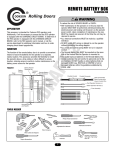
CONNECTION DIAGRAM (FDCL)
BATTERY BOX
CONNECTIONS
CONTROL BOX CONNECTIONS
OPERATOR
BLOCK (TB1)
BATT #2
BATT #1
BK
MAIN BOARD
#J14
BK
BK
FUSE
BK
BK
BATTERY
BOARD
J6
J1
J2
RD
RD
J7 J3 J4
J5
BATTERY
BLOCK (TB2)
GN
RD
OPERATOR
GROUND
CONDUIT
WIRES
RATING INFORMATION
GROUND
SERVICE PARTS
BATTERY (1): K29-NP08-12
FUSE: 35-313-005
BATTERY BOX ASSEMBLY: 50-BATBOX-FDCL
BATTERY: NOMINAL VOLTAGE 12VDC
FUSE: 5 Amp, 250V, Type 3AG
WARNING: FOR CONTINUED PROTECTION
AGAINST FIRE, REPLACE ONLY WITH THE
SAME TYPE AND RATING OF FUSE.
40-33381B
OPERATOR WIRING
FIGURE 5
1. Remove the black wire from the negative battery terminal (-)
to J14 of the logic board and discard.
2. Remove the red wire from the positive battery terminal (+) to
J5 of the battery management board and discard.
3. Remove the battery assemblies (Figure 5) from the operator
and retain for installation in the battery box.
NOTE: If the battery box is being placed into a new
installation, use the existing batteries from the FDO Operator.
If adding the battery box to an existing installation, new
batteries will be required, and the old batteries MUST be
removed from the operator (Figure 5).
4. Connect the black operator harness between J14 to TB1-10
(Figure 4).
5. Connect the red operator harness between J5 to TB1-9
(Figure 4).
6. Tie wrap the added wires along existing harnesses in the
operator. Replace all hardware removed while gaining access
to the batteries in step 1. Don’t replace the cover at this time.
NOTE: Do not connect battery connector or apply AC power to
the operator until installation of battery box is complete.
3