1
ENCODER UC-250E+ USER MANUAL
________________________________________________________________
INSTALLATION
FRONT PANEL
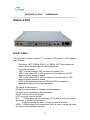
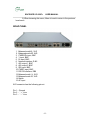
The front panel is shown in figure 2-1. It includes a LCD screen, 3 LED indicators
and 6 buttons.
-
Six buttons: LEFT, DOWN, RIGHT, UP, MENU, OK. These buttons are
used to select the Menu and set up the parameters.
Four LED indicators:
LED 1 is power indicator: LED on means the power is on.
LED 2 is the status LED1. LED on means it is encoding and no LED
means the input channel is closed.
LED 3 is the status LED 2. LED on means it is encoding and no LED
means the input channel is closed.
LED 4 is the temperature warning LED. Red LED on means the
temperature higher than setting temperature.
The usage of the buttons is:
DOWN: move menu down or changing value/parameters;
UP: move menu up changing value/parameters;
RIGHT: move the cursor to the right;
LEFT: move the cursor to the left;
OK:
1) When setting up the parameters, OK is used to confirm the set up
and return to the previous-level menu.
2) When browsing the menu, it enters the next level-menu;
MENU: 1) When setting up the parameters, Menu is used to cancel the setup
and return to the previous-level menu;
-5-