1
Note that when the Layers, Sections, and Profiles buttons are pressed multiple times (rotates)
the current layer, section or profile changes to the next (or previous) one. At the last (or first)
layer, section or profile the view jumps to the first (or last) one. One can jump directly into a
desired layer or section by first providing the index number on the Layer/Sexn text field and
then pressing the corresponding push button.
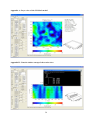
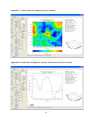
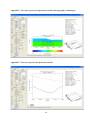
Note that the profile data does not display the actual data, which are assumed irregularly
spaced. Instead it shows the interpolated data, where the "number of profiles" and the "point
step" are based on the interpolation density, i.e, the X-stp and Y-stp values in the left control
pane. If the data are highly irregular, the contouring algorithm produces bad artifacts. In such
a case, the Edit-Contour/Image menu item should be used to change the data representation
from a contour map to an image map. Alternatively the data should be mapped on a regular
grid using some third party interpolation software (e.g. Golden Software Surfer, or Geosoft
Oasis Montaj).
GRABLOX can be used also for 2.5-D interpretation of single profile data. In this case the
data are always read in so that the data profile is located along the x-axis. Consequently, the
model needs to be discretized along the x direction only (y discretization can be equal to one).
Moreover, contour and image maps and Y-sections cannot be displayed and the profile
representation shows the actual data points along a single profile. Note, however, that 2.5-D
inversion has not been tested thoroughly in GRABLOX version 1.6.
Normally, the vertical depth axis is plotted in 1:1 scale with horizontal axes in X and Ysection views. The Vert. scale slide control can be used to stretch or squeeze the depth axis. It
is useful if the height of the model is considerably smaller than its horizontal dimensions. The
other three slide controls (Horiz. rotation, Vert. rotation and Rel. distance) are used to change
the view point of the 3-D model views.
21