1
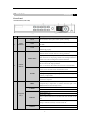
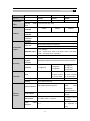
The F2 button is used to change the tab pages.
In PTZ control mode, it zooms in the image.
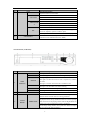
Enter numeral “4”;
4/GHI/ESC
Enter letters “GHI”;
Exit and back to the previous menu.
Enter numeral “5”;
Enter letters “JKL”;
5/JKL/EDIT
Delete characters before cursor;
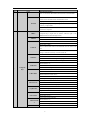
Check the checkbox and select the ON/OFF switch;
Start/stop record clipping in playback.
Enter numeral “6”;
6/MNO/PLAY
Enter letters “MNO”;
Playback, for direct access to playback interface.
Enter numeral “7”;
7/PQRS/REC
Enter letters “PQRS”;
Open the manual record interface.
Enter numeral “8”;
8/TUV/PTZ
Enter letters “TUV”;
Access PTZ control interface.
Enter numeral “9”;
9/WXYZ/PREV
Enter letters “WXYZ”;
Multi-channel display in live view.
Enter numeral “0”;
0/A
Shift the input methods in the editing text field. (Upper and
lowercase, alphabet, symbols or numeric input).
Double press the button to switch the main and auxiliary output.
4
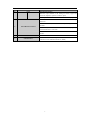
USB Interfaces
Universal Serial Bus (USB) ports for additional devices such as
USB mouse and USB Hard Disk Drive (HDD)
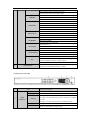
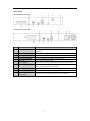
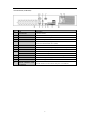
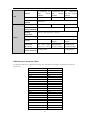
NVR-8Channel (NVR-CH8)
No.
Name
Function Description
POWER
Turns green when NVR is powered up.
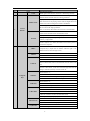
READY
The LED is green when the device is running normally.
The light is green when the IR remote control is enabled;
1
Status
STATUS
Indicators
The light is red when the function of the composite keys (SHIFT)
are used;
The light is out when none of the above conditions are met.
ALARM
HDD
The light is red when there is an alarm occurring.
Blinks red when HDD is reading/writing.
3