1
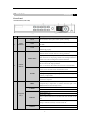
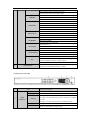
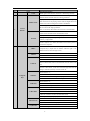
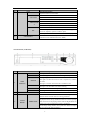
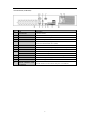
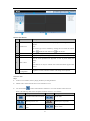
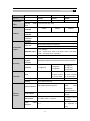
No.
Name
Function Description
Tx/Rx
Blinks green when network connection is functioning normally.
In menu mode, the direction buttons are used to navigate between
different fields and items and select setting parameters.
In playback mode, the Up and Down buttons are used to speed up
DIRECTION
and slow down record playing, and the Left and Right buttons are
used to move the recording 30s forwards or backwards.
In the image setting interface, the up and down button can adjust
the level bar of the image parameters.
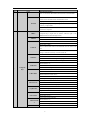
2
Control
In live view mode, these buttons can be used to switch channels.
Buttons
The Enter button is used to confirm selection in menu mode; or
used to check checkbox fields and ON/OFF switch.
In playback mode, it can be used to play or pause video.
ENTER
In single-frame play mode, pressing the Enter button will play the
video by a single frame.
In auto sequence view mode, the buttons can be used to pause or
resume auto sequence.
Switch between the numeric or letter input and functions of the
SHIFT
composite keys. (Input letter or numbers when the light is out;
Realize functions when the light is red.)
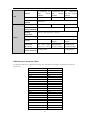
1/MENU
Enter numeral “1”;
Access the main menu interface.
Enter numeral “2”;
Enter letters “ABC”;
The F1 button when used in a list field will select all items in the
2/ABC/F1
list.
In PTZ Control mode, it will turn on/off PTZ light and when the
image is zoomed in, the key is used to zoom out.
Enter numeral “3”;
Enter letters “DEF”;
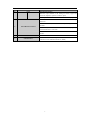
3
Composite
3/DEF/F2
Keys
The F2 button is used to change the tab pages.
In PTZ control mode, it zooms in the image.
Enter numeral “4”;
4/GHI/ESC
Enter letters “GHI”;
Exit and back to the previous menu.
Enter numeral “5”;
Enter letters “JKL”;
5/JKL/EDIT
Delete characters before cursor;
Check the checkbox and select the ON/OFF switch;
Start/stop record clipping in playback.
Enter numeral “6”;
6/MNO/PLAY
Enter letters “MNO”;
Playback, for direct access to playback interface.
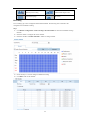
7/PQRS/REC
Enter numeral “7”;
Enter letters “PQRS”;
4