1
Installation
Details
Installation and Maintenance Details
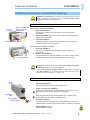
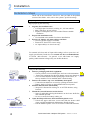
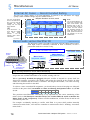
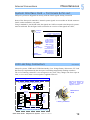
Opening or Closing the Minipack Drawer Shelf
To access the Minipack distribution area, you have to open the
Fastening screws
sliding drawer shelf. Do following to open or close the drawer:
for the drawer
Fastening screw
for the shelf
frame
1. Unlock the drawer shelf by
using a screwdriver to loosen the upper and lower locking
screws. Do not loose the screw in the middle!
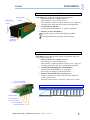
Minipack Sliding Drawer Shelf
in Operation Position
2. Open or close the drawer shelf by
holding the drawer from the side plates and sliding it
outwards.
The drawer shelf is the in the Maintenance Position.
or
sliding it on its mounting rail fully into the shelf
Fastening screw
for the shelf frame
3. Lock the drawer shelf by
screwing home the upper and lower locking screws.
The drawer is then securely locked in the shelf, in its
Operation Position
Shelf
Frame
F1, F2…Plastic
Cover
Minipack Sliding Drawer Shelf
in Maintenance Position
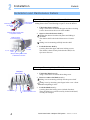
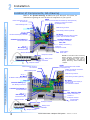
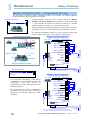
Mounting or Removing Minipack Blind Covers
Minipack
blind cover
1. Unlock the blind cover by
using a screwdriver to loosen the locking screw
2. Insert or remove the blind cover by
sliding it on its mounting rail fully into the power shelf
or
sliding it out, by inserting your fingers in the cover’s front
handle and pulling it loose
Front handle
4
Locking screw
to secure the blind cover
3. Lock the blind cover by
screwing home the locking screw (locked direction).
Then, the blind cover will be securely locked in the shelf,
or ready for transport
Quick Start Guide Minipack PS System
356808.103, 1v1-2007-03