1
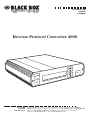
REVERSE PROTOCOL CONVERTER 4000
2. Quick Setup
This Quick Setup Guide is designed
to help you get up and running in a
short amount of time.
2.1 Unpacking
Check the box for freight or water
damage. If any damage is evident,
please contact your carrier
immediately.
The package should contain the
following items:
• Reverse Protocol Converter 4000
• Power supply
• Twinax V-connector and Coax
adapter cable
• This user’s manual
2.2 Installation
The Reverse Protocol Converter
4000 is easy to install and requires
no special tools. Follow these steps to
connect and set up the RPC:
1. Power off the printer.
2. If you decide to use the
Centronics compatible parallel
input, connect a parallel cable to
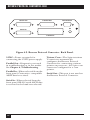
the “Parallel In” connector on
the Reverse Protocol Converter.
8
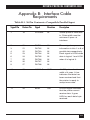
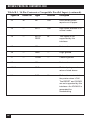
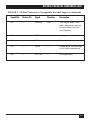
If you wish to use the RS-232
serial input, connect a serial
cable to the “Serial In”
connector on the Reverse
Protocol Converter. A
description of the cable
requirements is found in
Appendix B.
3. Connect the 9-pin Twinax
V-adapter or Coax adapter to the
9-pin connector labeled
“Twinax/Coax” on the back
panel of the Reverse Protocol
Converter.
4. For a twinax printer, connect
the twinax cable from the
printer to either one of the
twinax connectors on the
V-connector. For a coax printer,
connect the coax cable from the
printer to the coax connector on
the adapter cable.
5. Plug the wall-mounted
transformer into a standard
110-VAC power outlet.
6. Plug the center post connector
into the 9 VDC receptacle on the
back panel of the Reverse
Protocol Converter.
7. Power on the Reverse Protocol
Converter by pressing the “1-0”
power switch and proceed to
configure the Converter.