1
the test coverage. This manual also explains how to install the tool on your
workstation. Should the motivation fail you, think of the many hours of hard
work Nitpick will save you. Proving non-theorems is hard work.
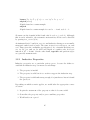
Another common use of Nitpick is to find out whether the axioms of a locale
are satisfiable, while the locale is being developed. To check this, it suffices
to write
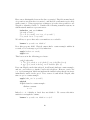
lemma “False”
nitpick [show_all ]
after the locale’s begin keyword. To falsify False, Nitpick must find a model
for the axioms. If it finds no model, we have an indication that the axioms
might be unsatisfiable.
For Isabelle/jEdit users, Nitpick provides an automatic mode that can be
enabled via the “Auto Nitpick” option under “Plugins > Plugin Options >
Isabelle > General.” In this mode, Nitpick is run on every newly entered
theorem.
To run Nitpick, you must also make sure that the theory Nitpick is imported—
this is rarely a problem in practice since it is part of Main. The examples presented in this manual can be found in Isabelle’s src/HOL/Nitpick_
Examples/Manual_Nits.thy theory. The known bugs and limitations at the
time of writing are listed in §8. Comments and bug reports concerning either
the tool or the manual should be directed to the author at blannospam
chette@in.
tum.de.
Acknowledgment. The author would like to thank Mark Summerfield for
suggesting several textual improvements.
2
Installation
Nitpick is part of Isabelle, so you do not need to install it. It relies on a
third-party Kodkod front-end called Kodkodi, which in turn requires a Java
virtual machine. Both are provided as official Isabelle components.
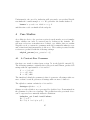
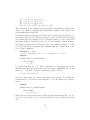
To check whether Kodkodi is successfully installed, you can try out the example in §3.1.
3