1
Launching HDT Primer PE
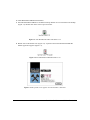
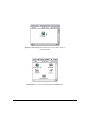
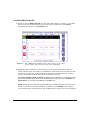
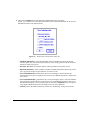
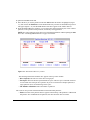
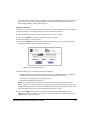
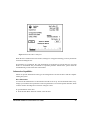
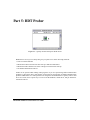
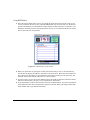
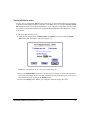
1. Double-click on the HDT Primer PE icon. The main window appearsÐsee Figure 3.1. If a SCSI
drive does not show up in this display because it has just been powered on, try the Rescan
command in the File menu, or the SCSI Bus menu.
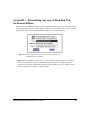
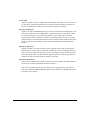
Figure 3.1: The of HDT Primer PE main window, also referred to as the volume
selector window. The currently selected drive is highlighted
2. HDT Primer PEÕs main window is where SCSI devices are displayed and selected. The main
window includes an icon for each drive, its SCSI ID, the volume name (if the drive has more than
one partition on it, the name of the Þrst Macintosh partition will be the name listed), the driveÕs
capacity, and the make, model number, and revision number of the drive.
The Format, Partition, Mount, Unmount, and Test buttons on the right side of the main window
perform common HDT Primer PE tasks. Other HDT Primer PE functions, such as Initialize and
Update Driver, are available in the HDT Primer PE File menu.
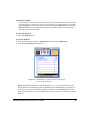
NOTE: On dual SCSI bus machines with SCSI Manager 4.3, HDT Primer PE will display all online devices connected to the internal SCSI bus by default. Use the SCSI Bus menu to display
devices attached to the external SCSI bus. See ÒSCSI Bus menuÓ on page 38 for more information.
18
Hard Disk ToolKit¥Personal Edition User Guide