1
RACETIME 2
Show Jumping
Program
Release 2.00
Racetime 2 - Show Jumping Program
User manual - Release 2.00
2
1. Index
1.
INDEX.........................................................................................................................2
2.
INTRODUCTION ........................................................................................................4
3.
MAIN MENU ...............................................................................................................5
4.
SPECIFIC SETTINGS ................................................................................................6
4.1
Setting of predefined corrections..................................................................................................................... 8
4.2
Selection of finish and phase 2 start signals.................................................................................................... 8
4.3
Default settings.................................................................................................................................................. 9
5.
TIMING .....................................................................................................................10
5.1
Connections and setup of Linkgate radio system......................................................................................... 10
5.2
Information displayed, use of keyboard ....................................................................................................... 13
5.2.1
Blocking of lines with LCK key. .............................................................................................................. 14
5.3
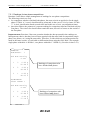
Interpretation of printouts ............................................................................................................................. 15
5.4
Single phase competition ................................................................................................................................ 16
5.4.1
Setting of competitor number and ride number ........................................................................................ 16
5.4.2
Countdown................................................................................................................................................ 17
5.4.3
Competitor during ride.............................................................................................................................. 18
5.4.4
Assignment of penalties and correction of ride time................................................................................. 18
5.4.5
Stopping of chronometer by judge............................................................................................................ 18
5.4.6
End of ride, confirmation of results .......................................................................................................... 19
5.4.7
Exceeding of time limit............................................................................................................................. 19
5.4.8
Intermediate time ...................................................................................................................................... 20
5.4.9
Display, printing and canceling of memorised rides................................................................................. 20
5.5
Two-phase competition................................................................................................................................... 21
5.5.1
Assignment of penalties or time corrections for phase 1 after the start of phase 2 ................................... 21
5.6
‘Consecutive barrage’ competition................................................................................................................ 22
6.
CONNECTION OF DISPLAY BOARD .....................................................................23
6.1
Data presentation on double display board.................................................................................................. 23
6.2
Data presentation on single display board.................................................................................................... 23
6.3
Data presentation on display boards of other producers ............................................................................ 24
7.
PRINTOUTS AND RANKINGS ................................................................................25
7.1
Printout of results ........................................................................................................................................... 25
Racetime 2 - Show Jumping Program
User manual - Release 2.00
3
7.2
Printout of rankings........................................................................................................................................ 26
7.2.1
Rankings for two-phase competitions....................................................................................................... 27
8.
VARIOUS FUNCTIONS............................................................................................28
8.1
Synchronization .............................................................................................................................................. 28
8.2
Data transmission ........................................................................................................................................... 28
8.3
Signal quality................................................................................................................................................... 29
8.4
RACETIME configuration ............................................................................................................................ 30
Setup of serial transmission parameters....................................................................................................................... 30
8.4.2
Modification of line disactivation times ................................................................................................... 31
8.4.3
Linkgate channel setup ............................................................................................................................. 31
8.5
Display board configuration .......................................................................................................................... 32
8.5.1
Display board type .................................................................................................................................... 32
8.5.2
Number of display boards......................................................................................................................... 32
8.5.3
Advertising ............................................................................................................................................... 32
8.6
Sexagesimal calculator ................................................................................................................................... 33
9.
BATTERY RECHARGE ...........................................................................................34
9.1
Low battery indicator..................................................................................................................................... 35
10.
MEMORY LIMITS .....................................................................................................36
11. APPENDIX - RACETIME 2 PROTOCOL TRANSMISSION .......................................37
11.1 Binary transmission............................................................................................................................................... 37
11.2 ASCII transmission ................................................................................................................................................ 39
Racetime 2 - Show Jumping Program
User manual - Release 2.00
4
2. Introduction
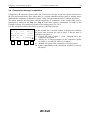
The Show jumping program for Racetime 2 is devised for use in show jumping events.
It is an extremely versatile program which can cover the most varied kinds of competition: in
conformity with ‘Table A’ or ‘Table C’, single phase or multiple phase as well as ‘Consecutive
barrage’. The management of the input lines also allows maximum versatility of use, making it easy
to adapt to the layout of the competition course. The software has been devised to exploit to the
utmost the characteristics of the Linkgate system for radio transmission of timing signals.
The program also offers comprehensive management of printouts and rankings.
The Show jumping program is selected by pressing F3 (C: Show Jumping) from the second display
of the menu for the selection of function programs (see also section 2.3 of the Racetime 2 User
Manual).
After choosing the program, you immediately enter the main menu, from which the various
functions available can be selected.
Racetime 2 - Show Jumping Program
User manual - Release 2.00
5
3. Main menu
A:Timing
B:Special settings
C:Printout/Rankings
A
B
C more
F1
F2
F3
5
4
7
F4
A:Synchronize
B:Send stored data
C:Signal level
A
B
C more
F1
F2
F3
8.1
8.2
8.3
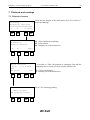
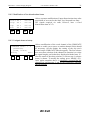
Select the items with the four function keys.
F1. Enters timing mode.
F2. Accesses the specific settings for the show jumping
program.
F3. Allows printing of results of memorised rides and of
rankings.
F4. Shows next menu.
Select the items with the four function keys.
F1. Synchronization of the machine’s internal clock.
F2. Transmission of previously memorised data.
F3. Checks efficiency of radio communication (Linkgate
transmission system).
F4. Shows next menu.
F4
A:RACETIME config.
B:Disp.Board Conf.
Select the items with the four function keys.
F1. RACETIME configuration.
F2. Display board configuration
A
F4. Shows next menu.
F1
B
C other
F2
F3
F4
8.4
A:Time calculator
B:Batery charge
A
B
F1
F2
8.6
9
menu
F3
F4
Select the items with the four function keys.
F1. Sexagesimal calculator (addition and subtraction of
times)
F2. Management of battery recharge.
F4. Returns you to initial menu.
Racetime 2 - Show Jumping Program
User manual - Release 2.00
6
4. Specific settings
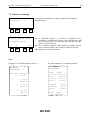
‘Specific settings’ make it possible to modify the specific parameters of the riding program.
To return to the main menu briefly press key CE.
A:Phas.2,single scor
B:Table Ph1/sing. A
C:Table Phase 2: A
A
B
C more
F1
F2
F3
F4
A:Penality settings
B:Finish signals
C:Pausa F1..F2: 15s
A
B
more
F1
F2
4.1
4.2
F3
F4
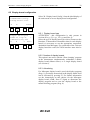
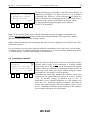
F1. Selection of the competition ‘phases’. Pressing on F1
allows you to choose from the following types of
competition:
- single phase
- two phases with progressive time (final competition time
is calculated by adding up the times of phases 1 and 2;
during phase 2, the chronometer does not start again from
0 but continues from the time of phase 1)
– two phases with separate times (the time of phase 2
starts again from 0 at the end of phase 1)
– Consecutive barrage: at the end of the first phase there is
a pause (5.6) after which a second countdown for phase 2
starts.
F2. Pressing key F2 allows you to select the type of FEI
reference table (‘A’ or ‘C’). Depending on the table
selected, the penalty assignment mode is modified
(‘points’ for table ‘A’ and ‘seconds’ for table ‘C’).
Note: for specialties with two phases, the setting refers to
phase 1.
F3. Selects the type of FEI reference table (‘A’ or ‘C’) for
phase 2. This configuration does not appear for single
phase competitions.
F4. Accesses the following page of specific settings.
F1. Accesses the submenu for the setting of the preset values
of time corrections and penalties.
F2. Accesses the submenu for the choice of types of signal
used for the finish of phase 1, the start of phase 2 and the
final finish.
F3. Allows you to set the pause time between the end of phase
1 and the start of countdown for phase 2. This setting only
applies to the ‘Consecutive Barrage’ specialty, and so
only appears on the display if this specialty has been
selected. Press F3 and then modify the value and confirm
with Enter.
F4. Accesses the following page of specific settings.
Racetime 2 - Show Jumping Program
A:Start T.
B:Max T.
C:Limit T.
A
B
F1
F2
60 s
60 s
120 s
C more
F3
F4
A:Start T. P2 60 s
B:Max T.
P2 60 s
C:Limit T. P2 120 s
A
B
C more
F1
F2
F3
F4
Penality for T>Tmax
A:Phase1/single 25
B:Phase2:
25
A
B
menu
F1
F2
F3
F4
F2
7
Setting of start times (countdown), the maximum time and the
time limit for single phase rides or for the first phase of
consecutive phase rides.
F1. Setting of start time. Setting 0 (zero) disactivates the
countdown function and the horse can start without time
limits.
F2. Setting of the maximum time above which penalties
(points or seconds, depending on the table being used) are
automatically applied to the competition time.
F3. Setting of time limit above which the horse is
automatically eliminated from the competition. It is
automatically preset to a value double that of the value of
the maximum time. Naturally, it does not accept values
lower than the maximum time.
F4. Accesses the following page of specific settings.
If one of the ‘2-phase’ modes has been selected, the maximum
times and time limits for the second phase can be set.
Note: if the two-phase mode with progressive time has been
selected, the maximum and limit times and time limits refer to
the total time (the sum of phase 1 time and phase 2 time).
If, however, the 2-phase mode with separate times or the
‘Consecutive barrage’ mode is being used, the times refer only
to the partial time of phase 2.
Setting of penalties per second calculated automatically when
the maximum allotted time is exceeded. The penalty is
expressed in hundredths (of a point or second depending on the
table chosen - ‘A’ or ‘C’)
F1. Modifies the setting of the penalty set for the single phase
specialty or for phase 1 in the two phase specialty.
F2. Modifies the penalty for exceeding the maximum time in
phase 2. The setting does not operate if the single phase
mode is chosen.
F4. Returns to the main menu, first requesting printing of the
configuration.
Answering ‘Yes’ (F3) allows you to print the current
configuration. Printing of the configuration before the start of
the competition is recommended, so this additional possibility
for verification after the printout of the timing can be included.
Print all special
settings ?
F1
User manual - Release 2.00
Yes
No
F3
F4
Racetime 2 - Show Jumping Program
User manual - Release 2.00
8
4.1 Setting of predefined corrections
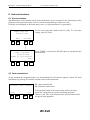
The assignment of penalties or time corrections during timing is particularly easy thanks to the
possibility of setting standard scores (or time corrections), which can be accessed by means of the
function keys (see 4.1).
The function of setting of predefined corrections is accessed from the ‘Specific settings’ menu.
F1,F2,F3 mod.value
(CE = exit)
Values Penality
3
4
6 P/TC
F1
F2
F3
F4
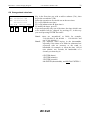
With function keys F1, F2, F3 select the value you intend to
modify. The values set will be placed in positions which
correspond to those of the relative function keys also during
timing.
Pressing F4 allows you to pass from the setting of predefined
penalties to the setting of time corrections.
To quit the function, briefly press key CE.
4.2 Selection of finish and phase 2 start signals
A:End of run: Stop
B:End of Ph.1: Start
C:Start Ph. 2: Aux
A
B
C esc
F1
F2
F3
Selection of the types of input signal for the end of the ride (or
the end of phase 2 in the case of timing with 2 phases), for the
end of phase 1 and for the start of phase 2. By selecting the
two signals in the appropriate manner, it is possible to
configure timing for any type of finish configuration, as shown
in the table below.
F4
F1. Selection of end of ride signal (single phase) or of end of
phase 2 (2 phases). It is possible to choose between the
Start or Stop signal.
F2. Selection of end of phase 1 signal (Note: the setting is
active only if one of the two phase modes has been
selected). It is possible to choose between Start, Stop and
Aux/L1 (‘Aux’ input in the case of timing via cable or
Lap 1 when the Linkgate radio system is used).
F3. Selection of the phase 1 start signal (Note: the setting is
active only in the case of selection of the ‘Consecutive
barrage’ mode, in which the end of phase 1 does not
coincide with the start of phase 2). It is possible to choose
between Start, Stop and Aux/L1 (‘Aux’ input in the case
of timing via cable or Lap 1 when the Linkgate radio
system is used) or L2 (Lap 2 radio signal – connection via
cable is not possible).
Racetime 2 - Show Jumping Program
User manual - Release 2.00
9
4.3 Default settings
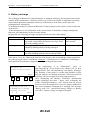
After the configuration has been annulled, the chronometer is initialized with the following settings:
Mode
Phase 1/single phase FEI table
Phase 2 FEI table
Preset penalties
Preset time corrections
End of ride signal
End of phase 1 signal
Start of phase 2 signal (consecutive barrage only)
Phase 1...phase 2 pause (consecutive barrage only)
Countdown time
Phase 1/single phase maximum time
Phase 1/single phase time limit
Phase 2 maximum time
Phase 2 time limit
Time fault assigned, phase 1/single phase
Time fault assigned, phase 2
Single phase
A
A
3, 4, 6
6, 8, 10
Stop
Aux/Lap 1 radio
Start
15 s
60 s
60 s
120 s
60 s
120 s
0.25 Points (tab. A)
1 second (tab. C)
0.25 Points (tab. A)
1 second (tab. C)
Racetime 2 - Show Jumping Program
User manual - Release 2.00
10
5. Timing
5.1 Connections and setup of Linkgate radio system
As has already been stressed in paragraph 3, the show jumping program offers maximum flexibility
in the connection of the photocells, so as to make simple the management of different types of
competitions (single phase with separate start and finish; single phase with coinciding start and
finish; two phases with separate start, end of phase 1/start of phase 2 and finish; two phases with
coinciding start and end of phase 1/start of phase 2; two phases with coinciding end of phase 1/start
of phase 2 and finish, consecutive barrage with the possibility of freely configuring the finish of
phase 1 and the start of phase 2).
Moreover the various inputs can be commanded with cable connections, or more conveniently, the
Linkgate system can be used for the transmission of timing impulses via radio. A mixed
configuration is also possible, as the inputs via cable and the signals via radio are managed in a way
which is completely transparent to the user.
The only exception is the Lap 2 signal via radio, for which there is no corresponding signal via
cable. However, the use of this signal is only necessary in the case (which is anyway rather
unlikely) of a competition with ‘Consecutive barrage mode’ and with all the signals (start of phase
1, finish of phase 1, start of phase 2, finish of phase 2) in different positions.
The table below shows the possible configurations of inputs (to which the different types of timing
shown in the figures correspond) and the correspondences between radio signals and ‘cabled’
inputs. For the selection of the different modes, see section 3.
For the correct setting up of signals on the Linkgate EncRadio transmitters and for their connection,
refer to the section ‘Linkgate System’ in the ‘Racetime 2 User Manual’ manual.
Racetime 2 - Show Jumping Program
Function
Beginning of start countdown
(if required)
Start of horse
End of ride
(configurable signal)
Intermediate time,
only in ‘single phase’ mode
Finish of phase 1 and start of
second phase, only in the ‘2 phases,
progressive time’ and ‘2 phases,
separate times’ modes
(configurable signal)
Start of second phase (only for the
‘Consecutive barrage’ mode
(configurable signal)
Radio signal
Lap E
Input line
Lap
Start
Stop
Start
Stop
or
Start
Lap 1
Diagram ref.
A, C, D, E, G
or
Start
Aux
Lap 1
B, F
Aux
or
Start
C, G
or
Start
or
Stop
Lap 1
D, F
or
Stop
Aux
or
Start
E
or
Start
or
Stop
or
Interruption and resumption of
timing by the judge
11
User manual - Release 2.00
Lap 2
Lap E
or
Stop
(Lap 2 is not available
via cable)
Lap
G
‘Single phase’ mode
A : Separate start and finish
B : Coinciding start and finish
Start: Start - Finish: Start
Start: Start
Finish: Stop
Racetime 2 - Show Jumping Program
12
User manual - Release 2.00
‘Two-phase’ mode
C : Start, phase 1/2 and separate finish
Start: Start
D : Start coinciding with phase 1/2
End of phase 1/start of phase 2: Aux/L1
Start, End of phase 1/start of phase 2: Start
Finish: Stop
Finish: Stop
E : Finish coinciding with phase 1/2
F : Start: coinciding finish and phase 1/2
End of phase 1/start of phase 2, finish: Stop
Start, end of phase 1/start of phase 2, finish: Start
Start: Start
G : ‘Consecutive barrage’ mode
with start and finish in two different points of the course
Finish of phase 2: Stop
Start of phase 1
Finish of phase 1: Aux/L1
Start of phase 2: L2
Racetime 2 - Show Jumping Program
User manual - Release 2.00
13
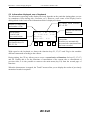
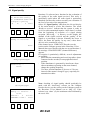
5.2 Information displayed, use of keyboard
The information appearing on the display obviously depends on the particular timing phase you are
in (countdown, horse during ride, correction, etc.). However, some zones of the display can be
distinguished on the basis of the information which is displayed in them.
In ‘2-phase’ mode, indicates
‘F1’ or ‘F2’
Number of competitor
and number of ride
Current status;
at end of ride,
shows total results
As always, last line is
for function keys F1,
F2, F3, F4
N123 R 1 F1 43.65
P
5.00 T.C. 6.00
Running
Cle Pen. T.C.
F1
F2
F3
F4
Current ride time and
final time
Penalties and time
corrections.
Penalties are automatically
increased after maximum time
has been exceeded
With regard to the keyboard, as always the function keys F1, F2, F3 and F4 give the machine
different commands according to the context.
During timing, the CE key allows you to access a second series of functions for keys F1, F2, F3
and F4. Usually this is for the functions of cancellation of the current ride or cancellation of
previous rides; it is also possible to return to the main menu (key F4) from the second page of
functions.
When the chronometer is stopped, the ⇑ and ⇓ arrows allow you to display the results of previously
memorised results in sequence.
Racetime 2 - Show Jumping Program
User manual - Release 2.00
14
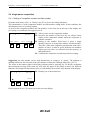
5.2.1 Blocking of lines with LCK key.
Although it is possible to annul any false events acquired by the chronometer at a later moment, it is
also possible to block the active input line by pressing the LCK key.
N 1 R 1
5.67
P
0.00 T.C. 0.00#
Running
Cle Pen. T.C. Î
F1
F2
F3
The activation of the block is shown by the presence of the
symbol '#' on the second line of the display.
Line blocked
F4
The blocking of the lines is active on the following input channels:
• Start, Stop, Lap1and Lap2 radio signals
• Aux input (corresponding to the Lap 1radio signal, see also section 5.1)
It is not active on the Start and Stop lines (input or keyboard), so as to allow the timekeeper to
intervene.
The Lap line (input or keyboard) and the corresponding Lap E radio signal are also not blocked by
the LCK key as they are needed to begin Countdown and to interrupt/resume timing (these are
manual actions performed by the timekeeper).
Racetime 2 - Show Jumping Program
15
User manual - Release 2.00
5.3 Interpretation of printouts
The timing printout shown below refers to ‘Consecutive barrage’ timing, according to table A. In
the other specialties, the information is presented in a similar way, with the exception of data
relative to the start and the countdown of the second phase.
During timing
Number of competitor
and number of ride
Countdown value at the
moment of start
Countdown value at start of
phase 2
Time correction of 6 seconds,
subsequently canceled
(- 6)
Stopping of chronometer
by judge and following
restart
N 3
P 1
Countdown
Sta 01:24:43.429
Start - 39.88 s
End F1 38.09 s
Sta 01:26:04.816
Start - 31.71 s
Penal.
6.00 p
T.Corr.
6.00 s
T.Corr.- 6.00 s
T.Corr.
4.00 s
Interr.
Restart
40.03 s
40.03 s
At end of ride (or in
reprint)
Effective competition
time (without
corrections)
Total time corrections
Total competition time
Time fault assigned
Final result
Sta 01:24:43.429
T.eff.1 38.09 s
Sta 01:26:04.816
T.eff.
72.91 s
T.Corr.
4.00 s
Tot.T.
76.91 s
T>Tmax
4.25 p
Penality 6.00 p
Total
10.25 p
Time of start
phase 1
Final time phase 1
Time of start
phase 2
Addition of 6 penalty
points
Time correction of 4
seconds
Time of start
phase 1
Effective time phase 1
Time of start
phase 2
Penalties assigned
manually
Penalties total
Racetime 2 - Show Jumping Program
User manual - Release 2.00
16
5.4 Single phase competition
5.4.1 Setting of competitor number and ride number
From the main menu, select ‘A: Timing’ (key F1) to access the timing functions.
The chronometer is in the competitor number and ride number setting mode. In this condition, the
chronometer receives no timing signals.
As well as the competitor number and ride number, on the first line at the top of the display, the
previously set countdown time appears (see 4).
N
1 R
1
60.00
Num +Num
F1
Run Conf→
F2
F3
F4
F1. Allows you to set the competitor number
F2. Increases the number of the horse by one (allows faster
setting of the competitor number when the competitor is
without a number)
F3. Setting of ride number. Each horse is given a single
identity based on its competitor number and ride number.
Therefore if the same competitor performs the same ride a
number of times, it must be given different ride numbers
(unless previous rides are canceled from the memory, as
indicated below).
F4. Confirms the competitor set and starts effective timing.
Suggestion: the ride number can be used alternatively as ‘category’ or ‘group’. The printout of
rankings allows for the selection of the ride number to which the rankings must refer. (see 7.2)
The arrow at the bottom right of the display indicates that by pressing key CE briefly (remember
that prolonged pressing of the same key will cause the paper of the printer to move on), different
functions are assigned to the function keys, as indicated by the last line at the bottom of the display.
N
1 R
1
60.00
←
F1
F4. Returns you to the main menu.
menu
F2
F3
F4
Pressing again on key CE returns you to the previous display.
Racetime 2 - Show Jumping Program
User manual - Release 2.00
17
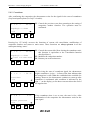
5.4.2 Countdown
After confirming the competitor, the chronometer waits for the signal for the start of countdown
(Lap from input/keyboard, or Lap E via radio).
N
1 R
1
60.00
Lap=begin C.down
Cle
→
F1
F3
F2
F1. Cancels the previous event, thus returning to the setting of
competitor number function. The operation must be
confirmed.
F4
Pressing key CE briefly accesses the functions of current ride cancellation, modification of
competitor number and return to main menu. These functions are always present in all the
subsequent timing ‘states’.
N
1 R
1
60.00
Lap=begin C.down
←Clear run Num menu
F1
N
F2
1 R
F3
1
F4
- 54.32
Countdown
Cle
F1
F2
7
N
→
F3
F4
On receiving the start of countdown signal, the chronometer
begins countdown. A sign ‘-‘ in front of the time indicates that
the competitor is still within the established time available for
starting. However, the chronometer continues to count up after
countdown is terminated (this condition is indicated by the
sign ‘+’ on the display), so the horse can start also at the end of
the regular time.
8
1 R
1
0.00
Attesa partenza
Cle
F1
F1. Cancels the current ride (Note: during the countdown wait,
this function is equivalent to the Cancellation function
described above).
F3. Modifies the competitor number.
F4. Returns you to the main menu.
F2
F3
→
F4
If the countdown time is set to zero, the start is free. After
confirmation of the competitor the chronometer waits for the
start signal.
Racetime 2 - Show Jumping Program
User manual - Release 2.00
18
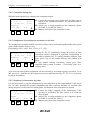
5.4.3 Competitor during ride
When the start signal arrives, timing of the competitor begins.
N 1 R 1
5.67
P
0.00 T.C. 0.00
Running
Cle Pen.
T.C. →
F1
F2
F3
5.4.4
5.4.4
F1. Cancels the previous event (in this case, the Start), and so
returns to the countdown function. The operation must be
confirmed.
F2. Allows you to assign penalties to the competitor (points
for Table A, seconds for Table C)
F3. Manual correction of the competitor’s time
F4
5.4.4 Assignment of penalties and correction of ride time
The assignment of penalties and the correction of time can be performed rapidly thanks to the preset
values on the function keys (see 4.1).
From timing (5.4.3), select ‘Pen.’ (F2) or ‘C.T.’ (F3).
N 1 R 1
5.67
P
0.00 T.C. 0.00
Running
Pen:
#
3
4
6
F1
F2
F3
F4
Pressing F1, F2, F3 immediately assigns the penalty (or time
correction), which is displayed in a position corresponding to
the relative function key. To assign penalties different from
those preset, key in the number directly and confirm with
Enter.
To quit without making corrections, simply press Enter
(naturally before setting a number – if necessary write over,
entering zero).
A previous incorrect penalty assignment can be corrected by activating negative correction. To do
this, press F4 (-) and then set the required correction (with function keys F1, F2, F3 or by directly
keying in the number).
5.4.5 Stopping of chronometer by judge
It is always possible to stop the chronometer by activating the Lap line (input/manual) or the Lap E
line via radio. Naturally the penalty assignment and time correction functions are available also
during the pause. At the end of the timing pause, the duration of the interruption is printed.
N 1 R 1
10.38
P
0.00 T.C. 2.00
Pause
Cle Pen.
T.C. →
F1
F2
F3
5.4.4
5.4.4
F4
F1. Cancels the judge’s stopping of the chronometer. If the
operation is confirmed, the time restarts as if it had not
been stopped.
F2. Allows you to assign penalties to the competitor (points
for Table A, seconds for Table C).
F3. Manual correction of the competitor’s time.
Racetime 2 - Show Jumping Program
User manual - Release 2.00
19
5.4.6 End of ride, confirmation of results
When the end of ride signal is received (configurable, see 4.2), the chronometer stops and the
results of the ride are immediately presented.
Before confirming the results, further penalties or time corrections can be assigned (this operation is
necessary, for example, when a fence is knocked down in close proximity to the finish).
N 1 R 1
74.68
TP 7.75 T.C. 6.00
GP 4.00
Cle Pen. T.C.Conf→
F1
F2
F3
5.4.5
5.4.5
F4
F1. Cancels the stop signal. If the operation is confirmed,
chronometer time restarts as if the finish had not taken
place. In this way any false impulses from the finish
photocell can be canceled.
F2. Enables you to assign penalties to the competitor (points
for Table A, seconds for Table C)
F3. Manual correction of competitor’s time
F4. Confirmation of results. After being confirmed, the results
are printed and the chronometer is automatically ready to
time the next competitor.
On the display the values of the penalties assigned (GP) and the total penalties (TP, the sum of the
penalties assigned and of those assigned automatically for exceeding the maximum ride time) are
shown, as well as the value of the time corrections made.
If timing is according to table ‘C’, the total final time, obtained by adding actual time + time
correction + penalties assigned + time faults, is also displayed (figure below).
N 1 R 1
62.99
TP 7.00 T.C.
6.00
GP 4.00 Ttot
69.99
Cle Pen.
T.C. Conf→
F1
F2
F3
5.4.5
5.4.5
F4
5.4.7 Exceeding of time limit
If the time limit is exceeded, the competitor is automatically eliminated. A message is printed and
the formula ‘T > Tlim’ appears on the alphanumeric display board.
Racetime 2 - Show Jumping Program
User manual - Release 2.00
20
5.4.8 Intermediate time
In the ‘single phase’ mode alone, it is possible to include an intermediate time (it must be connected
to the Aux input or transmitted via radio as Lap 1, see 4.2). The intermediate time appears for five
seconds on the chronometer display (the time blinks) and on the display board, after which normal
display of times resumes.
All other events (corrections, end of ride signal) interrupt display of the intermediate time and
brings back the normal display.
5.4.9 Display, printing and canceling of memorised rides
With the chronometer stopped (5.4.1) memorised rides can be displayed by using keys ⇑ and ⇓ or
by retrieving a competitor, in particular with keys F1, F2, F3.
N 1 R 1
74.68
TP 7.75 C.T. 6.00
GP 4.00
Num +Num
Run Tab→
F1
F2
F3
F1.
F2.
F3.
F4.
Allows you to enter the competitor’s number.
Increases the competitor’s number by one.
Setting of ride number.
Prints the results for the number displayed.
F4
By pressing briefly on the key CE, you access the functions of displayed ride cancellation and
return to main menu.
N 1 R 1
74.68
TP 7.75 T.C. 6.00
GP 4.00
←Elim
Print menu
F1
F2
F3
F1. Cancels the displayed ride. Asks for confirmation.
Attention: once confirmed, the operation is irreversible.
F3. Prints the results for the number displayed.
F4. Returns you to the main menu.
F4
By pressing on key CE again, you return to the previous display.
Racetime 2 - Show Jumping Program
User manual - Release 2.00
21
5.5 Two-phase competition
The functioning of the chronometer for the timing of ‘two-phase’ competitions is very similar to the
functioning for the single phase competition already described.
The differences can be summarized as follows:
• On the first line of the display ‘F1’ or ‘F2’ is constantly shown to indicate the active phase of
timing.
• If the competitor has not finished the first phase without any faults (penalty assigned, time
correction or penalty assigned automatically for exceeding the maximum time), he is
automatically eliminated and cannot go on to the second phase.
• The cancellation command (F1) in phase 2 makes it possible to cancel the finish of phase 1/start
of phase 2 event and therefore to ‘bring back’ the competitor to phase 1. Also in this case, this
operation cancels any false photocell impulses.
• The final competition time is the time of phase 2 alone in the case of the ‘2 phases, separate
times’ mode; it is the sum of the phase 1 and 2 times in the case of the ‘2 phases, progressive
time’ mode.
5.5.1 Assignment of penalties or time corrections for phase 1 after the start of phase 2
It often happens that faults for phase 1 have to be assigned after the competitor has started phase 2.
This occurs in particular when a fence is positioned before the photocell for the end of phase 1 and
the start of phase 2.
During correction, the display board shows the final time for phase 1 (even if previously it had
already gone on to the displaying of current event time for phase 2). This makes it possible to make
corrections with relative calm.
N 1 R 1 F2
TP 0.00 C.T.
Running
Cle Pen. T.C.
F1
5.67
0.00
C.P1→
F2
F3
5.4.4
5.4.4
F4
N 1 R 1 P2
5.67
TP 0.00 T.C. 0.00
Pen.Ph1!
Pen.
T.C. quit
F1
Press F4 (C.F1) to access the function for the assignment of
penalties or time corrections for phase 1.
F2
F3
5.4.4
5.4.4
F4
F2. Allows you to assign penalties to the competitor (points
for Table A, seconds for Table C).
F3. Manual correction of competitor’s time.
F4. Returns to the correction mode of phase 2. If a correction
for phase 1 has in fact been made, timing is stopped when
you quit the function (the competitor cannot be admitted
to phase 2).
Racetime 2 - Show Jumping Program
User manual - Release 2.00
22
5.6 ‘Consecutive barrage’ competition
Compared to the other two-phase modes, the ‘Consecutive barrage’ mode has a pause time between
the first and second phase, after which there is a second countdown before phase 2 actually starts.
Naturally the competitor is admitted to phase 2 only if he has finished phase 1 without any faults.
The pause between the first phase and the beginning of countdown of the second phase can be
prolonged by acting on the Lap line (Lap E if the radio signal is transmitted via radio by the
Linkgate system), in a similar way to that of the timing pause (see 5.4.5).
It is also possible to shorten the pause by means of the Skip function.
N 1 R 1 P1
38.74
TP 0.00 T.C.
0.00
Pause F1/F2
12.34
Cle Pen. T.C.Skip→
F1
F2
F3
5.4.4
5.4.4
F4
On the second line a seconds counter is displayed to indicate
the pause time between the end of phase 1 and the start of
countdown for phase 2.
F1. Cancels the end of phase 1 event, ‘bringing back’ the
competitor into phase 1.
F2. Allows you to assign penalties to the competitor (points
for Table A, seconds for Table C) for phase 1.
F3. Manual correction of the competitor’s time for phase 1.
F4. Passes immediately to the countdown for phase 2 (cancels
the pause)
Racetime 2 - Show Jumping Program
User manual - Release 2.00
23
6. Connection of display board
The ‘Show jumping’ program allows for the management of a double Microgate µTAB display
board (master display board + slave display board, or two master display boards with one set up as
slave), or a single display board. The two possibilities are managed simultaneously, and the display
mode can be chosen by setting the address of the display board.
Display board address
0
1
Mode
Double display board (master+slave)
Single display board
6.1 Data presentation on double display board
The double display board shows, in this order, number of competitor, time (current event time,
intermediate or final) and penalties (sum of the penalties assigned and the penalties given
automatically when maximum time is exceeded).
N###±SSS. dc P##.##
When the time limit is exceeded, the formula ‘T>Tlim’ appears.
6.2 Data presentation on single display board
The display board usually shows the competitor’s time (current, intermediate or final). When a
penalty is assigned, this is shown for 5 seconds, after which normal display of times resumes.
At the end of the ride, after confirmation of results, the final time and the penalty are displayed
alternately (the final time for 5 seconds and the penalty for 3 seconds).
± 58.64
P 11.00
Time display
Penalty display
When the time limit is exceeded, the formula ‘T>Tlim’ appears.
Racetime 2 - Show Jumping Program
User manual - Release 2.00
6.3 Data presentation on display boards of other producers
The ‘Show jumping’ program also allows the connection of Telecron or Alge display boards.
The presentation of data with these display boards is analogous to presentation on the single
Microgate display board (time and penalties are displayed alternately). As they are not
alphanumeric, the sign and indication ‘P’ (for ‘Points’) are not shown.
The number of the competitor is displayed.
24
Racetime 2 - Show Jumping Program
User manual - Release 2.00
25
7. Printouts and rankings
7.1 Printout of results
A:Timing
B:Special settings
C:Printouts/Rankings
A
B
C more
F1
F2
F3
From the first display of the main menu, press F1 to select ‘C:
Printouts/rankings’
F4
3
F1. Selects printout of rankings.
F2. Prints results.
F4. Returns you to the main menu.
A:Ranking
B:Print results
A
B
F1
F2
menu
F3
F4
3
7.2
Print results:
fr.N
1 to N 999
Run
1
do print
esc
F1
F2
F3
It is possible to ‘filter’ the printout by setting the first and last
competitor whose results you wish to print, and the ride.
F1. Carries out printing.
F4. Returns you to the main menu.
F4
3
Press CE to interrupt printing
Wait please…
CE stops printing
F1
F2
F3
F4
Racetime 2 - Show Jumping Program
26
User manual - Release 2.00
7.2 Printout of rankings
Run/group ?
F1
F2
Insert the ride number (or category number) the rankings
should refer to.
#
F3
F4
A:Print select.only
B:Complete print
A
B
F1
F2
esc
F3
F4
F1. If ‘Selection printout’ is selected, in addition to the
competitor’s position and number, only the total score and
the ride time (table A) or the total time and the ride time
(table C) will be printed
F2. The ‘Complete printout’ option makes it possible to print,
in the order of ranking, the complete results of the ride.
F4. Returns you to the print menu.
Note:
Example of ‘selection printout’ (tab. A) …
RANKING
RUN/GROUP
Rnk Num
1
Penalty
T.run
1
3
0.00 p
50.49 s
2
2
4.00 p
49.48 s
3
1
8.00 p
48.23 s
the same rankings as ‘complete printout’
RANKING
RUN/GROUP
1
Rank 1 Num
3
Sta 00.47:43.471
Run T.
40.49 s
T.Corr. 10.00 s
Tot.T.
50.49 s
T>Tmax
Penalty
Total
0.00 p
0.00 p
0.00 p
Rank 2 Num
Et cetera…
2
Racetime 2 - Show Jumping Program
User manual - Release 2.00
27
7.2.1 Rankings for two-phase competitions
Racetime 2 also allows simple management of rankings for two-phase competitions.
The following criteria are used:
• for competitors who have finished both phases, the same criteria are applied as for the single
phase (if Table ‘A’ is used, classification by points and, in the case of a tie, by times; if Table
‘C’ is used, classification based on total times and in the case of a tie, on competition times)
• there then follows the printout of a separate ranking for competitors who have finished only the
first phase,. The criteria for classification remain the same, but refer of course to the results of
the first phase.
Important note: Racetime 2 does not ascertain whether the data presented in the rankings are
homogeneous, that is, that they have all been acquired with the same kind of competition (single
phase, two phases, etc.) using the same table. Therefore, if rides which are not homogeneous are
made in the same session, it is advisable to differentiate them using the field ‘Ride’ (for example,
single phase with table A Æ Ride 1; two phases with table C Æ Ride 2). (See also section 5.4.1).
RANKING
RUN/GROUP.
1
Rnk Num Penalty
T.run
1
3
0.00 p
50.49 s
2
5
4.00 p
49.48 s
3
1
8.00 p
48.23 s
Rankings of competitors who
have finished both phases.
ELIMINATED
after PHASE 1
Rnk Num Penalty
T.run
1
2
4.00 p
35.69 s
2
4
4.00 p
37.18 s
Rankings of competitors who
have finished only phase 1.
Racetime 2 - Show Jumping Program
User manual - Release 2.00
28
8. Various functions
8.1 Synchronization
Synchronization of the internal clock of the chronometer is not essential for the functioning of the
program, but becomes necessary if devices for the manual backup of times are used.
From the second display of the main menu, select ‘A: Synchronization’ by pressing F1.
Set the exact time and confirm with F3 (OK). To correct the
setting, press F2 (Edit).
Input daytime
0:00:00.000
Edit
F1
F2
OK menu
F3
F4
Input daytime
0:00:00.000
START to synchronize
menu
F1
F2
F3
Press START or activate the START input to synchronize the
internal clock.
F4
8.2 Data transmission
At any moment the memorised times can be transmitted to a Personal Computer. Select ‘B: Send
stored data' by pressing F2 from the second screen of the main menu.
F1=Start data transm
Start
F1
esc
F2
F3
F4
F1. Starts transmission
F4. Returns to main menu
Transmission format is the same as that used by the other
Racetime 2 programs (except the OptoJump program).
However, the ‘Info’ field contains some special values which
are given in the appendix.
Racetime 2 - Show Jumping Program
User manual - Release 2.00
29
8.3 Signal quality
A: Racetime Config.
B: LINKGATE download
C:Signal quality
A
B
C more
F1
F2
F3
F4
Ready to receive!
menu
F1
F2
F3
F4
during
reception
of signal
durante
la ricezione
Receiving...
Start
F1
F2
F3
F4
after reception of signal
Ready to receive !
Start
Channel
4
S=100%
CHANNEL DIFF.! menu
F1
F2
F3
Racetime 2’s software has a function for the evaluation of
the quality of the radio signal received. This utility is
particularly useful when the radio signal is particularly
disturbed and therefore makes necessary an evaluation of
the level of security of the transmission.
Select ‘C: Signal quality’ (F3) from the Second display
of the main menu to access this function. The words
‘Ready to receive!’ indicate that the system is ready to
receive a radio transmitted impulse. After about 3 seconds
from the beginning of reception of a signal (during
reception ‘Receiving....’ is shown), on the display the
channel of the signal received and the ‘quality’ of the
signal as a percentage is shown. Naturally the closer to
100%, the better the quality. In any case, values above
40% are to be considered ‘secure’.
If the channel set on LINKGATE Encoder (see the
section on the Linkgate system in the ‘Racetime 2 User
Manual) does not coincide with the one set on Racetime 2,
the message ‘CHANNEL DIFF' (channel difference)
appears.
If reception is particularly difficult, several adjustments
are possible:
- place both the transmitting and receiving radios (those
connected to the encoder) in an upright and raised
position.
- If the disturbance is generated by interference from
other transmitters operating on the same channel,
change the working frequency
- Use more efficient antennas (1/4 wave or 5/8 wave,
instead of the normal “charged” type), especially for
transmission radios.
F4
Note: checking of signal quality should preferably be
made with the ‘short-long’ selector on the Linkgate
Encoder device (see the section on the Linkgate system in
the ‘Racetime 2 User Manual’) set to ‘long’ (L). If the
selector is on ‘short’ (S), the maximum value indicated by
the test is 20%.
Racetime 2 - Show Jumping Program
User manual - Release 2.00
30
8.4 RACETIME configuration
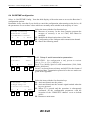
Select ‘A: RACETIME Config.’ from the third display of the main menu to access the Racetime 2
configuration options.
Remember in any case that if you decide to cancel the configuration when turning on the device, all
the parameters are set to those values which are normally most suitable in the majority of cases.
A:Time rounding
B:Holdoff times
C:LINKGATE Channel
A
B
C more
F1
F2
F3
F4
Select the items with the four function keys.
F1. Measure of accuracy. In the show jumping program the
measure of accuracy is set at 1/100s, and cannot be
modified.
F2. Modifies the disactivation times of the lines.
F3. Configuration of the Linkgate radio transmission channel.
F4. Shows the following menu.
8.4.3
A:Baudrate:
B:Format:
A
B
F1
F2
1200
ASCII
more
F3
F4
A:Printer
On
B:Keyb.beep On
C:Iniatilze Setup
A
B
C menu
F1
F2
F3
F4
8.4.1 Setup of serial transmission parameters
ATTENTION : this configuration is only present in versions
20.x.yy, 21.x.yy, 22.x.yy and 24.x.yy.
Press F1 to modify speed of serial transmission (1200, 2400,
4800 o 9600 bit/s).
Press F2 to choose between binary and ASCII for the format of
transmitted data. Transmission protocols for the two modes are
given in the Appendix.
Select the items with the four function keys
F1. Activates/disactivates the printer.
F2. Activates/disactivates the acoustic signal emitted when the
keys are pressed.
F3. When F3 is pressed and the operation is subsequently
confirmed, all the configuration parameters with the
exception of the ‘LINKGATE channel’ revert to default
values.
F4. Returns to main menu.
Racetime 2 - Show Jumping Program
User manual - Release 2.00
31
8.4.2 Modification of line disactivation times
Start
Stop
Lap
Aux
F1
HT
HT
HT
HT
F2
=
=
=
=
200
200
200
200
F3
ms
ms
ms
ms
Allows separate modification of input disactivation times after
acquisition of an event for the Start, Lap, Stop and Aux lines.
The signals acquired via radio, however, have a fixed
disactivation time of 2.7s.
F4
8.4.3 Linkgate channel setup
LINKGATE Chan. : 0
(S0000000)
(1=ON, 0=OFF)
Modify
menu
F1
F2
F3
F4
3
Allows modification of the work channel of the LINKGATE
system to enable you to move to another channel if this should
be necessary. On the display the setting of the dip-switch
located on the LINKGATE Encoder appears. The first selector
does not affect selection of the channel (its function is to select
the signal length), and is therefore displayed with the letter ‘S’.
Next the status of the other switches (1=selector up, 0=selector
down) is shown. To modify the setting, press ‘Modify’ (F1).
Once again remember that it is absolutely essential that the
channels set on Racetime 2 and on the LINKGATE Encoder
should coincide.
Racetime 2 - Show Jumping Program
User manual - Release 2.00
32
8.5 Display board configuration
A:RACETIME Config.
B:Disp.Board Conf.
A
B
F1
F2
other
F3
F4
A:Type: Microgate
B:Num.of Disp.B.
1
C:Advertising Off
A
B
C menu
F1
F2
Select 'B : Display board Config.' from the third display of
the main menu to access display board configuration.
F3
F4
8.5.1 Display board type
ATTENTION : this configuration is only present in
versions 20.x.yy, 21.x.yy, 22.x.yy and 24.x.yy.
Select the type of display board you wish to connect to the
Racetime 2 chronometer. Remember that for each display
board it is necessary to use the appropriate connection,
obtainable from Microgate. For connection of the Telecron
display board the code $ACC050 interface must also be
used.
8.5.2 Number of display boards
This option is not active with the ‘Show jumping’ program
as the chronometer simultaneously commands a double
display board (Master+Slave) or a single display board
(see section 6).
8.5.3 Advertising
If a Microgate display board is used, the display program
(Prog. 1) previously memorised in the display board itself
can be activated by pressing F3. For further information
see the instructions on this subject for the Microgate
display board µTAB. Press F3 again to disactivate the
display program and to reset the display board to the
normal working program (Prog. 0).
Racetime 2 - Show Jumping Program
User manual - Release 2.00
33
8.6 Sexagesimal calculator
TA= 12:34:56.789
TB= 10:20:30.876
02:14:25.913
A+B A-B oth.T. menu
F1
F2
F3
F4
3
Key in the first time you wish to add or subtract (TA) ; then
key in the second time (TB).
Select the operation to be carried out on the two times:
F1 (A+B) adds the two times
F2 (A-B) subtracts time B from time A
To modify the times, press F3.
If you must modify only one of the times, the time which is not
to be modified can be ‘skipped’ by pressing CE; in this way
you avoid pressing ENTER four times.
Note 1: times are ‘normalized’ at 24.00; for example,
2 :00 :00.000+23 :00 :00.000 = 1 :00 :00.000 and
not 25 :00 :00.000! ! !
Note 2: pay attention when keying in the thousandths,
especially if the times to be added or subtracted are
expressed with an accuracy to the tenth or
hundredth; for example, to insert the time 1:02.84
(one minute, two seconds, 84 hundredths of a
second) you must key in
0 ENTER (hours)
1 ENTER (minutes)
2 ENTER (seconds)
840 ENTER (thousandths), and NOT 84 ENTER! ! !
!!!
Racetime 2 - Show Jumping Program
34
User manual - Release 2.00
9. Battery recharge
The recharging of Racetime2’s internal batteries is managed entirely by the microprocessor which
controls all the chronometer’s functions. In this way, it has been possible to implement a recharge
control which guarantees maximum efficiency of the batteries at all times, at the same time
prolonging their working life.
To recharge the batteries, connect the Racetime 2 battery charger to the relative socket on the back
of the device.
If the chronometer is off, information on the current status of the battery recharge management
functions will immediately be shown on the display.
In particular, the following messages will appear on the first line of the display:
Status/message
Maintenance
Discharge
Recharge
Function description
the chronometer is supplied by an external power
source and, concurrently, the batteries are kept ‘fresh’
by a weak recharge current
at the beginning of the recharge cycle, the batteries are
completely discharged before being recharged
LED status
Brief blinking every
four seconds
LED continuously lit
recharge in progress. On the first line of the display, the Blinking LED
time still remaining until the end of recharge blinks
If the letters ‘Vext. Ins’ blink on the first line of the display, this means that the voltage supplied at
the recharge/supply input is insufficient. Attention : if external power is insufficient, recharging is
interrupted and so cannot be completed correctly or within the preset time.
Trickle ch.
A:Rep.charge/disch.
A
F1
menu
F2
F3
F4
3
Dischargingcorso...
A:Immediate charge
B:Break process
A
B
menu
F1
F2
F3
F4
If the chronometer is in ‘Maintenance’, press ‘A:
Rep.charge/disch.’ (F1) to begin a new charge cycle (A :Rep.
Charge/disch.) This will immediately start battery discharge.
The duration of this phase is variable and depends on how
fully the batteries are charged at the time. (The time needed to
discharge can last as long as four hours approximately).
After discharging the batteries, Racetime2 automatically
begins recharging; this takes 7 hours. After recharging, the
words ‘Charging terminated – OK’ indicate that the process
has been correctly completed. If, however, battery malfunction
has caused premature interruption of charging, the messages
‘Battery error (LV)’ (insufficient battery voltage) or ‘Battery
error (HV)’ (battery voltage too high) will appear.
Racetime 2 - Show Jumping Program
Charging
7:00:00
A:Immediate charge
B:Break process
A
B
menu
F1
F2
F3
F4
User manual - Release 2.00
35
During discharging, it is possible at any time to pass directly to
charging by pressing F1 (A: Ripeti scar./ric.) so as to shorten
recharging time. However, you are advised not to charge the
batteries without first discharging them as this could cause a
reduction in the capacity of the batteries (memory effect).
To interrupt discharging/recharging at any moment,
press F2 (‘B: Interrupt’).
3
Note 1: If the external power source should fail during charging, charging is interrupted and
resumed from the same point it had reached before being interrupted. This represents a further
guarantee of the reliability of the recharge system.
Note 2: During discharging and recharging, Racetime2 becomes slightly but noticeably warm. This
is absolutely normal.
It is also possible to access these functions when the chronometer is on. In this way, you can begin
to recharge the device without interrupting a timing session. To access recharge management, select
‘C: Battery charge.’ from the third display of the main menu.
9.1 Low battery indicator
A:Timing
B:Special settings
C:Printouts/Rankings
A
B
C more
F1
F2
F3
F4
When the batteries have nearly run down completely and the
external power source is not connected, a warning symbol
blinks at the top of the display. From the moment the symbol
begins to blink you still have a considerable amount of time to
finish your work, nearly two hours without using the printer
but much less if the printer is used frequently.
Remember that when fully charged, the batteries can be used
continuously for approximately 8-9 hours if a time is printed
every 20 seconds. Length of duration may be less in
particularly severe climatic conditions or if the batteries are
worn out. It is absolutely normal for battery efficiency to
decline after approximately 500-1000 recharge cycles. If you
notice a significant reduction in the duration of the batteries,
please contact Microgate for replacements.
Racetime 2 - Show Jumping Program
User manual - Release 2.00
36
10. Memory limits
Racetime2’s memory is large enough to store data for 400 rides (whichever mode is used). When
the memory limit has been reached, it is still possible to continue timing and to print the results. The
data is not memorised, however.
The memory can be canceled manually by canceling the individual records (see 5.4.9).
To cancel the memory, Racetime 2 must be turned off and the cancellation of data confirmed.
Racetime 2 - Show Jumping Program
37
User manual - Release 2.00
11. Appendix - Racetime 2 protocol transmission
11.1 Binary transmission
The data are transmitted in binary form so as to obtain more efficient compacting of data.
The ‘character type’ specified below refers to the length of data, in particular:
char
integer
long integer
1 byte (8 bit)
2 bytes
4 bytes
SERIAL PORT SETTING: No parity, 8 data bit, 1 stop bit. Standard baud rate is 1200 bit/s. It can be set to 1200,
2400, 4800, 9600 bit/s.
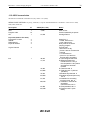
Description
N° and character type N°byte
Header
STX
1, char
1
Program code
10, char
10
CR
1,char
1
loop start (and on-line start)
Progressive counter
1, integer
2
Start N°
1, integer
2
Ride/category
1, char
1
Physical channel
1, char
1
Logical channel
1, char
1
Info
1, char
1
ASCII code
02h
0dh
Notes
Start of Text
‘R2HO’ followed by 6 spaces
Carriage Return
Starts from 1
<=65535, starts from 1
<=255, starts from 1
always 0 in the Show
normally 0
=254 in time of day
phase 2 start of Consecutive
barrage
=1 in total time
(info=24 or 56) if time limit has
been exceeded
0= Chronological start time
23= Phase 1 effective time
is different from 0 only if
the competition is two-phase
and phase 2 has been
finished
24=Total time tab. A
56=Total time tab. C (without
penalties)
25=Penalties assigned tab. A
57=Penalities assigned
(seconds) tab. C
26=Penalities for exceeding
maximum time, tab. A
58= Penalities in seconds for
exceeding maximum time,
tab. C
27=Total penalties, tab. A
59=Final time tab. C (with
faults)
Racetime 2 - Show Jumping Program
Description
N° and character type N°byte
Signal origin
1, char
1
Sign
1, char
1
Time
1, long integer
or
2 integers
4
CR
1, char
1
end of loop (and end of on-line) car. subtotal 15 (loops)
Epilogue
ETX
Checksum
1, char
1, char
38
User manual - Release 2.00
1
1
ASCII code
0Dh
03h
Notes
always 0 in the Show
jumping program
always 0 in the Show
jumping program
time in 1/25000 s *,**
When the value of the info field is
25, 26, 27, 57, 58
two words (2x16 bit) are
transmitted
the first is always null
the second contains the
penalties (points or seconds)
in hundredths
Carriage Return
End of Text
(∑ascii) module 128
Racetime 2 - Show Jumping Program
39
User manual - Release 2.00
11.2 ASCII transmission
The data are transmitted in ASCII form (only values< 127 (7Fh))
SERIAL PORT SETTING: No parity, 8 data bit, 1 stop bit. Standard baud rate is 1200 bit/s. It can be set to 1200,
2400, 4800, 9600 bit/s.
Description
Header
STX
Program code
CR
N°
ASCII (Dec, Hex)
1
10
1
2,02h
loop start (and on-line start)
Progressive counter
Start N°
Ride/category
Physical channel
4
4
3
3
Logical channel
3
Info
1
13,0Dh
48,30h
71,47h
72,48h
104,68h
73,49h
105,69h
74,4Ah
106,6Ah
75,4Bh
107,6Bh
Notes
Start of Text
‘R2HO’ followed by 6 spaces
Carriage Return
Starts from 1
<=9999, starts from 1
<=255, starts from1
always 000 in the Show
jumping program
normally 000
=254 in time of day
phase 2 start of Consecutive
barrage
=1 in the total time
(info=H or h) if the time
limit has been exceeded
0= Chronological start time
G=Effective phase time
is different from 0 only if
the competition is two phase
and phase 2 has been
finished
H=Total time tab. A
h=Total time tab. C (without
penalties)
I=Penalties imposed tab. A
i=Penalties imposed (seconds)
tab. C
J=Penalties for exceeding
maximum time, tab. A
j= Penalties in seconds for
exceeding
maximum time, tab. C
K=Total penalties, tab. A
k=Final time tab. C (with
faults)
Racetime 2 - Show Jumping Program
Description
N°
ASCII (Dec, Hex)
Signal origin
1
32,20h
Segno
1
Tempo
9
CR
1
13,0Dh
end of loop (and end of on-line) subtotal car.29 (loops)
Epilogue
ETX
Checksum
1
1
40
User manual - Release 2.00
3,03h
Notes
always ' ' (space) in the
Show jumping program
always ' ' (space) in the
Show jumping program
time in 1/1000 s
When the value of the info
field is I, J, K, i, j
the penalty (points or
seconds) is transmitted
in hundredths, in the form
#####.###
Carriage Return
End of Text
(∑ascii) module 128
Microgate S.r.l.
Via Stradivari, 4
39100 BOLZANO