1
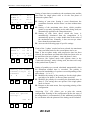
Racetime 2 - Show Jumping Program
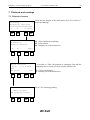
A:Start T.
B:Max T.
C:Limit T.
A
B
F1
F2
60 s
60 s
120 s
C more
F3
F4
A:Start T. P2 60 s
B:Max T.
P2 60 s
C:Limit T. P2 120 s
A
B
C more
F1
F2
F3
F4
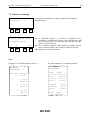
Penality for T>Tmax
A:Phase1/single 25
B:Phase2:
25
A
B
menu
F1
F2
F3
F4
F2
7
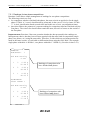
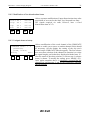
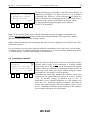
Setting of start times (countdown), the maximum time and the
time limit for single phase rides or for the first phase of
consecutive phase rides.
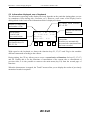
F1. Setting of start time. Setting 0 (zero) disactivates the
countdown function and the horse can start without time
limits.
F2. Setting of the maximum time above which penalties
(points or seconds, depending on the table being used) are
automatically applied to the competition time.
F3. Setting of time limit above which the horse is
automatically eliminated from the competition. It is
automatically preset to a value double that of the value of
the maximum time. Naturally, it does not accept values
lower than the maximum time.
F4. Accesses the following page of specific settings.
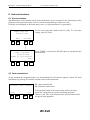
If one of the ‘2-phase’ modes has been selected, the maximum
times and time limits for the second phase can be set.
Note: if the two-phase mode with progressive time has been
selected, the maximum and limit times and time limits refer to
the total time (the sum of phase 1 time and phase 2 time).
If, however, the 2-phase mode with separate times or the
‘Consecutive barrage’ mode is being used, the times refer only
to the partial time of phase 2.
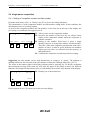
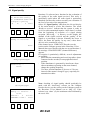
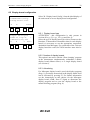
Setting of penalties per second calculated automatically when
the maximum allotted time is exceeded. The penalty is
expressed in hundredths (of a point or second depending on the
table chosen - ‘A’ or ‘C’)
F1. Modifies the setting of the penalty set for the single phase
specialty or for phase 1 in the two phase specialty.
F2. Modifies the penalty for exceeding the maximum time in
phase 2. The setting does not operate if the single phase
mode is chosen.
F4. Returns to the main menu, first requesting printing of the
configuration.
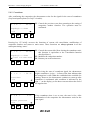
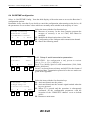
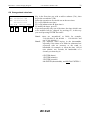
Answering ‘Yes’ (F3) allows you to print the current
configuration. Printing of the configuration before the start of
the competition is recommended, so this additional possibility
for verification after the printout of the timing can be included.
Print all special
settings ?
F1
User manual - Release 2.00
Yes
No
F3
F4