1
Projector
User’s Manual
screen for about 10 seconds:
6.Press the Power button once again(to turn off the power) while the message is still
showing on the screen.
. English .
5.To turn off the projector, press the Power button. A message will appear on the
Note:
Please wait until the fan motor and the Lamp LED turn off before removing the
power cord from the projector.
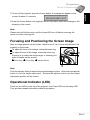
Focusing and Positioning the Screen Image
After an image appears on the screen, check to see if it is in focus and whether it fits
properly on the screen.
To adjust the focus of the image, rotate the focus ring.
To adjust the size of the image, rotate the zoom ring.
Zooming in to make the image larger or zooming out
make it smaller on the screen.
n Zoom Ring o Focus Ring p Adjuster Button
Note:
Push the adjuster button to adjust the projected image position. Hold down the adjuster
button to pull the height adjustment. Release the adjuster button and the height
adjustment position will be locked.
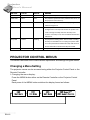
Operational Indicator (LED)
There are two LEDs on the top of the projector, the Power LED and the Lamp LED.
They provide valuable information about the projector.
○ ○ ○ ○ ○ ○ ○ ○ ○ ○
EN-15