1
35
User’s Manual
The ENDAT-3201M/MF/MH Embedded CPU Board
Password Check
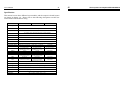
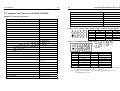
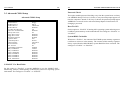
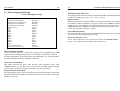
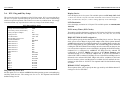
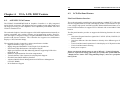
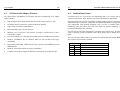
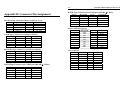
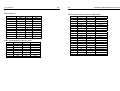
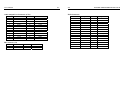
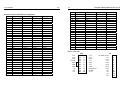
3-3. Advanced CMOS Setup
Advanced CMOS Setup
Quick Boot
1st Boot Device
2nd Boot Device
3rd Boot Device
4th Boot Device
Try Other Boot Devices
S.M.A.R.T. for Hard Disks
BootUp Num-Lock
Floppy Drive Swap
Floppy Drive Seek
PS/2 Mouse Support
Typematic Rate
System Keyboard
Primary Display
Password Check
Boot To OS/2
System BIOS Cacheable
C000, 32k Shadow
C800, 16k Shadow
CC00, 16k Shadow
D000, 16k Shadow
D400, 16k Shadow
D800, 16k Shadow
DC00, 16k Shadow
36
Enabled
Floppy
IDE-0
CD/DVD-0
Disabled
Yes
Disabled
On
Disabled
Disabled
Enabled
Fast
Present
VGA/EGA
Setup
No
Enabled
Cached
Disabled
Disabled
Disabled
Disabled
Disabled
Disabled
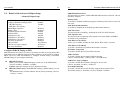
S.M.A.R.T. For Hard Disks
Set this option to “Enabled” to permit AMIBIOS to use the SMART (Self –
Monitoring, Analysis, and Reporting Technologies) protocol for reporting system
information. The settings are “Enabled” or “Disabled”.
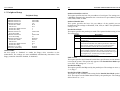
This option enables password checking every time the system boots or when you
run AMIBIOS Setup. If Always is chosen, a user password prompt appears every
time the computer is turned on. If Setup is chosen, the password prompt appears if
AMIBIOS is executed. See the Advanced Setup chapter for instructions on
changing a password.
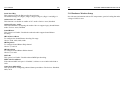
Boot To OS/2
Set this option to “Enabled” if running OS/2 operating system and using more than
64 MB of system memory on the motherboard. The settings are “Enabled” or
“Disabled”.
System BIOS Cacheable
When set to “Enabled”, the contents of the F0000h system memory segment can be
read from or written to cache memory. The contents of this memory segment are
always copied from the BIOS ROM to system RAM for faster execution. The
settings are “Enabled” or “Disabled”.