1
eTrust Single Sign-On
Implementation Guide
7.0
G00106-2E
This documentation and related computer software program (hereinafter referred to as the “Documentation”) is for
the end user’s informational purposes only and is subject to change or withdrawal by Computer Associates
International, Inc. (“CA”) at any time.
This documentation may not be copied, transferred, reproduced, disclosed or duplicated, in whole or in part, without
the prior written consent of CA. This documentation is proprietary information of CA and protected by the copyright
laws of the United States and international treaties.
Notwithstanding the foregoing, licensed users may print a reasonable number of copies of this documentation for
their own internal use, provided that all CA copyright notices and legends are affixed to each reproduced copy. Only
authorized employees, consultants, or agents of the user who are bound by the confidentiality provisions of the
license for the software are permitted to have access to such copies.
This right to print copies is limited to the period during which the license for the product remains in full force and
effect. Should the license terminate for any reason, it shall be the user’s responsibility to return to CA the reproduced
copies or to certify to CA that same have been destroyed.
To the extent permitted by applicable law, CA provides this documentation “as is” without warranty of any kind,
including without limitation, any implied warranties of merchantability, fitness for a particular purpose or
noninfringement. In no event will CA be liable to the end user or any third party for any loss or damage, direct or
indirect, from the use of this documentation, including without limitation, lost profits, business interruption,
goodwill, or lost data, even if CA is expressly advised of such loss or damage.
The use of any product referenced in this documentation and this documentation is governed by the end user’s
applicable license agreement.
The manufacturer of this documentation is Computer Associates International, Inc.
Provided with “Restricted Rights” as set forth in 48 C.F.R. Section 12.212, 48 C.F.R. Sections 52.227-19(c)(1) and (2) or
DFARS Section 252.227-7013(c)(1)(ii) or applicable successor provisions.
2004 Computer Associates International, Inc.
All trademarks, trade names, service marks, and logos referenced herein belong to their respective companies.
Contents
Chapter 1: Planning Your eTrust SSO Implementation
The Implementation Teams .................................................................... 1-1
The Technical Implementation Team ........................................................ 1-2
Responsibilities of the Technical Implementation Team ................................... 1-2
Preparing The Technical Implementation Team .......................................... 1-3
The Business Implementation Team......................................................... 1-3
Responsibilities of the Business Implementation Team .................................... 1-4
Preparing the Business Implementation Team ............................................ 1-5
Objectives .................................................................................... 1-6
Defining Project Objectives................................................................. 1-6
Formulating a Security Policy .............................................................. 1-6
Implementation Overview ..................................................................... 1-7
Overview of implementation ............................................................... 1-7
Plan the Implementation ................................................................... 1-7
The Initial Planning Session ............................................................ 1-7
Project Management ................................................................... 1-8
Collect Data .......................................................................... 1-8
Implement a Test Bed Installation ......................................................... 1-10
Conduct a Pilot Test ...................................................................... 1-10
Prepare the Installation Area .............................................................. 1-11
Deploy eTrust SSO ....................................................................... 1-11
Conduct End User Training ............................................................... 1-12
Chapter 2: Component Installation Overview
Implementation Strategy ......................................................................
Step 1. Install the Policy Server .................................................................
Step 2. Install the Policy Manager...............................................................
Step 3. Populate the Data Stores ................................................................
eTrust Access Control (Data Store) ..........................................................
eTrust Directory (LDAP Data Store) ........................................................
2-1
2-2
2-3
2-3
2-4
2-5
Contents
iii
Step 4. Install the Authentication Agents......................................................... 2-5
Step 5. Write Logon Scripts ..................................................................... 2-6
Step 6. Install the SSO Client.................................................................... 2-7
Step 7. Install the Session Administrator (Optional) ............................................... 2-8
Step 8. Install the Web Agent (Optional) ......................................................... 2-9
Step 9. Install the Password Synchronization Agent (Optional).................................... 2-10
Step 10. Install the One Time Password (OTP) Agent (Optional) .................................. 2-10
Step 11. Tune the SSO Installation .............................................................. 2-11
Chapter 3: Installing the Policy Server
Before You Begin .............................................................................. 3-2
Overview ................................................................................. 3-2
Checklist ................................................................................. 3-4
Policy Server for Windows ..................................................................... 3-5
To Install the Policy Server for Windows ..................................................... 3-5
To Change the Default User Data Store ...................................................... 3-7
Policy Server for UNIX ........................................................................ 3-8
To Install the Policy Server for UNIX ........................................................ 3-8
Start the Policy Server After Installation ........................................................ 3-11
To Start the Policy Server on Windows ..................................................... 3-11
From the Start Menu .................................................................. 3-11
From the Windows Command Line .................................................... 3-11
To Start the Policy Server on UNIX ......................................................... 3-13
Windows and UNIX Post-Installation Information ........................................... 3-15
Encryption Keys ...................................................................... 3-15
About Populating the Data Store ....................................................... 3-15
Chapter 4: Installing the Policy Manager
Before You Begin .............................................................................. 4-2
Overview ................................................................................. 4-2
Ways to install the Policy Manager ...................................................... 4-2
Decide Where to Install the Policy Manager .............................................. 4-2
Checklist ................................................................................. 4-3
Install the Policy Manager ...................................................................... 4-4
To Install the Policy Manager ............................................................... 4-4
Connect the Policy Manager to the Policy Server ................................................. 4-6
To Connect the Policy Manager to the Policy Server ........................................... 4-6
iv
eTrust SSO Implementation Guide
Chapter 5: Installing the SSO Client
Wizard Installation ........................................................................... 5-2
Pre-Installation Considerations ............................................................. 5-2
Pre-Installation Checklist .................................................................. 5-3
Install Using the Wizard ................................................................... 5-3
Modifying SSO Client on Windows ......................................................... 5-5
Silent Installation ............................................................................. 5-6
About the Silent Installation ................................................................ 5-6
Pre-Installation Considerations ............................................................. 5-6
Pre-Installation Checklist .................................................................. 5-7
Install Using the Silent Installation .......................................................... 5-8
Command Line Settings ................................................................... 5-9
Configuring the SSO Client ................................................................... 5-10
SSO Client on a File Server—Network Installation .............................................. 5-11
Configuration Parameters................................................................. 5-11
Security ................................................................................. 5-12
Chapter 6: Implementing Authentication Agents
How eTrust SSO Works with Third-Party Authentication Software ................................ 6-2
Summary of Authentication Agent Settings ..................................................... 6-3
Configuring the SSO Client ................................................................ 6-3
Set the Authentication Methods......................................................... 6-3
Set the Authentication Host and Port Number ........................................... 6-3
Configuring the Authentication Agent ...................................................... 6-4
Starting the Authentication Agent .............................................................. 6-5
Starting the Certificate, Entrust, LDAP, and RSA SecurID Authentication Agents................ 6-5
Starting the Windows Authentication Agent ................................................. 6-6
The Certificate Authentication Agent ........................................................... 6-7
System Requirements ..................................................................... 6-7
Pre installation Considerations ............................................................. 6-7
Trusted Certificates .................................................................... 6-7
Revocation ........................................................................... 6-8
Install the Certificate Authentication Agent ................................................. 6-10
Register the Authentication Host as an Agent Host ...................................... 6-10
To Install the Certificate Authentication Agent .......................................... 6-10
Configure the Windows Registry ...................................................... 6-14
Configure the SSO Client.............................................................. 6-17
Start CERT_AUTHHOST manually ........................................................ 6-17
Create an Authentication Host Entry on the Policy Server .................................... 6-18
Contents
v
Configuration Settings for the CERT Authentication Agent ................................... 6-18
The Entrust Authentication Agent ............................................................. 6-21
System Requirements ..................................................................... 6-21
Components Used in the Entrust Authentication Process ..................................... 6-21
Components Installed on the SSO Client ................................................ 6-22
Components Installed on the Entrust Authentication Host ................................ 6-22
Install the Entrust Authentication Agent .................................................... 6-22
Prepare the Entrust Authentication Agent Computer ..................................... 6-23
Configure eTrust Directory to Work with Entrust ........................................ 6-24
Create an Entrust User and Profile ...................................................... 6-26
Install and Configure the Entrust Authentication Agent .................................. 6-26
Configure the SSO Client .............................................................. 6-27
Configuration Settings for the Entrust Authentication Agent .................................. 6-27
The LDAP Authentication Agent .............................................................. 6-29
System Requirements ..................................................................... 6-29
To Install the LDAP Authentication Agent .................................................. 6-29
Create Users in the LDAP User Data Store .............................................. 6-29
Install the LDAP Authentication Agent ................................................. 6-30
Install the SSO Client (If It Is Not Already Installed) ...................................... 6-32
Configure the SSO Client (If It Is Already Installed) ...................................... 6-34
Test the LDAP Authentication Method.................................................. 6-35
Authenticate to an Active Directory Data Store Using the LDAP Authentication Agent .......... 6-36
Set Up the Active Directory Data Store .................................................. 6-37
Create A New User in the Active Directory Data Store.................................... 6-38
Install the LDAP Authentication Agent ................................................. 6-39
Configure the LDAP Authentication Agent .............................................. 6-41
Install the Policy Server and the Policy Manager ......................................... 6-41
Install the SSO Client .................................................................. 6-42
Test the LDAP Authentication Agent with Active Directory ............................... 6-42
Configuration Settings for the LDAP Authentication Agent ................................... 6-43
The NetWare Authentication Agent ............................................................ 6-45
System Requirements ..................................................................... 6-45
Install the Netware Authentication Agent ................................................... 6-45
Install the NetWare Client ............................................................. 6-45
Install the NetWare Authentication Agent ............................................... 6-46
Configure the NetWare Authentication Agent ........................................... 6-47
Configure the SSO Client .............................................................. 6-48
Allow Users to Access the Authentication Host .......................................... 6-48
Starting and Stopping the NetWare Authentication Agent .................................... 6-48
Viewing the NetWare Authentication Agent Trace Log ....................................... 6-48
The RSA SecurID Authentication Agent ........................................................ 6-49
vi
eTrust SSO Implementation Guide
System Requirements ....................................................................
Install the RSA SecurID Authentication Agent ..............................................
Register the Authentication Host as an Agent Host ......................................
Install the RSA SecurID Authentication Agent ..........................................
Configure the SSO Client..............................................................
Re-install the RSA SecurID Authentication Agent ...........................................
Restart RSA_AUTHHOST manually .......................................................
Create an Authentication Host Entry on the Policy Server ....................................
Configuration Settings for the RSA Authentication Agent ....................................
The SAFLINK Authentication Agent...........................................................
System Requirements ....................................................................
Install the SAFLINK Authentication Agent .................................................
Install the SAFLINK Drivers on the Policy Manager Computer ...........................
Copy the SAFLINK DLLs onto the Policy Manager Computer ............................
Create and Apply a SAFLINK Authentication Method ...................................
Enroll the User in SAFLINK Biometric Authentication ...................................
Change a User’s SAFLINK Authentication Method ......................................
The Windows Authentication Agent ...........................................................
System Requirements ....................................................................
Install the Windows Authentication Agent .................................................
Configuration Settings for the Windows Authentication Agent ...............................
Creating a New Authentication Agent .........................................................
Program Architecture ....................................................................
The GUI Component .................................................................
The OAE Component .................................................................
The TGA Component .................................................................
6-49
6-49
6-49
6-50
6-50
6-50
6-50
6-51
6-53
6-54
6-54
6-54
6-55
6-55
6-56
6-56
6-56
6-57
6-57
6-58
6-59
6-60
6-61
6-61
6-61
6-61
Chapter 7: Adding Applications to SSO
Logon Scripts.................................................................................
Developing Logon Scripts..................................................................
Logon Variables ..........................................................................
Learn Mode (First Logon Situation) .........................................................
Logon Script Maintenance .................................................................
Where the Logon Scripts are Stored .........................................................
Application Authentication ....................................................................
Setting Up Password Authentication (All Platforms)..........................................
7-2
7-3
7-3
7-4
7-5
7-5
7-6
7-7
Contents
vii
Chapter 8: Adding Web Applications to SSO
About the Web Agent.......................................................................... 8-2
Installing the Web Agent on Windows .......................................................... 8-3
System Requirements ...................................................................... 8-3
Pre-Installation Considerations ............................................................. 8-3
Pre-Installation Checklist ................................................................... 8-3
Web Agent Installation on Windows ........................................................ 8-4
Post-Installation Procedures ................................................................ 8-5
Defining Applications, Resources, and Access Rules ...................................... 8-5
Defining Applications .................................................................. 8-5
Defining Regular Applications .......................................................... 8-6
Defining Script-Entry Applications ...................................................... 8-6
Defining Resources .................................................................... 8-7
Implementing New Resources .......................................................... 8-7
Defining Access Rules .................................................................. 8-8
Configuring the Web Agent .................................................................... 8-9
Setting Up Self-Registration ................................................................ 8-9
SSL Protocol ............................................................................. 8-10
Setting Up SSL for Directories on Windows 2000 ............................................ 8-11
Configuring the SSL Connection Between the Policy Server and eTrust Directory ........... 8-11
Configuring the SSL Connection Between the Policy Server and Microsoft’s Active Directory 8-16
Synchronizing Resources in the Local Cache ................................................ 8-20
Using Automatic Synchronization ...................................................... 8-20
Using Manual Synchronization......................................................... 8-20
Sharing Security Tokens Between Web Servers .............................................. 8-21
Changing the Personality User and Password ............................................... 8-22
Starting and Stopping Web Servers and Services ................................................ 8-23
Starting and Stopping the Web Agent ...................................................... 8-23
Checking the Web Agent Startup in Windows ........................................... 8-23
Starting and Stopping the Windows Web Server Services ..................................... 8-24
Starting and Stopping the Service for the Policy Server ....................................... 8-24
Starting and Stopping the Service for eTrust Access Control .................................. 8-25
Chapter 9: Implementing Session Management
Automatic Session Management ................................................................ 9-2
Overview ................................................................................. 9-2
Pre-Installation Considerations ............................................................. 9-2
Configure the Policy Server ................................................................. 9-3
Windows Installations.................................................................. 9-3
viii
eTrust SSO Implementation Guide
UNIX Installations..................................................................... 9-3
Change the SSO Client Port Number ........................................................ 9-4
Creating and Applying Session Profiles with Policy Manager ................................. 9-4
Working with MetaFrame Application Migration ............................................ 9-4
Manual Session Management: Session Administrator............................................. 9-5
Overview ................................................................................ 9-5
Before You Begin.......................................................................... 9-5
Tomcat 4.1.24 ......................................................................... 9-6
Custom or Standard Installation ........................................................ 9-7
Install the Session Administrator ........................................................... 9-7
Create a New Certificate ................................................................... 9-7
Create a Self-Signed Certificate using Keytool ............................................ 9-8
Create a Certificate using a Certification Authority ....................................... 9-9
Configure the Session Administrator ....................................................... 9-10
Update the Web Server Host Name .................................................... 9-10
Update the Port on Which the Tomcat Server Listens for HTTPS messages ................. 9-10
Update the Locations of the Log Files .................................................. 9-11
Change the HTTPS Session Timeout Period ............................................. 9-12
Session Management Settings ................................................................. 9-12
Chapter 10: Implementing a Server Farm
Before You Begin ............................................................................ 10-2
Overview ............................................................................... 10-2
Pre-Installation Options and Requirements ................................................. 10-4
Checklist ................................................................................ 10-4
Server Farms for Windows ................................................................... 10-5
Add a New Policy Server to a Server Farm ................................................. 10-6
To Install the Policy Server ............................................................ 10-6
Add or Update an Existing Policy Server in a Server Farm ................................... 10-9
Back Up Existing Data on the Policy Server ............................................. 10-9
Specify Servers to Send Data to ....................................................... 10-12
Specify Servers to Receive Data ....................................................... 10-15
Restore and Replicate Data ........................................................... 10-17
Troubleshooting .................................................................... 10-19
Server Farms for UNIX ...................................................................... 10-20
Add a New Policy Server to a Server Farm ................................................ 10-21
Add an Existing Policy Server to a Server Farm ............................................ 10-22
Back Up Existing Data on the Policy Server ............................................ 10-22
Specify Servers to Send Data to ....................................................... 10-23
Specify Servers to Receive Data From ................................................. 10-24
Contents
ix
Restore and Replicate Data
........................................................... 10-25
Chapter 11: Implementing Citrix Application Migration
Client Experience of Application Migration ..................................................... 11-1
Overview of Application Migration Installation ................................................. 11-2
Example Applications..................................................................... 11-2
Pre-installation Considerations ................................................................ 11-3
Prerequisite Software ..................................................................... 11-3
Prerequisite Access and Logons ............................................................ 11-3
Pre-Installation Checklist .................................................................. 11-4
Install Application Migration .................................................................. 11-5
Install the SSO Client on an ICA Client Computer ........................................... 11-5
Install the SSO Client on the Citrix MetaFrame Server ........................................ 11-5
Write Script A ............................................................................ 11-6
Examples of Script A .................................................................. 11-6
Write Script B ............................................................................. 11-8
Examples of Script B .................................................................. 11-8
Define Script A on the Policy Server ....................................................... 11-10
Define Script B on the Policy Server ....................................................... 11-11
Create an SSO-Enabled Published Application ............................................. 11-12
Create an ICA Connection To The Published Application .................................... 11-14
More Information About the Logon Window ........................................... 11-16
Define the Application Credentials for Each User ........................................... 11-17
Test Application Migration ............................................................... 11-18
Troubleshooting ............................................................................ 11-19
MetaFrame Application Manager ............................................................. 11-20
Application States ....................................................................... 11-20
Application Manager Installation ......................................................... 11-20
Application Migration Configuration ......................................................... 11-21
Suspend ICA Client Connections During SSO Logoff ....................................... 11-21
Shared Workstations and Session Management ............................................. 11-21
Script A Samples ............................................................................ 11-22
Calculator in Seamless Window Mode ..................................................... 11-22
Calculator in Remote Desktop Mode ...................................................... 11-23
Chapter 12: Upgrading eTrust SSO 6.5 to 7.0
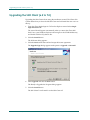
Upgrading the SSO Client (6.5 to 7.0) ........................................................... 12-2
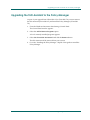
Upgrading the SSO Assistant to the Policy Manager ............................................. 12-3
x
eTrust SSO Implementation Guide
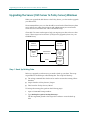
Upgrading the Server (SSO Server to Policy Server) Windows .................................... 12-4
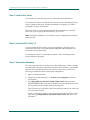
Step 1. Back Up Existing Data ............................................................. 12-4
Step 2. Uninstall Previous Versions ........................................................ 12-5
Uninstall the SSO Assistant............................................................ 12-5
Uninstall the SSO Server .............................................................. 12-5
Uninstall eTrust Access Control ....................................................... 12-5
Step 3. Install Policy Server ............................................................... 12-6
Step 4. Install the SSO Client 7.0 ........................................................... 12-6
Step 5. Restore the Database ............................................................... 12-6
Upgrading the Server (SSO Server to Policy Server) on UNIX .................................... 12-7
Step 1. Back up Existing Data.............................................................. 12-8
Step 2. Install Policy Server ............................................................... 12-8
Step 3. Restore the Database ............................................................... 12-8
Troubleshooting ............................................................................. 12-9
Trouble with Importing Rules into the database ............................................. 12-9
Trouble with Running Migratedb.bat ...................................................... 12-9
Known Issues........................................................................... 12-10
Migration from eTrust Access Control 4.1 to eTrust Directory............................ 12-10
Migration From eTrust Access Control 4.1 To eTrust Access Control 5.1 .................. 12-10
Further Information ..................................................................... 12-11
Appendix A: Uninstalling eTrust SSO
About the Product Explorer .................................................................... A-1
Uninstalling the SSO Client .................................................................... A-2
SSO Client Uninstall ....................................................................... A-2
Modify or Delete SSO Client Components ................................................... A-3
Uninstalling the Policy Manager ............................................................... A-4
Uninstalling the Policy Server .................................................................. A-5
Policy Server for Windows Uninstall ........................................................ A-5
Policy Server for UNIX Uninstall ........................................................... A-6
Uninstalling an Authentication Agent .......................................................... A-6
Uninstalling the Password Synchronization Agent ............................................... A-7
Uninstalling the Web Agent ................................................................... A-7
Uninstalling the Documentation................................................................ A-8
Appendix B: Third Party Acknowledgements
Apache Tomcat ............................................................................... B-1
Henry Spencer LibRegX ....................................................................... B-2
Contents
xi
OpenLDAP ................................................................................... B-3
OpenSSL ..................................................................................... B-4
Tcl . .......................................................................................... B-5
Microsoft ..................................................................................... B-6
JAVATM 2 Software Development Kit ......................................................... B-23
SUPPLEMENTAL LICENSE TERMS ....................................................... B-27
xii
eTrust SSO Implementation Guide
Chapter
1
Planning Your eTrust SSO
Implementation
This guide will help you install the eTrust Single Sign-On (eTrust SSO) system.
This chapter is designed to get you thinking about what Project Planning you
need to start to help you Implement eTrust SSO. For more information about the
steps involved with the implementation, see “Component Installation Overview”
in this guide.
The Implementation Teams
As with any other implementation project, the success of the eTrust SSO
installation at your site will depend very much on human factors: the skills and
performance of the implementation team and the cooperation of the end users.
Before any serious deployment of new technology can begin, it is imperative that
you assemble the proper implementation teams to facilitate the rollout of eTrust
SSO within the business. Although you may have the actual vendor or a
contractor run the project for your company, you should always own the
implementation and have an internal team assigned to work with the
deployment vendor.
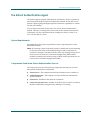
We recommend that you have two implementation teams, one for the technical
deployment of eTrust SSO, and the other for the rollout within the business.
Planning Your eTrust SSO Implementation
1–1
The Implementation Teams
The Technical Implementation Team
The system administrator should appoint the team. For best results the
implementation team should include:
■
A project manager
■
A security administrator
■
An application administrator
■
A password administrator
■
Script developers
■
A technical support person (for software installation)
■
An eTrust SSO administration for day-to-day administration.
Responsibilities of the Technical Implementation Team
The implementation team is responsible for:
■
■
■
■
■
1–2
Defining eTrust SSO security objectives
Mapping and documenting the computing environment, including users and
applications
Preparing the implementation plan, including definition of the eTrust SSO
database
Installing and configuring servers and clients
Defining security rules: primary authentication and application
authentication
■
Populating the eTrust SSO database
■
Preparing logon scripts
■
Testing the implementation
■
Training end users to use the eTrust SSO Client
eTrust SSO Implementation Guide
The Implementation Teams
Preparing The Technical Implementation Team
All team members: All members should review eTrust SSO manuals, both the
introductory chapters and the specific issues with which they will deal. They
should also refresh their knowledge of the relevant aspects of the site’s hardware
and software.
Technical support personnel: Staff who will install eTrust SSO need to be
familiar with migration considerations and with the steps required to install
eTrust SSO. Users who maintain the SSO databases must be familiar with the
material in eTrust SSO Selang Command Reference Guide. Knowledge of eTrust
Access Control utilities is also advisable (see eTrust Access Control / Utilities).
Script developers: The staff responsible for writing logon scripts for eTrust SSO
should become familiar with eTrust SSO Tcl Scripting Reference Guide and should
begin writing practice scripts as soon as possible.
The Business Implementation Team
The following sections explain how to identify the members of your business
implementation team and define their roles and responsibilities.
You business implementation team should in clued representatives from each of
the following affected areas:
Cooperation is
Essential
■
Security administration
■
Systems software
■
Applications software
■
Operations
■
Auditors
■
Business users
■
End users
It is important to note that a security implementation forces cooperation
between corporate areas that may never have been forced to work together
before. This cooperation, critical to the successful implementation of a security
product, provides another reason why you need a clearly defined management
commitment to the security implementation.
Planning Your eTrust SSO Implementation
1–3
The Implementation Teams
Responsibilities of the Business Implementation Team
After you have identified the organizational groups that will be involved in the
planning and implementation of the deployment of eTrust SSO, you need to
ensure that each of their functions are clearly identified. Regardless of
organizational responsibilities, the following roles should be considered and
assigned to specific members of the implementation team:
Project Manager—Owns the overall project management tasks, deliverables,
communications, and timetables.
Security Administrator—Responsible for the review and approval of design,
architecture, and naming standards as they pertain to user IDs and
resources. This team member is also responsible for the formation and
distribution of audit reports. After the implementation is complete, the
security administrator is responsible for the enforcement of the security
policies and procedures established for eTrust SSO.
Operations Representative—Responsible for the day-to-day operation of eTrust
SSO in terms of the hardware, software, and procedures required to maintain
the service levels agreed on. The Operations group is also responsible for
disaster recovery, business continuum, failover, and backups.
Network and Systems Representative—Responsible for maintaining the
connectivity of the environment in which eTrust SSO runs. Since there are
several components of eTrust SSO that can reside in multiple systems across
the network, it is important to include these groups in the design and
architecture phase of the implementation. During this implementation phase
of eTrust SSO, you need to consider firewalls, protocols, DMZ, operating
systems, authentication server, servers, and so on.
End User Liaison—A business person who represents the end user experience
when it comes to interface decisions or user awareness issues. This person
should have full voting rights when deciding what the user sees and what
procedures get implemented that will directly affect the experience of an end
user.
Business Representative—Responsible for the policies that will affect the end
user’s experience with certain business applications.
Management—The success of any project is the constant involvement and
approval of senior management at every step of the way. This team member
should be in a high enough position in the organizational structure to have
jurisdiction over all the parties involved in the deployment of this
technology.
1–4
eTrust SSO Implementation Guide
The Implementation Teams
Preparing the Business Implementation Team
All team members should be given a demonstration of eTrust SSO and should be
familiar with the basic benefits of installing eTrust SSO. Stakeholders should also
be reassured, where necessary, about the minimal impact on end-users.
Members of this team should be encouraged to read the eTrust SSO Getting
Started.
Planning Your eTrust SSO Implementation
1–5
Objectives
Objectives
Defining Project Objectives
To begin implementation, you must first define what you want eTrust SSO to do
for your system. For instance, what is your primary aim: To increase the security
of your data processing installation and data? Or, is it to simplify the work
environment of your end users? The answers to these types of questions help
define your objectives and aid in forming policy guidelines and priorities for
eTrust SSO implementation and operations.
Formulating a Security Policy
eTrust SSO provides a solution for security and productivity problems that result
from users having to work with many different passwords. Like any security
solution, eTrust SSO will be most effective when it is integrated into a welldefined and comprehensive system security plan.
eTrust SSO implementation should conform to system security requirements
regarding overall system security policies, password policies (either present
policies or new, stronger policies that can take advantage of eTrust SSO features),
physical protection of servers and backup servers, and auditing. In addition,
general system requirements regarding response time and survivability should
be considered when planning the number, location, and general configuration of
Policy Servers and backup servers.
The initial assignment of the security implementation project team may be to
develop and recommend the security policy or the document of security
objectives for your environment. You may be able to use or borrow concepts
from the established policies within your company with the same generic
security requirements, such as authentication and authorization.
If the security policy or the document of security objectives has already been
developed, the implementation team can use this document as its mandate. If
these documents must be developed, the team is an ideal committee to do it since
they can take into account the concerns of each affected area while developing
the objectives. If each area agrees to the direction being set, which is more likely
with active participation, then implementation can proceed smoothly without
time-consuming discord among the business areas.
After the security policy has been formulated, upper management should issue a
position statement to all internal employees and appoint a security officer (or at
least a security administrator). The security officer can then ensure that
employees are made aware of the security policies and procedures that they
must adhere to and the consequences of any security violation.
1–6
eTrust SSO Implementation Guide
Implementation Overview
Implementation Overview
Overview of implementation
You should always install the test a new system in a controlled environment.
Here are the suggested steps involved with the eTrust SSO implementation.
■
Plan the implementation
■
Implement a Test bed installation
■
Conduct a Pilot Test
Prepare the Installation Area
■
■
Deploy eTrust SSO
■
Conduct End User training
Plan the Implementation
Although eTrust SSO installation is straightforward and flexible, it is affected by,
and affects, much of the site’s system. You need an implementation plan in order
to schedule and control the properly paced introduction of eTrust SSO into the
nodes of the network and into the procedures of the workplace. For efficiency,
the plan has to provide step-by-step procedures, guidelines, and timetables.
The Initial Planning Session
An initial planning session should be convened to define the eTrust SSO
configuration. All the relevant servers and clients should be identified, together
with the users and the applications to be secured. Relationships between
applications and users have to be mapped.
Once decisions have been made on configuration, the team has to detail each of
the stages of implementation.
The plan should also take into consideration any other significant events, such as
installation of new hardware or software, that is planned for the same period and
that could affect implementation.
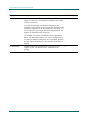
It is also advisable to define a pilot group that will have eTrust SSO installed
first. A pilot group can provide valuable initial experience that can prevent
problems in the full-scale implementation. You should make a decision about the
size and location of the pilot group and the applications that you will include in
the pilot study.
Planning Your eTrust SSO Implementation
1–7
Implementation Overview
Once the implementation plan is finalized, the team should prepare a project
schedule for the pilot and final implementation.
In a large computer system, it will probably not be practical to implement eTrust
SSO for all applications and for all users in one stage. An advantage of eTrust
SSO is that it allows for phased implementation, staggered by groups of users
and/or groups of applications. The implementation team has to set priorities for
adding user groups and application groups.
Project Management
Implementing eTrust SSO is a major project. As with any major endeavor, you
need to follow good project management guidelines to ensure a successful
implementation.
In addition to creating an implementation team, you need to:
■
Hold regular meetings
■
Establish an archive of all pertinent documentation relating to this project
■
Review your corporation’s security policies and procedures
Collect Data
Before a detailed plan can be formulated, the implementation team will have to
collect considerable relevant information. The team has to map and document
the computing environment, in particular those elements that directly affect
eTrust SSO implementation.
It is essential that the data about system configuration, operating systems,
applications, and authentication methods be detailed and up to date.
It is advisable to use a form or checklist to collect information in a systematic
way.
1–8
eTrust SSO Implementation Guide
Implementation Overview
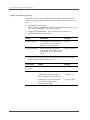
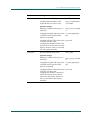
Here is a list of the information that you will need to obtain. The scope and detail
of initial database planning will depend on the scope of the final implementation
project itself. It is important to define the entities shown in the following table.
Entity
Definitions must include
All the applications to be accessible
using SSO
-
Application name/identifier
-
Application host
-
Authentication method
-
The application group to which the
application belongs, if any
All the application groups (if
application groups are planned)
-
Application group name
-
Application names/identifiers of
the application that are to be linked
to the application group
All the authentication hosts that will be
used by eTrust SSO
-
Authentication method
-
Authentication host names
-
The authentication host group to
which the authentication host
belongs, if any
All the authentication host groups (if
authentication host groups are
planned)
-
Authentication host group name
-
Authentication host names of the
authentication hosts that are to be
linked to the authentication host
group
User groups planned
-
User group name
-
The names of users in the group
-
Application groups associated with
the user group
Planning Your eTrust SSO Implementation
1–9
Implementation Overview
Implement a Test Bed Installation
Before you move into the Pilot Testing Phase, you should install and configure
the eTrust SSO system within a Test Bed environment, to make sure all the
components are configured correctly. This step will facilitate the smooth
introduction of eTrust SSO to users within your company and help with useracceptance, as well as assisting the implementation from a technical perspective.
Conduct a Pilot Test
In large systems, installation of the SSO Clients on end-user workstations will
generally begin with a pilot group.
When a pilot test is to be run, SSO Clients will first be installed on the pilot
group’s workstations. The implementation team has to work closely with the
pilot group for testing and for obtaining end user feedback. It is important to
prepare testing procedures and worksheets for recording results.
Every user has to be authorized to use the specific method of authentication.
Generally, we recommend that you set the user’s AuthMethod token value to
SSO when first implementing eTrust SSO. This will enable you to test the validity
of the records in the USER and APPL classes, without being affected by any
problems in primary authentication installation.
However, once in production, the token must be set to its planned value. For
example, to enable an end user to use Windows authentication, change the value
of the AuthMethod token in the ssoauth section to Windows NT. If the Windows
authentication agent is not installed on the primary domain controller, then
change the value of the authhost token in the auth.NT section to be the actual
name of the Windows authentication host, in uppercase letters.
1–10
eTrust SSO Implementation Guide
Implementation Overview
Prepare the Installation Area
Before you begin the eTrust SSO installation, you should review and prepare the
intended site. This stage, which can also be referred to as a walk-through,
involves the implementation team arriving on site to review the equipment and
facilities for the subsequent stages. Successful completion of this stage should be
viewed as a prerequisite to continuing the implementation.
The site staff should provide information about the hardware and software on
the site. The implementation team should check technical details of servers, enduser workstations, and primary authentication systems against the preliminary
data already received and analyzed.
The team should look for potential obstacles and problems. Hardware and
software prerequisites should be checked, including:
■
■
■
■
■
All client workstations must have with the network and TCP/IP configured
Each SSO component (clients, servers, authentication hosts) should be able to
ping its peer by name
If you are using Windows authentication, SSO users should have a domain
account and logon rights
If you are using UNIX hosts for the Policy Server they should have a
supported OS version (AIX, HP-UX, Solaris) installed and sufficient disk
space
Any third-party authentication software to be used (for example, RSA
SecurID), should be properly installed and configured
Deploy eTrust SSO
In the production phase, the eTrust SSO Client software is installed on all the
end-user workstations group by group (either by geographical groups or by
business function groupings). If there is no pilot testing phase, it may be
advisable to check the work of the previous stages by installing the SSO Client on
one or two workstations in each user group.
During each phase, auditing data and user feedback are collected and analyzed.
This allows management to evaluate the success of the implementation and
indicates what adjustments have to be made.
During this stage, the implementation team will begin transferring responsibility
for routine administration of eTrust SSO to the site’s IT organization.
Planning Your eTrust SSO Implementation
1–11
Implementation Overview
Conduct End User Training
In itself, eTrust SSO implementation will require only minimal end-user training.
Prior to implementation, end users should be told that changes in the network
will automate their logging into password-protected applications. They need to
be informed on how the specific implementation on the site will affect them in
regard to system logon, first-time eTrust SSO logon, routine logon to
applications, logon to sensitive applications, station lock release, reauthentication, and password change.
End users should also be informed that where they will still be asked for
passwords (such as for sensitive applications and password changes), they will
need only their user ID, a primary authentication password, and, where
applicable, an additional biometrics or token authentication. In addition, end
users should be informed that when they log onto applications for the first time
using SSO, they might be required to provide their application password to the
Policy Server.
Following installation of eTrust SSO Clients, end users will have to be told where
they will find eTrust SSO’s application list and the various ways of selecting
applications.
If eTrust SSO is implemented together with new third-party authentication, new
password rules and/or other security policies, then end users will have to be
educated on these topics.
1–12
eTrust SSO Implementation Guide
Chapter
2
Component Installation Overview
This chapter gives you a step by step overview of what order to deploy the
eTrust Single Sign-On (eTrust SSO) components in your organization.
Implementation Strategy
In many cases, the most efficient implementation strategy will be a sequential
process. Here are the suggested implementation steps in order of components.
Step 1.
Install the Policy Server
Step 2.
Install the Policy Manager (administrator workstations)
Step 3.
Populate the Data Stores
Step 4.
Install the authentication agent(s)
Step 5.
Write the logon scripts (and other scripts)
Step 6.
Install the SSO Client (end-user workstations)
Step 7.
Install the Session Administrator (optional)
Step 8.
Install the Web agent (optional)
Step 9.
Install the Password Sync Agent (optional)
Step 10.
Install the One Time Password (OTP) Agent (optional)
Step 11.
Tune the SSO installation
Tip: You may want to start development on Step 5. Write the Logon Scripts
early, in parallel with the other steps, to make sure they ready in good time.
After each installation and configuration step, we strongly recommend that you
verify that the component added is working as expected. For example, after
performing step 3, use the Policy Manager to perform an ad-hoc verification that
User and Application data is assigned as expected.
Component Installation Overview
2–1
Step 1. Install the Policy Server
Note: All operating system clocks must produce a reliable and correct timestamp
for the time-zone where each machine hosting any SSO components are
located. For example, a machine located in New York hosting a Policy Server
must have it’s OS clock set to US Eastern Daylight Time (EDT) whilst a
machine located in San Francisco hosting a LDAP Auth Agent must have it’s
OS clock set to US Pacific Daylight Time (PDT).
Step 1. Install the Policy Server
All Policy Servers should be installed and configured.
You can install a server farm within the eTrust SSO architecture. This helps with
load-balancing and failover, as well as scalability.
After installation, check that all servers are accessible from the end-user
networks. If possible, use the default name that the installation procedure
suggests for the Policy Server.
When the servers are installed, the databases should be populated with the rules
that will allow eTrust SSO to be administrated from an administration
workstation using the Policy Manager.
Next, the replication mechanisms of the server farm are implemented and tested.
When installing more than one server, use DNS name resolution, if possible, to
map pre-selected names to the specific Policy Server hosts. This will allow
flexibility in locating and upgrading the servers.
For more information about Server Farms see the eTrust SSO Administrator Guide.
2–2
eTrust SSO Implementation Guide
Step 2. Install the Policy Manager
Step 2. Install the Policy Manager
The Policy Manager is a Windows GUI for managing Policy Server and the data
stores. It is usually installed on an administrator’s workstation with TCP/IP
communication to the Policy Server. You can use the Policy Manager to
communicate with both UNIX and Windows Policy Server computers.
You should install the Policy Manager on all computers that your administrators’
use to control the Policy Server. Once you have installed the Policy Manager on
an initial machine, you must set access rights for any other machines that will be
authorized to access the Policy Manager. For more information about setting up
the Policy Manager for administrators for the first time, see the “Basic Tasks in
eTrust SSO” chapter of the eTrust Getting Started guide.
Step 3. Populate the Data Stores
eTrust SSO comes with two data stores, eTrust Access Control and eTrust
Directory, that each give slightly different benefits. You can also integrate thirdparty LDAP data stores.
You should use the eTrust Directory data store for storing user information and
the eTrust Access Control database to store all other information relating to
resources, applications, and administrators.
You should plan how to populate the data stores. The eTrust SSO database
includes the following entities:
■
■
Users (USER records) or eTrust Directory entries (typically iNetOrgPerson)
User groups (GROUP records) or eTrust Directory entries (typically eTrust
SSOGroup)
■
Applications (APPL records)
■
Application groups (GAPPL records)
■
Authentication hosts (AUTHHOST records)
■
Authentication host groups (GAUTHHOST records)
■
Password policies (PWPOLICY records)
■
Terminals (TERMINAL records), which are the computers that will be used
to administer eTrust SSO.
Component Installation Overview
2–3
Step 3. Populate the Data Stores
You can populate these data stores in two ways. If you are importing a large
amount of data to either of these data stores, you might want to use a Command
Line command, such as a selang script to import data into the eTrust Access
Control data store or a Directory utility, such as Jxplorer to import data into the
eTrust Directory data store. Selang is a CA-proprietary security language that
can be used to control the eTrust Access Control data base. If you are just
entering small amount of information you might use the Policy Manager.
Based on the implementation decisions, the implementation team should define
these entities and the relations among them, together with the associated access
rules.
eTrust Access Control (Data Store)
eTrust SSO comes with eTrust Access Control. The eTrust Access Control is a
database that stores all information about:
■
Resources
■
Applications
■
Access control rules
■
Administrators
You can use either eTrust Access Control, eTrust Directory, or another LDAP
directory to store information about:
■
Users
■
User groups
■
Logon information
You can populate this database with user and group information from existing
databases in your organization, during or after product installation. You can
conveniently import user and group information by running a utility, or by using
the command line interface.
Other eTrust products also use the eTrust Access Control database. Once you
load information in the database, these products can all read and update the
shared database for their separate and common purposes.
2–4
eTrust SSO Implementation Guide
Step 4. Install the Authentication Agents
eTrust Directory (LDAP Data Store)
eTrust SSO comes with eTrust Directory. eTrust Directory is designed to
efficiently manage thousands of users, which significantly enhances the
performance and scalability of eTrust SSO. The eTrust Directory data store is
perfect for large enterprise installations.
You can use eTrust Directory to store information previously stored on eTrust
Access Control. eTrust Directory can store information about:
■
Users
■
User groups
■
Logon information
Other eTrust products also use eTrust Directory. Once you load information in
the data store, these products can all read and update the shared database for
their separate and common purposes.
You must use the eTrust Access Control data store for all information that does
not relate to users, user groups and logon information.
Step 4. Install the Authentication Agents
If third-party software is to be used for either primary authentication (the user
identifying them self to the SSO system) or application authentication (the
method of identifying the user to the application they wish to access), it must be
already installed at the site before eTrust SSO primary authentication agents are
installed, however, each primary authentication agent will define their own
installation requirements that you must follow. For further information about
installing Authentication Agents, see the “Implementing Authentication Agents”
chapter of this guide. Your CA representative can help you with your specific
application requirements.
eTrust SSO primary authentication agents are installed on an Authentication
Host. This is typically on the computer where the third-party authentication
server is installed.
Authentication hosts have to be defined in the Policy Servers in order to grant
users the authority to log into eTrust SSO having passed primary authentication
on the authentication host.
Component Installation Overview
2–5
Step 5. Write Logon Scripts
Step 5. Write Logon Scripts
In the context of eTrust SSO the term “scripts” refers to Tcl programs that
perform tasks for the user. Scripts can be used for a wide variety of tasks. A logon
script, for example, is written to automatically log a user in to an application
(automatically insert the correct user’s name and password in the relevant fields
of the logon screens).
eTrust SSO logon scripts are written in a special extended version of the Tcl
scripting language. Prior experience with Tcl is not required to be able to write
these, but some programming experience is an advantage.
The security or system administrator in charge of eTrust SSO is responsible for
preparing the logon scripts. These scripts are written during implementation and
typically do not affect the day-to-day administration of eTrust SSO.
Application logon scripts should be written in the order planned and then tested.
You may also need to use JavaScript to launch Web applications using eTrust
SSO. For more information about launching Web applications see the Launching
Web Applications section in the “Common eTrust Processes” chapter in this
guide.
Tip: For a detailed explanation of how to write eTrust SSO logon scripts, see
the guide called eTrust SSO Scripting Reference guide
2–6
eTrust SSO Implementation Guide
Step 6. Install the SSO Client
Step 6. Install the SSO Client
The eTrust SSO Client is installed on every end-user workstation. The only
exception to this, is some thin-client environments, where eTrust SSO is only
used to facilitate web access.
You can install the SSO Client on each users computer using the eTrust SSO
product explorer wizard from the eTrust SSO CD, which is very straightforward,
but also time consuming if you have to roll the SSO Client out to large numbers
of users. Alternatively you can roll the SSO Client out to a large number of end
users machines on a network using appropriate software.
The SSO Client can be configured to work in a number of different ways. The
SSO Client behavior is controlled by the SsoClnt.ini file. You must install the
SSO Client at least once, using the product explorer wizard to get a copy of the
SsoClnt.ini file. You can then customize this INI file and distribute it so that
when you roll it the SSO Client to a large number of users, using the silent
installation, the SSO Client is already customized.
You should plan what functionality you want from the SSO Client and what you
want your users to experience from the eTrust SSO system. Decisions you need
to make, include:
■
■
■
■
What method of authentication are you planning to implement.
How you want users to access the SSO system and SSO-supported
applications
Whether you want shared workstation functionality
Whether you want application migration (Citrix Metaframe environments
only)
Users can access the their SSO applications in a number of different ways
including: as menu items in a Windows Program Group, as icons on the desktop,
or using the SSO Toolbar.
You also need to plan how you are going to install the SSO Client on end-user
computers. Are you going to install it on individual computers using the
installation wizard or are you going to do a silent installation on a large scale
using a software distribution tool?
For more information about customizing the SSO Client, see the “Working with
the SSO Client” chapter in this guide.
For a complete list of all SsoClnt.ini settings, see the “Configuring the SSO Client:
SsoClnt.ini” appendix in this guide.
For more information about silent installation of the SSO Client, see the
“Installing the SSO Client” chapter in the Implementation Guide.
Component Installation Overview
2–7
Step 7. Install the Session Administrator (Optional)
Step 7. Install the Session Administrator (Optional)
The Session Administrator is a web-based application that lets you view and
terminate eTrust SSO sessions. In addition to storing automatic session profiles
on the Policy Server, you can also manually track and terminate sessions using
the Session Administrator. The Session Administrator is a web-based tool that
lets you:
■
View and terminate users’ sessions
■
Check how long a session runs
■
Check what computers a session is running on
The Session Administrator can be installed on any Windows computer on the
network. It may be installed on the same computer as any other eTrust SSO
component.
The computer on which you install the Session Administrator is referred to as the
Session Administrator Server.
2–8
eTrust SSO Implementation Guide
Step 8. Install the Web Agent (Optional)
Step 8. Install the Web Agent (Optional)
The Web Agent intercepts any request to access a web resource and interacts
with the Policy Server to authenticate the user and determine if access to the
specific resource should be allowed. The Web Agent also passes a response to the
application through the web server that allows personalizing page content to the
needs and entitlements of each user.
After you install and start eTrust SSO, the web server that hosts the web site
requested by the user cannot send information to the user unless the Web Agent
permits it. However, once the Web Agent permits the user access to one resource,
the Web Agent handles the user’s logon to additional web resources and
applications without requiring the user to enter user ID and password
information again. Every request by the user for additional web resources is
evaluated by the Web Agent to see if the user has authorization to access that
additional resource.
You must install the Web Agent on each of the web servers that host the web
sites to be protected. After you have installed the Web Agent, define the
resources and applications and the access rules that protect them in the policy
data store. Until these definitions are created, the Web Agent grants all requests
(access is unlimited).
There are three ways to implement eTrust SSO to launch web applications and
two of these methods require the web agent to be installed. You can install all of
these methods within the same eTrust SSO system.
■
Cookie logon
■
Browser logon – requires the web agent
■
Client logon – requires the web agent
Client logon
The Client logon method launches web applications in the same way as any
other eTrust SSO windows application. A Tcl script launches the web browser,
inserts the application or page address, and then performs the logon actions.
Cookie logon – requires the web agent to be installed.
The Cookie logon method creates a cookie from the SSO ticket and this cookie is
recognized as valid authentication by the Web Agent which then grants the user
access to web applications and pages running on that server.
Browser logon – requires the web agent to be installed
Component Installation Overview
2–9
Step 9. Install the Password Synchronization Agent (Optional)
The Browser logon method challenges users for web-based authentication when
they try to access a web resource or page that is protected by the Web Agent. You
can use this logon method in a thin-client environment, which means that you
do not need to have the eTrust SSO Client installed on users’ computers.
Step 9. Install the Password Synchronization Agent
(Optional)
eTrust SSO provides you with a Password Synchronization Agent for both
Windows and mainframe platforms. The Password Synchronization Agent keeps
passwords synchronized between external systems and the Policy Server. When
a user changes their domain password, for example, that change is detected by
the Password Synchronization Agent and the new password is updated on the
Policy Server.
The Password Synchronization Agent for NT can either be installed on the
primary domain controller (PDC) or another machine on the network to enable
password policy and password synchronization for Windows NT domain users.
The Password Synchronization Agent for NT and the Policy Server must
communicate with each other. Therefore, TCP/IP software must be installed on
the PDC.
The Password Synchronization Agent for mainframe ensures password are
synchronized form the mainframe via and PDC, to the Policy Server.
Step 10. Install the One Time Password (OTP) Agent
(Optional)
eTrust SSO comes with a built-in one-time password (OTP) agent for UNIX
platforms only. The OTP authentication type can eliminate the security risk of
sending passwords across a network in clear text. With OTP, passwords are still
sent across the network, but they cannot be used to log on a second time, so they
are useless to whoever intercepts them.
Once the OPT agent detects that a password has been used, it generates a new
password and sends this to be stored on the Policy Server.
The OPT agent is installed on a UNIX computer that hosts SSO-supported
applications.
2–10
eTrust SSO Implementation Guide
Step 11. Tune the SSO Installation
Step 11. Tune the SSO Installation
After you have installed the SSO system and used it for some time, you may
want to fine-tune the installation if the number of users and applications has
grown.
For an implementation with a significant number of users and applications it is
worth considering using the Application List cache facility and we strongly
recommend that you store user data on eTrust Directory if you have a large
number of users, if they are not already stored there. For more information about
the Application List cache facility, see the “Managing Services” chapter of the
eTrust SSO Administrator Guide.
Component Installation Overview
2–11
Chapter
3
Installing the Policy Server
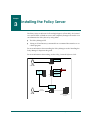
The Policy Server is the heart of eTrust Single Sign-On (eTrust SSO). It is located
on a central UNIX or Windows server, and completely manages eTrust SSO. You
can administer the Policy Server by using either:
■
■
The Policy Manager GUI
Selang or eTrust Directory commands from a command line interface or via
a batch program.
For more information about installing the Policy Manager see the “Installing the
Policy Manager” chapter in this guide.
For more information about selang, see the Selang Command Reference Guide.
Policy Manager
Administrator’s
machine
Administrator
Policy Server
Authentication
Agent
Authentication
machine
eTrust
Access Control
eTrust
Directory
Policy Server
machine
SSO Client
Primary
authentication
End user’s
machine
End user
Windows, UNIX,
Mainframe applications
machines
Installing the Policy Server
3–1
Before You Begin
Before You Begin
The Before You Begin Section is designed to guide you through what you need to
know before you install the Policy Server.
Overview
This section gives you an overview of the Policy Server installation and includes
what you need to do to consider before you install the Policy Server. This section
also explains the installation options to help you choose which method you
should use.
The Policy Server is very simple to install using the installation Wizard. You can
also do a silent installation from a command line, but unless you are installing a
large server farm, the silent installation will not save you much time.
Pre-Installation Options and Requirements
Your operating system must produce a reliable and correct timestamp for the
local time-zone. If it does not, the product may not work. For example, the
operating system clock of a Policy Server host in New York must be set to US
Eastern Daylight Time (EDT), whilst the operating system clock of an LDAP
Authentication Agent host in San Francisco must be set to US Pacific Daylight
Time (PDT).
If you plan to install the Policy Server and the Policy Manager on the same
machine, make sure you install the Policy Server first.
If you already have eTrust Access Control installed, see the “Upgrading” chapter
in this guide. eTrust Access Control must be stopped and/or uninstalled before
you install the Policy Server on the same machine.
If you want to track down an issue or diagnose a problem you can set up
logging. For more information, see the “Auditing, Logging, and Tracing” chapter
of the eTrust SSO Administrator Guide.
3–2
eTrust SSO Implementation Guide
Before You Begin
If You Want to Install a Stand-Alone Policy Server
This section explains each type of installation to help you choose which method
you should use.
Installation Type
Wizard complete
installation
Wizard custom
installation
Options
■
Installation location for the Policy Server
All the options for Complete installation plus:
■
Installation locations for the individual Policy
Server components, including eTrust Access
Control and eTrust Directory
■
Server farm member
■
Other servers in the server farm
■
Administrative computer, where the Policy
Manager will be installed.
Note: If you want to install the Policy Server as part
of a server farm, see the “Installing a Server Farm”
chapter in this guide.
Silent installation
■
Installation location for Policy Server
■
Installation run from a command line
If You Want to Install a Server Farm
If you want to install a server farm of Policy Servers, see the chapters “Installing
a Server Farm” in this guide. This chapter explains how to set up a new server
farm, or add servers to an existing server farm.
If You Want to Specify the User Data Store
You have two choices of user data store. We recommend the default which is
eTrust Directory unless you have legacy data and specifically want to continue to
use eTrust Access Control.
■
■
To use eTrust Directory as your user data store and eTrust Access Control as
your resources data store (default), see the To Install the Policy Server section
in this chapter.
To use eTrust Access Control as your user data store, instead of eTrust
Directory, and your resource data store, see the To Change the Default User
Data Store section in this chapter.
Installing the Policy Server
3–3
Before You Begin
Where to Next?
Once you have decided what type of installation you need and what options you
are going to use, see the Checklist section of this chapter to make sure you are
ready to install the Policy Server.
Checklist
Before you install the Policy Server make sure that the following requirements
are met.
Make sure you refer to the Readme for system requirements and any other
relevant installation information.
Make sure you disable or delay the screen saver on the computer so that it
will not run while you are installing the Policy Server.
Make sure you set administrator access rights.
■
■
On a Windows machine you must be allocated as a member of the local
administrators group before you install the Policy Server. You can do
this through Control Panel, User Accounts from the start menu.
On a UNIX machine you must be logged on a “root”
Make sure you close any open applications on the computer. You will need
to restart the computer at the end of this installation.
Where to Next
Once you have read the checklist and have fulfilled all the requirements listed,
you can start your installation.
3–4
eTrust SSO Implementation Guide
Policy Server for Windows
Policy Server for Windows
This section explains how to install the Policy Server on Windows.
To Install the Policy Server for Windows
This procedure tells you how to install the Policy Server. This procedure
describes the default installation which will configure eTrust Directory as your
user data store and eTrust Access Control as your resources data store.
1.
From the eTrust Single Sign-On 7.0 Product Explorer wizard select Policy
Server for Windows.
The wizard should appear automatically when you insert the eTrust SSO
disk. If not, open Windows Explorer and navigate to the CD-ROM directory
and double-click the PE_i386.exe file.
The Install button becomes active.
2.
Click the Install button.
The Welcome dialog appears.
4.
Click the Next button then read and accept the license agreement.
The Customer Information dialog appears.
Installing the Policy Server
3–5
Policy Server for Windows
5.
Enter your user name and organization information and click the Next
button.
The Setup Type dialog appears.
6.
Select what type of installation you want.
For more information about the Custom installation see the Before You Begin
section in this chapter.
The Destination Folder dialog appears.
7.
Select the destination folder and click the Next button.
The default destination for the Policy Server is: %Program
Files%\CA\eTrust Policy Server\(where %Program Files% is the value of
the Program Files environment variable on the local machine).
The Administrator Information dialog appears.
8.
Enter eTrust SSO administrator information (default username is ps-admin)
then click the Next button.
The administrator will have all access rights to the system. Make sure you
remember this information. Avoid using ‘Administrator’ as a user name
because it is the default and therefore insecure.
The Directory User dialog appears.
9.
Enter eTrust Directory SSO user information then click the Next button.
Make sure you remember this information.
The Ready to Install the Program dialog appears.
10. Click the Install button to complete the Policy Manager installation.
The installation may take some time.
When the installation is complete, you will be prompted to restart your
computer.
3–6
eTrust SSO Implementation Guide
Policy Server for Windows
To Change the Default User Data Store
This procedure tells you how to install the Policy Server on Windows. This
procedure describes a custom installation which will configure eTrust Access
Control as your user data store as well as your resources data store.
We recommend that you only follow this procedure if you have good reason not
to use eTrust Directory as the default user data store.
1.
Insert the eTrust SSO CD into the disk drive.
2.
Open a command window.
3.
Change the directory to <X>:/Policy Server/Nt (where X is the CD drive).
4.
Type setup.exe /v”LDAPDATASTORE=0”
The installation wizard appears.
5.
Follow the prompts for a standard installation. For more information, see
the Install the Policy Server on Windows section of this chapter.
Installing the Policy Server
3–7
Policy Server for UNIX
Policy Server for UNIX
This section tells you about installing the Policy Server on a UNIX platform.
To Install the Policy Server for UNIX
If you need to change the kernel configuration this will differ according to which
UNIX platform you are using. Refer to the relevant UNIX administrator guide for
further information. If you need to change the kernel configuration the
installation will prompt you for this information.
The Policy Server can be installed on the following UNIX systems:
■
AIX
■
HP-UX
■
Solaris
This section describes how to install the Policy Server for SSO on UNIX. It also
includes instructions about how to install the eTrust Access Control data store
and the eTrust Directory data store which are necessary for the installation.
Note: This UNIX installation is documented using the bash shell. If you are using
either csh or ksh then the commands may differ slightly.
1.
Begin installation by running ./setup script from the CD or installation
executable.
Mounting a CD will differ according to your platform and operating system
configuration.
Note: Make sure you logged on as “root”.
2.
Press Enter to scroll through the 'SYSREQ' system requirements file.
A list of existing file systems will be displayed, along with free space on
each.
3.
If you want to use one of these file systems type Y (default) or if you want to
exit the installation to create or modify a file system prior to install type N.
4.
Choose the number that corresponds to the file system you will install to.
Free space required and available is displayed on this filesystem.
5.
Select Y (default) to continue with the installation, or N to exit.
6.
Specify the installation path (for example, /opt/CA).
Note: The full installation path will be:
/opt/CA/eTrustSingleSignOn/PolicyServer You should specify a path that
corresponds to the filesystem you chose in step 4. If the path does not exist
you will need to confirm it, Y, or type N to choose another path.
3–8
eTrust SSO Implementation Guide
Policy Server for UNIX
7.
Specify if eTrust Access Control is already installed. If eTrust Access Control
is installed, make sure it is not running and type N.
8.
Specify any security administrators other than root. (Default: none)
Users other than root can be specified here, space separated, to be given
permissions to start and stop the eTrust Access Control and Policy Server
services.
9.
The eTrust Access Control installation is now completed, you have the
option to type Y (default) to install eTrust Directory, or type N and skip to
step 23.
10. eTrust Directory will print its kernel parameter requirements and should
explain how to go about making the system configuration modifications if
required. If configuration is insufficient, you are asked if you would like to
continue or exit and make the system changes.
11. Specify the default logon shell which the dsa user (eTrust Directory's UNIX
admin user account) will use: Bash, C or Korn (default <path to C shell>).
This user account, 'dsa', is used to start and stop eTrust Directory servers
(dxserver).
12. Supply and confirm the password for the dsa account. This user will be
added to the system, the root user should have the their PATH variable
configured so that the useradd utility is accessible.
13. Specify path for DXserver (Default: /opt/ca/etrustdirectory/dxserver),
confirm you do not wish to change it with N or type Y to retype (Default: N)
- if a custom path is supplied for this or any of the following steps, a
symbolic link will be created in the default location.
14. Supply the default shell which the Ingres user (Ingres' UNIX admin user
account) will use: Bash, C or Korn (Default: <path to C shell>). This user
account, 'Ingres', is used to start and stop Ingres services.
15. Supply and confirm the password for the Ingres account.
16. Specify path for Ingres (Default: /opt/CA/AdvantageIngresET/Ingres),
confirm you do not wish to change it with N or type Y to retype (Default: N).
17. Choose to use a separate location for each database - Data, Work,
Checkpoint, Dump and Journal (Default: N) or a single location for all. It is
suggested that these databases, together or separate, should be on a separate
physical disk to Ingres to maximize performance.
18. Specify paths for the entire database, or each individually, depending on step
19 (Default: /local/CA/AdvantageIngresET), confirm it is correct with N or
type Y to retype.
19. Specify regions and sub-regions for system time-zones. For example,
Australia, Australia-Victoria. This is not case sensitive.
20. Confirm time zone is correct or start over. You can also press enter if you
type the first region incorrectly to start over.
Installing the Policy Server
3–9
Policy Server for UNIX
21. Specify path for DXwebserver (Default:
/opt/ca/etrustdirectory/dxwebserver), confirm you do not wish to change
it with N or type Y to retype (Default: N).
22. Specify path for jre (Java Runtime Environment, Default:
/opt/ca/etrustdirectory/jre), confirm you do not wish to change it with N
or type Y to retype (Default: N).
23. The eTrust Directory and Ingres will now install. If you have chosen options
that require kernel configuration changes these will also occur and the
system will ask for a system reboot before starting its installation phase.
Setup will resume from this position by reading the
/etc/.etrust_policyserver_state file. If a reboot is required, do so and run the
setup script as in step 1.
24. Choose if you would like to install as part of a Server Farm (Default: N). This
can only be configured during install.
For more information about server farms, see the “Working with Server
Farms” chapter of the eTrust SSO Administrator Guide.
25. If a server farm is selected, you now need to enter a list of server farm station
names (one per line), press enter on a new line when finished.
26. Specify an admin user for the eTrust Access Control data store (Default: psadmin) and confirm passwords. Make sure to remember the account details
as they will be used to manage the Policy Server.
27. Specify any administrative station hostnames (Default: none). This list is
space separated. These stations will be allowed incoming Policy Manager
connections by the Policy Server. These can be configured later.
28. Specify any computer aliases (Default: none, space separated). These are any
other hostnames by which this computer is known, by remote computers.
29. Specify an admin user for the eTrust Directory data store (Default: ldap-pers)
and confirm passwords. Make sure to remember the account details as they
will be used to manage the Policy Server.
30. You may be asked if you would like to modify the static hostname records in
the /etc/hosts file to be compatible with the way Policy Server operates. It is
suggested to accept this request where required (Default: Y).
31. Installation is now complete, you can have the installer run Policy Server
(and eTrust Access Control) before finishing up.
3–10
eTrust SSO Implementation Guide
Start the Policy Server After Installation
Start the Policy Server After Installation
This section describes how you launch the Policy Server in both Windows and
UNIX environments.
To Start the Policy Server on Windows
From the Start Menu
To run the Policy Server service:
1.
From the Start menu select Control Panel, Administrator Tools, Services to
access the Services dialog box.
2.
Select eTrust Policy Server.
3.
Click Start.
From the Windows Command Line
You can also start the Policy Server service from the Command Prompt with the
following command:
sso_directory\bin\PolicyServer.exe –start
To control the Policy Server service from the Command Prompt, use the
following syntax:
Policysrver[.exe] -h | -i | -l | -p | -s | -r | -d
Option
Parameters
Function
-h[elp]
N/A
Shows an explanation of the ssod
syntax
-s[tart]
N/A
Starts the Policy Server service
-d[ebug]
N/A
Runs the Policy Server as a console
application for debugging.
-i[nstall]
N/A
Installs the Policy Server service
-l[logonid]
domain\logonName
The user name under which the
Policy Server service runs. For a local
user, the syntax is: .\logonid
-[password]
password
The password of the user under
which the Policy Server service runs.
-r[emove]
N/A
Removes the Policy Server service
Installing the Policy Server
3–11
Start the Policy Server After Installation
For post-installation information see Windows and UNIX Post-Installation
Information.
Note: When you start the Policy Server service in the Services Window, the
eTrust Access Control services are also started. When you reboot the Policy
Server computer, the Policy Server and the eTrust Access Control services are
started automatically.
3–12
eTrust SSO Implementation Guide
Start the Policy Server After Installation
To Start the Policy Server on UNIX
Once the Policy Server is installed, the Policy Server will start automatically
when you start the machine.
Alternatively, you can stop and start is manually using the following commands:
■
To stop the Policy Server manually, log on as “root” or Admin User and use
the stopserver command.
For example, if you installed the Policy Server in the default location the
command is:
# /opt/CA/eTrustSingleSignOn/PolicyServer/bin/stopserver
■
To start the Policy Server manually, log on as “root” or Admin User and use
the startserver command.
For example, if you installed the Policy Server in the default location the
command is:
# /opt/CA/eTrustSingleSignOn/PolicyServer/bin/startserver
Other command-line options (in addition to start) can be one or more of the
following:
Option
Meaning
-h[elp]
Displays a help message.
-c[fg] filePath
Defines path to ssod ini file
-f[orklimit] number
Defines maximum number of
concurrent connections to handle.
Default: is 3 (unless overridden by
ConfigFile).
-N[odaemon]
Specifies that ssod runs without
daemonizing
-p[ort] PortNumber
Overrides the default port specified in
ConfigFile. If -p is used without a port
number the Default: is 13980 (unless
overrriden by the ConfigFile).
-v[erbose]
Shows options being used.
Note: If you did not use the default installation directory path (/usr/sso) when
you installed the Policy Server, then you must use the -c option with the
installation directory path you used during installation.
Installing the Policy Server
3–13
Start the Policy Server After Installation
Verify that four processes have been started — seosd, seoswd, seagent, and ssod.
Use these commands:
#
#
#
#
ps
ps
ps
ps
–ef
–ef
–ef
–ef
|
|
|
|
grep
grep
grep
grep
policyserver
seosd
seagent
seoswd
Note: Policy Server may fail if the server is not authorized to use a file it needs.
Any file that has to be used by ssod (such as a script, a motd, an ini file, or a key
file) should have read permission for the SSO administration group.
Tip: By default all SSO files are owned by the Policy Server administrator
(default: ps-admin) and by the SSO administrator group (default: _ps-adms).
3–14
eTrust SSO Implementation Guide
Start the Policy Server After Installation
Windows and UNIX Post-Installation Information
The remainder of this chapter applies to Policy Servers on both Windows and
UNIX platforms.
Encryption Keys
The Policy Server is installed with a default public/secret key pair. After
installation we recommend that you generate a new unique public/secret key
pair, using the utility found in the bin directory where you installed the product.
Windows
UNIX
Run the /<SSO installation path>/bin/GenKeyPair.exe.
1.
2.
Set the following environment variables:
■
eTrustPath=<SSO installation path>
■
POLICY SERVER_PATH=<SSO installation path>
Run the /<SSO installation path>/bin/GenKeyPair
About Populating the Data Store
Before you can use eTrust SSO, you must populate the data store . Since there
may be thousands of users at an enterprise site, entering all the necessary data
from scratch would be a lengthy task. Fortunately, much of the information
needed is already present and accessible in existing enterprise systems. eTrust
SSO provides a number of methods to conveniently extract this information and
use it to load the data store — saving you valuable time and streamlining your
implementation.
Sources Of Data
The largest amount of information that must be entered into the data store is
user information. In most organizations, this is already present in:
■
Operating systems, such as Windows NT and NetWare
■
Groupware, such as Lotus Notes or SAP
■
Enterprise management tools
■
Computerized employee records
Installing the Policy Server
3–15
Start the Policy Server After Installation
Using Existing Data
To use existing data for an initial load of the data store , you can:
■
■
■
Selang Scripts
Employ Identity Management tools such as eTrust Admin.
Build Selang scripts (batch files) and load them into the eTrust Access
Control data store. The Selang scripts must contain the necessary user and
application information in the form of Selang commands.
Create appropriate ldif files (batch files) and load them into the eTrust
Directory data store. The ldif files must contain the necessary user
information in the form of directory data. For more information see the
eTrust Directory documentation.
Selang scripts for building the data store must contain a line for each record to
be loaded into the data store. See the following examples of Selang scripts:
A Selang script to load user information:
editusr ("JSmith") fullname("Jason Smith") phone("736-519-2526")
location("Acme") org_unit("Loans") auth_type(Method5)\
when days(mon, tue, wed, thu, fri, sat, )\
time (AnyTime))
editusr ("BBrown") fullname("Betty Brown")\
phone("736-519-2519") location("Acme")\
org_unit("MIS") auth_type(Method5)\
when(days(mon, tue, wed, thu, fri, sat, )\
time (AnyTime))
editusr . . .
A Selang script to load application data:
editappl ("NewLoans") logon_type(Pwd) sensitive script(mortgage.tcl)
editappl (“Contracts”) logon_type(Pwd) script('Negotiate.tcl')
A Selang script to load logon data:
editlogon ("JSmith") appl(NewLoans) logonid('jassmi') currpwd('B587jj34')
editlogon ("JSmith") appl(Contracts) logonid('jassmi') currpwd('Olympus4X')
There are two recommended methods for creating a Selang batch file.
One method is using a utility to extract and configure data from an OS and
convert the data to a Selang batch file. eTrust SSO currently provides two
utilities, UxImport for UNIX and ntimport for Windows NT. For information on
using these utilities, see the eTrust Access Control documentation.
The second method is building an in-house utility to extract information from
user and application files and configure them in Selang batch file format. For
example, if a site keeps user information in a data store such as Oracle, the data
store ’s report generator could be used to extract the data needed for SSO as an
ascii file. Then, using awk in UNIX, the ascii file could be configured to the
Selang batch file format needed.
To run the Selang script use the command Selang -r filename
3–16
eTrust SSO Implementation Guide
Start the Policy Server After Installation
LDIF Files
See the following examples of Ldif files (note that these contain the minimum
attributes required. Other attributes specified in the standard inetOrgPerson
schema may be added as required).
An LDIF file to load user information:
dn: cn=JSmith,o=ps
objectClass: top
objectClass: eTssoUser
objectClass: inetOrgPerson
objectClass: organizationalPerson
objectClass: person
cn: JSmith
surname: Smith
eTrustAutheMethod: Method 5
Note that application data is always stored in the eTrust Access Control
database, so in order to load application data it is still necessary to use a Selang
script:
editappl ("NewLoans") logon_type(Pwd) sensitive script(mortgage.tcl)
An LDIF file to load logon data:
dn: cn=JSmith@NewLoans,ou=LoginInfos,o=ps
objectClass: top
objectClass: eTssoLoginInfo
cn: JSmith@NewLoans
eTssoApplName: NewLoans
eTssoCurrPwd:: B587jj34
eTssoLoginID: JSmith
eTssoUserDN: cn=Jsmith,o=PS
To load the LDIF files, use the eTrust Directory dxModify tool. The syntax is as
follows:
dxmodify -a -f <ldif filename> -h <directory host> -p <directory port> -D <user
dn> -w <password>
By default the LDAP user store for the Policy Server is on the same machine as
the Policy Server itself, and the default port is 13389. The default user name for
accessing the LDAP user store is ldap-pers. If the machine name was Server1, the
command line to load the user info from the LDIF file specified above would be
as follows:
dxmodify -a -f user-info.ldif -h server1 -p 13389 -D ldap-pers -w <password>
See the eTrust Directory tools documentation for further details.
Installing the Policy Server
3–17
Chapter
4
Installing the Policy Manager
This chapter explains how to install the Policy Manager.
Policy Manager is a tool that lets you manage the Policy Server and the data
stores (eTrust Directory and eTrust Access Control). It is usually installed on an
administrator’s workstation with TCP/IP communication to the Policy Server.
You can use the Policy Manager to communicate with both UNIX and Windows
Policy Server computers.
You can use one Policy Manager to manage several Policy Servers, or several
Policy Managers to communicate with one Policy Server.
Policy Manager
Administrator’s
machine
Administrator
Policy Server
Authentication
Agent
Authentication
machine
eTrust
Access Control
eTrust
Directory
Policy Server
machine
SSO Client
Primary
authentication
End user’s
machine
End user
Windows, UNIX,
Mainframe applications
machines
Installing the Policy Manager
4–1
Before You Begin
Before You Begin
The Before You Begin Section is designed to guide you through what you need to
know before you install the Policy Manager.
Overview
This section gives you an overview of the Policy Manager installation.
For further information about things you should consider for your Policy
Manager installation, see the Checklist section of this chapter.
Ways to install the Policy Manager
This section explains each type of installation to help you choose which method
you should use.
Installation Type
Wizard Complete
installation
Configuration Options
■
File location for Policy Manager
■
Encryption method
■
Wizard Custom
installation
Products to be managed by the Policy Manager
(eTrust AC, eTrust Web AC and/or eTrust SSO)
All the options for Complete installation plus:
■
Installation locations for the individual Policy
Manager components
Note: If you are using the Policy Manager to control a server farm, you must
apply the Policy Manager server farm patch after you have installed the Policy
Manager. For more information see, the Readme document.
Decide Where to Install the Policy Manager
You can install the Policy Manager on an administrator’s workstation or on a
Policy Server computer.
If you are installing the Policy Manager on the same computer as the Policy
Server, make sure that you install the Policy Server first.
4–2
eTrust SSO Implementation Guide
Before You Begin
Checklist
Before you install the Policy Manager make sure that the following requirements
are met.
Make sure you have checked the System Requirements section of the
Readme file for this product.
Ensure that the computer you are installing the Policy Manager on has
TCP/IP to communicate with the Policy Server (s) that you want to manage.
Ensure that you have the name(s) of the Policy Server computer(s) that host
the Policy Server that you want manage. This information is not needed until
after the basic installation when you need to connect to the Policy Server for
the first time.
If you have eTrust Access Control running on your machine prior to
installing the Policy Manager, installation of the Policy Manager restarts
eTrust Access Control services.
If you install the Policy Manager on a machine that is running eTrust Access
Control, you should have administrative privileges in eTrust Access Control.
You cannot install the Policy Manager to a location containing the %
character in the folder path.
You cannot install the Policy Manager on a system that is also running the
Application Server Agent for WebSphere.
If you plan to install the Policy Manager on a machine with eTrust Access
Control installed, you must have eTrust Access Control Version 5.1 SP1 or
later.
If you want to track down an issue or diagnose a problem you can set up
logging. For more information, see the eTrust SSO Administrator Guide,
“Auditing, Logging, and Tracing” chapter.
Installing the Policy Manager
4–3
Install the Policy Manager
Install the Policy Manager
This section explains how to install a the Policy Manager. The Policy Manager is
a tool that lets you administer the Policy Server. The Policy Manager can only be
installed on a Windows machine.
To Install the Policy Manager
This procedure tells you how to install the Policy Manager.
1.
From the eTrust Single Sign-On 7.0 Product Explorer wizard select Policy
Manager for Windows.
The wizard should appear automatically when you insert the eTrust SSO
disk. If not, open Windows Explorer and navigate to the CD-ROM directory
and double-click the PE_i386.exe file.
The Install button becomes active.
2.
Click the Install button.
The Welcome dialog appears.
3.
Click next then accept the license agreement then enter your customer
information and click Next.
Note: You must scroll to the bottom of the license agreement.
The Setup Type dialog appears.
4.
Select what type of installation you want and click the Next button
For more information about the Custom installation see the Pre-Installation
Considerations in the previous section of this chapter.
The eTrust Policy Manager Administrative Options dialog appears.
4–4
eTrust SSO Implementation Guide
Install the Policy Manager
6.
Select the Policy Manager Modes.
You have the option to select other eTrust components that can be managed
by the Policy Manager.
Note: If you are using the Policy Manager to work with a server farm of
Policy Servers, you must select the “eTrust Access Control” option.
The Encryption Method dialog appears.
7.
Select the Encryption Method you wish to use and click the Next button.
Unless you have a specific reason not to, you should use the default method.
A message appears to say that you are now ready to install the program
message appears.
8.
Click Install to complete the installation of the Policy Server.
The default destination for the Policy Manager:
■
If the Policy Server is not already installed on this computer
%Program Files%\CA\eTrust Access Control\Policy Manager
■
If the Policy Server is already installed on this computer
%Program Files%\CA\eTrust Access Control\
Where to Next?
Once you have installed the Policy Manager, see the Connect the Policy Manager
to the Policy Server section of this chapter.
Installing the Policy Manager
4–5
Connect the Policy Manager to the Policy Server
Connect the Policy Manager to the Policy Server
When you launch the Policy Manager you must direct it to the Policy Server that
you want to manage.
To Connect the Policy Manager to the Policy Server
This procedure tells you how to connect to a Policy Server.
1.
From the Windows Start menu launch the Policy Manager
The logon dialog appears
2.
Enter your user name, password and the host name. In the Host Name field,
you should enter or browse for the computer that has the Policy Server
installed on it.
The username and password you entered here must be defined as an
administrator and have access rights to the Policy Server computer. When
the Policy Server was installed, a user was defined that can be used to
administrator the Policy Server. By default, the name of this administrator
user is ps-admin, but you may have changed this during the Policy Server
installation.
Where to Next?
You have now completed the Policy Manager installation and connected to the
Policy Server.
4–6
eTrust SSO Implementation Guide
Chapter
5
Installing the SSO Client
This chapter explains the different ways to install the SSO Client.
The SSO Client is an application that allows users in your enterprise to work
with eTrust Single Sign-On (eTrust SSO). This is the only eTrust SSO component
that the end user sees and works with.
The SSO Client runs on every workstation that uses eTrust SSO services. The SSO
Client can be installed on each workstation, or it can be run on the workstations
from a networked server.
Policy Manager
Administrator’s
machine
Administrator
Policy Server
Authentication
Agent
Authentication
machine
eTrust
Access Control
eTrust
Directory
Policy Server
machine
SSO Client
Primary
authentication
End user’s
machine
End user
Windows, UNIX,
Mainframe applications
machines
For more information about how the SSO Client helps to authenticate users and
launch applications see the ‘Common eTrust SSO Processes’ chapter in the eTrust
SSO Getting Started guide.
Installing the SSO Client
5–1
Wizard Installation
There are two methods of installing the SSO Client:
■
Wizard installation (Windows GUI)
■
Silent installation (command line prompt)
You must install the SSO Client using the wizard at lease once, even if you want
to use the Silent installation method. This is required to create a modified
SsoClnt.ini file relevant to your environment.
Wizard Installation
This section explains how to install the SSO Client using the Product Explorer
wizard. This method is not always appropriate for large installations, because it
is impractical to use the wizard on every user’s computer.
Pre-Installation Considerations
Part way through this installation you will be asked to choose whether you want
to do a custom installation or a typical installation. Select custom installation
when you want to install:
■
SSO GINA functionality (Windows NT/XP/2000 only)
■
Workstation Mode options (Windows NT/XP/2000 only)
■
■
■
Any authentication agents other than SSO and NT, which are installed by
default
Citrix Metaframe-supported functionality
SSO Client Toolbar instead of SSO Client Tools. This affects how users access
their eTrust SSO application list. SSO Client Tools is the default.
For more information about Workstation Modes and GINA functionality, see the
eTrust SSO Administrator Guide, “Customizing the SSO Client” chapter.
You can set up logging to track down any issues although this is only
recommend for when you have a specific reason, rather than leave it on all the
time. For more information about logging, see the eTrust SSO Administrator
Guide, “Auditing, Logging, and Tracing” chapter.
5–2
eTrust SSO Implementation Guide
Wizard Installation
Pre-Installation Checklist
Before you begin, use this checklist to make sure you have all the information
and software that you need to install the SSO Client.
Have the name(s) of the Policy Server computer(s) and the backup Policy
Server computer(s) (if you are using a backup server).
Have the name(s) of the authentication server computer(s) (authentication
host).
Log in with administrative privileges if you want to implement the SSO
GINA.
Make sure you are running Windows 98SE or later.
Make sure the computer you are installing the SSO Client on has a network
connection with TCP/IP to communicate with the Policy Server.
Make sure you shut down all other applications on the computer.
Install Using the Wizard
This procedure describes how to install the SSO Client using the Product
Explorer Wizard. This is a good method to use when you are installing the SSO
Client on a single computer.
Tip: When you enter more than one computer name in a list you can separate
the names with commas or spaces.
1.
From the eTrust Single Sign-On 7.0 Product Explorer wizard select Single
Sign-On Client 7.0.
The wizard should appear automatically when you insert the eTrust SSO
disk. If not, open Windows Explorer and navigate to the CD-ROM directory
and double-click the PE_i386.exe file.
2.
Click the Install button.
The Welcome dialog appears.
3.
Click the Next button then read and accept the license agreement.
The Setup Type dialog appears.
Installing the SSO Client
5–3
Wizard Installation
4.
Select Custom if you want to install any of the custom features or
components, and click the Next button.
If you select the Typical installation, go to step 11.
If you select Custom installation, the Custom Setup dialog appears.
5.
Click on any component and a drop-down menu appears. From this menu
you can select one of the following options:
- This feature will be installed on local hard drive
- This feature, and all subfeatures, will be installed on local hard drive
- This feature will not be available
All items marked with either
computer.
6.
or
icons will be installed on the
Once you have selected which features, if any, you want to install, click the
Next button.
The Authentication Methods dialog appears.
7.
Select the default authentication method and click the Next button.
This will set the default method, but the users of this computer will be able
to access all authentication methods that you have enabled using the drop
down menu on their SSO authentication dialog.
5–4
eTrust SSO Implementation Guide
Wizard Installation
If you selected the Station Lock component, the Station Lock dialog appears.
8.
Select the Station Lock (Workstation Mode), you want to install and click the
Next button.
The Interface Configuration dialog appears.
9.
Select the Interface Configuration option you want, and click the Next
button.
This sets how the user accesses the SSO Client.
The Citrix Metaframe Support dialog appears.
10. Select the appropriate option and click Next.
You must install the Citrix Metaframe support if you want to implement
application migration. If you do not have a Citrix Metaframe server installed
and operational, select No.
The Network Configuration dialog appears.
11. Enter the names of the following computers:
-
The Policy Server computer(s)
-
The backup Policy Server computer(s) (if any)
-
The authentication server computer(s)
Click the Next button.
The Ready to Install the Program dialog appears.
12. You are now ready to install. You can select the Add a shortcut to “eTrust
SSO Client” in the Startup folder on this screen. If you installed the GINA,
this will be done automatically.
The SSO Client will be installed on your computer.
You may be required to restart the computer.
Modifying SSO Client on Windows
If you need to modify SSO Client components, you can run the wizard for SSO
Client as you did for installation. You must shut down the SSO Client before you
make any modifications.
The wizard detects that the SSO Client is installed and shows the interface for
modification and maintenance of SSO Client components.
Note: After modifying SSO Client components, you must right-click the eTrust
Single Sign-On Agent icon, select Exit, and re-run the SSO Client for the
modifications to take effect.
Installing the SSO Client
5–5
Silent Installation
Silent Installation
About the Silent Installation
This method lets you install the SSO Client from the command line prompt. You
must use a customized SsoClnt.ini file with the silent installation. To get the
SsoClnt.ini file, you must install the SSO Client using the wizard at least once.
For more details about how to customize the SsoClnt.ini file, see Appendix A in
the eTrust SSO Administrator Guide.
This method is ideal when you want to quickly install the SSO Client on multiple
users’ computers.
Pre-Installation Considerations
You must configure the SsoClnt.ini file prior to installing the SSO Client using
the silent installation method. You get the SsoClnt.ini file by installing the SSO
Client using the wizard. If you accept the default locations that are set during the
default installation of the SSO Client using the wizard, the SsoClnt.ini file is
located in %Program Files%\CA\eTrust SSO\Client folder (where %Program
Files% is the value of the Program Files environment variable on the local
machine)
The SsoClnt.ini file is broken into sections. Each section has one or more settings
that you can change to alter the behavior of the SSO Client. Settings are also
known as tokens or keynames. Each section is denoted by words or letters
enclosed in square brackets, for example the first section is [sso].
For a complete list of all SsoClnt.ini file settings, see “Appendix A” of the eTrust
SSO Administrator Guide or the SsoClnt_Readme that is installed with the
SsoClnt.ini file
To silently install the SSO Client on a large scale, copy the Client installation files
to a network drive together with the customized SsoClnt.ini file.
You can set up logging to track down any issues although this is only
recommend for when you have a specific reason, rather than leave it on all the
time. For more information about logging, see the eTrust SSO Administrator
Guide, “Auditing, Logging, and Tracing” chapter.
5–6
eTrust SSO Implementation Guide
Silent Installation
Pre-Installation Checklist
Before you begin, use this checklist to make sure you have all the information
and software that you need to install the SSO Client.
Make sure the computer you are installing the SSO Client on has a network
connection with TCP/IP to communicate with the Policy Server.
Make sure you have saved changes to the SsoClnt.ini file and put it in the
installation directory. For more information about how to configure your
SsoClnt.ini file, see Modifying the SsoClnt.ini File section later in this
chapter, and Appendix A in the eTrust SSO Administrator Guide.
Set administrator privileges if you intend to implement the SSO GINA.
Have the name(s) of the authentication server computer(s) (authentication
host).
Make sure you shut down all the applications on the computer.
Make sure you have you saved changes to the SsoClnt.ini file and put it in
the installation directory. For more information about how to configure your
SsoClnt.ini file, see Modifying the SsoClnt.ini File section later in this
chapter, and Appendix A in the eTrust SSO Administrator Guide.
If you wish to supply your own Readme.html file to your users, place this in
the installation folder with the SsoClnt.ini file.
Installing the SSO Client
5–7
Silent Installation
Install Using the Silent Installation
This method is particularly good when you want to implement the SSO Client
quickly on many computers, but you also want to be able to configure multiple
settings in the SsoClnt.ini file.
1.
Install the SSO Client using the wizard.
2.
Make changes to the SsoClnt.ini file.
Unless you have specified a different location the SsoClnt.ini file is located in
%Program Files%\CA\eTrust SSO\Client folder (where %Program Files% is
the value of the program files environment variable on the local machine)
3.
Modify the SsoClnt.ini file to suit your installation needs.
For more information about how to configure your SsoClnt.ini file, see
Appendix A in the eTrust SSO Administrator Guide or the
SsoClnt_Readme.html file.
4.
Copy the installation files to a network drive and put the customized
SsoClnt.ini file in the same folder. You can also put a customized version of
the Readme.html in this folder.
5.
Open the command prompt and navigate to the location of the installation
files.
6.
From the command prompt, type:
setup.exe /s /v"/qn <insert variables here>"
You can specify certain information in the silent command line. For
information about what values you can specify in the silent install, see the
Command Line Settings section of this chapter.
The SSO Client will install silently using the supplied SsoClnt.ini file for all
the configuration information.
5–8
eTrust SSO Implementation Guide
Silent Installation
Command Line Settings
You can set several values when you install the SSO Client using a silent
installation.
Description
Setting
Installation directory on the user’s computer
INSTALLDIR = [enter location]
Install all authentication methods (see below) INSTALLLEVEL= 110
Install all authentication methods plus the
SSO GINA.
INSTALLLEVEL=130
You cannot install the GINA silently without
also installing all the authentication methods.
We recommend that you only use
INSALLLEVEL 110 or 130, not both.
Specify whether the eTrust SSO application
list will display in the user’s Windows Start
menu.
STARTUPFOLDER=[1|0]
0 = Don’t create in Start menu
1 = Do create in Start menu*
*See SESSMGMTENABLED below.
Enables Session Management GINA pass through option in the Windows Start menu.
SESSMGMTENABLED=[1|0]
If you:
■
■
■
are installing the GINA, and
are creating Shortcut in the Start
menu, and
have selected GinaPassThrough = yes
(in the SsoClnt.ini file)
then we strongly recommend that you set
SESSMGMTENABLED=0
Reboot the computer after installation?
REBOOT=[F|R]
F = Force a reboot
R = Suppress a reboot
Here is an example of a silent install command that includes variables:
Setup.exe /s /v"/qn INSTALLLEVEL=110 STARTUPFOLDER=1 REBOOT=R"
For more information about the SSO GINA see the eTrust SSO Administrator
Guide “Configuration the Client” chapter.
Installing the SSO Client
5–9
Configuring the SSO Client
Configuring the SSO Client
The behavior of the SSO Client is determined by the SsoClnt.ini file.
The SsoClnt.ini files is broken into sections. Each section has one or more
settings that you can change to alter the behavior of the SSO Client. Settings are
also known as Tokens or keynames. Each section is denoted by words or letters
enclosed in square brackets, for example the first section of the SsoCltn.ini file is
[sso].
To set the behavior of the SSO Client you file you often have to make changes to
several different sections of the SsoClnt.ini file in conjunction with each other.
If you are installing the SSO Client on multiple different workstations, it is good
practice to change the SsoClnt.ini to suit your needs before you install the SSO
Client. For this reason we recommend that you install, configure, and test the
SSO Client on one or two machines before you distribute it to the rest of your
enterprise.
For a complete list of all the SsoClnt.ini file settings, see “Appendix A” of the
eTrust SSO Administrator Guide or the SsoClnt_Readme that is installed with
the SsoClnt.ini file.
For more information about how to configure the SSO Client for a shared
workstation environment, see “SSO Client in a Shared Workstation
Environment” chapter in this guide.
5–10
eTrust SSO Implementation Guide
SSO Client on a File Server—Network Installation
SSO Client on a File Server—Network Installation
Although the SSO Client has essentially the same functionality in all operating
system environments, an SSO Client for one environment will not function
correctly in any other environment.
In a network installation, the SSO Client executables, SsoClnt.ini, and all
associated files are installed together on a network file server. The SSO Client is
run on the user’s workstation from the file server. To implement this, a network
installation places SSO Client shortcut folders in the Start Menu, Programs, and
Startup folders of the Windows directory, and updates the registry.
When the user selects SSO Client from the Start menu, the SSO Client starts
running the executable from the file server on the user’s workstation, using
configuration parameters.
In order to provide different client configuration for different users, more than
one SSO Client can be installed on the same file server. However, each SSO
Client must be placed in a separate subdirectory. The administrator can set up
different SSO Client configurations by giving each client a different SsoClnt.ini
file and control access to them by setting the appropriate path in the SSO Client
shortcut in the Profiles or Start Menu subdirectory on the users’ workstation.
Important! You should not install and run on the same workstation both the SSO
Client that is to be located on the user’s workstation and the SSO Client that is to be
installed on the network.
If an end user workstation belongs to a different domain to the one where the
SSO Client file server is installed, and if there are no trust relations between the
domains, a map network drive must be made from the user's workstation to the
Client folder on the SSO Client file server. Otherwise, a user will need to run the
setup program again or re-authenticate to the file server domain.
Configuration Parameters
The SSO Client obtains its initialization parameters from one of the following
places:
■
■
The SsoClnt.ini file, which is located in the same directory as the SSO Client
executable:
–
In a network installation, on a network file server.
–
In a local installation, on the local workstation
Local operating parameters
–
For Window clients, from the local Windows registry
–
For UNIX clients, from the SsoClnt.ini file in the home directory
Installing the SSO Client
5–11
SSO Client on a File Server—Network Installation
Security
For security reasons, you may want to clear the username field in the NT Logon
tab, so that by default, the last user who logged on is not listed.
Also, you may want to hide the Shutdown button on the NT Only tab.
To hide the name of the last user to log on, set the following registry key to 1:
HKEY_LOCAL_MACHINE\SOFTWARE\Microsoft\Windows\CurrentVersion\policies\system\dont
displaylastusername
To disable the Shutdown button, set the following registry key to 0:
HKEY_LOCAL_MACHINE\SOFTWARE\Microsoft\Windows\CurrentVersion\policies\system\shut
downwithoutlogon
5–12
eTrust SSO Implementation Guide
Chapter
6
Implementing Authentication
Agents
eTrust Single Sign-On (eTrust SSO) can be used with third-party authentication
software.
The process by which the end users identify themselves to eTrust SSO is called
primary authentication. eTrust SSO offers a variety of different methods for
primary authentication.
In order to provide maximum operational flexibility, a separate authentication
agent handles the interactions between the SSO Client and the third-party
authentication server.
Each of the authentication agents is a bridge for communication between the SSO
Client and an authentication server.
eTrust SSO includes ready-made agents for various authentication systems. This
chapter describes how to implement each of the authentication agents that are
supplied with eTrust SSO:
■
Certificate
■
Entrust
■
LDAP
■
Novell NetWare
■
RSA SecurID
■
SAFLINK
■
Windows
You can also use the eTrust SSO Open Authentication Toolkit to create an
authentication agent for other authentication systems used in your organization.
This lets you use your existing authentication methods to authenticate users to
eTrust SSO.
One of the three components of each authentication agent is a ticket granting
agent (TGA). The TGA is a Windows service. This component communicates
with the authentication server and also communicates with the SSO Client
library component through TCP/IP.
Implementing Authentication Agents
6–1
How eTrust SSO Works with Third-Party Authentication Software
How eTrust SSO Works with Third-Party Authentication
Software
This section gives you an overview of the primary authentication process.
1.
The user starts the SSO Client on their workstation.
2.
The SSO Client checks the AuthMethods keyname in the ssoauth section of
the SsoClnt.ini file.
All authentication methods listed in this section will be available to the user.
The first in the list will be displayed as the default.
3.
The SSO Client opens the logon dialog, which prompts the user for the
following:
-
Select an authentication method (the list of methods is taken from the
AuthMethods keyname in the SsoClnt.ini file)
-
Enter credentials, such as a user name and password, biometric
information, or a smart card.
4.
The SSO Client sends the user’s logon details and authentication method to
the eTrust SSO authentication agent on the authentication host.
5.
The authentication agent verifies that the credentials used to log on
correspond to a valid user on the authentication host.
If the authentication server does not approve the user’s primary
authentication, it sends a rejection message to the authentication agent,
which then notifies the SSO Client that the primary authentication has failed.
6.
If the verification is successful, the authentication agent creates an SSO ticket,
encrypts it using a secret key, and sends it to the SSO Client. The SSO ticket
is a string that includes user identification, authentication method, and time
stamp. The ticket is valid for a defined number of hours.
7.
The SSO Client does two things with the SSO ticket:
-
The SSO Client caches the SSO ticket. Later, it uses the same ticket in the
application logon process.
-
The SSO Client sends the SSO ticket to the Policy Server.
8.
The Policy Server verifies the SSO ticket.
9.
If the ticket is valid, the Policy Server retrieves from the user data store the
list of the applications that the user is authorized to use, and sends the list to
the SSO Client.
10. The SSO Client displays the list of applications. The user can now start work.
6–2
eTrust SSO Implementation Guide
Summary of Authentication Agent Settings
Summary of Authentication Agent Settings
This section describes the configuration settings that are common to all
authentication agents. These settings are also described for each authentication
agent later in this chapter.
Configuring the SSO Client
To use any of the authentication methods for primary authentication, the
following entries must exist in the SsoClnt.ini configuration file. The instructions
that follow describe how and when to do this.
For more information about configuring the SSO Client, see the appendix
“Configuring the SSO Client: SsoClnt.ini.”
Set the Authentication Methods
The AuthMethods keyname in the ssoauth section must contain the short names
of the desired authentication methods. For example:
[ssoauth]
AuthMethods=RSA, LDAP, SSO
Set the Authentication Host and Port Number
The authhost token in the auth.<short auth method name> section must specify
the host where the Windows Service component of the Authentication Agent is
running. For example:
[auth.RSA]
authhost=server598
It is also possible to specify the port number on which the SSO Client will
attempt to communicate with the TGA. For example:
[auth.RSA]
authhost=server598:13880
The port number specified here must match the port number specified in the
ticket granting agent (TGA). If the port number is not specified, a default port is
used.
NetWare and Windows authentication agents do not use TCP/IP ports. Instead,
the Novell authentication agent uses the Novell APIs, and the Windows
authentication agent uses named pipes.
Implementing Authentication Agents
6–3
Summary of Authentication Agent Settings
Configuring the Authentication Agent
This section lists the settings you can configure in the authentication agents. All
of these settings may be edited, but you must restart the authentication agent
service for the changes to take effect.
The settings for the Novell NetWare authentication agent are found in the
ssoauth.ini file. See the section The NetWare Authentication Agent for the
configuration settings in this file.
The settings for the other authentication agents are found in the following
Windows Registry keys:
Certificate
HKEY_LOCAL_MACHINE\SYSTEM\CurrentControlSet\Services\
sso_tga_cert_Agent1\Parameters\sso_tga_cert_Agent1
Entrust
HKEY_LOCAL_MACHINE\SYSTEM\CurrentControlSet\Services\
sso_tga_ents_Agent1\Parameters\sso_tga_ents_Agent1
LDAP
HKEY_LOCAL_MACHINE\SYSTEM\CurrentControlSet\Services\
sso_tga_ldap_Agent1\Parameters\sso_tga_ldap_Agent1
RSA SecurID
HKEY_LOCAL_MACHINE\SYSTEM\CurrentControlSet\Services\
sso_tga_rsa_Agent1\Parameters\sso_tga_rsa_Agent1
SAFLINK
HKEY_LOCAL_MACHINE\SOFTWARE\ComputerAssociates\
eTrustAccessControl\Client\
ClientType
Windows
HKLM\SOFTWARE\Computer Associates\eTrust SSO\
NT Authentication Agent
6–4
eTrust SSO Implementation Guide
Starting the Authentication Agent
Starting the Authentication Agent
From time to time, you may need to start and stop the authentication agent
services.
The Novell and SAFLINK authentication agents do not need to be started and
stopped.
Starting the Certificate, Entrust, LDAP, and RSA SecurID Authentication Agents
For the following three authentication agents, the ticket granting agent (TGA)
can be started either as a service or on a command line:
■
Certificate
■
Entrust
■
LDAP
■
RSA SecurID
The syntax for the command to start these three authentication agents is:
tga_appl.exe <option>
where <option> is one of the following:
-start [name]
Start the service corresponding to the specified name (or the default service,
if the name hasn’t been specified)
-stop [name]
Stop the service corresponding to the specified name (or the default service,
if the name hasn’t been specified)
-i[nstall] [name]
Create a service object using information based on the specified name (or the
default set of information, if the name hasn’t been provided) and add it to
the service control manager database
-r[emove] [name]
Mark the specified service for deletion from the service control manager
database
-d [name]
Run the application from the command line, using configuration settings of
the service corresponding to the specified name (or the default service, if the
name hasn’t been specified)
Implementing Authentication Agents
6–5
Starting the Authentication Agent
Starting the Windows Authentication Agent
The Windows authentication agent uses a similar list of commands, but without
the name attribute, and the -d command does not apply.- same commands but
no [name], and no d command
The syntax for the command to start the Windows authentication agent is:
tga_appl.exe <option>
where <option> is one of the following:
-start
Start the Windows authentication agent service
-stop
Stop the Windows authentication agent service
-i[nstall]
Create a service object and add it to the service control manager database
-r[emove]
Mark the Windows authentication agent service for deletion from the service
control manager database
6–6
eTrust SSO Implementation Guide
The Certificate Authentication Agent
The Certificate Authentication Agent
eTrust SSO supports primary authentication using certificates. This section
explains how to install the Certificate authentication agent.
Throughout this implementation guide, the host on which the Certificate
authentication agent is being installed is called the CERT_AUTHHOST.
System Requirements
For details about the systems requirements for this component please see the
README document.
Note: All operating system clocks must produce a reliable and correct timestamp
for the time-zone where each machine hosting any SSO components are
located. For example, a machine located in New York hosting a Policy Server
must have it’s OS clock set to US Eastern Daylight Time (EDT) whilst a
machine located in San Francisco hosting a LDAP Auth Agent must have it’s
OS clock set to US Pacific Daylight Time (PDT).
Pre installation Considerations
This sections explains a few of the concepts and requirements that you must
consider before you install the Certificate authentication agent.
Trusted Certificates
The CertAuthAgent uses this list of trusted certificates to determine if it should
allow a user certificate to be verified. Unless the issuing certificate of the user
certificate that is being used is included in this configuration option, the user
certificate can not be verified by the CertAuthAgent.
When you install the Certificate Authentication Agent you will be asked to
specify a Trusted Certificate (at least one Trusted Certificate must be specified),
you can use a ‘Browse’ button to navigate to the directory that contains the der
encoded certificate.
You must specify at least one Trusted Certificate to install the CertAuthAgent,
but you may also specify multiple Trusted Certificates. These certificates must all
reside in the same Directory.
Implementing Authentication Agents
6–7
The Certificate Authentication Agent
Revocation
This section explains what certificate revocation is and tells you about the
different revocation settings for the certificate authentication agent.
Revocation refers to the fact that the system can block certain certificates. This is
based upon the system knowing which certificates cannot be trusted. There are
several ways that the system can identify untrustworthy certificates.
CRL
CRL stands for Certificate Revocation List. This is a list of certificates that have
been revoked by the Certification Authority. The CRL is a blacklist that contains
the certificates which are no longer valid.
Fixed OCSP
Fixed OCSP lets you specify a fixed address for an OCSP responder that can
check the user certificates and verify whether they are valid or have been
revoked.
You will also need to have the full address (DNS/IP address and the Port) of the
responder to use this option.
AIA OCSP
AIA OCSP lets the CertAuthAgent retrieve the OSCP responder address from
the user certificate. This means that you don’t have to specify a fixed OCSP
address. To use this option the users’ certificates must contain an OCSP
responder address in the ‘Authority Information Access (AIA)’ attribute.
CRL DP
The CRLDP stands for CRL Distribution Points. This option lets the
CertAuthAgent retrieve a CRL via either HTTP or LDAP by using an address
listed in the ‘CRL Distribution Points’ attribute of the certificate.
You will also need to have the issuing/signer certificate of the CRLs that will be
used by the Cert Auth Agent.
You are required to specify at least one issuing/signer certificate, and you can
specify multiple issuing/signer certificates. These certificates must reside in the
same Directory.
6–8
eTrust SSO Implementation Guide
The Certificate Authentication Agent
Combinations
The CertAuthAgent lets you to use a combination of two of the available
Revocation Status Checking Methods. All combinations consist of CRL together
with another method. The available combinations are:
■
CRL and Fixed OCSP
■
CRL and AIA OCSP
■
CRL and CRLDP
The benefit of using a combination of Revocation Status Checking Methods is
that it will provide a more accurate result. The Certificate authentication agent
will always first check that certificate with the CRL. If the certificate is listed as
revoked here, the authentication agent will not check the second method. If the
certificate is not listed as revoked on the CRL, the authentication agent will go on
to check the second method. The configuration for each of the methods is the
same as if you selected them individually.
Implementing Authentication Agents
6–9
The Certificate Authentication Agent
Install the Certificate Authentication Agent
When installing the Certificate authentication agent you must install the
necessary files and then install and start the Certificate authentication agent
service.
This section explains how to install the Certificate Authentication Agent, and
how to start it once it has been installed.
Register the Authentication Host as an Agent Host
Your server administrator must register CERT_AUTHHOST as an Agent Host on
the Police Server.
■
There must be a TCP/IP connection between the Policy Server and
CERT_AUTHHOST.
To Install the Certificate Authentication Agent
This section explains how to install the Certificate Authentication Agent.
1.
From the eTrust Single Sign-On 7.0 Product Explorer wizard expand the
eTrust Single Sign-On Authentication Agents folder, and select Certificate
Authentication Agent.
The wizard should appear automatically when you insert the eTrust SSO
disk. If not, open Windows Explorer and navigate to the CD-ROM directory
and double-click the PE_i386.exe file.
The Install button becomes active.
2.
Click Install and accept the license agreement.
The Select Trusted Certificate Files dialog appears.
3.
6–10
Navigate to the Directory that contains the DER-encoded certificate files of
trusted issuing certificates. You must select at least one trusted issuing
certificate.
eTrust SSO Implementation Guide
The Certificate Authentication Agent
The CertAuthAgent uses this list of trusted certificates to determine if it
should allow a user certificate to be verified. The user certificate cannot be
verified unless the issuing certificate is specified here.
You can specify multiple trust certificates, but they must all be in the same
directory.
The last input field allows you to specify how many certificates will be
checked in the chain of certificates in the trusted set. The certification chain
is also called verification chain. For more information, see The Configuration
Settings for the CERT authentication Agent section of this chapter (the
VerifyDepth keyname in the table).
4.
Click Next.
The Certificate Revocation Status Checking Method dialog appears.
Implementing Authentication Agents
6–11
The Certificate Authentication Agent
You can configure the CertAuthAgent to perform revocation status checking
on the user certificates.
There are six revocation status checking methods that you can use. These
are:
6–12
■
CRL
■
Fixed OCSP
■
AIA OCSP
■
CRLDP
■
None
■
A combination of CRL and either Fixed OCSP, AIA OCSP or CRLDP.
eTrust SSO Implementation Guide
The Certificate Authentication Agent
5.
Select the appropriate Certificate Revocation Status Checking Method if you
want to use a checking method, and click next.
6.
Depending on which Certificate revocation status checking method you
chose you will be prompted for different information.. The following table
shows you what information you will need for each option.
If you selected
You will be prompted for this information
CRL
The Certificate Revocation List
The CA (certificate authority) that issued the CRL
(a DER file)
The time interval between each poll for an updated
CRL (optional).
Fixed OCSP
The hostname and port number of the OCSP
Responder.
The certificate that is used to sign the OCSP request
to your responder. This must be a PKCS#12 file.
HTTP Proxy configuration, if necessary for the
CertAuthAgent to access the OCSP responder.
AIA OCSP
The certificate that is used to sign the OCSP request
to your responder. This must be a PKCS#12 file.
HTTP Proxy configuration, if necessary for the
CertAuthAgent to access the OCSP responder.
CRL DP
A certificate that is used to issue the CRL. These files
must be DER-encoded.
The time interval between each poll for an updated
CRL (optional).
None of the above
7.
None
When you get to the Encryption Key dialog, enter the encryption key.
Note: If you have defined the AuthHost on the Policy Server to have an
Encryption Key, you will need to enter the same encryption key here.
8.
Select Next to complete the installation.
Implementing Authentication Agents
6–13
The Certificate Authentication Agent
Configure the Windows Registry
This section tells you how to edit the Windows Registry and what values to
change according to which certificate revocation status checking method you
chose.
1.
Open regedit and navigate to
HKEY_LOCAL_MACHINE\SYSTEM\CurrentControlSet\Services\sso_tga
_cert_Agent1\Parameters\sso_tga_cert_Agent1.
2.
Change the ‘AuthHostName’. This value must be the same as the
AuthHostName in the Policy Server.
Setting
Explanation
Example
TrustedCertPath
The full path to the directory that
contains the Trusted Certificate
files is set in this registry key
C:\certs
TrustedCertNames
cert1.der,cert2.der
The file name(s) of the trusted
certificate(s). Each certificate must
be separated by a comma, with no
spaces.
3.
6–14
Change the Following settings according to which certificate revocation
status checking method you chose, if any.
If you chose
Setting
No CRL
revocation
RevocationMeth key=
CRL revocation
RevocationMeth = CRL
CRL
CrlFileName = [full path and file
name of the der encoded CRL file]
c:\certs\list.crl
CrlIssuerCert = [full path and file
name of the issuing/signing
certificate of the CRL]
c:\certs\root.der
eTrust SSO Implementation Guide
Example
The Certificate Authentication Agent
If you chose
Setting
Example
Fixed OCSP
RevocationMeth= FIXED_OCSP
FIXED_OCSP
OcspResponder=[address of the
responder that you want to use]
http://computernam
e.com:3080
Optional settings:
HttpProxy: [address of the proxy, if
required]
http://proxy.com:808
0
OcspSignCert=[path and name of the c:\certs\signingCert.
.p12 filed used to sign the OCSP
p12
request, if required]
OcspSignCertPass= [The password to password
access the .p12 file in the
OcspSignCert attribute.] NOTE: This
password is stored in clear text in the
registry. Because of this you can add
it to the registry manually.
AIA OCSP
RevocationMeth= AIA_OCSP
AIA_OCSP
Optional settings:
HttpProxy: [address of the proxy, if
required]
http://proxy.com:808
0
OcspSignCert=[path and name of the c:\certs\signingCert.
.p12 filed used to sign the OCSP
p12
request, if required]
OcspSignCertPass= [The password to password
access the .p12 file in the
OcspSignCert attribute, if required.]
NOTE: This password is stored in
clear text in the registry. Because of
this you can add it to the registry
manually.
Implementing Authentication Agents
6–15
The Certificate Authentication Agent
If you chose
Setting
Example
CRLDP
RevocationMeth= CRLDP
CRLDP
CrlDPIssuerCertPath: Full path of the c:\certs
directory that contains the
issuing/signing certificate(s) of the
CRL(s)
CrlDPIssuerCerts: File name(s) of the cert1.der,cert2.der
issuing/signing certificate(s) of the
CRL(s).
CrlDPTimeOut: The time, in seconds, 90
that the CertAuthAgent should wait
to try retrieve the CRL
Optional settings:
http://proxy.com:80
HttpProxy: Proxy address for the
80
CertAuthAgent to access the CRL via
HTTP (if required)
*CRL and
CRLDP
RevocationMeth = CRLDP+CRL
CRLDP+CRL
*CRL and Fixed
OCSP
RevocationMeth =
FIXED_OCSP+CRL
FIXED_OCSP+CRL
*CRL and AIA
OCSP
RevocationMeth = AIA_OCSP+CRL
AIA_OCSP+CRL
*The CRL method is always checked first.
*After making any change to the registry settings of the CertAuthAgent you
will have to restart the Windows service before the changes will be picked
up by the CertAuthAgent.
6–16
eTrust SSO Implementation Guide
The Certificate Authentication Agent
Configure the SSO Client
This section explains what changes you need to make to the SsoClnt.ini file on
the SSO Client computer to configure Certificate authentication:
1.
Edit the SsoClnt.ini file to include CERT as one of the authentication
methods, preferably the first method in the list. For example:
[ServerSet0]
AuthMethods=CERT
authCERT=Server1:13987
[auth host name as it is listed in the Policy Server]
The port number is optional. If the port number is not specified, the default
port (13987) is used.
2.
Specify the name of the other settings associated with certificate
authentication in the authhost keyname in the SsoClnt.ini file. For example:
[auth.CERT]
certStore=PKCS11 FILE
defaultPkcs11Slot=
Pkcs11LibraryPath=C:\Program Files\Schlumberger\Smart Cards and
Terminals\Cyberflex Access Kits\v4\slbck.dll
Pkcs11PromptText=
disablePasswordField=0
Pkcs11TokenAbsenceBehavior=1
For more information about the SsoClnt.ini file settings, see the “Configuring the
SsoClnt.ini File” appendix in the eTrust SSO Administrator Guide.
Start CERT_AUTHHOST manually
When the service is running, the Certificate agent is ready to accept authorization
queries from the eTrust SSO client.
When you restart the CERT_AUTHHOST computer the Certificate service starts
automatically.
This procedure tells you how to start the service manually.
1.
Go to the Control Panel and select Settings, Administrative Tools, Services
2.
Find the Certificate authentication agent in the list and right-click and select
Start.
Implementing Authentication Agents
6–17
The Certificate Authentication Agent
Create an Authentication Host Entry on the Policy Server
This is only useful if you change the Authhostname registry value after installing
the auth agent. The default value is LDAP-ps-ldap, which points to an authhost
that is automatically created during installation.
You may consider using a different Auth Host entry to the Policy Server than
LDAP_pers-LDAP. If so, you will need to create an Auth Host entry that matches
the name of the authhost name registry value.
Configuration Settings for the CERT Authentication Agent
This section lists the settings you can configure in the Certificate authentication
agents. All of these settings may be edited, but you must restart the
authentication agent service for the changes to take effect.
The settings for the Certificate authentication agent are found in the following
Windows Registry key:
HKEY_LOCAL_MACHINE\SYSTEM\CurrentControlSet\Services\sso_tga_cert_Agent1\Paramete
rs\sso_tga_cert_Agent1
The following table lists the settings in the registry key:
Keyname
Description
Default Value
AuthHostName
LDAP_ps-ldap
The name of the authentication host that is included in the
SSO ticket. If you leave this blank, the computer name of the
authentication host is used.
You can use the same value for all authentication methods,
which allows you to use only one authhost entry in the
Policy Server.
By default, the Policy Server is installed with one authhost
already created: LDAP_ps-ldap.
ChildLimit
Determines the number of worker threads that get created
for dealing with incoming client requests.
3
IdleFreq
Idle frequency, in calls/second.
20
PortNumber
Port number on which the TGA is listening for client
requests.
13987
RecvBuffSize
Length of the buffer used when receiving the data (in bytes). 131072 (128 KB)
SendBuffSize
Length of the buffer used when sending the data (in bytes).
131072 (128 KB)
TicketKey
Key used to encrypt the ticket that is created by the TGA
(after successful authentication) and sent to the SSO client.
-
6–18
eTrust SSO Implementation Guide
The Certificate Authentication Agent
Keyname
Description
Default Value
TimeOutConnect
Connection time-out value (in seconds).
60
TimeOutRecv
Receive time-out value (in seconds).
60
TimeOutSend
Send time-out value (in seconds).
30
CrlFileName
Location of the DER-encoded CRL file. It can be a HTTP web
address or a LDAP directory entry both in URL format, or a
local file or a file located on a network drive.
When specifying a local file or a file on a network drive,
both direct path and the URL format can be used.
CrlIssuerCert
Path and name of the DER-encoded CRL issuer certificate
file.
CrlDPIssuerCertPat
h
Path to the directory where the CRL issuer certificates for
CRLDP revocation checking are stored.
CrlDPIssuerCerts
Comma separated file name list of the CRL issuer certificates
that are in the directory specified by the value of
CrlDPIssuerCertPath.
TrustedPath
The directory where trusted certificates can be found.
TrustedNames
A list of der-encoded certificate file names that are in the
directory defined by TrustedPath. The names must be
separated by comma.
RevocationMeth
Defines a revocation method used for certificates validation. [Blank]
When the method is specified it can have the following
values: FIXED_OCSP, AIA_OCSP, CRL, FIXED_OCSP+CRL,
AIA_OCSP+CRL, CRLDP, CRLDP+CRL
The default value of empty, means that no revocation
checking will be carried out.
OcspSignCert
The full path name of the certificate that will be used to sign
requests sent to OCSP Responder.
This must be in pkcs12 format.
OcspSignCertPass
Defines the password for OcspSignCert.
OcspResponder
The URL of the OCSP responder.
HttpProxy
The proxy name through which the OCSP request is sent
and/or the CRL is retrieved over HTTP.
Implementing Authentication Agents
6–19
The Certificate Authentication Agent
Keyname
Description
Default Value
VerifyDepth
The maximum depth of the verification chain. If this is
empty, it will be set to 2. The default installation of the TGA
will also set this to 2.
2
The value of this depth will affect the checking of the
certificates in the trusted set. If you want the verification and
checking of expiration of all the certificates in the chain, you
need to specify a big enough value here and include the self
signed root certificate in the trusted set.
For example, if you have a certification chain comprised of
ROOT, CA and END_ENTITY, you need to set this value to
2 or more to make the verification on CA and END_ENTITY,
and the expiration checking on all certificates in the chain to
happen.
CrlPollInterval
6–20
The time interval in seconds between each poll for new
updates of CRL. The default is zero, which means no
polling.
eTrust SSO Implementation Guide
0
The Entrust Authentication Agent
The Entrust Authentication Agent
eTrust SSO supports primary authentication with Entrust, which is a public key
infrastructure developed by Entrust Technologies Limited. eTrust SSO can use
Entrust’s digital signing and digital signature verification capabilities to confirm
the end user’s identity.
You can create user aliases for the users who use the Entrust authentication
method. This lets you manage those users by their short names instead of their
X.500 names. For more information about creating user aliases, see the eTrust
SSO Command Reference Guide.
System Requirements
For details about the systems requirements for this component please see the
README document.
Note: All operating system clocks must produce a reliable and correct timestamp
for the time-zone where each machine hosting any SSO components are
located. For example, a machine located in New York hosting a Policy Server
must have it’s OS clock set to US Eastern Daylight Time (EDT) whilst a
machine located in San Francisco hosting a LDAP Auth Agent must have it’s
OS clock set to US Pacific Daylight Time (PDT).
Components Used in the Entrust Authentication Process
The setup process involves the following components that take part in eTrust
SSO primary authentication with Entrust:
■
■
■
■
Entrust server—The computer that the Entrust Directory Server resides on.
Authentication host—The computer on which the Entrust authentication
agent is installed
SSO Client—Installed on the end-user workstation.
eTrust SSO user data store—Resides on the Policy Server, and is accessed by
the SSO Administrator using the Policy Manager or via selang.
Implementing Authentication Agents
6–21
The Entrust Authentication Agent
Components Installed on the SSO Client
When it is configured for Entrust primary authentication, the SSO Client contains
the following components in addition to the standard files:
■
■
■
■
The eTrust SSO Open Authentication Engine (OAE) for Entrust
The eTrust OAE GUI for Entrust, which displays a dialog box for user
authentication
The Entrust INI file (this is a standard Entrust file and should be copied from
the Entrust server)
The Entrust EPF files (these user profile files are standard Entrust files and
should be copied from the Entrust server)
Components Installed on the Entrust Authentication Host
A properly configured authentication host contains:
■
■
■
■
The executable for the eTrust Single Sign On agent for Entrust (this is the
ticket granting agent, or TGA)
An INI file for the eTrust Single Sign On agent for Entrust (for UNIX only)
The Entrust INI file (this is a standard Entrust file and should be copied from
the Entrust server)
The Entrust EPF files (these user profile files are standard Entrust files and
should be copied from the Entrust server)
Entrust can function in either of two modes: Entrust Lite or Entrust Full. eTrust
SSO supports both modes, by using the EntrustFile APIs.
Install the Entrust Authentication Agent
There are five steps to setting up the LDAP authentication agent:
6–22
1.
Prepare the Entrust Authentication Agent Computer
2.
Configure eTrust Directory to work with Entrust
3.
Create an Entrust User and Profile
4.
Install and Configure the Entrust Authentication Agent
5.
Configure the SSO Client.
eTrust SSO Implementation Guide
The Entrust Authentication Agent
Prepare the Entrust Authentication Agent Computer
1.
Log in to the Entrust authentication agent computer as the administrator.
2.
Insert the Entrust CD into the CD ROM drive.
3.
Select and install Entrust/PKI Documentation.
4.
If the computer runs Windows XP, install Update MDAC (Microsoft Data
Access).
5.
After familiarizing yourself with the documentation to make sure your
computer satisfies minimum system requirements, install the Informix
component.
6.
During the Informix installation, if you encounter a Possible Problem Using
Current Account pop-up window, informing you that the current user
account was created with upper-case characters, click the Yes button.
7.
When prompted in a Select Drive For Database window to select the drive
that will host the ifmxdata directory, choose a drive letter from the pulldown menu. Entrust components should be located on the same drive as
eTrust Directory files.
6.
Install the latest JRE (Java Runtime Environment) if it is not already installed.
7.
Install a directory of your choice, if one is not configured already. You can
use eTrust Directory, which is installed with the Policy Server.
Implementing Authentication Agents
6–23
The Entrust Authentication Agent
Configure eTrust Directory to Work with Entrust
The following instructions assume that you have installed eTrust Directory, and
that you are working with the sample directory, Democorp.
1.
Open the directory configuration file \schema\x500.dxc file. This is usually
located at:
C:\Program Files\CA\eTrustDirectory\dxserver\config\schema
2.
Check that the DXC file contains definitions for the pmiUser object class and
the attributeCertificateAttribute attribute.
If this class and attribute are not defined, use the Entrust documentation and
website to update your directory schema.
3.
In the same directory, find the default.dxg file and add the following line if it
is not already in the file:
source “entrust.dxc”;
4.
Open the command prompt and run the following command to check that
Democorp is running:
dxserver status
5.
Run the following command to reload the configuration settings:
dxserver init democorp
6.
Click Start, Programs, eTrust Directory, JXplorer to open JXplorer.
7.
In JXplorer, connect to the sample directory DEMOCORP, and create a new
entry at the top level:
a.
Set the RDN to ou=Authority.
b. Include the following classes: organizationalUnit and entrustCA.
c.
8.
Enter a password in the userPassword field.
In the newly created Authority level, create another new entry:
a.
Set the RDN to cn=Administrator.
b. Include the following classes: inetOrgPerson and entrustUser.
c.
Set the sn to Administrator.
d. Enter a password in the userPassword field.
9.
Insert the Entrust CD into the CDROM drive, and install the Entrust
Authority component. This option is initially disabled, because Informix
needs to be present on the system before the Entrust Authority database can
be created. Entrust Authority must be installed on a Windows 2000 server.
10. Use the default locations for the Entrust/Authority data files and backup
files (for example, use c:\authdata and c:\entbackup).
These directories will be referred to as ENT_AUTH_DATA_DIR and
ENT_AUTH_BACKUP_DIR for the rest of these instructions.
6–24
eTrust SSO Implementation Guide
The Entrust Authentication Agent
11. In the Directory Node and Port dialog, use the default value for Directory
Node Name, but enter 19389 as a value for Directory Listen Port. That is the
port number used to connect to Democorp, and the Certification Authority
was created under o=DEMOCORP.
12. You’ll be prompted to enter the Certification Authority distinguished name,
the CA Directory Access password, the Directory Administrator
distinguished name and the Directory Access password: the DN and
password values should correspond to those of the Authority and
Administrator entries created in the Configure eTrust Directory to Work
with Entrust section.
13. To enter the Directory Administrator’s distinguished name, open JXplorer
and right click on the newly created Administrator under the authority tree.
Click Copy Node and paste this into the configuration utility.
If any errors are reported in the log produced by Entrust Directory Verification
Tool, make sure they are analyzed and addressed before proceeding with the
installation.
14. Use the default values specified in ‘Advanced Directory Attributes’ window,
and throughout the rest of the utility execution.
15. In the Setup Complete window, check the box to run the
Entrust/Configuration utility, and click the Finish button.
16. In the ‘Configuration Complete’ window, tick the box to run Entrust/Master
Control, before clicking on the OK button.
17. In the ‘Entrust/Authority Master Control’ dialog, click Login button, and
enter passwords for three Master Users and the First Officer. Make sure you
remember the password values or note them down, because you will be
required to use them throughout Entrust authentication tests.
18. After Entrust/Authority installation is completed (Entrust Master Control
and Entrust RA components are available in Start->Programs->Entrust PKI),
edit the entrust.ini file in the [ENT_AUTH_DATA_DIR]\manager (e.g.
c:\authdata\manager\) directory and comment out the entire [FIPS Mode]
section. Failure to do so will result in inability to start Entrust Authentication
Agent (tgaents.exe) later on.
19. Create one Entrust user in the Entrust database for each eTrust SSO user that
will authenticate to eTrust SSO using Entrust.
Implementing Authentication Agents
6–25
The Entrust Authentication Agent
Create an Entrust User and Profile
1.
Ensure Entrust/Authority service is running, by either checking Services list
(Start->Settings->Control Panel->Administrative Tools->Services) or running
Entrust/Master Control.
2.
Open Entrust/RA (from Start->Programs->Entrust PKI)
3.
Enter the First Officer password you created in the Configure eTrust
Directory to Work with Entrust section.
4.
Right-click on Users, and select the New User option.
5.
Fill in the First Name and Last Name fields, and check the Create Profile box
and click OK.
6.
Enter a profile name and password, and verify the user creation request with
First Officer’s password.
Install and Configure the Entrust Authentication Agent
1.
Log in to the Entrust authentication Agent computer as the administrator.
2.
Install the Entrust Authentication Agent.
a.
During installation you will be asked to provide an encrption key. It is
very important that you remember this key. You will need to use it later
when setting up the Authentication host in the eTrust SSO.
b. You will be asked to specify the location of the entrust.ini file, or a copy
of this file on the Entrust authentication agent computer. This should be
located in the following directory:
[ENT_AUTH_DATA_DIR]\manager\
c.
You will also be asked to provide a path to the Entrust Profile file, or a
copy of this file on the Entrust authentication agent computer. The file
should be one of the .epf files in the following directory:
[ENT_AUTH_DATA_DIR]\manager\epf directory
This must be a valid user, since it acts like a personality in SSO but there
is no importance to which this user is.
3.
6–26
After the agent is installed, set the password, the UserNamePrefix, and the
UserNameSuffix before the service can be started. See the section
Configuration Settings for the Entrust Authentication Agent for the location
of the Windows Registry key.
eTrust SSO Implementation Guide
The Entrust Authentication Agent
Configure the SSO Client
1.
Install the SSO Client.
During installation, ensure that you use Custom Setup to select ENTS (under
authentication engines sub-tree) authentication method as one of the
methods to install support for. Also, specify the correct authentication host
(the computer on which you have installed Entrust authentication agent)
when prompted.
2.
Copy the following files from the into the SSO Client directory:
-
entapi32.dll
-
enterr.dll
-
etfile32.dll
If the files are not there, look for them in the Entrust Authentication agent
computer, and copy them across to the SSO Client directory.
Configuration Settings for the Entrust Authentication Agent
This section lists the settings you can configure in the Entrust authentication
agents. All of these settings may be edited, but you must restart the
authentication agent service for the changes to take effect.
The settings for the Entrust authentication agent are found in the following
Windows Registry key:
HKEY_LOCAL_MACHINE\SYSTEM\CurrentControlSet\Services\sso_tga_ents_Agent1\Paramete
rs\sso_tga_ents_Agent1
The following table lists the settings in the registry key:
Keyname
Description
Default Value
AuthHostName
Name of the authentication host in the SSO ticket. If blank,
the computer name of the authentication host is used.
LDAP_ps-ldap
You can use the same value for all authentication
methods, which allows you to use only one authhost
entry in the Policy Server.
By default, the Policy Server is installed with one
authhost already created: LDAP_ps-ldap.
ChildLimit
Determines the number of worker threads that get created 3
for dealing with incoming client requests.
EntrustIniFile
The absolute path to the Entrust INI file
-
EntrustPassword
Password to the EntrustProfile
-
Implementing Authentication Agents
6–27
The Entrust Authentication Agent
Keyname
Description
Default Value
EntrustProfile
The absolute path to the Entrust EPF file
-
IdleFreq
Idle frequency, in calls/second.
20
PortNumber
Port number on which the TGA is listening for client
requests.
13987
RecvBuffSize
Length of the buffer used when receiving the data (in
bytes).
131072 (128 KB)
SendBuffSize
Length of the buffer used when sending the data (in
bytes).
131072 (128 KB)
TicketKey
Key used to encrypt the ticket that is created by the TGA
(after successful authentication) and sent to the SSO
client.
-
TimeOutConnect
Connection time-out value (in seconds).
60
TimeOutRecv
Receive time-out value (in seconds).
60
TimeOutSend
Send time-out value (in seconds).
30
UserNamePrefix
The text before the user name that will not be put in the
SSO ticket during authentication. For example, set the
UserNamePrefix to cn= to remove the first three
characters from the following DN:
-
cn=Juanita Perez, ou=CompanyName
This is useful if not using the default LDAP directory
(eTrust Directory).
UserNameSuffix
The text after the user name that will not be put in the
SSO ticket during authentication. For example, set the
UserNameSuffix to , ou=CompanyName to remove the
last sixteen characters from the following DN:
cn=Juanita Perez, ou=CompanyName
This is useful if not using the default LDAP directory
(eTrust Directory).
6–28
eTrust SSO Implementation Guide
-
The LDAP Authentication Agent
The LDAP Authentication Agent
System Requirements
For details about the systems requirements for this component please see the
README document.
Note: All operating system clocks must produce a reliable and correct timestamp
for the time-zone where each machine hosting any SSO components are
located. For example, a machine located in New York hosting a Policy Server
must have it’s OS clock set to US Eastern Daylight Time (EDT) whilst a
machine located in San Francisco hosting a LDAP Auth Agent must have it’s
OS clock set to US Pacific Daylight Time (PDT).
To Install the LDAP Authentication Agent
There are three steps to setting up the LDAP authentication agent:
1.
Create users in the LDAP User Data Store
2.
Install the LDAP Authentication Agent
3.
Install or configure the SSO Client.
Create Users in the LDAP User Data Store
1.
Install the Policy Server and the Policy Manager, as described in this book.
2.
Open the Policy Manager.
3.
Create two new users in the ps-ldap data store.
Admin— You will use this user to configure the LDAP authentication agent
LDAPuser—You will use this user account to test the LDAP authentication
method
4.
For both users, assign the LDAP authentication method, and set a password
for the LDAP authentication method.
5.
Click Resources, Single Sign-On Resources, Data Stores, User Data Stores,
Properties, and note the following properties of the ps-ldap data store:
-
Base Path
-
Port Number
The LDAP authentication agent will use these properties to bind to the
Policy Server.
Implementing Authentication Agents
6–29
The LDAP Authentication Agent
Install the LDAP Authentication Agent
To set up the LDAP authentication agent, follow the steps below.
6–30
1.
In the Product Explorer, select the LDAP authentication agent and click
Install.
2.
On the Authentication page, enter the following information:
-
The name of the Policy Server computer
-
The ps-ldap data store port number (13389)
-
The DN of the user data store.
This is the common name (cn=%) plus the base path you recorded from
the User Data Store Properties dialog in the previous section.
eTrust SSO Implementation Guide
The LDAP Authentication Agent
3.
4.
On the Credentials for Initial Bind page, enter the following information:
-
The DN of the Admin user you created previously.
This is cn=Admin, o=PS.
-
The password of the Admin user.
On the Encryption Key page, enter the encryption key for the ticket. This is
the same key that is defined on the Policy Server.
This encryption key must match the key entered for the LDAP_ps-ldap
authentication host.
5.
Continue with the installation.
Implementing Authentication Agents
6–31
The LDAP Authentication Agent
Install the SSO Client (If It Is Not Already Installed)
Is the SSO Client has already been installed, skip to the next section.
If the SSO Client has not yet been installed, do the following:
6–32
1.
Install the SSO Client from the Product Explorer.
2.
During installation, use Custom Setup.
3.
Select LDAP (under authentication engines sub-tree) authentication method
as one of the methods to install support for.
eTrust SSO Implementation Guide
The LDAP Authentication Agent
4.
Specify the LDAP authentication host (the computer on which you have
installed the LDAP authentication agent).
Implementing Authentication Agents
6–33
The LDAP Authentication Agent
Configure the SSO Client (If It Is Already Installed)
If the SSO Client has already been installed, make the following configuration
changes:
6–34
1.
In the Product Explorer, select Single Sign-On Client 7.0 and click the Install
button, then click Next on the installation dialog.
2.
In the Program Maintenance page, select Modify, then click Next.
3.
In the Custom Setup list, select the LDAP authentication agent, then click
Next, then click Install to finish the modification.
4.
Open the SSO Client configuration file SsoClnt.ini file, and make the
following changes:
eTrust SSO Implementation Guide
The LDAP Authentication Agent
a.
In the ssoauth section, add the value LDAP to the Authmethod
keyname. Put it first if you want it to be the default, or let the user
change it later using the Authentication window.
b. In the auth.LDAP section, set the Authhost keyname to the name or IP
address of the authentication host (the computer on which the LDAP
authentication agent is installed).
Test the LDAP Authentication Method
1.
Start the SSO Client.
2.
Log in using the LDAP authentication method, using the LDAPuser
username and password you created in the LDAP user data store.
The user is authenticated using the LDAP authentication method, and is now
able to use eTrust SSO.
Implementing Authentication Agents
6–35
The LDAP Authentication Agent
Authenticate to an Active Directory Data Store Using the LDAP Authentication
Agent
You can use the LDAP authentication agent to authenticate eTrust SSO to an
Active Directory data store. To do this, you must be sure to install and configure
all of the software components correctly.
The four software components involved in the configuration setup are:
■
SSO Client
■
The Policy Server
■
The LDAP authentication agent for eTrust SSO
■
Active Directory
It is possible to install all four of these components on one computer.
Alternatively, each component can be on a separate computer.
Note: Active Directory requires Windows 2000 Server
You should only use these instructions if you are familiar with Active Directory
and how it will affect the Policy Server. Also, make sure that you have a copy of
the Windows 2000 Server CD-ROM, as you might be prompted to insert it during
the configuration process.
There are six steps to setting up the LDAP authentication agent to work with an
Active Directory data store:
6–36
1.
Set up the Active Directory data store
2.
Create a new user in the Active Directory data store
3.
Install the LDAP authentication agent
4.
Configure the LDAP authentication agent
5.
Install the Policy Server and the Policy Manager
6.
Install the SSO Client
eTrust SSO Implementation Guide
The LDAP Authentication Agent
Set Up the Active Directory Data Store
1.
Install Windows 2000 Server operating system on a clean computer.
2.
Log in as a Windows user with administrative privileges, preferably with a
built-in Administrator account.
3.
Select Start, Programs, Administrative Tools, Configure Your Server.
4.
From the menu on the left, select the Active Directory service.
5.
Scroll down the Active Directory page to find the Start the Active Directory
wizard option, and click Start.
6.
In the Domain Controller Type screen, select Domain controller for a new
domain.
7.
In the Create Tree or Child Domain screen, select Create a new domain tree.
8.
In the Create or Join Forest screen, select Create a new forest of domain
trees.
9.
Enter the full DNS name for the new domain. The DNS name is typically of
the form:
newDomainName.parentDomain.rootDomain
The following screenshots show a DNS name of server598.zz.com.
10. Enter the domain NetBIOS name.
This should be the same as the newDomainName in the previous step, but a
15-character length limit applies.
11. Use the default locations specified in the Database and Log Locations and
Shared System Volume screens, unless required otherwise.
12. If the following message appears, click OK.
13. In the Configure DNS screen, select the Yes, install and configure DNS on
this computer (recommended) option.
14. In the Permissions screen, select the Permissions compatible with preWindows 2000 servers option.
15. Enter and confirm the password for the server's Administrator account.
This account will be used when the computer is started in Directory Services
Restore mode.
16. Check that the information displayed on the summary screen corresponds to
the actions from steps above.
Implementing Authentication Agents
6–37
The LDAP Authentication Agent
17. Click Next to start configuration.
The Completing the Active Directory Installation wizard screen appears.
18. Click Finish to close the configuration wizard.
19. When prompted for a reboot, you should select Restart Now. If you do not
choose this option, make sure that you restart the computer as soon as
possible.
Create A New User in the Active Directory Data Store
1.
Log in as a Windows user with administrative privileges.
2.
Select Start, Programs, Administrative Tools, Configure Your Server.
3.
From the menu on the left, select the Active Directory service.
4.
Select the Manage User Accounts And Group Settings option.
The Active Directory Users and Computers console window opens.
5.
From the Tree panel on the left, right-click on the Users folder, then select
New, User.
The New object – User dialog opens.
6–38
6.
Fill in the fields to create a user, and click Next.
7.
Enter and confirm the user password, while leaving the checkboxes empty,
and then proceed to create the user object in Active Directory by finalizing
your selection.
eTrust SSO Implementation Guide
The LDAP Authentication Agent
Install the LDAP Authentication Agent
1.
Install eTrust SSO LDAP Authentication Agent.
2.
In the Authentication dialog enter the following information then click Next:
-
The name of the computer where the Active Directory service was installed
-
The port on which Active Directory is listening for communication
queries (389 is the default)
-
The user repository. For this installation, enter:
cn=%s,cn=Users,dc=server598,dc=ca,dc=com
Implementing Authentication Agents
6–39
The LDAP Authentication Agent
3.
4.
In the Credentials for Initial Bind dialog enter the following then click Next:
-
The full distinguished name of the user that you created in Active Directory
-
The password you specified when you created the user
In the post-install completion screen, clear the Start eTrust SSO LDAP
Authentication Agent service now checkbox.
You will need to adjust some configuration settings before you start the
LDAP Authentication Agent Windows service.
6–40
eTrust SSO Implementation Guide
The LDAP Authentication Agent
Configure the LDAP Authentication Agent
1.
Open the Windows Registry Editor: select Start, Run, then enter regedit and
click OK.
2.
Navigate to the following registry key:
HKEY_LOCAL_MACHINE\SYSTEM\CurrentControlSet\Services\sso_tga_ldap_Agent1\Para
meters\sso_tga_ldap_Agent1
3.
Set the value of AuthMethod to Bind.
4.
Set the value of UserNameSuffix to allow the Policy Server to understand the
Active Directory user name.
To do this, use the DN that you created in step 2 of Installing LDAP auth
agent, and enter everything that comes after cn=%s. For this example, you
would enter:
,cn=Users,dc=server598,dc=ca,dc=com
4.
Select Start, Settings, Control Panel, Administrative Tools, Services.
5.
Start the select eTrust SSO – LDAP Authentication Agent – Agent1 service.
Install the Policy Server and the Policy Manager
1.
Install the Policy Server, using the default settings and the Typical
installation type.
2.
Install the Policy Manager.
3.
Click Start, Programs, Computer Associates, eTrust, Access Control, Policy
Manager to start the Policy Manager.
4.
Connect to the Policy Server that was installed in step 1.
5.
Create a user in the ps-ldap data store. Make sure the name of the user
matches the user you created in Active Directory.
6.
In the Create New User dialog, click Browse and then add LDAP to the list
of selected authentication methods for the new user.
Implementing Authentication Agents
6–41
The LDAP Authentication Agent
Install the SSO Client
1.
Launch the SSO Client installation.
2.
From the Setup Type screen, select Custom installation, then click Next.
3.
Make sure that the LDAP sub-feature of the Authentication Engines feature
is selected.
4.
In the Authentication Methods screen, select LDAP to be the default
authentication method, then click Next.
5.
In the Network Configuration screen, enter the following information:
-
The name of the computer where the Policy Server v2.0 is installed
-
Leave the Back-up Servers field empty
-
The name of the computer on which the LDAP Authentication Agent is
running.
Test the LDAP Authentication Agent with Active Directory
1.
Launch the SSO Client. The Authentication dialog opens.
2.
Ensure that the LDAP tab is selected.
3.
In the Authentication dialog, enter the user name and password you created
previously.
4.
Ensure that the computer name in the Auth Server pull-down menu matches
the name of the computer on which the LDAP Authentication Agent is
running.
5.
Click OK.
The SSO Client authenticates and logs on to the Policy Server using LDAP
authentication.
6–42
eTrust SSO Implementation Guide
The LDAP Authentication Agent
Configuration Settings for the LDAP Authentication Agent
This section lists the settings you can configure in the LDAP authentication
agents. All of these settings may be edited, but you must restart the
authentication agent service for the changes to take effect.
The settings for the LDAP authentication agent are found in the following
Windows Registry key:
HKEY_LOCAL_MACHINE\SYSTEM\CurrentControlSet\Services\sso_tga_ldap_Agent1\Paramete
rs\sso_tga_ldap_Agent1
The following table lists the settings in the registry key:
Keyname
Description
Default Value
AuthHostName
LDAP_ps-ldap
The name of the authentication host that is included in the
SSO ticket. If you leave this blank, the computer name of the
authentication host is used.
You can use the same value for all authentication methods,
which allows you to use only one authhost entry in the
Policy Server.
By default, the Policy Server is installed with one authhost
already created: LDAP_ps-ldap.
AuthMethod
Compare
ChildLimit
Determines the number of worker threads that get created
for dealing with incoming client requests.
3
ConnectionLifetime
The maximum time in seconds that the connection made by
the LDAP authentication agent to the LDAP authentication
server is maintained. If the information needed by the agent
is obtained before this period elapses, the agent terminates
the connection.
3600
IdleFreq
Idle frequency, in calls/second.
20
MaxConnections
The maximum number of connections that will be allowed to 10
be opened to the group (pool) of LDAP authentication
servers defined in tga_ldapPolicy.ini.
OfflineTimeout
The time (in seconds) for which the LDAP authentication
120
server stays marked as offline after the LDAP authentication
agent fails to communicate with it.
PolicyFilePath
Path to the tga_ldapPolicy.ini file
C:Program Files\
CA\eTrust SSO\
LDAP Agent\
tga_ldapPolicy.ini
Implementing Authentication Agents
6–43
The LDAP Authentication Agent
Keyname
Description
Default Value
PortNumber
Port number on which the TGA is listening for client
requests.
17979
StandbyConnections The minimum number of connections to the group (pool) of 5
LDAP authentication servers (defined in tga_ldapPolicy.ini)
The number of connections maintained in the pool is kept
within the range of StandbyConnections and
MaxConnections. A minimum number of standby
connections is maintained, and increased to the maximum
number as required. When reducing the number of
connections (due to not having been used recently) the
standby is used as the minimum.
TicketKey
Key used to encrypt the ticket that is created by the TGA
(after successful authentication) and sent to the SSO client.
-
TimeOutConnect
Connection time-out value (in seconds).
60
TimeOutRecv
Receive time-out value (in seconds).
60
TimeOutSend
Send time-out value (in seconds).
30
UserNamePrefix
The text before the user name that will not be put in the SSO ticket during authentication. For example, set the
UserNamePrefix to cn= to remove the first three characters
from the following DN:
cn=Juanita Perez, ou=CompanyName
This is useful if not using the default LDAP directory (eTrust
Directory).
UserNameSuffix
The text after the user name that will not be put in the SSO
ticket during authentication. For example, set the
UserNameSuffix to , ou=CompanyName to remove the last
sixteen characters from the following DN:
cn=Juanita Perez, ou=CompanyName
This is useful if not using the default LDAP directory (eTrust
Directory).
6–44
eTrust SSO Implementation Guide
-
The NetWare Authentication Agent
The NetWare Authentication Agent
System Requirements
For details about the systems requirements for this component please see the
README document.
Note: All operating system clocks must produce a reliable and correct timestamp
for the time-zone where each machine hosting any SSO components are
located. For example, a machine located in New York hosting a Policy Server
must have it’s OS clock set to US Eastern Daylight Time (EDT) whilst a
machine located in San Francisco hosting a LDAP Auth Agent must have it’s
OS clock set to US Pacific Daylight Time (PDT).
Install the Netware Authentication Agent
There are five steps to setting up eTrust SSO to work with Netware
authentication:
1.
Install the Netware client.
2.
Install the Netware authentication agent.
3.
Configure the Netware agent.
4.
Configure the SSO Client.
5.
Allow users to access the authentication host.
Install the NetWare Client
1.
Make sure that the Novell NetWare client for Windows is already installed
on the client workstation.
This is because you will need to copy Novell agent files onto the NetWare
server.
2.
In the NetWare client, select Properties, Advanced Settings, then set the
Station Time to off.
This stops the time synchronization between the client computer and the
NetWare server.
Implementing Authentication Agents
6–45
The NetWare Authentication Agent
Install the NetWare Authentication Agent
1.
Install the NetWare authentication agent on a Novell server on the network.
2.
After the NetWare authentication agent installation is complete, look in the
/Agents/AuthNW directory for the following three files:
3.
-
ssoauth.nlm—The NetWare authentication agent module
-
ssoauth.dat—The file that contains the NetWare authentication agent
key
-
ssoauth.ini—The NetWare authentication agent configuration file
Copy these files into the SYSTEM directory of the NetWare server.
If this is not possible, copy the file into any other directory on the NetWare
server, and specify the path to this file when you load the module, and
ensure that the configuration file ssoauth.ini contains the correct paths to the
agent files.
6–46
4.
Log in the Novell Client to access the NetWare file system from Windows.
Refer to www.novell.com for information about using the Novell Client.
5.
In Windows Explorer, right-click on the copied files, select Properties, and
deselect the read-only attribute.
eTrust SSO Implementation Guide
The NetWare Authentication Agent
Configure the NetWare Authentication Agent
1.
List the NetWare authentication agent in autoexec.ncf to start the agent
automatically when the system is rebooted.
2.
Start the NetWare authentication agent manually:
NW_server : load ssoauth
3.
In the Netware authentication agent screen, select the Configuration option
in the Available Options section.
4.
Set the following parameters in the configuration dialog:
Configuration Setting
Values
Use external NCP IN
Yes
No (this is the default)
NCP ID
0
Provide Windows
support
Yes (this is the default)
Key Location
SYS:SYSTEM/SSOAUTH.DAT
Trace file name
SYS:SYSTEM/SSOTRACE.DAT
Trace file size
4K
Trace auto-backup
Yes
Trace file backup name
SYS:SYSTEM/SSOBCK.LOG
Use NDS user name
Yes
No
No
User name case
As defined in NetWare—(This is the default) The
NetWare agent will recognize the case that the
administrator defines for the user in the
database.
Lower case only—The NetWare agent will
recognize only lower-case letters in user names.
Upper case only—The NetWare agent will
recognize only upper-case letters in user names.
Implementing Authentication Agents
6–47
The NetWare Authentication Agent
Configure the SSO Client
1.
Open the SsoClnt.ini file on the client workstation.
2.
Edit the SsoClnt.ini file to include NOVELL as one of the authentication
methods. For example:
[ssoauth]
AuthMethods=NOVELL
3.
Edit the SsoClnt.ini to include the name of the NetWare authentication host
in the authhost keyname. For example:
[auth.NOVELL]
authhost=server598
Allow Users to Access the Authentication Host
You need to update the eTrust SSO user records so that users can use the
NetWare authentication method.
For each host that will be used for authentication, use the Policy Manager to
create a new authentication host in the policy data store with the same key that
was defined in the agent.
Starting and Stopping the NetWare Authentication Agent
To start the NetWare authentication agent manually, use the load command:
NW_server : load ssoauth
To disable the NetWare authentication agent, use the Esc key in the NetWare
authentication agent main console, or enter the unload command:
NW_server : unload ssoauth
To run the agent without displaying the console, use the load command with the
-NOSCREEN option:
NW_server : load ssoauth -NOSCREEN
Viewing the NetWare Authentication Agent Trace Log
The file ssotrace.log is the NetWare authentication agent's trace and activity log.
The SSO NetWare agent writes to this file, but if the agent doesn’t find an
ssotrace.log file, it opens a new one in the designated directory.
To view trace log of the SSO NetWare agent, select Activity Log and choose
current log or backup log. The activity log window shows a list of agent-related
activities.
6–48
eTrust SSO Implementation Guide
The RSA SecurID Authentication Agent
The RSA SecurID Authentication Agent
eTrust SSO supports primary authentication with RSA SecurID, a product
developed by RSA.
Throughout this implementation guide, the host on which the RSA
authentication agent is being installed is called the RSA_AUTHHOST.
System Requirements
For details about the systems requirements for this component please see the
README document.
Note: All operating system clocks must produce a reliable and correct timestamp
for the time-zone where each machine hosting any SSO components are
located. For example, a machine located in New York hosting a Policy Server
must have it’s OS clock set to US Eastern Daylight Time (EDT) whilst a
machine located in San Francisco hosting a LDAP Auth Agent must have it’s
OS clock set to US Pacific Daylight Time (PDT).
Install the RSA SecurID Authentication Agent
When installing the RSA SecurID authentication agent you must install the
necessary files and then install and start the RSA SecurID authentication agent
service.
Register the Authentication Host as an Agent Host
Your ACE Server administrator must register RSA_AUTHHOST as an Agent
Host.
1.
There must be a TCP/IP connection between the ACE server and
RSA_AUTHHOST.
2.
Copy the sdconf.rec file given to you by your ACE Server administrator into
your Windows system folder.
For more information, contact your ACE Server administrator
Note: The user in the Policy Server must have the same logon name as on the
RSA ACE Server.
Implementing Authentication Agents
6–49
The RSA SecurID Authentication Agent
Install the RSA SecurID Authentication Agent
1.
Open the CA Product Explorer, and run the RSA SecurID authentication
agent installation.
2.
When the installation prompts you to enter an encryption key, enter the
same value that you entered in the Key field for the new authentication host.
These values must be identical for the SSO Client to be granted
authentication from the Policy Server.
Configure the SSO Client
Make the following modifications to the SsoClnt.ini file on the SSO Client
computer:
1.
Edit the SsoClnt.ini file to include RSA as one of the authentication methods,
preferably the first method in the list. For example:
[ssoauth]
AuthMethods=RSA
2.
Specify the name of the RSA SecurID authentication host and the agent port
number in the authhost keyname in the SsoClnt.ini file. For example:
[auth.SSO]
authhost=server598:13880
The port number is optional. If the port number is not specified, the default
port (13970) is used.
Re-install the RSA SecurID Authentication Agent
If you uninstall the RSA SecurID authentication agent and then re-install it, alter
the configuration on the RSA ACE server:
1.
Open the Edit Agent Host dialog.
2.
De-select the Sent Secret Node check box.
Restart RSA_AUTHHOST manually
When the service is running, the RSA SecurID agent is ready to accept
authorization queries from the eTrust SSO client.
When you restart the RSA_AUTHHOST computer the RSA SecurID service starts
automatically.
■
6–50
To start the service manually, choose Programs, CA, eTrust, Single Sign-On,
Start SecurID Auth Agent.
eTrust SSO Implementation Guide
The RSA SecurID Authentication Agent
Create an Authentication Host Entry on the Policy Server
This is only useful if you change the Authhostname value after installing the
auth agent. The default value is LDAP_ps-ldap, which points to an authhost that
is automatically created during installation.
If the authentication agent is installed on the same computer as the Policy Server,
you should use the authentication host that was created automatically during
installation. This authentication host will already have the same name as the
computer. However, we do not recommend that the authentication agent be
installed on the same computer as the Policy Server.
The host on which the RSA SecurID authentication agent is being installed is
called the RSA_AUTHHOST.
1.
Make sure that the Policy Server contains an entry for the RSA SecurID
authentication host, and that the AUTHHOST entry has the same name as
the RSA_AUTHHOST computer.
-
If the RSA SecurID authentication agent is installed on the same
computer as the Policy Server, edit the authhost that corresponds to the
computer name.
-
If the RSA SecurID authentication agent is installed on a different
computer, use the Policy Manager to create a new authentication host on
the Policy Server.
The authentication host name must not contain the full domain name.
2.
Enter a value in the Key field. Use an alphanumeric password with at least
four characters. Record this value because you will use it when you install
the RSA SecurID authentication agent.
Implementing Authentication Agents
6–51
The RSA SecurID Authentication Agent
4
Click the Set Default Access button to open the Set Default Access dialog. Set
the default access to the new authentication host to Read.
5
Change the authentication method of the new authentication host to RSA.
6
Use the Policy Manager to create two new authentication host identifiers on
the Policy Server. Give the identifiers the following attributes:
HOSTNAME—The IP address of the RSA_AUTHHOST computer
HOSTNAME—The name of the RSA_AUTHHOST computer
The user in the Policy Server must have the same logon name as on the ACE
Server.
6–52
eTrust SSO Implementation Guide
The RSA SecurID Authentication Agent
Configuration Settings for the RSA Authentication Agent
This section lists the settings you can configure in the Entrust authentication
agents. All of these settings may be edited, but you must restart the
authentication agent service for the changes to take effect.
The settings for the RSA authentication agent are found in the following
Windows Registry key:
HKEY_LOCAL_MACHINE\SYSTEM\CurrentControlSet\Services\sso_tga_rsa_Agent1\Parameter
s\sso_tga_rsa_Agent1
The following table lists the settings in the registry key:
Keyname
Description
Default Value
AuthHostName
LDAP_ps-ldap
The name of the authentication host that is included in the
SSO ticket. If you leave this blank, the computer name of the
authentication host is used.
You can use the same value for all authentication methods,
which allows you to use only one authhost entry in the
Policy Server.
By default, the Policy Server is installed with one authhost
already created: LDAP_ps-ldap.
ChildLimit
Determines the number of worker threads that get created
for dealing with incoming client requests.
3
IdleFreq
Idle frequency, in calls/second.
20
PortNumber
Port number on which the TGA is listening for client
requests.
13969
RecvBuffSize
Length of the buffer used when receiving the data (in bytes). 131072 (128 KB)
SendBuffSize
Length of the buffer used when sending the data (in bytes).
131072 (128 KB)
StandbyConnections The minimum number of connections to the authentication
servers. When reducing the number of connections (due to
not having been used recently) the standby is used as the
minimum.
5
TicketKey
Key used to encrypt the ticket that is created by the TGA
(after successful authentication) and sent to the SSO client.
-
TimeOutConnect
Connection time-out value (in seconds).
60
TimeOutRecv
Receive time-out value (in seconds).
60
TimeOutSend
Send time-out value (in seconds).
30
Implementing Authentication Agents
6–53
The SAFLINK Authentication Agent
The SAFLINK Authentication Agent
eTrust SSO works seamlessly with SAFLINK biometric authentication. The
SAFLINK authentication agent is developed by SAFLINK as a CA Partner.
System Requirements
See http://saflink.com/SAFaccess.html for platform support information, or
contact SAFLINK directly.
Note: All operating system clocks must produce a reliable and correct timestamp
for the time-zone where each machine hosting any SSO components are
located. For example, a machine located in New York hosting a Policy Server
must have it’s OS clock set to US Eastern Daylight Time (EDT) whilst a
machine located in San Francisco hosting a LDAP Auth Agent must have it’s
OS clock set to US Pacific Daylight Time (PDT).
Install the SAFLINK Authentication Agent
There are four steps to setting up eTrust SSO to work with SAFLINK biometric
authentication:
6–54
1.
Install the SAFLINK drivers on the Policy Manager computer, or update the
existing SAFLINK drivers.
2.
Copy the SAFLINK DLLs onto the Policy Manager computer.
3.
Create a SAFLINK authentication method in the Policy Manager and apply it
to users.
4.
If necessary, enroll users in the SAFLINK biometric authentication device.
eTrust SSO Implementation Guide
The SAFLINK Authentication Agent
Install the SAFLINK Drivers on the Policy Manager Computer
To allow you to configure the SAFLINK drivers, they must be installed on the
Policy Manager computer.
1.
List all of the SAFLINK biometric devices used in your enterprise.
2.
Install the badge drivers for all of these devices on the Policy Manager
computer.
3.
Check for the following DLLs in the system32 directory on the Policy
Manager computer:
4.
-
Haapi.dll
-
HAAPICIT.DLL
-
safntapi.dll
If these DLLs are not on the Policy Manager computer, copy them from a
SAFLINK server installation into the system32 directory on the Policy
Manager computer.
Copy the SAFLINK DLLs onto the Policy Manager Computer
1.
2.
Get the following files from your SAFLINK representative:
-
SAFLNK00.dll
-
SAFLNK.dll
Place these SAFLINK files into the following directory on the Policy Manager
computer:
<System-drive>: \Program Files\CA\eTrustAccessControl\Policy Manager\bin.
If the Policy Server is installed on the Policy Manager computer, place the
SAFLINK files in this directory instead:
<System-drive>: \Program Files\CA\eTrustAccessControl\bin.
3.
On the Policy Manager computer, open the Registry Editor, and find the
following registry key:
HKEY_LOCAL_MACHINE\SOFTWARE\ComputerAssociates\eTrustAccessControl\Client\
ClientType
4.
Open the SSOMODE entry in the ClientType key, and change the value to 1,
and select the hexadecimal option.
5.
Open the SSO_CustomUserActionDLL entry in the ClientType key, and
change the value to SAFLNK00.dll.
Make sure you enter only the file name, not the full path.
6.
Close the Registry Editor, and shut down the Policy Manager.
The next time you open the Policy Manager, the Custom Admin option will be
available in the user menu.
Implementing Authentication Agents
6–55
The SAFLINK Authentication Agent
Create and Apply a SAFLINK Authentication Method
Use the instructions in the “Managing Resources with the Policy Manager”
chapter to create an authentication method for SAFLINK and apply the new
authentication method to the users.
Enroll the User in SAFLINK Biometric Authentication
To enroll a new user in SAFLINK:
1.
Open the Policy Manager, and navigate to the Users window.
2.
Right-click on a user name. The user menu appears.
3.
Select the Custom Admin, Enroll User option.
4.
Use the SAFLINK wizard to set up the user’s biometric details.
If you have an existing SAFLINK installation, you may need to manually migrate
the user data from SAFLINK to eTrust SSO. To do this, export the data from the
SAFLINK database, then use LDIF to import the data into the eTrust Directory
user data store.
Change a User’s SAFLINK Authentication Method
You can change the SAFLINK authentication method of a user.
1.
Open the Policy Manager, and navigate to the Users window.
2.
Right-click on a user name. The user menu appears.
3.
Select the Custom Admin, Enroll User option.
A list of all the SAFLINK biometric authentication methods that are available
on this computer appears.
4.
6–56
Choose a different authentication method.
eTrust SSO Implementation Guide
The Windows Authentication Agent
The Windows Authentication Agent
System Requirements
For details about the systems requirements for this component please see the
README document.
Note: All operating system clocks must produce a reliable and correct timestamp
for the time-zone where each machine hosting any SSO components are
located. For example, a machine located in New York hosting a Policy Server
must have it’s OS clock set to US Eastern Daylight Time (EDT) whilst a
machine located in San Francisco hosting a LDAP Auth Agent must have it’s
OS clock set to US Pacific Daylight Time (PDT).
Implementing Authentication Agents
6–57
The Windows Authentication Agent
Install the Windows Authentication Agent
1.
Set up your domain controller and create a user.
2.
Put the computers you wish to run the client, the server and the Windows
authentication agent from onto the network. Optionally, these can be the
same computer.
3.
Install the Policy Server onto a computer that it is also on the same domain.
a.
Create an authhost with the computer name of the domain controller,
although not fully qualified. For example, CYCLOPS.DOMAIN.NET
would be simply CYCLOPS. Enter a key into the key field for this
authhost.
b. Create an SSO user with the same name as a user on the domain
controller and allow them to access the new authhost. For example fred
would be fred.picard.net and have access to CYCLOPS
c.
Allow this new user to log on using the Windows auth method.
d. Enter the following command into a selang session changing the
authhost and user values for the ones you have used: “er authhost
cyclops useralias(“fred.domain.net=fred”).
4.
Log onto the client computer as the new user created on the domain
controller and install the SSO Client.
a.
Edit the SsoClnt.ini file to include Windows as one of the authentication
methods. For example:
[ssoauth]
AuthMethods=NT
b. Specify the name of the Windows authentication host in the authhost
keyname in the SsoClnt.ini file. For example:
[auth.NT]
authhost=server598
6–58
5.
Log onto a computer on the network as the user that you created in step 1
and install the Windows authentication agent. While installing enter the key
used in the authentication host in step 3a.
6.
On the client computer, run the SSO Client, and select the Windows logon
method. If a dialog appears, enter the user’s name plus the domain (for
example, use fred.domain.net, rather than just fred), and the user’s domain
password and ensure that the Auth Server field contains the name of the
computer on which the Windows authentication agent is installed.
eTrust SSO Implementation Guide
The Windows Authentication Agent
Configuration Settings for the Windows Authentication Agent
This section lists the settings you can configure in the Entrust authentication
agents. All of these settings may be edited, but you must restart the
authentication agent service for the changes to take effect.
The settings for the Windows authentication agent are found in the following
Windows Registry key:
HKLM\SOFTWARE\Computer Associates\eTrust SSO\NT Authentication Agent
The following table lists the settings in the registry key:
Keyname
Description
Default Value
AuthHostName
LDAP_ps-ldap
The name of the authentication host that is included in the
SSO ticket. If you leave this blank, the computer name of the
authentication host is used.
You can use the same value for all authentication methods,
which allows you to use only one authhost entry in the
Policy Server.
By default, the Policy Server is installed with one authhost
already created: LDAP_ps-ldap.
encryption_key
The encryption key that you entered during installation of
the authentication agent.
-
This key must be the same key that was entered on the Policy
Server when the authhost is created.
LogCfg
Points to the logging configuration file, in which you can
define the level of logging. INFO level logs some events, and
DEBUG level logs all events.
Implementing Authentication Agents
6–59
Creating a New Authentication Agent
Creating a New Authentication Agent
eTrust Single Sign-On (eTrust SSO) offers a number of “out-of-the-box” methods
for primary authentication, for example, SSO, Windows, and RSA SecureID.
However, you may want to develop your own specific authentication
mechanism, for example a biometric provider might want to integrate their
solution into eTrust SSO.
eTrust SSO provides the functionality to accomplish this by giving you the tools
to develop code that integrates with a defined SSO code interface. This interface
is defined and the information is supplemented using a simple sample
integration MS VC++ project that can be requested from your CA representative.
This sample demonstrates the steps you must follow can take to develop your
own Authentication Agent that integrates with SSO.
6–60
eTrust SSO Implementation Guide
Creating a New Authentication Agent
Program Architecture
All eTrust SSO authentication agents have a similar architecture. Each
authentication agent has three components:
■
A graphical user interface (GUI) – resides on SSO Client
■
An open authentication engine (OAE) – resides on SSO Client
■
A ticket-granting agent (TGA) – resides on an SSO Authentication Host
The GUI Component
The GUI DLL provides the eTrust SSO Client with an Authentication dialog,
which is defined by the interface function authenticate_Dlg.
The OAE Component
The open authentication engine is also known as the interface library.
This library provides the SSO Client with an interface for requesting
authentication defined by the oae_GetTicket function.
The OAE also provides a call-back function for the GUI component defined by
the AuthCb_Verify function. This function is triggered when the OK button is
pressed on the Login dialog. The OAE then sends a TCP/IP request to the TGA
component. In this way this part of the authentication agent is responsible for
communication between the GUI and the TGA.
The TGA Component
This agent can be either a Windows service or Unix daemon. The TGA
communicates directly with the authentication server. It also communicates with
client-side library components through TCP/IP.
The Windows and UNIX versions have the same architecture. The differences are
caused by the differences between the tools that each operating system uses to
create functions such as sub-processes, threads and inter-process
communication.
The encrypted TCP/IP communication between authentication agent
components is implemented using core tcpxdr and tcpcomm components.
Logging is done using log4cpp.
Implementing Authentication Agents
6–61
Chapter
7
Adding Applications to SSO
This chapter describes how to add applications to the eTrust Single Sign-On
(eTrust SSO) system so that you can allocate them to users.
eTrust Single Sign-On (eTrust SSO) automates the process of end-users logging
on to the applications. Before end-users can start using eTrust SSO, a set of logon
scripts have to be written. You need a logon script for every application that
users need to access from eTrust SSO.
For more information about adding applications to SSO, see the “Authenticating
Users to Applications” chapter to the eTrust SSO Administrator Guide.
Adding Applications to SSO
7–1
Logon Scripts
Logon Scripts
The logon script is a sequence of instructions that automate the logon process.
The primary task of the logon script is to simulate users actions when they log
into an application and insert their user credentials (user name and password,
for example) when required. Additionally, a logon script may contain
procedures for other tasks associated with the logon process, such as changing a
password and letting the Policy Server know the outcome of the logon attempt.
Whenever an authorized user selects an SSO-supported application, the SSO
interpreter receives the logon script and the logon data from the Policy Server
and executes the script.
A logon script needs to conform exactly to the specific logon requirements of an
application, mimicking the data entry and actions of an end-user of that
application in your system. Therefore, the person writing eTrust SSO logon
scripts needs to work together with an applications administrator who has a
detailed knowledge of the logon process for each application.
These logon scripts are written in an extended version of Tcl, a scripting
language that gives you the use of variables, conditions, loops, procedures, and
other common programming constructs with a minimum of complexity. Prior
experience with Tcl is not required, but the scriptwriter should be familiar with
the applications involved and, in particular, the logon processes. For a full
description of the SSO scripting language and writing logon scripts, see the
eTrust SSO Scripting Reference Guide.
The SSO Interpreter is an eTrust SSO component that executes the Tcl scripts.
Once the SSO Interpreter has carried out all the procedures in the logon script,
the application continues to run with no further input from eTrust SSO.
To enable application-specific logon scripts to serve various users, eTrust SSO
maintains separate logon variables for each authorized user for each application.
The logon scripts refer to these logon variables for individual logon name and
password and other data that may be necessary.
7–2
eTrust SSO Implementation Guide
Logon Scripts
Developing Logon Scripts
The security or system administrator in charge of eTrust SSO is usually
responsible for preparing the logon scripts. Generally, programmers write logon
scripts under the administrator’s supervision.
Following is an example of the main portion of a logon script for a telnet client
that comes with Windows NT:
# run the NT telnet client
sso run -path telnet.exe
# connect to the remote host
sso menu -item “Connect/Remote System”
sso setfield -label “Host Name” -value $_HOST
sso click -label Connect
# verify that the telnet window appears
sso window -title Telnet
# wait for the user ID; respond
sso waittext -text “logon:”
sso type -text “$_LOGINNAME{enter}”
# wait for the password prompt; respond
sso waittext -text “password:”
sso type -text “$_PASSWORD{enter}”
# wait for the system prompt
sso waittext -text “>“
...
The logon variables that appear in this logon script are $_HOST,
$_LOGINNAME, and $_PASSWORD. The SSO Interpreter on the user’s
workstation replaces these variables with the values received from the Policy
Server.
Symbol
Meaning
$
Tcl variables
$_
SSO logon variables
#
Comment
For a full explanation of logon scripts, see the eTrust SSO Tcl Scripting Reference
Guide.
Logon Variables
The logon variables include the logon script and the logon data sent to the SSO
Client. These variables are fetched from the data stores. Some variables pertain to
the current application, some are specific to the current user in relation to the
current application, and some may hold installation-wide data.
Adding Applications to SSO
7–3
Logon Scripts
The logon variables are stored in the LDAP or eTrust Access Control data store
in the user’s record as properties of the LOGONINFO section. Some of the logon
variables are used for authentication (logon credentials) and others provide
operational and auditing information (such as time of last logon).
For an illustration of how the logon variables are used, lets look at the following
scenario.
1.
Assume a user named Terri selects Terri selects CICS_TEST from the
application list.
The application record of CICS_TEST in the eTrust Access Control data store
contains:
–
DIALOG_FILE property with the value CICS.TCL
–
LOGON_TYPE property with the value AppTicket
–
HOST property with the value MVS_TEST
In Terri’s user record, in the LOGONINFO section relating to CICS_TEST,
the property LOGONNAME contains the value UTST021.
2.
The Policy Server generates an AppTicket and stores the result in the Tcl
variable _PASSWORD.
3.
The Policy Server places the logon name UTST021 in the Tcl variable
_LOGONNAME.
4.
The server sends the CICS.TCL logon script and the two logon variables
_PASSWORD, _LOGONNAME, and _HOST to the SSO Client.
5.
The SSO Client executes the supplied script, entering the username
(_LOGONNAME) and ticket (__PASSWORD) as required.
Learn Mode (First Logon Situation)
In order to reduce the amount of configuration needed, eTrust SSO has a learn
mode that functions during the first logon to an application and lets the end user
provide the logon credentials for the application.
If the user credentials needed for an application are not found in the user record
and the application logon uses password authentication, the Policy Server and
SSO Client assume that this is the first time the user is logging into the
application via eTrust SSO. eTrust SSO then enters learn mode (also called the
first logon situation), as follows:
7–4
1.
The Policy Server notifies the SSO Client that no credentials are available.
2.
The SSO Client displays a Learn Mode dialog box that prompts the user for
user credentials (logon name and password for the application requested).
eTrust SSO Implementation Guide
Logon Scripts
3.
After the user supplies the user credentials, the client sends the credentials to
the server and the client repeats the logon process with the new logon
credentials.
Note: Learn mode only functions for users who are authorized to use an
application and who have carried out primary authentication. Subsequent logon
attempts to the same application by that user will automatically use the
credentials they previously entered in learn mode.
Logon Script Maintenance
You should remember that eTrust SSO logon scripts use and interact with many
variables and elements of the computing environment. Changes in the
environment will affect the operation of logon scripts. For example:
■
■
■
Changes in hard disk organization that change the location of applications
may cause SSO-run commands to fail because the pathname argument will
no longer be correct.
Upgrading an application may result in many changes: new executable name
or new logon windows with different titles and field labels. eTrust SSO
extensions that refer to these elements will no longer function as expected.
Upgrades and changes to operating systems will have similar effects.
Because of this, it is important that the administrator supporting eTrust SSO
coordinate personnel responsible for version control and be in the loop on
system environmental changes and application upgrades.
Where the Logon Scripts are Stored
The logon scripts are stored as ASCII files on the Policy Server host.
The exact location of the logon scripts is determined by different methods
according to the Policy Server host operating system - Windows or UNIX.
Policy Server Host OS
Whether the Script Location is set
Windows
Windows Registry:
HKEY_Local_Machine ÆSoftwareÆComputer
AssociatesÆeTrustÆSharedÆPolicy ServerÆ2.0Æ
ssodÆ<ScriptPath>
Default ScriptPath is:
%Program Files%\CA\eTrust Policy Server\scripts
UNIX
PolicyServer.ini file. ScriptPath key value (or token).
Adding Applications to SSO
7–5
Application Authentication
Application Authentication
All application logons supported by eTrust SSO follow the same overall process.
The specific sub-section of application logon that handles the way the user is
authenticated to the application is called application authentication. eTrust SSO
offers two different methods of application authentication:
■
■
Password authentication which can be used for applications on any platform
(Windows, UNIX or Mainframe)
Ticket authentication which is only used for Mainframe applications. Ticket
authentication can be broken down into two subsections:
- PassTickets
- AppTickets
The application authentication method used for an SSO-supported application is
specified in the LOGON_TYPE property of the application’s record in the eTrust
Access Control data store. If a value for the LOGON_TYPE property is not
specified, the default method used is native SSO password.
7–6
eTrust SSO Implementation Guide
Application Authentication
Setting Up Password Authentication (All Platforms)
The following steps describe how to set up password authentication for an
application:
1.
Define the application in the eTrust Access Control data store with logon
type pwd.
2.
Link the application to a password policy using the Policy Manager (if
required).
3.
Authorize users and user groups to the application using the Policy
Manager.
4.
Write the logon script using Tcl and place it in the scripts directory defined
in the policyserver.ini file (for UNIX) or the ScriptPath in the Registry
settings (Windows) on the Policy Server host.
5.
Have a user log into the application. The first time the user logs in, check that
Learn Mode is activated.
6.
During the second and succeeding logons, the user is not prompted for a
password.
7.
Change the user’s password to check that the logon script and Policy Server
process the new password correctly.
For more information, see Changing the Primary Authentication Password and
Defining the Lifetime of Passwords in the chapter “Administering eTrust SSO
Users and Resources” and Logon script Maintenance in the chapter “Managing
eTrust SSO Services.”
Adding Applications to SSO
7–7
Chapter
8
Adding Web Applications to SSO
There are three ways to implement eTrust SSO for web applications:
■
Client logon
■
Cookie logon – requires the Web Agent
■
Browser logon – requires the Web Agent
There are multiple web logon methods because different methods are suited to
different web applications and different architectures. You can install all of these
methods within the same eTrust SSO system.
There are multiple web logon methods because different methods are suited to
different web applications and different architectures.
The term ‘web applications’ in this chapter includes restricted web pages.
For further information about the different ways to log on to web resources using
eTrust SSO, see the ‘Authenticating Users to Web Applications’ chapter in the
eTrust SSO Administrator Guide.
Adding Web Applications to SSO
8–1
About the Web Agent
About the Web Agent
Web Agents enforce access control policy, authentication, and directory
connectivity to web resources. The Web Agent intercepts any request to access a
resource and interacts with the Policy Server to authenticate the user and
determine if access to the specific resource should be allowed. The Web Agent
also passes a response to the web server to personalize the page content for each
user.
You must install the Web Agent on each of the web servers that host the web
sites to be protected. After you have installed the Web Agent, define the
resources and applications and the access rules that protect them in the policy
data store. Until these definitions are created, the Web Agent grants all requests
(access is unlimited).
Note: When a user tries to access a resource that is not defined as protected,
access is granted without going through the authorization process. In this
situation, the request is passed to the web server for regular processing.
After you install and start the Web Agent, the web server that hosts the web site
requested by the user cannot send information to the user unless the Web Agent
permits it. However, once the Web Agent permits the user access to one resource,
a cookie is created, and the Web Agent handles the user’s logon to additional
web resources and applications without requiring the user to enter their
credentials again. Every request by the user for access to an additional web
application is evaluated by the Web Agent to determine if the user is authorized
to access that web application .
8–2
eTrust SSO Implementation Guide
Installing the Web Agent on Windows
Installing the Web Agent on Windows
This section guides you through the installation of the Web Agent.
System Requirements
For details about the systems requirements for this component please see the
README document.
Note: All operating system clocks must produce a reliable and correct timestamp
for the time-zone where each machine hosting any SSO components are
located. For example, a machine located in New York hosting a Policy Server
must have it’s OS clock set to US Eastern Daylight Time (EDT) whilst a
machine located in San Francisco hosting a LDAP Auth Agent must have it’s
OS clock set to US Pacific Daylight Time (PDT).
Pre-Installation Considerations
You can set up logging to track down any issues although this is only
recommend for when you have a specific reason, rather than leave it on all the
time. For more information about logging, see the eTrust SSO Administrator
Guide, “Auditing, Logging, and Tracing” chapter.
Pre-Installation Checklist
Before you begin, use this checklist to make sure you have all the information
and software that you need to install the Policy Manager.
Make sure the computer you are installing the web agent on has TCP/IP to
communicate with the Policy Server.
Shut down all the applications on the computer.
Make sure you have a Web Server installed on the computer and that you
have the name of the Web Server vendor
Adding Web Applications to SSO
8–3
Installing the Web Agent on Windows
Web Agent Installation on Windows
The Web Agent is necessary for single sign-on access to web resources. This
process describes how to install a Windows web agent using the Product
Explorer.
1.
From the eTrust Single Sign-On 7.0 Product Explorer wizard select Web
Agent (IIS, iPlanet) or other web agent. You may have to expand the eTrust
Single Sign-On Web Agents folder.
The wizard should appear automatically when you insert the eTrust SSO
disk. If not, open Windows Explorer and navigate to the CD-ROM directory
and double-click the PE_i386.exe file.
The Install button becomes active.
2.
Click the Install button.
The Welcome dialog appears.
3.
Click the Next button.
The Setup Type dialog appears.
5.
Select what type of installation you want and click the Next button
If you selected the Typical installation, skip step 7.
If you selected the Custom installation , the eTrust Web Access Control Web
Agent Destination dialog appears.
6.
Select the destination folder, where the web agent will be installed and click
the Next button. You can click the Browse button to select the location.
The eTrust Web Access Control Web Agent Select dialog appears.
7.
Select which components you want to install and click the Next button. The
Core Files must be installed.
The Web Server Vendor dialog appears.
8.
Select which Web Server vendor has supplied that web server in your
enterprise, and click the Next button.
You are now Ready to Install the Program message appears.
9.
8–4
Click Install to complete the installation of the Web Agent.
eTrust SSO Implementation Guide
Installing the Web Agent on Windows
Post-Installation Procedures
After installing the Web Agent, there are still several tasks you must do. You
have to define applications and resources, implement resources, and define
access rules. The following paragraphs describe how to perform these tasks.
Defining Applications, Resources, and Access Rules
It is necessary to define the resources and applications to be protected and the
access rules that should protect them in the data store. Until these definitions are
created, the eTrust SSO for Web component grants all requests; it does not limit
access at all. There are several ways to enter this information. You can use the
Policy Manager or the command language Selang.
Defining Applications
If you want to protect an application, you must define it in the data store.
Protection means that in order to access the application the user must have a
valid ticket and permission to access the application. If there is no valid ticket,
Web Agent prompts the user to authenticate and a ticket is created. Then, the
user will be allowed or denied access to the application according to the
definitions in the data store.
eTrust SSO for Web differentiates between three kinds of web applications in the
data store:
■
Regular web applications
Protected URLs in the site. An authorized user can access the URL via his
personalized application list from the SSO Client or by entering the URL
directly.
■
Script-entry web applications
Applications for which HTML scripts have been written so that eTrust SSO
for Web supplies the usernames and passwords and automates the logon
process for the applications. Authorized users can access the applications via
the personalized application list.
■
Web resource applications
Applications used for defining access rules to web resources. These
applications are not displayed in the personalized application list of the
authorized end user. Web resources can be either specific URLs or regular
expressions.
Adding Web Applications to SSO
8–5
Installing the Web Agent on Windows
Defining Regular Applications
To define regular applications with the Policy Manager:
1.
Open the Policy Manager.
2.
Select Resources, Application Resources.
3.
Right-click in the Application list window, then select the New option.
The New Application window appears.
4.
Enter the application name, which should be the full URL.
For example, enter:
HTTP://<servername>:<port>/default.htm
Note: You do not have to enter the port number if the web server’s default
port is 80. If the web server is running on the default port, the path can be
relative.
For example, if you enter /default.htm, this will apply equally to all Web
Agents sharing the Policy Server data.
5.
Under Application Type select Web Application as the type of item to
protect. For all the other application properties, choose them as if you were
defining a desktop application.
6.
Click OK.
Defining Script-Entry Applications
To define script-entry applications with the Policy Manager, do the following:
1.
Open the Policy Manager.
2.
Select Resources, Application Resources.
3.
Right-click in the Application list window, then select the New option.
The New Application window appears.
4.
Enter the application name. You can choose a name. For example, enter:
my_e_mail
8–6
5.
In the Type section, select Web Application as the type of item to be
protected.
6.
Click Scripting, then enter the script file name.
7.
Click Authentication.
8.
In the Logon Type section, select Password (default).
9.
Click OK to close the dialogs.
eTrust SSO Implementation Guide
Installing the Web Agent on Windows
Defining Resources
To define resources using the Policy Manager:
1.
Open the Policy Manager.
2.
Select Resources, Application Resources, Application.
3.
Right-click in the Application list window, then select the New option.
The Create New APPL Resource window appears.
4.
Enter the web resource name as a regular expression.
5.
In the Type section, select Web Resource as the type of item to protect.
6.
Click the Set Default Access button, then set the default access for the
application.
7.
Click OK.
Physical and virtual access to files can also be set through the webagent.ini file.
This is independent of the Policy Server. This is done so that some files are
always available, regardless of Policy Server configuration. You might choose to
use this with help and error pages.
Implementing New Resources
In order to implement new resources defined during the run of the web server,
you do not need to restart the web server. Type the following command in the
address field of the browser:
http://<Web_Server_Name>/?SSOCMD=SSOREFRESH&REFRESHAPPL=WEBAPPS
Note: Only Policy Server admin users can issue this command.
If another user is currently logged on to eTrust SSO for Web on the same
computer (therefore, has a valid cookie) this error message appears:
Operation failed
If you receive this error, return to the eTrust SSO for Web application page and
log off from eTrust SSO for Web. Then, issue the command again. This time the
system prompts you to authenticate to SSO. Authenticating to SSO as the Web
Agent personality user allows executing the command. An approval message
appears:
Operation completed successfully
Adding Web Applications to SSO
8–7
Installing the Web Agent on Windows
Defining Access Rules
Define access rules for regular web applications, script-entry web applications,
and web resources in the same way that you define access rules for desktop
applications. For detailed instructions see the eTrust SSO Administrator Guide.
8–8
eTrust SSO Implementation Guide
Configuring the Web Agent
Configuring the Web Agent
Setting Up Self-Registration
eBusiness portals require that users have the ability to register themselves in the
user data store, and then be assigned privileges and entitlements based on their
roles and group memberships. This ability, called self-registration, means that
users of your web site can add their authentication credentials to a specific
application without help from your staff. After users have registered, they are
identified as members—simplifying their logon and making their access to
resources more efficient. As a result, self-registration allows large numbers of
users to register easily, and reduces the cost and effort involved in managing
these large user populations.
The Web Agent supports self-registration by allowing users to enter private
information in a dialog designed specifically for this purpose. Users may choose
to complete this dialog the first time they arrive at the web site. After the user
fills in the information, the browser sends the information to the web server on
which the Web Agent is installed. The Web Agent sends the information to the
Policy Server for storage in the policy data store. Since the user no longer has to
repeat this information each time he logs in to a resource, access to the resource
is more efficient.
The Web Agent provides a basic dialog, which you can customize to reflect your
corporate environment. To customize the self-registration dialog and process,
you must supply values for parameters in the Self-Registration section of the
webagent.ini file. See The Self-Registration Section in ‘Appendix C’ in the
Administrator Guide for a list of parameters and instructions for specifying values
for them.
In addition, you must perform the following steps so that a new user can be
created in any container of the user data store:
1.
Define the proper default user data store in the ‘main’ section of the Policy
Servers registry settings.
2.
Define the proper user data store properties for the AUTHHOST record in
the policy data store.
3.
Define the proper container name for the DefaultContext token in the main
section of the Policy Servers registry settings. The webagent ‘ContainerDN’
token should match this.
4.
Define the proper ContainerFormat property for the AUTHHOST entry (for
example, ou=containerName).
5.
Restart the Policy Server after completing the changes.
Adding Web Applications to SSO
8–9
Configuring the Web Agent
SSL Protocol
The Secure Sockets Layer (SSL) protocol is a standard on the Web for
authenticating web sites and for web-encrypting communications between
browser users and web servers. Because SSL is built into all major browsers and
web servers, simply installing a Server Certificate enables SSL capabilities.
SSL support requires you to have a web site certificate. A web site certificate
states that a specific web site is secure and genuine.
You must obtain a web site certificate and set your web server up to use it before
you can start sending encrypted information. You can obtain a web site
certificate from any company that generates these certificates. eTrust SSO does
not supply certificates. Consult the documentation that came with your web site
certificate and your web server for instructions.
After your web server is configured to support SSL, you must install the Web
Agent with the SSL option.
After you have acquired a web site certificate, set your web server up to use it,
and installed the Web Agent with the SSL option, you need to configure the
Policy Server to use SSL when communicating with the directory containing
your user data store. The procedure used to set up SSL is different for each
environment and for each type of directory you can use as a user data store.
Note: If your Policy Server and user data store reside on the same computer, SSL
is unnecessary.
8–10
eTrust SSO Implementation Guide
Configuring the Web Agent
Setting Up SSL for Directories on Windows 2000
The following sections explain how to set up SSL when the computer containing
your directory is running Windows 2000. The directory containing your user
data store can be either eTrust Directory or Microsoft’s Active Directory.
Instructions for setting up SSL differ depending on which directory you are
using for your user data store.
Configuring the SSL Connection Between the Policy Server and eTrust Directory
There are four major steps to configure the SSL connection between the Policy
Server and the eTrust Directory containing your user data store. They are:
1.
Creating the proper Policy Manager definitions.
2.
Creating a new service.
3.
Configuring the Policy Server.
4.
Verifying the SSL connection.
The following sections explain how to perform each step.
Adding Web Applications to SSO
8–11
Configuring the Web Agent
Create the Policy Manager Definitions
To create the Policy Manager definitions needed to support the SSL connection,
follow these steps:
1.
Open the Policy Manager, click the Users icon, and then open the ps-ldap
user directory. You will see a list of users in the application window.
2.
Open the Create New USER_DIR Resource dialog by clicking the Resources
icon, expanding the Data Stores folder, and selecting New from the Edit
menu.
3.
Create a new user directory called ps-ldap-ssl with the following values.
Specify these values on the View or Set USER_DIR Properties – General
dialog:
■
Name—ps-ldap-ssl
■
Data Store Type—LDAP
■
Owner—ps-admin
■
Base Path—o=PS
■
Host—Supply your LDAP server name.
■
Port—13389
■
SSL Connection—Click the check box to enable this function.
Specify these values on the View or Set USER_DIR Properties – Data Store
Configuration dialog:
■
■
■
Admin—Enter the DN for the directory administrator that will be used
to authenticate access to users in the directory (for example,
cn=new_user_name,o=PS).
Password—Enter the password for the administrator that you specified
for Admin.
Confirm Password—Type the password again.
Note: An error message appears if you try to open the ps-ldap-ssl directory at
this time.
Once you complete the definitions, you must create a new service so that eTrust
Directory supports the SSL connection.
8–12
eTrust SSO Implementation Guide
Configuring the Web Agent
Create a New SSL Service for eTrust Directory
To create the service needed to support the SSL connection, follow these steps:
1.
Obtain a certificate using the name of your eTrust Directory service and copy
it to this directory:
C:\Program Files\CA\SharedComponents\eTrust Common Services\eTrust
Directory\dxserver\config\ssld\personalities
2.
Install the Certificate Authority’s certificate in this directory:
C:\Program Files\CA\SharedComponents\eTrust Common Services\eTrust
Directory\dxserver\config\ssld
eTrust SSO provides sample test certificates in both of these directories. The
sample test certificates are:
Democorp.pem—A sample self-signed certificate located in the personalities
directory.
trusted.pem—A sample CA certificate located in the ssld directory.
Note: To use the democorp.pem sample certificate, first locate
democorp.pem in the personalities directory on your LDAP Server
computer. Make a copy of the democorp.pem file and rename it to your
eTrust Directory service. Place the file you just created in the same folder
containing democorp.pem.
3.
Open a Command Prompt and create a new service called sslServ using the
following command:
ssld install sslSrv –certfiles <”path_to_personalities_folder”> -ca
<”path_to_CA.pem file”>
A sample command is shown next:
ssld install sslSrv –certfiles C:\Program Files\CA\SharedComponents\eTrust
Common Services\eTrust Directory\dxserver\config\ssld\personalities –ca
C:\Program Files\CA\SharedComponents\eTrust Common Services\eTrust
Directory\dxserver\config\ssld\trusted.pem
4.
Verify that the new service was created by checking for the eTrust Directory
SSL daemon sslSrv in the Service window.
After you create the service, you must configure the Policy Server to support the
SSL connection.
Adding Web Applications to SSO
8–13
Configuring the Web Agent
Create and Locate a Log File
If you experience problems, you can check a log file to help you in the debugging
process. To see the log file, go to:
C:\Program Files\CA\SharedComponents\eTrust Common Services\eTrust
Directory\dxserver\logs\sslSrv.log
If you cannot find the sslSrv.log file, you will need to create it. To create the log
file, follow these steps:
8–14
1.
Stop the sslSrv service.
2.
Display the properties for the sslSrv service.
3.
Enter –debug 9 in the Start parameters field of the General tab.
4.
Restart the sslSrv service.
eTrust SSO Implementation Guide
Configuring the Web Agent
Configure the Policy Server
To configure the Policy Server so it supports the SSL connection, follow these
steps:
1.
If you used the sample certificates to perform the procedure in Create a New
SSL Service for eTrust Directory, perform this step. On the Policy Server
computer, locate and open the HOSTS file in the
WINNT\System32\drivers\etc\HOSTS directory, and then add the
following line:
<IP_address_of_LDAP_server> dxserver
2.
Copy your Certificate Authority certificate to C:\ and install the certificate by
double-clicking it.
3.
If you are using sample certificates, perform this step. Locate the trusted.pem
file in the following directory, and copy it to C:\:
C:\Program Files\CA\SharedComponents\eTrust Common Services\eTrust
Directory\dxserver\config\ssld
4.
Run the certconv.exe utility to convert the file. The file’s extension changes
from .pem to .der. Double-click the trusted.der file and click the Install
Certificate button on the Certificate window. Click Yes when the message
prompt appears.
5.
Open your Internet Explorer browser and enter the following URL:
https://<LDAP_server_name>:<LDAP_port_number>
When the Security Alert window appears, verify that the first two signs are
green. If both signs are not green, click the View Certificate button, and then
click the Install Certificate button. Reopen your browser with the same URL
and both signs should be green.
After you have configured the Policy Server, verify that your SSL connection
is working.
Verify the SSL Connection
You can verify that the SSL connection to the LDAP database is working by
opening the Policy Manager, and then opening the ps-ldap-ssl user directory. If
you see a list of users in the directory and can manage them, then your
connection is working.
Adding Web Applications to SSO
8–15
Configuring the Web Agent
Configuring the SSL Connection Between the Policy Server and Microsoft’s Active Directory
There are four major steps to configure the SSL connection between the Policy
Server and Microsoft’s eTrust Active Directory. They are:
1.
Creating the proper Policy Manager definitions.
2.
Adding certificate services.
3.
Configuring the Policy Server.
4.
Verifying the SSL connection.
The following sections explain how to perform each step.
8–16
eTrust SSO Implementation Guide
Configuring the Web Agent
Create the Policy Manager Definitions
To create the Policy Manager definitions needed to support the SSL connection,
follow these steps:
1.
Open the Policy Manager, click the Users icon, and then open the ps-ldap
user directory. You will see a list of users in the application window.
2.
Open the Create New USER_DIR Resource dialog by clicking the Resources
icon, expanding the Data Stores folder, and selecting New from the Edit
menu.
3.
Create a new user directory called ps-ad-ssl with the following values.
Specify these values on the View or Set USER_DIR Properties – General
dialog:
■
Name—ps-ad-ssl
■
Data Store Type—AD
■
Owner—ps-admin
■
Base Path—cn-users,dc=domain_name,dc=URL_address
Supply one dc= statement for each part of your URL address.
■
Host—Supply the complete path to your LDAP server (for example,
computer-name.doman.your-company.com).
■
Port—636
■
SSL Connection—Click the check box to enable this function.
Specify these values on the View or Set USER_DIR Properties – Data Store
Configuration dialog:
■
Admin—Enter the DN for the directory administrator that will be used
to authenticate access to users in the directory (for example,
cn=administrator,cn=users,dc=domain_name,dc=URL_address).
Note: Supply one dc= statement for each part of your URL address.
■
■
Password—Enter the password for the administrator that you specified
for Admin
Confirm Password—Type the password again.
Note: An error message appears if you try to open the ps-ldap-ssl directory at
this time.
Once you complete the definitions, you must add the Certificate Service so that
Active Directory supports the SSL connection.
Adding Web Applications to SSO
8–17
Configuring the Web Agent
Add Certificate Service
To support the SSL connection, you need to add Certificate Services on your
Active Directory LDAP server. Follow these steps:
1.
On your LDAP Server computer, open the Add/Remove window and click
the Add/Remove Components tab. Check the Certificate Services check box
and click Next to continue the installation.
2.
Select Enterprise root CA and complete these fields: CA name, Organization,
Organization Unit, and City. Finish the installation.
3.
Create the root certificate. From the Start button, select Programs,
Administrative Tools, Domain Controller Security Policy, Public Key
Policies, Automatic Certificate Request Settings. Right-click to display the
pop-up menu and select New, Next, Finish.
4.
Create the Server certificate for your LDAP Server. On your LDAP Server
computer, open the Internet Explorer browser and enter this URL:
http://localhost/certsrv
In the opened page, click Request a certificate. Click Next and select
Advanced request. Click Next and select Submit a certificate request to this
CA using a form. Click Next and select Web Server for your certificate
template. Then complete these fields:
■
Name—Enter your computer name in URL format (for example,
computer-name.company.com).
■
Key Size—1024
■
File Name—computer-name
5.
Check Enable strong private key protection, Mark keys as exportable, and
Export keys to file. If your LDAP Server and Policy Server are on the same
computer, you also need to check Use local computer store.
6.
Click Submit, enter the password that you specified when you installed the
Certificate Services Component. Click Download CA certificate and save it
on your disk.
After you add the service, you must configure the Policy Server to support the
SSL connection.
8–18
eTrust SSO Implementation Guide
Configuring the Web Agent
Configure the Policy Server
To configure the Policy Server so it supports the SSL connection, you need to
install the root certificate for the client. Follow these steps:
1.
On the Policy Server computer, open your browser and enter this URL:
http://< Active Directory Ldap Server>/certsrv
2.
In the opened page, select Retrive the CA certificate and click Next. Click the
link that installs this CA certification.
3.
Locate the certificate in your browser. From the Tools menu, choose Internet
Options, Content, Certificates. Go to the Trusted Root Certification tab and
locate the certificate named machine-nameCAserver.
4.
Open your Internet Explorer browser and enter the following URL:
https://<Active Directory LDAP Server>:<Active Directory LDAP port number>
When the Security Alert window appears, verify that the first two signs are
green. If both signs are not green, click the View Certificate button, and then
click the Install Certificate button. Reopen your browser with the same URL
and both signs should be green.
5.
Click View Certificate and copy the fully qualified name of the Active
Directory LDAP Server that appears in the Issued to field on the General tab
into the HOSTS file on the Policy Server computer. This file is located in the
directory WINNT\System32\drivers\etc\HOSTS.
6.
Open your browser and enter the following URL:
https://< Active Directory LDAP Server>:<Active Directory LDAP port number>
A sample name is https://machine-name.doman-name.company.com.
The message “Page cannot be displayed” appears.
After you have configured the Policy Server, verify that your SSL connection is
working.
Verify the SSL Connection
You can verify that the SSL connection to the LDAP database is working by
opening the Policy Manager, and then opening the ps-ad-ssl user directory. If
you see a list of users in the directory and can manage them, then your
connection is working.
Adding Web Applications to SSO
8–19
Configuring the Web Agent
Synchronizing Resources in the Local Cache
To process requests for web resources more efficiently, the Web Agent stores a
list of protected resources in a local cache. When a user requests access to a URL,
the Web Agent first checks the local cache to see if this URL is in the protected
resources list. If the requested URL is found on the list, then the Web Agent
checks with the Policy Server to see if the user is allowed to access the resource.
If the requested URL is not on the list, the user is allowed to access the resource
with no further checking.
Since the protected resources list on the Web Agent is separate from the list of
protected resources maintained by the Policy Server, you must synchronize the
two lists to keep the list on the Web Agent up-to-date. You can either
automatically or manually synchronize these lists.
Using Automatic Synchronization
Automatic synchronization allows you to specify that the local cache on the Web
Agent be synchronized with the Policy Server at regular intervals. You set how
often you want the synchronization to occur by specifying a value for the
SyncInterval parameter in the Config section of the webagent.ini file. Once set,
synchronization occurs with no further user intervention. See Appendix C of the
Administrator Guide for a complete explanation of this parameter.
Using Manual Synchronization
Manual synchronization allows you to immediately synchronize the local cache
on the Web Server with the Policy Server. Only the eTrust SSO administrator can
perform a manual synchronization. To perform this type of synchronization,
type the following URL in the address field of your browser:
http://<webserver>/webac/sync.htm
8–20
eTrust SSO Implementation Guide
Configuring the Web Agent
Sharing Security Tokens Between Web Servers
When your web environment contains many web servers from different
domains, there could be a problem with sharing a user’s security token (which is
stored in a cookie) between the different web servers. To solve this problem, you
can define primary and secondary web servers, which allows web servers from
different domains to share security tokens.
When you define primary and secondary web servers, you should configure one
web server and its Web Agent as primary and configure all others as secondary.
All authentication requests are done using the primary web server. The security
token received from authenticating against the primary server will be shared
between the primary Web Agent and all the secondary servers. If an
unauthenticated user tries to authenticate against a secondary server, the user is
automatically redirected to the primary Web Agent.
To define primary and secondary web servers, define one web server as the
primary and all the others as secondary. For each secondary web server, ensure
that the webagent.ini file has the PrimaryWebServer token set correctly after
installation.
Note: You do not need to change the settings for the primary server, since all
web servers are defined primary by default.
After changing the webagent.ini, you must restart the Web Server service.
Adding Web Applications to SSO
8–21
Configuring the Web Agent
Changing the Personality User and Password
When the Web Agent starts, the Web Agent personality logs in to eTrust SSO
using the EAC authentication method, which is SSO native authentication. The
Web Agent personality's username and password are stored in a file that is
encrypted using the Triple DES encryption algorithm. The file’s name is defined
in the webagent.ini configuration file in the General Configuration section with
the key name CredFile. The PswdGen utility, provided as a part of the Web
Agent, can be used to manipulate the contents of this file—allowing you to
manage the personality's username and password.
The following table lists the PswdGen utility commands and describes what each
command does.
Running PswdGen in
Windows
Command
Description
PswdGen
Presents the help screen
PswdGen -s <username> <password>
Sets the personality user name and
password
PswdGen –g
Shows (gets) the personality user name
PswdGen –d
Removes the personality user name
and password
The PswdGen utility is run from the command prompt. Before you run the
utility, change the directory to the one where you have the Web Agent
installed. The following example shows how to change the directory.
cd \Program Files\CA\eTrustWebAccessControl\web agent
Note: You must specify the full path when issuing any PswdGen commands if
you do not initially change the directory.
Now you are ready to run the utility using the commands shown in the previous
table. For example, to change the password of user WebAdmin to 12345:
PswdGen -s WebAdmin 12345
The following message appears: Selang
8–22
eTrust SSO Implementation Guide
user credentials successfully stored.
Starting and Stopping Web Servers and Services
Starting and Stopping Web Servers and Services
At times you may need to stop or start services for various components of eTrust
SSO. The following sections explain how to start and stop these services.
Starting and Stopping the Web Agent
eTrust SSO for Web Agent starts up when the web server starts, therefore, you
do not have to start it manually. Since the Web Agent has no separate processes
than those of the web server, you need to use alternative methods for detecting if
it is loaded.
Checking the Web Agent Startup in Windows
You can check if eTrust SSO for Web Agent started by looking in the
webagentlog.log (default name) file in the Web Agent installation folder. If the
Web Agent is started, there will be an entry stating ‘Successfully initialized’.
Adding Web Applications to SSO
8–23
Starting and Stopping Web Servers and Services
Starting and Stopping the Windows Web Server Services
Open the Service dialog from the Control Panel.
You can start or stop Windows web servers from the Services icon located on the
Control Panel. The name of the service differs for each web server. The following
table contains a list of Windows web servers and the names of their service.
Windows Web Server
Service Name
Microsoft IIS Web Server
World Wide Web Publishing Service
Netscape iPlanet Web Server
iWS(host_name)
Note: Replace host_name with the
computer’s name.
Starting and Stopping the Service for the Policy Server
The steps you take to start and stop the service associated with the Policy Server
For Windows
To start or stop the service for the Policy Server, perform these steps:
Go to the Services of the native operating system (for example, open the Control
Panel and double-click the Services icon).
Locate the service named eTrust Policy Server 2.
Start or stop the service.
For UNIX
To verify the status of the service for the Policy Server, run either of the
following commands.
ps –aef
ps –aef | grep PolicyServer
Note: The first command also checks the status of the services for eTrust Access
Control.
To start and stop the service for the Policy Server, go to the Policy Server file
location in the /bin directory and run the appropriate utility. Run the startserver
utility to start the service or the stopserver utility to stop the service.
Note: The startserver utility also starts the services for eTrust Access Control.
8–24
eTrust SSO Implementation Guide
Starting and Stopping Web Servers and Services
Starting and Stopping the Service for eTrust Access Control
Here are the steps you take to start and stop the service associated with eTrust
Access Control.
For Windows
To verify the status of the services for eTrust Access Control, go to the Services
of the native operating system (for example, open the Control Panel and
double-click the Services icon) and check the status of these services: SeOS
Agent, SeOS Engine, SeOS TD, and SeOS Watchdog.
To start or stop these services, perform these steps:
1.
Run the Command Prompt for your native operating system.
2.
Go to the eTrust Access Control file location in the \bin directory.
3.
Run one of the following commands to start or stop the services.
secons –s
seosd –start
The secons –s command stops the services; the seosd –start command starts
them.
Adding Web Applications to SSO
8–25
Chapter
9
Implementing
Session Management
eTrust Single Sign-On (eTrust SSO) has the ability to control the number of
sessions a user can have open concurrently. You can configure automatic session
management by setting rules in the Policy Server, or you can you can work with
sessions manually, using the Session Administrator tool.
When you install eTrust SSO, the SSO Client is already capable of managing user
sessions. To turn this feature on, you need to enable session management in the
Policy Server, create a session profile and apply it to a user or a group using the
Policy Manager.
The session administrator is a separate tool that you can install off the eTrust SSO
CD and use to terminate specific user sessions.
Note: When Session Management is turned on in the Policy Server, all users will
have a default policy applied. You can view a user’s default by going to the
Policy Manager, clicking on a user, selecting their session profile list then clicking
the Effective Profile button.
Implementing
Session Management 9–1
Automatic Session Management
Automatic Session Management
This section tells you how to set up automatic session management to limit the
numbers of eTrust SSO sessions a user can have open simultaneously.
Overview
This section give you an overview of the steps involved with setting up
automatic session management. To set up automatic session management that
lets you limit the number of sessions a users can have open simultaneously you
must perform these steps:
■
Configure the Policy Server
■
Change the SSO Client port number
■
Create and apply session profile
Pre-Installation Considerations
Here are the things you need before you start installing Session Management.
■
■
9–2
You must have the basic eTrust SSO components installed and working. This
includes the following components:
-
SSO Client
-
Policy Server
-
Policy Manager
-
Authentication Agent (except for SSO authentication)
-
Authentication software installed (except for SSO and LDAP)
You must synchronize the clocks between the Policy Server (or multiple
Policy Servers if you have a server farm) and the authentication host
machine.
eTrust SSO Implementation Guide
Automatic Session Management
Configure the Policy Server
This section tells you how to configure the Policy Server on both Windows and
UNIX platforms to enable automatic sessions management.
Windows Installations
For Windows installations you must use the Windows Registry on the Policy
Server to configure session management. The relevant registry values were set
up when you installed the Policy Server.
1.
From the Start menu on the Policy Server computer, select Run.
2.
Type regedit, then click OK. This launches the Registry Editor.
3.
Navigate to: HKEY_LOCAL_MACHINE, SOFTWARE, ComputerAssociates,
eTrust, Shared, Policy Server, 2.0 SessionManagement.
4.
Set the SessMgmtEnable variable to 1 or 2 to enable session management:
1 = Session management is enabled, but is not required
This allows SSO Clients from eTrust SSO 6.5 to work without Session
Management, and SSO Clients from eTrust SSO 7.0 to work with Session
Management
2 = Session management is required
If an eTrust SSO 6.5 Client (or earlier) is started, it attempts to connect to
the Policy Server and then closes immediately.
5.
Change any of the other settings that you require. For more information see
the Session Management Settings section in this chapter.
UNIX Installations
For UNIX installations:
1.
Open the policyserver.ini file.
2.
Set the SessMgmtEnable variable to 1 or 2 to enable session management:
1 = Session management is enabled, but is not required
This allows SSO Clients from eTrust SSO 6.5 to work without Session
Management, and SSO Clients from eTrust SSO 7.0 to work with Session
Management
2 = Session management is required
If an eTrust SSO 6.5 Client (or earlier) is started, it attempts to connect to
the Policy Server and then closes immediately.
3.
Restart the Policy Server.
Implementing
Session Management 9–3
Automatic Session Management
Change the SSO Client Port Number
To use the Direct Notification method, the SSO Client must be listening for
notification messages from the Policy Server on a particular port.
You may need to change the range of port numbers if you know that an
application on your network routinely uses a port in this range. The default
range is 20001-20201.
You can change this port in the Session Management section of the SsoClnt.ini
file on each client computer.
1.
Open the SsoClnt.ini file.
2.
Find the Session Management section.
3.
Change the range of port numbers listed for ClientPortRange keyname.
Creating and Applying Session Profiles with Policy Manager
For more information about creating and applying session profiles, see the
Managing User Sessions chapter in the eTrust SSO Administrator Guide.
Working with MetaFrame Application Migration
If you have Citrix MetaFrame installed, you can use eTrust SSO to allow users to
migrate their open applications from one workstation to another. For more
information, see the MetaFrame Application Migration section in the eTrust SSO
Administrator Guide.
To partially automate the migration of MetaFrame applications with eTrust SSO,
use the following session management settings:
■
■
Enable session management (set SessMgmtEnable to 1 or 2)
Apply a policy to each user that sets the maximum number of eTrust SSO
sessions to 1.
You will need a Tcl script that closes all applications launched from eTrust SSO.
9–4
eTrust SSO Implementation Guide
Manual Session Management: Session Administrator
Manual Session Management: Session Administrator
The Session Administrator can be installed on any Windows computer on the
network. It may be installed on the same computer as any other eTrust SSO
component.
The computer on which you install the Session Administrator is referred to as the
Session Administrator Server.
Overview
This section give you an overview of the steps involved with setting up the
Session Administrator. The Session Administrator is a web-based tool that lets
you manage and terminate users’ sessions. To install the set up the Session
Administrator you must perform these steps:
■
Install the Session Administrator
■
Create a New Certificate
■
Configure the Session Administrator
Before You Begin
The following descriptions use the variable name CATALINA_HOME to refer to
the directory into which you have installed Tomcat, and JAVA_HOME to refer to
the directory into which you installed the Java SDK.
During installation, three items are installed or updated:
■
Java SDK 1.4.2
If a version of Java SDK is already installed on the computer and it is older
that 1.4.2, it will be updated.
■
Tomcat 4.1.24
■
The Session Administrator Web Application
Implementing
Session Management 9–5
Manual Session Management: Session Administrator
Tomcat 4.1.24
The Session Administrator uses a lightweight version of the full Tomcat server.
If you have an existing version of Tomcat already installed, you will have to
install this lightweight version as well.
Make sure that the following two ports are unique for each installation of
Tomcat:
■
The port on which Tomcat listens for HTTP messages (the default is 8999)
■
The port which is used to start and stop the Tomcat server (the default is 8998)
The eTrust SSO version of Tomcat is set to run as the eTrust SSO – Session
Administrator service.
Note: During the installation, the %CATALINA_HOME% environment variable
is set to the location of the eTrust SSO version of Tomcat, which may override an
existing environment variable.
For more information about Tomcat, see
http://jakarta.apache.org/tomcat/tomcat-4.1-doc/index.html
9–6
eTrust SSO Implementation Guide
Manual Session Management: Session Administrator
Custom or Standard Installation
If you choose to run a standard installation, the three components listed above
will be installed with default settings. The only values you will be prompted to
change will be the port number and the host name.
If you choose to run a custom installation, you can customize the following:
Customizeable Setting
Default Value
Installation location
C:\Program Files\CA\eTrust
SSO\Session Administrator
Site name
localhost or the computer
name
The port on which the Tomcat server listens for
HTTPS messages
8999
The port used to start and stop the Tomcat service 8998
HTTPS session timeout value
5 minutes
Location of Session Administrator log files
\\SessionAdministrator\\log\\
SessionMgtGUI_J.log
Location of the communication log files
\\SessionAdministrator\\log\\
SessionMgtGUI_C.log
These items also can be changed after installation.
Install the Session Administrator
■
Install the Session Administrator using the CA Product Explorer.
Create a New Certificate
The Session Administrator comes with a generic, automatically generated
certificate. We strongly recommend that you create a new certificate immediately
after you install the Session Administrator, and install it in the keystore. You can
either do this using Keytool or using a commercial certificate generator. Then,
use Keytool to install the certificate into the keystore.
Implementing
Session Management 9–7
Manual Session Management: Session Administrator
Create a Self-Signed Certificate using Keytool
1.
Open a command prompt and navigate to JAVA_HOME (the directory in
which the Java SDK is installed).
2.
Navigate to the bin directory.
3.
At the prompt, type the following:
keytool –genkey –alias tomcat –keyalg RSA –keystore MyNewKeystore.keystore
where MyNewKeystore.keystore is the name of the new keystore you are
about to generate.
4.
When prompted, enter the password for the new keystore.
5.
When prompted to enter your first and last name, enter the site name of the
Session Administrator application.
This will make the certificate match the site name.
6.
When prompted, enter information about your organizational unit,
organization name, and so on.
7.
When the entire DN appears, type either yes or no. You cannot type y or n at
this prompt.
8.
When prompted to use the same password for Tomcat or create a different
password, you can choose either option.
The new keystore has now been created.
9.
Copy the new keystore file to the CATALINA_HOME\conf directory.
10. Stop the eTrust SSO - Session Administrator Web Service:
a.
Open the services manager (in Windows, this is in the Administrator
Tools section of the Control Panel).
b. Select the eTrust SSO - Session Administrator Web Service, then stop
the service.
11. Open the CATALINA_HOME\conf\server.xml file.
12. Make the following changes to the server.xml file:
■
■
Change the name of the keystore from sessionKeystore to the new
keystore file you created.
Change the password from changeit to the new password you set.
13. Restart the service you stopped before:
a.
Open the services manager.
b. Select the eTrust SSO - Session Administrator Web Service, then start
the service.
14. Open the Session Administrator, log in, and check that the third item on the
certificate dialog is checked.
9–8
eTrust SSO Implementation Guide
Manual Session Management: Session Administrator
Create a Certificate using a Certification Authority
These instructions assume that you are familiar with the certificate management
and certification authority concepts.
Before you can get a certificate from a Certification Authority, you will have to
create a Certificate Signing Request (CSR). The CSR will be used by the
Certification Authority to create a certificate.
For more information, see:
http://jakarta.apache.org/tomcat/tomcat-4.1-doc/ssl-howto.html.
1.
Create a local certificate:
keytool -genkey -alias tomcat -keyalg RSA -keystore <your_keystore_filename>
2.
When prompted to enter your last and first name, enter the site name. This
will make sure that the certificate matches the site name.
3.
Create a CSR named certreq.csr:
keytool -certreq -keyalg RSA -alias tomcat -file certreq.csr -keystore
<your_keystore_filename>
4.
Submit it to the Certification Authority (look at the Certification Authority
documentation for more information). In return you get a certificate.
5.
Import the certificate into your local keystore:
a.
Download a chain certificate from the Certification Authority you
obtained the certificate from.
b. Import the chain certificate into your keystore:
keytool -import -alias root -keystore <your_keystore_filename> \
-trustcacerts -file <filename_of_the_chain_certificate>
6.
Import your new certificate:
keytool -import -alias tomcat -keystore <your_keystore_filename> \
-trustcacerts -file <your_certificate_filename>
Implementing
Session Management 9–9
Manual Session Management: Session Administrator
Configure the Session Administrator
Update the Web Server Host Name
You only need to update the Web Server Host Name if a site name for the
Session Administrator has been set up. If a site name has not been set up, skip
this step.
1.
If a site name has been set up, open the CATALINA_HOME\conf\server.xml
file.
2.
Find the ENGINE tag:
<Engine name="Standalone" defaultHost="localhost" debug="0">
3.
Change the reference to local_host (or the local computer name) to the site
name in the ENGINE tag:
4.
Change the reference to localhost (or the local computer name) to the site
name in the HOST tag:
<Host name="localhost" debug="0" appBase="webapps" unpackWARs="true"
autoDeploy="true">
Update the Port on Which the Tomcat Server Listens for HTTPS messages
If you have already set the port number during installation, you can skip this
step.
The port number is recorded in the server.xml file. To change the port number
after installation:
1.
In server.xml, find the <CONNECTER> tag.
<Connector className="org.apache.coyote.tomcat4.CoyoteConnector" port="8999">
2.
9–10
Update the value of the port attribute.
eTrust SSO Implementation Guide
Manual Session Management: Session Administrator
Update the Locations of the Log Files
There are two kinds of log file for the Session Administrator:
■
The Session Administrator’s communications with the Policy Server
■
The Session Administrator’s inner workings
Also, you can read the logs of the Tomcat server. These logs are written to the
CATALINA_HOME\logs directory.
Note the use of the double back-slashes in the following instructions.
To Change the Location of the Communication Log File
1.
Find the following file:
%CATALINA_HOME%\webapps\SessionAdministrator\log\log4c_config.cfg:
2.
In the log4c_config.cfg file, find the following line:
appender root pattern file \
${CATALINA_HOME}\\webapps\\SessionAdministrator\\log\\SessionMgtGUI_C.log \
%d %p %c [%x] - %m%n
3.
Change the path. For example, you could change it to:
c:\\mydir\\logfiles\\mylogfile.txt
To Change the Location of the Session Administrator Log File
1.
Open the following file:
%CATALINA_HOME%\webapps\SessionAdministrator\log\log4j_config.lcf
2.
Find the following line:
log4j.appender.R.File=${catalina.home}\\webapps\\SessionAdministrator\\log\\Sess
ionMgtGUI_J.log
3.
Change the line to refer to a different file location. For example:
log4j.appender.R.File=c:\\mylogdir\\mylogfile.txt
Implementing
Session Management 9–11
Session Management Settings
Change the HTTPS Session Timeout Period
You can change the HTTPS session timeout period, which is stored in a file
named web.xml.
The timeout period is in minutes. The default value is 5 minutes. If you use 0, it
will default to 30 minutes. All other integer values are acceptable.
Important! Do not change any other values in web.xml. This file defines how the
Session Administrator functions.
1.
Open the webapps\SessionManagement\WEB_INF\web.xml file.
2.
Find the <session-timeout> tag, which is contained within the
<session-config> tag:
<session-config>
<session-timeout>5</session-timeout>
</session-config>
3.
Change the value of the <session-timeout> tag to any integer.
Session Management Settings
There are two ways to configure session management. Also, you can configure a
backup method in case the main method fails.
■
■
■
9–12
Method 1: Direct Notification (Default)—To terminate a session, the Policy
Server sends a message directly to the SSO Client. This is the faster method
of session termination.
Method 2: Terminate Message in Heartbeat Response—The SSO Client
sends a regular heartbeat to the Policy Server, and the Policy Server
responds. To terminate a session, the Policy Server includes a message in one
of its heartbeat responses. This is slower, but it can be used in systems that
contain internal firewalls or gateway computers that affect IP addressing.
Backup Method: No Heartbeat Heard—The SSO Client terminates a user
session if the Policy Server does not reply to a certain number of heartbeats.
This is useful as a backup in case the main method fails
eTrust SSO Implementation Guide
Chapter
10
Implementing a Server Farm
This chapter explains how to set up a server farm for eTrust SSO for both
Windows and UNIX environments.
A server farm is a system of multiple networked Policy Server computers. If you
have more than one Policy Server within your company you should connect
them together in a server farm. The data on each server can then be replicated to
all the other servers in the farm.
The benefits of a server farm that has full replication and hot backup include:
■
■
No need to maintain separate data stores
Failover which is the ability of a server to take over if one server goes offline
without affecting services
For further information about fail-over, see the “Working with Server Farms”
chapter of the eTrust SSO Administrator Guide.
A computer that has a Policy Server installed on it is called a host computer.
Implementing a Server Farm
10–1
Before You Begin
Before You Begin
The Before You Begin section is designed to guide you through what you need to
know before you install a server farm of Policy Servers.
Overview
The purpose of a server farm is to enable each server to send data to, and receive
data from, every other server in the farm to allow backup and failover.
If you are installing a new server farm, and you have no existing Policy Servers,
you can follow the Custom Installation wizard and specify each of the other
servers in the server farm. This is a quick and simple process and after all the
Policy Servers have been installed in this way, they will automatically
communicate with each other and replicate data.
If you are installing a server farm and you have one or more existing servers the
process becomes a bit more involved. You must:
1.
Install the new server(s) to the server farm using the Custom Installation
wizard and specify all the other servers in the farm, new and existing. This is
exactly the same process you follow to install a new server with no existing
servers in the farm.
The new server(s) can now send data to and receive data from all the other
servers in the farm, but the existing servers must be configured to send data
to and receive data from the new servers.
2.
On the existing Policy Server computer, back up the data in the eTrust
Access Control and eTrust Directory data stores.
If you have more than one server already installed, we assume that they are
already working as a server farm with full replication, so you only need to
back up one server. If you have multiple Policy Servers and they are not
replicating, you must manually back up each server in the farm and replicate
the data at the end of the process.
4.
On each existing server, manually specify the new server(s) to send data to.
5.
On each existing server, manually specify the new servers to receive data
from.
6.
Manually restore the backed-up data to each of the new servers.
Replication should occur automatically once all servers have been restarted.
You can restart the servers consecutively so that you don’t have all servers
offline at the same time.
10–2
eTrust SSO Implementation Guide
Before You Begin
Adding a New Server to a Server Farm
Updating an Existing Server in a Server Farm
Start
Back up data
eTrust Access Control and
eTrust Directory data
Install new Policy Server
y
y
Select ‘Member’ during
Wizard installation
Specify all other servers
in the server farm
Specify servers to send data to
eTrust Access Control and
eTrust Directory.
Yes
Do you have
more new Policy
Servers to add?
Specify servers to receive data
from
eTrust Access Control and
eTrust Directory.
No
Do you have
any existing Policy
Servers to add?
No
Yes
Yes
Do you have
other existing servers
to add to the server
farm?
No
Restore data to every new
Policy Server
Finish
eTrust Access Control and
eTrust Directory.
Setting Up a Server Farm
Implementing a Server Farm
10–3
Before You Begin
Pre-Installation Options and Requirements
Your operating system must produce a reliable and correct timestamp for the
local time-zone. If it does not, the product may not work. For example, the
operating system clock of a Policy Server host in New York must be set to US
Eastern Daylight Time (EDT), whilst the operating system clock of an LDAP
Authentication Agent host in San Francisco must be set to US Pacific Daylight
Time (PDT).
If you plan to install the Policy Server and the Policy Manager on the same
computer, make sure you install the Policy Server first.
If you already have eTrust Access Control installed, see the “Upgrading” chapter
in this guide. eTrust Access Control must be stopped or uninstalled before you
install the Policy Server on the same computer.
If you want to track down an issue or diagnose a problem you can set up
logging. For more information, see the “Auditing, Logging, and Tracing” chapter
of the eTrust SSO Administrator Guide.
Checklist
Please list the information outlined below to help you with the installation.
List the name(s) of all pre-existing Policy Server(s) that you want to include
in the server farm.
List all the new servers that you want to include in the server farm.
Check that all servers are connected to the network and available to each
other.
Where To Next?
Once you have all the information you need about the new servers that you are
going to add to the server farm, see the Backup Existing Data on the Policy
Server section of this chapter.
10–4
eTrust SSO Implementation Guide
Server Farms for Windows
Server Farms for Windows
When you first install a Policy Server it is easy to configure it to work within a
server farm using the installation wizard. This wizard lets you specify all the
other servers in the server farm. However, you cannot use this method with
existing servers. Existing servers must be manually configured to communicate
with any new servers in the farm.
If you have one or more Policy Servers already installed and you want set up a
server farm or add new servers to the farm, we recommend that you do the
following:
1.
Install all new Policy Servers using the installation wizard to specify all the
other new and existing servers in the server farm.
2.
Configure the original server to communicate with the other servers in the
farm.
To install a new Policy Server and configure it to work within a server farm, see
Add a New Policy Server to a Server Farm.
To configure an existing Policy Server to communicate with others servers within
a server farm, see Add an Existing Policy Server to a Server Farm.
Implementing a Server Farm
10–5
Server Farms for Windows
Add a New Policy Server to a Server Farm
This section explains how to install a Policy Server to work within a server farm.
The installation wizard will guide you through the Server Farm configuration
and let you specify all the other servers in the server farm.
To Install the Policy Server
This procedure tells you how to install the Policy Server as part of a server farm.
This assumes that you do not have any Policy Servers previously installed that
were not specified as part of this server farm.
1.
From the eTrust Single Sign-On 7.0 Product Explorer wizard select Policy
Server for Windows.
The wizard should appear automatically when you insert the eTrust SSO
disk. If not, open Windows Explorer and navigate to the CD-ROM directory
and double-click the PE_i386.exe file.
The Install button becomes active.
2.
Accept the license agreement, and when you get to the Setup Type dialog,
select the ‘Custom’ option and click Next.
The Custom Setup dialog appears.
3.
You can change the installation path if you want to, but we do not
recommend that you change the features on this dialog. Click Next.
The Server Farm dialog appears.
4.
Select the ‘Member’ option and click Next.
The Server Farm Member Stations dialog appears.
5.
Enter the names of the other Policy Server workstations that will be part of
the server farm, then click Next.
■
■
10–6
Make sure you enter the server names in upper-case.
Make sure you add every computer that you want to be part of the
server farm. It is harder to add them after installation.
eTrust SSO Implementation Guide
Server Farms for Windows
■
Make sure you enter the host name, not the IP address of the other
computers in the server farm.
The Administrator Information dialog appears.
6.
Enter the user name and password that will be used to administer the Policy
Server. Make sure you remember this password because you will not be able
to access the Policy Server computer without it. Click Next.
The Directory User dialog appears.
7.
Enter the user name and password that will be used to administer the
directory. Make sure you remember this password as you will not be able to
access the directory without it. Click Next.
The Administrative Station dialog appears.
8.
Specify the computer names of the administrative stations:
You should specify the names of the Policy Server stations that will have
administrative access to the Policy Server station you are currently installing.
We recommend that you add each of the Policy Server stations that will be
part of the server farm to this list. Click Next.
The eTrust Products Support dialog appears.
Implementing a Server Farm
10–7
Server Farms for Windows
9.
Select only the Single Sign On option, not Web Access Control. Click Next.
The Ready to Install the Program dialog appears.
10. Select Install.
The Policy Server will install. You will need to reboot the computer after
installation.
11. Repeat steps 1-9 on every computer that will be part of the server farm.
Where To Next?
If you have added every new Policy Server and you also have a pre-existing
Policy Server that you want to add to the server farm, see the Add Existing
Policy Server to a Server Farm section in this chapter.
If you have added every new Policy Server to the server farm, and you don’t
need to add a pre-existing Policy Server to the server farm, then you have
finished the Policy Server installation and should now install the Policy Manager,
if you have not already done so.
Note: When you install the Policy Manager make sure that you select the
installation for both Single Sign-On and Access Control. For more information
see the “Install the Policy Manager” chapter in this guide.
10–8
eTrust SSO Implementation Guide
Server Farms for Windows
Add or Update an Existing Policy Server in a Server Farm
This section explains how to configure a Windows server farm, if you already
have one or more Policy Servers in operation.
Make sure that when you installed the Policy Manager, you selected the “eTrust
Access Control” mode, as well as the “eTrust SSO” mode. This ensures that you
have all the correct menu options to configure a server farm. If you did not select
this option when you installed the Policy Manager, use the “Modify” function on
the eTrust SSO installation wizard to add it.
Back Up Existing Data on the Policy Server
Before you begin the process of adding one or more existing servers to a server
farm, you must, back up the data from each data store that is going to be
preserved and shared. This section explains how to back up data from the eTrust
Access Control data store, as well as the eTrust Directory data store. This data
will be restored and replicated later.
Implementing a Server Farm
10–9
Server Farms for Windows
To Back Up eTrust Access Control Data Stores
To back up the eTrust Access Control data, follow this procedure.
1.
Launch the Policy Manager.
2.
From the Tools Menu, select Export Database.
The Export Database Wizard dialog appears.
3.
Click Next.
The Export Options dialog appears.
4.
Select the “Generate a command script from the eTrust database” option and
click Next.
5.
Select a location to save the files and follow the prompts to the end of the
process.
Note: Remember where you saved the files.
10–10
eTrust SSO Implementation Guide
Server Farms for Windows
To Back Up eTrust Directory Data Stores
To back up the eTrust Directory data, follow this procedure.
1.
Open a command line
2.
Shut down the eTrust Directory DSAs by typing:
dxserver stop all
3.
Backup all data by typing:
dxdumpdb -p "o=PS" ps > <FILENAME>
This will create an LDIF format record of the eTrust Directory information
<FILENAME> [kw40]which can be loaded into the other eTrust Directory
data stores in the server farm.
Note: Remember where you saved the file and what you called it.
Where To Next?
Once you have backed up the eTrust Access Control and eTrust Directory data
stores, see the Specify Servers to Send Data to section.
Implementing a Server Farm
10–11
Server Farms for Windows
Specify Servers to Send Data to
For replication to work, each Policy Server computer in the server farm must be
able to send data to the other computers in the server farm. This section explains
how to configure the settings of every server to allow it to “talk” to other servers
in the farm.
Note: This configuration is done automatically if you did the Automatic Server
Farm Installation.[kw41]
To Configure eTrust Access Control to Send Data
To configure an eTrust Access Control data store to talk to other eTrust Access
Control data stores in the server farm, follow this procedure:
1.
Launch the Policy Manager.
2.
Select the Tools sidebar button, then select the Policy Model sidebar icon.
3.
Right-click on the Policy Model node and select Create Policy Model.
4.
Select the General tab and enter a policy model name.
For example:
Policy Model Name = PS_Server01
Note: The Policy Model name must not contain any spaces.
10–12
eTrust SSO Implementation Guide
Server Farms for Windows
5.
Click on the Administrators icon and add an administrator.
For example, administrator = ps-admin
Note: You must specify an administrator that already exists in the Policy
Server, so ps-admin and ps-pers are both acceptable choices.
6.
Right-click on the newly created “<Policy Model>” and select Add
Subscriber.
You may need to “expand” the Policy Model using the “+” sign.
7.
Supply the names of the servers that you want to be able to send data to.
Note: Make sure you enter the server names in upper case.
8.
Repeat steps 1 to 7 for every server in the farm.
Note: You can use the same Policy Manager to connect to different Policy
Servers.
Implementing a Server Farm
10–13
Server Farms for Windows
To Configure eTrust Directory To Send Data
To configure eTrust Directory running on a Windows computer to send updates
from other Windows Policy Servers, follow this procedure. This sets up both
read and write access for eTrust Directory.
1.
Open Windows Explorer on the standalone server and navigate to:
C:\Program Files\CA\SharedComponents\eTrust Common
Services\eTrust Directory\dxserver\config\knowledge
2.
Open PS_<SERVERNAME>.dxc and PSTD_<SERVERNAME>.dxc files in a
text editor and add the line “dsa-flags = multi-write”.
Note: Make sure you enter the server names in upper-case.
Note: The location of this new line is very important. It belongs below all the
other values except the flag values, if they exist. For example:
{
prefix
dsa-name
dsa-password
address
disp-psap
cmip-psap
snmp-port
console-port
ssld-port
auth-levels
max-idle-time
dsa-flags
trust-flags
{
3.
=
=
=
=
=
=
=
=
=
=
=
=
=
<o "PS">
<o "PS"><cn SERVERNAME>
"secret"
tcp "SERVERNAME" port 13389, tcp "localhost" port 13389
DISP
CMIP
13389
19389
1112
anonymous, clear-password, ssl-auth
60
multi-write
allow-check-password
Save and close both files.
Where To Next?
Once you have specified which other servers your primary Policy Server can sent
data to, see Specify Servers to Receive Data From.
10–14
eTrust SSO Implementation Guide
Server Farms for Windows
Specify Servers to Receive Data
Each server in the server farm must have instructions about which other servers
to receive data from. Therefore, you must edit the settings of every server to
allow it to “listen” to other servers in the farm.
Note: This configuration is done automatically if you did the Automatic Server
Farm Installation.
To Configure eTrust Access Control to Receive Data
To configure eTrust Access Control running on a Windows computer to receive
updates for other Windows Policy Servers, follow this procedure.
1.
From the Start button, open the Run dialogand type “regedit” to launch the
Windows Registry editing tool.
2.
Navigate to the Windows registry key:
HKEY_LOCAL_MACHINE\SOFTWARE\ComputerAssociates\
eTrustAccessControl\eTrustAccessControl\parent_pmd
3.
Edit the parent_pmd string so that is lists the names of every other Policy
Server computer that you want to be able to receive data from.
Each Policy Server should be listed as <PMD>@<SERVERNAME>, where
<PMD> is the name of the replication database you will create.
Note: When you are listing more than one Policy Server they should be
separated with a semi-colon with no spaces. For example:
PS_PMDB@server01;PS_PMDB@server02
Implementing a Server Farm
10–15
Server Farms for Windows
To Configure eTrust Directory to Receive Data
Each computer in the server farm must have access to and knowledge of the
eTrust Directory installation on each other computer.
If you set up the Policy Server station using the Member option and specified the
other computers in the server farm at the time of installation these knowledge
files will already exist. But, if you installed this server in standalone mode, you
will need to provide this information.
You must distribute the PS and PSTD configuration files from each server to all
other servers for eTrust Directory to be able to receive data from those servers.
1.
Open Windows Explorer and navigate to: C:\Program Files\CA\
SharedComponents\eTrust Common Services\eTrust Directory\dxserver
\config\knowledge
2.
Copy PS_<SERVERNAME>.dxc and PSTD_<SERVERNAME>.dxc files to
the same location on all the other servers.
Note: Make sure you enter the server names in upper-case.
3.
Repeat steps 1 and 2 for every server in the farm.
4.
When you have copied all the files, open the PS_servers.dxg on every server,
and make sure that it lists the configuration files of every other server in the
farm (you should be able to see the files in the current directory).
Checkpoint
All servers should now:
■
Accept updates from all other servers
■
Send updates to all other servers
Where To Next?
After you have configured the stand-alone Policy Server computer to
communicate (send and receive data) with every other server in the server farm.
For information about this, see the Restore and Replicate Data section of this
chapter.
10–16
eTrust SSO Implementation Guide
Server Farms for Windows
Restore and Replicate Data
Now that you have set up communication within the server farm, you should
restore the data. Because configuration is set up, when you restore the data on
one computer it will replicate the data to every other computer in the server
farm.
To Restore and Replicate eTrust Access Control Data
To restore eTrust Access Control data after you have installed a server farm,
follow this procedure:
1.
Open a command line.
2.
Navigate to the location of the database backup.
3.
Load the data from each of the backup files into the primary database using
the selang command:
-f <FILENAME>
Note: You may see errors for records that already exists in the database, for
example, ps-admin. You must manually reconcile these duplications.
4.
Repeat steps 1-3 for every server in the server farm.
Implementing a Server Farm
10–17
Server Farms for Windows
To Restore and Replicate eTrust Directory Data
To restore eTrust Directory data after you have installed a server farm, follow
this procedure.
WARNING! Make sure that all servers are started and can communicate with each
other, because the eTrust Directory queue may overflow if some servers are offline. This is
because- replication updates need to be stored in memory.
1.
Make sure eTrust Directory is running.
2.
Open a command line and navigate to the location of the Directory LDIF
backup. By default this is:
C:\Program Files\CA\SharedComponents\eTrust Common
Services\eTrust Directory\dxserver\bin
3.
Execute the command:
dxmodify -a -c -h localhost:<PORT> -D "cn=<Directory_User>,o=PS" -w
<User_Password> -f <FILENAME>
The default <PORT> is 13389
This default <Directory_User> is ldap-pers. this is the name you entered
during the installation of the Policy Server.
The <User_Password> is what you entered fur Directory_User during the
installation of the Policy Server.
Note: You may see errors for records that already exists in the database, for
example, ps-admin. You must manually reconcile these duplications.
4.
Restart the computer.
5.
Repeat steps 1-4 for every server in the server farm.
Where To Next?
You have now completed your server farm installation and configuration.
10–18
eTrust SSO Implementation Guide
Server Farms for Windows
Troubleshooting
If replication is not working or you are receiving errors when trying to set up the
server farm, check the following:
■
■
■
Have you supplied the eTrust Directory connection information for each
station on the other stations? See the Configure eTrust Directory to Send
section in this chapter.
Have you added each station to the required registry entry? See the
Configure eTrust Access Control to Receive Data section in this chapter.
Is each station listed in the policy model on each station? See the Specify
Servers to Send Data To section in this chapter.
Implementing a Server Farm
10–19
Server Farms for UNIX
Server Farms for UNIX
When you first install a Policy Server is it easy to configure it to work within a
server farm using the installation wizard. This wizard lets you specify all the
other servers in the server farm. However, you cannot use this method with
existing servers. Existing servers must be manually configured to communicate
with any new servers in the farm.
If you have one or more Policy Servers already installed and you want to set up a
server farm or add new servers to the farm, we recommend that you do the
following:
1.
Install all new Policy Servers using the installation wizard to specify all the
other new and existing servers in the server farm.
2.
Configure the original server to communicate with the other servers in the
farm.
To install a new Policy Server and configure it to work within a server farm, see
Add a New Policy Server to a Server Farm.
To configure an existing Policy Server to communicate with others servers within
a server farm, see Add an Existing Policy Server to a Server Farm.
For more information and explanation about the two different types of server
farm installation, see the Overview section of this chapter.
For more information about how to install a Policy Server on a UNIX computer,
see the “Installing a Policy Server” chapter of this guide.
10–20
eTrust SSO Implementation Guide
Server Farms for UNIX
Add a New Policy Server to a Server Farm
This section explains how to install a Policy Server to work within a server farm.
The installation wizard will guide you through the server farm configuration and
let you specify all the other servers in the server farm.
1.
Begin installation of the Policy Server by running ./setup script from the CD
or installation executable.
Mounting a CD will differ according to your platform and operating system
configuration.
Note: Make sure you logged on as “root”.
2. Follow the installation prompts and select the Server Farm option.
Implementing a Server Farm
10–21
Server Farms for UNIX
Add an Existing Policy Server to a Server Farm
This section describes how to configure a UNIX server farm.
The steps involved in configuring a server farm are:
1.
Back up existing data in the eTrust Access Control and eTrust Directory data
stores.
2.
Specify servers to send data to.
3.
Specify servers to receive data from.
4.
Restore data.
Back Up Existing Data on the Policy Server
Before you begin the process of adding one or more existing servers to a server
farm, you must, back up the data from each data store that is going to be
preserved and shared. This section explains how to back up data from the eTrust
Access Control data store, as well as the eTrust Directory data store. This data
will be restored and replicated later.
To Back Up eTrust Access Control Data
To back up the eTrust Access Control data, follow this procedure.
1.
Launch the Policy Manager
2.
From the Tools Menu, select Export Database
3.
Select the Generate Command Script option and follow the prompts
Remember where you saved the files.
To Back Up eTrust Directory Data
To back up the eTrust Directory data, follow this procedure.
1.
Log on as dsa user.
2.
From the command line, shut down the Directory DSAs using the following
command:
dxserver stop all
3.
Execute the following command to back up all data:
dxdumpdb -p "o=PS" ps > <FILENAME>
Remember where you saved the files.
10–22
eTrust SSO Implementation Guide
Server Farms for UNIX
Specify Servers to Send Data to
Each server in the server farm must have instructions about which other servers
to send data to. Therefore you must edit the settings of every server to allow it to
“talk” to other servers in the farm.
Note: This configuration is done automatically if you did the Automatic Server
Farm Installation.
To Configure eTrust Access Control to Send Data
To configure eTrust Access Control to send data, follow this procedure.
1.
Launch the Policy Manager.
2.
Select the Tools SideBar Button, then the Policy Model Sidebar icon.
3.
Right-click on 'Policy Model' and select Create Policy Model.
4.
Enter a Policy Model Name and an Administrator, for example, PS_PMDB
and ps-pers respectively.
Note: The Policy Model name must not contain any spaces.
5.
Right-click on the newly created '<Policy Model>' and select Add Subscriber
You may need to “expand” the Policy Model using the “+” sign.
6.
Supply the server name of computers that you want to be able to send data
from.
7.
Repeat steps 1 to 6 for every server in the farm. You can use the same Policy
Manager to connect to all the different Policy Servers.
To Configure eTrust Directory to Send Data
To configure eTrust Directory running on a UNIX computer to receive updates
from other UNIX Policy Servers, follow this procedure. This sets up both read
and write access for eTrust Directory.
1.
Navigate to: <install path for Directory dxserver>/config/knowledge
2.
Open PS_<SERVER>.dxc and PSTD_<SERVER>.dxc files in a text editor and
add the line dsa-flags = multi-write.
This should be located below all the other values, except the flag values if
they exist. For example:
prefix
= <o "PS">
dsa-name
= <o "PS"><cn PS_SERVER598>
dsa-password = "secret"
…
auth-levels
= anonymous, clear-password, ssl-auth
max-idle-time = 60
dsa-flags
= multi-write
trust-flags
= allow-check-password
3.
Save the file.
Implementing a Server Farm
10–23
Server Farms for UNIX
Specify Servers to Receive Data From
Each server in the server farm, must have instructions about which other servers
to receive data from. Therefore you must edit the settings of every server to
allows it to “listen” to other servers in the farm.
To Configure eTrust Access Control to Receive Data
To configure a Policy Server that is running on a UNIX computer to receive
updates from other UNIX Policy Servers, follow this procedure.
1.
Log on as “root”.
2.
Modify <AccessControl>/seos.ini
parent_pmd=<PolicyServer>/farm.sso
3.
Modify <PolicyServer>/farm.sso
This file should contain a list of servers. Each server should be on a new line.
For example:
PS_PMDB@server1
PS_PMDB@server2
To Configure eTrust Directory to Receive Data
To configure eTrust Directory to receive data, follow this procedure. Distribute
the PS and PSTD configuration files from each server to all other servers.
1.
Navigate to: <install path for Directory dxserver>/config/knowledge
2.
Copy PS_<SERVER>.dxc and PSTD_<SERVER>.dxc files to the same
location on all the other servers.
3.
Repeat steps 1 and 2 for every server in the farm.
4.
After all the files have been copied, open the PS_servers.dxg on every server,
and make sure that it lists the configuration files of every other server in the
farm (you should be able to see the files in the current directory).
Checkpoint
All servers should now:
10–24
■
Accept updates from all other servers
■
Send updates to all other servers
eTrust SSO Implementation Guide
Server Farms for UNIX
Restore and Replicate Data
Now that you have set up communication within the server farm, you should
restore the data. Because configuration is set up, when you restore the data on
one computer it will replicate the data to every other computer in the server
farm.
To Restore and Replicate eTrust Access Control Data
To restore eTrust Access Control data after you have installed a server farm,
follow this procedure:
1.
Open a command line.
2.
Load the data from each of the backup files into the primary database using
the selang command:
-f <FILENAME>
Note: You will see errors for all records that already exists in the database,
for example, ps-admin. You must manually reconcile these duplications.
To Restore and Replicate eTrust Directory Data
To restore eTrust Directory data after you have installed a server farm, follow
this procedure.
1.
Log on as user dsa.
2.
Make sure eTrust Directory is running.
3.
Open a command line and navigate to: <install path for Directory
dxserver>/bin
4.
Execute the command:
dxmodify -a -c -h localhost:<PORT> -D "cn=<Directory_User>,o=PS" -w
<User_Password> -f <FILENAME>
By default The port is 13389.
You must enter the user and password that you entered during installation,
by default the Directory_User is ldap-pers.
Note: You may see errors for records that already exists in the database, for
example, ps-admin. You must manually reconcile these duplications.
WARNING! Make sure that all servers are started and reachable, as the Directory
queue may overflow if some servers are offline. This is because replication updates
need to be stored in memory.
Implementing a Server Farm
10–25
Chapter
11
Implementing Citrix Application
Migration
This chapter explains how to set up Citrix MetaFrame application migration.
Citrix MetaFrame application migration within eTrust SSO refers to the
functionality that lets users transfer an application session launched through
eTrust SSO from one workstation to another. Throughout this chapter we will
refer to this functionality as ‘application migration.’
This functionality is only available when you deploy eTrust SSO within a Citrix
MetaFrame client-server environment. Citrix products are sold independently of
eTrust SSO.
Client Experience of Application Migration
Using application migration, a user can log on to eTrust SSO on workstation A,
open an application from their eTrust SSO list, and start working on that
application (this is standard eTrust SSO functionality). The user can then move to
workstation B, log on to eTrust SSO, launch the same application, and continue
working where they left off because their original session has been transferred
(migrated) to the second workstation.
Case study
A doctor logs in to eTrust SSO on workstation A, and opens the Patient
History application from the eTrust SSO list. The doctor then gets called away
to another ward but wants to continue working on the same patient history in
the new ward. The doctor can simply log on to workstation B, launch the
application manager from his list of SSO applications, put Patient History into
‘suspend mode’ and reopen Patient History on the new workstation. The
application automatically opens exactly where the doctor was last working.
Implementing Citrix Application Migration
11–1
Overview of Application Migration Installation
Overview of Application Migration Installation
This section is a summary of the steps that you need to set up application
migration using eTrust SSO. The rest of this chapter explains each step in detail.
We recommend that you work through this chapter in the order it is written until
you understand the process fully:
1.
Check that you have all the pre-requisite software, access and logons and fill
in the Pre-installation Checklist
2.
Install the SSO Client on the Citrix MetaFrame Server
3.
Install the SSO Client on the ICA Client workstation
4.
Write Script A: This is the script you must write to launch the published
application connection on the ICA Client computer
5.
Write Script B: This is the script you must write to launch the SSO-enabled
application on the MetaFrame Server computer
6.
Define Script A on the Policy Server
7.
Define Script B on the Policy Server
8.
Create an SSO-enabled published application on the MetaFrame Server
computer that
9.
Create an ICA connection on the ICA Client computer to the published
application on the MetaFrame Server
10. Define the logon credentials for the user for both scripts
Example Applications
To help you understand this process, we have used Application Manager and
Calculator as examples that are described after every step in the process. At the
end of this chapter you should be able to migrate these two applications.
■
■
11–2
You will probably already have Calculator installed on your computer as
part of a standard Windows setup.
You will install Application Manager automatically when you install the SSO
Client installation on the Citrix MetaFrame Server later in this chapter. For
more information about Application Manager see the MetaFrame
Application Manager section later in this chapter.
eTrust SSO Implementation Guide
Pre-installation Considerations
Pre-installation Considerations
This section outlines all the software, connections and access rights you need to
set before you start implementing application migration.
Prerequisite Software
You must have the following software installed and operational before you can
set up application migration:
■
Citrix MetaFrame server installed on at least one server machine
(Windows Server XP or 1.8)
■
ICA Client installed on at least two workstations (Windows 2000 or XP)
■
Policy Server installed on a server machine
■
■
Policy Manager installed on a workstation (or server) and connected to the
Policy Server
Authentication method (for example, native SSO authentication)
Prerequisite Access and Logons
You must have access and logon information set up as follows.
■
Administrator logon details for the Policy Server
■
Administrator logon details for the Citrix Server
■
SSO user logon details to SSO
■
SSO user logon details for the Citrix MetaFrame Server
There is space to write these details on the Pre-Installation Checklist.
Note: Every SSO user must have a unique logon to the Citrix MetaFrame Server.
Implementing Citrix Application Migration
11–3
Pre-installation Considerations
Pre-Installation Checklist
This is a checklist for all the information that you will need in order to
implement application migration. Throughout this chapter you will be prompted
to write information on this page, so you may want to print it out and write on it.
Be careful to protect password security. You may not want to write passwords
on this piece of paper.
Policy Server machine name
____________________________
Policy Server administrator username
____________________________
Policy Server administrator password
____________________________
Citrix MetaFrame machine name
____________________________
Citrix MetaFrame administrator username
____________________________
Citrix MetaFrame administrator password
____________________________
Citrix MetaFrame test user username
____________________________
Citrix MetaFrame test user password
____________________________
SSO test user data store
____________________________
SSO test user username
____________________________
SSO test user password
____________________________
The following refers to logon Scripts A and B. You must write a Script A and a
Script B for every application that you want users to be able to migrate. We have
provided you with example scripts that are listed here and are explained in this
chapter.
11–4
Example application name
Application Manager
Example Script A name
appman_script_a.tcl
Example Script B name
appman_script_b.tcl
Example application name
Calculator
Example Script A name
calc_script_a.tcl
Example Script B name
calc_script_b.tcl
eTrust SSO Implementation Guide
Install Application Migration
Install Application Migration
Install the SSO Client on an ICA Client Computer
This procedure tells you how to install the SSO Client on a Citrix ICA Client
machine.
1.
From the eTrust Single Sign-On Product Explorer wizard choose
Single Sign-On Client.
The wizard should appear automatically when you insert the eTrust SSO
disk. If not, open Windows Explorer and navigate to the CD-ROM directory
and double-click the PE_i386.exe file.
2.
Follow the prompts to install, but make sure you:
■
■
■
Choose Custom installation and choose the options that are appropriate
for your environment
Choose I’m installing eTrust SSO on an ICA Client Workstation when
prompted
Choose authentication method that users must use
The SSO Client will now be installed on the ICA Client machine.
Install the SSO Client on the Citrix MetaFrame Server
This procedure tells you how to install the eTrust SSO Client on the Citrix
MetaFrame server.
1.
From the eTrust Single Sign-On Product Explorer wizard choose
Single Sign-On Client.
The wizard should appear automatically when you insert the eTrust SSO
disk. If not, open Windows Explorer and navigate to the CD-ROM directory
and double-click the PE_i386.exe file.
2.
Follow the prompts to install, and accept default values but make sure you:
■
Choose Custom installation
■
Choose I’m installing eTrust SSO on a Citrix MetaFrame Server.
■
Do not choose the SSO Client to run in Toolbar Mode.
The SSO Client will now be installed on the Citrix MetaFrame Server machine.
Note: You might want to consider making sure that the ssoagent.exe process is
closed when the ssointrp.exe process ends in the Citrix session, when Script
B is completed. To do this you should go to the [SSO Interpreter] section of
the SsoClnt.ini file and set CloseAgentOnExit=yes.
Implementing Citrix Application Migration
11–5
Install Application Migration
Write Script A
This procedure tells you how to write a Script A. Every application that you
want SSO users to be able to migrate must have its own Script A. A Script A runs
on the ICA Client machine and launches the Citrix published application
connection.
1.
Open a text editor and write Script A in Tcl.
You will need this name later when you are making your ICA Client
connection.
2.
Save the Script A in the Scripts directory on the Policy Server.
Be default, the Scripts directory is found at:
C:\Program Files\CA\eTrust Policy Server\Scripts\
Examples of Script A
This section shows you two examples of Script As, one for Application Manager
and one for Calculator.
Here are some things you should know about the following example Script As in
this section:
■
■
■
■
■
11–6
These are example scripts only and you will need to customize these scripts
to suit your environment. For example, you may need to increase or decrease
the SSO sleep time.
The underlined text in these examples represents the published application
name that is defined on the Citrix MetaFrame server (you do not need to
underline any text in your script). These names must match each other in this
script.
The login name and password referred to in this script are the credentials
that the user uses to log on to the Citrix MetaFrame Server. These credentials
must be unique for each SSO user.
These scripts assume that the ICA Client is installed in the following location
on the workstation: C:\Program Files\Citrix\ICA Client\pn.exe
These example script names are written on the example Pre-Installation
Checklist at the start of this chapter.
eTrust SSO Implementation Guide
Install Application Migration
Application Manager Example Script A
Here is an example Script A for Application Manager to run in a Remote Desktop
Citrix environment. This script will not work in a Seamless Windows Citrix
Environment.
Application name:
Script A name:
sso
sso
sso
sso
sso
sso
sso
sso
sso
Application Manager
appman_script_a.tcl
run -path {C:\\Program Files\\Citrix\\ICA Client\\pn.exe /APP:"Application_Manager"}
lockinput
window -titleglob "Application Manager - Citrix ICA Client"
sleep -time 4
type -text "$_LOGINNAME"
type -text "{tab}"
type -text "$_PASSWORD"
type -text "{enter}"
unlockinput
For examples of more complex and robust scripts, see the Example Scripts
section at the back of this chapter.
Calculator Example Script A
Here is an example Script A for Calculator to run in a Remote Desktop Citrix
environment. This script will not work in a Seamless Windows Citrix
Environment.
Application name:
Script A name:
sso
sso
sso
sso
sso
sso
sso
sso
sso
Calculator
calc_script_a.tcl
run -path {C:\\Program Files\\Citrix\\ICA Client\\pn.exe /APP:"Calculator"}
lockinput
window -titleglob "Calculator - Citrix ICA Client"
sleep -time 4
type -text "$_LOGINNAME"
type -text "{tab}"
type -text "$_PASSWORD"
type -text "{enter}"
unlockinput
For examples of more complex and robust scripts, see the Example Scripts
section at the back of this chapter.
Implementing Citrix Application Migration
11–7
Install Application Migration
Write Script B
This procedure tells you how to write a Script B. Every application that you want
SSO users to be able to migrate must have its own Script B. A Script B runs on the
Citrix MetaFrame Server and launches the SSO-enabled application. This script
represents standard SSO functionality, but it is defined as a hidden application
on the Policy Server.
1.
Open a text editor and write Script B in Tcl.
2.
Save the Script B in the Scripts directory on the Policy Server.
For example:
C:\Program Files\CA\eTrust Policy Server\Scripts\appman_script_b.tcl
Examples of Script B
This section shows you two example Script Bs, one for Application Manager and
one for Calculator.
Here are some things you should know about the following example Script Bs in
this section:
■
■
■
■
■
11–8
These are example scripts only and you will need to customize these scripts
to suit your environment.
You should write this script as if it was launching an application on a local
workstation (normal eTrust SSO functionality).
This is a simple example script that does not require a username and
password. Most SSO-enabled applications would require a username and
password.
The scripts assume that Application Manager and Calculator are located at
the defined locations. The M: drive may be a different drive letter on your
Citrix MetaFrame server.
These example script names are written on the example Pre-Installation
Checklist at the start of this chapter.
eTrust SSO Implementation Guide
Install Application Migration
Application Manager Example Script B
Here is an example Script B for Application Manager. This script will work in
either a Seamless Windows Citrix environment or a Remote Desktop Citrix
environment.
Application name:
Script B name:
Application Manager
appman_script_b.tcl
sso run -path {M:\\Program Files\\CA\\eTrust SSO\\Client\\mf_appl_migration.exe}
Calculator Example Script B
Here is an example Script B for Calculator. This script will work in either a
Seamless Windows Citrix environment or a Remote Desktop Citrix environment.
Application name:
Script B name:
Calculator
calc_script_b.tcl
sso run -path {M:\\WINNT\\system32\\calc.exe}
Implementing Citrix Application Migration
11–9
Install Application Migration
Define Script A on the Policy Server
This procedure tells you how to define a Script A on the Policy Server. The Script
A launches the Citrix published application connection on the ICA client
machine.
1.
Launch the Policy Manager
2.
In the Program Bar navigate to Single Sign-On Resources, Application
Resources, Application.
3.
Right-click in the Application Window and choose New.
The Create New APPL Resource – General dialog appears.
4.
Fill in the details of the application.
For example:
Name:
Caption:
Type:
Application Manager Script A
Application Manager
Desktop Application
Note: The caption is what the user sees in their eTrust SSO Application List.
11–10
5.
Click the Scripting button.
The Scripting dialog appears.
6.
Enter the Script A name in the Script File field, and then click OK.
For example, appman_script_a.tcl.
7.
Select the Authorize icon.
The Create New APPL Recourse – Authorize dialog appears.
8.
Right-click and choose Add.
The Add Access Control List Accessor dialog appears.
9.
Choose the users who will have access to this application, and then click OK.
These should be the same users that you allocate to have access to Script B.
eTrust SSO Implementation Guide
Install Application Migration
Define Script B on the Policy Server
This procedure tells you how to define a Script B on the Policy Server. The Script B
must be defined as a hidden application. This script will launch the SSO-enabled
application on the Citrix Server.
1.
Launch the Policy Manager
2.
In the Program Bar navigate to Single Sign-On Resources, Application
Resources, Applications.
3.
Right-click in the Application Window and choose New.
The Create New APPL Resource – General dialog appears.
4.
Fill in the details of the application.
For example:
Name:
Caption:
Type:
Application Manager Script B
Application Manager (Hidden)
Desktop Application
5.
Click the Scripting button.
The Scripting dialog appears.
6.
Enter the Script B name in the Script File field and click OK.
For example: appman_script_b.tcl.
7.
Click the Attributes icon.
The View or Set APPL Properties – Attributes dialog appears.
8.
Choose the Hidden checkbox.
9.
Select the Authorize icon.
The Create New APPL Recourse – Authorize dialog appears.
10. Right-click and choose Add
The Add Access Control List Accessor dialog appears.
11. Choose the user(s) who will have access to this application and click OK
when you are finished. This user(s) should be the same users that you
allocated access to Script A.
Implementing Citrix Application Migration
11–11
Install Application Migration
Create an SSO-Enabled Published Application
This section tells you how to configure an application hosted on the Citrix Server
so that it can be accessed from a user’s eTrust SSO list on the ICA Client machine.
These instructions apply to Citrix XP. You can also configure Application
Migration with Citrix 1.8.
1.
Open the Citrix Management Console on the Citrix MetaFrame Server
machine.
2.
Choose the Publish Application icon.
This launches the Application Publishing Wizard.
3.
Enter the display name and descriptions for the application and press Next.
For example:
■
■
Display Name: Application Manager
This is the name referred to in Script B. This name is not visible to end
users.
Application Description: Application Manager
The display name is not visible to end users.
The Specify What to Publish dialog appears.
4.
In the Specify What to Publish dialog, chose the following:
-
Application (option button)
-
Command Line: Browse for ssointrp.exe then type the exact name of the
application that has script B assigned to it (you defined this using the
Policy Manager)
-
Working Directory: This is the folder in which the ssointrp.exe is stored.
This will be populated automatically if you browse for ssointrp.exe.
For example:
C:\Program Files\CA\eTrust SSO\Client\ssointrp.exe “Application Manager Script B"
When you click Next the Program Neighborhood Settings dialog appears.
11–12
5.
Continue through the Publish Application screens until you get to the
Specify Servers dialog appears (you can accept the default information for all
intervening screens).
6.
Add all servers that should be able to run the published application.
eTrust SSO Implementation Guide
Install Application Migration
When you click Next the Specify Users dialog appears.
7.
Add all users or user groups that need access to this application.
Note: Do not choose Allow Anonymous Connections, because application
migration only supports explicit applications.
When you click Next the Specify File Type Associations dialog appears.
8.
Specify any associations that you require (none by default).
When you click Finish you return to the Citrix Management Console.
9.
Check that the application that you just published is visible in the
Applications folder. You should see the Display Name that you entered in
step 3.
Implementing Citrix Application Migration
11–13
Install Application Migration
Create an ICA Connection To The Published Application
This procedure tells you how to make the ICA Client connection to the
MetaFrame server application.
1.
On the ICA Client machine, open the Citrix Program Neighborhood from the
Start menu.
2.
Choose Application Set Manager
3.
Choose Custom ICA Connections
4.
Choose Add ICA Connection
The Add New ICA Connection wizard appears
5.
Choose the type of connection (this will usually be the LAN option) and click
Next.
6.
Enter the appropriate information, and make sure that you choose the
Published Application option, then click Next.
For example:
-
Description: Application Manager
This description should exactly match the name of the published
application defined in Script A. This is the Application Name on your
Pre-Installation Checklist.
11–14
-
Protocol drop-down: TCP/IP
-
Option: Published Application
-
Application drop-down: Application Manager
(This drop-down menu shows the Display Names entered when you
published the application on the Citrix MetaFrame Server).
eTrust SSO Implementation Guide
Install Application Migration
7.
Choose View in a remote desktop window and click Next.
Important! You must choose this option for MetaFrame Application Manager to
work because there must be a separate Citrix session for every application. If you do
not want to use the Application Manager and want your end users to run all of their
applications in one Citrix session, you may chose to run the published applications
in a Seamless Window.
8.
Choose the encryption level and click Next.
9.
You must uncheck Use local User name and Password and fill in the fields as
show:
User name: [Leave blank]
Password: [Leave blank]
Domain:
[Specify the domain for the connection]
This ensures the logon dialog is displayed when the ICA Client connection is
launched. Script A will be used to automatically log the SSO user on to the
Citrix Server using the relevant Citrix logon credentials defined on the Policy
Server in the following section.
10. Finish the setup, you can accept the defaults.
Implementing Citrix Application Migration
11–15
Install Application Migration
More Information About the Logon Window
The application logon dialog is only displayed when a new Citrix Session is
established. The logon script A will insert the user’s authentication credentials.
In a Remote Desktop Windows environment a new Citrix Session is established
for every application that is launched on the Citrix MetaFrame Server.
In a Seamless Windows environment a new Citrix Session is only established for
the first application that is launched - all other applications are considered to be
part of this first Citrix Session.
11–16
eTrust SSO Implementation Guide
Install Application Migration
Define the Application Credentials for Each User
This procedure tells you how to define the logon credentials for the SSO user to
log on to the:
■
Citrix MetaFrame server (Script A)
■
SSO-enabled published application (Script B)
1.
Launch the Policy Manager and navigate to Single Sign-On Users, and find
the test user.
2.
Right-click on the test user and choose Properties.
The View or Set User Properties – General dialog appears.
5.
Choose Application List icon
The View or Set User Properties – Application List dialog appears.
6.
Choose the Script A application and click the Update Login Information
button.
The Update Login Information dialog appears.
7.
Enter the appropriate username (login name) and password for this user on
the domain that will let the user access the published application for access
to the Citrix MetaFrame server then click OK.
Remember that this is the script that launches the published application link
on the ICA client machine, so these credentials are what the user would
normally enter to logon to the Citrix MetaFrame server to access the
application.
Note: Every SSO user must have their own unique logon details to the Citrix
MetaFrame Server so that SSO can recognize individual sessions.
8.
Choose the Script B application and click the Update Login Information
button.
The Update Login Information dialog appears.
9.
Enter the appropriate username (login name) and password for this user for
the published application that runs on the MetaFrame Citrix server then click
OK
Note: In our example Script B for the Application Manager, we do not make
reference to a username and password, because the Application Manager
does not have a logon screen. You would normally need to specify a
username and password for the application that runs Script B. This Update
Login Information dialog is where you enter the username and password
that would be inserted into Script B.
Implementing Citrix Application Migration
11–17
Install Application Migration
Test Application Migration
This procedure tells you how to test application migration. This is the procedure
that end-users would follow.
1.
Using the test user, logon and authenticate to SSO on the ICA client machine.
This means that you will have a current SSO ticket.
2.
Choose the application from the list of SSO-enabled applications.
For example, Calculator, if you have defined it.
The scripts should now launch the application.
3.
Enter some numbers into Calculator. Remember these numbers so that you
can test that you are opening the same session on the new machine.
4.
Using the test user, logon and authenticate to SSO on a second ICA client
machine.
5.
Launch Application Manager from the list of SSO-enabled applications.
The Application Manager launches and you will see Calculator under the list
of published applications.
7.
Click the Disconnect button to put the application into suspend mode. You
should notice the Calculator application session close on the first ICA Client
machine.
8.
Launch Calculator from the list of SSO-enabled applications.
You should see the same session of Calculator with the numbers that you
entered in step three.
11–18
eTrust SSO Implementation Guide
Troubleshooting
Troubleshooting
Here are some trouble shooting tips to help you if you cannot get Application
Migration working.
■
■
■
■
Ensure the logon credentials that you used to access the Citrix MetaFrame
Server are valid and that the user has the relevant Citrix privileges to run the
published application.
Make sure that you have a current valid SSO ticket by logging on the SSO
user again.
Check that the MetaFrame Manager has the Remote Procedure Call (RPC)
Windows Service on the Citrix MetaFrame Server is running (this is only
necessary for the Application Manager program).
Check that every Citrix MetaFrame server that hosts published applications
is listed in the SsoMetafrrame.ini file. These servers should be listed as
shown:
[Simple_Config]
MetaframeServers=<names of servers, space separated>
This is only necessary for the Application Manager program.
■
Check the Tcl logon scripts
■
Check the application script names in the Policy Manager
■
Check that the Description you entered when you made the ICA connection
to the Published application matches the names that you entered in script A.
If you are still having problems running the Application Manager, you can
inspect the MetaFrameLog.cfg in the SSO Client directory on the Citrix Server.
Implementing Citrix Application Migration
11–19
MetaFrame Application Manager
MetaFrame Application Manager
The MetaFrame Application Manager (Application Manager) is a software tool
that lets users administer their own sessions. Whether you give users access to
this tool is a choice you need to make based on how much control you want to
give to your end users.
The design of the Application Manager is based on a Citrix utility that is
normally only available to administrators. The Application Manager lets users
view all the instances of each SSO-enabled software package that they are
currently logged onto.
Although the Application Manager will work in both a Remote Desktop and
Seamless Window environment, its full functionality is only realized in a Remote
Desktop Window environment. This is because the Application Manager relies
on a Citrix session hosting a single SSO application, not a Citrix session hosting
multiple SSO applications (which is what happens in a Seamless Window
environment).
The Application Manager only works in a Remote Desktop Citrix environment,
not a Seamless Windows environment.
Application States
The Application Manager lets users put application sessions into one of three
states:
Application State
Result
Connected
This means that the application is currently running
on a workstation.
Disconnected
This means that the application is ‘suspended’ but not
closed and can be migrated to another workstation.
Do not confuse this with “terminated”.
Terminated
This means that the application has been closed and is
not available to be migrated to another workstation.
Application Manager Installation
The Application Manager runs on the Citrix Server. You will automatically
install the Application Manager when you install the SSO Client on the Citrix
Server. You then have the option of adding this as an SSO-enabled application to
each user’s SSO application list.
11–20
eTrust SSO Implementation Guide
Application Migration Configuration
Application Migration Configuration
This section tells you about ways you can configure Application Migration and a
little bit more about how it works with the SSO Client.
Suspend ICA Client Connections During SSO Logoff
When the SSO Client is installed on the ICA Client workstations, a Tcl script
called Citrix_SSO_Logoff.tcl is installed in the SSO Client directory. This script
automatically converts all open ICA Client connections to the “disconnected”
state on the Citrix MetaFrame server when the user logs off SSO on that
workstation.
If the same user then logs on to SSO on another ICA Client workstation and
starts one of the disconnected applications, the previous instance of that
application will be returned to the user.
Shared Workstations and Session Management
Application Migration functionality is often used in conjunction with session
management in a shared workstation environment. If you give every user a
session profile that limits them to one SSO session and automatically closes their
previous instance of eTrust SSO then applications will “follow” users from
workstation to workstation using the Citrix_SSO_Logoff.tcl logoff script
discussed in the previous section.
For more information about shared workstation mode see the “Working with the
SSO Client” chapter of the eTrust SSO Administrator Guide.
For more information about managing user sessions see the “Managing User
Sessions” chapter of the eTrust SSO Administrator Guide.
Implementing Citrix Application Migration
11–21
Script A Samples
Script A Samples
Here are some Script A examples for Application Manager and Calculator. These
are similar to the examples shown in the Write Script A section earlier in this
chapter, but are more robust and complex.
Calculator in Seamless Window Mode
Here is an example of a robust Script A written for Calculator that will run in a
Seamless Windows Citrix environment.
Application name:
Calculator
Script A name:
calc_script_a.tcl
# Is the application already running? If yes, set focus to ERRORMODE resume
set wintitle [sso window -titleglob "Calculator - \\\\Remote"]
# If not launch the ICA Client connection to run the published application
if {! [string match "$wintitle" "Calculator - \\Remote"]}
{
set _ERRORMODE stop
sso lockinput
sso run -path {C:\\Program Files\Citrix\\ICA Client\\pn.exe /APP:Calculator}
# Does the user already have a Citrix Session established?
set _ERRORMODE resume
set loginwintitle [sso window -titleglob "Log On to Windows - \\\\Remote"]
# If not (i.e. prompted for Citrix login credentials), login to Citrix
# to establish Citrix session
if {[string match "$loginwintitle" "Log On to Windows - \\Remote"]}
{
set _ERRORMODE stop
sso sleep -time 4
sso type -text "$_LOGINNAME"
sso type -text "{tab}"
sso type -text "$_PASSWORD"
sso type -text "{enter}"
}
sso unlockinput
}
set _ERRORMODE stop
Here is an example of a robust Script A written for Calculator that will run in a
Remote Desktop Citrix environment. These are example scripts only and you
may need to change these scripts to suit your environment.
11–22
eTrust SSO Implementation Guide
Script A Samples
Calculator in Remote Desktop Mode
Here is an example Script A for Calculator to run in a Remote Desktop Citrix
environment.
Application name:
Calculator
Script A name:
calc_script_a.tcl
# Is the application already running? If yes, set focus to ERRORMODE resume
set wintitle [sso window -titleglob "Calculator - Citrix ICA Client"]
set _ERRORMODE stop
# If not launch the ICA Client connection to run the published application and
login to Citrix
if {! [string match "$wintitle" "Calculator - Citrix ICA Client"]}
{
sso lockinput
sso run -path {C:\\Program Files\Citrix\\ICA Client\\pn.exe /APP:Calculator}
sso window -titleglob "Calculator - Citrix ICA Client"
sso sleep -time 4
sso type -text "$_LOGINNAME"
sso type -text "{tab}"
sso type -text "$_PASSWORD"
sso type -text "{enter}"
sso unlockinput
}
Implementing Citrix Application Migration
11–23
Implementing Citrix Application Migration
11–1
Chapter
12
Upgrading eTrust SSO 6.5 to 7.0
The three basic components that make up the eTrust Single Sign-On (eTrust SSO)
system that need upgrading are:
■
SSO Client 6.5 Æ SSO Client 7.0
■
SSO Assistant Æ Policy Manager
■
SSO Server Æ Policy Server
Upgrading eTrust SSO 6.5 to 7.0
12–1
Upgrading the SSO Client (6.5 to 7.0)
Upgrading the SSO Client (6.5 to 7.0)
Upgrading the SSO Client is done using the installation wizard. The eTrust SSO
system detects that you have the old SSO Client and will install the new one over
the top.
1.
From the eTrust Single Sign-On 7.0 Product Explorer wizard select Single
Sign-On Client 7.0.
The wizard should appear automatically when you insert the eTrust SSO
disk. If not, open Windows Explorer and navigate to the CD-ROM directory
and double-click the PE_i386.exe file.
2.
Click the Install button.
The Welcome dialog appears.
3.
Click the Next button then read and accept the license agreement.
The Upgrade Type dialog appears with options to Upgrade or Uninstall.
4.
Select Upgrade and click the Next button.
The Ready to Upgrade the Program dialog appears.
5.
Click the Install button.
The SSO Client 7.0 will install over the SSO Client 6.5.
12–2
eTrust SSO Implementation Guide
Upgrading the SSO Assistant to the Policy Manager
Upgrading the SSO Assistant to the Policy Manager
As part of your upgrade from eTrust SSO 6.5 to eTrust SSO 7.0 you must remove
the SSO Assistant (eTrust SSO 6.5) and install the Policy Manager (eTrust SSO
7.0).
1.
From the Windows Start menu select Settings, Control Panel.
The Control Panel window appears.
2.
Select the Add or Remove Programs option.
A list of currently installed programs appears.
3.
Select CA eTrust SSO Assistant 6.5 and click the Remove button.
The SSO Assistant will be removed from your system.
4.
Go to the “Installing the Policy Manager” chapter of this guide to install the
Policy Manager.
Upgrading eTrust SSO 6.5 to 7.0
12–3
Upgrading the Server (SSO Server to Policy Server) Windows
Upgrading the Server (SSO Server to Policy Server) Windows
When you upgrade the SSO Server to the Policy Server, you also need to upgrade
your data stores.
We recommend that your user data should be stored in the eTrust Directory data
store, and all your other data (resources and administrators) are stored in the
eTrust Access Control data base. This is the default setup.
eTrust SSO 7.0 comes with scripts to help you migrate your data to the two data
stores. These scripts are located in X:\PolicyServer\Upgrade (where X is your
CDROM Drive).
Windows
SSO Server
Access
Control
4.x
Windows
Policy Server
Administrators
Resources
Users
Access
Control
5.2
LDAP
Directory
4.0
Step 1. Back Up Existing Data
Before you upgrade your data store you need to back up your data. The script
responsible for the backup is called Backup.bat. This script will back up:
■
The selang command files which can be used to recreate the existing eTrust
database
■
Scripts found in <Policy Server>/Scripts
■
Files found in <Policy Server>/Motd
To backup the existing data, perform the following steps.
1.
Open a Command Prompt window.
2.
Type Backup.bat <path to backup directory>.
The first argument passed to the script tells it where to store the back up
files.
12–4
eTrust SSO Implementation Guide
Upgrading the Server (SSO Server to Policy Server) Windows
Step 2. Uninstall Previous Versions
All previous components of eTrust SSO 6.5 must be removed before the new
components are installed.
Uninstall the SSO Assistant
If the SSO Assistant is installed on the computer you are migrating to eTrust
Access Control 5.2, uninstall it. This can be done either by:
■
■
Using the Windows Start menu, Control Panel, Add or Remove Programs
Typing the following in a command window: %WinDir%\IsUninst.exe f"<Assistant Installation path>\Uninst.isu" (where %WinDir% is the value
of the WinDir environment variable on the local machine, for example,
C:\WINNT\).
Uninstall the SSO Server
Uninstall the SSO Server from the computer by either:
■
■
Using the Windows Start menu, Control Panel, Add or Remove Programs
Typing the following in a command window: %windir%\IsUninst.exe f"<SSO Server Installation path>\Uninst.isu" -c"<SSO Server Installation
path >\SsodUnInst.dll" (where %WinDir% is the value of the WinDir
environment variable on the local machine, for example, C:\WINNT\).
Uninstall eTrust Access Control
You must uninstall eTrust Access Control before you can install the new version
of the Policy Server. The following describes how to stop and uninstall eTrust
Access Control a Windows machine.
1.
Open a command prompt and change directory to the eTrust Access Control
directory. The default path is C:\Program Files\seos\bin.
2.
Type secons –s and press enter.
eTrust Access Control will be stopped.
3.
Uninstall eTrust Access Control from the computer by either:
■
■
Selecting Start menu, Control Panel, Add/Remove Programs
Typing the following in a command window: %WinDir%\IsUninst.exe
-f"<AC Installation path>\Uninst.isu" -c"<AC Installation path
>\seuninst.dll" (where %WinDir% is the value of the WinDir
environment variable on the local machine, for example, C:\WINNT\).
Upgrading eTrust SSO 6.5 to 7.0
12–5
Upgrading the Server (SSO Server to Policy Server) Windows
Step 3. Install Policy Server
You should now install the Policy Server, which replaces the SSO Server.
For instructions on how to install the Policy Server, see the “Installing the Policy
Server” chapter in this guide. When the installation is complete, you will be
prompted to restart your computer.
The Policy Server is not installed by default in the same directory as the SSO
Server, but you can specify the same directory if you wish.
Note: During the installation, you should use your 6.5 administrator username
and password.
Step 4. Install the SSO Client 7.0
You must install the SSO Client 7.0 as part of upgrading to the Policy Server
because the SSO Client 7.0 contains the SSO Interpreter which interprets and
executes the restore data scripts.
For instructions on how to install the SSO Client, see the “Installing the SSO
Client” chapter in this guide.
Step 5. Restore the Database
This step restores the data to the data stores. The default setup, which is strongly
recommended, is that all user data be stored in the eTrust Directory and all other
data (resources and administrators) are stored on eTrust Access control. The
following command will restore data in this configuration.
1.
Open a command window.
2.
Change the current directory to “<X>:/Policy Server/Upgrade” where X is
the CD drive.
3.
Type MigrateDB.bat <BACKUP DIRECTORY> LDAP and press Enter.
BACKUP DIRECTORY is the path of the directory where all the back-up files
are kept. This was set in Step 1. Back Up Existing Data.
This will restore you user data to the eTrust Directory and all your other data
to eTrust Access Control.
Tip: If you specifically want to store your users in the eTrust Access Control
data store, type MigrateDB.bat <BACKUP DIRECTORY> AC. This is not
the default.
12–6
eTrust SSO Implementation Guide
Upgrading the Server (SSO Server to Policy Server) on UNIX
Upgrading the Server (SSO Server to Policy Server) on UNIX
When you upgrade the SSO Server to the Policy Server, you also need to upgrade
your data stores.
We recommend that your user data should be stored in the eTrust Directory data
store, and all your other data (resources and administrators) are stored in the
eTrust Access Control data base. This is the default setup.
eTrust SSO 7.0 comes with scripts to help you migrate your data to the new data
stores. These scripts are located in /cdrom/upgrade (where /cdrom is your
mounted CDROM drive).
SSO Server
Access
Control
Policy Server
Administrators
Resources
Users
Access
Control
LDAP
Directory
If you are on a UNIX platform, running the setup script will make eTrust
Directory your default user data store. Before you run setup, please back up your
existing database.
Upgrading eTrust SSO 6.5 to 7.0
12–7
Upgrading the Server (SSO Server to Policy Server) on UNIX
Step 1. Back up Existing Data
Before you upgrade the Policy Server, and your data store you need to back up
your data. To back up your existing database, use the scripts provided on the
eTrust Single Sign-on 7.0 CD.
1.
Put in the eTrust Single Sign-on CD. Depending on your operating system,
the CD should automatically mount. If not, please mount the CD to make it
readable.
2.
Uncompress the tar ball if it is not already extracted.
3.
Change the current directory to <cdrom> directory.
By default, the backup directory is set to /ac_backup in the Backup.sh script.
If you need to change that, open Backup.sh in a text editor and modify the
backup directory.
4.
Type “./Backup.sh” to run the Backup.sh script.
You data will be backed up.
Step 2. Install Policy Server
You should now install the Policy Server, which replaces the SSO Server.
1.
Begin installation by running ./setup script from the CD or installation
executable.
Note: Make sure you are logged on as “root”.
2.
Follow the prompts for a standard installation.
For more detailed information about installing the Policy Server on UNIX
systems, please see the “Installing the Policy Server” chapter of this guide.
Step 3. Restore the Database
This section shows you how to restore the databse that you backed up in Step 1.
1.
Run the MigrateDb.sh script by typing:
“./MigrateDb.sh <BACKUP_DIR> <LDAP|AC>"
BACKUP_DIR
Type the location of the backup directory.
LDAP|AC
Type LDAP if you want to use the LDAP data store
(eTrust Directory) as your user data store. This is the
default.
Type AC if you want to use eTrust Access Control as
your user data store.
Note: Make sure you are logged on as “root”.
12–8
eTrust SSO Implementation Guide
Troubleshooting
Troubleshooting
Trouble with Importing Rules into the database
The key to success is a correct import file. In this case the ac_backup.txt that is
created using the ‘sedb2src –l’ command. If the syntax of this text file is incorrect
then error will appear in the output file and the new entries will not be created in
the database.
Trouble with Running Migratedb.bat
Errors that occur when executing the MigrateDb.bat script are normally caused
by incorrect syntax which confuses the TCL parser. All entries that cause an error
are placed in an error file – the filename and path are defined by the variable
ERROR_FILE in MigrateDb.bat.
Browse the error file and ensure that the entries do not contain special characters
that have not been escaped (i.e. prefix with a backslash ‘\’). If so, modify the
entry in the back up file [ac_backup.txt] by pre-pending the special character
with a backslash.
Upgrading eTrust SSO 6.5 to 7.0
12–9
Troubleshooting
Known Issues
Migration from eTrust Access Control 4.1 to eTrust Directory
■
■
■
■
eTrust Access Control allows a user to have the same name as a user-group,
however, but eTrust Directory will not allows this. During the migration, the
LDIF file containing all the user information is sorted using the ldifsort
executable, and this removes all entries with duplicate common names.
These duplicates are written to a file: <backup directory>/ldif_dup.txt that
can be sorted manually.
In Policy Server 2.0, only users and user groups that are stored in the eTrust
Access Control data store can be authorized to access a terminal.
Using the migration scripts, all users are migrated across from eTrust Access
Control 4.1 data store into the eTrust Directory 4.0 (LDAP) data store. All
users that have been marked as an administrator in the eTrust Access
Control data store are migrated across with this administrator status into the
eTrust Directory, but their administrator status cannot be seen or changed
using the Policy Manager. To verify this, use the selang command “showusr
<username>”.
On UNIX platforms, SPECIALPGM can be set so that some users or user
groups can execute a program with the privileges of another user. When you
select the default data store as eTrust Directory you cannot specify
SPECIALPGM programs to run with the privileges of the user that is stored
in the eTrust Directory (LDAP).
Migration From eTrust Access Control 4.1 To eTrust Access Control 5.1
■
■
■
12–10
Authentication hosts that are migrated across now have a default data store
which is dependent on the default user data store. If the default user data
store is eTrust Directory, then the default data store of the migrated
authentication host is “ps-ldap”. Otherwise, the default data store will be the
eTrust Access Control data store.
In eTrust Access Control 4.1, users be any of the following: “Administrator”,
“Auditor” and “Password Manager”. However in version 5.1, users can only
be “Administrator” and “TNG Administrator”. Therefore only the
“Administrator” role will be migrated.
In SSO Server v6.5, applications can be both a Container and a Desktop
application. In Policy Server 2.0, an application must be either a container or
a desktop application. Where the application was both a container and a
desktop application in SSO Server 6.5, it will be migrated across as a
container application only.
eTrust SSO Implementation Guide
Troubleshooting
■
In SSO Server v6.5, an application could be a “Web Resource”. This is not
available on Policy Server version 2.0, so “Web Resource” applications will
be migrated as ordinary applications in Policy Sever 2.0.
Further Information
The eTrust Access Control Administrator’s Guide describes the steps in
exporting the database rules in greater detail than are covered here. The eTrust
selang Command Reference Guide details the steps in using the selang command
and importing rules into a new database.
Upgrading eTrust SSO 6.5 to 7.0
12–11
Upgrading eTrust SSO 6.5 to 7.0
12–1
Appendix
A
Uninstalling eTrust SSO
This chapter tells you how to uninstall the eTrust SSO Components. You can
uninstall every component using the Product Explorer wizard, except a UNIX
installation of the Policy Server.
This chapter covers uninstalling the following eTrust SSO components:
■
SSO Client
■
SSO Client components
■
Policy Manager
■
Policy Server - Windows
■
Policy Server - UNIX
■
Authentication Agent
■
Password Synchronization Agent
■
Web Agent
■
Documentation
You can also uninstall every component using the Windows Add/Remove
programs utility located in Control Panel. That method is not documented in
this chapter.
About the Product Explorer
You can use the Product Explorer to either install or uninstall any eTrust SSO
component. In addition to this, you can use the Product Explorer to modify some
of the components.
You can tell if a component is already installed because it appears in bold in the
Product Explorer window.
Uninstalling eTrust SSO
A–1
Uninstalling the SSO Client
Uninstalling the SSO Client
You can either choose to uninstall the SSO Client or just some SSO components.
SSO Client Uninstall
This procedure tells you how to uninstall the SSO Client.
1.
Open the eTrust Single Sign-On 7.0 Product Explorer window.
This window should appear automatically when you insert the eTrust SSO
disk. If not, open Windows Explorer, navigate to the CD-ROM directory, and
double-click the PE_i386.exe file.
2.
Select the Single Sign-On Client 7.0 option.
The Uninstall button becomes active.
3.
Click the Uninstall button.
The Welcome screen appears.
4.
Click the Next button.
The Program Maintenance dialog appears.
5.
Select the Remove option and click the Next button.
The Remove the Program dialog appears.
7.
Click the Remove button.
The eTrust SSO Client will be uninstalled and the InstallShield Wizard
Completed dialog appears.
8.
Click the Finish button.
The eTrust SSO Client is now uninstalled.
You may be asked to restart the machine.
A–2
eTrust SSO Implementation Guide
Uninstalling the SSO Client
Modify or Delete SSO Client Components
This procedure tells you how to uninstall the SSO Client components without
uninstalling the SSO Client itself. The components that you can remove include:
■
GINA Upgrade
■
Station Lock
■
Gina Pass Through
■
Authentication Methods
1.
Open the eTrust Single Sign-On 7.0 Product Explorer window.
This window should appear automatically when you insert the eTrust SSO
disk. If not, open Windows Explorer, navigate to the CD-ROM directory, and
double-click the PE_i386.exe file.
2.
Select the Single Sign-On Client 7.0 option.
The Uninstall button becomes active.
3.
Click the Uninstall button.
The Welcome screen appears.
4.
Click the Next button.
The Program Maintenance dialog appears.
5.
Select the Modify option and click the Next button.
The Custom Setup dialog appears.
6.
Use the drop-down menus for each SSO Client component to select or
remove it from the current client installation, and click the Next button.
The Ready to Modify the Program dialog appears.
7.
Click the Install button.
The eTrust SSO Client will be modified as you specified and the
InstallShield Wizard Completed dialog appears.
8.
Click the Finish button.
The eTrust SSO Client is now modified.
You may be asked to restart the machine.
Uninstalling eTrust SSO
A–3
Uninstalling the Policy Manager
Uninstalling the Policy Manager
This procedure tells you how to uninstall the Policy Manager on Windows.
1.
Open the eTrust Single Sign-On 7.0 Product Explorer window.
This window should appear automatically when you insert the eTrust SSO
disk. If not, open Windows Explorer, navigate to the CD-ROM directory, and
double-click the PE_i386.exe file.
2.
Select the Policy Manager for Windows option.
The Uninstall button becomes active.
3.
Click the Uninstall button.
The Welcome screen appears.
4.
Click the Next button.
The Program Maintenance dialog appears.
5.
Select the Remove option and click the Next button.
The Remove the Program dialog appears.
7.
Click the Remove button.
The Policy Manager will be uninstalled and the InstallShield Wizard
Completed dialog appears.
8.
Click the Finish button.
The Policy Manager is now uninstalled.
A–4
eTrust SSO Implementation Guide
Uninstalling the Policy Server
Uninstalling the Policy Server
The Policy Server can be installed on either Windows or UNIX platforms. This
section describes how to uninstall the Policy Server from both platforms.
Policy Server for Windows Uninstall
This procedure tells you how to uninstall the Policy Server on Windows.
1.
Open the eTrust Single Sign-On 7.0 Product Explorer window.
This window should appear automatically when you insert the eTrust SSO
disk. If not, open Windows Explorer, navigate to the CD-ROM directory, and
double-click the PE_i386.exe file.
2.
Select the Policy Server for Windows option.
The Uninstall button becomes active.
3.
Click the Uninstall button.
The Welcome screen appears.
4.
Click the Next button.
The Program Maintenance dialog appears.
5.
Select the Remove option and click the Next button.
The Remove the Program dialog appears.
7.
Click the Remove button.
The Policy Server will uninstall and the InstallShield Wizard Completed
dialog appears. This may take some time.
8.
Click the Finish button.
The Policy Server is now uninstalled.
You may be asked to restart the machine.
Uninstalling eTrust SSO
A–5
Uninstalling an Authentication Agent
Policy Server for UNIX Uninstall
This procedure tells you how to uninstall the Policy Server on UNIX.
1.
Log on as “root” or Admin User
2.
Type the Policy Server path and append the deinstall command.
For example, if you installed the Policy Server in the default location the
command is:
# <user_specified_path>/eTrustSingleSignOn/PolicyServer/bin/deinstall
3.
Follow the prompts to uninstall.
The Policy Server will be uninstalled.
eTrust Directory and Ingres and their associated data will be removed as
part of the Policy Server uninstallation unless they are being used by another
product.
You are asked to confirm whether to uninstall eTrust Access Control.
Uninstalling an Authentication Agent
This procedure tells you how to uninstall an Authentication Agent.
1.
Open the eTrust Single Sign-On 7.0 Product Explorer window.
This window should appear automatically when you insert the eTrust SSO
disk. If not, open Windows Explorer, navigate to the CD-ROM directory, and
double-click the PE_i386.exe file.
2.
Select the Authentication Agent you wish to uninstall.
The Uninstall button becomes active.
3.
Click the Uninstall button.
The Welcome screen appears.
4.
Click the Next button.
The Program Maintenance dialog appears.
5.
Select the Remove option and click the Next button.
The Remove the Program dialog appears.
7.
Click the Remove button.
The Authentication Agent will be uninstalled and the InstallShield Wizard
Completed dialog appears.
8.
Click the Finish button.
The Authentication Agent is now uninstalled.
A–6
eTrust SSO Implementation Guide
Uninstalling the Password Synchronization Agent
Uninstalling the Password Synchronization Agent
This procedure tells you how to uninstall the Single Sign-On Password
Synchronization Agent.
1.
Open the eTrust Single Sign-On 7.0 Product Explorer window.
This window should appear automatically when you insert the eTrust SSO
disk. If not, open Windows Explorer, navigate to the CD-ROM directory, and
double-click the PE_i386.exe file.
2.
Select the Single Sign-On Password Synchronization Agent option.
The Uninstall button becomes active.
3.
Click the Uninstall button.
The Windows Installer confirmation dialog appears.
4.
Select Yes to confirm that you want to uninstall.
A notice that you must restart your computer appears.
5.
Select Yes to restart the computer now, or No to restart the computer later.
After rebooting, the Password Synchronization Agent is uninstalled.
Uninstalling the Web Agent
This procedure tells you how to uninstall the Web Agent.
1.
Open the eTrust Single Sign-On 7.0 Product Explorer window.
This window should appear automatically when you insert the eTrust SSO
disk. If not, open Windows Explorer, navigate to the CD-ROM directory, and
double-click the PE_i386.exe file.
2.
Select the Web Agent you want to uninstall.
The Uninstall button becomes active.
3.
Click the Uninstall button.
A Confirm File Deletion dialog appears.
4.
Click the OK button.
A Question dialog appears asking if you would like Web Agent data to be
removed from the Policy Server data store.
5.
Click the Yes or No option.
The web agent is now uninstalled.
You may be asked to restart the machine.
Uninstalling eTrust SSO
A–7
Uninstalling the Documentation
Uninstalling the Documentation
This procedure tells you how to uninstall the eTrust SSO documentation.
1.
Open the eTrust Single Sign-On 7.0 Product Explorer window.
This window should appear automatically when you insert the eTrust SSO
disk. If not, open Windows Explorer, navigate to the CD-ROM directory, and
double-click the PE_i386.exe file.
2.
Select any of the items in the Documentation Folder.
The Uninstall button becomes active.
3.
Click the Uninstall button.
The Windows Installer confirmation dialog appears.
4.
Select Yes to confirm that you want to uninstall the documentation.
The eTrust SSO documentation is now uninstalled.
A–8
eTrust SSO Implementation Guide
Appendix
B
Third Party Acknowledgements
This appendix lists all the third party acknowledgments for eTrust SSO 7.0.
Apache Tomcat
This product includes software developed by the Apache Software Foundation
(<http://www.apache.org/>). The Apache software is distributed in accordance
with the following license agreements.
The Apache Software License, Version 1.1
===========================================================
Copyright (c) 1999 The Apache Software Foundation. All rights reserved.
Redistribution and use in source and binary forms, with or without modification,
are permitted provided that the following conditions are met:
1. Redistributions of source code must retain the above copyright notice, this list
of conditions and the following disclaimer.
2. Redistributions in binary form must reproduce the above copyright notice, this
list of conditions and the following disclaimer in the documentation and/or
other materials provided with the distribution.
3. The end-user documentation included with the redistribution, if any, must
include the following acknowlegement: "This product includes software
developed by the Apache Software Foundation (http://www.apache.org/)."
Alternately, this acknowlegement may appear in the software itself, if and
wherever such third-party acknowlegements normally appear.
4. The names "The Jakarta Project", "Tomcat", and "Apache Software Foundation"
must not be used to endorse or promote products derived from this software
without prior written permission. For written permission, please contact
[email protected].
5. Products derived from this software may not be called "Apache" nor may
"Apache" appear in their names without prior written permission of the Apache
Group.
Third Party Acknowledgements
B–1
Henry Spencer LibRegX
THIS SOFTWARE IS PROVIDED ``AS IS'' AND ANY EXPRESSED OR IMPLIED
WARRANTIES, INCLUDING, BUT NOT LIMITED TO, THE IMPLIED
WARRANTIES OF MERCHANTABILITY AND FITNESS FOR A PARTICULAR
PURPOSE ARE DISCLAIMED. IN NO EVENT SHALL THE APACHE
SOFTWARE FOUNDATION OR ITS CONTRIBUTORS BE LIABLE FOR ANY
DIRECT, INDIRECT, INCIDENTAL, SPECIAL, EXEMPLARY, OR
CONSEQUENTIAL DAMAGES (INCLUDING, BUT NOT LIMITED TO,
PROCUREMENT OF SUBSTITUTE GOODS OR SERVICES; LOSS OF USE,
DATA, OR PROFITS; OR BUSINESS INTERRUPTION) HOWEVER CAUSED
AND ON ANY THEORY OF LIABILITY, WHETHER IN CONTRACT, STRICT
LIABILITY, OR TORT (INCLUDING NEGLIGENCE OR OTHERWISE)
ARISING IN ANY WAY OUT OF THE USE OF THIS SOFTWARE, EVEN IF
ADVISED OF THE POSSIBILITY OF SUCH DAMAGE.
===========================================================
This software consists of voluntary contributions made by many individuals on
behalf of the Apache Software Foundation. For more information on the Apache
Software Foundation, please see .
Henry Spencer LibRegX
This product includes software developed by the University of California,
Berkeley and its contributors. The software is distributed in accordance with the
following agreement.
Copyright (c) 1992 Henry Spencer.
Copyright (c) 1992, 1993
The Regents of the University of California. All rights reserved.
This code is derived from software contributed to Berkeley by Henry Spencer of
the University of Toronto.
Redistribution and use in source and binary forms, with or without modification,
are permitted provided that the following conditions are met:
1. Redistributions of source code must retain the above copyright notice, this list
of conditions and the following disclaimer.
2. Redistributions in binary form must reproduce the above copyright notice, this
list of conditions and the following disclaimer in the documentation and/or
other materials provided with the distribution.
3. All advertising materials mentioning features or use of this software must
display the following acknowledgement: This product includes software
developed by the University of California, Berkeley and its contributors.
B–2
eTrust SSO Implementation Guide
OpenLDAP
4. Neither the name of the University nor the names of its contributors may be
used to endorse or promote products derived from this software without specific
prior written permission.
THIS SOFTWARE IS PROVIDED BY THE REGENTS AND CONTRIBUTORS
``AS IS'' AND ANY EXPRESS OR IMPLIED WARRANTIES, INCLUDING, BUT
NOT LIMITED TO, THE IMPLIED WARRANTIES OF MERCHANTABILITY
AND FITNESS FOR A PARTICULAR PURPOSE ARE DISCLAIMED. IN NO
EVENT SHALL THE REGENTS OR CONTRIBUTORS BE LIABLE FOR ANY
DIRECT, INDIRECT, INCIDENTAL, SPECIAL, EXEMPLARY, OR
CONSEQUENTIAL DAMAGES (INCLUDING, BUT NOT LIMITED TO,
PROCUREMENT OF SUBSTITUTE GOODS OR SERVICES; LOSS OF USE,
DATA, OR PROFITS; OR BUSINESS INTERRUPTION) HOWEVER CAUSED
AND ON ANY THEORY OF LIABILITY, WHETHER IN CONTRACT, STRICT
LIABILITY, OR TORT (INCLUDING NEGLIGENCE OR OTHERWISE)
ARISING IN ANY WAY OUT OF THE USE OF THIS SOFTWARE, EVEN IF
ADVISED OF THE POSSIBILITY OF SUCH DAMAGE.
@(#)regex.h 8.2 (Berkeley) 1/3/94
OpenLDAP
This product includes software developed by the OpenLDAP Foundation,
OpenLDAP Project (<http://www.openldap.org/>). The OpenLDAP software is
distributed in accordance with the following agreement.
The OpenLDAP Public License
Version 2.3, 28 July 2000
Redistribution and use of this software and associated documentation
("Software"), with or without modification, are permitted provided that the
following conditions are met:
1. Redistributions of source code must retain copyright statements and notices.
2. Redistributions in binary form must reproduce applicable copyright
statements and notices, this list of conditions, and the following disclaimer in the
documentation and/or other materials provided with the distribution.
3. Redistributions must contain a verbatim copy of this document.
4. The name "OpenLDAP" must not be used to endorse or promote products
derived from this Software without prior written permission of the OpenLDAP
Foundation.
Third Party Acknowledgements
B–3
OpenSSL
5. Products derived from this Software may not be called "OpenLDAP" nor may
"OpenLDAP" appear in their names without prior written permission of the
OpenLDAP Foundation.
6. Due credit should be given to the OpenLDAP Project
(http://www.openldap.org/).
7. The OpenLDAP Foundation may revise this license from time to time. Each
revision is distinguished by a version number. You may use the Software under
terms of this license revision or under the terms of any subsequent revision of the
license.
THIS SOFTWARE IS PROVIDED BY THE OPENLDAP FOUNDATION AND
CONTRIBUTORS ``AS IS'' AND ANY EXPRESSED OR IMPLIED
WARRANTIES, INCLUDING, BUT NOT LIMITED TO, THE IMPLIED
WARRANTIES OF MERCHANTABILITY AND FITNESS FOR A PARTICULAR
PURPOSE ARE DISCLAIMED. IN NO EVENT SHALL THE OPENLDAP
FOUNDATION OR ITS CONTRIBUTORS BE LIABLE FOR ANY DIRECT,
INDIRECT, INCIDENTAL, SPECIAL, EXEMPLARY, OR CONSEQUENTIAL
DAMAGES (INCLUDING, BUT NOT LIMITED TO, PROCUREMENT OF
SUBSTITUTE GOODS OR SERVICES; LOSS OF USE, DATA, OR PROFITS; OR
BUSINESS INTERRUPTION) HOWEVER CAUSED AND ON ANY THEORY OF
LIABILITY, WHETHER IN CONTRACT, STRICT LIABILITY, OR TORT
(INCLUDING NEGLIGENCE OR OTHERWISE) ARISING IN ANY WAY OUT
OF THE USE OF THIS SOFTWARE, EVEN IF ADVISED OF THE POSSIBILITY
OF SUCH DAMAGE.
OpenLDAP is a trademark of the OpenLDAP Foundation.
Copyright 1999-2000 The OpenLDAP Foundation, Redwood City,
California, USA. All Rights Reserved. Permission to copy and distributed
verbatim copies of this document is granted.
OpenSSL
This product includes software developed by the OpenSSL Project. The OpenSSL
software is distributed in accordance with the following agreement.
The OpenSSL toolkit stays under a dual license, i.e. both the conditions of the
OpenSSL License and the original SSLeay license apply to the toolkit.
See below for the actual license texts. Actually both licenses are BSD-style Open
Source licenses. In case of any license issues related to OpenSSL please contact
[email protected].
B–4
eTrust SSO Implementation Guide
TCL
Tcl
This product includes software developed by third parties and is distributed in
accordance with the following license agreement
This software is copyrighted by the Regents of the University of California, Sun
Microsystems, Inc., Scriptics Corporation, ActiveState Corporation and other
parties. The following terms apply to all files associated with the software unless
explicitly disclaimed in individual files.
The authors hereby grant permission to use, copy, modify, distribute, and license
this software and its documentation for any purpose, provided that existing
copyright notices are retained in all copies and that this notice is included
verbatim in any distributions. No written agreement, license, or royalty fee is
required for any of the authorized uses. Modifications to this software may be
copyrighted by their authors and need not follow the licensing terms described
here, provided that the new terms are clearly indicated on the first page of each
file where they apply.
IN NO EVENT SHALL THE AUTHORS OR DISTRIBUTORS BE LIABLE TO
ANY PARTY FOR DIRECT, INDIRECT, SPECIAL, INCIDENTAL, OR
CONSEQUENTIAL DAMAGES ARISING OUT OF THE USE OF THIS
SOFTWARE, ITS DOCUMENTATION, OR ANY DERIVATIVES THEREOF,
EVEN IF THE AUTHORS HAVE BEEN ADVISED OF THE POSSIBILITY OF
SUCH DAMAGE.
THE AUTHORS AND DISTRIBUTORS SPECIFICALLY DISCLAIM ANY
WARRANTIES, INCLUDING, BUT NOT LIMITED TO, THE IMPLIED
WARRANTIES OF MERCHANTABILITY, FITNESS FOR A PARTICULAR
PURPOSE, AND NON-INFRINGEMENT. THIS SOFTWARE IS PROVIDED ON
AN "AS IS" BASIS, AND THE AUTHORS AND DISTRIBUTORS HAVE NO
OBLIGATION TO PROVIDE MAINTENANCE, SUPPORT, UPDATES,
ENHANCEMENTS, OR MODIFICATIONS.
GOVERNMENT USE: If you are acquiring this software on behalf of the U.S.
government, the Government shall have only "Restricted Rights" in the software
and related documentation as defined in the Federal Acquisition Regulations
(FARs) in Clause 52.227.19 (c) (2). If you are acquiring the software on behalf of
the Department of Defense, the software shall be classified as "Commercial
Computer Software" and the Government shall have only "Restricted Rights" as
defined in Clause 252.227-7013 (c) (1) of DFARs. Notwithstanding the foregoing,
the authors grant the U.S. Government and others acting in its behalf permission
to use and distribute the software in accordance with the terms specified in this
license.
Third Party Acknowledgements
B–5
Microsoft
Microsoft
END-USER LICENSE AGREEMENT FOR MICROSOFT SOFTWARE
IMPORTANT-READ CAREFULLY: This Microsoft End-User License Agreement
(''EULA'') is a legal agreement between you (either an individual or a single
entity) and Microsoft Corporation for the Microsoft software product(s)
accompanying this EULA, which include(s) computer software and may include
"online" or electronic documentation, associated media, and printed materials
(''SOFTWARE PRODUCT''). By installing, copying, or otherwise using the
SOFTWARE PRODUCT or any UPDATES (as defined below), you agree to be
bound by the terms of this EULA. If you do not agree to the terms of this EULA,
do not install, copy, or otherwise use the SOFTWARE PRODUCT; you may,
however, return it to your place of purchase for a full refund. In addition, by
installing, copying, or otherwise using any updates or other components of the
SOFTWARE PRODUCT that you receive separately as part of the SOFTWARE
PRODUCT (''UPDATES''), you agree to be bound by any additional license terms
that accompany such UPDATES. If you do not agree to the additional license
terms that accompany such UPDATES, you may not install, copy, or otherwise
use such UPDATES.
SOFTWARE PRODUCT LICENSE
The SOFTWARE PRODUCT is protected by copyright laws and international
copyright treaties, as well as other intellectual property laws and treaties. The
SOFTWARE PRODUCT is licensed, not sold. NOTE: The terms of a printed,
paper EULA which may accompany the SOFTWARE PRODUCT supersede the
terms of any on-screen EULA found within the SOFTWARE PRODUCT.
1. LICENSE TO USE SOFTWARE PRODUCT.
1.1 General License Grant. Microsoft grants to you as an individual, a personal,
nonexclusive license to make and use copies of the SOFTWARE PRODUCT for
the sole purposes of designing, developing, and testing your software product(s)
that are designed to operate in conjunction with any Microsoft operating system
product. You may install copies of the SOFTWARE PRODUCT on an unlimited
number of computers provided that you are the only individual using the
SOFTWARE PRODUCT. If you are an entity, Microsoft grants you the right to
designate one individual within your organization to have the sole right to use
the SOFTWARE PRODUCT in the manner provided above.
B–6
eTrust SSO Implementation Guide
Microsoft
1.2 Documentation. This EULA grants you, as an individual, a personal,
nonexclusive license to make and use an unlimited number of copies of any
documentation, provided that such copies shall be used only for personal
purposes and are not to be republished or distributed (either in hard copy or
electronic form) beyond the user's premises and with the following exception:
you may use documentation identified in the MSDN Library portion of the
SOFTWARE PRODUCT as the file format specification for Microsoft Word,
Microsoft Excel, Microsoft Access, and/or Microsoft PowerPoint ("File Format
Documentation") solely in connection with your development of software
product(s) that operate in conjunction with Windows or Windows NT that are
not general purpose word processing, spreadsheet, or database management
software products or an integrated work or product suite whose components
include one or more general purpose word processing, spreadsheet, or database
management software products. Note: A product that includes limited word
processing, spreadsheet, or database components along with other components
that provide significant and primary value, such as an accounting product with
limited spreadsheet capability, is not considered to be a "general purpose"
product.
1.3 Storage/Network Use. You may also store or install a copy of the
SOFTWARE PRODUCT on a storage device, such as a network server, used only
to install or run the SOFTWARE PRODUCT on computers used by a licensed
end user in accordance with Section 1.1. A single license for the SOFTWARE
PRODUCT may not be shared or used concurrently by other end users.
1.4 Visual Studio-Effect of EULA. This Section 1.4 also applies if the SOFTWARE
PRODUCT is Microsoft Visual Studio, a suite of development tools and other
software programs (each such tool or software program, a "Component").
Components that you receive as part of the SOFTWARE PRODUCT may include
a separate end-user license agreement (each, a "Component EULA"). Except as
provided in Section 7, in the event of inconsistencies between this EULA and any
Component EULA, the terms of this EULA shall control.
1.5 Microsoft Internet Explorer. You may make and use copies of the Microsoft
Internet Explorer for use on all computers for which you have a validly licensed
copy of Microsoft operating system products.
2. MICROSOFT BACKOFFICE SERVER DEVELOPER EDITION
COMPONENTS. The SOFTWARE PRODUCT may include certain of Microsoft
BackOffice Server (collectively, the "BackOffice Components").
Third Party Acknowledgements
B–7
Microsoft
2.1 Installation and Grant of License. The BackOffice Components consist of
software programs that provide services on a computer called a server ("Server
Software; the computer running the Server Software shall be referred to as the
"Server") and software programs that allow a computer or workstation to access
or utilize the services provided by the Server Software ("Client Software"). You
may make, use and install the Server Software and the Client Software on an
unlimited number of computers solely in accordance with Section 1. The media
on which the Server Software resides may contain several versions of the Server
Software, each of which is compatible with a different microprocessor
architecture (such as the x86 architecture or various RISC architectures). You
may install the Server Software for use with only one of those architectures at
any given time. The Server Software may not be used as the software on the
server that supports your development of software product(s) (e.g., as a
repository for source code). The components of the Server Software may only be
used on one and the same Server. A maximum of ten (10) simultaneous
connections may be made to access the services of the Server. (Note: See
exception to this limitation for Microsoft SQL Server described below in Section
2.2.3).
2.2 ADDITIONAL RIGHTS AND RESTRICTIONS.
2.2.1 Microsoft SNA Server. The 3270 and 5250 terminal emulation applets and
the ODBC/DRDA driver provided with SNA Server are licensed for use only by
one user per licensed SNA Server.
2.2.2 Microsoft Exchange Server. Microsoft Exchange Server includes Microsoft
Schedule+ ("Schedule+"), Forms Designers ("Forms Designers"), and Sample
Applications ("Sample Applications"). Schedule+, the Forms Designers, and
Sample Applications may only be installed and used in conjunction with the
Microsoft Client Software. Microsoft Exchange Server also includes Source
Extractor software, for migrating data from other electronic mail software;
Administrator software; and Microsoft Mail Connector software. The Source
Extractor, Administrator, and Microsoft Mail Connector programs contain
components that may be installed on additional machines. Microsoft grants to
you the additional right to modify the source code version of the Source
Extractor programs. Such programs may only be used to migrate data to
Microsoft Exchange Server.
2.2.3 Microsoft SQL Server. Notwithstanding Section 1.1, solely with respect to
the Microsoft SQL Server portion of the BackOffice Components, the following
additional rights apply: (a) a maximum of five users may access and use the
Server Software for the sole purposes of designing, developing, and testing your
software product(s) that are designed to operate in conjunction with Microsoft
SQL Server; and (b) an unlimited number of simultaneous connections may be
made to access the services of the Microsoft SQL Server Server Software.
B–8
eTrust SSO Implementation Guide
Microsoft
3. REDISTRIBUTABLE CODE-ADDITIONAL LICENSE RIGHTS. In addition to
the rights granted in Section 1, certain portions of the SOFTWARE PRODUCT, as
described in this Section 3, are provided to you with additional license rights
provided that you comply with the terms of Section 4.1.
3.1 Sample Code. Microsoft grants you the right to use and modify the source
code version of those portions of the SOFTWARE PRODUCT identified as
"Samples" in REDIST.TXT or elsewhere in the SOFTWARE PRODUCT ("Sample
Code") for the sole purposes of designing, developing, and testing your software
product(s), and to reproduce and distribute the Sample Code, along with any
modifications thereof, only in object code form.
3.2 Redistributable Code-Standard. Microsoft grants you a nonexclusive, royaltyfree right to reproduce and distribute the object code form of any portion of the
SOFTWARE PRODUCT listed in REDIST.TXT ("Redistributable Code"). NOTE:
certain Redistributable Code may be subject to the restrictions in Section 3.3 if it
is also identified as "Limited Use Redistributable Code."
3.3 Redistributable Code-Limited Use. Provided that you ALSO comply with the
terms of Section 4.1.3, Microsoft grants you a nonexclusive, royalty-free right to
reproduce and distribute the object code form of those portions of the
SOFTWARE PRODUCT listed in REDIST.TXT as Limited Use Redistributable
Code ("Limited Use Redistributable Code").
3.4 Redistributable Code-Microsoft Exchange-Note Regarding the Use of the
Sample Applications and Outlook Web Access Software.
3.4.1 Sample Applications. Provided that you comply with the terms of Section
4.1.1, Microsoft grants you the nonexclusive, royalty-free right to use and modify
the source code version of the Sample Applications and to reproduce and
distribute the object code versions of such modifications in conjunction with your
application that utilizes the services of Microsoft Exchange Server.
3.4.2 Outlook Web Access Software ("OWA Software"). Microsoft grants you the
nonexclusive, royalty-free right to use, customize, reproduce and distribute the
OWA Software, provided that (a) you comply with the terms of Section 4.1.1; and
(b) you include an end-user license agreement with the OWA Software that
grants a limited license to use the OWA Software and otherwise protects
Microsoft's and its suppliers' intellectual property rights in the OWA Software.
Third Party Acknowledgements
B–9
Microsoft
3.5 Redistributable Code-Microsoft SQL Server-Note Regarding the Use of RunTime Software. Provided that you comply with the terms of Section 4.1.1,
Microsoft grants you the nonexclusive, royalty-free right to reproduce and
distribute those DB-Library, Net-Library, and ODBC files required for run-time
execution of compiled applications ("SQL Run-Time Files") in conjunction with
and as a part of your application software product that is created using the
Microsoft SQL Server Software ("SQL Application"), provided that if your SQL
Application contains ODBC Run-Time Files: (a) your SQL Application must
operate in conjunction with Microsoft SQL Server; and (b) you agree to distribute
all ODBC components specified in the Readme file in conjunction with your SQL
Application.
3.6 Redistributable Code-Site Server Software Development Kits ("Site Server
SDK Software"). Microsoft grants you the nonexclusive, royalty-free right to
install and use copies of the Site Server SDK Software on one or more computers
located at your premises solely for the purpose of designing, developing, and
testing your applications that work in conjunction with Microsoft Site Server.
You may modify the Site Server Sample Code to design, develop, and test your
applications. For the purposes of this Section 3.6, "Site Server Sample Code" shall
mean the sample source, HTML, and Active Server Pages (ASP) code located in
Site Server "SDK" and "samples" directories. Portions of Site Server are
designated as "Redistributable Code." The text files named REDIST.TXT and
LICENSE.TXT located in the Site Server portion of the SOFTWARE PRODUCT,
describe the distribution rights associated with each file of the Site Server
Redistributable Code.
3.7 Redistributable Code-SNA Server Development Software. Microsoft grants
you the following nonexclusive, royalty-free right to install and use copies of the
OLE DB Data Provider for VSAM and AS/400 ("OLE DB Provider") and/or the
COM Transaction Integrator for CICS and IMS ("COM Transaction Integrator")
on one or more computers located at your premises solely for the purpose of
designing, developing, and testing your applications that work in conjunction
with Microsoft SNA Server. Portions of the SNA Server portion of the
SOFTWARE PRODUCT are also designated as "Redistributable Code." The text
file named REDIS.TXT in the SNA Server portion of the SOFTWARE PRODUCT
contains a list of such files, as well as the distribution rights associated with the
SNA Server Redistributable Code.
B–10
eTrust SSO Implementation Guide
Microsoft
3.8 Redistributable Code-Visual C++ and Visual Studio: Microsoft Foundation
Classes (MFC), Template Libraries (ATL), and C runtimes (CRTs). If this EULA
accompanies Visual C++ or Visual Studio, then in addition to the rights granted
in Section 1, Microsoft grants you the right to use and modify the source code
version of those portions of the SOFTWARE PRODUCT that are identified as
MFC, ATL, or CRTs (collectively, the "VC Redistributables"), for the sole
purposes of designing, developing, and testing your software product(s).
Provided you comply with Section 4.1 and you rename any files created by you
that are included in the Licensed Product (defined below), Microsoft grants you a
nonexclusive, royalty-free right to reproduce and distribute the object code
version of the VC Redistributables, including any modifications you make. For
purposes of this section, "modifications" shall mean enhancements to the
functionality of the VC Redistributables.
4. DISTRIBUTION REQUIREMENTS; LICENSE RESTRICTIONS.
4.1 General. The SOFTWARE PRODUCT may contain up to three categories of
redistributable code, any redistribution of which by you requires compliance
with the following terms.
4.1.1. Redistributable Code-Standard. If you are authorized and choose to
redistribute Sample Code, Redistributable Code, Limited Use Redistributable
Code, Sample Applications, and/or SQL Run-Time Files (collectively, the
"Redistributables") as described in Section 3, you agree to: (a) distribute the
Redistributables in object code only in conjunction with and as a part of a
software application product developed by you using the product accompanying
this EULA that adds significant and primary functionality to the SOFTWARE
PRODUCT ("Licensed Product"); (b) not use Microsoft's name, logo, or
trademarks to market the Licensed Product; (c) include a valid copyright notice
on the Licensed Product; (d) indemnify, hold harmless, and defend Microsoft
from and against any claims or lawsuits, including attorney's fees, that arise or
result from the use or distribution of the Licensed Product; (e) include
"Copyright Microsoft Systems Journal" in all Microsoft Systems Journal (MSJ)
code used within your program(s); (f) otherwise comply with the terms of this
EULA; and (g) agree that Microsoft reserves all rights not expressly granted. You
also agree not to permit further distribution of the Redistributables by your end
users except: (1) you may permit further redistribution of the Redistributables by
your distributors to your end-user customers if your distributors only distribute
the Redistributables in conjunction with, and as part of, the Licensed Product
and you and your distributors comply with all other terms of this EULA; and (2)
in the manner described in Section 4.1.2.
Third Party Acknowledgements
B–11
Microsoft
4.1.2 Redistributable Code-Extended Use. Visual Basic, Visual C++, Visual J++,
and Visual Studio. If this EULA accompanies any of the Microsoft products listed
in the heading of this subsection, you may permit your end users to reproduce
and distribute the object code form of certain portions of the SOFTWARE
PRODUCT (as listed in REDIST.TXT as "Extended Use Redistributable Code")
only in conjunction with and part of a Licensed Product and/or Web page that
adds significant and primary functionality to the Extended Use Redistributable
Code. (NOTE: The foregoing license grant does not apply to files designated as
Dbgrid.ocx and Graph32.ocx). You are authorized to exercise the foregoing rights
provided that:
(a) you comply with Section 4.1.1, and
(b) your end user agrees to: (i) distribute the Extended Use Redistributable Code
in object code only in conjunction with and as a part of a software application
product developed by them that adds significant and primary functionality to
the Extended Use Redistributable Code; (ii) not use Microsoft's name, logo, or
trademarks to market the End-User Application; (iii) include a valid copyright
notice on the End-User Application; (iv) indemnify, hold harmless, and defend
Microsoft from and against any claims or lawsuits, including attorney's fees, that
arise or result from the use or distribution of the End-User Application; and (v)
not permit further distribution of the Extended Use Redistributable Code by the
user of the End-User Application.
4.1.3 Redistributable Code-Limited Use. If you are authorized and choose to
redistribute Limited Use Redistributable Code, in addition to the terms of Section
4.1.1, you must also comply with the following (as applicable to the
corresponding portions of the SOFTWARE PRODUCT identified in REDIST.TXT
as Limited Use Redistributable Code).
4.1.3.1 "Jet" Files. If you redistribute the "Jet Files" (as identified in the
SOFTWARE PRODUCT ) you agree to comply with the following additional
requirements: (a) your Licensed Product shall not substantially duplicate the
capabilities of Microsoft Access or, in the reasonable opinion of Microsoft,
compete with same; and (b) unless your Licensed Product requires your
customers to license Microsoft Access in order to operate, you shall not
reproduce or use any of the Jet Files for commercial distribution in conjunction
with a general purpose word processing, spreadsheet or database management
software product, or an integrated work or product suite whose components
include a general purpose word processing, spreadsheet, or database
management software product except for the exclusive use of importing data to
the various formats supported by Microsoft Access. Note: A product that
includes limited word processing, spreadsheet or database components along
with other components which provide significant and primary value, such as an
accounting product with limited spreadsheet capability, is not considered to be a
"general purpose" product.
B–12
eTrust SSO Implementation Guide
Microsoft
4.1.3.2 Microsoft Data Access Components. If you redistribute the Microsoft Data
Access Component file identified as MDAC_TYP.EXE, you also agree to
redistribute such file in object code only in conjunction with and as a part of a
Licensed Product developed by you with a Microsoft development tool product
that adds significant and primary functionality to MDAC_TYP.EXE.
5. MICROSOFT WINDOWS NT OPTION PACK COMPONENTS.
Notwithstanding anything to the contrary contained in this EULA, solely for
those portions of the SOFTWARE PRODUCT identified as the Microsoft
Windows NT Option Pack Components, the following provisions apply. Note
that your use of the Microsoft Windows NT Option Pack Components is (a)
subject to your prior acquisition of a validly licensed copy of certain Microsoft
operating system or server products; and (b) all capitalized terms in this Section
5 refer to those terms as defined in the end user license agreement for the
Windows NT Option Pack Component referenced in the respective paragraphs
of this Section (all such terms are noted in brackets):
5.1 IF YOU USE THE SOFTWARE COMPONENTS AS PART OF MICROSOFT
WINDOWS NT SERVER 4.0, MICROSOFT WINDOWS NT SERVER
ENTERPRISE EDITION 4.0 OR MICROSOFT BACKOFFICE 2.5, THE
FOLLOWING TERMS APPLY TO YOU:
NOTE: IF YOU DO NOT HAVE A VALID LICENSE FOR MICROSOFT
WINDOWS NT SERVER 4.0, MICROSOFT WINDOWS NT SERVER
ENTERPRISE EDITION 4.0, OR MICROSOFT BACKOFFICE 2.5, YOU ARE NOT
AUTHORIZED TO INSTALL, COPY OR OTHERWISE USE THE WINDOWS NT
SOFTWARE COMPONENTS. FOR PURPOSES OF THIS SECTION 5.1, THE
"WINDOWS NT SOFTWARE COMPONENTS" SHALL MEAN THE
FOLLOWING SOFTWARE COMPONENTS: MICROSOFT MESSAGE QUEUE
SERVER, MICROSOFT TRANSACTION SERVER, MICROSOFT INTERNET
INFORMATION SERVER AND THE INTERNET CONNECTION SERVICES
FOR MICROSOFT REMOTE ACCESS SERVICE. EVEN IF YOU HAVE A RIGHT
TO USE THE WINDOWS NT SOFTWARE COMPONENTS, YOU DO NOT
HAVE ANY RIGHT TO INSTALL, COPY OR OTHERWISE USE ANY OF THE
OTHER WINDOWS NT OPTION PACK COMPONENTS, UNLESS
OTHERWISE PROVIDED IN A DIFFERENT PARAGRAPH OF THIS SECTION.
5.1.1 General. The Windows NT Software Components contain server software
and client software which are deemed part of the [Server Software] and [Client
Software], respectively, of Microsoft Windows NT Server 4.0 (either as a
standalone product or as a component of Microsoft BackOffice) or Microsoft
Windows NT Server, Enterprise Edition 4.0, as applicable. If you have a valid
license for Microsoft Windows NT Server 4.0, Microsoft Windows NT Server
Enterprise Edition 4.0 or Microsoft BackOffice 2.5 (each referred to individually
as a ["SOFTWARE PRODUCT"]), you are authorized to use the Windows NT
Software Components under the terms and conditions of the EULA applicable to
such product, except as set forth herein.
Third Party Acknowledgements
B–13
Microsoft
5.1.2 For Microsoft Windows NT Server-Client Access. In addition to the [Client
Access] requirements currently set forth in the applicable EULA, you need a
separate [Client Access License] for Windows NT Server in order to access or
otherwise utilize the following Windows NT Server basic network/application
services or [Server Software] components: Microsoft Message Queue Server
(sending or receiving messages from Microsoft Message Queue Server),
Microsoft Transaction Server (invoking component-based applications managed
by Microsoft Transaction Server), and Remote Access Service (accessing the
server from a remote location through a communications link). Note: Remote
Access Service includes the use of Internet Connection Services, including
Internet Authentication Services (validation or transference of a remote access
request) or Connection Point Services (remotely configuring the Microsoft
Connection Manager Client with new phone numbers or other data).
Performance or Benchmark Testing. You may not disclose the results of any
benchmark test of either the [Server Software] or [Client Software] for Microsoft
Message Queue Server, Microsoft Transaction Server or Microsoft Internet
Information Server to any third party without Microsoft's prior written approval.
Installation on a Single [Server]. The [Server Software] components that make up
the applicable [SOFTWARE PRODUCT] may only be installed together for use
on one [Server] and may not be separated, unless otherwise provided herein.
Note on Microsoft Site Server Express. You may freely copy and distribute
Microsoft Site Server Express for your use on any computer within your
organization
5.1.3 For Microsoft Internet Information Server-Use. Notwithstanding anything
to the contrary contained in the applicable EULA, you do not need a separate
[Client Access License] to access or otherwise utilize the services of Microsoft
Internet Information Server, except to the extent that a [Server] or [Server
Software] component which requires a [Client Access License] is accessed or
utilized by Microsoft Internet Information Server.
5.1.4 Additional Rights and Restrictions. You also have the right to make
additional copies of the Windows NT Software Components equal to the number
of validly licensed copies of each [SOFTWARE PRODUCT] which you have, and
you may use each copy in the manner specified above. If you do not have a valid
license for Microsoft Windows NT Server 4.0, Microsoft Windows NT Server
Enterprise Edition 4.0 or Microsoft BackOffice 2.5, you have no rights under the
foregoing section.
5.2 IF YOU USE THE SOFTWARE COMPONENTS AS PART OF MICROSOFT
WINDOWS NT WORKSTATION 4.0, THE FOLLOWING TERMS APPLY TO
YOU:
B–14
eTrust SSO Implementation Guide
Microsoft
NOTE: IF YOU DO NOT HAVE A VALID LICENSE FOR MICROSOFT
WINDOWS NT WORKSTATION 4.0, YOU ARE NOT AUTHORIZED TO
INSTALL, COPY OR OTHERWISE USE THE WINDOWS NT WORKSTATION
SOFTWARE COMPONENTS. FOR PURPOSES OF THIS SECTION 5.2, THE
"WINDOWS NT WORKSTATION SOFTWARE COMPONENTS" SHALL MEAN
THE FOLLOWING SOFTWARE COMPONENTS: MICROSOFT
TRANSACTION SERVER AND MICROSOFT PERSONAL WEB SERVER. EVEN
IF YOU HAVE A RIGHT TO USE THE WINDOWS NT WORKSTATION
SOFTWARE COMPONENTS, YOU DO NOT HAVE ANY RIGHT TO INSTALL,
COPY OR USE ANY OF THE OTHER SOFTWARE COMPONENTS, UNLESS
OTHERWISE PROVIDED IN A DIFFERENT PARAGRAPH OF THIS SECTION.
5.2.1 General. The Windows NT Workstation Software Components are deemed
part of Microsoft Windows NT Workstation 4.0 (the ["SOFTWARE PRODUCT"]),
and are therefore subject to the terms and conditions of its EULA, except as
otherwise provided herein. Use Limitation. At any point in time, only a
maximum of two (2) computers [instead of ten (10)] are permitted to use the
services of the Microsoft Transaction Server component. The two (2) computer
maximum includes any indirect uses made through software or hardware which
pools or aggregates uses. Performance or Benchmark Testing. You may not
disclose the results of any benchmark test of either of the Windows NT
Workstation Software Components to any third party without Microsoft's prior
written approval.
5.2.2 Additional Rights and Restrictions. You also have the right to make
additional copies of the Windows NT Workstation Software Components equal
to the number of validly licensed copies of Microsoft Windows NT Workstation
4.0 which you have, and you may use each copy in the manner specified above.
If you do not have a valid license for Microsoft Windows NT Workstation 4.0,
you have no rights under the foregoing section.
5.3 IF YOU USE THE SOFTWARE COMPONENTS AS PART OF MICROSOFT
BACKOFFICE SMALL BUSINESS SERVER 4.0, THE FOLLOWING TERMS
APPLY TO YOU:
NOTE: IF YOU DO NOT HAVE A VALID LICENSE FOR MICROSOFT
BACKOFFICE SMALL BUSINESS SERVER 4.0, YOU ARE NOT AUTHORIZED
TO INSTALL, COPY, OR OTHERWISE USE THE WINDOWS NT SOFTWARE
COMPONENTS (AS DEFINED PREVIOUSLY IN SECTION 5.1). EVEN IF YOU
HAVE THE RIGHT TO USE THE WINDOWS NT SOFTWARE COMPONENTS,
YOU DO NOT HAVE ANY RIGHT TO INSTALL, COPY, OR OTHERWISE USE
ANY OF THE OTHER SOFTWARE COMPONENTS, UNLESS OTHERWISE
PROVIDED IN A DIFFERENT PARAGRAPH OF THIS SECTION.
Third Party Acknowledgements
B–15
Microsoft
5.3.1 General. The Windows NT Software Components contain server software
and client software which is deemed part of the [Server Software] and [Client
Software], respectively, of Microsoft BackOffice Small Business Server 4.0, and is
therefore subject to the terms and conditions of its EULA, except as otherwise
provided herein. Note on Microsoft Site Server Express. You may freely copy
and distribute Microsoft Site Server Express for your use on any computer within
your organization.
5.3.2 Additional Rights and Restrictions. You also have the right to make
additional copies of the Windows NT Software Components equal to the number
of validly licensed copies of Microsoft BackOffice Small Business Server 4.0
which you have, and you may use each copy in the manner specified above. If
you do not have a valid license for Microsoft BackOffice Small Business Server
4.0, you have no rights under the foregoing section.
5.4 IF YOU USE THE SOFTWARE COMPONENTS AS PART OF MICROSOFT
WINDOWS 95, THE FOLLOWING TERMS APPLY TO YOU:
NOTE: IF YOU DO NOT HAVE A VALID LICENSE FOR MICROSOFT
WINDOWS 95, YOU ARE NOT AUTHORIZED TO INSTALL, COPY OR
OTHERWISE USE THE WINDOWS 95 SOFTWARE COMPONENTS. FOR
PURPOSES OF THIS SECTION 5.4, THE "WINDOWS 95 SOFTWARE
COMPONENTS" SHALL MEAN THE FOLLOWING SOFTWARE
COMPONENTS: MICROSOFT PERSONAL WEB SERVER AND MICROSOFT
TRANSACTION SERVER FOR WINDOWS 95. EVEN IF YOU HAVE A RIGHT
TO USE THE WINDOWS 95 SOFTWARE COMPONENTS, YOU DO NOT
HAVE ANY RIGHT TO INSTALL, COPY OR USE ANY OF THE OTHER
SOFTWARE COMPONENTS, UNLESS OTHERWISE PROVIDED IN A
DIFFERENT PARAGRAPH OF THIS SECTION.
5.4.1 General. The Windows 95 Software Components are deemed part of
Microsoft Windows 95 (the ["SOFTWARE PRODUCT"]), and are therefore
subject to the terms and conditions of its EULA, except as otherwise provided
herein.
5.4.2 Use Limitation. At any point in time, a maximum of ten (10) computers are
permitted to use the services of the Microsoft Personal Web Server component.
The ten (10) computer maximum includes any indirect uses made through
software or hardware which pools or aggregates uses. The Microsoft Transaction
Server for Windows 95 component may not be used as a network server; that is,
no computers or workstations may access or utilize any network services of that
component. Performance or Benchmark Testing. You may not disclose the results
of any benchmark test of either of the Windows 95 Software Components to any
third party without Microsoft's prior written approval.
B–16
eTrust SSO Implementation Guide
Microsoft
5.4.3 Additional Rights and Restrictions. You also have the right to make
additional copies of the Windows 95 Software Components equal to the number
of validly licensed copies of Microsoft Windows 95 which you have, and you
may use each copy in the manner specified above. If you do not have a valid
license for Microsoft Windows 95, you have no rights under the foregoing
section.
6. DESCRIPTION OF OTHER RIGHTS AND LIMITATIONS
6.1 Not For Resale Software. If the SOFTWARE PRODUCT is labeled "Not For
Resale" or "NFR," then you may not resell, or otherwise transfer for value, the
SOFTWARE PRODUCT.
6.2 Limitations on Reverse Engineering, Decompilation, and Disassembly. You
may not reverse engineer, decompile, or disassemble the SOFTWARE
PRODUCT, except and only to the extent that such activity is expressly
permitted by applicable law notwithstanding this limitation.
6.3 Rental. You may not rent, lease or lend the SOFTWARE PRODUCT.
6.4 Trademarks. This EULA does not grant you any rights in connection with any
trademarks or service marks of Microsoft.
6.5 Support Services. Microsoft may provide you with support services related to
the SOFTWARE PRODUCT ("Support Services"). Use of Support Services is
governed by the Microsoft policies and programs described in the user manual,
in "online" documentation and/or other Microsoft-provided materials. Any
supplemental software code provided to you as part of the Support Services shall
be considered part of the SOFTWARE PRODUCT and subject to the terms and
conditions of this EULA. With respect to technical information you provide to
Microsoft as part of the Support Services, Microsoft may use such information
for its business purposes, including for product support and development.
Microsoft will not utilize such technical information in a form that personally
identifies you.
6.6 Software Transfer. The initial user of the SOFTWARE PRODUCT may make a
one-time permanent transfer of this EULA and SOFTWARE PRODUCT only
directly to an end user. This transfer must include all of the SOFTWARE
PRODUCT (including all component parts, the media and printed materials, any
upgrades, this EULA, and, if applicable, the Certificate of Authenticity). Such
transfer may not be by way of consignment or any other indirect transfer. The
transferee of such one-time transfer must agree to comply with the terms of this
EULA, including the obligation not to further transfer this EULA and
SOFTWARE PRODUCT.
6.7 Separation of Components. The SOFTWARE PRODUCT is licensed as a
single product. Its component parts may not be separated for use by more than
one user.
Third Party Acknowledgements
B–17
Microsoft
6.8 Production Use. The BackOffice Components of SOFTWARE PRODUCT may
only be used for development purposes and may not be used in a production
environment.
6.9 Version Limitation. The Server Software portion of the BackOffice
Components contains a certain version number (such as version "3.5"). This
License permits you to install: (1) one copy of the Server Software, (2) with the
same (or a lower) version number as the Server Software version number listed
above, (3) on a single computer (for example, if the version number listed above
is "3.5," you may install Server Software that contains a "3.5" or "2.0" version
number, but not a "3.6" version number).
6.10 Performance or Benchmark Testing. You may not disclose the results of any
benchmark test of either the Server Software or Client Software for Microsoft
SQL Server, Microsoft Exchange Server, Microsoft Transaction Server, Microsoft
Message Queue Server, Microsoft Site Server, Microsoft Site Server, Microsoft
Proxy Server, or Microsoft Internet Information Server to any third party without
Microsoft's prior written approval.
6.11 Termination. Without prejudice to any other rights, Microsoft may terminate
this EULA if you fail to comply with the terms and conditions of this EULA. In
such event, you must destroy all copies of the SOFTWARE PRODUCT and all of
its component parts.
7. PRERELEASE CODE. Portions of the SOFTWARE PRODUCT may be
identified as prerelease code ("Prerelease Code"). Such Prerelease Code is not at
the level of performance and compatibility of the final, generally available
product offering. The Prerelease Code may not operate correctly and may be
substantially modified prior to first commercial shipment. Microsoft is not
obligated to make this or any later version of the Prerelease Code commercially
available. The grant of license to use Prerelease Code expires upon availability of
a commercial release of the Prerelease Code from Microsoft. NOTE: In the event
that Prerelease Code contains a separate end-user license agreement, the terms
and conditions of such end-user license agreement shall govern your use of the
corresponding Prerelease Code.
8. UPGRADES. If the SOFTWARE PRODUCT is labeled as an upgrade, you must
be properly licensed to use a product identified by Microsoft as being eligible for
the upgrade in order to use the SOFTWARE PRODUCT. A SOFTWARE
PRODUCT labeled as an upgrade replaces and/or supplements the product that
formed the basis for your eligibility for the upgrade. You may use the resulting
upgraded product only in accordance with the terms of this EULA. If the
SOFTWARE PRODUCT is an upgrade of a component of a package of software
programs that you licensed as a single product, the SOFTWARE PRODUCT may
be used and transferred only as part of that single product package and may not
be separated for use on more than one computer.
B–18
eTrust SSO Implementation Guide
Microsoft
9. COPYRIGHT. All title and intellectual property rights in and to the
SOFTWARE PRODUCT (including but not limited to any images, photographs,
animations, video, audio, music, text, and "applets" incorporated into the
SOFTWARE PRODUCT), the accompanying printed materials, and any copies of
the SOFTWARE PRODUCT are owned by Microsoft or its suppliers. All title and
intellectual property rights in and to the content which may be accessed through
use of the SOFTWARE PRODUCT is the property of the respective content
owner and may be protected by applicable copyright or other intellectual
property laws and treaties. This EULA grants you no rights to use such content.
All rights not expressly granted are reserved by Microsoft.
10. U.S. GOVERNMENT RESTRICTED RIGHTS. The SOFTWARE PRODUCT
and documentation are provided with RESTRICTED RIGHTS. Use, duplication,
or disclosure by the Government is subject to restrictions as set forth in
subparagraph (c)(1)(ii) of the Rights in Technical Data and Computer Software
clause at DFARS 252.227-7013 or subparagraphs (c)(1) and (2) of the Commercial
Computer Software-Restricted Rights at 58 CFR 52.227-19, as applicable.
Manufacturer is Microsoft Corporation/One Microsoft Way/Redmond, WA
98052-6399.
11. EXPORT RESTRICTIONS. You agree that you will not export or re-export the
SOFTWARE PRODUCT, any part thereof, or any process or service that is the
direct product of the SOFTWARE PRODUCT (the foregoing collectively referred
to as the "Restricted Components"), to any country, person, entity or end user
subject to U.S. export restrictions. You specifically agree not to export or reexport any of the Restricted Components (i) to any country to which the U.S. has
embargoed or restricted the export of goods or services, which currently include,
but are not necessarily limited to Cuba, Iran, Iraq, Libya, North Korea, Sudan
and Syria, or to any national of any such country, wherever located, who intends
to transmit or transport the Restricted Components back to such country; (ii) to
any end user who you know or have reason to know will utilize the Restricted
Components in the design, development or production of nuclear, chemical or
biological weapons; or (iii) to any end-user who has been prohibited from
participating in U.S. export transactions by any federal agency of the U.S.
government. You warrant and represent that neither the BXA nor any other U.S.
federal agency has suspended, revoked or denied your export privileges.
12. NOTE ON JAVA SUPPORT. THE SOFTWARE PRODUCT CONTAINS
SUPPORT FOR PROGRAMS WRITTEN IN JAVA. JAVA TECHNOLOGY IS
NOT FAULT TOLERANT AND IS NOT DESIGNED, MANUFACTURED, OR
INTENDED FOR USE OR RESALE AS ONLINE CONTROL EQUIPMENT IN
HAZARDOUS ENVIRONMENTS REQUIRING FAIL-SAFE PERFORMANCE,
SUCH AS IN THE OPERATION OF NUCLEAR FACILITIES, AIRCRAFT
NAVIGATION OR COMMUNICATIONS SYSTEMS, AIR TRAFFIC CONTROL,
DIRECT LIFE SUPPORT MACHINES, OR WEAPONS SYSTEMS, IN WHICH
THE FAILURE OF JAVA TECHNOLOGY COULD LEAD DIRECTLY TO
DEATH, PERSONAL INJURY, OR SEVERE PHYSICAL OR ENVIRONMENTAL
DAMAGE.
Third Party Acknowledgements
B–19
Microsoft
MISCELLANEOUS
If you acquired this product in the United States, this EULA is governed by the
laws of the State of Washington.
If you acquired this product in Canada, this EULA is governed by the laws of the
Province of Ontario, Canada. Each of the parties hereto irrevocably attorns to the
jurisdiction of the courts of the Province of Ontario and further agrees to
commence any litigation which may arise hereunder in the courts located in the
Judicial District of York, Province of Ontario.
If this product was acquired outside the United States, then local law may apply.
Should you have any questions concerning this EULA, or if you desire to contact
Microsoft for any reason, please contact Microsoft, or write: Microsoft Sales
Information Center/One Microsoft Way/Redmond, WA 98052-6399.
LIMITED WARRANTY
LIMITED WARRANTY. Except with respect to the REDISTRIBUTABLES, which
are provided "as is," without warranty of any kind, Microsoft warrants that (a)
the SOFTWARE PRODUCT will perform substantially in accordance with the
accompanying written materials for a period of ninety (90) days from the date of
receipt, and (b) any Support Services provided by Microsoft shall be
substantially as described in applicable written materials provided to you by
Microsoft, and Microsoft support engineers will make commercially reasonable
efforts to solve any problem. To the extent allowed by applicable law, implied
warranties on the SOFTWARE PRODUCT, if any, are limited to ninety (90) days.
Some states/jurisdictions do not allow limitations on duration of an implied
warranty, so the above limitation may not apply to you.
CUSTOMER REMEDIES. Microsoft's and its suppliers' entire liability and your
exclusive remedy shall be, at Microsoft's option, either (a) return of the price
paid, if any, or (b) repair or replacement of the SOFTWARE PRODUCT that does
not meet Microsoft's Limited Warranty and that is returned to Microsoft with a
copy of your receipt. This Limited Warranty is void if failure of the SOFTWARE
PRODUCT has resulted from accident, abuse, or misapplication. Any
replacement SOFTWARE PRODUCT will be warranted for the remainder of the
original warranty period or thirty (30) days, whichever is longer. Outside the
United States, neither these remedies nor any product support services offered
by Microsoft are available without proof of purchase from an authorized
international source.
B–20
eTrust SSO Implementation Guide
Microsoft
NO OTHER WARRANTIES. TO THE MAXIMUM EXTENT PERMITTED BY
APPLICABLE LAW, MICROSOFT AND ITS SUPPLIERS DISCLAIM ALL
OTHER WARRANTIES AND CONDITIONS, EITHER EXPRESS OR IMPLIED,
INCLUDING, BUT NOT LIMITED TO, IMPLIED WARRANTIES OR
CONDITIONS OF MERCHANTABILITY, FITNESS FOR A PARTICULAR
PURPOSE, TITLE AND NON-INFRINGEMENT, WITH REGARD TO THE
SOFTWARE PRODUCT, AND THE PROVISION OF OR FAILURE TO
PROVIDE SUPPORT SERVICES. THIS LIMITED WARRANTY GIVES YOU
SPECIFIC LEGAL RIGHTS. YOU MAY HAVE OTHERS, WHICH VARY FROM
STATE/JURISDICTION TO STATE/JURISDICTION.
LIMITATION OF LIABILITY. TO THE MAXIMUM EXTENT PERMITTED BY
APPLICABLE LAW, IN NO EVENT SHALL MICROSOFT OR ITS SUPPLIERS
BE LIABLE FOR ANY SPECIAL, INCIDENTAL, INDIRECT, OR
CONSEQUENTIAL DAMAGES WHATSOEVER (INCLUDING, WITHOUT
LIMITATION, DAMAGES FOR LOSS OF BUSINESS PROFITS, BUSINESS
INTERRUPTION, LOSS OF BUSINESS INFORMATION, OR ANY OTHER
PECUNIARY LOSS) ARISING OUT OF THE USE OF OR INABILITY TO USE
THE SOFTWARE PRODUCT OR THE FAILURE TO PROVIDE SUPPORT
SERVICES, EVEN IF MICROSOFT HAS BEEN ADVISED OF THE POSSIBILITY
OF SUCH DAMAGES. IN ANY CASE, MICROSOFT'S ENTIRE LIABILITY
UNDER ANY PROVISION OF THIS EULA SHALL BE LIMITED TO THE
GREATER OF THE AMOUNT ACTUALLY PAID BY YOU FOR THE
SOFTWARE PRODUCT OR U.S.$5.00; PROVIDED, HOWEVER, IF YOU HAVE
ENTERED INTO A MICROSOFT SUPPORT SERVICES AGREEMENT,
MICROSOFT'S ENTIRE LIABILITY REGARDING SUPPORT SERVICES SHALL
BE GOVERNED BY THE TERMS OF THAT AGREEMENT. BECAUSE SOME
STATES/JURISDICTIONS DO NOT ALLOW THE EXCLUSION OR
LIMITATION OF LIABILITY, THE ABOVE LIMITATION MAY NOT APPLY TO
YOU.
Si vous avez acquis votre produit Microsoft au CANADA, la garantie limit?e
suivante vous concerne :
Third Party Acknowledgements
B–21
Microsoft
GARANTIE LIMITEE
GARANTIE LIMIT?E - Sauf pour celles du REDISTRIBUTABLES, qui sont
fournies "comme telles," sans acune garantie quelle qu'elle soit, Microsoft
garantit que (a) la performance du LOGICIEL sera substantiellement en
conformit? avec la documentation qui accompagne le LOGICIEL, pour une
p?riode de quatre-vingt-dix (90) jours ? compter de la date de r?ception; et (b)
tout support technique fourni par Microsoft sera substantiellement en conformit?
avec toute documentation aff?rente fournie par Microsoft et que les membres du
support technique de Microsoft feront des efforts raisonnables pour r?soudre
toute difficult? technique d?coulant de l'utilisation du LOGICIEL. Certaines
juridictions ne permettent pas de limiter dans le temps l'application de la
pr?sente garantie. Aussi, la limite stipul?e ci-haut pourrait ne pas s'appliquer
dans votre cas. Dans la mesure permise par la loi, toute garantie implicite portant
sur le LOGICIEL, le cas ?ch?ant, est limit?e ? une p?riode de quatre-vingt-dix (90)
jours.
RECOURS DU CLIENT - La seule obligation de Microsoft et de ses fournisseurs
et votre recours exclusif seront, au choix de Microsoft, soit (a) le remboursement
du prix pay?, si applicable, ou (b) la r?paration ou le remplacement du
LOGICIEL qui n'est pas conforme ? la Garantie Limit?e de Microsoft et qui est
retourn? ? Microsoft avec une copie de votre re?u. Cette Garantie Limit?e est
nulle si le d?faut du LOGICIEL est caus? par un accident, un traitement abusif ou
une mauvaise application. Tout LOGICIEL de remplacement sera garanti pour le
reste de la p?riode de garantie initiale ou pour trente (30) jours, selon la plus
longue de ces p?riodes. A l'ext?rieur des Etats-Unis, aucun de ces recours non
plus que le support technique offert par Microsoft ne sont disponibles sans une
preuve d'achat provenant d'une source authoris?e.
AUCUNE AUTRE GARANTIE - DANS LA MESURE PREVUE PAR LA LOI,
MICROSOFT ET SES FOURNISSEURS EXCLUENT TOUTE AUTRE GARANTIE
OU CONDITION, EXPRESSE OU IMPLICITE, Y COMPRIS MAIS NE SE
LIMITANT PAS AUX GARANTIES OU CONDITIONS IMPLICITES DU
CARACTERE ADEQUAT POUR LA COMMERCIALISATION OU UN USAGE
PARTICULIER EN CE QUI CONCERNE LE LOGICIEL OU CONCERNANT LE
TITRE, L'ABSENCE DE CONTREFA?ON DUDIT LOGICIEL, ET TOUTE
DOCUMENTATION ECRITE QUI L'ACCOMPAGNE, AINSI QUE POUR
TOUTE DISPOSITION CONCERNANT LE SUPORT TECHNIQUE OU LA
FA?ON DONT CELUI-CI A ETE RENDU. CETTE GARANTIE LIMITEE VOUS
ACCORDE DES DROITS JURIDIQUES SPECIFIQUES.
B–22
eTrust SSO Implementation Guide
JAVATM 2 Software Development Kit
PAS DE RESPONSABILITE POUR LES DOMMAGES INDIRECTS MICROSOFT OU SES FOURNISSEURS NE SERONT PAS RESPONSABLES, EN
AUCUNE CIRCONSTANCE, POUR TOUT DOMMAGE SPECIAL, INCIDENT,
INDIRECT, OU CONSEQUENT QUEL QU'IL SOIT (Y COMPRIS, SANS
LIMITATION, LES DOMMAGES ENTRAINES PAR LA PERTE DE BENEFICES,
L'INTERRUPTION DES ACTIVITES, LA PERTE D'INFORMATION OU TOUTE
AUTRE PERTE PECUNIAIRE) DECOULANT DE OU RELIE A LA LICENCE
D'ACCES DU CLIENTET CE, MEME SI MICROSOFT A ETE AVISEE DE LA
POSSIBILITE DE TELS DOMMAGES. LA RESPONSABILITE DE MICROSOFT
EN VERTU DE TOUTE DISPOSITION DE CETTE CONVENTION NE POURRA
EN AUCUN TEMPS EXCEDER LE PLUS ELEVE ENTRE I) LE MONTANT
EFFECTIVEMENT PAYE PAR VOUS POUR LA LICENCE D'ACCES DU
CLIENT OU II) U.S.$5.00. ADVENANT QUE VOUS AYEZ CONTRACTE PAR
ENTENTE DISTINCTE AVEC MICROSOFT POUR UN SUPPORT TECHNIQUE
ETENDU, VOUS SEREZ LIE PAR LES TERMES D' UNE TELLE ENTENTE.
La pr?sente Convention est r?gie par les lois en vigeur dans ela province
d'Ontario, Canada. Chacune des parties ? la pr?sente reconna?t irr?vocablement
la comp?tence des tribunaux de la province d'Ontario et consent ? instituer tout
litige qui pourrait d?couler de la pr?sente aupr?s des tribunaux situ?s dans le
district judiciaire de York, province d'Ontario.
Au cas o? vous auriez des questions concernant cette licence ou que vous d?siriez
vous mettre en rapport avec Microsoft pour quelque raison que ce soit, veuillez
contacter la succursale Microsoft desservant votre pays, dont l'adresse est fournie
dans ce produit, ou ?crire ?: Microsoft Sales Information Center, One Microsoft
Way, Redmond, Washington 98052-6399.
JAVATM 2 Software Development Kit
Sun Microsystems, Inc. Binary Code License Agreement for the JAVATM 2
SOFTWARE DEVELOPMENT KIT (J2SDK), STANDARD EDITION, VERSION
1.4.2_X
SUN MICROSYSTEMS, INC. ("SUN") IS WILLING TO LICENSE THE SOFTWARE
IDENTIFIED BELOW TO YOU ONLY UPON THE CONDITION THAT YOU
ACCEPT ALL OF THE TERMS CONTAINED IN THIS BINARY CODE LICENSE
AGREEMENT AND SUPPLEMENTAL LICENSE TERMS (COLLECTIVELY
"AGREEMENT"). PLEASE READ THE AGREEMENT CAREFULLY. BY
DOWNLOADING OR INSTALLING THIS SOFTWARE, YOU ACCEPT THE
TERMS OF THE AGREEMENT. INDICATE ACCEPTANCE BY SELECTING THE
"ACCEPT" BUTTON AT THE BOTTOM OF THE AGREEMENT. IF YOU ARE NOT
WILLING TO BE BOUND BY ALL THE TERMS, SELECT THE "DECLINE"
BUTTON AT THE BOTTOM OF THE AGREEMENT AND THE DOWNLOAD OR
INSTALL PROCESS WILL NOT CONTINUE.
Third Party Acknowledgements
B–23
JAVATM 2 Software Development Kit
B–24
1.
DEFINITIONS. "Software" means the identified above in binary form, any
other machine readable materials (including, but not limited to, libraries,
source files, header files, and data files), any updates or error corrections
provided by Sun, and any user manuals, programming guides and other
documentation provided to you by Sun under this Agreement. “Programs”
mean Java applets and applications intended to run on the Java 2 Platform,
Standard Edition (J2SETM platform) platform on Java-enabled general
purpose desktop computers and servers.
2.
LICENSE TO USE. Subject to the terms and conditions of this Agreement,
including, but not limited to the Java Technology Restrictions of the
Supplemental License Terms, Sun grants you a non-exclusive, nontransferable, limited license without license fees to reproduce and use
internally Software complete and unmodified for the sole purpose of
running Programs. Additional licenses for developers and/or publishers are
granted in the Supplemental License Terms.
3.
RESTRICTIONS. Software is confidential and copyrighted. Title to Software
and all associated intellectual property rights is retained by Sun and/or its
licensors. Unless enforcement is prohibited by applicable law, you may not
modify, decompile, or reverse engineer Software. Licensee acknowledges
that Licensed Software is not designed or intended for use in the design,
construction, operation or maintenance of any nuclear facility. Sun
Microsystems, Inc. disclaims any express or implied warranty of fitness for
such uses. No right, title or interest in or to any trademark, service mark,
logo or trade name of Sun or its licensors is granted under this Agreement.
Additional restrictions for developers and/or publishers licenses are set
forth in the Supplemental License Terms.
4.
LIMITED WARRANTY. Sun warrants to you that for a period of ninety
(90) days from the date of purchase, as evidenced by a copy of the receipt,
the media on which Software is furnished (if any) will be free of defects in
materials and workmanship under normal use. Except for the foregoing,
Software is provided "AS IS". Your exclusive remedy and Sun's entire
liability under this limited warranty will be at Sun's option to replace
Software media or refund the fee paid for Software. Any implied warranties
on the Software are limited to 90 days. Some states do not allow limitations
on duration of an implied warranty, so the above may not apply to you. This
limited warranty gives you specific legal rights. You may have others, which
vary from state to state.
5.
DISCLAIMER OF WARRANTY. UNLESS SPECIFIED IN THIS
AGREEMENT, ALL EXPRESS OR IMPLIED CONDITIONS,
REPRESENTATIONS AND WARRANTIES, INCLUDING ANY IMPLIED
WARRANTY OF MERCHANTABILITY, FITNESS FOR A PARTICULAR
PURPOSE OR NON-INFRINGEMENT ARE DISCLAIMED, EXCEPT TO
THE EXTENT THAT THESE DISCLAIMERS ARE HELD TO BE LEGALLY
INVALID.
eTrust SSO Implementation Guide
JAVATM 2 Software Development Kit
6.
LIMITATION OF LIABILITY. TO THE EXTENT NOT PROHIBITED BY
LAW, IN NO EVENT WILL SUN OR ITS LICENSORS BE LIABLE FOR ANY
LOST REVENUE, PROFIT OR DATA, OR FOR SPECIAL, INDIRECT,
CONSEQUENTIAL, INCIDENTAL OR PUNITIVE DAMAGES, HOWEVER
CAUSED REGARDLESS OF THE THEORY OF LIABILITY, ARISING OUT
OF OR RELATED TO THE USE OF OR INABILITY TO USE SOFTWARE,
EVEN IF SUN HAS BEEN ADVISED OF THE POSSIBILITY OF SUCH
DAMAGES. In no event will Sun's liability to you, whether in contract, tort
(including negligence), or otherwise, exceed the amount paid by you for
Software under this Agreement. The foregoing limitations will apply even if
the above stated warranty fails of its essential purpose. Some states do not
allow the exclusion of incidental or consequential damages, so some of the
terms above may not be applicable to you.
7.
SOFTWARE UPDATES FROM SUN. You acknowledge that at your request
or consent optional features of the Software may download, install, and
execute applets, applications, software extensions, and updated versions of
the Software from Sun ("Software Updates"), which may require you to
accept updated terms and conditions for installation. If additional terms and
conditions are not presented on installation, the Software Updates will be
considered part of the Software and subject to the terms and conditions of
the Agreement.
8.
SOFTWARE FROM SOURCES OTHER THAN SUN. You acknowledge
that, by your use of optional features of the Software and/or by requesting
services that require use of the optional features of the Software, the
Software may automatically download, install, and execute software
applications from sources other than Sun ("Other Software"). Sun makes no
representations of a relationship of any kind to licensors of Other Software.
TO THE EXTENT NOT PROHIBITED BY LAW, IN NO EVENT WILL SUN
OR ITS LICENSORS BE LIABLE FOR ANY LOST REVENUE, PROFIT OR
DATA, OR FOR SPECIAL, INDIRECT, CONSEQUENTIAL, INCIDENTAL
OR PUNITIVE DAMAGES, HOWEVER CAUSED REGARDLESS OF THE
THEORY OF LIABILITY, ARISING OUT OF OR RELATED TO THE USE OF
OR INABILITY TO USE OTHER SOFTWARE, EVEN IF SUN HAS BEEN
ADVISED OF THE POSSIBILITY OF SUCH DAMAGES. Some states do not
allow the exclusion of incidental or consequential damages, so some of the
terms above may not be applicable to you.
9.
TERMINATION. This Agreement is effective until terminated. You may
terminate this Agreement at any time by destroying all copies of Software.
This Agreement will terminate immediately without notice from Sun if you
fail to comply with any provision of this Agreement. Either party may
terminate this Agreement immediately should any Software become, or in
either party's opinion be likely to become, the subject of a claim of
infringement of any intellectual property right. Upon Termination, you must
destroy all copies of Software.
Third Party Acknowledgements
B–25
JAVATM 2 Software Development Kit
10. EXPORT REGULATIONS. All Software and technical data delivered under
this Agreement are subject to US export control laws and may be subject to
export or import regulations in other countries. You agree to comply strictly
with all such laws and regulations and acknowledge that you have the
responsibility to obtain such licenses to export, re-export, or import as may
be required after delivery to you.
11. TRADEMARKS AND LOGOS. You acknowledge and agree as between
you and Sun that Sun owns the SUN, SOLARIS, JAVA, JINI, FORTE, and
iPLANET trademarks and all SUN, SOLARIS, JAVA, JINI, FORTE, and
iPLANET-related trademarks, service marks, logos and other brand
designations ("Sun Marks"), and you agree to comply with the Sun
Trademark and Logo Usage Requirements currently located at
http://www.sun.com/policies/trademarks. Any use you make of the Sun
Marks inures to Sun's benefit.
12. U.S. GOVERNMENT RESTRICTED RIGHTS. If Software is being
acquired by or on behalf of the U.S. Government or by a U.S. Government
prime contractor or subcontractor (at any tier), then the Government's rights
in Software and accompanying documentation will be only as set forth in
this Agreement; this is in accordance with 48 CFR 227.7201 through 227.72024 (for Department of Defense (DOD) acquisitions) and with 48 CFR 2.101 and
12.212 (for non-DOD acquisitions).
13. GOVERNING LAW. Any action related to this Agreement will be governed
by California law and controlling U.S. federal law. No choice of law rules of
any jurisdiction will apply.
14. SEVERABILITY. If any provision of this Agreement is held to be
unenforceable, this Agreement will remain in effect with the provision
omitted, unless omission would frustrate the intent of the parties, in which
case this Agreement will immediately terminate.
15. INTEGRATION. This Agreement is the entire agreement between you and
Sun relating to its subject matter. It supersedes all prior or contemporaneous
oral or written communications, proposals, representations and warranties
and prevails over any conflicting or additional terms of any quote, order,
acknowledgment, or other communication between the parties relating to its
subject matter during the term of this Agreement. No modification of this
Agreement will be binding, unless in writing and signed by an authorized
representative of each party.
B–26
eTrust SSO Implementation Guide
JAVATM 2 Software Development Kit
SUPPLEMENTAL LICENSE TERMS
These Supplemental License Terms add to or modify the terms of the Binary
Code License Agreement. Capitalized terms not defined in these Supplemental
Terms shall have the same meanings ascribed to them in the Binary Code License
Agreement . These Supplemental Terms shall supersede any inconsistent or
conflicting terms in the Binary Code License Agreement, or in any license
contained within the Software.
A. Software Internal Use and Development License Grant. Subject to the
terms and conditions of this Agreement, including, but not limited to the
Java Technology Restrictions of these Supplemental Terms, Sun grants you a
non-exclusive, non-transferable, limited license without fees to reproduce
internally and use internally the Software complete and unmodified for the
purpose of designing, developing, and testing your Programs.
B. License to Distribute Software. Subject to the terms and conditions of this
Agreement, including, but not limited to the Java Technology Restrictions of
these Supplemental Terms, Sun grants you a non-exclusive, non-transferable,
limited license without fees to reproduce and distribute the Software,
provided that (i) you distribute the Software complete and unmodified
(unless otherwise specified in the applicable README file) and only
bundled as part of, and for the sole purpose of running, your Programs, (ii)
the Programs add significant and primary functionality to the Software, (iii)
you do not distribute additional software intended to replace any
component(s) of the Software (unless otherwise specified in the applicable
README file), (iv) you do not remove or alter any proprietary legends or
notices contained in the Software, (v) you only distribute the Software
subject to a license agreement that protects Sun's interests consistent with the
terms contained in this Agreement, and (vi) you agree to defend and
indemnify Sun and its licensors from and against any damages, costs,
liabilities, settlement amounts and/or expenses (including attorneys' fees)
incurred in connection with any claim, lawsuit or action by any third party
that arises or results from the use or distribution of any and all Programs
and/or Software.
Third Party Acknowledgements
B–27
JAVATM 2 Software Development Kit
C. License to Distribute Redistributables. Subject to the terms and conditions
of this Agreement, including but not limited to the Java Technology
Restrictions of these Supplemental Terms, Sun grants you a non-exclusive,
non-transferable, limited license without fees to reproduce and distribute
those files specifically identified as redistributable in the Software
"README" file ("Redistributables") provided that: (i) you distribute the
Redistributables complete and unmodified (unless otherwise specified in the
applicable README file), and only bundled as part of Programs, (ii) you do
not distribute additional software intended to supersede any component(s)
of the Redistributables (unless otherwise specified in the applicable
README file), (iii) you do not remove or alter any proprietary legends or
notices contained in or on the Redistributables, (iv) you only distribute the
Redistributables pursuant to a license agreement that protects Sun's interests
consistent with the terms contained in the Agreement, (v) you agree to
defend and indemnify Sun and its licensors from and against any damages,
costs, liabilities, settlement amounts and/or expenses (including attorneys'
fees) incurred in connection with any claim, lawsuit or action by any third
party that arises or results from the use or distribution of any and all
Programs and/or Software.
D. Java Technology Restrictions. You may not modify the Java Platform
Interface ("JPI", identified as classes contained within the "java" package or
any subpackages of the "java" package), by creating additional classes within
the JPI or otherwise causing the addition to or modification of the classes in
the JPI. In the event that you create an additional class and associated API(s)
which (i) extends the functionality of the Java platform, and (ii) is exposed to
third party software developers for the purpose of developing additional
software which invokes such additional API, you must promptly publish
broadly an accurate specification for such API for free use by all developers.
You may not create, or authorize your licensees to create, additional classes,
interfaces, or subpackages that are in any way identified as "java", "javax",
"sun" or similar convention as specified by Sun in any naming convention
designation.
B–28
eTrust SSO Implementation Guide
JAVATM 2 Software Development Kit
E. Distribution by Publishers. This section pertains to your distribution of the
Software with your printed book or magazine (as those terms are commonly
used in the industry) relating to Java technology ("Publication"). Subject to
and conditioned upon your compliance with the restrictions and obligations
contained in the Agreement, in addition to the license granted in Paragraph 1
above, Sun hereby grants to you a non-exclusive, nontransferable limited
right to reproduce complete and unmodified copies of the Software on
electronic media (the "Media") for the sole purpose of inclusion and
distribution with your Publication(s), subject to the following terms: (i) You
may not distribute the Software on a stand-alone basis; it must be distributed
with your Publication(s); (ii) You are responsible for downloading the
Software from the applicable Sun web site; (iii) You must refer to the
Software as JavaTM 2 Software Development Kit, Standard Edition, Version
1.4.2; (iv) The Software must be reproduced in its entirety and without any
modification whatsoever (including, without limitation, the Binary Code
License and Supplemental License Terms accompanying the Software and
proprietary rights notices contained in the Software); (v) The Media label
shall include the following information: Copyright 2003, Sun Microsystems,
Inc. All rights reserved. Use is subject to license terms. Sun, Sun
Microsystems, the Sun logo, Solaris, Java, the Java Coffee Cup logo, J2SE ,
and all trademarks and logos based on Java are trademarks or registered
trademarks of Sun Microsystems, Inc. in the U.S. and other countries. This
information must be placed on the Media label in such a manner as to only
apply to the Sun Software; (vi) You must clearly identify the Software as
Sun's product on the Media holder or Media label, and you may not state or
imply that Sun is responsible for any third-party software contained on the
Media; (vii) You may not include any third party software on the Media
which is intended to be a replacement or substitute for the Software; (viii)
You shall indemnify Sun for all damages arising from your failure to comply
with the requirements of this Agreement. In addition, you shall defend, at
your expense, any and all claims brought against Sun by third parties, and
shall pay all damages awarded by a court of competent jurisdiction, or such
settlement amount negotiated by you, arising out of or in connection with
your use, reproduction or distribution of the Software and/or the
Publication. Your obligation to provide indemnification under this section
shall arise provided that Sun: (i) provides you prompt notice of the claim; (ii)
gives you sole control of the defense and settlement of the claim; (iii)
provides you, at your expense, with all available information, assistance and
authority to defend; and (iv) has not compromised or settled such claim
without your prior written consent; and (ix) You shall provide Sun with a
written notice for each Publication; such notice shall include the following
information: (1) title of Publication, (2) author(s), (3) date of Publication, and
(4) ISBN or ISSN numbers. Such notice shall be sent to Sun Microsystems,
Inc., 4150 Network Circle, M/S USCA12-110, Santa Clara, California 95054,
U.S.A , Attention: Contracts Administration.
Third Party Acknowledgements
B–29
JAVATM 2 Software Development Kit
F. Source Code. Software may contain source code that, unless expressly
licensed for other purposes, is provided solely for reference purposes
pursuant to the terms of this Agreement. Source code may not be
redistributed unless expressly provided for in this Agreement.
G. Third Party Code. Additional copyright notices and license terms applicable
to portions of the Software are set forth in the
THIRDPARTYLICENSEREADME.txt file. In addition to any terms and
conditions of any third party opensource/freeware license identified in the
THIRDPARTYLICENSEREADME.txt file, the disclaimer of warranty and
limitation of liability provisions in paragraphs 5 and 6 of the Binary Code
License Agreement shall apply to all Software in this distribution.
For inquiries please contact: Sun Microsystems, Inc., 4150 Network Circle, Santa
Clara, California 95054, U.S.A.
(LFI#129530/Form ID#011801)
B–30
eTrust SSO Implementation Guide
Index
A
Active Directory from Microsoft
setting up SSL, 8-16
Application authentication, 7-6
authentication method
SAFLINK, 6-54
B
business representative, implementation role, 1-4
C
cache, synchronizing Web Agent’s with Policy Server, 8-20
cookie
storing security tokens on, 8-21
customizing self-registration dialog, 8-9
D
document of security objectives, 1-6
E
end user liaison, implementation role, 1-4
Index–1
F
First login situation, 7-4
I
implementation plan
creation of team, 1-8
tasks, 1-8
implementation team
cooperation among members, 1-3
creating, 1-1, 1-8
formulating security policy, 1-6
identifying members, 1-3
identifying roles, 1-4
iWS service, 8-24
L
Learn mode, 7-4
local cache, synchronizing Web Agent’s with Policy Server, 8-20
Log File
use in SSL debugging, 8-14
Login dialogs, 7-2
logon dialogs
maintenance, 7-5
logon variables
definition, 7-3
storage, 7-4
N
network representative, implementation role, 1-4
O
operations representative, implementation role, 1-4
Index–2
eTrust SSO Implementation Guide
P
password synchronization agent
for NT, 2-10
personality
changing user and password, 8-22
how encrypted, 8-22
manipulating file containing, 8-22
using PswdGen utility commands, 8-22
when file name is defined, 8-22
Policy Server
starting/stopping services, 8-24
synchronizing local cache of Web Agent with, 8-20
project manager, implementation role, 1-4
PswdGen utility, 8-22
R
resources
accessing unprotected, 8-2
S
SAFLINK, 6-54
Scripts, 7-2
Secure Sockets Layer (SSL)
setting up from browser to web server, 8-10
security administrator
implementation role, 1-4
security officer, appointing, 1-6
security policy
appointing security officer, 1-6
creating, 1-6
issuing position statement, 1-6
notifying employees, 1-6
security token
sharing, 8-21
self-registration
customizing dialog, 8-9
description of, 8-9
role of Web Agent in, 8-9
setting up, 8-9
Index–3
setting up new user creation, 8-9
senior management, implementation role, 1-5
server farms, 10-1
how authentication is handled, 8-21
required change to webagent.ini, 8-21
sharing security tokens among web servers, 8-21
services
starting/stopping Policy Server, 8-24
starting/stopping Windows Web Server, 8-24
SSL
adding certificate service for Active Directory, 8-18
configuring connection between Policy Server and Active Directory, 8-16
configuring connection between Policy Server and eTrust Directory, 8-11
configuring Policy Server for Active Directory, 8-19
configuring Policy Server for eTrust Directory, 8-15
creating new service for eTrust Directory, 8-13
creating Policy Manager definitions for Active Directory, 8-17
creating Policy Manager definitions for eTrust Directory, 8-12
setting up from browser to web server, 8-10
setting up on Windows 2000, 8-11
verifying connection, 8-15, 8-19
SSO Client
components, 5-10
starting and stopping web servers
Windows, 8-24
survivability with server farms, 10-1
synchronizing
local cache automatically, 8-20
local cache manually, 8-20
Web Agent local cache with Policy Server, 8-20
SyncInterval parameter
use in synchronizing local cache, 8-20
systems representative, implementation role, 1-4
U
users
defining new for self-registration, 8-9
W
Web Agent
changing personality user and password, 8-22
Index–4
eTrust SSO Implementation Guide
configuring in server farm, 8-21
how it works, 2-9, 8-2
role in authorization, 2-9, 8-2
setting up SSL, 8-10
support of self-registration, 8-9
synchronizing local cache with Policy Server, 8-20
where to install, 2-9, 8-2
web server
configuring primary and secondary, 8-21
sharing security tokens among, 8-21
starting/stopping services for Windows, 8-24
using primary and secondary, 8-21
Windows 2000, setting up SSL, 8-11
World Wide Web Publishing Service, 8-24
Index–5