1
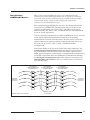
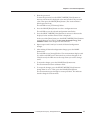
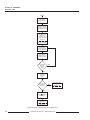
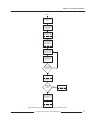
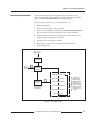
Chapter 4—Front Panel Operation Start Press MODE key until [Setup] LED is lit. Press the ▼ SELECT METER key until “rESETS” is displayed. Press the PHASE (Enter) key to select the “rESETS” option. P---- is displayed. Press the SELECT METER keys until your password is displayed. Then press the PHASE (Enter) key. No is displayed. Press the PHASE (Enter) key until the LED next to the value to be reset is lit. Press the ▲ SELECT METER (Value) key to change from No to Yes. Do you want to select another reset option? YES NO Press the MODE key once. Circuit Monitor displays No. Execute the selected resets? NO Press the PHASE (Enter) key Circuit Monitor returns to METERS mode. YES Press the ▲ SELECT METER (Value) key to select Yes Press PHASE (Enter) key Circuit Monitor performs resets Figure 4-3: Flowchart for performing resets using the Resets option 1998 Square D Company All Rights Reserved 57