1
1
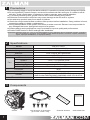
Precautions
■ Avoid inserting objects or hands into the fan while it is in operation to prevent product damage and injuries.
■ Do not ingest the Thermal Grease, and avoid its contact with skin and eyes. If contact is made
with skin, wash off with water. If ingested or irritation persists, seek medical attention.
■ To prevent possible injuries, gloves must be worn while handling this product.
■ Excessive force exerted on the fan may cause damage to the fan and/ or system.
■ Use and keep product away from reach of children.
■ Check the components list and condition of the product before installation. If any problem is found,
contact the retailer to obtain a replacement.
■ During transportation of the system, the cooler must be removed. Zalman is not responsible for
any damages that occur during the transport of a system.
■ Product design and specifications may be revised to improve quality and performance.
■ Enable PWM function in BIOS settings after installation.
Disclaimer) Zalman Tech Co., Ltd. is not responsible for any damages due to external causes, including
but not limited to, improper use, problems with electrical power, accident, neglect, alteration,
repair, improper installation, or improper testing.
2
Specifications
Model
Dimensions
Weight
Material
Heat Dissipation Area
Dimension
Speed
Noise Level
Fan
Bearing Type
Control Method
Connector
Input Voltage
Socket
Thermal Grease
3
CNPS7X LED+
104(L) X 85(W) X 134(H)mm
360g
Pure Copper and Aluminum
2,970cm²
Ø92 x 25(H)mm
1,350 – 2,100RPM ±10%
18 - 28dBA ±10%
Long Life Bearing
PWM Control, Auto Restart
4Pin
12V
Intel Socket LGA 115X/775 CPUs
AMD Socket FM2/FM1/AM3+/AM3/AM2+/AM2 CPU & APUs
ZM-STG2M(ver2)
Components
Th
er
Cooler
1
Clip Support & Pushpins
[For LGA 115X / 775]
m
al
G
re
as
e
Thermal Grease
User’s Manual
.COM