1
Main Brush
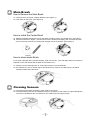
How to Remove the Main Brush
01. Hold the brush and push it slightly leftward. (See Figure 1)
02. Then take out the brush. (See Figure 2)
Figure 1
Figure 2
How to Install the Center Brush
01. Hold the brush(the end which the brush axis stuck out will be insert in the cleaner first ), See Figure 1.
02. Inset the end show in Figure 1 into the left end of the cleaner and slightly push it inward, the other
end of the brush will then be inserted into the right end of the cleaner. (See Figure 2)
Figure 1
Figure 2
How to clean center Brush
For a better cleaning effect, please regularly clean out the hair, yarn and large debris en-winded or
adhered on the main brush and the dust on the suction inlet .
01. Directly use the cleaning brush to clean paper scraps or minute particles.
02. En-winded hair, yarn or similar objects should be cut by scissors or pulled out by hand while
carefully rotating the main brush.
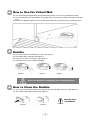
Cleaning Sensors
01. The sensors should be cleaned by cotton swab or soft cloth.
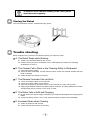
02. The wall-following sensors are installed in the front of bumper of the cleaner, the ground detection
sensors are installed at the front bottom of the cleaner (see the figure below)