1
Copyright © 2006 – OusKe.com
The Automated Delivery menus
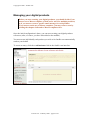
The new version of the Automated Delivery module has brought some changes to the
way you manage your products.
Let’s take a look at the menus at your disposition.
“Manage your digital products” menu
This is, as it was previously, the main component where you will create, edit and
manage your digital products.
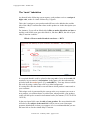
The product screen has been divided into 4 tabulations to make editing easier:
•
•
•
•
Main
Own email template
Master email template
Options
These 4 sections will be discussed in details later on.
“Manage Master templates” menu
This new feature allows you to use one same email template for as many
products as you wish.
This means that you don’t have to create an individual email message for each
new product you create: you can now just specify which Master template you
want to use.
In this menu, you can manage (create, edit, delete) your Master templates.
“Master templates” will be examined in details later on.
“Module options” menu
This new screen lets you specify options that will apply to the whole Automated
delivery module.
“Module options” will be examined later on.
Version 2.10 – February 2006 – page 3 of 23