1
Part 1 – Introduction
This document describes installation and operation of IDIS Solution Suite Video Wall software, which is designed to be
used with IDIS Solution Suite Standard or IDIS Solution Suite Federation software.
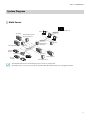
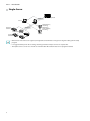
Multiple users can monitor video from devices through the streaming server. When the streaming service is not
running, monitoring is still available, but it is restricted to fewer users based on the maximum number of simultaneous
connections supported by the device.
When you register more than one streaming service by buying additional WIBU-Keys, the IDIS Solution Suite program
distributes streaming workload to the several streaming servers by using the load balancing function, and it increases
monitoring stability. If one of the streaming servers stops operating for any system problem, other streaming servers
take that server’s place within the limit of the number of channels that can be streamed.
•• Number of services and channels that streaming is available for:
-- Service Registration: One to four streaming services (the number of streaming services that can be registered
differs depending on the type and number of WIBU-Keys purchased)
-- Streaming: The number of channels that can be streamed equals the number of channels that can be recorded
unless streaming WIBU-Keys have been added (maximum of 512 to 2,048 channels depending on the type and
number of the WIBU-Keys when WIBU-Keys have been added).
•• This product includes software developed by the OpenSSL Project for use in the OpenSSL Toolkit
(http://www.openssl.org/).
•• The software included in this product contains some Open Sources. You may obtain the complete corresponding source
code from us. See the Open Source Guide on the software CD (OpenSourceGuide\OpenSourceGuide.pdf ) or as a printed
document included along with this document.
4