1
Reports (TopGuard Patrol PLUS only) • Six (6) Report Formats:
• Summary Report
• Personnel Report
• Control Point Report
• Incident Report
• Break Report
• Database History Report
• Four (4) Report Options
(Summary and Personnel Report
only)
• Print missing control points
• Print Exceptions
• Print missing control points
• Summary only
System Requirements Minimum System:
Recommended System:
• Intel® 486 processor (or
compatible)
• 16 MB RAM
• 50 MB hard disk
• Screen resolution 800 x 600
• USB port (for DTU)
• Intel® Pentium® Dual-Core E5700
3.0 GHz processor (or
compatible)
• 2 GB RAM
• 500 GB hard disk
• Screen resolution 1024 x 768
• USB port (for DTU)
Works under Windows® 2000, XP,
Vista and Windows 7
NOTE: In addition, TopGuard Patrol
PLUS includes a copy protection
device that must be attached to a
USB data port on the PC in order
for the software to operate.
TopGuard Patrol can be used on a stand-alone PC or on a workstation in a network. There is not a network version of TopGuard Patrol; however, multiple workstations having TopGuard Patrol PLUS installed can be configured to share downloaded data and produce reports independently.
Password Protection Each time TopGuard Patrol is
started, the password is requested.
You may log in as the administrator
or a user, as required. This
prevents unauthorized access to
master files and configuration of
data acquisition units. The downloaded data is also protected by
a CRC checksum to prevent manipulation.
Programming and
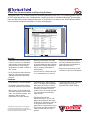
Downloading Tours are easily defined by manually entering or downloading control
points from a data acquisition unit
into a control point “pool.” Collected
data is evaluated immediately after
downloading it to the computer, and
within seconds you can view the
report on the screen. GCS magnetic data strips, RFID tags and bar
codes can be used as control points
or for predefined incidents or personnel identification. Reports may
be printed, saved to a file or sent
by e-mail in native TopGuard Patrol
format or as an HTML or Adobe
Acrobat® PDF file.
January 11, 2012
Configuration of
Data Acquisition and
Transfer Units -
Detex Limited Warranty
1-Year Limited Manufacturers
Warranty
The built-in utility function communicates with all GCS ProxiPen and
Escorte data acquisition units and
the ProxiPen data transfer
unit. It can be used to check the
battery status, set the date and
time, define dialing parameters for
data transfer by modem and
other tasks.
Modem Transfer Data transfer by modem allows recorded data to be downloaded from
different remote sites to a central
station for creating and evaluating
reports at one central site. The recorded data stays in the memory of
the data acquisition unit until the local modem confirms correct receipt
of all data. The PP-Modem utility,
included with TopGuard Patrol,
communicates with and downloads
the remote devices.
Detex Corporation
302 Detex Drive
New Braunfels, Texas 78130-3045 USA
PH. (830) 629-2900
(800) 729-3839
FAX (830) 620-6711
(800) 653-3839
http://www.detex.com
USA Sales:
[email protected]
International Sales:
[email protected]