1
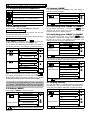
2. SECURING THE PROTECTED SITE
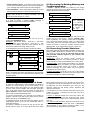
2.1. Security-Related Pushbuttons
Key
Function
Arming when nobody is at home
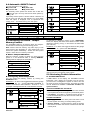
2.4 Arming ‘HOME’
If all perimeter zones are READY, and quick arming is
allowed, proceed as shown:
Action
Arming when people remain at home
Canceling the entry delay upon arming
(‘AWAY-INSTANT’ or ‘HOME-INSTANT’)
Resultant Display
☞
ARMING
Move to interior zone
Disarming the system and stopping alarms
☞
HH:MM
If Ready is displayed, all zones are secured, and you may
arm the system any way you choose.
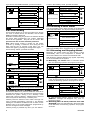
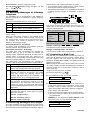
If at least one zone is open (disturbed), the display will read:
READY
HH:MM
If NOT READY is displayed, click
to review the
numbers and names of all open zones one by one.
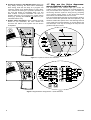
Let us assume that zone 2 (the back door) and zone 13
(the kitchen) are open. To investigate, proceed as follows:
Action
Resultant Display
☞
☞
NOT
READY
BACK
Sound
HH:MM
☞
"
"
"
(alternating)
OPEN
$ (after 10 seconds) $
NOT
☞
Do not disarm the system - just press
. Since
this operation reduces the security level, the PowerMax
will ask you to key in your master or user code, thus
making sure that you are an authorized user.
Action
Resultant Display
Sound
☞
☞[!]
READY
ARMING
Move to interior zone
☞
☞[!]
Sound
"
AWAY
Vacate the premises
NOW
$ (Exit Delay) $
"
#!
!#
AWAY
ARM lights steadily throughout the armed state
DE5450U
___
"
"
#!
!#
HOME
MEM
$ (Exit Delay) $
HH:MM
(alternating)
HOME
MEMORY
ARM flashes throughout the armed state
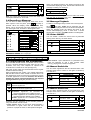
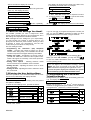
2.7 Arming ‘Instant’
You may arm AWAY or HOME without an entry delay any detection in any zone will trigger an immediate alarm.
If you wish to arm AWAY-INSTANT, proceed as follows:
Resultant Display
☞
☞
Sound
ARMING
AWAY
ARMING
INSTANT
"
"
(alternating)
$
EXIT
Sound
ARMING
Action
If the system is READY, proceed as shown:
Resultant Display
Resultant Display
HOME
2.3 Arming ‘AWAY’
PLEASE
HH:MM
CODE
Move to interior zone
HH:MM
IMPORTANT! All arming procedures below are based on
the assumption that quick arming has been enabled by
the installer. If quick arming is disabled, the PowerMax
will prompt you to enter your security code before arming.
ARMING
$ (Exit Delay) $
If an alarm occurred while the system was armed in the
AWAY mode, the display will respond differently:
☞
☞
HOME
"
"
#!
!#
ARM flashes throughout the armed state
.
Note: To quit immediately at any stage, press
It is highly recommended to fix the open zone(s), thus
restoring the system to the state of “ready to arm”. If you
do not know how to do this, consult your installer.
Action
___
CODE
Action
Kitchen
None (see note
below)
2.6 Switching from ‘AWAY’ to ‘HOME’
HOME
OPEN
Z13
Do not disarm the system - just press
. The
response will be the same as in Para. 2.2. Vacate the
premises before the exit delay expires.
DOOR
(alternating)
Z2
HH:MM
2.5 Switching from ‘HOME’ to ‘AWAY’
Before arming, make sure that READY is displayed:
NOT
$ (Exit Delay) $
"
#!
!#
ARM flashes throughout the armed state
2.2 Preparing to Arm
READY
HOME
HOME
Testing the system (see Para. 6.7).
Sound
PLEASE
Vacate the premises
EXIT
NOW
$ (Exit Delay) $
"
#!
!#
AWAY
ARM lights throughout the armed state
7