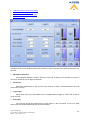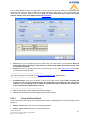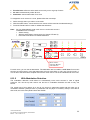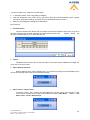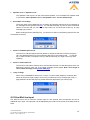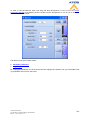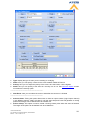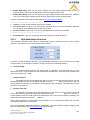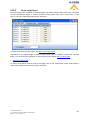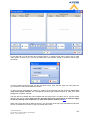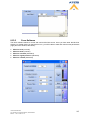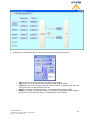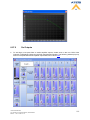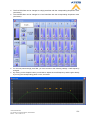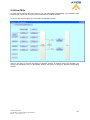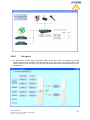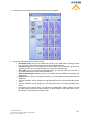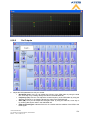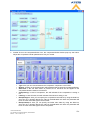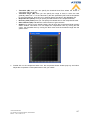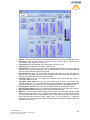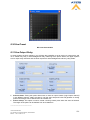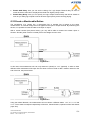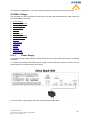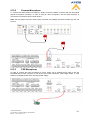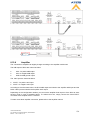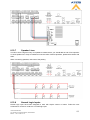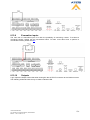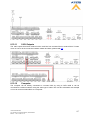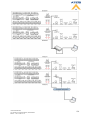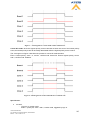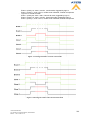
1
DIVA8M User Manual Version 1.1 Ateïs International Ch. du Dévent, 1024 Ecublens, Switzerland. Phone : +41 21 881 25 10 1 WELCOME ................................................................................................................................................. 5 1.1 1.2 1.3 1.4 1.4.1 1.4.2 1.4.3 1.4.4 1.4.5 1.5 2 HARDWARE DESCRIPTION ................................................................................................................ 10 2.1 2.2 2.3 2.4 3 FIREMAN MICROPHONE ...................................................................................................................... 19 PSS ..................................................................................................................................................... 19 PSM ................................................................................................................................................... 20 JB (JUNCTION BOX) ............................................................................................................................ 20 DIVA PHILOSOPHY ............................................................................................................................... 22 5.1 5.2 5.3 6 INSTALLATION PROCESS ..................................................................................................................... 15 UNINSTALL ......................................................................................................................................... 18 SOFTWARE UPGRADE ......................................................................................................................... 18 EXTERNAL DEVICES ............................................................................................................................ 19 4.1 4.2 4.3 4.4 5 DIVA8M FRONT VIEW ....................................................................................................................... 11 DIVA8M REAR VIEW ......................................................................................................................... 12 DIVA8S FRONT VIEW ........................................................................................................................ 13 DIVA8S REAR VIEW .......................................................................................................................... 14 SOFTWARE .............................................................................................................................................. 15 3.1 3.2 3.3 4 PRESENTATION ..................................................................................................................................... 5 CONTACT .............................................................................................................................................. 6 INSTALLATION ...................................................................................................................................... 6 SYSTEM OVERVIEW .............................................................................................................................. 7 General............................................................................................................................................ 7 Audio ............................................................................................................................................... 7 Connectivity..................................................................................................................................... 7 System Configuration ...................................................................................................................... 7 System Control ................................................................................................................................ 7 SAFETY DECLARATION ......................................................................................................................... 7 FRONT PANEL ..................................................................................................................................... 22 SOFTWARE .......................................................................................................................................... 22 EVENT ................................................................................................................................................ 22 FRONT PANEL OPERATIONS ............................................................................................................. 23 MENU ................................................................................................................................................. 23 6.1 6.1.1 Reset Monitor ................................................................................................................................ 23 Logout ........................................................................................................................................... 23 6.1.2 Mac Number .................................................................................................................................. 24 6.1.3 IP Address ..................................................................................................................................... 24 6.1.4 Set time .......................................................................................................................................... 25 6.1.5 Speaker Level ................................................................................................................................ 25 6.1.6 Log files ......................................................................................................................................... 25 6.1.7 Mic/Line ........................................................................................................................................ 25 6.1.8 Stop All Events .............................................................................................................................. 26 6.1.9 Ethernet Settings....................................................................................................................... 26 6.1.10 Music 1 Level............................................................................................................................ 26 6.1.11 Music 2 Level............................................................................................................................ 26 6.1.12 Get Reference ........................................................................................................................... 26 6.1.13 MUSIC................................................................................................................................................. 27 6.2 6.2.1 Zone Selection ............................................................................................................................... 27 Source Selection ............................................................................................................................ 27 6.2.2 Attenuator...................................................................................................................................... 27 6.2.3 MESSAGE AND MICROPHONE CALL .................................................................................................... 27 6.3 6.3.1 Messages ....................................................................................................................................... 27 Fireman Microphone..................................................................................................................... 28 6.3.2 7 DIVA SOFTWARE PRESENTATION ................................................................................................... 29 7.1 TITLE BAR .......................................................................................................................................... 30 Ateïs International Ch. du Dévent, 1024 Ecublens, Switzerland. Phone : +41 21 881 25 10 2 7.2 7.2.1 7.2.2 7.2.3 7.2.4 7.2.5 7.2.6 7.2.7 7.2.8 7.2.9 7.3 7.4 7.5 7.6 7.7 7.8 8 MAIN MENU BAR ............................................................................................................................... 30 File ................................................................................................................................................ 30 Edit ................................................................................................................................................ 31 View............................................................................................................................................... 31 User ............................................................................................................................................... 33 Operation ...................................................................................................................................... 33 Tools .............................................................................................................................................. 34 Lock ............................................................................................................................................... 34 Window.......................................................................................................................................... 35 Help ............................................................................................................................................... 35 TOOLBARS .......................................................................................................................................... 36 TAB BAR ............................................................................................................................................. 37 DESIGN COMPONENT SECTION ........................................................................................................... 37 DESIGN VIEW AREA ........................................................................................................................... 39 PROPERTY CONTROL SECTION ............................................................................................................ 39 STATUS BAR ....................................................................................................................................... 40 HOW TO? .................................................................................................................................................. 41 SAVE/OPEN ......................................................................................................................................... 41 8.1 8.1.1 Open .............................................................................................................................................. 42 Save ............................................................................................................................................... 42 8.1.2 Save as........................................................................................................................................... 42 8.1.3 Autosave ........................................................................................................................................ 42 8.1.4 PRINT PROJECT ................................................................................................................................... 43 8.2 8.3 START A NEW PROJECT ...................................................................................................................... 44 8.4 CHANGE COLOR SCHEME ................................................................................................................... 46 8.5 CONFIGURE NETWORK OPTIONS ......................................................................................................... 46 8.6 USE THE USER MANAGEMENT ............................................................................................................ 47 8.6.1 Add User Account ......................................................................................................................... 48 Delete User Account...................................................................................................................... 49 8.6.2 Explanation on User Level ............................................................................................................ 49 8.6.3 ENTER PASSWORD .............................................................................................................................. 50 8.7 8.8 UPDATE DIVA ..................................................................................................................................... 51 8.9 COMPILE ............................................................................................................................................. 51 8.10 STORE ................................................................................................................................................. 51 8.11 REVERSE ............................................................................................................................................. 52 8.12 ADD DESIGN COMPONENT .................................................................................................................. 53 8.13 SEARCH DEVICE ................................................................................................................................. 54 8.14 SET IP ADDRESS ................................................................................................................................. 55 8.15 PERFORM A DIVA MASTER NETWORK ............................................................................................... 55 8.16 ADD MESSAGES INTO DIVA ............................................................................................................... 56 TO SET SPEAKER PARAMETERS SETTINGS .......................................................................................... 58 8.17 8.18 USE EVENT ......................................................................................................................................... 59 8.18.1 Common Options ...................................................................................................................... 61 Event Sequence ......................................................................................................................... 62 8.18.2 Event Type ................................................................................................................................ 65 8.18.3 SET UP FRONT PANEL MESSAGES ....................................................................................................... 81 8.19 8.20 USE FIREMAN MICROPHONE ............................................................................................................... 83 8.21 USE MUSIC SOURCE ........................................................................................................................... 85 8.21.1 From the Front Panel ............................................................................................................... 87 With Modulation Detection ...................................................................................................... 88 8.21.2 In Permanent Mode .................................................................................................................. 89 8.21.3 From PSS.................................................................................................................................. 89 8.21.4 From Logic Input...................................................................................................................... 91 8.21.5 Software Control ...................................................................................................................... 94 8.21.6 USE PSS MICROPHONE ....................................................................................................................... 95 8.22 8.22.1 General Page............................................................................................................................ 95 Keys Page ................................................................................................................................. 97 8.22.2 USE MIC/LINE INPUT .......................................................................................................................... 99 8.23 8.23.1 With Modulation Detection .................................................................................................... 102 Ateïs International Ch. du Dévent, 1024 Ecublens, Switzerland. Phone : +41 21 881 25 10 3 8.23.2 From Logic Input.................................................................................................................... 103 From Software ........................................................................................................................ 105 8.23.3 USE LOGIC INPUTS ............................................................................................................................ 106 8.24 8.24.1 Normal Logic Inputs ............................................................................................................... 107 Evacuation Inputs ................................................................................................................... 108 8.24.2 External Fault Inputs .............................................................................................................. 109 8.24.3 USE MONITORING ............................................................................................................................. 110 8.25 8.25.1 Zone Monitoring ..................................................................................................................... 111 Amplifier Monitoring .............................................................................................................. 112 8.25.2 USE THE SCHEDULER ....................................................................................................................... 112 8.26 8.27 USE FILTERS ..................................................................................................................................... 116 8.27.1 On Inputs ................................................................................................................................ 117 On Outputs ............................................................................................................................. 119 8.27.2 USE PEQS ......................................................................................................................................... 121 8.28 8.28.1 On Inputs ................................................................................................................................ 122 On Outputs ............................................................................................................................. 124 8.28.2 USE COMPRESSOR/LIMITER .............................................................................................................. 125 8.29 8.30 USE PRESET ...................................................................................................................................... 129 8.31 USE OUTPUT RELAY ......................................................................................................................... 129 8.32 CREATE A MONITORABLE BUTTON................................................................................................... 130 8.33 WIRE THINGS.................................................................................................................................... 131 8.33.1 Power Supply.......................................................................................................................... 131 Fireman Microphone .............................................................................................................. 132 8.33.2 PSS Microphone ..................................................................................................................... 132 8.33.3 Music Sources......................................................................................................................... 133 8.33.4 Mic/Line ................................................................................................................................. 133 8.33.5 Amplifier ................................................................................................................................. 134 8.33.6 Speaker Lines ......................................................................................................................... 135 8.33.7 Normal Logic Inputs ............................................................................................................... 135 8.33.8 Evacuation inputs ................................................................................................................... 136 8.33.9 Outputs ................................................................................................................................... 136 8.33.10 100V Outputs .......................................................................................................................... 137 8.33.11 Computer ................................................................................................................................ 137 8.33.12 RS232 ..................................................................................................................................... 139 8.33.13 DIVA8S ................................................................................................................................... 139 8.33.14 Remote Panel.......................................................................................................................... 140 8.33.15 Basic Wiring ........................................................................................................................... 140 8.33.16 USE TONE GENERATOR .................................................................................................................... 140 8.34 9 COMMUNICATION PROTOCOLS .................................................................................................... 140 10 EXPLANATION ABOUT MONITORING PROCESS ....................................................................... 141 11 CANCEL ALL AND COEXIST MODE ............................................................................................... 142 Ateïs International Ch. du Dévent, 1024 Ecublens, Switzerland. Phone : +41 21 881 25 10 4 1 Welcome Thank you for choosing ATEÏS DIVA8M . We (at ATEÏS) hope you will enjoy to use this exciting piece of technology as much as we enjoy developing and building it. This Help file version is: Ver.EN.1.1 This files has been written for the ATEIS DIVA software version: VER1.0.1.19 This manual can be updated at any time without prior notice in order to keep this manual up to date. In case of errors in this manual or not clear process description, feel free to submit us mistakes, suggestions or questions by sending an email. This document intends to be a complete manual and we hope that this Help file will provide you all information or answers needed. However if you have any questions, feel free to contact us. 1.1 Presentation With more than twenty years of experience, ATEÏS has quickly established itself as a leading manufacturer of Public Address, Voice Alarm systems and counter intercoms. The constant growth of market share in Europe provides confirmation of the quality of ATEÏS’s commercial and technical approach. Products: The company now offers a full range of sound equipment: microphones, preamplifiers, digital processors, digital audio matrixes, loud-speaker monitoring systems, amplifiers, etc. ATEÏS designs and manufactures leading products in the voice alarm systems market which have been certified EN60849 compliant by the TÜV. Development: Thanks to a development team that includes thirty engineers, and to constant investment, we are able to respond rapidly to the demands of our various markets with specific solutions and cutting edge technology. We have distributors in more than fifteen countries in Europe and the Middle East, with whom we have carried out major projects. In choosing ATEÏS, you are guaranteed a trustworthy partner that can be counted on for the long term. ATEÏS Field: ATEÏS's audio systems have been installed in the following markets : - Railways - Subways - Airports - High raise buildings - Hotels - Restaurants - Shopping malls - Theme parks Ateïs International Ch. du Dévent, 1024 Ecublens, Switzerland. Phone : +41 21 881 25 10 5 - Places of worship - Stadia. - Museums. - Industrial buildings - Industrial plants - Commercial buildings 1.2 Contact Ateïs International S.A. Chemin du Dévent, 1024 Ecublens -Switzerland Phone: +41 (0)21/ 881 25 10 Fax: +41 (0)21/ 881 25 09 Mail: [email protected] http://www.ateis-international.com 1.3 Installation DIVA8M Package Content: Opening the box you should find the following items: • DIVA Master Unit • Rack rounting brackets, 2 pcs • Metal screws Philips M3x6, 6 pcs • 12-way euroblock connectors, 1 pcs • 10-way euroblock connectors, 3 pcs • 5-way euroblock connectors, 2 pcs • 4-way euroblock connector, 11 pcs • 230V/24 VDC power supply • CD-ROM • Fireman Microphone If you realize anything missing, please contact your distributor. Rack mounting: If needed, fit the rack mounting brackets to each side of the DIVA by using the 6 pcs Phillips M3x6 screws supplied with the package. Ateïs International Ch. du Dévent, 1024 Ecublens, Switzerland. Phone : +41 21 881 25 10 6 Sitting: The DIVA takes a 2U 19’’ rack space and generates little heat itself. Consider leaving enough ventilation space above and below the unit. Do not mount the LAP directly above heat generating devices like power supplies or power amplifiers. Power connection: DIVA only accepts 24 VDC power supply. Use the power supply furnished with DIVA or use an external 24VDC power supply like the PS24 and connect it on a 4-way euroblock connector respecting the polarity. 1.4 System Overview This paragraph intend to briefly described the main DIVA properties. 1.4.1 General The DIVA8M module unit houses: audio digital processing (DSP), a matrix, a digital message player, a fully monitored fireman microphone, amplifiers monitoring with switchover to backup amplifier and loudspeaker lines monitoring. It can process and route one PSSxxDT security microphone console or up to eight cascaded PSM paging microphones and two 0 dB audio inputs into 2 different channels (Music + Voice). Each input is fitted with volume controls and equalizers. The two audio inputs feature contact and VOX activation (ideal when using the cordless microphone, for example). 1.4.2 Audio There are 5 audio inputs. Two are 0 dB line inputs for tuner, cd player, etc. One gain adjustable MIC/LINE inputs for using a third 0 dB source or an external microphone. One input for PSS or PSM microphone and one fireman microphone input. Built in DIVA8M, a front panel fireman microphone input that is fully monitored. There are eight monitored loudspeaker zones (A+B) feed by two amplifier channel Voice and Music. 1.4.3 Connectivity The DIVA master is designed to be networked with slave DIVA on RS485 using CAT5 cables. The DIVA master is connected to the computer upon Ethernet protocol. Third party control can be achieved via the RS232. Adding slave increase the number of zone as well as input/output contacts. 1.4.4 System Configuration The DIVA8M/S configuration is done with the DIVA Windows® based graphical design and operating environment software. This is an all in one software with configurable option for each DIVA’s features. 1.4.5 System Control The DIVA software allows user to real-time control features like PEQs, filtering, level adjustment. But DIVA has also been defined to be a standalone device once configured. The front panel offers controls like, zone selection, music routing, zone attenuator knob, message launching buttons and different indicators LED. 1.5 Safety Declaration Ateïs International Ch. du Dévent, 1024 Ecublens, Switzerland. Phone : +41 21 881 25 10 7 • Do not expose the DIVA to extreme temperatures, direct sunlight, humidity, or dust, which could cause fire or electrical shock hazard. • Keep away water or other liquids from the DIVA. Otherwise fire or electrical shock may result. • Connect the power cord only to an AC outlet of the type stated in this Owner's Manual or as marked on the unit. Otherwise fire and electrical shock hazard results. • When disconnecting the power cord from an AC outlet always grab the plug. Never pull the cord. A damaged power cord is a potential risk of fire and electrical shock hazard. • Avoid touching power plugs with wet hands. Doing so is a potential electrical shock hazard. • Take care for correct polarity when operating the DIVA from a DC power source. Reversed polarity may cause damage to the unit or the batteries. • Avoid placing heavy objects on power cords. A damaged power cord is a fire and electrical shock hazard. • Do not cut, scratch, bend, twist, pull, or heat the power cord. A damaged power cord is a fire and electrical shock hazard. Ask your ATEÏS dealer for replacement. • Turn off immediately the unit, remove the power cord from the AC outlet and consult your ATEÏS dealer in any of the following circumstances: • Smoke, odor, or noise getting out of the unit. • Foreign objects or liquids get inside the DIVA. • The unit has been dropped or the shell is damaged. • The power cord is damaged. If you continue using the DIVA, fire and electrical shock may result. • Do not drop or insert metallic objects or flammable materials into the unit as this may result in fire and electrical shock. • Do not remove the DIVA's cover, as there are exposed parts inside carrying high voltages that may cause an electrical shock. Contact your ATEÏS dealer if internal inspection, maintenance, or repair is necessary. • Do not try to make any modifications to the DIVA. This is a potential fire and electrical shock hazard. • Avoid the DIVA's ventilation slots to be blocked. Blocking the ventilation slots is a potential fire hazard. • To prevent the unit from falling down and causing personal injury and/or property damage, avoid installing or mounting the unit in unstable locations. • Leave enough space above and below the unit to provide good ventilation of the DIVA. If the airflow is not adequate, the DIVA will heat up inside and may cause a fire. • Operate the DIVA in an environment with a free-air temperature of between 0 °C and 40 °C (32 °F and 104 °F). • Turn off all audio equipment when making any connections to the DIVA, and make sure to use adequate cables. Ateïs International Ch. du Dévent, 1024 Ecublens, Switzerland. Phone : +41 21 881 25 10 8 • Do not use benzene, thinner, or chemicals to clean the DIVA. Use only a soft, dry cloth. • If the DIVA is moved from a cold place (e.g., overnight in a car) to a warmer environment, condensation may form inside the unit, which may affect performance. Allow the DIVA to acclimatize for about one hour before use. Ateïs International Ch. du Dévent, 1024 Ecublens, Switzerland. Phone : +41 21 881 25 10 9 2 Hardware Description DIVA's conception lead to a very intuitive front panel as well as very complete connection solutions on the back panel. In the next four paragraph, the DIVA8M/S front panel and the rear panel connection board are detailed. Ateïs International Ch. du Dévent, 1024 Ecublens, Switzerland. Phone : +41 21 881 25 10 10 2.1 DIVA8M Front view Ateïs International Ch. du Dévent, 1024 Ecublens, Switzerland. Phone : +41 21 881 25 10 11 2.2 DIVA8M Rear view Ateïs International Ch. du Dévent, 1024 Ecublens, Switzerland. Phone : +41 21 881 25 10 12 2.3 DIVA8S Front view Zone Event Indicator LEDs Power Indicator LED Zone Selection Buttons Ateïs International Ch. du Dévent, 1024 Ecublens, Switzerland. Phone : +41 21 881 25 10 13 2.4 DIVA8S Rear view Ateïs International Ch. du Dévent, 1024 Ecublens, Switzerland. Phone : +41 21 881 25 10 14 3 Software As briefly mentioned in the Installation paragraph, DIVA8M package hold a CD-Rom. The CD contain the DIVA8M Quick Start Manual (.pdf), User Manual (Microsoft® HTML Help Executable .chm, HTML .htm). and DIVA software. It could happen that the software on the CD-Rom is not the last release. In that case, please visit ATEÏS website to download the latest release and follow the steps described in the Software Installation Process. 3.1 Installation Process • Insert the CD-Rom in your computer. • Double Click on the "My Computer" on the desktop. Open the CD-ROM submenu. • Double Click on the DIVA software icon . The DIVA installshield wizard will prompt. Please follow the install instruction that are displayed. Change the User Name and the Organization's name at your convenience. Ateïs International Ch. du Dévent, 1024 Ecublens, Switzerland. Phone : +41 21 881 25 10 15 Choose an installation folder, by default, it will be install in C:\Program Files Then launch the installation process by clicking "Install". Ateïs International Ch. du Dévent, 1024 Ecublens, Switzerland. Phone : +41 21 881 25 10 16 To finish the Installation process, just click "Finish". The installation process will automatically create a Desktop Icon like the one under. Ateïs International Ch. du Dévent, 1024 Ecublens, Switzerland. Phone : +41 21 881 25 10 17 3.2 Uninstall To uninstall a current version of the DIVA software, please follow the next few steps: Click on "start" -> "Program" -> ATEIS -> DIVA -> ATEIS DIVA v1.0.0-Uninstall Windows Installer will ask you if you are really sure to remove this program, click "Yes". 3.3 Software Upgrade In case of a new release of the DIVA software: Please go to the ATEÏS website in order to download the last software version. Before installing the new software, please uninstall the current version. Double click the new software version icon. Follow the installation process. Ateïs International Ch. du Dévent, 1024 Ecublens, Switzerland. Phone : +41 21 881 25 10 18 4 External Devices This chapter will quickly describe the external devices that could be connected to a DIVA unit. It won't speak about external contact or button that also could be used. For more information about those devices, please visit ATEÏS website. 4.1 Fireman Microphone The Fireman Microphone SHM 1 is a small compact microphone dedicated to security calling. It is a totally monitored microphone with internal resistor network to detect four different states (Shortcut, Closed Contact, Open Contact, Absent). Firemen Microphone SHM 1 for All call, group or zone calls. The EN 60849 surveillance is realised thanks to the DIVA SEC interface. 4.2 PSS The PSSDT paging microphone can be configured either using a PC computer, or by using control keys and the front LCD screen of the SINAPS module to which it is connected. Access can be password-protected. All parameters needed for site operating can be programmed: zones assigned to the different buttons, name of zones, zone groups, priorities, access to different messages, levels adjustments, pre-call chime, press-to-talk, music ON/OFF and music routing. Its large LCD screen provides an overall view of busy zones and active sources. A VU meter controls the microphone presence and modulation level. A built-in loudspeaker makes it possible to listen to all system-generated messages and announcements. The PSSDT console is SINAPS security system interface and is fully monitored (microphone capsule, power supply, touchscreen, audio and RS485 connections). Any system faults are detected, located and indicated clearly on the screen. Different product references are available to suit all site sizes: Ateïs International Ch. du Dévent, 1024 Ecublens, Switzerland. Phone : +41 21 881 25 10 19 PSS849: 4 zones for SINAPS-Compact (IDA4) PSS12DT: 12 zones for SINAPS-M and SINAPS-XM PSS24DT: 24 zones for SINAPS-M and SINAPS-XM PSS48DT: 48 zones for SINAPS-M and SINAPS-XM PSS72DT: 72 zones for SINAPS-M and SINAPS-XM PSS96DT: 96 zones for SINAPS-M and SINAPS-XM Access to the PSS Data Sheet. 4.3 PSM The PSM8 is a 10 keys call station of which 8 are programmable with microphone, integrated loudspeaker and buzzer. It can be used with either IDA4(X)(M)(s) or DIVA8M. it is possible to add up to 11 extensions to the PSM8 increasing programmable keys number to 96. Extensions are call stations without microphone. The PSM8 can be cascade in order to increase the number of call station. In that case, the first PSM8 will become a Master PSM8 and the rest will become slave PSM8. 4.4 JB (Junction Box) Easy chain-connection of LAP peripherals (URC and PPM), using standard CAT5 cables. KEY FEATURES: • 5 x RJ45: • Connection to previous JB (or LAP bus on the first JB) • RS485-SIDE for URC connection • Easy connection to a Master PPM using the supplied 10 pins cable. • Connection to first Slave PPM (Slave features are not available for the moment) • MAIN OUT connection to next JB Ateïs International Ch. du Dévent, 1024 Ecublens, Switzerland. Phone : +41 21 881 25 10 20 • 2 internal screw connectors for 0 dB audio: • audio output from PPM microphone --> Audio Output (connect to the Audio In of the LAP) • audio input to PPM speaker --> Audio Input (connect to the Audio Output of the LAP, if needed) • 1 input for additional 24V power supply. (Depending on distance between LAP and PPM/URC you will have to put an external powe supplyr) • 1 internal switch for PPM Master or Slave selection. (Slave features are not available for the moment) • 1 internal switch for System or Local power supply selection. Ateïs International Ch. du Dévent, 1024 Ecublens, Switzerland. Phone : +41 21 881 25 10 21 5 DIVA Philosophy Before going any further, the philosophy of DIVA have to be exposed. This chapter will be split in three parts: • • • Front Panel Software Events 5.1 Front Panel The DIVA front panel have been made for basic controls operation as well as to define basic settings. Some features of the front can be disabled in case of advanced configuration. The Front Panel is designed to start three different messages, toggle between two music sources or none, zone selection and Fireman Microphone call, access different menus and to add level attenuation for each speakers zone. 5.2 Software The DIVA software is designed to perform a complete configuration as well as to real time control some parameters. Some software features activation can induced the corresponding front panel controls to be disabled. Mostly, real time controls are related to audio settings, you will have control on parameters like, PEQs, level and filters. 5.3 Event DIVA is a multi-functional device that can be use with several external sources and trigger command. In order to associate any action to an external command, you will have to define Event. Event can be compare to an action. Each action or event can be started by a multiple of different ways: external trigger, modulation detection, etc. Those events are hierarchically organized by priority levels set for each one of them. You also can set permanent event like playing music. More information about Events can be found here. Ateïs International Ch. du Dévent, 1024 Ecublens, Switzerland. Phone : +41 21 881 25 10 22 6 Front Panel Operations This chapter will describe all the operations that can be achieved from the front panel. In order to be clear as possible, this chapter will be divider by theme: • • • Menu Music Messages Some operation from the front panel required an higher level than level 1, in that case you will have to enter a valid user name and password. Please check the user level explanation as well as How To Enter Password. 6.1 Menu The menu display offers the possibility to access different controls and system information. Here are the list of menu topic you will be able to access: • • • • • • • • • • • • • Reset Monitor Logout Mac Number IP Address Set Time Speaker Level Log files Mic/Lines Stop All Events Ethernet Setting Music 1 Level Music 2 Level Get Reference The front panel buttons are described in the hardware description -> Front View. 6.1.1 Reset Monitor The reset monitor menu allows user to reset the speaker line monitoring after fixing an eventual line problems. • • • • Press the arrow keys to acess the Reset Monitor menu Click Ok, it will display "Are you sure to rest monitoring?" Click OK Press ESC to go out of the menu 6.1.2 Logout In case of multiuser levelling, you can logout from the current user session in order to login in an other one. • • • • Use arrow keys to access the Logout menu Click OK, it will display "Are you sure to Logout?" Click OK You will be prompt to login. Ateïs International Ch. du Dévent, 1024 Ecublens, Switzerland. Phone : +41 21 881 25 10 23 • • • • Enter your user name Enter your password You will be log in a your user account Press ESC to go out of the menu 6.1.3 Mac Number In the world of computer networking, there is one common way to set an quasi-unique identifier to a network device. This is the MAC address (Media Access Control Address). This number act like a name for one particular network device. This cannot be change. To see the MAC address just follow this steps: • • • Use the arrow keys to access the MAC ADRESS menu click OK, the MAC Address number is display Press ESC to go out of the menu The MAC address value's can be changed, please change the MAC address only if it's needed. • • • • • • Use the arrow keys to access the MAC ADRESS menu click OK, the MAC Address number is display Use Arrow Key to go on the number to change Us +/- key to change the number's value Press OK to accept the changes, you will be prompt to validate the changes Press OK if you accept the changes In the world of computer networking, there is one common way to set an quasi-unique identifier to a network device. This is the MAC address (Media Access Control Address). This number act like a name for one particular network device. This cannot be change. To see the MAC address just follow this steps: • • • Use the arrow keys to access the MAC ADRESS menu click OK, the MAC Address number is display Press ESC to go out of the menu The MAC address value's can be changed, please change the MAC address only if it's needed. • • • • • • Use the arrow keys to access the MAC ADRESS menu click OK, the MAC Address number is display Use Arrow Key to go on the number to change Us +/- key to change the number's value Press OK to accept the changes, you will be prompt to validate the changes Press OK if you accept the changes 6.1.4 IP Address The IP address (Internet Protocol Address) is a common way of using an address in order to identify and communicate into a computer network. This IP address is mostly used to be a locator to a device in order to communicate with it. This is most frequently an unique address into a specific network. This address can be seen and modified (see How to Set IP Address). • • Use the arrow key to access the IP Address menu Click OK, you will see the current IP address Ateïs International Ch. du Dévent, 1024 Ecublens, Switzerland. Phone : +41 21 881 25 10 24 • Press ESC to go out of the menu 6.1.5 Set time On DIVA front panel, you can set the current location time format as well as the current date and time. • • • • • • • • • • • • Use arrow keys to access the set time menu Press OK Use the arrow keys to access the format submenu Press OK, you will have the choice between the 24 hours format or the AM/PM format. Select the one you need Press OK Use arrow keys to go to the Time, Data submenu Press OK, you will see the date and time stored into DIVA. Data and time are display as follow: Month/Day hour/minutes/second. Use the arrow keys to go on the number you need to change Use + or - keys to adjust the number value Press OK, you will be prompt to validate the time/data changes "Validate the Time/Data changes?" Press OK Press ESC to go out of the menu 6.1.6 Speaker Level You can adjust the integrated front panel speaker level to avoid high level disturbance. • • • • Use arrow keys to access the Speaker Level menu Press OK Adjust the level with the +/- or arrow keys Press ESC to go out of the menu 6.1.7 Log files In the menu section of DIVA, you read the Log File as well as delete it if needed. • • • • • • • • • • Use arrow keys to access the Log Files menu Press OK Use arrow keys to access DELETE submenu. If you want to delete the Log Files, Press OK. It will ask you "Are you sure to delete Log Files?". If Yes, Press OK If No, Press ESC Use arrow keys to go on the VIEW submenu Click OK Use arrow keys to display different Log Files information Press ESC to go out of the menu 6.1.8 Mic/Line With this menu, you can adjust the level of the external microphone or the third music source. • • • • Use arrow keys to access MIC/LINE menu Press OK Adjust level either with +/- or arrow keys Press ESC to go out of the menu Ateïs International Ch. du Dévent, 1024 Ecublens, Switzerland. Phone : +41 21 881 25 10 25 6.1.9 Stop All Events From the front panel of DIVA, you are able to stop all the running events (events are discussed in How to use events). • • • • • Use arrow keys to access the STOP ALL EVENTS menu Press OK, it will ask you "Are you sure to Stop all events?" If yes, Press OK If no, press ESC Press ESC to go out of the menu 6.1.10 Ethernet Settings From the front panel menu, you can set all parameters concerning the network. If not already log in, DIVA will ask you to enter a valid username and password to be able to modify Ethernet parameters. • • • • • • • • • • • • Use the arrow keys to access the Ethernet Setting menu Press OK twice Choose between DHCP enable or disable. Enable DHCP means that the IP configuration will be automatically set by your network, be careful when using this option. In most of the case, you will have to enter manually your network prameters, to achieve this choose disable. Press OK Enter the IP address value using arrow keys and +/- keys to change the IP address value. Default address is 192.168.100.1000 Press OK Enter the Submask value using arrow keys and +/- keys to change the IP address value. Default Submask is 255.255.255.0 Press OK Enter the Gateway value using arrow keys and +/- keys to change the IP address value. Default Gateway is 192.168.100.1 Press OK You will be prompt: Are you sure? Press OK, if yes or no if not 6.1.11 Music 1 Level You can adjust the level of the music source 1. • • • • Use arrow keys to access the Speaker Level menu Press OK Adjust the level with the +/- or arrow keys Press ESC to go out of the menu 6.1.12 Music 2 Level You can adjust the level of the music source 2. • • • • Use arrow keys to access the Speaker Level menu Press OK Adjust the level with the +/- or arrow keys Press ESC to go out of the menu 6.1.13 Get Reference From the front panel menu, you can get monitoring references by accessing the Get Reference menu. You can get reference individually for each speaker zones and amplifiers. Ateïs International Ch. du Dévent, 1024 Ecublens, Switzerland. Phone : +41 21 881 25 10 26 • • • • Use the arrow keys to access the Get Reference menu Press OK Choose between zone 1 - 8 or Music Amplifier - Voice Amplifier Press OK The new monitoring reference is now made and stored. 6.2 Music On DIVA front panel, you have the possibility to assigned music sources to a zone (or multiple), set up attenuation for each speaker zone and to toggle between music sources. This will be possible in the case you set music in Route Key mode, see How To Use Music Source. 6.2.1 Zone Selection The zone selections have been designed to be simple. In order to select a zone, please follow the next steps: • • • Press the zone button(s) you want to activate. The corresponding green selection LED(s) should light(s) up Choose the music source you want to route Press the Route button 6.2.2 Source Selection The DIVA front panel offers the possibility to toggle between two music sources or none. • • • Press the SELECT button to go from Source 1 to Source 2 Press SELECT button to go from Source 2 to no selection Press SELECT button to re-select Source 1 6.2.3 Attenuator In each zone, the music level can be attenuated depending your needs. • Adjust the corresponding zone(s) ATTENUATOR KNOBS to the desired level Note: if two music sources are used, keep in mind that attenuator will only have effect on only one of them (music 1). This is due to the fact that the amplifier used for the music source 2 is the one dedicated for voice call. 6.3 Message and Microphone Call From the front panel, you have the choice two start three different messages or do a zone call with the fireman microphone. See those two chapter for more information about how to set up messages and how to configure the Fireman Microphone. 6.3.1 Messages Next steps are for zone selection in case of starting a message: • • Press the zone button(s) where you want the message to be played. The corresponding green selection LED(s) should light(s) up Press the desired message button, the message will start performing in the zone. If EVAC message, the corresponding EVAC LED(s) should light(s) up. If Test or Alarm message, the corresponding PAGE LED(s) should light up Note: If the message set on the front panel have been defined with pre-defined zone, pressing only the message button will result in starting the message in the pre-defined zones. Ateïs International Ch. du Dévent, 1024 Ecublens, Switzerland. Phone : +41 21 881 25 10 27 6.3.2 Fireman Microphone Next steps are for zone call with the fireman microphone: • • Press the zone button(s) where you want the call to be played. The corresponding green selection LED(s) should light(s) up Press the fireman microphone contact to start speaking in the selected zone(s), the corresponding EVAC LED(s) should light(s) up Note: If the fireman microphone paging event has pre-defined zones, pressing the microphone button will start a call in the pre-defined zone. In case of doing a call in manually selected zone, the next microphone call will take place in the pre-defined zones after a adjustable delay, see How To Use Fireman Microphone. Ateïs International Ch. du Dévent, 1024 Ecublens, Switzerland. Phone : +41 21 881 25 10 28 7 DIVA Software Presentation The chapter will introduce to you the DIVA software. This is a visual presentation in order to let you know where you can find the needed tools. After installing the DIVA software, you can access it: • Either by double-clicking on the Desktop icon: • Or by start -> program files -> Ateis -> ATEIS DIVA v1.x.x. The DIVA software starts with no file loaded and a blank worksheet looking as follow: 1 2 3 4 5 6 7 8 Startup View Elements: (1) Title Bar Displays the path name of the active file. (2) Menu Bar Holds the main menu commands arranged into functionality groups. (3) Toolbars Toolbar items act like a shortcut to their corresponding menu command. Ateïs International Ch. du Dévent, 1024 Ecublens, Switzerland. Phone : +41 21 881 25 10 29 (4) Tab Bar Shows the window title of all open design and component control windows for quick access. (5) Design Component Holds all design component libraries. Section (6) Design View Area This area is your work space showing all design windows and component control windows. (7) Property Control Section This section slides up for 'System Status', 'LED Display'. (8) Status Bar Displays useful status, communication and compiler information. 7.1 Title Bar The title bar displays 'DIVA', 'Untitled' if you start a new system design, or the full path name of the saved file. At the right hand corner you can find the usual Windows minimize button and the close box, which exit the program. 7.2 Main Menu Bar The main menu bar contains the following menus: • • • • • • • • • File Edit View User Operation Tools Lock Window Help 7.2.1 File In this paragraph, you will find everything related to system files as well as printing command. All the DIVA files are saved under the .diva extension. Ateïs International Ch. du Dévent, 1024 Ecublens, Switzerland. Phone : +41 21 881 25 10 30 • New: Opens a new system file • Save: Saves the current system file • Save as: Opens the 'Save As...' dialog window to choose file path and name • Open: Opens the 'Open...' dialog window to choose an existing file path and name • Open autosaved: Opens the last automatically saved file • Recent files: Pathname>> Quick access to recently used files ________________ • Print: Starts printing ________________ • Exit: Terminates the current LAP session after asking to save modified files 7.2.2 Edit Here you will find all the common basic edition tools of windows based software. • • • • • • Undo/ctrl+z: Will undo the last actions Redo/ctrl+y: Will redo the last action or will retrieve the last state in case undoing too far Cut/ctrl+x: Cuts out the active selection and copies it to the operating system’s clipboard Copy/ctrl+c: Copies the active selection to the operating system’s clipboard Paste/ctrl+v: Pastes the content of the operating system’s clipboard Delete/Del.: Deletes the active selection 7.2.3 View The commands in this group are used to call closed or invisible control windows and toolbars. Ateïs International Ch. du Dévent, 1024 Ecublens, Switzerland. Phone : +41 21 881 25 10 31 • System: Calls the 'System' library control window to add and create a network system • Preset List: Calls the 'Component' library control window to choose DSP components • LED Display: Calls the 'System Status' control window • System Status: Calls the 'PPM Chime' control window for assigning pre- and post-announcement chimes ________________ • Event: Calls the 'Logic In' control window to edit and monitor TTL input properties • Message: Calls the 'Logic In' control window to edit and monitor TTL output properties • Scheduler: Calls the 'Logic In' control window to edit and monitor analog control input properties • GPIO: List Calls the 'Subpreset Elements' control window to monitor parameters registered with the current subpreset • LCD: Calls the 'Remote device List' where you can search for and register URCs or PPMs in the system ________________ Ateïs International Ch. du Dévent, 1024 Ecublens, Switzerland. Phone : +41 21 881 25 10 32 • Toolbars: Within this menu subgroup you'll find the commands to call closed or hidden toolbars or floating toolbox items > Edit > Compile > Preset > Control > Function Link > Help > Windows Manager 7.2.4 User Here you are able to manage the user right: add users with a password and restrict access only to needed features. • User Management: Calls the 'User Management' window to set up users or user groups and their individual privileges • Logout: Opens the 'User Login' window 7.2.5 Operation Here you can find all data communication commands. Ateïs International Ch. du Dévent, 1024 Ecublens, Switzerland. Phone : +41 21 881 25 10 33 • • • • • • • • • • Set Date/Time: Allow user to set the time and date of the DIVA unit Set Store Password: Offers a store process protection, password management Compile: Compiles the current configuration and displays eventual errors Store: Upload configuration parameter into the DIVA's parameter memory Reverse: Downloads the DIVA configuration in the computer Connect: Establishes data connection to the machine(s) in order to monitor or adjust parameters online Disconnect: Disconnects DIVA software from the machine(s) Audio Enable: Enables DIVA's audio processing Audio Disable: Disables DIVA's audio processing Stop All Events: Stops all running events 7.2.6 Tools Here you will find command related to communication with DIVA units. • • • • Update: Will update the DIVA Firmware to the one corresponding to your current software version. NOTE: Upgrading from a too old version to the current one could cause configuration files compatibility issues. Device Search: Will search and display all the DIVA Master IP connected to the TCP/IP network. Language: Allows user to change the software language. Options: Will open the Options window in which you will be able to set network parameters, as well as software colour scheme and autosaved function. See Pictures below. 7.2.7 Lock The Lock menu allow you to lock the software with a password in order to avoid another user to manipulate your configuration. Ateïs International Ch. du Dévent, 1024 Ecublens, Switzerland. Phone : +41 21 881 25 10 34 • • Lock: Locks the software. Note: if no password were specified, every user can unlock the software Set Password: Offers the possibility to set a password for unlocking the software. If set, as soon as you press the unlock button, it will prompt you to enter the last password set 7.2.8 Window This menu provides window arrangement commands, and quick access to open design or component control windows • • • Cascade: Cascades the current opened windows Tile: Tiles the screen with the current opened windows Arrange Icons: Arranges Icons in a window where possible ________________ Here you can find a list of all currently opened windows > System > Master 1 > Master 1 - DSP Configuration 7.2.9 Help Here you will be able to check that the software version corresponds to the one into DIVA units access to software information as well as the help user manual document. • Version: Shows the software version and checks the DIVA unit embedded version. See below Ateïs International Ch. du Dévent, 1024 Ecublens, Switzerland. Phone : +41 21 881 25 10 35 • • About: Opens a information windows about copyrights, software release version, etc. User Manual: Opens the complete help user manual 7.3 Toolbars In the DIVA software, the different toolbars offers shortcut to main menu items. Here are the list of them from left to right and up to down: • • • New Project: Opens a new project Open: Opens existing project Save: Saves current project ____________________ • Print: Opens the print preview window. See "How to print project" to learn more about the printing options. ____________________ • • • • Cut: Cuts out the active selection and copies it to the operating system’s clipboard Copy: Copies the active selection to the operating system’s clipboard Paste: Pastes the content of the operating system’s clipboard Delete: Deletes the active selection ____________________ • • Undo: Will undo the last actions Redo: Will redo the last actions or will retrieve the last state in case undoing too far _________________________________________________________________________________ • • • Cascade: Cascades the current opened windows Tile: Tiles the screen with the current opnened windows Arrange Icon: Arranges Icons in a window where possible _________________________________________________________________________________ • Lock: Locks the software. Note: if no password were specified, every user can unlock the software _________________________________________________________________________________ • Compile: Compiles the current configuration and displays eventual errors Ateïs International Ch. du Dévent, 1024 Ecublens, Switzerland. Phone : +41 21 881 25 10 36 • • Store: Upload configuration parameter into the DIVA's parameter memory Reverse: Downloads the DIVA configuration in the computer _________________________________________________________________________________ • • • • • Connect: Establishes data connection to the machine(s) in order to monitor or adjust parameters online Disconnect: Disconnects DIVA software from the machine(s) Audio Enable: Enables DIVA's audio processing Audio Disable: Disables DIVA's audio processing Stop All Events: Stops all running events 7.4 Tab Bar Opening design or component control windows creates a new tab within the tab bar. The active window is orange highlighted and can be closed by clicking the close box at the right side of the bar. As the tab bar gets full, additional orange colored arrow control boxes will appear at the right side of the tab bar. Click on the left or right arrow to move the content of the tab bar to the left or the right. 7.5 Design Component Section The Design Component Section shows, in a tree folder arrangement, all element that can be connected or added in a DIVA configuration. All the component are drag and drop component, errors are avoid thanks to the emplacement identification. See How to Add Design Component. Ateïs International Ch. du Dévent, 1024 Ecublens, Switzerland. Phone : +41 21 881 25 10 37 • • • DIVA System: In the DIVA System folder, you will find DIVA Master unit icon. See How to Add Design Component Audio source: In Audio Source folder, you will find audio elements that can be connected to a master DIVA unit. >Fireman Microphone: see How to use a Fireman Microphone >PSS: see How to Use PSS Microphone >Music: see How to Use Music Source >Microphone: see How to Use MIC/LINE Input >Line In: see How to Use MIC/LINE Input Audio Component: Audio Component contains high/low pass filters, PEQ equalizer and compressor limiter components. >Hi/Lo Pass: see How to Use Filters >PEQ: see How to Use PEQs >Compressor/Limiter: see How to Use Compressor/Limiter >Compressor - Limiter: see How to Use Compressor - Limiter Ateïs International Ch. du Dévent, 1024 Ecublens, Switzerland. Phone : +41 21 881 25 10 38 7.6 Design View Area In this area, you will: • Develop your DIVA configuration (see the How To chapter) and DIVA master network (see How to perform a DIVA master Network) • Access the monitor window, see How to Use Monitoring • Access to DIVA element and their adjustments 7.7 Property Control Section In this section you can find several control windows docked together into a sliding control panel. You can look at the different control windows by bringing the cursor over their tabs at the bottom of the very bottom of the main window. The corresponding control window will slide up allowing you to quickexamine or quick-modify settings without selecting it from the Menu Bar. The control panel will automatically slide down again if you move the cursor out of it's space giving again the whole view to the Design View Area. The two accessible sub-bar windows are listed below: • System Status: Gives access to Log files management as well as project build historic Ateïs International Ch. du Dévent, 1024 Ecublens, Switzerland. Phone : +41 21 881 25 10 39 • LED Display: offers real time status LED display, only if connected to DIVA units. It is a replic of the front panel LED display 7.8 Status Bar The status bar shows quick look status information about: • Connection: Lights up when connected to DIVA • Fault: Lights up when a faults status is detect onto DIVA • Evac: Lights up when a Evac state is detected Additional Status Information • Timeline: Shows the progress of commands like opening component control windows • Modified: Indicates if the current file has been modified since last save • Compiled: Indicates if the current file has been compiled Ateïs International Ch. du Dévent, 1024 Ecublens, Switzerland. Phone : +41 21 881 25 10 40 8 How To? The How To section is divided by theme. Each Theme discusses about how to perform an action or multiple action in order to build a configuration. The Philosophy of this chapter is that if you read it from A to Z, you will be able to perform a full advanced DIVA configuration. But it has been written to offer quick navigation so that you can find specific information about one theme. Here under, you will find a complete list of the How To topics: • • • • • • • • • • • • • • • • • • • • • • • • • • • • • • • • • • Save/Open Print Project Start a New Project Change Colour Scheme Configure network Options Use the User Management Enter Password Update DIVA Compile Store Reverse Add design Component Search Device Set IP Adress Perform a DIVA Master Network Add Messages Into DIVA To Set Speaker Parameters Settings Use Events Set up Front Panel Messages Use a Fireman Microphone Use Music Source Use PSS Microphone Use Mic/Line Input Use Logic Inputs Use Monitoring Use the Scheduler Use filters Use PEQs Use Compressor/Limiter Use Preset Use Output Relay Create a Monitorable Button Wire things Use Tone Generator Note: Some topics could be divided in sub-topics as the procedure could induce multiple procedure to achieve the main goal. 8.1 Save/Open The Save/Open procedure is quite identical to most of the Microsoft Windows based software. The icon used as well as keyboard shortcuts are well-known for Microsoft Windows users. Ateïs International Ch. du Dévent, 1024 Ecublens, Switzerland. Phone : +41 21 881 25 10 41 Here you will find procedures to: • • • • Open a file Save a file Save a file as Set an Autosave process 8.1.1 Open Open a DIVA file: Click on the Open Icon (Highlighted in picture below) in the Edit toolbar or go to menu File -> Open or even press ctr+o. 8.1.2 Save Save a DIVA file: Click on the Save Icon (Highlighted in picture below) in the Edit toolbar or go to menu File -> Save or even press ctr+s. The first time you will be saving a project, you will be prompt to enter a name for that file. The 'Save' command is used to save current project under the current name. Note: DIVA's configuration files are saved in .diva extension. 8.1.3 Save as The 'Save As' option can be used to save a configuration under a different name. Simply go to the menu File -> Save As 8.1.4 Autosave In the Options page under File tab, you have the possibility to set an autosave procedure. You also can set the number of recent files visible in the file menu -> recent files. Ateïs International Ch. du Dévent, 1024 Ecublens, Switzerland. Phone : +41 21 881 25 10 42 • • • Tick the "Autosave your design" option in order to activate the autosave option Choose after how much time the "autosave" will automatically run. Choose how many recent files would be visible in the menu file -> recent 8.2 Print Project In order to print a project, you need to access the print preview page. To access this page, go in the menu: File -> Print or click on the print shortcut (highlighted on picture below) in the edit toolbar. Once you launch the print command, you will enter the "Print Preview" window, see below. The print preview offer you the possibility to print DIVA main windows separately. In case of DIVA master Network, you can select which master window you want to print. Ateïs International Ch. du Dévent, 1024 Ecublens, Switzerland. Phone : +41 21 881 25 10 43 The print toolbar include: • • • • Print Button: in order to send the print request Print Setting Button: in order to set your printer parameters Master Drop-Down Menu: here you can change the DIVA master unit Items Drop-Down Menu: Here you can select which window have to be print, choose between 'System configuration', 'Master Configuration' and 'DSP Configuration' 8.3 Start a New Project In order to start a new project, go to the menu: File -> New, or click on the 'New' shortcut on the edit toolbar (see below) or even type ctrl+n. After launching a new project, the DIVA software start a new system window looking like the one on the picture below. Ateïs International Ch. du Dévent, 1024 Ecublens, Switzerland. Phone : +41 21 881 25 10 44 Once the new project is started, you will need to set up the network otpion as well as the correct IP adress, see How To Configure Network Option and How To Set IP Address. By double-clicking the DIVA icon, you will enter the master window page, see below. In the Master window you will be able to add design components and set settings for the integrated speakers of DIVA and PSS. Ateïs International Ch. du Dévent, 1024 Ecublens, Switzerland. Phone : +41 21 881 25 10 45 8.4 Change Color Scheme In the Color Scheme Options page, you will be able to personalize the colour scheme of DIVA software. You can change colour for: • • • • Background Label DSP element Other (Windows and Buttons) By using the "Use Default" button, you can retrieve default color scheme. 8.5 Configure Network Options In order to be able to communicate with DIVA master units, you have to set your network parameters. In the Network options page, you can specify your network card, the UDP port value as well as the RS232 port number. Ateïs International Ch. du Dévent, 1024 Ecublens, Switzerland. Phone : +41 21 881 25 10 46 After all the network options have been set, please refer to the How To Set IP Address paragraph. 8.6 Use the User Management To access the user management window, go on the menu User -> User Management. Ateïs International Ch. du Dévent, 1024 Ecublens, Switzerland. Phone : +41 21 881 25 10 47 The picture above shows the main page of the user manager. In this page you will be able to add new user account, delete account and modify account settings. The list below explains how the button works: • • • • • • Add: allows to add new user account Edit: allows to edit existing account parameters Select All: can instantaneously select all the existing account Select none: instantaneously unselect the previously selected account Delete: allows to delete accounts Close: closes the User Management window 8.6.1 Add User Account To add a new user account, simply click on the add button. A New Account pop-up window like the one below will appear. • • Enter the user name for the new account Click next • • • • Enter a password for the account created Confirm password Click Next to continue the process of creating an account Click Back to go back to the previous step Ateïs International Ch. du Dévent, 1024 Ecublens, Switzerland. Phone : +41 21 881 25 10 48 • • • Select an Level for this user account, explanation on user level can be found here. Click Finish to finish the process Click Back to go back to the previous step 8.6.2 Delete User Account • • • Select an account in the list of the User Management Click on delete it will prompt you "Delete User account?", click OK to delete or Cancel if stop the delete process 8.6.3 Explanation on User Level In order to comply to the European standard EN 54-16, the user level have been set as described: • Level 1 is the lowest level. Ateïs International Ch. du Dévent, 1024 Ecublens, Switzerland. Phone : +41 21 881 25 10 49 Level 1 has the right to use real-time software control (music level, filters and PEQ), real-time front panel control (music level, speaker level) and indicators. Level 1 is always accessible without password. Can do reverse procedure and connect from software. • Level 2 is defined to be for person having a specific responsibility for safety. Level 2 has all right, except: o Storing config + messages o Change Ethernet settings as well as MAC address o Update firmware To enter level 2, a password is needed. • Level 3 is for specific maintenance operator and trained persons. Level 3 has all the right of level 2. o Store a new configuration file o Manage messages o Maintenance operation To enter level 3, a password is needed. • Level 4 is for authorized by the manufacturer to either repair the unit and/or alter its firmware. Level 4 has all the level 3 rights. o Update firmware o Repair To enter level 4, a password is needed. 8.7 Enter Password For process like storing and updating, you will need a username and a password, see How To Use User Management. There are two different way of connecting to your account, from front panel or from software. • From front panel: When trying to attempt protected operations, you will have to enter you user name and your password. • Use the arrow keys to select the right letter or number click OK enter the next letter or number repeating the same procedure Once you have enter the right user name, press once the down arrow key to find "APL". Press OK, this will validate you entry DIVA will ask to enter your password, repeat the same procedure to enter password From software: You will be automatically login after first store, update, network options change, ethernet settings change. Effectively, DIVA software will ask you to enter a valid user name and password and will remember your username and password until you exit or logout of the current configuration file. Ateïs International Ch. du Dévent, 1024 Ecublens, Switzerland. Phone : +41 21 881 25 10 50 To log out, go to the menu User -> Logout. 8.8 Update Diva The update command allow user to upgrade the DIVA internal software to the version delivered by the Windows based software. This is one of the first things to do when starting a new project or using a DIVA unit for the first time. This could really save time and avoid communication and store problem. To activate this command, go the menu: Tools -> Update. The Update window look like the one below: • • • Open: Here you can specify the path of the mcu update file. By default, the path specified correspond to the software release version. Update: will start the update process Close: closes the window A timeline display shows the update process progression. Once clicked on update, DIVA will prompt you to enter a valid user name and password. This will happen the first time you want to update if you are not already log in. 8.9 Compile Compiling your current project will inform you in case of configuration errors or warnings. In order to be able to store a configuration into DIVA, you will have to compile your project first. To compile go in the menu: Operations -> Compile or Click on the Compile icon in the compile toolbar (view picture below) or even type F9. On the Status Bar, you can permanently see the compile status of your project: • • Compiled: means the current state of your project have been checked Not Compiled: means that your current project has not been checked 8.10 Store The store command, menu Operations -> Store or the Store shortcut or even F8, open the store window, see below. Ateïs International Ch. du Dévent, 1024 Ecublens, Switzerland. Phone : +41 21 881 25 10 51 To start storing, click on the "Store" button. A timeline display the status of the process. The different state of the store process are written in the Store Status Area. If not already log in, DIVA software will ask you to enter a valid user name and password. Once the store process is finished, you will be prompt to: • • Connect to DIVA? choose Yes or No Enable Audio on DIVA? choose Yes or No 8.11 Reverse The reverse command allow to download from DIVA to the software the current configuration stored into DIVA. • • To start the reverse process, go to the menu Operations -> Reverse or use the Reverse Shortcut on the compile toolbar Click Reverse, you can follow the advancement of the process on the timeline display The reverse window will be open, see below. Ateïs International Ch. du Dévent, 1024 Ecublens, Switzerland. Phone : +41 21 881 25 10 52 8.12 Add design Component After starting a new project, the "System" window is opened. On the left, you will find the Design Component Section. The DIVA software have been made to simply add/remove component. All the component are 'drag & drop' items. Each component can only be dropped in its own place. Ateïs International Ch. du Dévent, 1024 Ecublens, Switzerland. Phone : +41 21 881 25 10 53 8.13 Search Device To perform a device search, go to the menu Tools -> Device Search. The Device search window will open, see below. Ateïs International Ch. du Dévent, 1024 Ecublens, Switzerland. Phone : +41 21 881 25 10 54 Buttons explanation: • • • • Search: starts the search process. A progression bar indicates when the search is finished Auto Connect: allows to connect to a master DIVA that have been found. Select a master in the list by just clicking on the corresponding line. Note: attention do not select Enable DHCP when clicking on the line, it could cause connection problem. Manual Connect: allows to quickly connect to a known master DIVA IP without doing the search process Close: closes the Device Search window 8.14 Set IP Address From the front panel of DIVA, you can change the address from the LCD menu display. In order to do this, please read this. IP, submask and gateway address can also been changed from the software by going in the device search menu: Tools -> Device Search. Once a DIVA unit has been found, click in the IP Address, Subnet Mask or Gateway Address field to be able to change the current value. To save the new settings, click on Modify. Note: you have to keep in mind that setting TCP/IP parameters not related to the one set for your network card, could lead to communication problems. 8.15 Perform a DIVA Master Network As briefly explained before, you can put several DIVA master on a same network. The DIVA master network is based on Ethernet protocol. Keep in mind that DIVA slave unit are not on Ethernet network. In order to complete a DIVA network you will need the following devices: • • • Ethernet Switch/Hub Multiple DIVA8M units A computer Before connecting those devices on the network, you need to check the IP address of each DIVA master units and set each DIVA IP address corresponding to your project's network. By default, a new DIVA8M unit has the following IP: 192.168.100.100. See How to Set IP Adress. Ateïs International Ch. du Dévent, 1024 Ecublens, Switzerland. Phone : +41 21 881 25 10 55 Link the DIVA master units and the computer to the Ethernet switch, see diagram below. After the devices have been connected and in order to know if your network is well configured, go to the "Device Search" window: Tools -> Device Search and start a search. If some DIVA master aren't visible, please check wiring and/or IP address settings. Also check your computer network card parameter and be sure they are set in accordance to the DIVA network builded. NOTE: DIVA master won't be able to communicate with each other through the network. This network only intend to offer quick configuration solution over IP. 8.16 Add Messages into DIVA In order to store messages into DIVA memory, you have to use the message manager window. • • Go under menu: View -> Message. The message window will pop up, see below In the upper part of the Message window, you can select the DIVA master unit you want to work on for messages The message window is divided in two section, one for the message taken from the message library (left one) and one for the messages stored in DIVA (right one). Here is a list of buttons and their corresponding function. • • Select All: allows to instantaneously select all the messages from the list Select None: instantaneously deselect all the selected message Ateïs International Ch. du Dévent, 1024 Ecublens, Switzerland. Phone : +41 21 881 25 10 56 • • • MSG Manager: will open the message manager Store: Stores permanently the selected messages into DIVA's memory Delete: deletes selected messages from the store list _____________________ • • • • Read: reads messages stored into DIVA unit Delete: deletes messages from DIVA memory Select All: allows to instantaneously select all the messages from the list Select None: instantaneously deselect all the selected message To add messages to DIVA, you need to access the message manager Library by clicking on "MSG Manager". The message manager window will prompt, see below. Select the message by ticking the square at their left and by clicking the "Add to Diva" button. In the message library window, you can add and delete messages. Clicking the Add button will open a new window, see below. In this window you can select any wave file to be a message. Note: Only 16 kHz 16 Bits format will be stored. DIVA can handle up to 45 minutes of messages at this format. Ateïs International Ch. du Dévent, 1024 Ecublens, Switzerland. Phone : +41 21 881 25 10 57 By using the Import/Export buttons on the Message Library page, you are able to import and export complete message library. After adding messages from the library to the message manager, the procedure to store them into DIVA is as follow: • • tick the messages you want to store and specify wheather they are security messages or not Click Store to start the store process Once messages are stored into DIVA, you can adjust independantly their level. Follow the next few steps: • • • • • Click on the level field With arrow keys adjust the level Clicking the Play button will start playing the message at the current level (see below) Clicking the Stop button will stop playing the message Clicking the Save Level button will save the current message level 8.17 To Set Speaker Parameters Settings The speaker parameters setting allow to route to the PSS internal speaker and to the DIVA internal speaker music sources, mic/line and messages. In order to route those different devices, go on the Master window and tick the corresponding sources to be route to the DIVA and/or the PSS. Ateïs International Ch. du Dévent, 1024 Ecublens, Switzerland. Phone : +41 21 881 25 10 58 • • • • Music 1 Enable: by ticking this option, the music source 1 speaker or PSS speaker. Music 2 Enable: by ticking this option, the music source 2 speaker or PSS speaker. Mic/Line Enable: by ticking this option, the Mic/Line source speaker or PSS speaker. Message Enable: by ticking this option, the messages will be or PSS speaker. will be routed either on the DIVA will be routed either on the DIVA will be routed either on the DIVA played either on the DIVA speaker 8.18 Use Event As briefly explained before, the DIVA action is based on event philosophy. Each action is described in event. Event can be started by different type of trigger. The event created by any manner are all listed in the event page window. To access this window, go to the menu View -> Event. In the Event window, you can managed all the event created and see the priority hierarchy, next event called, sequences and calling event. Ateïs International Ch. du Dévent, 1024 Ecublens, Switzerland. Phone : +41 21 881 25 10 59 • Master: here you can select which master events' list you wan to work on _____________________________________ • • • Square Selector: you can select event(s) by ticking the square selector at their right ID: Name: displays the event's name. You can specify a name for an event when editing the event. By default the name is set to Event X • Priority: displays the priority level of an event • Security: displays if the event is a security one or not • Type: displays the type of the event • Next Event: displays which event is called after this event • Time: if an event loop have been created, displays the number of time the loop is made • Link By: displays the previous event in the sequence or loop _____________________________________ • • • • • • • Select All: select instantaneously all events in the list Select None: deselect instantaneously all selected events Delete: delete selected event from the list Event Type: here you can select the event type that you want to create. This have to be made before press the Add button Add: after the event type selection, pressing the Add button will create the new event in the list Edit: after creating an event, you will have to edit all its parameters. By clicking the edit button, you will enter the different event setting windows Close: closes the Event window There are different type of event and here is a list of all event that can be created. Note: some event created by accessing the music, fireman microphone and MIC/LINE windows are automatically named and offer settings that could differ from those described in this chapter. Ateïs International Ch. du Dévent, 1024 Ecublens, Switzerland. Phone : +41 21 881 25 10 60 • • • • • • • • • • • • • • • • Load Preset Logic Output Command String Stop Event Stop Zone Play Message Fireman Mic Paging MIC/LINE Paging Music ON Music OFF Music ON By Zones Music OFF By Zones Toggle Music ON/OFF Toggle Music ON/OFF By Zones Security Mode Stop All Event 8.18.1 Common Options Security Option: The Security option is common to all event type. If the security option is selected, this event will be able to be started when DIVA has entered the security mode. This mode have been created to enter a power safe mode in case of power supply failure, in order to save energy when supply by emergency battery. This mode is automatically launched when using External Fault Inputs. Zone Selection: In many event you will be able to choose some pre-defined zones. Here is the zone selector display and explanation. From Left to right and up to down Master 1: correspond to your project name (master unit plus slave ones) o All: selects all zones of master and slave(s) units Master: means master unit o All: selects all zone of the master unit o 1-8: allows to select independently zone 1 to 8 from a master and/or slave unit Cancel All and Coexist options The Cancel All and Coexist options have been created to manage conflict when two events use a common zone. The higher priority event always overwrite the lowest priority event in the common zone. But regarding to the option chosen, the behaviour is different. To learn more, please read this. Ateïs International Ch. du Dévent, 1024 Ecublens, Switzerland. Phone : +41 21 881 25 10 61 8.18.2 Event Sequence You can define multiple events by accessing the event window (menu “View -> Event”). In this window, all the existing event are listed. You can add/delete events. Before adding a new event, choose in the “Event Type” drop-down menu the desire event’s type. Click on the new event then “Edit” to be able to set up parameters for this new event. You can declare event with the same action, like playing a message (even playing the same message). You just have to give them different names. The event can be cascaded. An explanation diagram is visible on the next figure. An action like closing a contact could induce to start an event. But the first event, as soon as it will be finished or stopped could launch an other event. The second event could activate the start of a third event, and so on. In each event edit page, there is a next event drop down menu, see below. In this menu you will be able to choose between all the existing events. Events could also be looped. The diagram on figure below explains it visually. Ateïs International Ch. du Dévent, 1024 Ecublens, Switzerland. Phone : +41 21 881 25 10 62 According to the looping event diagram, when selecting next event for “Event 2”, choose “Event 1”. As soon as you select a event that is before in the chain, a new “Circular Times” selector is visible just beside the next event drop-down menu (see below). This selector permits to define how many time the events’ loop will be repeat or to make it continuously repeating. This is a quick way to loop different language evacuation messages for example. Ateïs International Ch. du Dévent, 1024 Ecublens, Switzerland. Phone : +41 21 881 25 10 63 Once you go back in the event window. You can see multiple information about sequences like the next event that is called (Next event), the number of time the loop is repeated (Times) and the event or action that is linked to one event (Link By), see picture below. By clicking at the right of the Next Event box, you will be able to graphicaly display the event sequence or loop,see below. Ateïs International Ch. du Dévent, 1024 Ecublens, Switzerland. Phone : +41 21 881 25 10 64 8.18.3 Event Type In the Next paragraph, you will fin a description of all the different event that could be found in DIVA programming. You will by this way learn how to use them and when to use them. • • • • • • • • • • • • • • • • Load Preset Logic Output Command String Stop Event Stop Zone Play Message Fireman Mic Paging MIC/LINE Paging Music ON Music OFF Music ON By Zones Music OFF By Zones Toggle Music ON/OFF Toggle Music ON/OFF By Zones Security Mode Stop All Events 8.18.3.1 Load Preset In DIVA, you have the possibility to set preset. To learn more about presets, please read this. The event load preset can be used as soon as there are existing preset. • • • Type: displays the type of event that is created, in this case Load Preset Name: here you can specify a name for the event created Attrib: here you can choose between security event or not. See Common Option to learn more about the security option __________________________________________ • Next Event: you can specify an event that will be started as soon as this event has finished __________________________________________ Ateïs International Ch. du Dévent, 1024 Ecublens, Switzerland. Phone : +41 21 881 25 10 65 • Preset: here you can specify the preset to be loaded 8.18.3.2 Logic Output As described before, DIVA has 8 output channels that can be commanded by several trigger type. When using the Logic Output Event, you can associate to a trigger the closing of an output. • • • Type: displays the type of event that is created, in this case Load Preset Name: here you can specify a name for the event created Attrib: here you can choose between security event or not. See Common Option to learn more about the security option _________________________________________ • Next Event: you can specify an event that will be started as soon as this event has finished _________________________________________ • • Active at Start: Ticking this option allows user to close an output contact (Logic Output channel) in two different manner. Static will close it until the event stop and Pulse will generate a closing pulse whose length can be defined from 50 to 60000 ms. Active at Stop: This option is used to create a closing contact pulse when the event is finished. The length of the pulse can be defined from 50 to 60000 ms. To learn more about output relay, please read the How To Use Output Relay. _________________________________________ • Logic Output: here you can specify which output(s) you want to close when a trigger has been detected. Ateïs International Ch. du Dévent, 1024 Ecublens, Switzerland. Phone : +41 21 881 25 10 66 8.18.3.3 Command String With this event you can send by RS232 commands to third party devices. Valid commands are described in the Communication Protocoles chapter. • • • Type: displays the type of event that is created, in this case Load Preset Name: here you can specify a name for the event created Attrib: here you can choose between security event or not. See Common Option to learn more about the security option _________________________________________ • Next Event: you can specify an event that will be started as soon as this event has finished _________________________________________ • • Command: here you can type in the command to send Port Number: here you have to specify on which port the command have to be sent 8.18.3.4 Stop Event This event have been created in order to be able to stop any event by the means of a trigger. • • Type: displays the type of event that is created, in this case Load Preset Name: here you can specify a name for the event created Ateïs International Ch. du Dévent, 1024 Ecublens, Switzerland. Phone : +41 21 881 25 10 67 • • Priority: here you can choose a priority level for this event Attrib: here you can choose between security event or not. See Common Option to learn more about the security option _________________________________________ • Next Event: you can specify an event that will be started as soon as this event has finished _________________________________________ • Stop Event: here you can select from the existing event list, the event to stop 8.18.3.5 Stop Zone The Stop Zones event can interupt every paging, music events in pre-defined zone(s). • • • • Type: displays the type of event that is created, in this case Load Preset Name: here you can specify a name for the event created Priority: here you can choose a priority level for this event Attrib: here you can choose between security event or not. See Common Option to learn more about the security option _________________________________________ • Next Event: you can specify an event that will be started as soon as this event has finished _________________________________________ • Zone Selection: here you can choose in which zones lower priority events will be interrupted 8.18.3.6 Play Message Play message event can start playing messages in pre-defined zones after trigger. For more information about use of output relay, please read this. Ateïs International Ch. du Dévent, 1024 Ecublens, Switzerland. Phone : +41 21 881 25 10 68 • • • • Type: display the type of event you are creating or modifying Name: here you can specify a name for the event created. Default is Event X Priority: here you can adjust the priority of the event. 20 is the lowest, 0 is the highest Attrib: here you can specify if this event is a security one or not. See Common Option to learn more about the security option ______________________________________ • Next Event: here you can select the event to start after the current on is finished ______________________________________ • Active at Start: Ticking this option allows user to close an output contact (Logic Output channel) in two different manner. Static will close it until the event stop and Pulse will generate a closing pulse whose length can be defined from 50 to 60000 ms. Ateïs International Ch. du Dévent, 1024 Ecublens, Switzerland. Phone : +41 21 881 25 10 69 • • • Active at Stop: This option is used to create a closing contact pulse when the event is finished. The length of the pulse can be defined from 50 to 60000 ms. Enable ACK Relay: here you can set the closing of a Logic Output Channel relay as soon as zones where an event has to be played are freed from higher priority events. Enable Busy Relay: here you can specify an Logic Output Channel relay that will be closed as soon as you will trying to speak in zones where a higher priority event currently playing. To learn more about output relay, please read the How To Use Output Relay. ______________________________________ • Message: by using the drop down menu, you can select, in the list of stored message, a message to assign to the event • Play Mode: by ticking continous, the message will be played until a trigger happen • Conflict: you can choose between Cancel All or Coexist • Repeat Time: if continous not ticked, you can choose a number of time this event will be repeated ______________________________________ • Zone Selection: here you can specify the zone(s) where the message will be played 8.18.3.7 Fireman Mic Paging A Fireman Mic Paging event can be declare in order to be used with any type of trigger. The one that can be declared in the Fireman Mic window Ateïs International Ch. du Dévent, 1024 Ecublens, Switzerland. Phone : +41 21 881 25 10 70 • • • • Type: display the type of event you are creating or modifying Name: here you can specify a name for the event created. Default is Event X Priority: here you can adjust the priority of the event. 20 is the lowest, 0 is the highest Attrib: here you can specify if this event is a security one or not. See Common Option to learn more about the security option ______________________________________ • Next Event: here you can select the event to start after the current on is finished ______________________________________ • • Active at Start: Ticking this option allows user to close an output contact (Logic Output channel) in two different manner. Static will close it until the event stop and Pulse will generate a closing pulse whose length can be defined from 50 to 60000 ms. Active at Stop: This option is used to create a closing contact pulse when the event is finished. The length of the pulse can be defined from 50 to 60000 ms. Ateïs International Ch. du Dévent, 1024 Ecublens, Switzerland. Phone : +41 21 881 25 10 71 • • Enable ACK Relay: here you can set the closing of a Logic Output Channel relay as soon as zones where an event has to be played are freed from higher priority events. Enable Busy Relay: here you can specify an Logic Output Channel relay that will be closed as soon as you will trying to speak in zones where a higher priority event currently playing. To learn more about output relay, please read the How To Use Output Relay. ______________________________________ • • Conflict: you can choose between Cancel All or Coexist Pre Chime: Before a call you can add a chime message. Here, if Pre Chime Enable is selected, you can select which message will be used as pre chime • Pre-define Zone: if ticked, you can choose pre defined zone with the zone selector ______________________________________ • Zone Selection: here you can specify the zone(s) where the call will be played 8.18.3.8 Music On The Music On event allows to start music source 1 or 2 with any type of trigger. Music sources will start playing in pre-defined zone(s) chosen in the Music Event window. • • • • Type: display the type of event you are creating or modifying Name: here you can specify a name for the event created. Default is Event X Priority: here you can adjust the priority of the event. 20 is the lowest, 0 is the highest Attrib: here you can specify if this event is a security one or not. See Common Option to learn more about the security option ______________________________________ • Next Event: here you can select the event to start after the current on is finished ______________________________________ Ateïs International Ch. du Dévent, 1024 Ecublens, Switzerland. Phone : +41 21 881 25 10 72 • • Active at Start: Ticking this option allows user to close an output contact (Logic Output channel) in two different manner. Static will close it until the event stop and Pulse will generate a closing pulse whose length can be defined from 50 to 60000 ms. Active at Stop: This option is used to create a closing contact pulse when the event is finished. The length of the pulse can be defined from 50 to 60000 ms. To learn more about output relay, please read the How To Use Output Relay. ______________________________________ • Music Source: here you can choose the music source you want to switch on 8.18.3.9 Music Off The Music On event allows to stop music source 1 or 2 with any type of trigger. Music sources will stop playing in pre-defined zone(s) chosen in the Music Event window. • • • • Type: display the type of event you are creating or modifying Name: here you can specify a name for the event created. Default is Event X Priority: here you can adjust the priority of the event. 20 is the lowest, 0 is the highest Attrib: here you can specify if this event is a security one or not. See Common Option to learn more about the security option ______________________________________ • Next Event: here you can select the event to start after the current on is finished ______________________________________ • • Active at Start: Ticking this option allows user to close an output contact (Logic Output channel) in two different manner. Static will close it until the event stop and Pulse will generate a closing pulse whose length can be defined from 50 to 60000 ms. Active at Stop: This option is used to create a closing contact pulse when the event is finished. The length of the pulse can be defined from 50 to 60000 ms. To learn more about output relay, please read the How To Use Output Relay. Ateïs International Ch. du Dévent, 1024 Ecublens, Switzerland. Phone : +41 21 881 25 10 73 ______________________________________ • Music Source: here you can choose the music source you want to switch off 8.18.3.10 MIC/LINE Paging • • • • Type: display the type of event you are creating or modifying Name: here you can specify a name for the event created. Default is Event X Priority: here you can adjust the priority of the event. 20 is the lowest, 0 is the highest Attrib: here you can specify if this event is a security one or not. See Common Option to learn more about the security option ______________________________________ • Next Event: here you can select the event to start after the current on is finished ______________________________________ Ateïs International Ch. du Dévent, 1024 Ecublens, Switzerland. Phone : +41 21 881 25 10 74 • • • • Active at Start: Ticking this option allows user to close an output contact (Logic Output channel) in two different manner. Static will close it until the event stop and Pulse will generate a closing pulse whose length can be defined from 50 to 60000 ms. Active at Stop: This option is used to create a closing contact pulse when the event is finished. The length of the pulse can be defined from 50 to 60000 ms. Enable ACK Relay: here you can set the closing of a Logic Output Channel relay as soon as zones where an event has to be played are freed from higher priority events. Enable Busy Relay: here you can specify an Logic Output Channel relay that will be closed as soon as you will trying to speak in zones where a higher priority event currently playing. To learn more about output relay, please read the How To Use Output Relay. ______________________________________ • • Conflict: you can choose between Cancel All or Coexist Pre Chime: Before a call you can add a chime message. Here, if Pre Chime Enable is selected, you can select which message will be used as pre chime • Pre-define Zone: if ticked, you can choose pre defined zone with the zone selector ______________________________________ • Zone Selection: here you can specify the zone(s) where the call will be played 8.18.3.11 Music On By Zone The Music On By Zones event allows to start music source 1 or 2 with any type of trigger in predefined zone(s). Ateïs International Ch. du Dévent, 1024 Ecublens, Switzerland. Phone : +41 21 881 25 10 75 • • • • Type: display the type of event you are creating or modifying Name: here you can specify a name for the event created. Default is Event X Priority: here you can adjust the priority of the event. 20 is the lowest, 0 is the highest Attrib: here you can specify if this event is a security one or not. See Common Option to learn more about the security option ______________________________________ • Next Event: here you can select the event to start after the current on is finished ______________________________________ • • Active at Start: Ticking this option allows user to close an output contact (Logic Output channel) in two different manner. Static will close it until the event stop and Pulse will generate a closing pulse whose length can be defined from 50 to 60000 ms. Active at Stop: This option is used to create a closing contact pulse when the event is finished. The length of the pulse can be defined from 50 to 60000 ms. To learn more about output relay, please read the How To Use Output Relay. ______________________________________ • Music Source: here you can choose the music source you want to switch on ______________________________________ • Zone Selection: here you can specify the zone(s) where the music will be played 8.18.3.12 Music Off By Zone The Music Off By Zones event allows to stop music source 1 or 2 with any type of trigger in predefined zone(s). Ateïs International Ch. du Dévent, 1024 Ecublens, Switzerland. Phone : +41 21 881 25 10 76 • • • • Type: display the type of event you are creating or modifying Name: here you can specify a name for the event created. Default is Event X Priority: here you can adjust the priority of the event. 20 is the lowest, 0 is the highest Attrib: here you can specify if this event is a security one or not. See Common Option to learn more about the security option ______________________________________ • Next Event: here you can select the event to start after the current on is finished ______________________________________ • • Active at Start: Ticking this option allows user to close an output contact (Logic Output channel) in two different manner. Static will close it until the event stop and Pulse will generate a closing pulse whose length can be defined from 50 to 60000 ms. Active at Stop: This option is used to create a closing contact pulse when the event is finished. The length of the pulse can be defined from 50 to 60000 ms. To learn more about output relay, please read the How To Use Output Relay. ______________________________________ • Music Source: here you can choose the music source you want to switch off ______________________________________ • Zone Selection: here you can specify the zone(s) where the music will stop playing Ateïs International Ch. du Dévent, 1024 Ecublens, Switzerland. Phone : +41 21 881 25 10 77 8.18.3.13 Toggle Music On/Off The Toggle Music On/Off event have been created to turn music on or off with one same trigger. As example, using a contact, one closing will switch on music, one more closing will switch off music. • • • • Type: display the type of event you are creating or modifying Name: here you can specify a name for the event created. Default is Event X Priority: here you can adjust the priority of the event. 20 is the lowest, 0 is the highest Attrib: here you can specify if this event is a security one or not. See Common Option to learn more about the security option ______________________________________ • Next Event: here you can select the event to start after the current on is finished ______________________________________ • • Active at Start: Ticking this option allows user to close an output contact (Logic Output channel) in two different manner. Static will close it until the event stop and Pulse will generate a closing pulse whose length can be defined from 50 to 60000 ms. Active at Stop: This option is used to create a closing contact pulse when the event is finished. The length of the pulse can be defined from 50 to 60000 ms. To learn more about output relay, please read the How To Use Output Relay. ______________________________________ • Music Source: here you can choose the music source you want to switch on/off 8.18.3.14 Toggle Music On/Off By Zone The Toggle Music On/Off By Zone event have been created to turn music on or off with one same trigger in some zones. As example, using a contact, one closing will switch on music, one more closing will switch off music in pre-defined zone(s). Ateïs International Ch. du Dévent, 1024 Ecublens, Switzerland. Phone : +41 21 881 25 10 78 • • • • Type: display the type of event you are creating or modifying Name: here you can specify a name for the event created. Default is Event X Priority: here you can adjust the priority of the event. 20 is the lowest, 0 is the highest Attrib: here you can specify if this event is a security one or not. See Common Option to learn more about the security option ______________________________________ • Next Event: here you can select the event to start after the current on is finished ______________________________________ • • Active at Start: Ticking this option allows user to close an output contact (Logic Output channel) in two different manner. Static will close it until the event stop and Pulse will generate a closing pulse whose length can be defined from 50 to 60000 ms. Active at Stop: This option is used to create a closing contact pulse when the event is finished. The length of the pulse can be defined from 50 to 60000 ms. To learn more about output relay, please read the How To Use Output Relay. ______________________________________ • Music Source: here you can choose the music source you want to switch on/off ______________________________________ • Zone Selection: here you can specify the zone(s) where the music will be played and stopped Ateïs International Ch. du Dévent, 1024 Ecublens, Switzerland. Phone : +41 21 881 25 10 79 8.18.3.15 Security Mode In order to be compliant to standard and to save energy, DIVA has to working mode: Normal and Security. Normal: normal mode is when DIVA is supplied by the electricity network. In normal mode, any type of event could be started Security: security mode is when DIVA is supplied by backup batteries after a power supply failure. In security mode, only security event could be started, Music is automatically desactivated. This have been made to save energy and to increase DIVA working state under batteries. In order to fit the event philosophy, you can force DIVA to enter the security mode with the Security Mode event. Be carefull when using such an event, all non security event will be unavailable. • • • • Type: display the type of event you are creating or modifying Name: here you can specify a name for the event created. Default is Event X Priority: here you can adjust the priority of the event. 20 is the lowest, 0 is the highest Attrib: not accessible ______________________________________ • Next Event: here you can select the event to start after the current on is finished 8.18.3.16 Stop All Events This event has been design in order to stop event that are currently running in the system with one trigger action. • • • Type: display the type of event you are creating or modifying Name: here you can specify a name for the event created. Default is Event X Priority: here you can adjust the priority of the event. 20 is the lowest, 0 is the highest Ateïs International Ch. du Dévent, 1024 Ecublens, Switzerland. Phone : +41 21 881 25 10 80 • Attrib: here you can specify if this event is a security one or not. See Common Option to learn more about the security option ______________________________________ • Next Event: here you can select the event to start after the current on is finished 8.19 Set up Front Panel Messages There are three message button on the front panel: Evacuation, Alarm and Test. In order to assign play message events to those buttons, follow the next steps. Access the front panel setup window by clicking on the Front Panel Setup button in the master page, see below. At the left of the window, you will find the button name. You can set an event for only one button, two or all. • • In the corresponding line, click on New to assign a new play message event to the button. Event created is by default named Event X. Click the Edit button of the corresponding line to enter the play message event window, see below. Ateïs International Ch. du Dévent, 1024 Ecublens, Switzerland. Phone : +41 21 881 25 10 81 In the Play Message Event window, you will find controls and indicators, please refer to the following list: • • • • Type: display the type of event you are creating or modifying Name: here you can specify a name for the event created. Default is Event X. Priority: here you can adjust the priority of the event. 20 is the lowest, 0 is the highest. Attrib: here you can specify if this event is a security one or not. See How to Use Event to learn more about the security option. ______________________________________ • Next Event: here you can select the event to start after the current on is finished ______________________________________ The output relay part is discussed in the How To Use Output Relay, please read it. Ateïs International Ch. du Dévent, 1024 Ecublens, Switzerland. Phone : +41 21 881 25 10 82 ______________________________________ • Message: by using the drop down menu, you can select, in the list of stored message, a message to assign to the event • Play Mode: by ticking continuous, the message will be played until a trigger happen • Conflict: you can choose between Cancel All or Coexist • Repeat Time: if continuous not ticked, you can choose a number of time this event will be repeated ______________________________________ In the last section, you can specify in which zone this event should take act. Please refer to the How To Use Event to learn more. ______________________________________ • • OK: will accept the current setting and close the window Cancel: will annulled the current settings and close the window 8.20 Use Fireman Microphone In order to use the fireman microphone, first drag and drop the fireman microphone from the Design Component Section to the Master window. Double click the fireman microphone icon to enter the Fireman Microphone window (see below). Here is a list of controls and indicator in the fireman microphone window: • Advance Setting: by clicking the Edit button you will enter the fireman microphone event setting window. Please see below. Note: the fireman microphone paging mode is always push to talk. By default, the priority of the fireman microphone is set to zero, the highest priority available, and the security event is ticked. The Ateïs International Ch. du Dévent, 1024 Ecublens, Switzerland. Phone : +41 21 881 25 10 83 fireman microphone have been designed to be an emergency paging element, so be careful when changing priority and security settings. • Level (dB): When connected to DIVA, you can adjust, real time mode, the level of the fireman microphone • Volume (dB): Indicates the current output level of the fireman microphone • Level Overflow: This is a LED indicators that light up when a too high level is detected on the fireman microphone ______________________ • • • Zone Release Time: here you can set a time for which the manually zone selection is kept in memory. Since this time has passed, the next fireman microphone called will be routed in the predefine zone Push to talk: with this option ticked, you will need to keep the microphone button pressed in order to be able to talk Lock To Talk: with this option ticked, one pressure on the microphone button will start the call and one more pressure will stop the call. For safe operations, you can set a time after which the call is automatically stopped The Fireman Microphone Paging Event window (see below) is divided in several section where you will be able to set: • Priority: you can specify a priority level between 20 and zero. The highest priority level is 0 when 20 is the lowest • Security: by ticking security, you will allow user to make a call when DIVA is in security mode ______________________ • The next portion of the window is dedicated to the output relay management. In order to find out to use please see "How to Use Output Relay". ______________________ • • • Conflict: here you can choose how to manage priority conflict. “Cancel All” consists of cancelling all the messages or events, with a lower priority, that are currently playing in the selected zone. “Coexist” permit to momentarily disable the current message or event and to retrieve it as soon as the one with a higher priority has finished. Pre-Chime: the pre-chime option allows to play a chime message before each call. You can choose the chime message using the drop-down menu. Pre-define Zone: by ticking this option you will be able to select pre-define zone in which the call will be made. Pre-defining zones don't disable the front-panel zones selector. As soon as a call in Ateïs International Ch. du Dévent, 1024 Ecublens, Switzerland. Phone : +41 21 881 25 10 84 non pre-defined zone is finished, the next call will be automatically rerouted in the pre-defined zone after the amount of time set in the fireman microphone main window. ______________________ • By clicking Ok you will validate your settings, Cancel will annulled the current settings. 8.21 Use Music Source In order to use music sources, first drag and drop music source from the Design Component Section to the Master window. Double-click the music source Icon to enter the Music Source window, see below. Music sources routing can be managed from front panel, from PSS and from logic input. You can also use real-time control and indicators in order to adjust the music sources' level, to mute sources independently and to check music sources status. See the following chapter to learn more: Ateïs International Ch. du Dévent, 1024 Ecublens, Switzerland. Phone : +41 21 881 25 10 85 • • • • Use Music Source From Front Panel Use Music Source From PSS Use Music Source From Logic Input Software Control The Music Source main window allows user to select in which mode the music sources are used. You can find: • Modulation Detection The modulation detection mode is like the VOX mode. It allows you to activate a source as soon as a certain amount of signal is detected. • Permanent Permanent mode allows to set up both music sources' routing. It will deactivate all the front panel music controls • Logic Input Using music from logic input allows user to manage external trigger to control the routing of music sources. • Route Key The route key mode will activate all the music button on the front panel. It has to be used when music should be controlled directly from the machine. Ateïs International Ch. du Dévent, 1024 Ecublens, Switzerland. Phone : +41 21 881 25 10 86 For all those different mode, you will have to set up the music sources setting by clicking the Edit button for both sources. When clicking on the Edit button for music source 1 or 2, you will enter the music source Advanced setting, see below. Note: for music used with logic inputs, the music sources settings have to be made with the Music Events. • Priority: here you can adjust the priority of the event. 20 is the lowest, 0 is the highest. Note: be carful when setting priority for both sources, conflict may appeared if both sources have the same priority level. • Attrib: here you can specify if this event is a security one or not. See How to Use Event to learn more about the security option. ______________________________________ The output relay part is discussed in the How To Use Output Relay, please read it. ______________________________________ • Pre-define Zone: here you can specify in which zone music will be routed. Note: In Route Key mode, you don't have to pre-define zones as everything is controlled from the front panel. However, you can specify zone in Route Key mode but keep in mind that the routing will only be activated for default music source. ______________________________________ • • OK: will accept the current setting and close the window Cancel: will annulled the current settings and close the window 8.21.1 From the Front Panel On the front panel (see below), the buttons that are used for managing music sources routing are the following: • • Route: validates the music source and zone(s) selection Select: toggles between Source 1, Source 2 and none Ateïs International Ch. du Dévent, 1024 Ecublens, Switzerland. Phone : +41 21 881 25 10 87 • • • Zone Selector: allows to select each zone one by one or a group of zones All Call: instantaneously select all zone Attenuator: sets an attenuation for a zone To assigned a music source to a zone, please follow the next steps: • • • Select zone(s) where you want to route music With the select button, choose which music source will be routed to the selected zone(s) Press the Route button in order to validate the selections Note: You can independently route music source 1 and music source 2. To disable music in zone(s): o Select zone(s) o With the select button choose none (no Source LED are lit) o Press the Route button to validate selections Music Source Selection Buttons and Indicators For each zone, you can set an attenuation. The attenuation are from 0dB to -20dB. Note: if two music sources are used, keep in mind that attenuator will only have effect on only one of them (music 1). This is due to the fact that the amplifier used for the music source 2 is the one dedicated for voice call. 8.21.2 With Modulation Detection The modulation detection mode allows to automatically route music sources in case of signal presence. You can set up both source one and two in modulation detection as well as only one source. The normal use of this options is to set up one source in permanent mode and the other one in modulation detection (example tuner in permanent and CD player in mod.det.). Keep in mind that in that mode, the music front panel buttons are disable. Ateïs International Ch. du Dévent, 1024 Ecublens, Switzerland. Phone : +41 21 881 25 10 88 In order to use the modulation detection, tick the Modulation Detection option for the source you want to use that way. Once the option selected, you will have access to detection settings: • Threshold (dB): The threshold setting will set the trigger point for activation of the music source. If the threshold is set to -10 dB, the music source activation will take place when the signal received from that source will be over -10 dB. • Attack Time (ms): The Attack time can be understood like the amount of time that the signal have to be over the threshold point before music source will be activated. A correct setting of the attack time can avoid inopportune activation of the music source (peak signal activation). The Attack time can be set from 0 ms to 5000 ms. • Release Time (ms): As opposed to the Attack time, the Release time is the amount of time for which the signal have to stay under the threshold point before deactivation of the music sources. A correct Release Time can avoid inopportune deactivation of the music source (blank in CD). The release time can be set from 0 ms to 5000 ms. Setting those parameter correctly needs some experience, so be careful and please test it to learn more about the behaviour of this option. Once your modulation detection parameters are adjusted, you have to edit the advance setting for the music sources, please refer to the Use Music Source general chapter. 8.21.3 In Permanent Mode In Permanent mode, the music sources are set once and cannot be manage anymore from front panel. However, real-time controls are still useable. To change the sources routing, you will have to change the DIVA configuration. In permanent mode, you only have to Edit the music sources parameters, see this. Note: be carful when setting priority for both music sources. Same priority for the two music sources can result in conflict. 8.21.4 From PSS The PSS microphone is able to operate on music sources. In order to do so, you have to define PSS keys to suit your need. See How To Use PSS Microphone to learn more about the PSS. Note: Routing music from the PSS can only be operated if the music source mode is Route Key. PSS keys, for music operations, can be set to different type using the drop-down menu, see below: Ateïs International Ch. du Dévent, 1024 Ecublens, Switzerland. Phone : +41 21 881 25 10 89 • Zone Selection By creating a "Zone Selection" key, you can make a selection of zones in which music will be routed. Note: Zone Selection keys are not exclusively for music. Zone selection for paging are made the same way. As soon as you select "Zone Selection", a new "Zone Selection" window will pops up. In this window, choose the zone(s) to associate to the key (see below). • Music Source Selection When creating a "Music Source Selection" key, you will have to choose between music source 1 and music source 2 with the "Key Setting" pop-up window. Ateïs International Ch. du Dévent, 1024 Ecublens, Switzerland. Phone : +41 21 881 25 10 90 This type of key is used as the front panel select button. You have to select the music source before you can route it to some zones. Note: this key is not a music source toggle type, you will have to create two music source selection key in order to be able to route both sources. • Route The ROUTE key act exactly as the front panel route button. It is the way to validate a music source and zone selection. • Music Level +/ Music Level - From the PSS you can create keys to control the music sources level. The Key created that way is affiliated to one source. So for Controlling both sources level, you will have to create four keys, two for source one and two for source two. Example 1: procedure to route music source 1 to zone 2, 4 and 6 and music source 2 to zone 3, 5 and 7 • • • • • • Create "Zone Selection" key type for zone 2, 3, 4, 5, 6 and 7. Named them accordingly Create a "ROUTE" key Create two "Music Sources Selection" keys. Named them "Music 1" and "Music 2" Store your configuration into DIVA To route "Music 1" in zone 2, 4 and 6, press the "Music 1" key then press the zone 2, 4 and 6 and finally press the "ROUTE" key To route "Music 1" in zone 3, 5 and 7, press the "Music 2" key then press the zone 3, 5 and 7 and finally press the "ROUTE" key Example 2: procedure to increase and decrease music source 1 level • • • Create a "Music Level +" key and a "Music Level -" key. Named them "Music1 Level+" and "Music1 Level-" To increase music source 1 level, simply press the "Music1 level+" key To decrease music source 1 level, simply press the "Music1 level-" key 8.21.5 From Logic Input Like with the PSS, music sources routing can be operate by external trigger, that means with the help of the logic, evacuation or even external fault inputs. In order to access the logic inputs menu, go on menu View -> Logic Inputs. The Logic Inputs page will pops up, see below. Ateïs International Ch. du Dévent, 1024 Ecublens, Switzerland. Phone : +41 21 881 25 10 91 To learn more about the Logic inputs, see How to Use Logic Inputs. The idea is to use logical trigger to start an event. Event type for operation on music are listed below. You can find more information on those events in the chapter How To Use Events. • • • • • • Music On Music Off Music On By Zones Music Off By Zones Toggle Music On/Off Toggle Music On/Off by Zones In order to associate a event to a logic input trigger, click on the "Start" button under "Event Setting". The Events Selection window will be open, see below. Ateïs International Ch. du Dévent, 1024 Ecublens, Switzerland. Phone : +41 21 881 25 10 92 On the left side, you will find the list of existing event. To create a new event, simply click on New under Event. As soon as you click on the New button, the software will ask to choose a event's type, see below. In order to select an event's type, use the drop-down menu. Then click OK. After you have press OK, you will return to the Events Selection window. To edit your new event settings, select it by clicking on the right line and then click Edit. Note: don't click in the square selector. The corresponding event's type window will pop up. After your event settings are complete, click OK. The last step is to affiliate the event created with the logical input. In order to do so, tick the square selector and click on insert. Note: you can associate more than one event to an external trigger as well as creating event sequences. To learn more about it, please read this. When logic input have set for music sources, you can find a list of logic input associated to music source on the music source window in Logic Input drop-down menu. Ateïs International Ch. du Dévent, 1024 Ecublens, Switzerland. Phone : +41 21 881 25 10 93 8.21.6 Software Control The DIVA software allows to control and monitor music sources. Once you have enter the music source window, by double clicking on the music source icon, you will be able to read and control some parameters (right part of the window, see below): • • • • • Music 1 and 2 level (controls) Music 1 and 2 mute (controls) Music 1 and 2 overflow (indicators) Music 1 and 2 signal presence (indicators) Music 1 and 2 volume (indicators) Ateïs International Ch. du Dévent, 1024 Ecublens, Switzerland. Phone : +41 21 881 25 10 94 8.22 Use PSS Microphone As described briefly in the External Device - PSS chapter, the PSS microphone is an advance touchscreen paging microphone. The PSS touches (Keys) can be set by the user using the PSS window in DIVA software. In order to use a PSS microphone with DIVA, simply drag and drop the PSS microphone from the Design Component Section to the master window. To access the PSS window simply double click on the PSS icon on the master page. In the PSS window, you will find two different tabs, one for property settings (General) and one for Keys configuration (Key). 8.22.1 General Page Here is a list of what you can parameter in the General tab: Properties Section: • • • • Name: here you can set a name for your PSS Priority: here you can set the PSS priority. Take care when choosing a priority as the PSS could be a security microphone as well as a evacuation source. Access Code: you can specify an access code, only number, in order to be able to use the PSS screen. Language: allows user to set the PSS screen language between French, English, Russian, Romanian, Polish and German. Ateïs International Ch. du Dévent, 1024 Ecublens, Switzerland. Phone : +41 21 881 25 10 95 Mode: • • • No Fault If Missing: if ticked, DIVA won't display a fault if the PSS is not physically connected Press To Talk: this option change the behaviour of the Mic key on the PSS screen from "Lock to Talk" to "Push to Talk". For calling in "Push to Talk" mode, you have to keep the PSS Mic key press as long as you want to talk Security source: if ticked, you will be able to use the PSS microphone when DIVA has entered into the security mode. When ticked, it adds the option Evacuation Source. If evacuation source is selected, the paging from the PSS will act like an evacuation event. So the front panel EVAC LED will light up. Options: • • Buzzer On: this options allows user to enable the PSS buzzer. It will beep for any DIVA fault status and for PSS internal fault External Microphone: in case of using an other microphone that the gooseneck you will have to tick this option Chime selection: • • Pre: allows to add a chime message at the beginning of a microphone call. Simply choose the pre-chime message from the drop down menu Post: allows to add a chime message at the end of a microphone call. Simply choose the postchime message from the drop down menu Selected Messages: Ateïs International Ch. du Dévent, 1024 Ecublens, Switzerland. Phone : +41 21 881 25 10 96 • Message 1 to Message 4: with the use of the drop down menu you can add to the PSS up to 4 event buttons that will launch the corresponding selected events. Please only use Play Message type of event for that application. Monitoring: • • • • • • • • Pre Amp: virtual LED that will light up in case of PSS microphone pre amplifier failure SPK Cable: virtual LED that will light up in case of PSS integrated loudspeaker connection failure MIC: virtual LED that will light up in case of microphone capsule issue MIC Out: virtual LED that check the state of the microphone output LCD: virtual LED that indicates any LCD screen fault Keyboard: virtual LED that light up in case of touchpad issue MIC Cable: virtual LED that will light up in case of microphone cable issue Missing: virtual LED that light up if the PSS is not plug into DIVA 8.22.2 Keys Page The Key page is where you will define touches for the PSS and their associated action. Depending on the PSS model, you can specify up to 96 keys so 96 actions. It's important to notice that you can only visualize 12 key at the same time. To see up to 96 keys, you have to jump to pages with the drop-down menu at the upper left corner. You also can cut, copy, paste and delete keys with the upper corresponding button. Ateïs International Ch. du Dévent, 1024 Ecublens, Switzerland. Phone : +41 21 881 25 10 97 In order to create a key, follow the next few steps: • • • In the three square, enter a key label (3x 6 digits) With the drop-down menu, select a key type (some keys type will automatically open a popup window for parameters setting), see below for the complete list ok key functions Edit your key settings by clicking on the Edit button Key functions: • Zone Selection: The zone selection key allows user to arrange to his will the selection of the zone. As soon as the zone selection type has been selected, the zone selection window will appear. Simply tick the zone corresponding to your needs and click OK. • Route: The Route key act like the one on the front panel, it has to be used to validate the routage of a music source in some zones. • Music Source Selection: When creating a music source selection key, you will have to specify the corresponding music source with the help of the musis source selection window. • Music Level + / Music Level -: The Music Level + and - need to be associated with a music source. The selection of the music source is made with the music source selection window. Note: Music Level + and Music Level - are two distinct keys. Ateïs International Ch. du Dévent, 1024 Ecublens, Switzerland. Phone : +41 21 881 25 10 98 • Speaker Level + / Speaker Level The Speaker Level keys act on the PSS internal speaker. You can adapt PSS speaker level to your desire. Note: Speaker Level + and Speaker Level - are two distinct keys. • Event Start / Event Stop Those two keys are an additional way of starting and stoping events that are not selected in the message section (please read this). You can start and stop any kind of event. Please be careful to the fact that you will need a stop event key for each start event key for play message type of event. When creating an Event Start/Stop key, you will have to select in the existing event list the one to associate to the key. • Push-To-Talk Microphone Call The Push-To-Talk Microphone Call key allows to change the behaviour of the microphone call. The default behaviour for the microphone (Mic Key) is the locked to talk. To use this key in order to make a microphone call, you will have to keep your finger on the key while speaking. • Push-To-Talk Chime Call The Push-To-Talk Chime Call key has to be used like the Push-To-Talk Microphone Call. The difference is that for each call, a pre-chime message will be played. Note: don't forget to load a chime message in the general PSS page. • Jump To Page When using a PSSXXDT that has over 12 keys, it could be really helpful to create key that allows to jump from page to page. As soon as you select the Jump To Page type of key, a page selection window will pops up, please select the page where you want to jump. 8.23 Use Mic/Line Input The Mic/Line input can be used as a direct input for one external hand microphone and as an additional music input. The input gain can be adjusted by the means of the screw on the back panel of DIVA. Ateïs International Ch. du Dévent, 1024 Ecublens, Switzerland. Phone : +41 21 881 25 10 99 In order to use the Mic/Line input, first drag and drop Microphone or Line In from the Design Component Section to the Master window. Double-click the Microphone or Line In icon to enter the Mic/Line window, see below. The Mic/Line has two activation mode: • • Modulation Detection Logic Input By clicking the Edit Button you will enter the Mic/Line Paging Event window. Her you will be able to set up parameters of this event, see below. Ateïs International Ch. du Dévent, 1024 Ecublens, Switzerland. Phone : +41 21 881 25 10 100 • • • • Type: display the type of event you are creating or modifying Name: here you can specify a name for the event created. Default is Event X Priority: here you can adjust the priority of the event. 20 is the lowest, 0 is the highest Attrib: here you can specify if this event is a security one or not. See Common Option to learn more about the security option ______________________________________ • Next Event: here you can select the event to start after the current on is finished ______________________________________ • • Active at Start: Ticking this option allows user to close an output contact (Logic Output channel) in two different manner. Static will close it until the event stop and Pulse will generate a closing pulse whose length can be defined from 50 to 60000 ms. Active at Stop: This option is used to create a closing contact pulse when the event is finished. The length of the pulse can be defined from 50 to 60000 ms. Ateïs International Ch. du Dévent, 1024 Ecublens, Switzerland. Phone : +41 21 881 25 10 101 • • Enable ACK Relay: here you can set the closing of a Logic Output Channel relay as soon as zones where an event has to be played are freed from higher priority events. Enable Busy Relay: here you can specify an Logic Output Channel relay that will be closed as soon as you will trying to speak in zones where a higher priority event currently playing. To learn more about output relay, please read the How To Use Output Relay. ______________________________________ • • Conflict: you can choose between Cancel All or Coexist Pre Chime: Before a call you can add a chime message. Here, if Pre Chime Enable is selected, you can select which message will be used as pre chime • Pre-define Zone: if ticked, you can choose pre defined zone with the zone selector ______________________________________ • Zone Selection: here you can specify the zone(s) where the call will be played 8.23.1 With Modulation Detection The modulation detection mode allows to automatically route the Mic/Line source in case of signal presence. The behaviour is the same that for music sources. In order to use the modulation detection, tick the Modulation Detection option for the source you want to use that way. Once the option selected, you will have access to detection settings: • Threshold (dB): The threshold setting will set the trigger point for activation of the Mic/Line source. If the threshold is set to -10 dB, the Mic/Line source activation will take place when the signal received from that source will be over -10 dB. • Attack Time (ms): The Attack time can be understood like the amount of time that the signal have to be over the threshold point before music source will be activated. A correct setting of the attack time can avoid inopportune activation of the Mic/Line source (peak signal activation). The Attack time can be set from 0 ms to 5000 ms. • Release Time (ms): As opposed to the Attack time, the Release time is the amount of time for which the signal have to stay under the threshold point before deactivation of the Mic/Line sources. A correct Release Time can avoid inopportune deactivation of the music source (pause in speech). The release time can be set from 0 ms to 5000 ms. Setting those parameter correctly needs some experience, so be careful and please test it to learn more about the behaviour of this option. Once your modulation detection parameters are adjusted, you have to edit the advance setting for the Mic/Line, please refer to the Use Mic/Line Input general chapter. Ateïs International Ch. du Dévent, 1024 Ecublens, Switzerland. Phone : +41 21 881 25 10 102 8.23.2 From Logic Input Mic/Line routing can be operate by external trigger, that means with the help of the logic, evacuation or even external fault inputs. In order to access the logic inputs menu, go on menu View -> Logic Inputs. The Logic Inputs page will pops up, see below. To learn more about the Logic inputs, see How to Use Logic Inputs. The idea is to use logical trigger to start an event. Event type for operation on Mic/Line are listed below. You can find more information on those events in the chapter How To Use Events. • Mic/Line Paging Event In order to associate a event to a logic input trigger, click on the "Start" button under "Event Setting". The Events Selection window will be open, see below. Ateïs International Ch. du Dévent, 1024 Ecublens, Switzerland. Phone : +41 21 881 25 10 103 On the left side, you will find the list of existing event. To create a new event, simply click on New under Event. As soon as you click on the New button, the software will ask to choose a event's type, see below. In order to select the event's type, use the drop-down menu. Then click OK. After you have press OK, you will return to the Events Selection window. To edit your new event settings, select it by clicking on the right line and then click Edit. Note: don't click in the square selector. The corresponding event's type window will pop up. After your event settings are complete, click OK. The last step is to affiliate the event created with the logical input. In order to do so, tick the square selector and click on insert. Note: you can associate more than one event to an external trigger as well as creating event sequences. To learn more about it, please read this. When logic input have set for Mic/Line source, you can find a list of logic input associated to Mic/Line source on the Mic/Line window in Logic Input drop-down menu. Ateïs International Ch. du Dévent, 1024 Ecublens, Switzerland. Phone : +41 21 881 25 10 104 8.23.3 From Software The DIVA software allows to control and monitor Mic/Line source. Once you have enter the Mic/Line window, by double clicking on the Mic/Line icon, you will be able to read and control some parameters (right part of the window, see below): • • • • • Mic/Line level (controls) Mic/Line mute (controls) Mic/Line overflow (indicators) Mic/Line signal presence (indicators) Mic/Line volume (indicators) Ateïs International Ch. du Dévent, 1024 Ecublens, Switzerland. Phone : +41 21 881 25 10 105 8.24 Use Logic Inputs Logical inputs is a way to start any type of event with an external trigger. They are separated in three different types: • Normal Logic Inputs: The eight normal logical inputs are simple logical inputs with no monitoring options. • Evacuation Inputs: The nine evacuation inputs can be used as simple logical inputs as well as monitored logical inputs. Monitoring type are on contact or voltage UGA. In contact monitored mode and using a resistor network, the measurement unit can detect 4 different states: 1.3 V, 2 V, 2.7 V and 4.4 V. The 4 states correspond respectively to Shortcut, Closed Contact, Opened contact and Absent (open line). The voltage UGA monitoring mode is based on polarizing the input with an external 24V source. • External Fault Inputs: External Fault Inputs are used to put DIVA into security mode. The way to configure event for all logic inputs' type is identical. Please read the few next step to know how to associate an event to a logic input: Click on the "Start" button under "Event Setting". The Events Selection window will be open, see below. Ateïs International Ch. du Dévent, 1024 Ecublens, Switzerland. Phone : +41 21 881 25 10 106 On the left side, you will find the list of existing event. To create a new event, simply click on New under Event. As soon as you click on the New button, the software will ask to choose a event's type, see below. In order to select an event's type, use the drop-down menu. Then click OK. After you have press OK, you will return to the Events Selection window. To edit your new event settings, select it by clicking on the right line and then click Edit. Note: don't click in the square selector. The corresponding event's type window will pop up. After your event settings are complete, click OK. The last step is to affiliate the event created with the logical input. In order to do so, tick the square selector and click on insert. Note: you can associate more than one event to an external trigger as well as creating event sequences. To learn more about it, please read this. 8.24.1 Normal Logic Inputs To access the Logic Inputs window, go to the menu View -> Logic Inputs. Then click on the Normal Logic Inputs tab. Ateïs International Ch. du Dévent, 1024 Ecublens, Switzerland. Phone : +41 21 881 25 10 107 • • • • Name: Here you can specify a name by simply clicking in the box. Normally Close/Open: Here you can specify the behaviour of the inputs. Normally closed means that the contact is closed in neutral position and reciprocally normally open means that the contact is open in neutral position. Latch Mode: By ticking this option you will set the contact to be in latch mode. It means that you will need on trigger to open/close the contact and one more trigger to get it back to the neutral position. Event Setting: By clicking start you will be able to associate an event to this input, see this to learn more. 8.24.2 Evacuation Inputs Evacuation input have been design to offer monitoring on logical inputs as well as UGA mode, even though they can be used as normal logic inputs, in order to provide an higher security level for external trigger. • Name: Here you can specify a name by simply clicking in the box. Ateïs International Ch. du Dévent, 1024 Ecublens, Switzerland. Phone : +41 21 881 25 10 108 • • • • • Normally Close/Open: Here you can specify the behaviour of the inputs. Normally closed means that the contact is closed in neutral position and reciprocally normally open means that the contact is open in neutral position. Latch Mode: By ticking this option you will set the contact to be in latch mode. It means that you will need on trigger to open/close the contact and one more trigger to get it back to the neutral position.v Monitor: By ticking this option in contact or UGA monitoring mode, you will define an input as a monitored logical input. Event Setting: By clicking start you will be able to associate an event to this input, see this to learn more. Monitor Mode: With the drop down menu, you can choose between contact monitoring mode or UGA mode. Contact monitor mode implies the use of an resistor network on a contact, see How To Create a Monitorable Button. The UGA mode is based on polarizing the input with an external 24VDC source provided by external devices. Note: The UGA mode is an alternative way of using contact. It does not offer real monitoring behaviour and does not increase security. 8.24.3 External Fault Inputs As explained before, the External fault Inputs have been implemented in order to offer the possibility to force DIVA to enter his security mode. For more information about security mode, please read this. The external trigger of those inputs should come from security devices such as security power supply. You can also use those input to force DIVA into the security mode in order to save energy during night. Like any of the logic inputs, you can associate an event to External Fault Inputs. • • • Name: Here you can specify a name by simply clicking in the box. Normally Close/Open: Here you can specify the behaviour of the inputs. Normally closed means that the contact is closed in neutral position and reciprocally normally open means that the contact is open in neutral position. Event Setting: By clicking start you will be able to associate an event to this input, see this to learn more. Ateïs International Ch. du Dévent, 1024 Ecublens, Switzerland. Phone : +41 21 881 25 10 109 8.25 Use Monitoring In order to activate zones monitoring and/or amplifiers monitoring, double click on the monitoring button under DIVA icon in the master window, see below. The default tab in the monitoring window is the Zone Monitoring, see below. To enter the voice or music amplifier monitoring page, simply click on the corresponding tab in the tab bar. Ateïs International Ch. du Dévent, 1024 Ecublens, Switzerland. Phone : +41 21 881 25 10 110 To learn more about how the monitoring is perform, please read Explanation About Monitoring Process. 8.25.1 Zone Monitoring Zone Monitoring display: • • • • • • • • Zone: displays the zone number ReferenceA (Ohm): displays the value taken as reference for line A of one zone ReferenceB (Ohm): displays the value taken as reference for line B of one zone RefereneA/B (Ohm): displays the value taken as reference for A and B in parallel Connected Source: display the source connected to one zone (Voice Amplifier, Music Amplifier, VO3) Tolerance (%): here you can specify the tolerance wherein measurement has to stay before generating a fault state Measure (Ohm): displays the real time measurement of A and B in parallel Diff (%): displays the difference in percent between Reference A/B and Measure Zone Monitoring Controls: • • • • • • Monitoring period: When using attenuator values like -12, -16 and -20 dB, you have to specify a monitoring period in order to avoid issues. To learn more about that point, please read this. Get Reference: this button start the get reference process for one zone at a time Get all Reference: this button start the get reference process for all zone Reset Reference: this button allows to reset all reference stored Reset Monitoring: this button allows to reset the monitoring in case of maintenance Tone Generator: this button allows to set the tone generator settings. You can learn more about tone generator by reading this. Procedure to make references for one zone, please follow the next steps: • • • Select a zone by clicking on the corresponding line Press the "Get Reference" button Choose a tolerance value Ateïs International Ch. du Dévent, 1024 Ecublens, Switzerland. Phone : +41 21 881 25 10 111 Procedure to make references for all zone, please do so: • Press the "Get All Reference" 8.25.2 Amplifier Monitoring The amplifier monitoring tabs are separated for music and voice amplifier, however controls and displays are identical. This is why only the voice amplifier monitoring will be presented. • • • • • • • Reference unloaded: displays the reference taken as open line gain Reference fully loaded: displays the reference taken as charged line gain Tolerance %: here you can specify the value of the tolerance wherein measurement has to stay before generating a fault state Measure: displays the measure of the amplifier current gain Get Reference: this button start the get reference process on the amplifier Reset reference: this button allows to reset all reference stored Reset Monitoring: this button allows to reset the monitoring in case of maintenance The gain value are absolute gain. A gain of 100 correspond to a gain of 40 dB. 8.26 Use The Scheduler To access the Scheduler window, go on the menu View -> Scheduler. The window below should appear. Ateïs International Ch. du Dévent, 1024 Ecublens, Switzerland. Phone : +41 21 881 25 10 112 • • • • • Master: this indicates the device on which the scheduler task will happen. ID: displays the ID number of the task. Name: display the scheduler task name. This name can be entered in the scheduler task window. Enable: indicates if the task is enable or not (ticked means enable). Occurrence: under the occurrence display you will find all information about the type of event and the way it will be triggered. o Type: displays the type of the task: single or cycle. Single is a task that will only happen once, cycle could be a repeating task (see below under how to set a task). o Repeat: displays if the task is repeated daily, weekly, monthly or a single task. o Start Time: displays the time at which the task starts. o End Time: displays the time at which the task stops. Note: if the task is a Single task, start time and end time will be the same. • Target: display which event is affiliated to the task. ______________________________________ • • • • • • Select All: allows to instantaneously select all the tasks from the list Select None: allows to instantaneously deselect task selected from the list Del: allows to delete selected task from the list Add: allows to add a new task to the scheduler Edit: allows to edit one task parameters Close: close the scheduler window. ______________________________________ How to set a task: To add a scheduler task click on the Add button in the scheduler window. Then the Scheduler Task window will pops up. Ateïs International Ch. du Dévent, 1024 Ecublens, Switzerland. Phone : +41 21 881 25 10 113 • • • • • • Specify a name for the task. Default name are Scheduler Task X. Tick the option enable in order to make the task available. In the trigger event, you will find a list of all event that are existing. You can edit one existing event by selecting it in the list and then click the Edit button Select one in the list or create a new event. Once the event is selected, click on the select button to affiliate the event to the task that is created Select if it is a Single occurrence task or a Cycle task. For Cycle task, see picture below. In case of Single occurrence, follow the next few step: o Select a month. To change the month, use the arrow keys. o Select a day. o Select a hour. Use the arrow keys or directly enter it by clicking in the cell o Press Ok o Your task is then display in the scheduler window as follow Ateïs International Ch. du Dévent, 1024 Ecublens, Switzerland. Phone : +41 21 881 25 10 114 • In case of cycle occurrence, please follow the next few steps: o Choose the repeat frequency: hour, day, week, month or year. o Choose the repeat mode: permanent, number of times or period permanent: task will happen every hour, day, week, month or year from the date and hour selected. Number of times: task will happen for a certain number of hour, day, week, month or year from the date and hour selected. Example: if set every day, then 3 number of times, the task will happen the first day set and the two next day at the same hour. Period: task will happen each hour, day, week, month or year for a certain period (can be several hours, days, weeks, etc.). For this option, you will have to specify an end time. o Select a month, day and hour as described above. o Press OK Ateïs International Ch. du Dévent, 1024 Ecublens, Switzerland. Phone : +41 21 881 25 10 115 o Your task will be displayed as follow in the scheduler window. 8.27 Use Filters On DIVA, you can add hi-pass or low-pass filtering on audio input and on amplifier outputs in order to adjust the frequency range to your needs. To do so, you have to access to the DSP Configuration Ateïs International Ch. du Dévent, 1024 Ecublens, Switzerland. Phone : +41 21 881 25 10 116 window. • In the Master window, double-click on the DIVA icon. The DSP configuration window will pop up. Note: if no audio sources have been set into the configuration, the corresponding Filter and Compressor-Limiter location will be grayed. On the left of the DSP Configuration window you can find all audio inputs and on the right amplifier outputs. 8.27.1 • On Inputs To add high or low pass filter on audio input, drag and drop Hi/Lo Pass filter from the design component section on the Filters location, see picture below. Note: you also can add high and low pass filtering by using the PEQ filter on input, read this. Ateïs International Ch. du Dévent, 1024 Ecublens, Switzerland. Phone : +41 21 881 25 10 117 • Double click on the Hi/Low Pass icon, the Hi/Low pass window pops up (see below). o Type: here you can choose the filter type, high pass or low pass. o Slope: here you can specify the slope of the filter (12dB, 24dB or 36dB). o Frequency: here you can specify the filter cutoff frequency by adjusting the slide bar, using arrow keys or writing it directly in the cell. o Bypass: by clicking on the Bypass button, you instantaneously bypass the filter. o Graphic: by clicking on the Graphic button, you will enter the filter graphic edition window, see below. By moving the blue point, you can adjust the cutoff frequency. Ateïs International Ch. du Dévent, 1024 Ecublens, Switzerland. Phone : +41 21 881 25 10 118 8.27.2 • On Outputs To add high or low pass filter on audio amplifier outputs, double click on the icon: PEQ Voice Channel or PEQ Music Channel in the DSP Configuration Window. The following window pops up. Note: more explanation about amplifier output PEQ can be found here. Ateïs International Ch. du Dévent, 1024 Ecublens, Switzerland. Phone : +41 21 881 25 10 119 • • • • The first PEQ filter can be changed to a High pass filter with the corresponding drop-down menu (see below). The last PEQ filter can be changed to a Low Pass filter with the corresponding drop-down menu (see below). For the low pass and high pass filter, you have access to the following settings: cutoff frequency and gain. By clicking on the Graphic button you will able to adjust the cutoff frequency and the gain directly by moving the corresponding yellow cursor, see below. Ateïs International Ch. du Dévent, 1024 Ecublens, Switzerland. Phone : +41 21 881 25 10 120 8.28 Use PEQs On both output channels and input sources, you can add peaking equalization. You can add a three band PEQ on inputs and use up to seven bands PEQ on amplifier outputs. To access the PEQ on inputs, go on the DSP configuration window. There is two ways to access the PEQs on amplifier outputs, by double clicking the amplifier icon (Voice Amp and Music Amp) on the Master window, see below, or directly by the DSP Configuration window. Ateïs International Ch. du Dévent, 1024 Ecublens, Switzerland. Phone : +41 21 881 25 10 121 8.28.1 • On Inputs To add PEQ on an input, drag and drop the PEQ from the filter menu in the Design Component Section. Note: if there is already hi/lo pass filtering on the same input, you won't be able to add PEQ on that input. On one input, you only have one filter location and can use either PEQ or Hi/Lo Pass filtering. Ateïs International Ch. du Dévent, 1024 Ecublens, Switzerland. Phone : +41 21 881 25 10 122 • Double Click on the PEQ icon to enter the PEQ window, see below. • Adjust the PEQ parameters to suit your needs. o Bandwidth (Oct): here you can adjust the Q factor of the PEQ either by using the slide bar, arrow key or by entering directly the value in the dedicated cell. o Frequency (Hz): here sou can adjust the central frequency of the PEQ either by using the slide bar, arrow key or by entering directly the value in the dedicated cell. o Gain (dB): here you can adjust the PEQ gain either by using the slide bar, arrow key or by entering directly the value in the dedicated cell. o PEQ Overflow Signal: indicates if there is an overflow after the addition of the PEQ to the base signal. o Bypass All: by clicking on the Bypass All button, you will instantaneously bypass all three PEQ filter. o The first PEQ filter can be changed to a High pass filter with the corresponding drop-down menu. o The last PEQ filter can be changed to a Low Pass filter with the corresponding drop-down menu. o By clicking on the Graphic button, you will enter the PEQ graphic edition window. You will be able to adjust gain and central frequency of each PEQ by moving the yellow cursor. Bandwidth is controlled by the orange cursor. Ateïs International Ch. du Dévent, 1024 Ecublens, Switzerland. Phone : +41 21 881 25 10 123 8.28.2 • On Outputs Adjust the PEQ parameters to suit your needs. o Bandwidth (Oct): here you can adjust the Q factor of the PEQ either by using the slide bar, arrow key or by entering directly the value in the dedicated cell. o Frequency (Hz): here sou can adjust the central frequency of the PEQ either by using the slide bar, arrow key or by entering directly the value in the dedicated cell. o Gain (dB): here you can adjust the PEQ gain either by using the slide bar, arrow key or by entering directly the value in the dedicated cell. o PEQ Overflow Signal: indicates if there is an overflow after the addition of the PEQ to the base signal. Ateïs International Ch. du Dévent, 1024 Ecublens, Switzerland. Phone : +41 21 881 25 10 124 o Bypass All: by clicking on the Bypass All button, you will instantaneously bypass all three PEQ filter. o Volume (dB): displays the real-time volume on output. o Level (dB): allows to adjust the output level either by using the slide bar, arrow key or by o o entering directly the value in the dedicated cell. Level Overflow: indicates if there is signal overflow on the base signal. Graphic: by clicking on the Graphic button, you will enter the PEQ graphic edition window, see below. You will be able to adjust gain and central frequency of each PEQ by moving the yellow cursor. Bandwidth is controlled by the orange cursor. 8.29 Use Compressor/Limiter In DIVA software, you can add for each audio input a compressor, a limiter or a combination of both limiter and compressor.In order to do so, please follow the next few steps: • • In the Master window, double-click on the DIVA icon. The DSP configuration window will pop up. Note: if no audio sources have been set into the configuration, the corresponding Filter and Compressor-Limiter location will be grayed. Drag and Drop from the Design Component Section either Compressor/limiter or compressorlimiter to the right location. o Compressor/Limiter is a component that is either a compressor or a limiter o Compressor-Limiter is a component that offers both compression and limitation o The DSP configuration windows should look like follow. Ateïs International Ch. du Dévent, 1024 Ecublens, Switzerland. Phone : +41 21 881 25 10 125 • Double click on the compressor/limiter icon, the compressor/limiter window pops up, see below. Adjust the Compressor/Limiter parameters to suit your needs. o Type: here you can choose between the compressor component or the limiter. o Bypass: clicking on the bypass button will instantaneously bypass the compressor/limiter. o Soft Knee: if the soft knee button is pressed, the a soft knee will be applied to the compressor/limiter instead of a hard knee. o Compressing: in case of compressor, this will indicates if the compression is acting or not. o Limiting: in case of limiter, this will indicates if the limiter is acting or not. o Ratio(Comp)x:1: here you can specify the compression ratio either by using the slide bar, o arrow key or by entering directly the value in the dedicated cell. Note: this parameter will have no action if the filter type is set as limiter. Ratio(Limiter)x:1: here you can specify the limiter ratio either by using the slide bar, arrow key or by entering directly the value in the dedicated cell. Note: this parameter will have no action if the filter type is set as compressor. Ateïs International Ch. du Dévent, 1024 Ecublens, Switzerland. Phone : +41 21 881 25 10 126 o Threshold (dB): here you can specify the threshold level from where the limiter or compressor will start acting. o Threshold range (dB): here you can specify the range of level, in which the ratio o o o o • gradually alters from 1:1 to the value set by the ratio parameter (soft knee function)either by using the slide bar, arrow key or by entering directly the value in the dedicated cell. Response time (10ms): here you specify the attack time for the compressor/limiter. Recovery time (10ms): here you can specify the release time for the compressor/Limiter Gain reduction (dB): indicates the current amount of gain reduction. Graphic: by clicking on the graphic button, this will open the Compressor/Limiter graphic edition window, see below. You can adjust the compression ratio by moving the red cursor, the threshold level by moving the blue cursor and the threshold range with the yellow cursor.. Double click on the compressor-limiter icon, the compressor-limiter window pops up, see below. Adjust the Compressor-Limiter parameters to suit your needs. Ateïs International Ch. du Dévent, 1024 Ecublens, Switzerland. Phone : +41 21 881 25 10 127 o Bypass: clicking on the bypass button will instantaneously bypass the compressor-limiter. o Soft Knee: if the soft knee button is pressed, the a soft knee will be applied to the compressor-limiter instead of a hard knee. o Compressing: this will indicates if the compression is acting or not. o Limiting: this will indicates if the limiter is acting or not. o Ratio(Comp)x:1: here you can specify the compression ratio either by using the slide bar, o o o o o o o arrow key or by entering directly the value in the dedicated cell. Note: this parameter will have no action if the filter type is set as limiter. Ratio(Limiter)x:1: here you can specify the limiter ratio either by using the slide bar, arrow key or by entering directly the value in the dedicated cell. Note: this parameter will have no action if the filter type is set as compressor. Threshold (dB): here you can specify the threshold level from where the limiter or compressor will start acting. Threshold range (dB): here you can specify the range of level, in which the ratio gradually alters from 1:1 to the value set by the ratio parameter (soft knee function)either by using the slide bar, arrow key or by entering directly the value in the dedicated cell. Response time (10ms): here you specify the attack time for the compressor-limiter. Recovery time (10ms): here you can specify the release time for the compressor-Limiter Gain reduction (dB): indicates the current amount of gain reduction. Graphic: by clicking on the graphic button, this will open the Compressor-Limiter graphic edition window, see below. You can adjust the limitation ratio by moving the red cursor, the limiter threshold level and compression ratio by moving the upper blue cursor and the limiter threshold range with the upper yellow cursor. You can adjust the compressor threshold level by moving the lower blue cursor and the compressor threshold range with the lower yellow cursor. Ateïs International Ch. du Dévent, 1024 Ecublens, Switzerland. Phone : +41 21 881 25 10 128 8.30 Use Preset Will soon be available 8.31 Use Output Relay In some windows of DIVA software, you will have the possibility to set an action for output relay and /or to enable busy relay or acknowledgement relay. Referring to the picture below, the upper squares are for output relay activation and the lower squares for acknowledgement and busy relay states. • Active at Start: Ticking this option allows user to close an output contact (Logic Output channel) in two different manner. Static will close it until the event stop and Pulse will generate a closing pulse whose length can be defined from 50 to 60000 ms. • Active at Stop: This option is used to create a closing contact pulse when the event is finished. The length of the pulse can be defined from 50 to 60000 ms. _________________________ Ateïs International Ch. du Dévent, 1024 Ecublens, Switzerland. Phone : +41 21 881 25 10 129 • • Enable ACK Relay: here you can set the closing of a Logic Output Channel relay as soon as zones where an event has to be played are freed from higher priority events. Enable Busy Relay: here you can specify an Logic Output Channel relay that will be closed as soon as you will trying to speak in zones where a higher priority event currently playing. 8.32 Create a Monitorable Button The surveillance of a contact line, a microphone line or speaker line is based on the same measurement. An internal voltage source is applied to the input or output terminal. By measuring this tension, it is possible to know the state of the input or output. With a normal contact (see picture below), you only will be able to measure two states: Open or Shorten. Shorten (when contact is closed) forces the voltage source to zero. FigAnnexe 1 In this case, the measurement unit can only detect 0V (closed) or 4.4 V (opened). In order to have different state measurement like open line and short-circuit we need to add a resistor network to the end of the line, see picture below. FigAnnexe 2 Using the resistor Network, the measurement unit can detect 4 different states: 1.3 V, 2 V, 2.7 V and 4.4 V. The 4 states correspond respectively to Shortcut, Closed Contact, Opened contact and Absent (open line). Ateïs International Ch. du Dévent, 1024 Ecublens, Switzerland. Phone : +41 21 881 25 10 130 According to the FigAnnexe 2, you have a fully monitored line responding to the security norms. 8.33 Wire Things In this chapter you will find schematics about how to wire DIVA with external devices. Here is the list of devices that will be discussed: • • • • • • • • • • • • • • • • Power Supply Fireman Microphone PSS Microphone Music Sources Mic/Line Amplifier Speaker lines Normal Logic Inputs Evacuation Inputs Outputs 100V Output Computer RS232 DIVA8S Basic Wiring Remote Panel 8.33.1 Power Supply The DIVA operating voltage supply is 24VDC. Pleas use only the provided power block or something equivalent. To connect the provided 230V/24VDC power supply, use an euroblock connector in order to link the power supply to the 24VDC and 0V DIVA inputs. In case of using an other supply, watch out for polarity and voltage value. Ateïs International Ch. du Dévent, 1024 Ecublens, Switzerland. Phone : +41 21 881 25 10 131 8.33.2 Fireman Microphone To connect the SHM1 fireman microphone, simply connect the SHM1 connector with the front panel fireman microphone connector. In case of using an other microphone, use the back connector to connect the microphone, see the lower picture. Note: the front panel connector and the back connector are parrallel connected. Please only use one of them. 8.33.3 PSS Microphone In order to connect the PSS microphone to DIVA, simply use a shielded CAT5 cable to link the PSS/PSM DIVA RJ45 connector to the RJ45 of the PSS. Maximum cable length 200m, if more distance is needed please use a local 24V power supply . Ateïs International Ch. du Dévent, 1024 Ecublens, Switzerland. Phone : +41 21 881 25 10 132 8.33.4 Music Sources Connecting music sources to DIVA is easy thanks to the CINCH connections. You have a left and right connection for both music sources. Keep in mind, that DIVA is not a stereo player, all music sources are processed in mono. 8.33.5 Mic/Line The MIC/Line input can be used as a microphone input or as a third music input. According to the schematics below, use an standard XLR cable to link the microphone to DIVA or connect the Left/Right channel of a music source to XLR connector of DIVA. Note: gain must be adjusted in case of using microphone or a music source. Ateïs International Ch. du Dévent, 1024 Ecublens, Switzerland. Phone : +41 21 881 25 10 133 8.33.6 Amplifier The connection to amplifier can slightly change according to the amplifier model used. The 0dB output of DIVA are named as follow: • • • AIN+: for positiv 0dB output AIN-: for negativ 0dB output GND: for 0dB ground output The 100V input are named as follow: • • AOUT+: for positiv 100V input AOUT-: for negativ 100V input According to the schematic below, the DIVA 0dB output are linked to the amplifier 0dB input and the DIVA 100V input are linked to the amplifier 100V output. Depending on the configuration needed, you can use the amplifier fault output to force DIVA to enter security mode in case of amplifier failure. To achieve this aim, simply connect the DIVA EXFLT connector to the amplifer FAULT connector. To learn more about amplifier connection, please refer to the amplifier manual. Ateïs International Ch. du Dévent, 1024 Ecublens, Switzerland. Phone : +41 21 881 25 10 134 8.33.7 Speaker Lines In order to have a high accuracy on impedance measurement, you should add an end of line capacitor on each speaker line. If help is needed to know the value of those capacitors, please take contact with Ateis. When connecting speakers, take care of the polarity. 8.33.8 Normal Logic Inputs Normal logic input have been designed to work with simple contact or button. Follow the next schematic to connect a contact to a normal logic input. Ateïs International Ch. du Dévent, 1024 Ecublens, Switzerland. Phone : +41 21 881 25 10 135 8.33.9 Evacuation inputs The main aim of evacuation input is to offer the possibility of monitoring contact. To achieve a monitored contact, please see the schematics below. To learn more about how to perform a monitorable contact, please read this. 8.33.10 Outputs Logic output are simple contact that when closing link the OUTPUTx connector to the COM connector. The following schematic show a way to create a indicator LED. Ateïs International Ch. du Dévent, 1024 Ecublens, Switzerland. Phone : +41 21 881 25 10 136 8.33.11 100V Outputs The 100V outputs have been made to link the 100V line from a master DIVA to a slave DIVA. To learn more on how to do the connection between master and slave, please read this. 8.33.12 Computer The computer can be directly connected to a master DIVA by using a CAT5 cable or can be connected to a ethernet network using the same type of cable. The next two schematics are example on how to connect masters DIVA to a computer. Ateïs International Ch. du Dévent, 1024 Ecublens, Switzerland. Phone : +41 21 881 25 10 137 Ateïs International Ch. du Dévent, 1024 Ecublens, Switzerland. Phone : +41 21 881 25 10 138 8.33.13 RS232 COMING SOON 8.33.14 DIVA8S To connect one slave DIVA to a master simply connect the "Link Out" connector of the Master to the "Link In" of the slave with a RJ-45 CAT5 cable and so on for the next slave unit. To pass the audio to the slave unit, simply connect the Master "100V Link" connector to the slave "100V In" connectors. If more than 500W of power is needed, you can add two amplifier channel per slave unit. To synchronize the audio, simply link the OdB output of the master to the additional amplifiers OdB input and additional amplifier 100V output to the corresponding 100V slave input. The first schematic shows how to perform a DIVA system with 1 master and 2 slave units using the same amplifier. The second schematic shows how to perform a DIVA system with two additional amplifiers. On both schematics, the 0dB line are displayed in black and 100V line in red. Note: connection are not fully described (example: OdB line is described as one wire instead of 3). Ateïs International Ch. du Dévent, 1024 Ecublens, Switzerland. Phone : +41 21 881 25 10 139 8.33.15 Remote Panel COMING SOON 8.33.16 Basic Wiring This schematics intends to show how to create a simple wiring for one DIVA master unit. CONTACT GND AUDIO- AUDIO+ 24VDC EVAC9- EVAC9+ EVAC8- EVAC8+ EVAC7- EVAC7+ EVAC6- EVAC6+ EVAC5- EVAC5+ EVAC4- 0V E X T E R N A L F IR E M A N M IC R O P H O N E ZO NE2 ZO NE3 ZO NE4 ZO NE5 ZO NE6 ZONE7 R R 1 2 - + G A IN M IC /LIN E P S S /P S M 0V L 24VDC LINEB- LINEB+ ZO NE8 L 0V E X T E R N A L F IR E M A N M IC R O P H O N E M U S IC IN P U T LINEA- LINEA+ LINEB- LINEB+ LINEA- M U S IC A M P LINEA+ LINAB- LINEB+ LINEA- LINEA+ LINEB- LINEB+ LINEA- LINEA+ LINEB- LINEB+ LINEA- LINEA+ LINEB- LINEB+ LINEA- LINEA+ LINEB- LINEB+ LINEA- LINEA+ LINEB- LINEB+ LINEA- LINEA+ ZONE1 V O IC E A M P F IR E M A N M IC R O P H O N E ETHERNET PORT L IN K O U T 1 0 0V o u t O U PU TS 24VDC AOUT- AOUT+ GND AIN- AIN+ AOUT- AOUT+ GND AIN- AIN+ MUSIC- VOICE- VOICE+ EVAC EVAC OUTPUT7 OUTPUT6 OUTPUT5 OUTPUT4 OUTPUT3 OUTPUT2 MUSIC+ E V A C U A TIO N IN P U T S IN P U TS OUTPUT1 EVAC4+ EVAC3- EVAC3+ EVAC2- EVAC1- EVAC2+ EVAC1+ COM EXFLT2 COM EXFLT1 FAULT INPUT8 FAULT INPUT7 INPUT6 COM INPUT5 COM INPUT4 OUTPUT8 INPUT3 INPUT2 INPUT1 D IV A M A S T E R RS232 C o n tro l C o m p u te r PSS AM P L in e A Zone 1 Zone 2 Zone 3 Zone 4 S P A 2 2 4 0 2x 2 4 0 W L in e B P r ése nc e S O R T IE 2 P r ése nc e S O R T IE 1 SONAES D éfa ut S E C T E U R D éfa ut B A T T E R IE Zone 1 Zone 2 Zone 3 Zone 4 SO N aes TUNER B a tt B a tt CD 8.34 Use Tone Generator In the DIVA software you can control the tone generator parameters. To access the tone generator parameters window, click on "Monitoring" under the DIVA icon in the system window. Then click on the Tone Generator button. • • • • Mute: here you can mute the generation of the pilot tone Frequency (Hz): allows to choose between 18kHz and 20kHz pilot tone by using the drop-down menu Target Level (dB): allows to increase the tone level up to 10dB Enable 1K Tone: ticking this option allows to add a 1kHz signal to the current pilot tone 9 Communication Protocols COMING SOON Ateïs International Ch. du Dévent, 1024 Ecublens, Switzerland. Phone : +41 21 881 25 10 140 10 Explanation About Monitoring Process The monitoring can be split into 2 different parts: Line monitoring (zones) and amplifier monitoring. Line monitoring is based on impedance measurement and amplifier monitoring on amplifier's gain measurement. Amplifier monitoring: The amplifier monitoring used a pilot tone at 18kHz or 20kHz that is adapted to pull out 2 Vrms. By measuring the output signal of the amplifier and computing it in the DSP, we can adjust the level of the pilot tone. The adjustment of the pilot tone is related to the amplifier gain and can directly inform us on the gain value. The gain variation are measured constantly and compared to a gain references value. Below, you can find a bloc schematics for Voice amplifier channel. NOTE: If the amplifier gain is changed after the reference has been taken, the pilot tone level could increase dramatically. Example: the reference is taken with a gain of 1, the pilot tone will be set to 2Vrms. Then if the amplifier gain is increased to 100, the pilot tone level will be raised to 200Vrms!!!! To avoid problems, the gain of both Music and Voice amplifier should be set to same value and in preference to the maximum gain value. There is three different channel for monitoring: Voice amplifier channel, Music amplifier channel and VO3 channel. VO3 is channel that only generate the pilot tone in case no amplifier channel is in used. Zone Monitoring: Zone Monitoring is based on three different reference values: Line A, Line B and Line A/B. Reference for Line A and Line B are Line A and Line B direct impedance measure. Reference Line A/B correspond to the Line A and B in parallel. Line A = Za Line B = Zb Line A/B = 1/((1/Za) + (1/Zb)) To ensure a high precision measure, for each reference (A, B and B/A) three values are taken. Example: Line A: VO3 channel, Line A: Voice amp channel and Line A: Music amp channel. In the references display, the value will change according to channel routed on each zone. Example: Zone 1 Line A ref: - VO3: 530 Ohm - Voice: 545 Ohm - Music: 540 Ohm Ateïs International Ch. du Dévent, 1024 Ecublens, Switzerland. Phone : +41 21 881 25 10 141 When music is routed to zone 1, the display shows 540 Ohm. As soon as a Voice call is routed on the zone 1, the display will show 545 Ohm. If no music or no voice call is routed on zone 1, the display will show 530 Ohm. The schematics above explain how the different channel are routed to zone(S) and how the impedance measurement is made. Signal VSix, VSgx, ISix and ISgx are computed into DSP and then compared to reference values. The real measure is made with A and B in parallel. In the case the measured value differs from the reference value, Line A will be measured independently and compare to the Line A reference and the same process is done for Line B. The faults 11 Cancel All and Coexist mode The priority parameter of an event allows it to be started or not if there is already one event active. A higher priority event will overwrite zones of a lower priority event in any case. The lowest priority event will be temporally disabled while the highest priority event is active. If the trigger of the lowest priority event is still active after the highest priority event has stopped, the lowest priority event must start again in any case. It exists two different modes to manage zone conflict: Coexist and Cancel All mode. Note: Events in the chronograms represent also the corresponding trigger. Coexist mode: allows the lowest priority event to keep going in the non-common zones while the highest priority event is active. The chronogram on figure 1 describes the process for coexist mode situation: Event 1 lowest priority, zone 1, 2, 3 and 4, conflict mode: coexist. Event 2 highest priority, zone 3 and 4, conflict mode: whatever. Ateïs International Ch. du Dévent, 1024 Ecublens, Switzerland. Phone : +41 21 881 25 10 142 Figure 1 : Chronogram for Coexist mode with 2 common zone Cancel All mode: when the highest priority event overwrites at least one zone of the lowest priority event, the lowest priority event will be totally deactivated while the highest priority event is active. The chronogram on figure 3 describes the process for cancel All mode situation: Event 1 lowest priority, zone 1, 2, 3 and 4, conflict mode: Cancel All. Event 2 highest priority, zone 3 and 4, conflict mode: whatever. Figure 2 : Chronogram for Cancel All mode for 2 common zone Special case: • 3 events: - Figure 3: In coexist mode. Event 1: priority 20, zone 1 and 2, coexist mode, triggered by logic in. Ateïs International Ch. du Dévent, 1024 Ecublens, Switzerland. Phone : +41 21 881 25 10 143 - Event 2: priority 10, zone 2, 3 and 4, coexist mode, triggered by logic in Event 3, priority 1, zone 3 and 4, conflict mode: whatever, Fireman microphone Figure 4: in Cancel All mode. Event 1: priority 20, zone 1 and 2, Cancel All mode, triggered by logic in Event 2: priority 10, zone 2, 3 and 4, Cancel All mode, triggered by logic in Event 3, priority 1, zone 3 and 4, conflict mode: whatever, Fireman microphone Figure 3: Chronogram with 3 events in coexist mode Figure 4: Chronogram with 3 events in Cancel All mode Ateïs International Ch. du Dévent, 1024 Ecublens, Switzerland. Phone : +41 21 881 25 10 144