1
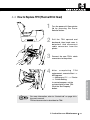
4.2 How to Replace Ribbon
1
Open printer lid by pressing the
Cover Release button.
2
Hold the used ribbon and pull it
out from the printer.
3
4. Instructions on Maintenance
4. Instructions on Maintenance
Make sure that supply ribbon
and rewinding ribbon placed in
right position. Close the printer
lid.
53