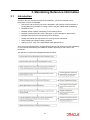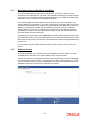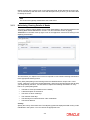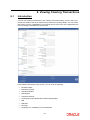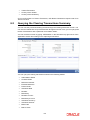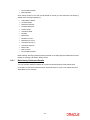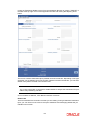
1
Clearing User Guide Oracle FLEXCUBE Universal Banking Release 12.0.2.0.0 Part No. E49740-01 October 2013 Clearing User Guide October 2013 Oracle Financial Services Software Limited Oracle Park Off Western Express Highway Goregaon (East) Mumbai, Maharashtra 400 063 India Worldwide Inquiries: Phone: +91 22 6718 3000 Fax:+91 22 6718 3001 www.oracle.com/financialservices/ Copyright © 2007, 2013, Oracle and/or its affiliates. All rights reserved. Oracle and Java are registered trademarks of Oracle and/or its affiliates. Other names may be trademarks of their respective owners. U.S. GOVERNMENT END USERS: Oracle programs, including any operating system, integrated software, any programs installed on the hardware, and/or documentation, delivered to U.S. Government end users are "commercial computer software" pursuant to the applicable Federal Acquisition Regulation and agency-specific supplemental regulations. As such, use, duplication, disclosure, modification, and adaptation of the programs, including any operating system, integrated software, any programs installed on the hardware, and/or documentation, shall be subject to license terms and license restrictions applicable to the programs. No other rights are granted to the U.S. Government. This software or hardware is developed for general use in a variety of information management applications. It is not developed or intended for use in any inherently dangerous applications, including applications that may create a risk of personal injury. If you use this software or hardware in dangerous applications, then you shall be responsible to take all appropriate failsafe, backup, redundancy, and other measures to ensure its safe use. Oracle Corporation and its affiliates disclaim any liability for any damages caused by use of this software or hardware in dangerous applications. This software and related documentation are provided under a license agreement containing restrictions on use and disclosure and are protected by intellectual property laws. Except as expressly permitted in your license agreement or allowed by law, you may not use, copy, reproduce, translate, broadcast, modify, license, transmit, distribute, exhibit, perform, publish or display any part, in any form, or by any means. Reverse engineering, disassembly, or decompilation of this software, unless required by law for interoperability, is prohibited. The information contained herein is subject to change without notice and is not warranted to be error-free. If you find any errors, please report them to us in writing. This software or hardware and documentation may provide access to or information on content, products and services from third parties. Oracle Corporation and its affiliates are not responsible for and expressly disclaim all warranties of any kind with respect to third-party content, products, and services. Oracle Corporation and its affiliates will not be responsible for any loss, costs, or damages incurred due to your access to or use of third-party content, products, or services. Contents 1. Preface ...................................................................................................... 1-1 1.1 1.2 1.3 1.4 1.5 1.6 2. 4.2 Introduction.............................................................................................................. 4.1.1 Specifying Exchange Rate Variance .......................................................... 4.1.2 Maintaining Preferences for Clearing ......................................................... Processing Reversals ............................................................................................. 4-1 4-2 4-3 4-7 Maintaining Account, Rate, and Charge Details ................................... 5-1 5.1 6. Introduction.............................................................................................................. 3-1 3.1.1 Maintaining Clearing Details of your Bank.................................................. 3-2 3.1.2 Defining Sectors ......................................................................................... 3-2 3.1.3 Maintaining Clearing Details of Banks........................................................ 3-3 3.1.4 Maintaining Clearing Cut-off Time for the Branch ...................................... 3-5 3.1.5 Maintaining Clearing Cut-off Time for the Day ........................................... 3-6 3.1.6 Reversal of Cut-off time for Outward Clearing............................................ 3-8 3.1.7 Maintaining Cut Off Time for Inward Clearing Scan Pass or reject ............ 3-8 3.1.8 Viewing Inward Clearing Scan Pass Reject Cut off ................................. 3-10 3.1.9 Maintaining Branch cutoff for inward clearing Scan Pass/Reject ............. 3-10 3.1.10 Viewing Branch Cutoff for Inward Clearing Scan Pass/Reject ................ 3-11 3.1.11 Maintaining Clearing Houses and Clearing House Holidays .................... 3-13 3.1.12 Maintaining Clearing House Holidays....................................................... 3-14 3.1.13 Identifying End Point Details..................................................................... 3-15 Maintaining Clearing Products ............................................................... 4-1 4.1 5. Introduction.............................................................................................................. 2-1 Maintaining Reference Information ........................................................ 3-1 3.1 4. 1-1 1-1 1-1 1-1 1-2 1-2 An Overview ............................................................................................. 2-1 2.1 3. Introduction.............................................................................................................. Audience.................................................................................................................. Documentation Accessibility.................................................................................... Organization ............................................................................................................ Related Documents ................................................................................................. Glossary of Icons..................................................................................................... Introduction.............................................................................................................. 5.1.1 Indicating Offset Details ............................................................................. 5.1.2 Indicating Transaction Details .................................................................... 5.1.3 Indicating Transaction Codes ..................................................................... 5-1 5-4 5-5 5-5 Viewing Clearing Transactions .............................................................. 6-1 6.1 6.2 6.3 Introduction.............................................................................................................. 6-1 Querying the Clearing Transactions Summary ....................................................... 6-2 6.2.1 Maintaining Settlement Details ................................................................... 6-3 6.2.2 Resolving Customer Credits for Clearing Checks ...................................... 6-6 6.2.3 Levying Charges on Dishonored Cheque................................................... 6-8 Querying Clearing (Repair) Upload Summary ........................................................ 6-9 6.3.1 Inward Clearing of Instruments................................................................. 6-12 6.3.2 Validating Returned Outward Clearing Transaction ................................. 6-12 6.4 7. Reports ..................................................................................................... 7-1 7.1 7.2 7.3 7.4 7.5 7.6 7.7 7.8 7.9 7.10 7.11 7.12 7.13 7.14 7.15 7.16 7.17 7.18 8. Introduction.............................................................................................................. 7-1 Inward Clearing Extract Report ............................................................................... 7-1 7.2.1 Contents of the Report ............................................................................... 7-2 Inward Clearing Extract – Passed Entries ............................................................... 7-3 7.3.1 Contents of the Report ............................................................................... 7-3 Inward Clearing Extract - Failed Entries .................................................................. 7-4 7.4.1 Contents of the Report ............................................................................... 7-5 Inward Clearing Extract – Rejected Entries............................................................. 7-5 7.5.1 Contents of the Report ............................................................................... 7-6 Inward Clearing Extract – Forcefully Passed Entries .............................................. 7-7 7.6.1 Contents of the Report ............................................................................... 7-7 Inward Clearing Summary Report ........................................................................... 7-8 7.7.1 Contents of the Report ............................................................................. 7-10 Outward Clearing Failed Transactions Report ...................................................... 7-10 7.8.1 Contents of the Report ............................................................................. 7-12 Cheques Due for Realization Report..................................................................... 7-12 7.9.1 Contents of the Report ............................................................................. 7-14 Inward Clearing Cheque Reject Report................................................................. 7-14 7.10.1 Contents of the Report ............................................................................. 7-16 Outward Clearing Cheque Reject Report .............................................................. 7-17 7.11.1 Contents of the Report ............................................................................. 7-18 Outward Clearing Summary Report ...................................................................... 7-19 7.12.1 Contents of the Report ............................................................................. 7-20 Clearing Balance Summary Report ....................................................................... 7-21 7.13.1 Contents of the Report ............................................................................. 7-22 Liquidated Instrument Report ................................................................................ 7-23 7.14.1 Contents of the Report ............................................................................. 7-24 Instrument Issued Today Report ........................................................................... 7-24 7.15.1 Contents of the Report ............................................................................. 7-26 Outward Clearing Handoff Report ......................................................................... 7-27 7.16.1 Contents of the Report ............................................................................. 7-28 Float Extension Report .......................................................................................... 7-28 7.17.1 Contents of the Report ............................................................................. 7-29 On Us Transaction Report..................................................................................... 7-30 7.18.1 Contents of the Report ............................................................................. 7-31 Annexure I ................................................................................................ 8-1 8.1 9. Clearing Batch Process (CGUPLOAD) ................................................................. 6-13 6.4.1 Provision for populating Clearing Upload: ................................................ 6-13 Order of Replacement of Parameters with Wild Card Entries ................................. 8-1 Annexure II ............................................................................................... 9-1 9.1 Different Currency Combinations- Rate Code and Rate Type Pickup..................... 9-1 10. Function ID Glossary ............................................................................. 10-1 1. Preface 1.1 Introduction This manual is designed to help you quickly get acquainted with the Clearing module of Oracle FLEXCUBE. It provides an overview to the module, and provides information on using the clearing module of Oracle FLEXCUBE. You can further obtain information specific to a particular field by placing the cursor on the relevant field and striking <F1> on the keyboard. 1.2 Audience This manual is intended for the following User/User Roles: 1.3 Role Function Back office clerk Input functions for contracts. Back office managers/officers Authorization functions. Product Managers Product definition and authorization. End of day operators Processing during end of day/ beginning of day. Financial Controller / Product Managers Generation of reports. Documentation Accessibility For information about Oracle's commitment to accessibility, visit the Oracle Accessibility Program website at http://www.oracle.com/pls/topic/lookup?ctx=acc&id=docacc. 1.4 Organization This manual is organized into the following chapters: Chapter 1 About this Manual gives information on the intended audience. It also lists the various chapters covered in this User Manual. Chapter 2 An Overview - is a snapshot of the features that the module provides. Chapter 3 Maintaining Reference Information gives information on basic information that needs to be maintained in the system before beginning operations in the clearing module. Chapter 4 Maintaining Clearing Products describes how you can create a clearing product. Chapter 5 Maintaining Account, Rate and Charge Details -described in this chapter is the procedure to set up accounting, rates and charges details for a clearing product. 1-1 1.5 1.6 Chapter 6 Viewing Clearing Transactions gives details about maintaining settlement, resolving customer credits for check clearance,charges for dishounoured checks and querying clearing information. Chapter 7 Reports provides a list of reports that can be generated in this module and also explains their contents. Chapter 8 Annexure I-gives information regarding order of replacement of parameters with wild card entries Chapter 9 Annexure II-gives information regarding different currency combinations used for rate code and rate type pickup Chapter 10 Function ID Glossary has alphabetical listing of Function/Screen ID's used in the module with page references for quick navigation. Related Documents Procedures User Manual Settlements User Manual Products User Manual Charges and Fees User Manual Tax User Manual Settlements User Manual User Defined Fields User Manual Glossary of Icons Icons Function Exit Add row Delete row Option List 1-2 2. An Overview 2.1 Introduction The Clearing module of Oracle FLEXCUBE offers you the facility to process checks, DDs and other instruments that are presented by your customers or clearing houses. Clearing transactions, in Oracle FLEXCUBE, can be classified into two categories: Inward Clearing transactions Outward Clearing transactions A third-party presenting an instrument drawn on your bank, through a clearing house, is an example of an inward clearing transaction. Your customer presenting an instrument drawn on another bank is an example of an outward clearing transaction. 2-1 3. Maintaining Reference Information 3.1 Introduction In order to process clearing transactions automatically, you need to maintain some information in Oracle FLEXCUBE: Specify the code by which your bank is identified in the Clearing House and define a Routing Mask for generation of routing numbers (as part of Bank-wide Parameters) Maintain Sectors Maintain details of banks participating in the Clearing House Maintain clearing information for the branches of your bank (Branch Parameters) Maintain Clearing Houses and Clearing House Holidays Identify End Points and map them to the clearing houses maintained Setup Outward and Inward Clearing Products Specify account, rates, and charge details (ARC Maintenance) Once you set up this information, the appropriate customer and clearing accounts maintained in your bank will automatically be credited or debited, depending on the nature of the transaction. The sequence is represented diagrammatically as follows: 3-1 3.1.1 Maintaining Clearing Details of your Bank For Oracle FLEXCUBE to handle clearing transactions, you have to capture clearing information at the Head Office of your bank. This information would apply to all the branches of your bank. You can maintain clearing-related information for your bank in the ‘Bank-wide Parameters’ screen, invoked from the Application Browser. In the Clearing Bank Code field, specify the code by which your bank is identified in the Clearing Network you participate in. The code you specify for your bank in this screen has to the same as that specified for your bank in the Clearing Bank Code Maintenance screen. In addition to specifying the clearing code that identifies your bank, you have to specify a “Routing Mask” for your bank. A mask defines the manner in which a Routing Number is generated for your bank. It is on the basis of the routing number that Oracle FLEXCUBE processes inward clearing transactions. The following is a typical mask format: ‘BBBbbbSSS’, wherein, ‘BBB’ indicates the bank code, ‘bbb’ indicates the branch, and ‘SSS’ indicates the sector to which the branch belongs. On the basis of the routing number, inward clearing transactions are routed to the appropriate branch of your bank. For more details about the Bank-wide Parameters screen, refer the Core Services user manual. 3.1.2 Defining Sectors In Oracle FLEXCUBE, you can identify specific geographical areas as ‘sectors’. A sector encompasses the branches of the various banks in the geographical area. As part of the maintenance required to process clearing transactions in Oracle FLEXCUBE, you need to identify various sectors. You can do this in the ‘Sector Code Maintenance’ screen. You can invoke this screen by typing ‘STDSECMN’ in the field at the top right corner of the Application tool bar and clicking on the adjoining arrow button. 3-2 Identify a sector with a unique code. In the Description field, briefly describe the sector that you are maintaining. With the sector code and description that you enter, you should be able to identify the sector. Note The sectors are typically maintained at the Head Office. 3.1.3 Maintaining Clearing Details of Banks You have to capture clearing details of every bank participating in the Clearing Network in the ‘Clearing Bank Codes Maintenance’ screen. You can invoke this screen by typing ‘DEDBNKCD’ in the field at the top right corner of the Application tool bar and clicking on the adjoining arrow button. The information you capture in this screen is required to route outward clearing transactions to the appropriate clearing house. Every bank participating in the Clearing network is identified with a unique code. In this screen, capture the code of the participating bank, and enter a brief description that will help you easily identify the bank. You also have to capture the following information for every branch of a participating bank: The Branch Code (as identified in the network) A brief description of the branch The sector to which it belongs The customer float days The float days for bank and sector code combination The branch address Country Specify the country of the bank code. This adjoining option list displays all valid country codes maintained in the system. You can choose the appropriate one. 3-3 Note The country information is captured to enable Mantas to analyze the transactions for possible money laundering activities. For more details on Mantas, refer 'Mantas' interface document. You can maintain different Float days for each bank and sector code combination. Subsequently, you can also maintain float days for customers of each bank and sector combination. The float days you define here will be defaulted in the Customer Float Days maintenances screen. Refer to the Core Entities user manual under section Maintaining Float Days for Outward Clearing Customer Transactions for further details. The system calculates the value date for the clearing transaction in the following manner: Firstly, the system checks for the branch code for the clearing transaction, clearing product, sector code, currency of the instrument and the float days for bank and customer maintained in ARC maintenance. Secondly, the system checks the maintenance for clearing bank, and if the details for the destination sector code, bank code and branch code and float days (for both customer and bank) is maintained, these values take precedence over the details in ARC maintenance. Finally, system verifies the details maintained in the Customer level float maintenance for the clearing transaction, branch code, currency, sector code, clearing product code and the customer group to which the customer belongs to and arrives at the float days to calculate the value date. After you maintain the above details for a branch, click ‘Add’ button to capture the details of the next branch. 3.1.3.1 Maintaining Details of Branches of Your Bank In this screen, in addition to capturing information relating to other banks, you have to maintain clearing information for your bank and the branches of your bank.Capture the code that identifies your bank in the Clearing Network. To every branch of your bank (the Branch Codes maintained in Oracle FLEXCUBE), assign the code that identifies it at the Clearing Network. Note The clearing bank code that identifies your bank at the Clearing Network should be the same as that specified in the Bank Wide Parameters screen. Also, the branch code and sector that identifies a branch at the Clearing Network should be the same as that specified for the branch in the Branch Parameters screen. 3.1.3.2 Maintaining Clearing Details of Branch To facilitate automatic clearing of instruments that involve your branch, you need to specify clearing-related options for your branch. To do this, you can invoke the ‘Branch Parameters’ screen from the Application Browser. In the Branch Code for Clearing field, indicate the code that identifies your branch in the Clearing Network. The code you specify for your branch should be the same as that defined in the Clearing Bank Code Maintenance screen. For your branch, you must also specify the 3-4 Sector Code, as specified in the Clearing Bank Code Maintenance screen. Finally, if clearing transactions involving your branch must be routed through another branch, specify the Oracle FLEXCUBE branch code of that branch in the Clearing through Branch field. On the basis of the Routing Number Mask defined for your bank, and your specifications in this screen, Oracle FLEXCUBE automatically generates the Routing Number for clearing transactions involving your branch in the Routing Number field. This routing number is used to resolve outward clearing transactions. For example, if you (Westside Bank, Seattle branch) issue a Demand Draft (DD) that is payable at an outstation branch of, say, Friendly Neighborhood Bank, Nashville, based on the routing number, the DD, if presented at any other bank in Nashville, will be sent to Friendly Neighborhood Bank for clearing and not your bank and branch. For more details about the Branch Parameters screen, refer the Core Services user manual. 3.1.4 Maintaining Clearing Cut-off Time for the Branch You can maintain the clearing cut-off time for the branch using the ‘Clearing Branch Parameters Maintenance’ screen. You can invoke this screen by typing ‘CGDBRNPM’ in the field at the top right corner of the application tool bar and clicking on the adjoining arrow button. Branch Code System displays the current branch code here; however, you can select the branch code from the adjoining option list. Branch Name System displays the selected branch name here. Clearing Cut Off Time Hour Specify the clearing hour for the cut-off time in 24 hours clock. 3-5 Return Marking Cut-Off time hour is captured in 24 hour format. Min Specify the clearing minutes for the cut-off time. Note Time specified here will be the daily cut off time for the clearing transactions in the branch. Transactions input after the specified time, will not be processed on the same day and will take one additional day to arrive at the credit value date; however, you can manually reverse the transaction to process it on the same day. Return Marking Cut Off Time Hour Specify hours for the cut-off time of return marking of outward cheque in 24 hours clock. Minute Specify minutes for the cut-off time of return marking of outward cheque. Note Return marking is allowed in non-clearing branches until the return marking cut-off time before the value date of the outward clearing transaction. 3.1.5 Maintaining Clearing Cut-off Time for the Day You can maintain the clearing cut-off time for the current day of the branch using the ‘Clearing cut-off time Maintenance’ screen. You can invoke this screen by typing ‘CGDLTCLG’ in the field at the top right corner of the application tool bar and clicking on the adjoining arrow button. 3-6 Branch Code System displays the current branch code here. You can select the branch code from the adjoining option list. Branch Name System displays the selected branch name here. Current Date System displays the current date here. Click ‘P’ button to populates the clearing cut off time maintained in the ‘Clearing Branch Parameter’ screen. Clearing Cut Off time Hour Specify the clearing hour for the cut-off time in 24 hours clock. Min Specify the clearing minutes for the cut-off time. Note Time specified here will be applicable only for the current day cut off time for the clearing transactions in the branch. Click ‘P’ button to populate current date, clearing cut-off hour, and Minute maintained in the ‘Clearing Branch Parameters’ screen. If the cut off time has been advanced or extended for the specific day, system will take the cut off time maintained here. If the cut off time is not maintained here, then system considers the cut off time maintained at the branch level. Return Marking Cut Off Time Hour Specify hours for the cut-off time of return marking of outward cheque in 24 hours clock. Minute Specify minutes for the cut-off time of return marking of outward cheque. Note – Return marking is not allowed after the cut off time maintained. – If Return marking is maintained in Clearing Branch parameters and Late Clearing is maintained for specific day, then the system takes the cut off time maintained for the specific day. – If Return marking is not maintained in Late Clearing and is maintained for specific day, then the system takes the cut off time from Clearing Branch parameters. In non clearing branches return marking is allowed, until the return marking cut-off time and before the value date of the outward clearing transaction. 3-7 3.1.6 Reversal of Cut-off time for Outward Clearing The outward clearing transactions posted before and on the original cut-off time for the day are processed as normal clearing transactions, while those posted after the original cut-off time for the day would be processed as late clearing transactions. Value Date of the Clearing Transactions Posted before the Original Cut-Off Time The customer value date = Current date + customer float days arrived The bank value date = current date + bank float days arrived Value Date of the Clearing Transactions Posted after the Original Cut-Off Time current date + customer float days arrived + bank float days arrived+ additional float day However; if the cut-off time of any outward clearing transaction is extended or changed, you can execute the clearing cut-off time revision batch, CGBCTREV, which is maintained as Intraday Batch to process the reversal of cut-off time on existing transactions. Note The system will not prompt you to execute the batch When the cut-off time for the day is changed at ‘Cut-off Time Maintenance’ level, the system logs and stores the cut-off time change. CGBCTREV batch is run after the revision of the cutoff time for the day. Note Clearing cut-off time revision batch should be run before the new cut-off time. If the cut-off revision batch is run after the new cut-off time, System would not reverse the cut-off for the transactions. In the CGBCTREV batch, the system will pick up all the late clearing transactions which are processed between original cut-off time and the current cut-off time and reverse the cut-off time for the clearing transaction. The system will reverse the accounting entries for the original value date and book new accounting entries with new value date. Note Cut-off time revision batch would not reverse cut-off time on the transactions which are posted with late clearing product. i.e., with the clearing product with ‘late clearing’ option set. Cut-off time can only be extended and it cannot be set to expired time. The accounting entries for the original entry with the original value date would be reversed. There would be a new accounting entry with the new value date. 3.1.7 Maintaining Cut Off Time for Inward Clearing Scan Pass or reject The cut off time for inward clearing can be maintained in the Inward Clearing Scan Pass/ Reject cut-off Maintenance screen. You can invoke the ‘Inward Clearing Scan Pass/Reject 3-8 Cut-off’ screen by typing ‘CGDINWCT’ in the field at the top right corner of the Application tool bar and clicking the adjoining arrow button. Specify the following here: End Point Select the end points from the adjoining option list. Description The system defaults the description of the end point chosen. Clearing Type Select the inward clearing product type from the adjoining option list. Description The system displays the clearing product description. Scan Pass to Fall Cutoff Hour Specify the hours of the cutoff time for the scan pass to reject. Minutes Specify the minutes of the cutoff time for the scan pass to reject. Allow Scan reject to pass for Non-Clearing Branch Check ‘Allow Scan Reject to Pass for Non-Clearing Branch’ to enable the scan reject to pass option (Error/override to success) for non-clearing branches. Note – If the cut off time is exceeded then the pass to reject will not be allowed for any branch. 3-9 – 3.1.8 Cut off time can be overridden for a specific day through the Branch cut-off time for Inward Clearing Maintenance screen. Viewing Inward Clearing Scan Pass Reject Cut off You can view the clearing cutoff scan pass /reject cut off time details in the Inward clearing Scan Pass/Reject cutoff Summary screen. You can invoke this screen by typing ‘CGSINWCT’ in the field at the top right corner of the Application tool bar and clicking the adjoining arrow button. CGSINWCT__SUMMARY In the above screen, you can base your queries on any or all of the following parameters and fetch records: Authorization Status Clearing Type Record Status End Point Select any or all of the above parameters for a query and click ‘Search’ button. The records meeting the selected criteria are displayed. The system displays the following details pertaining to the fetched records: 3.1.9 Authorization Status Record Status Clearing type End Point Hours Minutes Maintaining Branch cutoff for inward clearing Scan Pass/Reject You can override the cutoff time maintained for the end point and clearing type in the Branch cutoff time for Inward clearing screen. You can invoke this screen by typing ‘CGDBRNCT’ in 3-10 the field at the top right corner of the Application tool bar and clicking the adjoining arrow button. Specify the following here: Branch code Select the branch code from the adjoining option list. End Point Select the end point from the adjoining option list. Description The system displays the description of the end point chosen. Posting Date The system displays the current date of the branch. Clearing Type Select the clearing type from the adjoining option list. Description The system displays the clearing product description. Scan Pass to Fall Cutoff Hour Specify the hours of the cutoff time for the scan pass to reject. Minutes Specify the minutes of the cutoff time for the scan pass to reject. 3.1.10 Viewing Branch Cutoff for Inward Clearing Scan Pass/Reject You can view the branch cutoff for inward clearing scan pass /reject in the Inward Clearing Scan Pass/Reject Branch Cutoff Summary screen. You can invoke this screen by typing 3-11 ‘CGSBRNCT’ in the field at the top right corner of the Application tool bar and clicking the adjoining arrow button. In the above screen, you can base your queries on any or all of the following parameters and fetch records: Authorization Status Clearing Type Branch Code Record Status End Point Select any or all of the above parameters for a query and click ‘Search’ button. The records meeting the selected criteria are displayed. The system displays the following details pertaining to the fetched records: Authorization Status Record Status Clearing type End Point Hours Minutes Branch Code Note – If the current time of the transaction is greater than the cut-off time maintained for the clearing type and end point then the system displays an error message as “Scan Pass to Reject of the transaction cannot be performed for the day”. – In order to process pass to reject status should be chosen to dishonour return and the reject code should be provided. This operation is supported in Cheque return (6560), Query Clearing Upload (CGDCLGDT) & Interface Clearing Details (IFDCLGDT) screens. – Cutoff time for the validation is in the below order: 3-12 3.1.11 – Scan Pass to Reject cut-off time maintained at the Branch Cut-off time (CGDBRNCT) for Scan Pass/Reject of Inward Clearing for the clearing type and end point of the transaction being processed. – Scan Pass to Reject cut-off time maintained at the Cut-off time for Scan Pass/Reject of Inward Clearing (CGINWCT) for the clearing type and end point of the transaction being processed. – In order to process Reject to Pass status should be chosen from error/override to success. The Query Clearing Upload (CGDCLGDT) and Interface Clearing Details (IFDCLGDT) are supported for this operation. – If the processing branch is non-clearing branch and if ‘Allow Scan Reject to Pass’ is not chosen for the clearing type and end point of the clearing transaction then the system displays an error as message “Scan Reject to Pass not allowed for the branch.” Maintaining Clearing Houses and Clearing House Holidays In the ‘Clearing House Maintenance’ screen, invoked from the Application Browser, you have to maintain the clearing houses your bank participates in. You can invoke this screen by typing ‘STDCLDMT’ in the field at the top right corner of the Application tool bar and clicking on the adjoining arrow button. Identify every Clearing House you participate in with a unique code. In the Description field, briefly capture the details of the Clearing House. The Clearing House Code and Description you enter should help you easily identify a clearing house. Additionally, specify a SWIFT code for the clearing house. In order to process MT306, MT340, MT 360 and MT361 you need to maintain the following codes as SWIFT Codes for the field 29H, 29E and 22B: EUTA - Target LKCO – Colombo PKKA - Karachi ROBU - Bucharest TRIS - Istanbul 3-13 3.1.12 VNHA - Hanoi Maintaining Clearing House Holidays In the Clearing House Holidays Calendar Maintenance screen, invoked from the Application Browser, you can identify the holidays for the various clearing houses maintained at your bank. You can invoke this screen by typing ‘STDCLHOL’ in the field at the top right corner of the Application tool bar and clicking on the adjoining arrow button. In the Clearing House field, specify the clearing house for which you are maintaining holiday details. The dates on the calendar are marked in black and red. The dates you mark in black are “working days” and dates you mark in red are “holidays”. Click on a date to change its color. Note Clearing Houses and Clearing House Holidays are typically maintained at the Head Office. Refer the chapter ‘Maintaining Clearing Holidays ‘ in the Core Services User Manual for details about this screen. 3-14 3.1.13 Identifying End Point Details In Oracle FLEXCUBE, clearing houses are also referred to as end points. To facilitate errorfree processing of clearing transactions, you need to maintain end point details and map an end point to a clearing house. Invoke the End Point Details screen from the Application Browser to maintain end point details. You can invoke this screen by typing ‘STDENDMT’ in the field at the top right corner of the Application tool bar and clicking on the adjoining arrow button. In this screen, you achieve two things: Identify an end point with a unique code and description “Map” every End Point you are maintaining with a Clearing House Enter a unique code and a brief description to identify an end point (in other words, a clearing house). Note In Oracle FLEXCUBE, a nine-digit number identifies end points and a three-digit number identifies clearing houses. By mapping an end point to a clearing house, you identify the end point captured at the branch as a valid clearing house maintained in Oracle FLEXCUBE. 3-15 4. Maintaining Clearing Products 4.1 Introduction In this chapter, we shall discuss the manner in which you can define attributes specific to a Clearing (CG) product. You can create a clearing product in the ‘CG Product Definition’ screen. You can invoke this screen by typing ‘CLDFNPRD’ in the field at the top right corner of the Application tool bar and clicking on the adjoining arrow button. In this screen, you can enter basic information relating to a clearing product such as the Product Code, the Description, etc. The advantages of defining a product Let us consider the steps involved in processing an outward clearing transaction (for example, your customer presents a check drawn on another bank) at your bank. Your specifications would include the following: The Code of the bank on which the instrument is drawn (as identified in the Clearing Network) The Code of the branch on which the instrument is drawn (as identified in the Clearing Network) The Clearing Network through which the instrument has been routed The Floating Days to calculate the booking date for the bank leg of the transaction The Floating Days to calculate the booking date for the customer leg The Exchange Rate applicable, etc. If you process a thousand such outward clearing transactions in a day, you would need to repeat these operations as many times. By defining outward clearing transactions as a product in Oracle FLEXCUBE, and defining standard attributes for it, you can simplify the task of processing clearing transactions. Every time you process a clearing transaction under a product, Oracle FLEXCUBE automatically applies the attributes defined for the product. 4-1 However, if required, you can change the inherited attributes at the time of processing. For any product you create in Oracle FLEXCUBE, you can define generic attributes, such as branch, currency, and customer restrictions, interest details, tax details, etc., by clicking on the appropriate icon in this screen. For a loans product, in addition to these generic attributes, you can specifically define other attributes. These attributes are discussed in detail in this chapter. You can define the attributes specific to a loans product in the CG Product Definition Main screen and the CG Product Preferences screen. In these screens, you can specify the product type and set the product preferences respectively. For further information on the generic attributes that you can define for a product, please refer to the Product Definition User Manual under Modularity. Product Type A product you are creating can belong to either of the following categories: ‘IC’ for inward clearing of checks ‘ID’ for inward clearing of DDs ‘OC’ for Outward Clearing These product categories are referred to as product types. When you create a product, you must specify its ‘type’. 4.1.1 Specifying Exchange Rate Variance A clearing transaction may involve a currency conversion. For such transactions, the rate corresponding to the Rate Type that you specify for the product will be picked up. (Cash rate, Standard Rate, Spot Rate, etc., are examples of Rate Types). When processing a transaction, the rate value that is picked up can be changed. You can define the limits within which this change can be made, as follows: 4-2 Normal variance The rate variance can exceed the rate maintained for the Rate Type by the value you specify here (normal variance). In such a case, the system prompts the user with an override message before the contract is saved. Maximum variance For transactions involving the product, the exchange rate variance cannot exceed the rate corresponding to the Rate type by this value (Maximum Variance). If the rate that is input exceeds the maximum variance defined, the system will not allow storing of the contract. 4.1.2 Maintaining Preferences for Clearing You can maintain preferences for clearing through the Preferences screen. To invoke this screen, click ‘Preferences’ button in the ‘Clearing Product Definition’ screen. The screen appears as shown below: CLDFNPRD__CVS_PREF Referral Required Referral refers to the process of handling customer transactions, which force the accounts involved in such a transaction to exceed the overdraft limit. Clearing transactions can force an account to move into overdraft. While maintaining the details of a Clearing product you can indicate whether transactions involving the product need to be considered for referral checks. Enabling this option indicates whether the product needs to be considered for referral. If a product is marked for referral, the details of transactions resulting in the account (involved in the transaction) moving into Overdraft will be sent to the Referral Queue. Note If a clearing transaction breaches the limits, the details of all transactions processed during the day will also be moved to the Posted Entries section in the Referral Queue. You can choose to accept or reject the transactions. The details of the transaction which has breached the limits will be displayed in the Unposted Entries section of the queue. For further details on Referrals refer to the Processing Referrals in Oracle FLEXCUBE chapter of the Core Entities manual. Defer Liquidation Check this box to defer liquidation of the selected clearing product. 4-3 Defer liquidation is applicable for outward Clearing products. If Defer liquidation sets to Y, System supports Stage wise accounting Indicating requirement for Referral Clearing transactions can force an account to move into overdraft. You can indicate whether inward clearing transactions involving the product need to be considered for referral checks for exceeding their overdraft limit. Check this option to indicate that referral is required. Consolidation Required This field is enabled only for inward clearing products. Check this option to indicate consolidation for all transactions for a customer in an inward clearing batch, is required. Any inward clearing product which has Consolidation Required enabled, cannot be selected for a manual clearing entry. Insufficient Funds Reversal This field is enabled only for inward clearing products. The Transaction Code is used to reverse the accounting entry if an individual clearing transaction is reversed from the Referral Queue due to insufficient funds. Specify a Transaction Code for reversal. If the Transaction Code is left blank, the Transaction Code of the original clearing entry will be used for reversal. CASA Reversal This field is enabled only for inward clearing products. The Transaction Code is used to reverse the accounting entry if an individual clearing transaction is reversed due to any CASA error. Specify a Transaction Code for CASA reversal. If the Transaction Code is left blank, the Transaction Code of the original clearing entry will be used for reversal. Only those Transaction Codes which have Cheque Mandatory set as ‘NO’ in the Transaction Code Maintenance screen, will appear for selection. Consolidation Transaction Code You need to specify the Transaction Code required for passing a consolidated clearing entry. The same Transaction Code should be maintained with Cheque Mandatory option as ‘No’, in the Transaction Code Maintenance screen. Dispatch Days Specify the number of days to be used to calculate the dispatch days from the booking date. System uses the local currency calendar to compute the dispatch days from the date of deposit. For example, if the dispatch days is given as 1 system fires DCLG on the next Local currency working day. In case that day is a local holiday, then the event is fired on the next business date. Liquidation Days Specify the number of days to be used to calculate the liquidation days from the booking date. System uses the local currency calendar to compute the liquidation days from the date of deposit. For example, if the liquidation day is given as 2, the system fires LIQD after 2 Local currency working days. In case that day is a local holiday, then the event is fired on the next business date. 4-4 4.1.2.1 Role to Head Mapping Screen You can maintain accounting roles for clearing products through the Role to Head mapping screen. To invoke this screen, click ‘Role to Head’ button in the ‘Clearing Product Definition’ screen. The screen appears as shown below: The following accounting roles can be maintained: CONT_ACCNT_DUE - Contingent Account Due CONT_ACCNT_PAY - Contingent Account Payable CLRNG_ACCOUNT- Clearing Account CLRNG_OFS_ACCOUNT -Clearing Offset Account The following amount tags can be maintained: 4.1.2.2 TXN_AMOUNT - Cheque Amount OFS_AMOUNT - Cheque Amount Events You can maintain the events for clearing through the Events screen. To invoke this screen, click ‘Events’ button in the ‘Clearing Product Definition’ screen. 4-5 The screen appears as shown below: The following events are maintained: INIT - Deposit of Cheque DCLG - Dispatch to Clearing LIQD - Liquidation of Cheque The CGBEOD batch is run for outward clearing to handle the accounting entries on Day 1 and Day 2. The batch is setup to run at the End of Transaction Input Stage to process eligible clearing contracts. The system fires INIT event and passes the accounting entries based on the product setup and marks the status of the contracts as “Deposited” in case of deferred liquidation, This happens online during contract booking itself. The system fires DCLG event and marks the status as “Dispatched” on the day of dispatch (Book Date + Number of Dispatch days), The system automatically liquidates all the contracts which are in “Dispatched” status on Liquidation date (Book Date + Liquidation Days), On Liquidation Date the system reverses the accounting entries passed for INIT and DCLG events, i.e. it passes the REVR event, accounting entries and LIQD event, accounting entries and marks the status as ‘Liquidated’. The system picks up the accounting entries setup for the events INIT and DCLG from Clearing Product and LIQD from ARC Maintenance. For further information on Accounting Entries and Advices, please refer to the Product Definition User Manual under Modularity. 4-6 4.2 Processing Reversals Reversal of individual clearing entries will be processed automatically by the system in case of any CASA related errors or any other error while processing the individual instruments. The CASA Reversal Transaction Code specified in the Clearing Product Preferences screen will be used for reversal due to CASA errors. If this Transaction Code is not maintained, the Transaction Code used for passing the consolidated clearing entry (of which this instrument was a part) will be used for reversal. The individual transaction will be marked as rejected in this case. In case the Force Posting option has been checked in the Interface Clearing Details screen, and an individual transaction is posted to a referral queue because of insufficient funds (if the Referral option is checked in the Clearing Product Definition screen and the Customer Account Maintenance screen), you will have to manually reverse or accept the clearing transaction. In such a case, the individual clearing transaction will be marked as success. In case a reversal needs to be done for a transaction which was part of the consolidated clearing process, the transaction will be reversed using the Insufficient Funds Reversal Transaction Code maintained in the Clearing Product Preference screen. In case the Transaction Code is not maintained, the Transaction Code used for passing the consolidated clearing entry (of which this instrument was a part) will be used for reversal. Charge entries, if any, will also be reversed using the Transaction Code of the individual clearing transaction. In case of any other error the individual clearing transaction will be marked as rejected and the transaction will be reversed using Transaction Code used for passing the Consolidated Clearing Entry of which this instrument was a part. Rejected transactions can be reprocessed as usual. Consolidated Clearing Entry will not be passed while reprocessing rejected transactions. The values of Insufficient Funds Reversal Transaction Code and the CASA Reversal Transaction Code can be specified in the Clearing Product Preference screen. These fields are applicable only for Inward Clearing products only. Each individual transaction (Upload table) will be marked with the Reference Number generated for passing the Consolidated Clearing Entry and an option indicating whether reversal has been done or not. 4-7 5. Maintaining Account, Rate, and Charge Details 5.1 Introduction Once you have captured the basic information required for processing clearing transactions in Oracle FLEXCUBE, you have to maintain information that would be required to process clearing transactions involving a specific product. In the Account, Rate, and Charge (ARC) Maintenance screen, you have to maintain information that will be used to: Route transactions belonging to a specific product, branch and currency combination to a specific Clearing House/Sector Code Post accounting entries generated by clearing transactions involving a specific product to specific accounts Calculate and apply the specified charges The ARC Maintenance screen can be accessed from the Application Browser. You can invoke this screen by typing ‘IFDATMMN’ in the field at the top right corner of the Application tool bar and clicking on the adjoining arrow button. In the ARC Maintenance screen, you primarily define parameters for processing clearing transactions involving a specific product, currency, and branch combination, and involving a specific Clearing House (in case of an inward clearing transaction) or a Sector (in case of an outward transaction). Towards this, you must specify the following details: The details of accounts or GL’s to which offset accounting entries should be posted. (Typically, you would post the accounting entries generated by transactions involving a specific clearing house to an account or GL maintained for the purpose.) The details of any charges that your bank would need to collect or levy, for the clearing service. 5-1 If you are maintaining ARC details for a product and a specific clearing house/sector, the details maintained in this screen will be used for posting entries generated by clearing transactions involving the product, clearing house/sector, branch and currency code combination. Note You must maintain ARC details for all possible combinations of products, currencies, branches, and clearing houses/sectors. Product In the ARC Maintenance screen, you have to first of all indicate the clearing product for which you are maintaining ARC details. Transaction Type Specify the type of transaction for the ARC maintenance. This adjoining option list displays all valid transaction types maintained in the system. You can choose the appropriate one. Currency ARC details are maintained for a product, branch, currency, and clearing house combination. Indicate the currency of the combination in the currency field. Branch The ARC record is maintained for a Branch + Product + Type + Ccy. Account Class/Product ARC record can be maintained for a Module specific Product Combination or for a specific Account Class level. Note The ARC pickup is based on Customer Group code in addition to branch- product-customer-transaction currency and customer. If an ARC record is not maintained at a branchproduct-customer-currency level, system checks the ARC record for branch-product-customer group-currency before doing a wild card search. The order of replacement of the parameters with wild card entries will be done based on the following order: Branch Product Transaction Currency Transaction Type Customer Group Specify the customer group to define charges. This adjoining option list displays all valid customer groups of type charge maintained in the system. You can choose the appropriate one. Input to this field is mandatory. Account Class Group Select the account class group from the adjoining option list. 5-2 Note If ARC is maintained for an account class group, then the charges computed is applicable for all the account classes defined under that account class group, The ARC resolution logic is as below: Sequen ce Accou nt Class Group Branch Product Currenc y Custome r Group Transactio n Type 1 Specific Specific Specific Specific Specific Specific 2 Specific *.* Specific Specific Specific Specific 3 Specific Specific Specific *.* Specific Specific 4 Specific Specific Specific Specific *.* Specific 5 Specific Specific Specific Specific Specific *.* 6 Specific *.* Specific *.* Specific Specific 7 Specific *.* Specific Specific *.* Specific 8 Specific *.* Specific Specific Specific *.* 9 Specific Specific Specific *.* *.* Specific 10 Specific Specific Specific *.* Specific *.* 11 Specific *.* Specific *.* *.* Specific 12 Specific *.* Specific *.* Specific *.* 13 Specific *.* Specific Specific *.* *.* 14 Specific Specific Specific *.* *.* *.* 15 Specific *.* Specific *.* *.* *.* 16 *.* Specific Specific Specific Specific Specific 17 *.* *.* Specific Specific Specific Specific 18 *.* Specific Specific *.* Specific Specific 19 *.* Specific Specific Specific *.* Specific 20 *.* Specific Specific Specific Specific *.* 21 *.* *.* Specific *.* Specific Specific 22 *.* *.* Specific Specific *.* Specific 5-3 5.1.1 23 *.* *.* Specific Specific Specific *.* 24 *.* Specific Specific *.* *.* Specific 25 *.* Specific Specific *.* Specific *.* 26 *.* *.* Specific *.* *.* Specific 27 *.* *.* Specific *.* Specific *.* 28 *.* *.* Specific Specific *.* *.* 29 *.* Specific Specific *.* *.* *.* 30 *.* *.* Specific *.* *.* *.* Indicating Offset Details You can indicate the offset currency to be used for processing FX contracts involving different currency combinations. Exchange rate for the contract is based on the rate code and type defined for the currency combination in the Retail Teller product definition, Product preference screen. Based on the transaction currencies chosen and the exchange rate defined for the currency combination, the system will pass the relevant accounting entries. Note The Offset currency field will be enabled for all products and not for account classes. The ARC pickup in branch and host will be based on offset currency in addition to branch, product, transaction currency, customer and customer group. The order of replacement of the parameters with wild card entries is done in the following order: Branch Product Offset currency Transaction Currency Allowed Value For FX transactions, the second currency from FX screens is used as offset currency for ARC pickup. For RT transactions, offset currency will also be used for ARC pickup. The order of replacement of the parameters with the wild card entries will be as per the matrix given in the Annexure I. The Rate code and type pickup in branch and host for the Retail transactions will be from the product preferences for the currencies involved in the transaction. If a record is not maintained for the given product and specific currency combination, the system will check for the currency combinations given in Annexure II. If no record is found for all the given combinations, the system will pickup the rate code and type from the product definition. Indicating the Offset Details You can specify the branch and the offset account or GL into which offset entries are to be booked. In case of an inward clearing transaction, this would typically be the Liability GL for Inward Checks to which the credit entries would be posted. (The customer account would be debited.) In case of an outward clearing transaction, this would be the Liability GL maintained 5-4 for Outward Checks to which the debit entries would be posted. (The customer, in this case, would be credited.) 5.1.2 Indicating Transaction Details You can specify the branch and the account number in which the transaction is taking place. The account in this field is the customer account. In case of inward clearing transactions, this account number would be available on upload of clearing transactions. 5.1.3 Indicating Transaction Codes A unique Transaction Code identifies all transactions in Oracle FLEXCUBE. As part of ARC maintenance, you can indicate the offset transaction code and the main transaction code. You have to choose a transaction code for which the status of the option ‘Cheque Mandatory’ is checked at the definition. By this, the system can track the used cheques. End Point If you are maintaining ARC details for an outward clearing type product, you should specify the branch, the currency, and the sector code that are part of the combination. In addition, you should specify the end point (or clearing house) to which branches in this sector report to and the bank and customer float days. If you are maintaining ARC details for an inward clearing type product, you should specify the branch, currency, and end points that form part of the combination. From the pick list available in the Clearing House field, specify the Clearing House for which you are maintaining ARC details. Clearing Houses are also referred to as End Point Codes in Oracle FLEXCUBE. Select the End Point Code of the Clearing House in the End Point field. Generate MT101 Check this box to generate MT101. Bank and the Customer Float Days “Float days,” indicate the number of days that are added to the booking date of an outward clearing transaction to arrive at its value date (that is, the day on which an account is actually debited or credited with funds). As part of the ARC Maintenance for a transaction type, you have to indicate the Bank and Customer Float days. The term “bank float days” refers to the days that will be used to calculate the value date of the bank leg of a transaction. The term “customer float days” refers to the days that will be used to calculate the value date of the customer leg of a transaction. The following example illustrates the implications. If you have maintained float days, the system will validate the Clearing House Holiday Maintenance also. Note You can choose to maintain an ARC Wildcard record for a Branch, Currency and Customer combination or for any one or more of these entities. Ensure that the wildcard symbol that you are using is a *. Float Days Basis Float days applicable for outward clearing customer transactions are defined through the Customer Float Days Maintenance screen. The float days can either be considered as: 5-5 Calendar days – indicating that the float days will not be dependent on any holiday maintenance. Working days - indicating that the float days will be based on the clearing house calendar and they will be working days on the basis of clearing house calendar. You can select the appropriate option, which will be used to arrive at the value date for outward clearing customer transactions. For details about defining float days for a customer or customer group, refer the Core Entities user manual. Charge Debit Account You can choose the charge debit account from the adjoining drop-down list. The available options are: Offset Account Transaction Account Netting Charges You have the option to net the accounting entries for the debit leg of the charges along with the main transaction entries. Check this box to indicate that the debit leg of the charges is to be netted before passing the accounting entries. Leave the box unchecked to pass the entries without netting the charges of the debit leg. Main Offset Accounting Entries Required If this box is checked, the system will pass the main accounting entries along with charges defined at ARC for a Product. Otherwise only the charges accounting entries defined for the product will be passed which is used for online charge collection. Note When RT products are used for On-line charge definition (STDCHGMN), then this check box has to be unchecked. Generate Transaction Advice 5.1.3.1 Whether an Advice needs to be generated for the Transaction (redundant for J2EEBranch, might still be used for other Interfaces). Indicating Service Charges for Inter-branch Transactions In a transaction, if the account branch of the teller transaction is different from the transaction branch, then charges maintained by inter-branch product will be applied to the transaction. If you select the IB transaction as 'Yes' for a RT product at ARC, the system picks up and process the charge entries as maintained. If you select the IB transaction as 'NO' for a RT product at ARC, then the charges maintained in non-ib product are applied to the transaction. IB Transaction Check this box if you want the system to pick up the product, for inter-branch transactions. You will notice the difference in the service charges processed for two transactions with same kind of product. 5-6 Note This will be supported for Cash Deposit (1401), Cash Withdrawal (1001) and Account to Account Transfer (1006) 5.1.3.2 Indicating Exchange Rate Revaluation You can specify the following details: Profit Revaluation GL Specify the profit revaluation GL details. Loss Revaluation GL Specify the loss revaluation GL details. 5.1.3.3 Defining Charge Details You can define a maximum of five charges. A charge can be computed based either on the transaction amount or on an earlier charge amount As part of defining the Charge details for each charge, you need to capture the following details: Charge Type The Charge Type that should be applied on the transaction. It could either be a Percentage of the transaction amount or a Flat Charge. Slab Type Whether the Charge computation has to be over different Amount Slabs or Tiers (0-100 @ 10, 101-500 @ 15 etc.). Basis You can indicate the basis amount on which the charge is to be computed. Since you can‘Transaction maintain five different amounts, the basisamounts. amount that you enter let could either beyou the Amount’ orcharge any of only the earlier charge Forthe example, us assume aredefining maintaining Charge 1. The basis for charge 1 can amount be transaction amount. While Charge 2 you can choose either the transaction or Charge 1 as the basis. Similarly while defining Charge 3, you can choose the transaction amount or Charge 1closure or Charge 2 asproduct. the basis. NUM-ACC=OPN-DAYS' is type usedshould as basis to define theas Account Charge When this basis is used, Slab be maintained "SLAB”. As system will check slab for charges to be collected based on the Number of days account kept open by thethe customer.Currency You can indicate the currency in which the charge amount would be expressed. If the transaction currency is different from the charge currency, a conversion would be done, using the rate code and rate type that you specify for each charge. Their Charges For outward clearing checks, you can indicate whether the charge is being collected on behalf of the collecting bank. If you set this option, you need not specify the charge account. Since the charge amount would not known upfront, you need not specify the amount either Charge Debit Account Select the charge debit account into which charge related entries are to be posted from the adjoining option list. Note – If charge debit account is maintained at both ARC and charge level with different values, the system will take precedence of the charge debit account at the charge level to debit the charges.The charge debit account can either be "TXN_ACC" or "OFS_ACC" or GL's (Income or Expense) 5-7 – If netting charge is checked at ARC level, charge debit account should be maintained at ARC level. This charge debit account and charge credit account is used when bank has to remit tax on income they receive as part of each and every RT transactions. Charge Credit Account Select the charge credit account from the adjoining option list. The other leg of the charge is posted to a GL, as specified in the ARC record. For example, To collect tax from the income received will be as follows: For cash deposit transactions, bank wants to collect a charge of 5% on the transaction amount (inclusive of tax). The bank has to remit Tax @ 9.090909% of gross charge collected from the income GL. The ARC maintenance can be done as follows to achieve the same: Charge 1: Charge Basis: Transaction Amount % Charge: 5 % Charge Debit Account: Transaction Account Charge Credit Account: Income GL (say INC00001) Charge 2: Charge Basis: Charge 1 % Charge: 9.090909% Charge Debit Account: Income GL (INC00001) Charge Credit Account: Tax Payable GL (say PAYB0001) For a cash deposit of USD 1000 in account CASA0001, the gross charge (inclusive of tax) will be USD 50 and Tax will be 4.55 after rounding. The accounting entries for the maintained ARC will be as below: DR CASH GL USD 1000 CR CASA0001 USD 1000 DR CASA0001 USD 50 CR INC00001USD 50 DR INC00001USD 4.55 CR PAYB0001 USD 4.55 Netting Charge If two or more accounting entries, for the same event, are to be passed to the same account, on the same Transaction Date, these entries can be netted. You can choose to net charges by choosing this option. 5-8 Transaction Code You can indicate the code using which the accounting entries would be booked, for each charge. Rate Code and Rate Type While settling charges for cross currency transactions, you can choose to debit the customer by applying the mid rate, buy rate or by using the buy/sell spread over the mid-rate. Therefore, you need to specify the Exchange Rate details for each ARC definition record that you maintain in the system. Firstly, indicate the Rate Code for which different rates can be maintained. A list of all the rate codes maintained in the Floating Rates Maintenance screen is displayed in the list. You can choose the appropriate code. In addition to specifying the Rate Code, you have to indicate the Rate Type which should be picked up for exchange rate conversions involving settlement of charges for cross currency transactions. You can maintain any one of the following as the Rate Type: Buy Mid Sell After identifying the Rate Code and Rate Type you can indicate the basis amount on which charges are to be computed. Amount You have to specify the flat amount only when the charge type is a Flat Amount. The flat amount will be collected in the currency that you have specified in the Charge Currency field. Rate If you have indicated that the charge should be a percentage of the transaction amount, you have to necessarily capture the rate that is to be applied on the transaction amount. The rate that you specify will be applied after converting the amount into the Account Currency. Minimum and Maximum Charge Amount When the charge type applicable on the transaction is a percentage of the transaction amount you have to capture the minimum and maximum charge amounts that should be applied on the transaction. If the charge percentage involving a particular transaction is less than the minimum charge, the system will, by default, debit the customer account with the minimum charge amount. If the charge percentage exceeds the maximum amount, the system will debit the customer account with the maximum charge amount. Note The charge amount will be deducted in the currency that you specified in the Charge Currency field. MIS Head Specify the MIS Head that is applicable for the charge-related accounting entry. 5-9 Description You can indicate a short description for the charge.If you have provided a charge, it is mandatory to enter the description. Charge Tracking Preference Select charge tracking preference from the adjoining drop-down list. The options available are: Part Debit/Part Waive - If your account does not have an amount sufficient to collect the full charge, then the system collects the available amount and waives off the remaining amount. There will not be any tracking for the waived amount. For example: If the charge amount is Rs100 and there is Rs70 in the customer account, then Rs70 will be collected as the charge and the remaining Rs30 would be waived off. Part Debit/Part Track - If your account does not have an amount sufficient to collect the full charge, then the system collects the available amount and tracks the remaining amount. For example: If the charge amount is Rs100 and there is Rs70 in the customer account, then Rs70 will be collected as the charge and the remaining Rs30 would be tracked for collection. Full Waive - If your account does not have sufficient balance then the system waives off the full charge amount. For e.xample: If the charge amount is Rs100 and there is Rs70 in the account, the entire Rs100 charge will be waived off. Full Track - If your account does not have sufficient balance to cover the charge, then the system tracks the entire amount as receivable. For example: If the charge is Rs100 and the amount in the account is Rs70, charge will not be collected, instead Rs100 will be tracked as receivable and this would be tracked till closure. Force Debit - The system debits the charge amount forcefully from your account. If the amount available in the account is not sufficient then force debit results in negative balance. For example: If the charge is Rs100 and the customer account has Rs70, then the system forcibly debits the customer account of Rs100 resulting in the customer account balance of Rs30. The amount is not tracked in this case. This option if selected, ignores all other validations for balance check and will debit the customer account for the charge amount. The same balance check validations are skipped here too which are currently skipped by the system if balance check required flag is unchecked at transaction code level. However, other validations such as No debit, account freeze will not be skipped. Not Required - Select ‘Not Required’ if charge for tracking is not preferred. The system behaves in the same manner as it is when “Tracking required auto liquidation” flag is unchecked. This will consider the validations for balance check, that is preference at transaction code level or account overdraft errors (e.g. AC-OVD) Reject - If the account does not have sufficient balance, then the system rejects entire transaction. Note If “Charge Tracking Preference” is any of the above other than “Not Required”, the given preference will take precedence over the account overdraft check validation (AC-OVD). For example, if account overdraft check validation (AC-OVD) is set up as an override, but tracking preference is selected as full track or part debit/ part track, the charge amount will be tracked if available balance is insufficient to cover the charges. If tracking preference is selected as “Not Required”, then the system will debit the account for charge even if available balance is insufficient to cover the charges. If account overdraft check validation (ACOVD) is set up as an error, but tracking preference is selected as “Force Debit”, then the charge amount will be debited to the customer account by skipping the balance check validation and if available balance is insufficient to cover the charges. But if the tracking preference is selected as “Not Required”, the transaction fails due to insufficient fund. 5-10 Note – The charge tracking preference is not applicable if the charge debit account is a GL – The charge tracking preference is not applicable for Account close out products or NUM-ACC-OPN-DAYS if selected as basis. Liquidation Preference for Tracked Charges Select liquidation preference for tracked charges from the adjoining drop-down list. The options available are:Partial - If ‘Partial’ is selected, the system liquidates the tracked charge amounts partially during EO only if part amount is available in the account. For example: If Rs.30 is tracked for an account and during next day EOD, system finds Rs10 is available in the account, system will try to collect the available Rs10. Full - If this is selected, then the system tries to liquidate the individual tracked charge amount fully during EOD. If only part amount is available in the account, system will not try to collect the part amount. For example: If Rs30 is tracked for a charge in an account and during next day EOD, system finds Rs10 is available in the account; system will not try to collect the available Rs10. But, system will wait till the time balance available in the account becomes Rs30. Note – The system does not validate the “Charge Tracking Preference” selected and “Liquidation Preference for Tracked Charges” selected for a given charge. This has to be operationally controlled. The “Liquidation Preference for Tracked Charges” is applicable only if the Charge tracking preference is selected as “Full Track” or “Part Debit/ Part Track”. In all other cases, the liquidation preference can be maintained as “Full” or “Partial” which will not have any impact unless any charges are tracked. – Liquidation of IC tracked charges are done as per the logic available for other tracked amounts like RT, CL tracked amounts. – You can define the priority of liquidation order product-wise at account class AMT block screen for IC charge products also. The system displays override messages when: Available balance is sufficient to cover the transaction amount but not sufficient for the charge. Product level tracking is checked and when transaction amount is greater than the available balance. The non sufficient funds tracked transactions can be reversed on the same day only, next day reversal is not allowed. If netting is disabled for credit transactions, the charges will be deducted from the account. Hence, NSF charge tracking preference will be applicable if system is unable to collect the charge amount. For further details refer ‘Maintaining Accounting Details’ chapter of Retail Teller user manual. 5.1.3.4 Specifying Regulation CC Availability for Clearing Products In addition to the accounting entry and charge definition you will also have to maintain the following ARC details to incorporate the Regulation CC requirements: Indicate whether Regulation CC rules apply to the product that you are defining Each check deposited will have a nine digit routing number or a four digit routing code associated with it, which determines the clearing float days for the check and the funds 5-11 availability schedule .You will have to indicate the Float Days for the product for large deposits (>5000). (For deposits falling within the 5000 range you can specify the float days in the existing Customer Float Days screen. Float days for new accounts Indicate that Special Checks that are given the next day availability should not be included in the next day availability calculation and are also not considered for large deposit exception. Checks given such special availability will not be governed by the Reg CC schedules. Note – In case of cash deposits, electronic payments and transactions through proprietary/ non-proprietary ATM, the next day availability can be enabled through the appropriate transaction code, and these transactions must not be considered for Regulation CC. – Checks for which collection is doubtful and re-deposited checks should be posted using separate products that are not considered for Regulation CC, with the desired float for the products being defined in the ARC Maintenance. Availability depends upon the specifications in the Clearing House Holiday Maintenance and the Branch Holiday Maintenance. The value date is first arrived at using the clearinghouse calendar, and if it happens to be a branch holiday, it is moved to the next working day. During transaction processing the value date for Reg CC availability for the check deposit gets defaulted based on the Credit Account and the ARC Maintenance for the Clearing Product. To specify the Reg CC details, click ‘Regulation’ button in the ARC Maintenance screen. The Reg Details screen is opened, where you can specify the details. The schedule for the availability of funds for check deposits under Reg CC will be calculated in the following manner: For local and non local checks when the aggregate deposit amount in a day < 5000 Sch1 Transaction day + 1 100 Sch2 Available day – 1 400 5-12 Sch3 Available day Balance For local and non local checks when the aggregate deposit amount in a day > 5000 Sch1 Transaction day + 1 100 Sch2 Available day – 2 400 Sch3 Available day - 1 4500 Sch4 Available day Balance For federal or special checks the funds are made available only on the next business day irrespective of the amount deposited, and the checks are not considered for Regulation CC scheduling. Account Statements All the details of the checks deposited on a given day and the funds cleared as per the schedule will be displayed in the account statement. 5-13 6. Viewing Clearing Transactions 6.1 Introduction You can view clearing transactions in the ‘Clearing Transaction Query’ screen, where you provide the details of the check instruments as well as the clearing details. You can invoke this screen by typing ‘CGDQUERY’ in the field at the top right corner of the Application tool bar and clicking on the adjoining arrow button. In the Clearing Transaction Input screen, you can view the following: Remitter Details Beneficiary Details Instrument Details Date Details Instrument Amount Viewing Document Identification Number (DIN) details DIN DIN Date Remarks Regulation CC Availability for Check Deposits 6-1 Tanked Transaction Country of the remitter Country of the beneficiary For more information on Tanked Transaction, refer Branch Parameters chapter under Core Services module. 6.2 Querying the Clearing Transactions Summary You can view the processed clearing records through the Clearing transaction screen. You can reverse a transaction or input a transaction through this screen. Also, you can query/view the list of transactions with a particular reconciliation status. You can invoke this screen by typing ‘CGSQUERY’ in the field at the top right corner of the Application tool bar and clicking on the adjoining arrow button. You can query the clearing transactions based on the following details: Authorization Status Contract Status Reference Number External Reference Product Code Instrument Date Remitter Beneficiary Remitter Account Beneficiary account Instrument Currency Instrument Amount Bank Code Branch Code 6-2 Reconciliation Status Batch Number Click ‘Search’ button to view the records based on criteria you have selected. The following details of the record get displayed: Authorization Status Contract Status Reference Number External Reference Product Code Instrument Date Remitter Beneficiary Remitter Account Beneficiary account Instrument Currency Instrument Amount Bank Code Branch Code Reconciliation Status Refer heading ‘Specifying Clearing/Cheque Details’ in the Utility Payments Manual for further details on Clearing Transaction Query screen. 6.2.1 Maintaining Settlement Details You can maintain settlement details for Inward and Outward Direct Credit transactions. For details on Inward and Outward Direct Credit transactions, refer to the Retail Teller and Retail Branch user manuals. 6-3 Invoke the ‘Settlement Details’ screen from the Application Browser by typing ‘FTDRCST’ in the field at the top right corner of the Application tool bar and clicking the adjoining arrow button. This screen contains fields that explore possible routes of the transfer. Depending on the type of transfer you are initiating and on the number of banks involved in the transfer, you can enter details of the parties involved in the transfer route. Note The country information is captured to enable Mantas to analyze the transactions for possible money laundering activities. For more details on Mantas, refer 'Mantas' interface document. Route Code This is an identifier for the transfer route that you are creating. During a retail teller transaction input, you can use this route code to call up the settlement and messaging details that you maintain in this screen. 6-4 Intermediary Reimbursement Institution An ‘Intermediary Reimbursement Institution’ is the financial institution between the Sender’s Correspondent and the Receiver’s Correspondent, through which the reimbursement of the transfer will take place. Intermediary The ‘Intermediary’ in a transfer refers to the financial institution, between the ‘Sender’ and the ‘Account With Institution’, through which the transfer must pass. The Intermediary may be a branch or affiliate of the Sender or the account with Institution, or an entirely different financial institution. This field corresponds to field 56a of S.W.I.F.T. Here you can enter either the: ISO Bank Identifier Code of the bank or the Name and address of the Bank. Local Clearing Code of the bank Receiver’s Correspondent The ‘Receiver’s Correspondent’ is the branch of the Receiver or another financial institution at which the funds will be made available to the Receiver. This field corresponds to field 54a of S.W.I.F.T. You can enter one of the following: ISO Bank Identifier Code of the bank The branch of the Receiver’s Correspondent Name and address of the Receiver’s Correspondent. Account With Institution An ‘Account With Institution’ refers to the financial institution, at which the ordering party requests the Beneficiary to be paid. The Account With Institution may be a branch or affiliate of the Receiver, or of the Intermediary, or of the Beneficiary Institution, or an entirely different financial institution. This field corresponds to Field 57A of S.W.I.F.T. You can enter one of the following: ISO Bank Identifier Code of the bank The branch of the Receiver’s Correspondent Name and address of the Receiver’s Correspondent Other identification codes (for example, account number) Local Clearing Code of the bank Sender to Receiver Information You can include any message that the Sender wishes to pass on to the Receiver as part of the funds transfer. Receiver Intermediary The ‘Receiver Intermediary’ in a transfer refers to the financial institution, between the ‘Receiver’ and the ‘Account With Institution’, through which the transfer must pass. The Intermediary may be a branch or affiliate of the Receiver or the account with Institution, or an entirely different financial institution. This field corresponds to field 56a of S.W.I.F.T. Here you can enter either the: ISO Bank Identifier Code of the bank Name and address of the Bank 6-5 Local Clearing Code of the bank Beneficiary Institution Here, you can enter details of the institution in favor of which the payment is made. It is in reality the bank that services the account of the Ultimate Beneficiary. This field corresponds to Field 58A of S.W.I.F.T. You will be allowed to make entries into this field only for Bank Transfers (when the remitter and beneficiary of the transfer are financial institutions — MT 100 or MT 202). Here you can enter either: 6.2.2 The ISO Bank Identifier Code of the Beneficiary Institution The Name and Address of the Beneficiary Institution The Local Clearing Code of the bank. If the receiver of funds is the same as the Beneficiary Institution, you can specify the bank’s own local clearing code. Resolving Customer Credits for Clearing Checks For processing outward clearing checks, you need to ensure that: You have maintained the clearing products that would be used for processing the Registration (INIT) and Liquidation (LIQD) events. In the Demand Drafts Details screen, you must associate the statuses used for registration and liquidation with the appropriate product codes. Assume, you have maintained the products CGOC (Registration of Outward Clearing checks) and DDLQ (Liquidation of Outward Clearing checks). You need to associate the status INIT (Registration) with the product CGOC and LIQD (Liquidation) with the product DDLQ. The Clearing Required option has not be enabled for the product maintained for the liquidation event, in the Demand Draft Details screen. Charges in respect of an outward clearing check transaction could be collected either upfront or after the credit to the customer account. The manner in which accounting is done in both cases, along with the appropriate ARC maintenance, is illustrated below: When charges are collected upfront Step 1 This is the registration event (INIT), for which you can define the following entries: Debit/Credit Indicator Accounting Role Amount Tag Debit Nostro with the collecting bank Check amount Credit Clearing Suspense account Check amount Debit Clearing Suspense account Our charges Credit Income - Our charges Step 2 This is the liquidation event, for which you can define the following entries: Debit/Credit Indicator Accounting Role Amount Tag Debit Clearing Suspense account Check amount Credit Customer Check amount 6-6 Debit/Credit Indicator Accounting Role Amount Tag Debit Customer Our charges Credit Clearing Suspense account Our charges Debit Customer Collecting bank charges Credit Collecting Bank charge Account Collecting bank charges When clearing charges are collected from the customer after credit Step 1 This is the registration event. The following entries can defined for this event: Debit/Credit Indicator Accounting Role Amount Tag Debit Nostro with the collecting bank Check amount Credit Clearing Suspense account Check amount Step 2 This is the liquidation event. The following entries can be defined for this event. Debit/Credit Indicator Accounting Role Amount Tag Debit Clearing Suspense account Check amount Credit Customer Check amount Debit Customer Our charges Credit Clearing Suspense account Our charges Debit Customer Collecting bank charges Credit Collecting Bank charge Account (Nostro of collecting bank with your bank) Collecting bank charges For the registration product, when the charge is collected upfront, the ARC Maintenance must be as follows: Txn Account Offset Account Charge Account Charge From Account Suspense Nostro Income Transaction Account For the registration product, when clearing charges are collected from the customer after credit, the ARC Maintenance must be as follows: Txn Account Offset Account Charge Account Charge From Account Suspense Nostro - - 6-7 For the liquidation product, when clearing charges are collected from the customer after credit, the ARC Maintenance must be as follows: 6.2.3 Charge Type Txn Account Offset Account Charge Account Charge From Account Our charges Customer Suspense Income Transaction Account Collecting Bank charges Customer Suspense Income Transaction Account Levying Charges on Dishonored Cheque You can levy charges on dishonored cheques based on the reason for rejection. Invoke the ‘Clearing Rejection Reason’ screen from the application browser. You can invoke this screen by typing ‘CGDRJMNT’ in the field at the top right corner of the Application tool bar and clicking on the adjoining arrow button. In this screen, you have to specify a reject code and give a description of the same. A reject code has to be assigned to every check that you reject. Select ‘CHQ’ as the instrument used and check the Charge Applicable box. You can also mention a reason for application of charge. For all reject codes where charge is applicable a charge basis is automatically created by the system. You have to link the charge basis to a charge product in the IC module. You can check the box ‘Include for Cheque Return Counter’ to indicate that the reject code is considered for incrementing the return counter, when the cheque comes in for clearing. Refer to the Interest and Charges user manual to find out how to create a charge basis. 6-8 If you wish to levy charge for a dishonored check, then, when marking the check as dishonored, specify a reject code that has a charge basis linked to it. You can do this in the Interface Clearing Details screen, which is explained in the next section. On authorization of dishonored checks, the system will validate if the reject code associated with a dishonored check has a charge basis linked to it and process charges accordingly. 6.3 Querying Clearing (Repair) Upload Summary You can modify the details for multiple clearing transactions using ‘Query Clearing Upload’ screen. You can use this screen for both inward clearing as well as outgoing clearing transactions and you can also authorize, reject clearing transactions in bulk. You can invoke this screen by typing ‘CGDCLGDT’ in the field at the top right corner of the Application tool bar and clicking on the adjoining arrow button. You can query the multiple clearing transactions based on: External Reference No Specify the external reference of the transaction you are querying. This adjoining option list displays all valid external reference numbers maintained in the system. You can choose the appropriate one. The system displays the following details corresponding to the specified External Reference No. However, you can modify them, if the default status is not ‘Success’. End Point Specify the end point/clearing house of the transaction you are querying. This adjoining option list displays all valid end points maintained in the system. You can choose the appropriate one. Remitter Account No Specify the remitter account number of the transaction you are querying. This adjoining option list displays all valid external remitter account numbers maintained in the system. You can choose the appropriate one. 6-9 Product Specify the clearing product of the transaction you are querying. This adjoining option list displays all valid clearing product codes maintained in the system. You can choose the appropriate one. Beneficiary Account Specify the beneficiary account you are querying. This adjoining option list displays all valid beneficiary account numbers maintained in the system. You can choose the appropriate one. Transaction Date Enter the transaction date you are querying. User Id Specify user Id who input the transaction you are querying. This adjoining option list displays all valid user Ids maintained in the system. You can choose the appropriate one. Status Select the status of the transaction you are querying from the drop-down list: Overrides Unprocessed Success Dishonour Return Error Currency Specify currency of the instrument you are querying. This adjoining option list displays all valid currencies maintained in the system. You can choose the appropriate one. Remitter Branch Specify remitter branch you are querying. This adjoining option list displays all valid remitter branches maintained in the system. You can choose the appropriate one. Remitter Account Currency Specify remitter account currency you are querying. This adjoining option list displays all valid remitter account currencies maintained in the system. You can choose the appropriate one. Instrument No Specify instrument number you are querying. Amount Specify the instrument amount you are querying. Authorization Status Select the authorization status of the transaction you are querying from the drop-down list: Authorized Unauthorized Instrument Type The system displays the instrument type here and the default value is CHQ. Direction Select the direction of the transaction you are querying from the drop-down list: Inward Outward 6-10 Reject Code Specify reject reason code for querying. This adjoining option list displays all valid reject codes maintained in the system. You can choose the appropriate one. Force Posting To force the transaction to happen even in case of insufficient funds. Routing No Specify the routing number for cheque clearance. The adjoining option list displays all routing numbers along with the Branch codes and Bank Codes. You can select the appropriate one. Batch Number Specify the batch number for the transaction you want to query. Click ‘Search’ button to view the records based on criteria you have selected. The following details of the record get displayed: Clearing Details: Status Reject Code Force Posting Advice Required Waive Reject Charge – Rejection charge will be waived if this box is checked. Remitter Account No Remitter Branch Instrument Number Instrument Currency Instrument Amount Liquidation Date Product Contract Reference Beneficiary Account Beneficiary Customer Narrative Routing No End Point External Reference Maker Id Maker Date Stamp Authorization Status Source Code Instrument Type Error Code Error Params Upload Status The system displays the following details: Remitter Bank 6-11 6.3.1 Beneficiary Bank Bank Validate Beneficiary Branch Branch Entry No Inward Clearing of Instruments You can process the failed inward clearing transactions of instruments using ‘Query Clearing Upload’ screen. You can invoke this screen by typing ‘CGDCLGDT’ in the field at the top right corner of the Application tool bar and clicking on the adjoining arrow button. To process the failed inward clearing transactions of instruments, 1. Specify the instrument type from the adjoining option list. 2. Select the status as ‘Error’ from the drop-down list. 3. Click the ‘Query’ button to view all the failed transactions. 4. Change the status as ‘Unprocessed’, to process the transactions failed due to expired instrument. Note 6.3.2 – You need to revalidate the instrument before processing them from the clearing repair screen. If not, system will display the error message and the status will be updated as ‘ERRR’. – The cheque cannot be rejected after the return marking cut off time, however will be postponed to the next working day. Validating Returned Outward Clearing Transaction If the outward clearing transaction is returned from ‘Clearing Repair Screen’ (CGDCLGDT); ‘Cheque Return Screen’ (6560); ‘Clearing Log Screen’ (IFDCLGDT), on save, the following validation will be done 6-12 If the current time is greater than the return cut-off time maintained in the ‘Clearing Cut off Time Maintenance’ screen, system will display the following error message as “Return marking is not allowed for the day”. If the return cut-off time is not maintained in the ‘Clearing Cut off Time Maintenance’ screen, system will use the cut-off time maintained in the ‘Clearing Branch Parameter’ screen. On successful validation, the upload status would be changed to ‘Unprocessed’ and after authorization; the cheque return will be processed. Note Return cut-off time would be validated only for the outward clearing returns of cheques. 6.4 Clearing Batch Process (CGUPLOAD) CGUPLOAD batch can be configured as intra-day batch to process the uploaded clearing data. This will process the clearing upload data which are in unprocessed status and creates the clearing transaction based on the instrument type, instrument product. 6.4.1 If the instrument type is ‘CHEQUE’, ‘DD’ or ‘BC’ and the product type is ‘OC’ (Outward clearing), the system will create the outward clearing transaction. If the instrument type is ‘CHEQUE’ and the product type is ‘IC’ (Inward clearing), the system will create the inward clearing transaction If the instrument type is ‘DD’ or ‘BC’ and the product type is not ‘OC’ (Outward Clearing) the system will trigger the liquidation process for the DD/BC instrument received for clearing. The Clearing batch process will update the status of the clearing upload data in the clearing log data store. If the clearing transaction is created successfully, the status will be updated as ‘SUCS’ in the clearing log data store which can be viewed from the ‘Clearing Log Summary’ screen. During accounting process, the system will fail the transaction based on the conversion error code maintenance for the accounting overrides. These transactions can be processed (fail to pass) from the ‘Clearing Log/Repair’ screen. If transaction is failed during batch process, the system would update the status as ‘ERRR’ with error code and error description in the clearing log, which can be viewed from clearing log summary (IFSCLGDT) or Clearing Repair Screen (CGDCLGDT). You can manually correct the error data from the ‘Clearing Bulk Repair’ screen. Provision for populating Clearing Upload: The excel upload process exposed by the system can be utilized to upload the clearing data into the clearing log data store. The following are the fields which are mandatory for both Inward and Outward Clearing: Field Description Data Type INSTRNO Instrument number Number PROD Product code (inward clearing product) String 6-13 Field Description Data Type INSTRCCY Instrument currency String INSTRAMT Instrument amount Number ROUTINGNO Routing Number String The following are the fields which are mandatory for Inward Clearing: Field Description Data Type REMACCOUNT Remitter account Number ENDPOINT End point String The following are the fields which are mandatory for Outward Clearing: Field Description Data Type BENACCOUNT Beneficiary account Number INSTRDATE Instrument date Date 6-14 7. Reports 7.1 Introduction The report programs available under the Clearing module are explained in this chapter. All activities that are performed by the Clearing module are recorded. The inputs you have made at different stages are pieced together and can be extracted in the form of meaningful reports as and when you may require them. Every day teller doing the financial transactions, print hard copy of the reports. The reports that can be generated for the clearing Module are as follows: 7.2 Inward Clearing Extract Report Inward Clearing Extract – Passed Entries Inward Clearing Extract - Failed Entries Inward Clearing Extract – Rejected Entries Inward Clearing Extract – Forcefully Passed Entries Inward Clearing Summary Report Outward Clearing Failed Transactions Report Cheques Due for Realization Report Inward Clearing Cheque Reject Report Outward Clearing Cheque Reject Report Outward Clearing Summary Report Clearing Balance Summary Report Liquidated Instrument Report Instrument Issued Today Report Outward Clearing Handoff Report Float Extension Report On Us Transaction Report Inward Clearing Extract Report This Report lists the all inward clearing records. It will have all the records irrespective of their status. You can invoke ‘Inward Clearing Extract Report’ screen by typing ‘CGRINCLR’ in the 7-1 field at the top right corner of the Application tool bar and clicking on the adjoining arrow button. Specify the transaction date. Click ‘OK’ button to generate the inward clearing extract report, click ‘Exit’ to return to the Reports Browser. 7.2.1 Contents of the Report The contents of the report are discussed under the following heads: Header The Header carries the Branch of the report, information on the branch and date, the ID of the user who generated the report, the date and time at which it was generated and the module of the report. Body of the report The generated report will be ordered by the batch number and currency. The Batch No (4-7 character of Reference Number). The Summation will be for Number of entries, amount. Field Name Description End Point This indicates the end point. Clearing Type This indicates the clearing type. Remitter Branch This indicates the remitter branch. Remitter Account This indicates the remitter account. Beneficiary Account This indicates the beneficiary account. Cheque Number This indicates the cheque number. Entry Number This indicates the entry number. Routing Number This indicates the routing number. 7-2 7.3 Field Name Description Payee This indicates the payee. Instrument Date This indicates the instrument date. Currency This indicates the currency. Cheque Amount This indicates the cheque amount. Status This indicates the status. Inward Clearing Extract – Passed Entries After authorization, all the transactions will come to ‘Clearing Log’ (IFSCLGDT) screen. Here some transactions will go as error, because of lack of funds, or other reasons. A report is required containing data of how many entries passed. You can invoke ‘Inward Clearing Extract - Passed Entries’ screen by typing ‘CGRCLGPS’ in the field at the top right corner of the Application tool bar and clicking on the adjoining arrow button. Specify the transaction date. Click ‘OK’ button to generate the inward clearing extract report, click ‘Exit’ to return to the Reports Browser. 7.3.1 Contents of the Report The contents of the report are discussed under the following heads: Header The Header carries the Branch of the report, information on the branch and date, the ID of the user who generated the report, the date and time at which it was generated and the module of the report. 7-3 Body of the report The generated report will be ordered by the batch number and currency. Batch No (4-7 character of Reference Number). The Summation will be for Number of entries, amount. 7.4 Field Name Description End Point This indicates the end point. Clearing Type This indicates the clearing type. Remitter Branch This indicates the remitter branch. Remitter Account This indicates the remitter account. Beneficiary Account This indicates the beneficiary account. Cheque Number This indicates the cheque number. Entry Number This indicates the entry number. Routing Number This indicates the routing number. Remarks This indicates the remarks. Instrument Date This indicates the instrument date. Currency This indicates the currency. Amount This indicates the amount. Inward Clearing Extract - Failed Entries This Report lists the failed inward clearing records. You can invoke ‘Inward Clearing Extract - Failed Entries’ screen by typing ‘CGRCLREF’ in the field at the top right corner of the Application tool bar and clicking on the adjoining arrow button. Transaction Date Specify the transaction date. 7-4 Click ‘OK’ button to generate the inward clearing extract report, click ‘Exit’ to return to the Reports Browser. 7.4.1 Contents of the Report The contents of the report are discussed under the following heads: Header The Header carries the Branch of the report, information on the branch and date, the ID of the user who generated the report, the date and time at which it was generated and the module of the report. Body of the report The generated report will be ordered by the batch number and currency. The Batch No (4-7 character of Reference Number). The Summation will be for Number of entries, amount. 7.5 Field Name Description End Point This indicates the end point. Clearing Type This indicates the clearing type. Remitter Branch This indicates the remitter branch. Remitter Account This indicates the remitter account. Beneficiary Account This indicates the beneficiary account. Cheque Number This indicates the cheque number. Entry Number This indicates the entry number. Routing Number This indicates the routing number. Failed Reason This indicates the failed reason. Remarks This indicates the remarks. Instrument Date This indicates the instrument date. Currency This indicates the currency. Amount This indicates the amount. Inward Clearing Extract – Rejected Entries This Report lists the reject inward clearing records. The bank may wish to reverse some of the passed cheques. A report is required of how many cheques reversed with details. 7-5 You can invoke ‘Inward Clearing Extract - Rejected Entries’ screen by typing ‘CGRCHREV’ in the field at the top right corner of the Application tool bar and clicking on the adjoining arrow button. You can specify the following parameters here: Transaction Date Specify date of transaction of inward clearing extract for which you wish to generate report, from the adjoining calendar. Reject Code Specify reject code of the inward clearing extract for which you wish to generate report, from the adjoining option list. Reject Reason Reason for the rejection of the inward clearing extract is defaulted here based the specified reject code. Click ‘OK’ button to generate the inward clearing extract report, click ‘Exit’ to return to the Reports Browser. 7.5.1 Contents of the Report The contents of the report are discussed under the following heads: Header The Header carries the Branch of the report, information on the branch and date, the ID of the user who generated the report, the date and time at which it was generated, the module of the report and reject code. Body of the report The generated report will be ordered by the batch number and currency. The Batch No (4-7 character of Reference Number). The Summation will be for Number of entries, amount. Field Name Field Description Transaction Branch This indicates the transaction branch. Remitter Account This indicates the remitter account. Beneficiary Account Number This indicates the beneficiary account. 7-6 7.6 Field Name Field Description Customer Name This indicates the customer name. Cheque Number This indicates the cheque number. Batch Number This indicates the batch number Currency This indicates the currency of the transaction Total Amount This indicates the total amount Total Number of Records This indicates the total number of records Value Date This indicates the value date. Reject Reason This indicates the reject reason. Currency This indicates the currency. Amount This indicates the amount. Inward Clearing Extract – Forcefully Passed Entries The bank will forcefully pass some of the entries which had failed earlier. A report is required of how many passed forcefully with details. You can invoke ‘Inward Clearing Extract – Forcefully passed Entries’ screen by typing ‘CGRCLFPS’ in the field at the top right corner of the Application tool bar and clicking on the adjoining arrow button. Specify the transaction date. Click ‘OK’ button to generate the inward clearing extract report, click ‘Exit’ to return to the Reports Browser. 7.6.1 Contents of the Report The contents of the report are discussed under the following heads: 7-7 Header The Header carries the Branch of the report, information on the branch and date, the ID of the user who generated the report, the date and time at which it was generated and the module of the report. Body of the report The generated report will be ordered by the batch number and currency. The Batch No (4-7 character of Reference Number). The Summation will be for Number of entries, amount. 7.7 Field Name Field Description End Point This indicates the end point. Clearing Type This indicates the clearing type. Remitter Branch This indicates the remitter branch. Remitter Account This indicates the remitter account. Beneficiary Account This indicates the beneficiary account. Cheque Number This indicates the cheque number. Entry Number This indicates the entry number. Routing Number This indicates the routing number. Previous Status This indicates the previous status. Current Status This indicates the current status. Payee This indicates the payee. Instrument Date This indicates the instrument date. Currency This indicates the currency. Amount This indicates the amount. Inward Clearing Summary Report Cheques are processed in various Inward Clearing types, Currencies, and Batches throughout the day. These Inward Clearing Cheques are either processed successfully or rejected, based on the accounts fund position, status, etc. You can generate ‘Inward Clearing Summary Report’ to help the branches in balancing inward clearing transactions. This report lists all the inward clearing transactions processed on that day. The transactions are grouped by batches. You can invoke ‘Inward Clearing 7-8 Summary Report’ screen by typing ‘CGRINCLG’ in the field at the top right corner of the Application tool bar and clicking on the adjoining arrow button.CGRINCLG__CVS_MAIN You can specify the following parameters here: Branch Code Specify a valid code of the Branch in which report is being generated from the adjoining option list. Date Specify the date for which you wish to generate the report from the adjoining calendar. End Point Specify cheque number which you wish to maintain as an end point to generate the report, from the adjoining option list. Report Format Select the format in which you need to generate the report from the adjoining drop-down list. This list displays the following values: HTML – Select to generate report in HTML format. RTF – Select to generate report in RTF format. PDF – Select to generate report in PDF format. EXCEL – Select to generate report in EXCEL format. Report Output Select the output in which you need to generate the report from the adjoining drop-down list. This list displays the following values: Print – Select to print the report. View – Select to print the report. Spool – Select to spool the report to a specified folder so that you can print it later. Printer At Select location where you wish to print the report from the adjoining drop-down list. This list displays the following values: Client – Select if you need to print at the client location. Server – Select if you need to print at the server location 7-9 Printer Select printer using which you wish to print the report from the adjoining option list. 7.7.1 Contents of the Report The parameters specified while generating the report are printed at the beginning of the report. Other content displayed in the Inward Clearing Summary Report is as follows: Header The Header carries the Branch of the report, information on the branch and date, the ID of the user who generated the report, the date and time at which it was generated and the module of the report. Body of the Report The following details are displayed as body of the generated report: 7.8 Field Name Field Description End Point Indicates End Point Clearing House Name Indicates Clearing House Name Clearing House Indicates Clearing house Currency Indicates Currency Batch Number Indicates Batch Number Debit Amount Indicates Sum of Cheque Amount of the batch Rejected Amount Indicates Sum of amount of the rejected cheques of the batch Passed Amount Indicates Sum of amount of the passed cheques of the batch Outward Clearing Failed Transactions Report Outward clearing cheques are settled by forwarding them to clearing houses. On the due date of settlement, credits are received from the other banks, through the clearing house. Subject to the returns, the funds are credited to the customer accounts. If an outward clearing transaction fails, then you can generate ‘Outward Clearing Failed Transactions Report’ to list transactions which failed on that day. This report groups all failed transactions based on the instrument and clearing type of the transaction. 7-10 You can invoke ‘Outward Clearing Failed Transactions Report’ screen by typing ‘CGROCFTN’ in the field at the top right corner of the Application tool bar and clicking on the adjoining arrow button.CGROCFTN__CVS_MAIN End Point Specify cheque number which you wish to maintain as an end point to generate the report, from the adjoining option list. Process Date Specify the date when the outward clearing transaction was processed from the adjoining Calendar. Report Format Select the format in which you need to generate the report from the adjoining drop-down list. This list displays the following values: HTML – Select to generate report in HTML format. RTF – Select to generate report in RTF format. PDF – Select to generate report in PDF format. EXCEL – Select to generate report in EXCEL format. Report Output Select the output in which you need to generate the report from the adjoining drop-down list. This list displays the following values: Print – Select to print the report. View – Select to print the report. Spool – Select to spool the report to a specified folder so that you can print it later. Printer At Select location where you wish to print the report from the adjoining drop-down list. This list displays the following values: Client – Select if you need to print at the client location. Server – Select if you need to print at the server location Printer Select printer using which you wish to print the report from the adjoining option list. 7-11 7.8.1 Contents of the Report The parameters specified while generating the report are printed at the beginning of the report. Other content displayed in the Outward Clearing Failed Transactions Report is as follows: Header The Header carries the Branch of the report, information on the branch and date, the ID of the user who generated the report, the date and time at which it was generated and the module of the report. Body of the Report The following details are displayed as body of the generated report: 7.9 Field Name Field Description End Point Indicates the end point Transaction Date Indicates the date of transaction Instrument Type Indicates the instrument type Instrument No Indicates Instrument Number XREF Indicates External Reference Number Acc Branch Indicates Payee Account Branch Beneficiary Account Number Indicates the beneficiary account number Instrument CCY Indicates the instrument currency SC CCY Indicates the charge currency Transaction Status Indicates the transaction status Reference Number Indicates FCC Reference Number Routing No Indicates Clearing Routing Number Remitter Account Indicates Payee Account Number Beneficiary Account Description Indicates the Beneficiary Account Description Instrument Amount Indicates Instrument Amount SC Amount Indicates Service Charge Amount Reject Reason Indicates Cheque Reject Remarks Cheques Due for Realization Report Instruments that need to be credited to the customer’s account are lodged in clearing. On the clearing due date, the cheques are realized and the accounts are credited, subject to the returns. Simultaneously branches open various clearing sessions based on the requirements and lodge cheques. You can generate ‘Cheques Due for Realization Report’ to list cheques that are due for realization for that day. This report lists cheques which were already due for credit to the 7-12 accounts value date. You can invoke ‘Cheques Due for Realization Report’ screen by typing ‘CGRCDTOD’ in the field at the top right corner of the Application tool bar and clicking on the adjoining arrow button. You can specify the following parameters here: Clearing Type Specify clearing type for which you wish to generate the report, form the adjoining option list. Value Date Specify clearing value date of the outward clearing transaction from the adjoining calendar. Branch Code Specify a valid code of the Branch in which report is being generated from the adjoining option list. End Point Specify cheque number which you wish to maintain as an end point to generate the report, from the adjoining option list. Report Format Select the format in which you need to generate the report from the adjoining drop-down list. This list displays the following values: HTML – Select to generate report in HTML format. RTF – Select to generate report in RTF format. PDF – Select to generate report in PDF format. EXCEL – Select to generate report in EXCEL format. Report Output Select the output in which you need to generate the report from the adjoining drop-down list. This list displays the following values: Print – Select to print the report. View – Select to print the report. Spool – Select to spool the report to a specified folder so that you can print it later. Printer At Select location where you wish to print the report from the adjoining drop-down list. This list displays the following values: 7-13 Client – Select if you need to print at the client location. Server – Select if you need to print at the server location Printer Select printer using which you wish to print the report from the adjoining option list. 7.9.1 Contents of the Report The parameters specified while generating the report are printed at the beginning of the report. Other content displayed in the Cheques Due for Realization Report is as follows: Header The Header carries the Branch of the report, information on the branch and date, the ID of the user who generated the report, the date and time at which it was generated and the module of the report. Body of the Report The following details are displayed as body of the generated report: Field Name Field Description End Point Indicates Clearing End Point Origination Branch Indicates the origination branch Clearing type and description Indicates the clearing type and description Instrument type Indicates the instrument type Currency Indicates the currency of the transaction Account Number Indicates Account Number Name Indicates Account Holder Name Bank Code Indicates Bank Code Instrument No Indicates Instrument Number Amount in TCY Indicates the Amount in TCY Transaction Seq NO Indicates the transaction sequence number Deposit Date Indicates Cheque Deposited Date Product Code Indicates the product code Value Date Indicates value date Transaction Ltrl Indicates Transaction ltrl 7.10 Inward Clearing Cheque Reject Report Cheques which were presented in inward clearing are cleared after verifying the following: Balance in the account Signature of Account holder Mandatory validations 7-14 If the presented cheque fails in any of the above validations, then the Drawee Bank rejects the cheque. Subsequently, these cheques are returned to clearing house, with reasons for not honoring it. You can generate ‘Inward Clearing Cheque Reject Report’ with details of cheques which were rejected during inward clearing process for a given period. This report groups cheques, based on the end point, branch code, and totals provided for instrument amount. You can invoke ‘Inward Clearing Cheque Reject Report’ screen by typing ‘CGRICLRS’ in the field at the top right corner of the Application tool bar and clicking on the adjoining arrow button.CGRICLRS__CVS_MAIN You can specify the following parameters here: Branch Code Specify a valid code of the Branch in which report is being generated from the adjoining option list. From Date Specify the date from when you wish to generate the report from the adjoining calendar. To Date Specify the date till when you wish to generate the report from the adjoining calendar. End Point Specify cheque number which you wish to maintain as an end point to generate the report, from the adjoining option list. Account Number Specify account number to which the rejected inward clearing cheque was submitted, from the adjoining option list. Reject Reason Specify rejection code for rejection of the cheque from the adjoining option list. Report Format Select the format in which you need to generate the report from the adjoining drop-down list. This list displays the following values: HTML – Select to generate report in HTML format. RTF – Select to generate report in RTF format. 7-15 PDF – Select to generate report in PDF format. EXCEL – Select to generate report in EXCEL format. Report Output Select the output in which you need to generate the report from the adjoining drop-down list. This list displays the following values: Print – Select to print the report. View – Select to print the report. Spool – Select to spool the report to a specified folder so that you can print it later. Printer At Select location where you wish to print the report from the adjoining drop-down list. This list displays the following values: Client – Select if you need to print at the client location. Server – Select if you need to print at the server location Printer Select printer using which you wish to print the report from the adjoining option list. 7.10.1 Contents of the Report The parameters specified while generating the report are printed at the beginning of the report. Other content displayed in the Inward Clearing Cheque Reject Report is as follows: Header The Header carries the Branch of the report, information on the branch and date, the ID of the user who generated the report, the date and time at which it was generated and the module of the report. Body of the Report The following details are displayed as body of the generated report: Field Name Field Description RM ID Relationship manager ID Account No Indicates Remitter Account Number Account Desc Indicates Account Description Instrument type Indicates Instrument type Instrument No Indicates Instrument No Instrument CCY Indicates Instrument Currency Instrument Amount Indicates Instrument Amount Cheque Return date Indicates Transaction date Routing No Indicates Clearing routing no Clearing Ref No Indicates FCC Contract reference no TXN No Indicates Xref Telephone No Indicates Contact No 7-16 Field Name Field Description Reject reason Indicates Reject reason Auth ID Indicates Authorizer Id Auth ID date Indicates Authorizer date and time 7.11 Outward Clearing Cheque Reject Report You can generate a report of outward clearing cheque rejections using ‘Outward Clearing Reject Report’ screen. This screen gives the details of the cheques those were bounced during a given period. You can invoke ‘Outward Clearing Cheque Reject Report’ screen by typing ‘CGROCLRS’ in the field at the top right corner of the Application tool bar and clicking on the adjoining arrow button.CGROCLRS__CVS_MAIN You can specify the following parameters here: Branch Code Specify a valid code of the Branch in which report is being generated from the adjoining option list. From Date Specify the date from when you wish to generate the report from the adjoining calendar. To Date Specify the date till when you wish to generate the report from the adjoining calendar. End Point Specify cheque number which you wish to maintain as an end point to generate the report, from the adjoining option list. Account Number Specify account number to which the rejected inward clearing cheque was submitted, from the adjoining option list. Reject Reason Specify rejection code for rejection of the cheque from the adjoining option list. 7-17 Include Subordinates The relationship managers can generate the reports for the customers who are associated with their subordinate RMs. Choose one of the following options: Yes – Select this box to include the customers assigned to your subordinate RMs. No – Select this to generate the report only for the customers assigned to you, excluding the customers assigned to your subordinate RMs. Report Format Select the format in which you need to generate the report from the adjoining drop-down list. This list displays the following values: HTML – Select to generate report in HTML format. RTF – Select to generate report in RTF format. PDF – Select to generate report in PDF format. EXCEL – Select to generate report in EXCEL format. Report Output Select the output in which you need to generate the report from the adjoining drop-down list. This list displays the following values: Print – Select to print the report. View – Select to print the report. Spool – Select to spool the report to a specified folder so that you can print it later. Printer At Select location where you wish to print the report from the adjoining drop-down list. This list displays the following values: Client – Select if you need to print at the client location. Server – Select if you need to print at the server location Printer Select printer using which you wish to print the report from the adjoining option list. 7.11.1 Contents of the Report The parameters specified while generating the report are printed at the beginning of the report. Other content displayed in the Inward Clearing Cheque Reject Report is as follows: Header The Header carries the Branch of the report, information on the branch and date, the ID of the user who generated the report, the date and time at which it was generated and the module of the report. Body of the Report The following details are displayed as body of the generated report: Field Name Field Description Rm ID Relationship Manager ID Transaction Branch Transaction Branch End Point End Point Remittance Account Remittance Account 7-18 Field Name Field Description Account Description Account Description Instrument type Instrument type Instrument No Instrument Number Instrument CCY Instrument Currency Instrument Amt Instrument Amount Cheque Return Date Cheque Return Date Routing No Routing No Reference No Reference No Transaction No Transaction No Contact No Contact No Auth ID Auth ID Auth Time Auth Time Reject Reason Reject Reason 7.12 Outward Clearing Summary Report When a customer submits instruments of various other banks to credit their accounts, they are lodged into outward clearing and are moved to clearing settlement. You can generate ‘Outward Clearing Summary Report’ to provide list of the transactions processed successful or rejected while processing outward clearing. The results are grouped based on the endpoint, clearing type, and transaction currency. You can invoke ‘Outward Clearing Summary Report’ screen by typing ‘CGROCSAR’ in the field at the top right corner of the Application tool bar and clicking on the adjoining arrow button. You can specify the following parameters here: 7-19 Branch Code Specify a valid code of the Branch in which report is being generated from the adjoining option list. Transaction Status Select status of the transaction from the adjoining drop-down list. This list displays the following values: Success – Select if the transaction was processed successfully. Rejected – Select if the transaction was rejected. Transaction Date You can generate this report for the transactions having a specific transaction date. Select the transaction date using the adjoining calendar button. Report Format Select the format in which you need to generate the report from the adjoining drop-down list. This list displays the following values: HTML – Select to generate report in HTML format. RTF – Select to generate report in RTF format. PDF – Select to generate report in PDF format. EXCEL – Select to generate report in EXCEL format. Report Output Select the output in which you need to generate the report from the adjoining drop-down list. This list displays the following values: Print – Select to print the report. View – Select to print the report. Spool – Select to spool the report to a specified folder so that you can print it later. Printer At Select location where you wish to print the report from the adjoining drop-down list. This list displays the following values: Client – Select if you need to print at the client location. Server – Select if you need to print at the server location Printer Select printer using which you wish to print the report from the adjoining option list. 7.12.1 Contents of the Report The parameters specified while generating the report are printed at the beginning of the report. Other content displayed in the Outward Clearing Summary Report is as follows: Header The Header carries the Branch of the report, information on the branch and date, the ID of the user who generated the report, the date and time at which it was generated and the module of the report. 7-20 Body of the Report The following details are displayed as body of the generated report: Field Name Field Description No of Txns Indicates No of Transactions Product Indicates the product Transaction Ccy Indicates the transaction currency Transaction Date Indicates the transaction date Amount credited Indicates Credit amount for outward transactions Amount Return Indicates Return amount for outward transactions Net amount in TCY Indicates Total net amount for outward cheque transactions Net amount in LCY Indicates Total net amount for outward LCY transactions 7.13 Clearing Balance Summary Report Clearing houses are conducted region-wise and a pool of branches of each bank participates in each clearing house to settle the funds. You can generate ‘Clearing Balance Summary Report’ to get region-wise summary details of clearing house details, clearing, and amount cleared for that day. The details are grouped based on the clearing house and branch. You can invoke ‘Clearing Balance Summary Report’ screen by typing ‘CGRBLSUM’ in the field at the top right corner of the Application tool bar and clicking on the adjoining arrow button. You can specify the following parameters here: Branch Code Specify a valid code of the Branch in which report is being generated from the adjoining option list. Region Code Specify a valid region code of the clearing house for which you wish to generate clearing balance summary, from the adjoining option list. 7-21 Transaction Date Specify the transaction date. In the report, the system will include all the transactions entered on the date specified here. Report Format Select the format in which you need to generate the report from the adjoining drop-down list. This list displays the following values: HTML – Select to generate report in HTML format. RTF – Select to generate report in RTF format. PDF – Select to generate report in PDF format. EXCEL – Select to generate report in EXCEL format. Report Output Select the output in which you need to generate the report from the adjoining drop-down list. This list displays the following values: Print – Select to print the report. View – Select to print the report. Spool – Select to spool the report to a specified folder so that you can print it later. Printer At Select location where you wish to print the report from the adjoining drop-down list. This list displays the following values: Client – Select if you need to print at the client location. Server – Select if you need to print at the server location Printer Select printer using which you wish to print the report from the adjoining option list. 7.13.1 Contents of the Report The parameters specified while generating the report are printed at the beginning of the report. Other content displayed in the Clearing Balance Summary Report is as follows: Header The Header carries the Branch of the report, information on the branch and date, the ID of the user who generated the report, the date and time at which it was generated and the module of the report. Body of the Report The following details are displayed as body of the generated report: Field Name Field Description Status Indicates the status of the clearing balance Clearing House Indicates Clearing house description Clearing Branch. Indicates Clearing branch code Region code Indicates Region code Region name Indicates Region name Inward Txn date Indicates the inward transaction date 7-22 Field Name Field Description Outward Txn Date Indicates the outward transaction date No. Of Inward Cheques Indicates the number of inward cheques Inward Amount (LCY) Indicates the inward amount in local currency No. of Outward cheques Indicates Cheque count Outward amount (LCY) Indicates the outward amount in local currency Amount Brought (LCY). Indicates Sum of all instruments amount 7.14 Liquidated Instrument Report When a bank issues instruments to its customers and non-customers, they can be issued against CASA, Cash or GL Account. You can generate ‘Liquidated Instrument Report’ with complete details of instruments and the corresponding beneficiary. The details are grouped based on the instrument type. You can invoke ‘Liquidated Instrument Report’ screen by typing ‘CGRLQINT’ in the field at the top right corner of the Application tool bar and clicking on the adjoining arrow button. You can specify the following parameters here: Branch Code Specify a valid code of the Branch in which report is being generated from the adjoining option list. Liquidation Date Specify the liquidation date when the instrument was liquidated from the adjoining calendar. Report Format Select the format in which you need to generate the report from the adjoining drop-down list. This list displays the following values: HTML – Select to generate report in HTML format. RTF – Select to generate report in RTF format. PDF – Select to generate report in PDF format. 7-23 EXCEL – Select to generate report in EXCEL format. Report Output Select the output in which you need to generate the report from the adjoining drop-down list. This list displays the following values: Print – Select to print the report. View – Select to print the report. Spool – Select to spool the report to a specified folder so that you can print it later. Printer At Select location where you wish to print the report from the adjoining drop-down list. This list displays the following values: Client – Select if you need to print at the client location. Server – Select if you need to print at the server location Printer Select printer using which you wish to print the report from the adjoining option list. 7.14.1 Contents of the Report The parameters specified while generating the report are printed at the beginning of the report. Other content displayed in the Liquidated Instrument Report is as follows: Header The Header carries the Branch of the report, information on the branch and date, the ID of the user who generated the report, the date and time at which it was generated and the module of the report. Body of the Report The following details are displayed as body of the generated report: Field Name Field Description Reference No Indicates Reference no Instrument Type Indicates Instrument Type Instrument Number Indicates Instrument No Issued Date Indicates Instrument Date Currency Indicates Instrument currency Instrument Amount Indicates Instrument Amount Beneficiary Name. Indicates Customer Name Total count & Amount Indicates Transaction count and amount 7.15 Instrument Issued Today Report Banks issue various types of instruments like DD/BC/TCs etc to their customers. You can generate ‘Instrument Issued Today’ report with the details of the customers and the issued instruments, for the run date. As per regulatory requirements, PAN no. is also maintained for instruments issued with higher amounts. 7-24 The instrument details are grouped based on the instrument type and currency wise. You can invoke ‘Instruments Issued Report’ screen by typing ‘CGRINSTR’ in the field at the top right corner of the Application tool bar and clicking on the adjoining arrow button. You can specify the following parameters here: Branch Code Specify a valid code of the Branch in which report is being generated, from the adjoining option list. Instrument Type Specify instrument type for which you need to generate the report from the adjoining option list. Teller ID Specify a valid ID of the teller for which you need to generate the report from the adjoining option list. Report Format Select the format in which you need to generate the report from the adjoining drop-down list. This list displays the following values: HTML – Select to generate report in HTML format. RTF – Select to generate report in RTF format. PDF – Select to generate report in PDF format. EXCEL – Select to generate report in EXCEL format. Report Output Select the output in which you need to generate the report from the adjoining drop-down list. This list displays the following values: Print – Select to print the report. View – Select to print the report. Spool – Select to spool the report to a specified folder so that you can print it later. Printer At Select location where you wish to print the report from the adjoining drop-down list. This list displays the following values: Client – Select if you need to print at the client location. Server – Select if you need to print at the server location 7-25 Printer Select printer using which you wish to print the report from the adjoining option list. 7.15.1 Contents of the Report The parameters specified while generating the report are printed at the beginning of the report. Other content displayed in the Instrument Issued Today Report is as follows: Header The Header carries the Branch of the report, information on the branch and date, the ID of the user who generated the report, the date and time at which it was generated and the module of the report. Body of the Report The following details are displayed as body of the generated report: Field Name Field Description Teller ID Indicates the teller ID Instrument Currency Indicates Instrument currency Instrument type Indicates Instrument type Issuer Short Name Indicates Account description Instrument Date Indicates Instrument Date Instrument Number Indicates the instrument number Payable bank Indicates Payable bank code Contract Ref no Indicates Contract reference no Xref Indicates Reference no Instrument Amount Indicates Instrument Amount Instrument No Indicates Instrument No Account Currency Indicates Account Currency Account Currency Amount Indicates Account amount Charge Ccy Indicates Charge Currency Charge Amt Indicates Charge Amount Payable Branch Indicates the payable branch Identifier Name Indicates the name of the identifier Pan Card Number Indicates the PAN card number No of Instruments of this type Indicates Total no of instruments Total Amount for this type Indicates Total amount for each instrument type Total amount for this currency Indicates Total amount for each instrument currency 7-26 7.16 Outward Clearing Handoff Report Outward clearing instruments received from the customers are lodged and sent to end point clearing for crediting the customer accounts. On the clearing value date, the funds are made available to the customers. You can generate ‘Outward Clearing Handoff Report’ to list complete details of outward clearing transaction handoff. You can invoke ‘Outward Clearing Handoff Report’ screen by typing ‘CGROCGHR’ in the field at the top right corner of the Application tool bar and clicking on the adjoining arrow button. You can specify the following parameters here: From Date Specify the date from when you wish to generate the report from the adjoining calendar. To Date Specify the date till when you wish to generate the report from the adjoining calendar. Currency Specify a valid currency in which the outward clearing transaction was handed-off, from the adjoining option list. Report Format Select the format in which you need to generate the report from the adjoining drop-down list. This list displays the following values: HTML – Select to generate report in HTML format. RTF – Select to generate report in RTF format. PDF – Select to generate report in PDF format. EXCEL – Select to generate report in EXCEL format. Report Output Select the output in which you need to generate the report from the adjoining drop-down list. This list displays the following values: Print – Select to print the report. View – Select to print the report. Spool – Select to spool the report to a specified folder so that you can print it later. 7-27 Printer At Select location where you wish to print the report from the adjoining drop-down list. This list displays the following values: Client – Select if you need to print at the client location. Server – Select if you need to print at the server location Printer Select printer using which you wish to print the report from the adjoining option list. 7.16.1 Contents of the Report The parameters specified while generating the report are printed at the beginning of the report. Other content displayed in the Outward Clearing Handoff Report is as follows: Header The Header carries the Branch of the report, information on the branch and date, the ID of the user who generated the report, the date and time at which it was generated and the module of the report. Body of the Report The following details are displayed as body of the generated report: Field Name Field Description Account Branch Indicates Originating branch Clearing Branch Indicates Transaction branch Remitter Account Indicates Payee Account TXN Seq No Indicates FCC Contract reference no Instr No Indicates Instrument No Instr Date Indicates Cheque Issue date Routing No Indicates Routing No Beneficiary Account Indicates Drawee account Acc Ccy Indicates Beneficiary Account currency Amount Indicates Instrument Amount Clg type Indicates Clearing product code End Point Indicates Outward clearing branch 7.17 Float Extension Report You can generate a float extension report to view the list of cheque transactions processed in float extension batch. 7-28 You can invoke ‘Float Extension Report’ screen by typing ‘CGRFLTEX’ in the field at the top right corner of the Application tool bar and clicking on the adjoining arrow button. Specify the following here: Branch Code Select the transaction branch of the float extension from the adjoining option list. From Date Indicate the date from which transactions are extended. The system defaults current date. From Date should be lesser than or equal to ‘To Date’. To Date Indicate the date to which the transactions are extended. The system defaults current date. To Date should be lesser than or greater to ‘From Date’ 7.17.1 Contents of the Report The contents of the report are discussed under the following heads: Header The Header carries the Branch of the report, information on the branch and date, the ID of the user who generated the report, the date and time at which it was generated and the module of the report. The selection criteria used for the generation of the report is displayed below the header. 7-29 Body of the Report Field Name Field Description Float Extension Reference Number Indicates the Float Extension Reference Number generated by the system. Execution Date Indicate the Date of Execution Branch Code Indicates Branch Code Remitter Account Indicates the Remitter Account Number Beneficiary Account Indicates the Beneficiary Account Number. Float Days Extended Indicates the number of Float Days extended. Status Indicates the Status of execution. Old Value Date Indicates Value Date before float extension. New Value Date Indicates Value Date after float extension. Clearing Type Indicates the Clearing product code. Sector Code Indicates the Sector Code Clearing Bank Code Indicates the clearing bank code Clearing Branch Code Indicates the clearing branch code Instrument Number Indicates the Instrument Number of Cheque/DD/BC Currency Indicates the Currency of the Instrument Instrument Amount Indicates the Amount of the Instrument Entry Number Indicates Entry Sequence Number of Float Extension. Instrument Date Indicates the Date of the Instrument 7.18 On Us Transaction Report You can invoke ‘On Us Transaction Report’ screen by typing ‘CGRPOUTN’ in the field at the 7-30 top right corner of the Application tool bar and clicking on the adjoining arrow button. 7.18.1 Contents of the Report The parameters specified while generating the report are printed at the beginning of the report. Header The Header carries the Branch of the report, information on the branch and date, the ID of the user who generated the report, the date and time at which it was generated and the module of the report. Body of the Report The following details are displayed as body of the generated report: Field Name Field Description Account Number Indicates the account number Customer Name Indicates the name of the customer Debit/Credit Indicator Indicates whether the transaction is credit or debit Currency Indicates the currency of the account Amount Indicates the amount Instrument Number Indicates the instrument number Description Gives brief on the transaction Value Date Indicates value date Input Branch Indicates the input branch Maker ID Indicates the identification of the maker of the record Input Date Indicates the date of input Reference Number Indicates the reference number 7-31 8. Annexure I 8.1 Order of Replacement of Parameters with Wild Card Entries Branch Product Offset Currency Txn Currency Customer/Customer Group Txn Brn Product Ofs CCY Txn CCY Customer Txn Brn Product Ofs CCY Txn CCY Customer Group *.* Product Ofs CCY Txn CCY Customer *.* Product Ofs CCY Txn CCY Customer Group Txn Brn Product *.* Txn CCY Customer Txn Brn Product *.* Txn CCY Customer Group Txn Brn Product Ofs CCY *.* Customer Txn Brn Product Ofs CCY *.* Customer Group Txn Brn Product Ofs CCY Txn CCY *.* *.* Product *.* Txn CCY Customer *.* Product *.* Txn CCY Customer Group *.* Product Ofs CCY *.* Customer *.* Product Ofs CCY *.* Customer Group *.* Product Ofs CCY Txn CCY *.* Txn Brn Product *.* *.* Customer Txn Brn Product *.* *.* Customer Group Txn Brn Product *.* Txn CCY *.* Txn Brn Product Ofs CCY *.* *.* *.* Product *.* *.* Customer *.* Product *.* *.* Customer Group *.* Product *.* Txn CCY *.* *.* Product Ofs CCY *.* *.* Txn Brn Product *.* *.* *.* *.* Product *.* *.* *.* 8-1 9. Annexure II 9.1 Different Currency Combinations- Rate Code and Rate Type Pickup Currency 1 Currency 2 Specific Main Currency Specific Offset Currency Specific Offset Currency Specific Main Currency Specific Main Currency *.* *.* Specific Main Currency *.* Specific Offset Currency Specific Offset Currency *.* *.* *.* 9-1 10. Function ID Glossary CGRLQINT ...............................7-23 CGROCFTN .............................7-11 CGROCGHR ............................7-27 CGROCLRS .............................7-17 CGROCSAR .............................7-19 CGRPOUTN .............................7-30 CGSBRNCT .............................3-12 CGSQUERY ...............................6-2 CLDFNPRD ................................4-1 C CGDBRNCT ............................. 3-10 CGDBRNPM .............................. 3-5 CGDCLGDT ............................... 6-9 CGDINWCT ............................... 3-9 CGDLTCLG ............................... 3-6 CGDQUERY .............................. 6-1 CGDRJMNT ............................... 6-8 CGRBLSUM ............................. 7-21 CGRCDTOD ............................ 7-13 CGRCHREV .............................. 7-6 CGRCLFPS ............................... 7-7 CGRCLGPS ............................... 7-3 CGRCLREF ............................... 7-4 CGRFLTEX .............................. 7-29 CGRICLRS .............................. 7-15 CGRINCLG ................................ 7-9 CGRINCLR ................................ 7-1 CGRINSTR .............................. 7-25 D DEDBNKCD ...............................3-3 F FTDRCST ...................................6-4 S STDCLDMT ..............................3-13 STDENDMT .............................3-15 STDSECMN ...............................3-2 10-1