1
Switching off the system
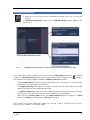
! Click on the File button in the Main Menu bar and then click on the Exit button to leave the
ZEN 2009 software.
! If any lasers are still running you should shut them off now in the pop-up window indicating the lasers
still in use.
! Shut down the computer.
! Wait until the fan of the Argon laser has switched off.
! On the REMOTE CONTROL turn off the Components switch and the System/PC switch (Fig. 1).
! Switch off the X-Cite 120 lamp or the HBO 100 mercury burner.
! Switch off the UV-Ar laser of by the toggle switch on the power supply (Fig. 2).
10/2009
21