1
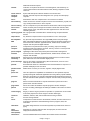
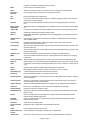
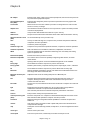
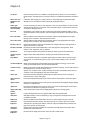
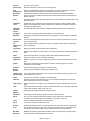
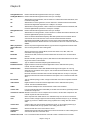
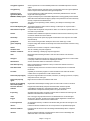
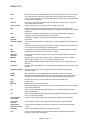
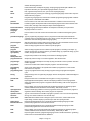
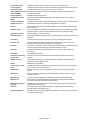
unzip
To restore a compressed, or zipped, file to its original form. See also uncompress.
user ID
Unique combination of characters, such as letters of the alphabet and/or numbers, that
identifies a specific user. See also user name.
user interface
The portion of software that defines how a user interacts with a computer, including how the
user enters data and instructions and how information is displayed on the screen.
user name
Unique combination of characters, such as letters of the alphabet and/or numbers, that
identifies a specific user.
utility
Type of system software that allows a user to perform maintenance-type tasks, usually
related to managing a computer, its devices, or its programs.
utility program
Type of system software that allows a user to perform maintenance-type tasks usually related
to managing a computer, its devices, or its programs.
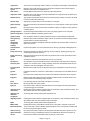
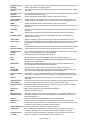
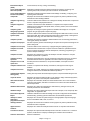
virtual memory
A portion of a storage medium, usually the hard disk, that the operating system allocates to
function as additional RAM.
virtualization
Practice of sharing or pooling computing resources, such as servers.
virus
Potentially damaging computer program that affects, or infects, a computer negatively by
altering the way the computer works without a user’s knowledge or permission.
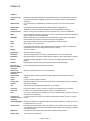
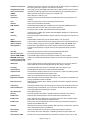
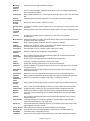
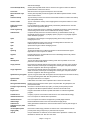
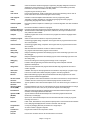
virus author
Programmer who intentionally writes a virus program.
warm boot
Process of using the operating system to restart a computer.
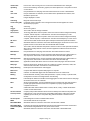
Web filtering
software
Program that restricts access to certain material on the Web.
widget
Mini-program with limited functionality that connects to another program or provides
information. See also gadget.
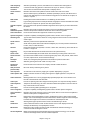
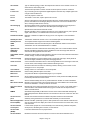
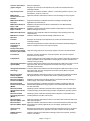
Windows 7
Microsoft's fastest, most efficient operating system to date, offering quicker program start up,
built-in diagnostics, automatic recovery, improved security, enhanced searching and
organizing capabilities, and an easy-to-use interface.
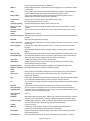
Windows 7
Windows 7 edition that includes all the capabilities of Windows 7 Starter and also includes
Home Premium Windows Aero with its Aero Flip 3D feature.
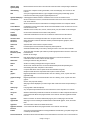
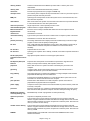
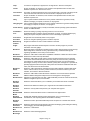
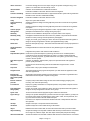
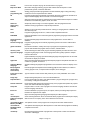
Windows 7
Professional
Windows 7 edition that provides users in all sizes of businesses with a secure operating
environment that uses Windows Aero where they easily can search for files, protect their
computers from unauthorized intruders and unwanted programs, use improved backup
technologies, securely connect to Wi-Fi networks, quickly view messages on a powered-off,
specially equipped notebook computer, easily share documents and collaborate with other
users, and watch and record live television.
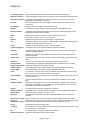
Windows 7
Starter
Windows 7 edition designed for netbooks and other small notebook computers that allows
users to search for files, connect to printers and devices, browse the Internet, join home
networks, and connect to wireless networks.
Windows 7
Ultimate
Windows 7 edition that includes all features of Windows 7 Home Premium and provides
additional features designed to keep files secure and support for 35 languages.
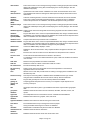
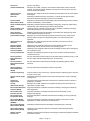
Windows Aero
Interface for computers with more than 1 GB of RAM that provides an enhanced visual look,
additional navigation options, and animation.
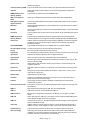
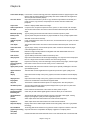
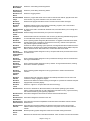
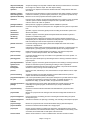
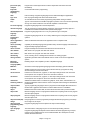
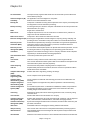
Windows
Calendar
Windows 7 feature that allows you to coordinate your schedule with others' schedules.
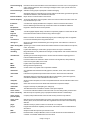
Windows
Contacts
Windows Vista feature that allows you to organize name and address information.
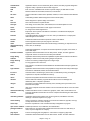
Windows
Defender
Windows 7 security feature that protects your computer from spyware.
Windows DVD
Maker
Windows 7 feature that allows users to create DVDs from digital videos.
Windows
Embedded CE
Scaled-down Windows operating system designed for use on communications,
entertainment, and computing devices with limited functionality.
Windows
Firewall
Windows 7's built-in personal firewall that protects computers or a network from hackers.
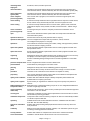
Windows Live
Essentials
Windows 7 feature that includes programs for instant messaging, photo editing and sharing,
e-mail, blogging, and video editing and sharing.
Windows Live
Mail
Windows 7 e-mail feature.
Windows Live
Messenger
Windows 7 instant messaging feature.
Chapter 8 Page 38