1
PowerMapper
one-click site mapping
Overview
[Pro] indicates features only
available in PowerMapper
Professional Edition.
Introduction to
PowerMapper
PowerMapper is a one-click site
mapping tool that eliminates
weeks of intensive manual labor by
automatically creating site maps
and content inventories.
Pages are requested from the web
server in the same way that a web
browser requests them. This
means the product works with
password protected pages as well
as server technologies like
ASP.NET, JSP, ColdFusion and
SharePoint.
Web Server
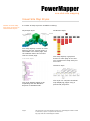
It produces visual site maps in a
variety of styles, and allows data
export to other applications and
databases for additional
processing.
Request
Web Pages
SortSite
Example PowerMapper Site Map
How PowerMapper Works
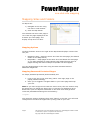
PowerMapper scans each page of a
site, capturing page thumbnails
and metadata, and then examines
the page for links to un-scanned
pages. It scans the newly found
pages and repeats this process
until all pages have been scanned.
Page 2
This process is called web
crawling, and is used by search
engine agents like Googlebot to
find pages to index. Like other
well-behaved web crawlers,
PowerMapper obeys the Robots
Exclusion Protocol (robots.txt)
which describes areas of sites that
are off limits to web crawlers.
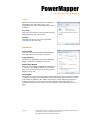
In addition, you can add URL
patterns to ignore:
*.pdf – to ignore all PDF files
*logout* - to ignore all URLs
containing ‘logout’
For more information see
Advanced Options: Blocks below.
This document is for informational purposes only. PowerMapper Software makes
no warranties, express or implied in this document.
Copyright 1996-2012 PowerMapper Software