1
SATEL i-LINK
User Manual, Version 1.4
4 OPERATION
The Operation mode is selected using the PRTCL-switch. The operations are Point-to-Point or
Point-to-Multipoint. In Point-to-Point operation mode the system consists of one pair of units. The
inputs of the unit are transmitted as outputs of the other unit.
In Multipoint mode the main-station controls the sub-stations.
4.1 Point- to- Point
Point-to-Point operation is between two units. The inputs of the unit are transmitted as outputs of
the other unit.
4.1.1 Updating Digital messages
Digital information (relay, switch etc.) will be sent to the other unit always, when there is a
change at the input.
4.1.2 Start of the Point-to-Point operation
o Connect radio modem to i-LINK directly to its connector and check that
it is locked.
o The MP-switch must be “0 ”, in the P-to-P-position.
o Before connecting the device to a power supply, connect first all inputs
and outputs that are to be used.
o When both units have these basic settings the supply voltage can be connected.
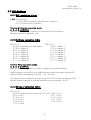
o Check that the channel switches 2, 3, 4, 5 = 0000, unless they are
purposely selected for a specific channel for example 2, 3, 4, 5= 0101=
channel 5 (see chapter 3.7… /channel selection table).
4.2 Point- to- Multipoint
In this mode the program at the main station controls the units of the sub stations. The main
station can drive one or more sub stations (maximum 15 pcs / system).
4.2.1 Start of the Multipoint operation
o
Connect one SATELLINE radio modem to the COM-Port of the PC.
o
Connect the i-LINK slave(s) to the radio modems.
o
The “MP”- switch must be “1”, in the P-to-MP-position.
o Before connecting the device to a power supply, connect first all inputs and outputs that are
to be used.
o Set individual address to all slaves. (As this is a master–slave operation, the slaves have
to be addressed). All slaves must have different address (see chapter 3.7…/address
selection table.
o Start using the system by the master by opening the controlling program for example
SATELLINK PC Pro etc.
o
With the program it is possible to turn ON / OFF the outputs and monitor the inputs.
Please contact local SATEL distributor or visit SATEL’s web site in order to get information of the
multipoint commands.
11