1
Small Vision System Calibration
1.2
6
Setting the Camera Characteristics
The calibration procedure must have knowledge of the cameras that produced the input images. This
is true whether you use stored or live images. Each image pair must come from the same stereo rig: you
can’t mix image sets taken from different stereo rigs. Also, each camera in the stereo rig must have
approximately the same characteristics, i.e., the same lens focal length and imager type.
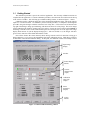
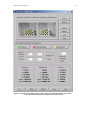
There are preset values for the stereo heads sold by Videre Design: the STH-V2 and STH-V3 analog
heads, and the MEGA-D megapixel digital head. Choosing one of these stereo head types, in the camera
characteristics section of the dialog, sets most of the required values. The only choice remaining is
whether to use Kappa2 or not. This choice is discussed in a section below.
If you want to calibrate a stereo rig other than the Videre Design stereo heads, then you must choose
the Custom setting and input the camera parameters. Usually these parameters can be found from the
specifications of the cameras.
Note well: For custom stereo rigs, the calibration procedure is very sensitive to the
camera characteristics. If the input characteristics do not match the actual camera values,
it is usually not possible to get a good set of calibration parameters.
In the Custom mode, the required parameters are the width and height of the camera imagers (in
pixels), and the pixel size. For example, the imagers in the STH-V2 stereo head are 320x240 pixels, and
each pixel is 0.0144 mm (width, or dx) x 0.0138 mm (height, or dy). These are the active pixels, that is, the
ones that actually contribute to the output signal of the camera, which in this case is an NTSC video signal.
The imager itself has 356 x 288 pixels, so that it can also output a PAL video signal. If you were using a
PAL framegrabber, then you would use the larger imager size.
Note well: The imager size is not the same as the image size captured into memory by a
framegrabber. For analog cameras, the camera outputs a video signal (usually NTSC or
PAL), which is then digitized by a framegrabber. The framegrabber can scale the image,
for example, it will usually produce a 640-pixel line from an NTSC signal, even if the
imager only has 320 pixels in each line. In any case, you must use the number of pixels
on the imager that produce the output image, rather than the number of output pixels
digitized by the framegrabber. Digital imagers, such as the MEGA-D, output each
pixel’s value, and so the output image from the camera corresponds directly to the
number of pixels in the imager.
The aspect ratio is the ratio between the width and height of each pixel in the imager. Although the
aspect ratio is fixed on the imager itself (because every pixel has the same size), an analog framegrabber
can change the aspect ratio by digitizing the video stream at a different pixel rate than it was produced. To
adjust for slight variations in the aspect ratio, the calibration routines can search for a modified aspect ratio
to use in place of the original one. For analog stereo heads (the STH-V2/V3), the Fixed Aspect box should
be unchecked, to allow for this search. Digital stereo heads (the MEGA-D) should fix the aspect ratio,
because the output image corresponds directly to the pixels on the imager.
The Kappa2 value is a parameter to correct for lens distortion. Allowing the calibration routines to
search for a good value for Kappa2 can help with lenses that have a large amount of distortion, which is
most noticeable on wide-angle lenses (> 50 degree field of view). The calibration dialog allows you to fix
Kappa2 at 0, so that the search is not performed. In general, leave this box unchecked, unless you have
trouble with the calibration parameters that are produced (Section 1.6.1)