1
User’s
Manual
FA-M3 Programming Tool
WideField3
(Script)
IM 34M06Q16-04E
Yokogawa Electric Corporation
IM 34M06Q16-04E
3rd Edition
Blank Page
i
Applicable Product:
Range-free Multi-controller FA-M3
-
Model Name: SF630-MCW
-
FA-M3 Programming Tool WideField3
The document number and document model code for this manual are given below.
Refer to the document number in all communications; also refer to the document
number or the document model code when purchasing additional copies of this manual.
-
Document No.: IM 34M06Q16-04E
Document Model Code: DOCIM
Media No. IM 34M06Q16-04E (CD)
3rd Edition: Dec. 2013 (AR)
All Rights Reserved Copyright 2013, Yokogawa Electric Corporation
IM 34M06Q16-04E
3rd Edition: Dec. 25, 2013-00
ii
Important
About This Manual
-
This Manual should be passed on to the end user.
Before using the controller, read this manual thoroughly to have a clear
understanding of the controller.
This manual explains the functions of this product, but there is no guarantee that
they will suit the particular purpose of the user.
Under absolutely no circumstances may the contents of this manual be transcribed
or copied, in part or in whole, without permission.
The contents of this manual are subject to change without prior notice.
Every effort has been made to ensure accuracy in the preparation of this manual.
However, should any errors or omissions come to the attention of the user, please
contact the nearest Yokogawa Electric representative or sales office.
Symbols Related to Safety
Danger. This symbol on the product indicates that the operator must follow the
instructions laid out in this user's manual to avoid the risk of personnel injuries,
fatalities, or damage to the instrument. Where indicated by this symbol, the manual
describes what special care the operator must exercise to prevent electrical shock
or other dangers that may result in injury or the loss of life.
Protective Ground Terminal. Before using the instrument, be sure to ground this
terminal.
Function Ground Terminal. Before using the instrument, be sure to ground this
terminal.
Alternating current. Indicates alternating current.
Direct current. Indicates direct current.
IM 34M06Q16-04E
3rd Edition: Dec. 25, 2013-00
iii
The following symbols are used only in the user's manual.
WARNING
Indicates a “Warning”.
Draws attention to information essential to prevent hardware damage, software
damage or system failure.
CAUTION
Indicates a “Caution”.
Draws attention to information essential to the understanding of operation and
functions.
TIP
Indicates a “TIP”.
Gives information that complements the present topic.
SEE ALSO
Indicates a “SEE ALSO” reference.
Identifies a source to which to refer.
Safety Precautions when Using/Maintaining the Product
-
-
-
-
For the protection and safe use of the product and the system controlled by it, be
sure to follow the instructions and precautions on safety stated in this manual
whenever handling the product. Take special note that if you handle the product in
a manner other than prescribed in these instructions, the protection feature of the
product may be damaged or impaired. In such cases, Yokogawa cannot guarantee
the quality, performance, function and safety of the product.
When installing protection and/or safety circuits such as lightning protection devices
and equipment for the product and control system as well as designing or installing
separate protection and/or safety circuits for fool-proof design and fail-safe design of
processes and lines using the product and the system controlled by it, the user
should implement it using devices and equipment, additional to this product.
If component parts or consumable are to be replaced, be sure to use parts specified
by the company.
This product is not designed or manufactured to be used in critical applications
which directly affect or threaten human lives and safety — such as nuclear power
equipment, devices using radioactivity, railway facilities, aviation equipment,
shipboard equipment, aviation facilities or medical equipment. If so used, it is the
user’s responsibility to include in the system additional equipment and devices that
ensure personnel safety.
Do not attempt to modify the product.
In order to prevent electrical shock, turn off all the power sources before connecting
wires, etc.
This product is classified as Class A for use in industrial environments. If used in a
residential environment, it may cause electromagnetic interference (EMI). In such
situations, it is the user’s responsibility to adopt the necessary measures against
EMI.
IM 34M06Q16-04E
3rd Edition: Dec. 25, 2013-00
iv
Exemption from Responsibility
-
Yokogawa Electric Corporation (hereinafter simply referred to as Yokogawa Electric)
makes no warranties regarding the product except those stated in the WARRANTY
that is provided separately.
Yokogawa Electric assumes no liability to any party for any loss or damage, direct or
indirect, caused by the use or any unpredictable defect of the product.
Software Supplied by the Company
-
Yokogawa Electric makes no other warranties expressed or implied except as
provided in its warranty clause for software supplied by the company.
Use the software with one computer only.
You must purchase another copy of the software for use with each additional
computer.
Copying the software for any purposes other than backup is strictly prohibited.
Store the original media that contain the software in a safe place.
Reverse engineering, such as decompiling of the software, is strictly prohibited.
Under absolutely no circumstances may the software supplied by Yokogawa Electric
be transferred, exchanged, or sublet or leased, in part or as a whole, for use by any
third party without prior permission by Yokogawa Electric.
IM 34M06Q16-04E
3rd Edition: Dec. 25, 2013-00
v
General Requirements for Using the FA-M3 Controller
Set the product in a location that fulfills the following requirements:
-
-
-
Where the product will not be exposed to direct sunlight, and where the operating
surrounding air temperature is from 0°C to 55°C (32°F to 131°F).
There are modules that must be used in an environment where the operating
surrounding air temperature is in a range smaller than 0°C to 55°C (32°F to 131°F).
Refer to hardware user’s manual or the applicable user’s manual. In case of
attaching such a module, the entire system's operating surrounding air temperature
is limited to the module’s individual operating surrounding air temperature.
Where the relative humidity is from 10 to 90%.
In places where there is a chance of condensation, use a space heater or the like to
constantly keep the product warm and prevent condensation.
For use in Pollution Degree 2 Environment.
Where there are no corrosive or flammable gases.
Where the product will not be exposed to mechanical vibration or shock that exceed
specifications.
Where there is no chance the product may be exposed to radioactivity.
Use the correct types of wire for external wiring:
-
USE COPPER CONDUCTORS ONLY.
Use conductors with temperature ratings greater than 75°C.
Securely tighten screws:
-
Securely tighten module mounting screws and terminal screws to avoid problems
such as faulty operation.
Tighten terminal block screws with the correct tightening torque.
Refer to the hardware user’s manual or the applicable user’s manual for the
appropriate tightening torque.
Securely lock connecting cables:
-
Securely lock the connectors of cables, and check them thoroughly before turning
on the power.
Interlock with emergency-stop circuitry using external relays:
-
Equipment incorporating the FA-M3 controller must be furnished with emergencystop circuitry that uses external relays. This circuitry should be set up to interlock
correctly with controller status (stop/run).
Ground for low impedance:
-
For safety reasons, connect the [FG] grounding terminal to a Japanese Industrial
Standards (JIS) Class D (earlier called Class 3) Ground*1. For compliance to CE
Marking, use braided or other wires that can ensure low impedance even at high
frequencies for grounding.
*1 Japanese Industrial Standard (JIS) Class D Ground means grounding resistance of 100 Ω max.
IM 34M06Q16-04E
3rd Edition: Dec. 25, 2013-00
vi
Configure and route cables with noise control considerations:
-
Perform installation and wiring that segregates system parts that may likely become
noise sources and system parts that are susceptible to noise. Segregation can be
achieved by measures such as segregating by distance, installing a filter or
segregating the grounding system.
Configure for CE Marking Conformance:
-
For compliance with CE Marking, perform installation and cable routing according to
the description on compliance to CE Marking in the “Hardware Manual”.
We recommend that you stock up on maintenance parts:
-
We recommend that you stock up on maintenance parts, including spare modules,
in advance.
Preventive maintenance (replacement of the module or its battery) is required for
using the module beyond 10 years. For enquiries on battery replacement service
(for purchase), contact your nearest Yokogawa Electric representative or sales
office. (The module has a built-in lithium battery. Lithium batteries may exhibit
decreased voltage, and in rare cases, leakage problems after 10 years.)
Discharge static electricity before touching the system:
-
Because static charge can accumulate in dry conditions, first touch grounded metal
to discharge any static electricity before touching the system.
Wipe off dirt with a soft cloth:
-
-
Gently wipe off dirt on the product’s surfaces with a soft cloth.
If you soak the cloth in water or a neutral detergent, tightly wring it out before wiping
the product.
Letting water enter the module interior can cause malfunctions.
Do not use volatile solvents such as benzine or paint thinner or chemicals for
cleaning, as they may cause deformity, discoloration, or malfunctioning.
Avoid storing the FA-M3 controller in places with high temperature or
humidity:
-
Since the CPU module has a built-in battery, avoid storage in places with high
temperature or humidity.
Since the service life of the battery is drastically reduced by exposure to high
temperatures, take special care (storage surrounding air temperature should be
from –20°C to 75°C).
There is a built-in lithium battery in a CPU module and temperature control module
which serves as backup power supply for programs, device information and
configuration information. The service life of this battery is more than 10 years in
standby mode at room temperature. Take note that the service life of the battery
may be shortened when installed or stored at locations of extreme low or high
temperatures. Therefore, we recommend that modules with built-in batteries be
stored at room temperature.
Always turn off the power before installing or removing modules:
-
Failing to turn off the power supply when installing or removing modules, may result
in damage.
IM 34M06Q16-04E
3rd Edition: Dec. 25, 2013-00
vii
Do not touch components in the module:
-
In some modules you can remove the right-side cover and install ROM packs or
change switch settings. While doing this, do not touch any components on the
printed-circuit board, otherwise components may be damaged and modules may fail
to work.
Do not use unused terminals:
-
Do not connect wires to unused terminals on a terminal block or in a connector.
Doing so may adversely affect the functions of the module.
Use the following power source:
-
Use only power supply module F3PU□□-□□ in FA-M3 Controller for supplying power
input for control circuit connection.
If using this product as a UL-approved product, for the external power supply, use a
limited voltage / current circuit power source or a Class 2 power source.
Refer to the user’s manual before connecting wires:
-
Refer to the hardware user’s manual or the applicable user’s manual for the external
wiring drawing.
Refer to “A3.6.5 Connecting Output Devices” in the hardware user’s manual before
connecting the wiring for the output signal.
Refer to “A3.5.4 Grounding Procedure” in the hardware user’s manual for attaching
the grounding wiring.
IM 34M06Q16-04E
3rd Edition: Dec. 25, 2013-00
viii
Waste Electrical and Electronic Equipment
Waste Electrical and Electronic Equipment (WEEE), Directive 2002/96/EC
(This directive is only valid in the EU.)
This product complies with the WEEE Directive (2002/96/EC) marking requirement.
The following marking indicates that you must not discard this electrical/electronic
product in domestic household waste.
Product Category
With reference to the equipment types in the WEEE directive Annex 1, this product is
classified as a “Monitoring and Control instrumentation” product.
Do not dispose in domestic household waste.
When disposing products in the EU, contact your local Yokogawa Europe B. V. office.
How to Discard Batteries
The following description on DIRECTIVE 2006/66/EC (hereinafter referred to as the EU
new directive on batteries) is valid only in the European Union.
Some models of this product contain batteries that cannot be removed by the user.
Make sure to dispose of the batteries along with the product.
Do not dispose in domestic household waste.
When disposing products in the EU, contact your local Yokogawa Europe B. V. office.
Battery type: Lithium battery
Note: The symbol above means that the battery must be collected separately as
specified in Annex II of the EU new directive on batteries.
IM 34M06Q16-04E
3rd Edition: Dec. 25, 2013-00
ix
Introduction
About This Manual
The WideField3 manual set consists of the following four volumes.
Table 1 Manual List
Volume
Introduction and Troubleshooting
Offline
Online
Script
Trace Function
Document No.
IM 34M06Q16-01E
IM 34M06Q16-02E
IM 34M06Q16-03E
IM 34M06Q16-04E
IM 34M06Q50-21E
This manual is the operation manual, Script, for the Range-free Multi-controller FA-M3
Programming Tool (known as WideField3 in this manual).
Overview of This Manual
This manual describes functions of the script for WideField3.
For enquiries, please contact the store where you purchased the product or the nearest
Yokogawa sales office listed at the back of this manual.
We recommend using this manual together with the operation manuals of your computer
or printer, as required.
Structure of the Manual
This manual consists of 1 part: G.
Part G describes all functions of the script.
PART G
Script Editing Manual
G1.
Overview of Scripts
This chapter describes the overview and limitations of the script.
G2.
Creating and Editing Scripts
This chapter describes how to create scripts as well as useful functions for editing
scripts.
G3.
Script Syntax
This chapter describes the script syntax.
G4.
Setting a Script in a Project
This chapter describes how to set a script in a project.
G5.
Debugging Scripts
This chapter describes how to debug scripts.
G6.-G11.
Script Functions
These chapters describe script functions.
IM 34M06Q16-04E
3rd Edition: Dec. 25, 2013-00
x
How to Read This Manual
Be sure to read the “Introduction” as well as “How to read this manual” before using
WideField3.
Part G of the manual describes all functions of the script.
We have tried to make the user interface, operations and editing functions of the
WideField3 application as similar as possible to other generally available Windows
software. This manual does not contain information on general Windows editing
operations, which are not specific to WideField3.
Notation
Notation for Windows Screens and Operation
-
Items in initial caps denote symbols, names and window names.
Example: WideField3, Program Monitor dialog
-
Bracketed items denote menu bar items, dialog box fields, commands, and buttons.
Example: Select [File]–[New] from the menu bar.
Click [OK].
Representations in WideField3 Figures and Screens
Screen examples given in this manual assumes that the application is running under
Windows XP operating system environment. Under Windows Vista, Windows 7 and
Windows 8 operating systems, you may observe slight differences such as differences
in icon names or application names.
Some figures in this manual may, for reasons of convenience, be emphasized or
simplified, or parts of it may be omitted. Some screen images in this manual may differ
from actual screens due to differences in the operating machine environment.
Notation for Procedures
Procedure pages are laid out with the procedure steps on the left and the corresponding
screen images on the right.
Procedure :User actions are displayed in bold.
Description of the results of user actions is provided after the ⇒ mark.
Screens :The procedure step(s) corresponding to a screen image is indicated by
step numbers below the screen.
Function Keys and Shortcut Keys
In addition to using a mouse, you can operate WideField3 menus using function keys
and shortcut keys.
In general, this manual describes operations using a mouse, and does not include
equivalent operations using function keys or short cut keys.
IM 34M06Q16-04E
3rd Edition: Dec. 25, 2013-00
xi
Other User's Manuals
You should read the following user's manuals.
-
FA-M3 Programming Tool WideField3 Read Me First (IM 34M06Q16-11E)
FA-M3 Programming Tool WideField3 Introduction and Troubleshooting (IM
34M06Q16-01E)
FA-M3 Programming Tool WideField3 Offline (IM 34M06Q16-02E)
FA-M3 Programming Tool WideField3 Online (IM 34M06Q16-03E)
FA-M3V Environment Tool Trace Function (IM 34M06Q50-21E)
For individual sequence CPU modules, please refer to the relevant user's manuals.
F3SP71, 76
-
Sequence CPU Instruction Manual – Functions (for F3SP71-4N/4S, F3SP76-7N/7S)
(IM 34M06P15-01E)
Sequence CPU – Network Functions (for F3SP71-4N/4S, F3SP76-7N/7S) (IM
34M06P15-02E)
Sequence CPU Instruction Manual – Instructions (IM 34M06P12-03E)
F3SP66, 67
-
Sequence CPU – Functions (for F3SP66-4S, F3SP67-6S) (IM 34M06P14-01E)
Sequence CPU – Network Functions (for F3SP66-4S, F3SP67-6S) (IM 34M06P1402E)
Sequence CPU Instruction Manual – Instructions (IM 34M06P12-03E)
F3SP22, 28, 38, 53, 58, 59
-
Sequence CPU Instruction Manual – Functions (for F3SP22-0S, F3SP28-3N/3S,
F3SP38-6N/6S, F3SP53-4H/4S, F3SP58-6H/6S, F3SP59-7S) (IM 34M06P13-01E)
Sequence CPU Instruction Manual – Instructions (IM 34M06P12-03E)
F3SP05, 08, 21, 25, 35
-
Sequence CPU – Functions (for F3SP21, F3SP25 and F3SP35) (IM 34M06P1202E)
Sequence CPU Instruction Manual – Instructions (IM 34M06P12-03E)
IM 34M06Q16-04E
3rd Edition: Dec. 25, 2013-00
xii
Refer to the following manuals as required.
Specifications and Layout*1 of the FA-M3, Mounting and Wiring, Testing,
Maintenance and Inspection, and System-wide Restrictions for
Mounting Modules
*1: See specific manuals for products other than the power module, base module, I/O module, cables, and terminal block
units.
-
Hardware Manual (IM 34M06C11-01E)
Fiber-optic FA-Bus Functions
-
Fiber-optic FA-bus Module and Fiber-optic FA-bus Type 2 Module, FA-bus Type 2
Module (IM 34M06H45-01E)
FA Link Functions
-
FA Link H Module, Fiber-optic FA Link H Module (IM 34M06H43-01E)
IM 34M06Q16-04E
3rd Edition: Dec. 25, 2013-00
xiii
Copyrights and Trademarks
Copyrights
Copyrights of the programs and online manual included in this CD-ROM belong to
Yokogawa Electric Corporation.
This online manual may be printed but PDF security settings have been made to prevent
alteration of its contents.
This online manual may only be printed and used for the sole purpose of operating this
product. When using a printed copy of the online manual, pay attention to possible
inconsistencies with the latest version of the online manual. Ensure that the edition
agrees with the latest CD-ROM version.
Copying, passing, selling or distribution (including transferring over computer networks)
of the contents of the online manual, in part or in whole, to any third party, is strictly
prohibited. Registering or recording onto videotapes and other media is also prohibited
without expressed permission of Yokogawa Electric Corporation.
Trademarks
-
The trade and company names that are referred to in this document are either
trademarks or registered trademarks of their respective companies.
IM 34M06Q16-04E
3rd Edition: Dec. 25, 2013-00
Blank Page
TOC-1
FA-M3
Programming Tool
WideField3 Script
IM 34M06Q16-04E 3rd Edition
CONTENTS
Applicable Product ....................................................................................i
Important ...................................................................................................ii
Introduction ..............................................................................................ix
Copyrights and Trademarks .................................................................xiii
PART-G Script Editing Manual
G1. Overview of Scripts .................................................................... G1-1
G1.1
Scripts ................................................................................................... G1-2
G1.1.1 What are Scripts?...................................................................... G1-2
G1.1.2 Purpose of Scripts ..................................................................... G1-2
G1.2
Creating Scripts .................................................................................... G1-4
G1.3
Precautions When Using Scripts ........................................................ G1-5
G2. Creating and Editing Scripts ..................................................... G2-1
G2.1
Editing Scripts ...................................................................................... G2-3
G2.1.1 Procedure for Editing a Script ................................................... G2-3
G2.1.2 Displaying a Script in the Ladder Format .................................. G2-6
G2.2
Input Correction Functions for Editing Scripts ................................. G2-8
G2.3
Useful Functions for Editing Scripts .................................................. G2-9
G2.3.1 Comments and Indents ............................................................. G2-9
G2.3.2 Inline Mnemonics .................................................................... G2-12
G2.3.3 Using the Functions for Ladders in Scripts ............................. G2-13
G2.3.4 Display of Input Candidates .................................................... G2-15
G2.3.5 Registering and Editing of Constant Definition ....................... G2-16
G2.4
Printing Scripts ................................................................................... G2-19
G3. Script Syntax ............................................................................ G3-11
G3.1
Assignment Statements ...................................................................... G3-2
G3.2
Operators .............................................................................................. G3-4
G3.2.1 Arithmetic Operators ................................................................. G3-4
G3.2.2 Comparison Operators .............................................................. G3-6
G3.2.3 Logical Operators ...................................................................... G3-6
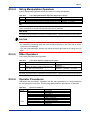
G3.2.4 String Manipulation Operators .................................................. G3-7
G3.2.5 Other Operators ........................................................................ G3-7
G3.2.6 Operator Precedence ................................................................ G3-7
G3.3
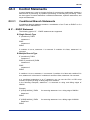
Control Statements .............................................................................. G3-8
G3.3.1 Conditional Branch Statements ................................................ G3-8
IM 34M06Q16-04E
3rd Edition: Dec. 25, 2013-00
TOC-2
G3.3.2 Repetitive Statements .............................................................. G3-11
G3.3.3 Script Exit Statements ............................................................. G3-13
G3.3.4 Restrictions on Control Statements ........................................ G3-14
G3.4
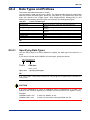
Data Types and Prefixes .................................................................... G3-16
G3.4.1 Specifying Data Types ............................................................ G3-16
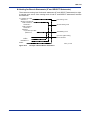
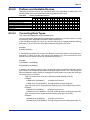
G3.4.2 Prefixes and Available Devices ............................................... G3-17
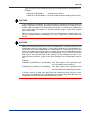
G3.4.3 Converting Data Types............................................................ G3-17
G3.4.4 Data Types in Functions.......................................................... G3-19
G3.5
Reserved Words ................................................................................. G3-20
G4. Setting a Script in a Project ....................................................... G4-1
G4.1
Setting Work Device Areas .................................................................. G4-2
G4.2
Display Formats of Work Devices in Converted Ladders ................ G4-3
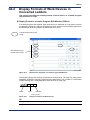
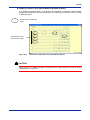
G5. Debugging Scripts ..................................................................... G5-1
G5.1
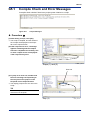
Compile Check and Error Messages .................................................. G5-2
G5.2
Syntax Check and Error Messages .................................................... G5-7
G5.3
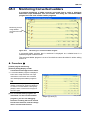
Monitoring Converted Ladders ......................................................... G5-10
G5.4
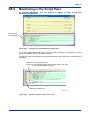
Monitoring in the Script Pane ........................................................... G5-12
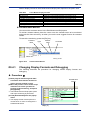
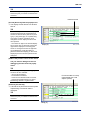
G5.4.1 Changing Display Formats and Debugging ............................ G5-13
G5.4.2 Hiding Monitor Line ................................................................. G5-15
G6. Script Functions ......................................................................... G6-1
G7. Basic Functions.......................................................................... G7-1
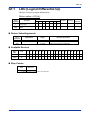
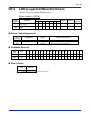
G7.1
LDU (Logical Differential Up) .............................................................. G7-2
G7.2
LDD (Logical Differential Down) ......................................................... G7-4
G8. Computational Functions .......................................................... G8-1
G8.1
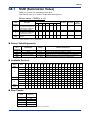
SUM (Summation Value) ...................................................................... G8-2
G8.2
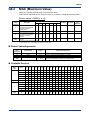
MAX (Maximum Value) ......................................................................... G8-4
G8.3
MIN (Minimum Value) ........................................................................... G8-6
G8.4
ABS (Absolute Value) ........................................................................... G8-8
G8.5
LOG (Logarithm) ................................................................................. G8-10
G8.6
EXP (Exponent) ................................................................................... G8-12
G8.7
SQR (Square Root) ............................................................................. G8-14
G8.8
POW (Power) ....................................................................................... G8-16
G8.9
SIN (Sine) ............................................................................................. G8-18
G8.10 COS (Cosine) ...................................................................................... G8-20
G8.11 TAN (Tangent) ..................................................................................... G8-22
G8.12 ASIN (Arc Sine) ................................................................................... G8-24
G8.13 ACOS (Arc Cosine) ............................................................................. G8-26
G8.14 ATAN (Arc Tangent) ............................................................................ G8-28
G8.15 ANDV (Logical AND) ........................................................................... G8-30
G8.16 ORV (Logical OR) ............................................................................... G8-32
G8.17 XORV (Logical XOR) ........................................................................... G8-34
G8.18 NOTV (Logical NOT) ........................................................................... G8-36
IM 34M06Q16-04E
3rd Edition: Dec. 25, 2013-00
TOC-3
G9. Data Processing Functions ....................................................... G9-1
G9.1
RROT (Right Rotate)............................................................................. G9-2
G9.2
LROT (Left Rotate)................................................................................ G9-4
G9.3
RSFT (Right Shift)................................................................................. G9-6
G9.4
LSFT (Left Shift).................................................................................... G9-8
G9.5
RSFTN (Right Shift m-bit Length Data by n Bits) ............................ G9-10
G9.6
LSFTN (Left Shift m-bit Length Data by n Bits) ............................... G9-12
G9.7
MOV (Move) ......................................................................................... G9-14
G9.8
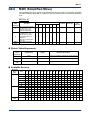
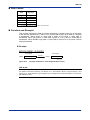
MOV (Simplified Move) ...................................................................... G9-17
G9.9
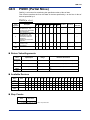
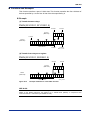
PMOV (Partial Move) .......................................................................... G9-19
G9.10 HMOV (Byte Block Move) .................................................................. G9-21
G9.11 BSET (Block Set) ................................................................................ G9-23
G9.12 SWAP (Swap) ...................................................................................... G9-26
G9.13 HSWAP (Byte Swap) ........................................................................... G9-28
G9.14 HCHN (Byte Chain) ............................................................................. G9-30
G9.15 HDEL (Partial Byte Deletion) ............................................................. G9-33
G9.16 BIN (Binary Conversion) .................................................................... G9-35
G9.17 BCD (BCD Conversion) ...................................................................... G9-37
G9.18 FBCD (Float to BCD) .......................................................................... G9-39
G9.19 BCDF (BCD to Float) .......................................................................... G9-41
G9.20 ITOF (Integer to Float) ........................................................................ G9-43
G9.21 ITOE (Integer to Double Precision Float) ......................................... G9-45
G9.22 FTOW (Float to Integer)...................................................................... G9-47
G9.23 FTOL (Float to Integer) ....................................................................... G9-49
G9.24 ETOL (Double Precision Float to Integer) ........................................ G9-51
G9.25 ETOD (Double Precision Float to Integer)........................................ G9-53
G9.26 FTOE (Float to Double Precision Float) ........................................... G9-55
G9.27 ETOF (Double Precision Float to Float) ........................................... G9-57
G9.28 RAD (Convert Degree to Radian) ...................................................... G9-59
G9.29 DEG (Convert Radian to Degree) ...................................................... G9-61
G9.30 ASC (Convert ASCII) .......................................................................... G9-63
G9.31 APR (Approximate Broken Line)....................................................... G9-65
G10. String Manipulation Functions ................................................ G10-1
G10.1 VAL (Convert String to Numeric) ...................................................... G10-2
G10.2 STR (Convert Numeric to String) ...................................................... G10-5
G10.3 SMOV (String Move) ........................................................................... G10-7
G10.4 SLEN (String Length Count) .............................................................. G10-9
G10.5 INSTR (String Search) ....................................................................... G10-11
G10.6 INSTR (Simplified String Search) .................................................... G10-13
G10.7 MID$ (String Middle) ......................................................................... G10-15
G10.8 MID$ (Simplified String Middle) ...................................................... G10-17
G10.9 RIGHT$ (String Right) ...................................................................... G10-19
G10.10 LEFT$ (String Left) ........................................................................... G10-21
G10.11 SDEL (Substring Deletion)............................................................... G10-23
IM 34M06Q16-04E
3rd Edition: Dec. 25, 2013-00
TOC-4
G10.12 SINS (String Insertion) ..................................................................... G10-25
G10.13 REPLACE (String Replacement) ..................................................... G10-27
G10.14 TRIM (Leading and Trailing Space Deletion) ................................. G10-30
G10.15 RTRIM (Trailing Space Deletion) ..................................................... G10-32
G10.16 LTRIM (Leading Space Deletion) ..................................................... G10-34
G10.17 RPAD (Right-side Character Addition) ........................................... G10-36
G10.18 LPAD (Left-side Character Addition) .............................................. G10-38
G10.19 SDIST (String to Byte-unit Characters) .......................................... G10-40
G10.20 SUNIT (Byte-unit Characters to String) .......................................... G10-42
G11. Program Control Functions ..................................................... G11-1
G11.1 IF ... ENDIF (Conditional Branch Statements) ..................................G11-2
G11.2 FOR ... NEXT (Repetitive Statements) ...............................................G11-5
G11.3 SELECT ... ENDSELECT (Conditional Branch Statement) ..............G11-9
G11.4 EXITSCRIPT (Script Exit Statement)................................................G11-12
Index ............................................................................................... Index-1
Revision Information .................................................................................i
IM 34M06Q16-04E
3rd Edition: Dec. 25, 2013-00
FA-M3
Programming Tool WideField3
Script
PART-G Script Editing Manual
IM 34M06Q16-04E 3rd Edition
This manual describes all functions of the script.
IM 34M06Q16-04E
3rd Edition: Dec. 25, 2013-00
Blank Page
G1-1
G1.
Overview of Scripts
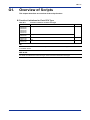
This chapter describes an overview of the script function.
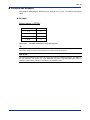
Function Limitations for Each CPU Type
Table G1.1
CPU Modules
F3SP22-0S,
F3SP28-3S,
F3SP38-6S,
F3SP53-4S,
F3SP58-6S,
F3SP59-7S
F3SP66-4S,
F3SP67-6S
F3SP71-4N,
F3SP76-7N
F3SP71-4S,
F3SP76-7S
Function Limitations for Each CPU Type
Limitations
SEE ALSO
Scripts cannot be used.
Scripts cannot be used.
N/A
N/A
TIP
This section does not describe hardware-dependant limitations for each CPU type, such as the number
of available devices.
SEE ALSO
For details on limitations for each CPU type, refer to the user's manual for each type.
IM 34M06Q16-04E
3rd Edition: Dec. 25, 2013-00
G1-2
G1.1
Scripts
G1.1.1
What are Scripts?
This section describes an overview and purpose of scripts, and also precautions
when using scripts.
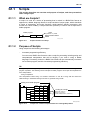
A script is a code for a series of processing that is coded in a BASIC-like format as
opposed to a ladder language format. A script consists of script syntax, which describes
a series of processing, and script functions, which perform specific processing, that
function as a kind of library. A script instruction (SCRIPT) is used to call a script from a
ladder program.
Ladder program
Script
IF (X00301==1) THEN
SCRIPT
D0001=D0002+D0003
ENDIF
ST1
G0101_01.VSD
Figure G1.1
G1.1.2
Script Instruction and Script
Purpose of Scripts
Using scripts has the following advantages.
-
Increases programming efficiency
You can use a BASIC-like format to code a script for processing including string and
computational manipulation that will be lengthy if you code it using a ladder
language. Processing coded in a BASIC-like format can be automatically converted
into a ladder program, and this increases programming efficiency.
TIP
Coding a script for a string manipulation or computational manipulation is easier than coding a ladder
program equivalent. The following shows examples of ladder programs and scripts that implement the
same manipulations.
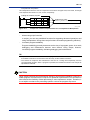
- String manipulation
This manipulation inserts string "12" between characters 'A' and 'B' in string "AB" and stores the
obtained string in addresses starting from D201 to generate string "A12B".
Coding as a ladder program
SMOV
"AB"
D0101
SMOV
"12"
D0121
SLFT
D0101
1
D0131
SRIT
D0101
1
D0141
SCHN
D0131
D0121
D0131
SCHN
D0131
D0141
D0201
Always ON
Coding as a script
SMOV("AB", S.D0101)
SMOV("12", S.D0121)
S.D0201=SINS(S.D0101, S.D0121, 2)
G0101_02.VSD
Figure G1.2
Comparison of Different Implementations of a String Manipulation
IM 34M06Q16-04E
3rd Edition: Dec. 25, 2013-00
G1-3
- Computational manipulation
This manipulation stores the area of a trapezoid in D101 when the upper base, lower base, and height
of the trapezoid are stored in D1, D2, and D3, respectively.
Coding as a ladder program
Always ON
D0010
=
D0001
+
D0002
D0010
=
D0010
*
D0003
D0101
=
D0010
/
2
Coding as a script
W.D0101 = ((W.D0001 + W.D0002) * W.D0003) / 2
G0101_03.VSD
Figure G1.3
-
Comparison of Different Implementations of a Computational Manipulation
Allows using script functions
In scripts, you can use predefined functions for supporting advanced operations and
string manipulations. Using these script functions increases programming efficiency.
-
Increases program readability
Program readability generally decreases as the size of a program grows. As a result,
debugging and maintenance become more difficult. Using scripts, however,
increases program readability, facilitating debugging and maintenance.
TIP
- Scripts are converted into a ladder instruction program and transferred to the CPU. In the CPU,
those ladder instructions are executed in the same way as other ladder instructions.
- The contents of scripts are also transferred to the CPU in a coding format separately from the
converted ladder program. When a program is uploaded, the transferred contents of the scripts are
uploaded and restored.
CAUTION
Using scripts increases the programming efficiency and program readability. However, a
ladder program converted from a script is not optimized in performance nor minimized in
size because the flexibility of data processing is more important in scripts. Therefore, it
is not helpful to enhance the processing speed or reduce the program step count.
IM 34M06Q16-04E
3rd Edition: Dec. 25, 2013-00
G1-4
G1.2
Creating Scripts
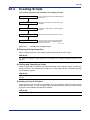
This section describes the procedure for creating a script.
Enter a script instruction
Enter a script instruction in the ladder program
edit screen.
Code a script
Program a script as the contents of the script
instruction.
Compile and save
Compile the script and save it with the ladder
program.
Set a script in a project
Set the work device areas used by the script.
Syntax check and download
Figure G1.4
Perform a syntax check of the script together
with the ladder program, and download the
program to the CPU.
G0102_01.VSD
Procedure for Creating a Script
Entering a Script Instruction
Enter a script instruction in the ladder program edit window to call a script.
SEE ALSO
For details on entering a script instruction, see Chapter G2, "Creating and Editing Scripts" in this
manual.
Coding and Compiling a Script
Code a script that is called by the script instruction. After coding a script, compile the
script to check if the contents are correct (i.e., if the script can be converted correctly
into a ladder program).
SEE ALSO
For details on coding and compiling a script, see Chapter G2, "Creating and Editing Scripts" in this
manual.
Setting a Script in a Project
Work devices must be used to temporarily store the operation results of script syntax
and script functions. You can configure where to assign work devices in the device area
from the Project Settings/Configuration window.
SEE ALSO
For details on setting a script in a project, see Chapter G4, "Setting a Script in a Project" in this manual.
IM 34M06Q16-04E
3rd Edition: Dec. 25, 2013-00
G1-5
G1.3
Precautions When Using Scripts
The following restrictions apply to scripts. Follow these restrictions when using scripts.
Compatible CPU Types
Scripts can be used only on CPU modules F3SP71 and F3SP76.
Number of Scripts Usable in a Block
The range of the script numbers that can be registered in a block is from 1 to 9,999.
A script number can be used in a block as many times as needed.
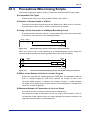
Using a Script Instruction in a Multiple-Branching Circuit
A script instruction cannot be used in a multiple-branching circuit on the output side.
A conversion error will occur in the following example.
I0001 I0002
SCRIPT
ST1
I0003
G0102_01.VSD
Figure G1.5
Multiple-Branching Circuit That Contains a Script Instruction
When you want to use a script instruction in a multiple-branching circuit, modify the
circuit into logical branches by inserting another device (I0100 shown below).
I0001
I0100
I0002
I0100
I0100
SCRIPT
ST1
I0003
G0102_02.VSD
Figure G1.6
How to Avoid a Multiple-Branching Circuit That Contains a Script Instruction
Effect on the Number of Lines in a Ladder Program
Scripts are converted into a ladder program in WideField3. The allowable number of
lines in a ladder program for each block contains the number of lines of the
converted ladder program. In addition, the number of lines in a ladder program
converted from a single script instruction cannot exceed 2,000 lines. A compile error
occurs if it exceeds 2,000 lines.
Maximum Number of Characters per Line in a Script
You cannot use one or more line feeds to code in multiple lines.
The maximum number of characters per line in a script is 499 characters. There is
no restriction on the number of lines in a script, although the maximum number of all
characters for each script is 10,240 characters.
IM 34M06Q16-04E
3rd Edition: Dec. 25, 2013-00
G1-6
Searching and Replacing in a Script, and Changing I/O Installation
Position
Device searching/replacement within a script cannot be performed. When
performing a device search of a ladder program, the cursor moves to the script
instruction when the searched for item is found in the script. For device replacement
in a ladder program, moving to or replacing the script instruction cannot be
performed. The contents of a script are not modified even if you use the Replace in
Project function or Change I/O Installation Position function.
Reading Circuits for a Tag Name Definition and Deleting Unused Tag
Names
Even if you use the Read Circuits function for a tag name definition, the devices
used only in a script are not read in the tag name definition. Also, if you delete
unused tag names, the devices used only in a script are deleted from the tag name
definition.
Circuit Comment-out for a Script Instruction
Circuit comment-out function cannot be used for a script instruction. However, you
can perform the equivalent operation for a script instruction by commenting out
(inactivating) its input condition or by commenting out every line of the script.
Ladders Converted from a Script
A ladder program converted from a script is displayed in a window different from the
ladder program edit window. In program monitoring, that ladder program is
displayed in a window together with other ladder programs. In addition, the
converted ladder program cannot be modified either in offline or online editing.
Online Editing
In online editing, you can edit the contents of a script, but you cannot add or delete
a script instruction.
Not Supported in Interrupt Routines and Sensor Control Blocks
You cannot use scripts in interrupt routines and sensor control blocks. Using scripts
in such components will cause an error during syntax checking.
Constant Names
You cannot use constant names indicating BIN type according to the type
specification performed by the constant definition as an internal script constant.
Using such names in a script will cause a compile error.
Balloon Comment
In the program monitor screen, you can insert a balloon comment into a ladder
program that has been converted from a script. If a balloon comment is inserted into
a converted line, reflecting the online balloon to the offline project will move that
balloon comment to the corresponding script instruction line in the offline circuit
editing screen.
IM 34M06Q16-04E
3rd Edition: Dec. 25, 2013-00
G1-7
Saving in Card Load Format Project
If a script uses any tag name, saving project data in card load format without tag
name definitions leaves tag names in the script as they are, instead of being
converted to the corresponding addresses. This causes a syntax error if you open
the project in card load format and perform a syntax check on the project because
unallocated tag names are used. Therefore, store the tag name definitions when a
script uses any tag name.
Displaying Project Settings/Configuration for Running Program
For a running program, the script setup shown in the Project Settings screen is the
one at the time of the connection. This means if project settings of scripts stored in
the CPU are modified from another personal computer during connection to the
CPU, the script setup at the start of the connection will be displayed, instead of the
one stored in the CPU.
IM 34M06Q16-04E
3rd Edition: Dec. 25, 2013-00
Blank Page
G2-1
G2.
Creating and Editing Scripts
This chapter describes how to create and edit scripts.
Before creating a script, you must first enter a script instruction.
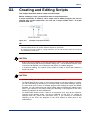
A script instruction is used to call a script from a ladder program and can be
entered only on the output side. You can set a script number from 1 to 9,999
prefixed with "ST".
Figure G2.1
Example of a Script Instruction
TIP
- Script numbers are managed on a block basis. Therefore, even if you use the same script number
between different blocks, the specific behavior depends on each block.
- By specifying the script number of a script instruction, you can call the same script as many times
as needed in the same block.
CAUTION
-
Even if the input condition of a script instruction is OFF, the CPU module scans the
inside of the script with the input condition being OFF. This is different from the case
of a macro call (MCALL) or a subroutine call (CALL) in a ladder program.
In mnemonic editing, you cannot newly create or modify a circuit that contains a
script instruction.
CAUTION
-
-
In online editing, you cannot add or delete a script instruction.
For WideField3 R2.03 or later, if using online editing to edit the contents of a script,
you can end editing by canceling it. If a compile error occurs when editing a script or
if a conversion error occurs in a ladder program after editing the script and ladder
program, you can cancel and end online editing without reflecting the editing to the
CPU. If you choose to end online editing by canceling it, the program on the CPU
retains its state prior to the modifications.
For WideField3 R2.03 or later, if there is a conversion error, then all the contents,
including areas without errors, will not be reflected on the CPU. To update all
changes and exit, correct the conversion error. If you choose to exit without
reflecting to the CPU, the program on the CPU retains its state prior to the
modifications.
IM 34M06Q16-04E
3rd Edition: Dec. 25, 2013-00
G2-2
-
-
-
For WideField3 R2.02 or earlier, if using online editing to edit the contents of a
script, there some required conditions for ending online editing. If a compile error
occurs when editing a script, online editing cannot be ended until the compile error
is remedied. If a conversion error occurs in a ladder program after editing the script
and ladder program, online editing cannot be ended until the ladder program
conversion error is remedied.
For WideField3 R2.02 or earlier, if there is a conversion error, then only contents up
to the error area will be reflected on the CPU. To update all changes and exit,
correct the conversion error. You may choose to exit without reflecting the invalid
areas to the CPU but this may result in a displaced circuit comment in subsequent
uploading if there was a conversion error in a circuit before or after the circuit
comment.
If using tag names and structures with a script, online editing cannot be performed
unless a project on a PC is opened. After opening a project, open the program
monitor screen and perform online editing.
IM 34M06Q16-04E
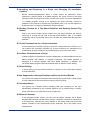
3rd Edition: Dec. 25, 2013-00
G2-3
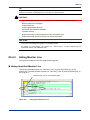
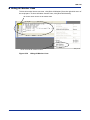
G2.1
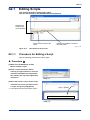
Editing Scripts
This section describes how to edit scripts.
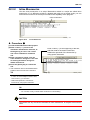
You can edit scripts on the Edit Mnemonics/Script pane.
Displays the
script for the
cursor position.
Saves the edit result of the
script.
Displays the ladders converted
from the script.
G0201_01.VSD
Figure G2.2
G2.1.1
Edit Mnemonics/Script Pane
Procedure for Editing a Script
Use the following procedure to edit a script.
Procedure ◆
(1) Make sure the Edit Block or Edit
Macro window is open.
(2) Enter a script instruction. When
entering a script instruction, enter the
instruction (SCRIPT) and a parameter
(ST number) like any other application
instruction.
Step (2)
G0201_02.VSD
(3) Move the position cursor to the script
instruction for which you want to edit
a script, and press [Ctrl]+[Enter].
⇒ The Edit Mnemonics/Script pane opens.
[Ctrl] + [Enter]
Edit Mnemonics/Script pane
Step (3)
G0201_03.VSD
IM 34M06Q16-04E
3rd Edition: Dec. 25, 2013-00
G2-4
Coding as a script
(4) Code a script on the Edit
Mnemonics/Script pane. When you
edit a script, the Script editing dialog
box appears with the [OK] and
[Cancel] buttons.
Step (4)
G0201_04.VSD
(5) After editing the script, click [OK]. The
edited contents are confirmed, the
script is compiled, and the Script
editing dialog box closes.
⇒ The results of the compile are displayed
in the Script tab on the output window.
TIP
Clicking [Cancel] displays a message box to
confirm whether to finish the editing. Clicking
[No] discards all contents you edited and
restores the script to the state before editing.
Click [Yes] to continue the editing.
Compile results
Step (5)
G0201_05.VSD
TIP
- If the contents of the script you edited contain one or more errors, the Script tab on the output
window displays one or more compile errors, and you must correct the contents of the script.
- You can continue to the next operation even if the script contains an error. If you move the position
cursor to the script instruction, the [Check Errors] button is enabled on the Edit Mnemonics/Script
pane, allowing you to compile the script again and check the results. If the script has no error, the
[Check Errors] button is disabled and cannot be selected.
- While editing a script, you can cancel the last result you edited and restore the previous state. To
cancel the last result, select [Undo] on the popup menu or use the corresponding shortcut key.
- In the Edit Mnemonics/Script pane, you can perform a copy or move operation in the script. To
perform a copy or move operation, select [Copy], [Cut], or [Paste] on the popup menu or use the
corresponding shortcut key.
IM 34M06Q16-04E
3rd Edition: Dec. 25, 2013-00
G2-5
CAUTION
-
-
You can save blocks and macros even if a script contains a compile error. Note that
the save operation saves scripts and then ladder programs. Thus, if a script
contains a compile error, conversion is not performed even if the modified ladder
program is correct in regard to circuits without any conversion error. When you open
the block or macro again, the program is displayed with shading, indicating that the
program is not converted yet.
The menu bar is not available while you are editing a script. To access a function
you want to use to edit the script, select the function by opening the popup menu or
use the corresponding shortcut key.
You cannot edit mnemonics or scripts in a comparison results window.
CAUTION
In offline editing of a ladder program, the script contents corresponding to the ST
number that is disappeared from the ladder program will be automatically deleted when
the description of the script instruction is changed by editing operations such as deleting
lines, deleting/overwriting the instruction, and changing the ST number. If the script
contents are deleted, the following message will be displayed.
To recover the contents, perform [Edit]-[Undo]. If reusing the script, leave that ST
number of the script instruction intact.
G0201_05-2.VSD
IM 34M06Q16-04E
3rd Edition: Dec. 25, 2013-00
G2-6
G2.1.2
Displaying a Script in the Ladder Format
You can display the contents of the coded script converted into a ladder program.
CAUTION
You cannot edit program contents in the ladder conversion window.
Display Contents in the Ladder Conversion Window
A work device used
in the script.
The identification
instruction circuit that
represents the
beginning of the
script.
The execution logic
circuits of the script.
The identification
instruction circuit that
represents the end
of the script.
Figure G2.3
G0201_06.VSD
Display Contents in the Ladder Conversion Window
Start Script Relay (sM3ON)
The program opened in the ladder conversion window always contains the "sM3ON"
relay as it is required to run a script converted into ladders.
"sM3ON" is called a "start script relay."
CAUTION
Even if you enter a hexadecimal constant in a script, the constant is displayed in decimal
format in the converted ladder program.
IM 34M06Q16-04E
3rd Edition: Dec. 25, 2013-00
G2-7
Displaying the Ladder Conversion Window
Use the following procedure to display a script converted into a ladder program.
Procedure ◆
(1) Make sure the Edit Block or Edit
Macro window is open.
(2) Move the position cursor to the script
instruction you want to display in the
ladder format.
Step (2)
G0201_07.VSD
(3) Select [View]–[Display Ladder
Converted from Script] from the menu.
⇒ The ladder conversion window is
displayed for the script.
TIP
- Clicking the [Display Ladder Converted from
Script] button also displays the script
converted into a ladder program.
- If a script contains any compile error, the
script cannot be displayed in the ladder
format.
Step (3)
G0201_08.VSD
IM 34M06Q16-04E
3rd Edition: Dec. 25, 2013-00
G2-8
G2.2
Input Correction Functions for Editing
Scripts
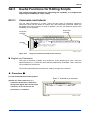
The Edit Mnemonics/Script pane supports the following input correction
functions. Corrections are made when the script is compiled.
Automatic Conversion from Lower Case to Upper Case
In the Edit Mnemonics/Script pane, if you use lower-case characters when entering a
prefix, device address, or function name, the characters are automatically converted into
upper-case characters when the script is compiled.
Omission of Zeros for Device Addresses
When entering device addresses in the Edit Mnemonics/Script pane, you can omit
leading zeros of the addresses. For example, when you want to code "W.D00001", if you
enter "W.D1", this is automatically converted into "W.D00001" when the script is
compiled.
Automatic Space Completion
A space character is required before and after each operator, and between arguments of
each function in each script. When the script is compiled, the automatic space
completion function automatically inserts a space character wherever a required space
character is missing, and also automatically replaces two or more successive space
characters with a single space character.
IM 34M06Q16-04E
3rd Edition: Dec. 25, 2013-00
G2-9
G2.3
Useful Functions for Editing Scripts
G2.3.1
Comments and Indents
This section describes functions for enhancing the capability of a program and
improving its readability in script coding.
You can enter comments in a script. There are two types of comments: single-line
comments, which can be written in a whole line, and end-of-text comments, which can
be written at the end of a line in a script. In addition, you can use indents to improve the
readability of your program.
End-of-text
comment
Single-line
comment
Indents
G020301_01.VSD
Figure G2.4
Single-Line Comment and End-of-Text Comment
Single-Line Comments
This type of comment is written as a single line. At the beginning of a line, enter two
slash characters ("//"), which are the comment identification characters. Then, the entire
line is handled as a comment.
The following describes the procedure for entering a single-line comment.
Procedure ◆
(1) Click the Edit Mnemonics/Script pane.
Enter "//" followed by a comment
(2) Enter two slash characters ("//")
(comment identification characters).
Strings that appear after the two slash
characters in the current line are
processed as a comment.
Step (2)
G020301_02.VSD
IM 34M06Q16-04E
3rd Edition: Dec. 25, 2013-00
G2-10
(3) Press the [Enter] key to confirm the
comment.
⇒ The single-line comment is confirmed
and the position cursor moves to the next
line.
TIP
To enter multiple single-line comments, enter
two slash characters ("//") in each line.
End-of-Text Comments
This type of comment is described as a supplemental comment at the end of a line in a
script program.
Enter two slash characters ("//") (comment identification characters) followed by a string.
As a result, the string is handled as a comment.
The following describes the procedure for entering an end-of-text comment.
Procedure ◆
(1) Click the Edit Mnemonics/Script pane.
(2) At the end of a line in a script, enter
After the end of the script line, enter
"//" followed by a comment
one or more space characters, and
then enter two slash characters ("//")
(comment identification characters).
Strings that appear after the two slash
characters in the current line are
processed as a comment.
Step (2)
G020301_03.VSD
(3) Press the [Enter] key to confirm the
comment.
⇒ The end-of-text comment is confirmed
and the position cursor moves to the next
line.
TIP
- In addition to improving the readability of a program, you can also use comments to suppress some
lines in a script when a compile error occurs in the script or when the script does not work correctly
on a CPU module.
- Comments are stored in a CPU module when a program is downloaded. You can add, modify, or
delete comments or indents in online editing.
IM 34M06Q16-04E
3rd Edition: Dec. 25, 2013-00
G2-11
Indents
Use this function to insert space characters at the beginning of a line in a script program.
You can use indents to distinguish the range of a control statement or a set of
statements for specific processing from other parts.
The following describes the procedure for entering an indent.
Procedure ◆
(1) Click the Edit Mnemonics/Script pane.
Enter space characters for indent
(2) Move the position cursor to the
beginning of the line and enter the
desired number of space and tab
characters.
⇒ The line is indented as many number of
space and tab characters as you entered.
TIP
Spaces and tabs are optimized at compile
and deleted (except for those at the beginning
of a line).
Step (2)
G020301_04.VSD
IM 34M06Q16-04E
3rd Edition: Dec. 25, 2013-00
G2-12
G2.3.2
Inline Mnemonics
You can enter mnemonics in a script. Mnemonics coded in a script are called inline
mnemonics. If it is difficult to achieve a desired task with only a simple script, you can
enter inline mnemonics in the script to enhance the capability of the program.
Inline mnemonics
G020302_01.VSD
Figure G2.5
Inline Mnemonics
Procedure ◆
(1) Click the Edit Mnemonics/Script pane.
(2) Enter a colon (":"), which is the
mnemonic identification character, at
the beginning of a line. The current
line can be treated as a mnemonic
line.
(3) Enter a mnemonic string. You can
enter mnemonic strings as in the case
of entering mnemonic strings for
ladder instructions.
(4) Press the [Enter] key to confirm the
line.
⇒ The mnemonic line is confirmed and the
position cursor moves to the next line.
Enter a colon (":") at the beginning of the line,
and then enter a mnemonic instruction.
Delimit the operands of the instruction by
using space characters.
Step (2)
TIP
G020302_02.VSD
- You cannot enter more than one mnemonic
in a line. To enter multiple mnemonic lines,
enter a colon (":") in each line.
- Delimit the operands of a mnemonic
instruction by using space characters.
TIP
- Inline mnemonics are converted into ladder instructions and transferred to the CPU module.
- You can add, modify, or delete inline mnemonics in online editing.
CAUTION
You cannot use any end-of-text comment in inline mnemonics. A compile error occurs if
used.
IM 34M06Q16-04E
3rd Edition: Dec. 25, 2013-00
G2-13
CAUTION
The following instructions cannot be used in inline mnemonics. A compile error occurs if
used.
- All input-side instructions (e.g., LD, AND, CMP, and NCALL)
- Continuous-type application instructions
-
G2.3.3
The following output-side instructions
OUT, OUTN, OUTW, TIM, CNT, SFTR, IL, ILC, NOP, END, SUB, RET, INTP, IRET,
DI, EI, FOR, NEXT, BRK, CBD, CBE, STRCT, STMOV, SCALL, NMOUT, MRET,
JMP, CALL, MCALL, PARA, TPARA, ACT, and INACT
Using the Functions for Ladders in Scripts
This section describes how to use the functions of ladder programs in scripts.
Tag Names
You can use tag names in scripts. Tag names are used in scripts in the same way as in
ladder instructions. You must assign addresses to tag names separately from script
editing.
Example:
B.Switch=1
W.Data=123
SEE ALSO
For details on how to use tag names, see Section E1.3, "Entering Tag Names and Addresses" in "FAM3 Programming Tool WideField3 (Offline)" (IM 34M06Q16-02E).
Local Devices
You can use local devices in scripts. When entering a local device in a script, prefix a
device with a slash character ("/") as in the case of ladder instructions.
Example:
W./D00001=1
CAUTION
When you use local devices in a division calculation, you must enter a space character
after a division operator (/). If the space character is missing, a local device name is
handled as an end-of-text comment.
Example:
/D00030=/D00020 / /D00010 A division by /D00010 is performed.
/D00030=/D00020 //D00010 "D00010" is handled as an end-of-text comment.
SEE ALSO
For details on how to use local devices, see Chapter F2, "Using Local Devices" in "FA-M3
Programming Tool WideField3 (Offline)" (IM 34M06Q16-02E).
IM 34M06Q16-04E
3rd Edition: Dec. 25, 2013-00
G2-14
Index Modification
In scripts, you can use both constant index modifications and index modifications with
index registers. When entering an index modification in a script, add a semicolon (";")
after a device, followed by an index register or a constant, as in the case of ladder
instructions.
Example:
W.D00001;V001=123 for using a word index register
W.D00001;V001L=123 for using a long-word index register
W.D00001;100=123
for using a constant index modification
CAUTION
Use a long-word (L) prefix if using a long-word index register (except for index
modification).
Example:
L.V001=100
Correct description
V001L=100
Compile error
SEE ALSO
For details on how to enter index modifications, see Section E1.2.19, "Input and Display of Indexed
Devices" in "FA-M3 Programming Tool WideField3 (Offline)" (IM 34M06Q16-02E).
Indirect Specification
You can use indirect specification in scripts. When entering an indirect specification
device in a script, prefix a device with an "@" character as in the case of ladder
instructions. However, there are no script functions corresponding to the indirect address
set (SET@), indirect address add (ADD@), and indirect address move (MOV@)
instructions. Thus, you must code these instructions using inline mnemonics if you
require their use.
In addition, when you use indirect specification, set the initial setting of an indirect
address at the beginning of the ladder program. Even if the input condition of a script
instruction is OFF, the inside of the script is scanned. Thus, when indirect specification is
used in the input condition for the inside of the script, an instruction processing error
occurs during execution in the CPU if the initial setting of the indirect address has not
been performed.
Example:
W.@D00001=123
SEE ALSO
For details on how to enter indirect specification devices, see Section E1.2.21, "Input and Display of
Indirect Specification Devices" in "FA-M3 Programming Tool WideField3 (Offline)" (IM 34M06Q16-02E).
TIP
The following functions are supported in ladder programs but not in scripts.
- Subroutines and interrupt routines
In scripts, you cannot enter SUB-RET and INTP-IRET, which indicate the start and end of a
subroutine, and interrupt routine, respectively. Create subroutines and interrupt routines using a
ladder program.
- Labels and jumps
You cannot enter labels in a script. Also, you cannot code, such as that for a jump, that changes the
program execution flow in a script.
IM 34M06Q16-04E
3rd Edition: Dec. 25, 2013-00
G2-15
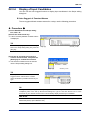
G2.3.4
Display of Input Candidates
You can use the auto suggest function to display input candidates in the Script editing
dialog box.
Auto Suggest of Constant Names
To auto suggest defined constant names for a script, use the following procedure.
Procedure ◆
(1) In the Edit Mnemonics/Script dialog
box, enter "#".
(2) Press the down arrow key.
⇒ A list of currently defined constant names
is displayed.
TIP
To cancel displaying input candidates and go
back to the Script editing dialog box, press the
[Esc] key.
Step (2)
G020304_01.VSD
(3) Use the up and down arrow keys to
select a constant name, and press the
[Enter] key to confirm the selection.
⇒ The selected constant name is entered
into the Script editing dialog box.
Step (3)
G020304_02.VSD
TIP
When input candidates are shown, the auto
suggest function narrows down constant
name candidates to possible matches as you
type.
G020304_03.VSD
TIP
If the [Automatically Display Candidate] setting is turned on in the [Instruction/Instruction Parameter
Completion] area of the Set up Environment dialog box, type "#" and then the first one or more
characters of your desired constant name to automatically display matched input candidates.
SEE ALSO
For details on constant names, see Chapter E3, "Constant Definition" in "FA-M3 Programming Tool
WideField3 (Offline)" (IM 34M06Q16-02E).
IM 34M06Q16-04E
3rd Edition: Dec. 25, 2013-00
G2-16
G2.3.5
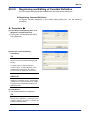
Registering and Editing of Constant Definition
You can register and edit constant definitions in the Script editing dialog box.
Registering Constant Definition
To register constant definitions in the Script editing dialog box, use the following
procedure.
Procedure ◆
(1) In the Script editing dialog box, click
[Register Constant Definition].
⇒ The Register Constant Definition dialog
box is displayed.
Step (1)
G020305_01.VSD
Step (2)
G020305_02.VSD
(2) Enter the constant definition
information.
TIP
Available values for constant definitions are
the same as in the [Constant Definition] edit
window.
To display a list of currently registered
constant names, click the [▼] button of the
[Constant Name] drop-down list. Select a
constant name to display the current value.
SEE ALSO
For details on available values for constant
definitions, see Section E3.2.2, "Specification
of Elements of Constant Definition" in "FA-M3
Programming Tool WideField3 (Offline)" (IM
34M06Q16-02E).
(3) Click [Save].
⇒ The constant definition is registered.
TIP
If you try to enter a constant name that has
already been registered, a message box is
displayed asking if you want to overwrite the
existing constant definition.
IM 34M06Q16-04E
3rd Edition: Dec. 25, 2013-00
G2-17
CAUTION
-
You cannot use BIN type constant names for constants in scripts. Doing so causes
a compile error.
You cannot register constant definition during online editing.
TIP
- If the [Constant Definition] edit window is open in the background, the window is updated with your
specification of constant definition but the specification is not saved. To confirm registration of the
specified constant definition, you must save the constant definition.
- If the [Constant Definition] edit window is closed, the specified constant definition is saved and
applied to the window when you register the definition.
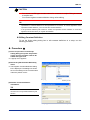
Editing Constant Definition
To use the Script editing dialog box to edit constant definitions in a script, use the
following procedure.
Procedure ◆
(1) In the script shown in the Script
editing dialog box, place the position
cursor over the constant name to be
edited and right-click.
⇒ A popup menu appears.
(2) Select the [Edit Constant Definition]
menu.
⇒ The Register Constant Definition dialog
box is displayed. The dialog box shows
the current settings of the constant name
under the position cursor.
Step (2)
G020305_03.VSD
(3) Edit the constant definition
information.
TIP
Available values for constant definitions are
the same as in the [Constant Definition] edit
window.
Step (3)
G020305_04.VSD
IM 34M06Q16-04E
3rd Edition: Dec. 25, 2013-00
G2-18
SEE ALSO
For details on available values for constant
definitions, see Section E3.2.2, "Specification
of Elements of Constant Definition" in "FA-M3
Programming Tool WideField3 (Offline)" (IM
34M06Q16-02E).
(4) Click [Save].
⇒ A message box is displayed asking if you
want to overwrite the existing constant
definition. Click [Yes] to overwrite the
constant definition.
CAUTION
You cannot register constant definition during online editing.
TIP
Regardless of whether the [Constant Definition] edit window is open or closed in the
background, the specified constant definition is saved and applied to the window when
you register the definition.
IM 34M06Q16-04E
3rd Edition: Dec. 25, 2013-00
G2-19
G2.4
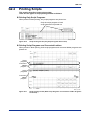
Printing Scripts
This section describes how to print scripts.
There are two types of script printing formats as follows.
Printing Only Script Programs
When printed in block printing, only script programs are printed out.
Only the script program of each
script instruction is printed out.
G0204_01.VSD
Figure G2.6
Script Printing Format (Only Script Programs Are Printed)
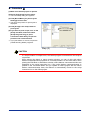
Printing Script Programs and Converted Ladders
When printed in block printing, both script programs and converted ladder programs are
printed out.
Script
program
Converted
ladder
program
Script
program
Converted
ladder
program
G0204_02.VSD
Figure G2.7
Script Printing Format (Both Script Programs and Converted Ladder Programs
Are Printed)
IM 34M06Q16-04E
3rd Edition: Dec. 25, 2013-00
G2-20
Procedure ◆
(1) Make sure that the project is opened.
(2) Select [File]-[Print] from the menu.
⇒ The Print Setup dialog box appears.
(3) Click [Block/Macro] for [Print Layout
Settings] from the tree.
⇒ The list of setup items for print layout is
displayed.
(4) Click [Script] in the setup items for
print layout.
(5) If you want to print scripts, turn on the
[Print] checkbox, and select either
[Script Program Only] or [Print
Converted Ladder Also]. Scripts are
printed in the selected format.
⇒ If you print blocks or macros, scripts are
printed following ladder programs.
Step (5)
G0204_03.VSD
CAUTION
-
If a script contains a compile error, the ladder program converted from the script is
not printed.
When printing the block or macro monitor window, you can do this with online
balloon comments/monitors placed on converted ladders. On the other hand, when
printing the Edit Block or Edit Macro window, offline balloon comments/monitors are
displayed on the script instruction line. If the online balloon comment/monitor is
placed on the converted ladder and you update an offline project with the online
balloon comment/monitor data, the balloon is automatically moved to the script
instruction line on the offline project.
IM 34M06Q16-04E
3rd Edition: Dec. 25, 2013-00
G3-1
G3.
Script Syntax
This chapter describes the script syntax.
A script consists of script syntax, which describes a series of processing, and
script functions, which perform specific processing, functioning as a kind of
library.
Script syntax must be expressed with a combination of operands and operators,
and be coded based on the following syntax elements.
- Assignment statements
- Operators
- Control statements (IF statement, SELECT statement, FOR statement, and
EXITSCRIPT statement)
- Data types (prefixes)
- Reserved words
The following describes how to use each syntax element and related information.
IM 34M06Q16-04E
3rd Edition: Dec. 25, 2013-00
G3-2
G3.1
Assignment Statements
An assignment statement consists of the left-hand side, right-hand side, and an
assignment operator that connects both sides. The value or result of the right-hand side
is assigned to the left-hand side. There are three types of assignment statements as
follows:
- Numeric value assignment statements
- String assignment statements
- Bit assignment statements
Numeric Value Assignment Statements
A numeric value assignment statement assigns the value or operation result of the righthand side to the left-hand side.
Example:
W.D00001 = 123
L.D00001 = L.D00100 + L.D00200
F.D00001 = SQR(F.D00003)
For assigning a numerical constant
For assigning the result of a numerical operation
For assigning the operation result of a function
String Assignment Statements
A string assignment statement assigns a string literal or the result of a string operation at
the right-hand side to the left-hand side.
Example:
S.D00001 = "AB"
S.D00001 = "D2" & S.D2
For assigning a string literal
For assigning the result of a string operation
CAUTION
A “” (NULL) assignment cannot be used for a assigning a string. Doing so will result in
an instruction processing error during execution in the CPU.
TIP
- You can assign up to four characters as a string literal. Use a constant name if you want to assign a
string literal longer than the maximum.
SEE ALSO
For details on how to use constant names, see Chapter E3, "Constant Definition" in "FA-M3
Programming Tool WideField3 (Offline)" (IM 34M06Q16-02E).
IM 34M06Q16-04E
3rd Edition: Dec. 25, 2013-00
G3-3
Bit Assignment Statements
A bit assignment statement assigns a bit constant or the result of a bit operation on the
right-hand side to the left-hand side.
Example:
B.I00001 = 1
For assigning a bit constant
B.I00001 = B.I00002 AND (B.I00003 OR B.I00004) For assigning an operation result
B.I00001 = W.D00001 < W.D00002
B.I00001 = LDU(B.X00301)
For assigning a comparison result
For assigning the result of a
function
CAUTION
Observe the following points when using assignment statements:
If the data types of the right- and left-hand sides are different, the assignment statement
generates an error.
Example:
W.D00001 = S.D00001
A compile error occurs.
W.D00001 = L.D00001
A compile error occurs.
L.D00001 = W.D00001
A compile error occurs.
F.D00001 = $FF7FFFFF
A compile error occurs if a decimal or hexadecimal
constant is assigned to a floating-point type.
L.D00001 = %1.2
A compile error occurs if a floating-point constant is
assigned to an integer type.
If the left-hand side cannot be assigned, the assignment statement generates an error.
In the following example, it is not possible to assign a value to the value "5", and the
assignment statement generates an error.
Example:
5 = W.D00001
A compile error occurs.
SEE ALSO
Operating between different data types requires the conversion of one or more data types. For details
on converting data types, see Section G3.4.3, "Converting Data Types" in this manual.
IM 34M06Q16-04E
3rd Edition: Dec. 25, 2013-00
G3-4
G3.2
Operators
An operator is a symbol that denotes an operation performed on data.
Each operator is represented as a symbol such as an addition ("+") and division ("/")
used in mathematical expressions in a script.
SEE ALSO
For details on data type conversions that occur in various operations, see Section G3.4.3, "Converting
Data Types" in this manual.
List of the Types of Operators
There are five types of operators as follows:
-
G3.2.1
Arithmetic operators
Comparison operators
Logical operators
String manipulation operators
Other operators
Arithmetic Operators
An arithmetic operator returns the result of an arithmetic operation.
Table G3.1
List of Arithmetic Operators Supported in Scripts
Symbols
+
Description
Calculates the sum of two values. (Addition)
-
Calculates the difference of two values. (Subtraction)
*
Calculates the product of two values. (Multiplication)
/
Calculates the quotient of two values. (Division)
MOD
Calculates the remainder of two values.
++
Inverts the sign of a value.
Increments the value (+1) and returns the result.
--
Decrements the value (-1) and returns the result.
Usage Examples
D00001 = D00002 + D00003
L.D00001 = L.D00013 + L.D00023
F.D00001 = F.D00013 + F.D00023
D00001 = D00002 - D00003
L.D00001 = L.D00013 - L.D00023
F.D00001 = F.D00013 - F.D00023
D00001 = D00002 * D00003
L.D00001 = L.D00013 * L.D00023
F.D00001 = F.D00013 * F.D00023
D00001 = D00002 / D00003
L.D00001 = L.D00013 / L.D00023
F.D00001 = F.D00013 / F.D00023
D00001 = D00002 MOD D00003
L.D00001 = L.D00013 MOD L.D00023
- D00001
D00001 = D00002++
L.D00001 ++
D00001 = D00002-L.D00001 --
SEE ALSO
For details on the precedence of operators, see Section G3.2.6, "Operator Precedence" in this manual.
CAUTION
-
Arithmetic operators cannot process string type (S) data and bit type (B) data.
The remainder (MOD) operator cannot process floating-point type (F and E) data.
If a space character does not exist after a division operator (/), the device after the
division operator is handled as a local device.
Example:
D00001=D00002 / D00003 A division by D00003 is performed.
D00001=D00002 /D00003
/D00003 is handled as a local device.
IM 34M06Q16-04E
3rd Edition: Dec. 25, 2013-00
G3-5
-
Spaces are required before and after a minus operator (-) and decrement operator (-). If there is no space, the tag name might be identified as including the preceding
and following letters.
- You cannot use increment operators (++) and decrement operators (--) to process
floating-point type (F and E) data, double-long-word (D) data, mathematical
expressions, and constants and their names.
- Increment operators (++) and decrement operators (--) can only be placed after a
value. You cannot put them before a value.
Example:
D00001 = D00002 ++
Increments (+1) the value D00002 and assigns the
result to D00001.
D00001 = ++ D00002
Compile error
IM 34M06Q16-04E
3rd Edition: Dec. 25, 2013-00
G3-6
G3.2.2
Comparison Operators
A comparison operator returns the result of a comparison operation.
Table G3.2
List of Comparison Operators Supported in Scripts
Symbols
<
Description
Less than
<=
Less than or equal to
>
Greater than
>=
Greater than or equal to
==
Equal to
<>
Not equal to
Usage Examples
D00001 < D00002
L.D00001 < L.D00003
F.D00001 < F.D00003
D00001 <= D00002
L.D00001 <= L.D00003
F.D00001 <= F.D00003
D00001 > D00002
L.D00001 > L.D00003
F.D00001 > F.D00003
D00001 >= D00002
L.D00001 >= L.D00003
F.D00001 >= F.D00003
D00001 == D00002
L.D00001 == L.D00003
F.D00001 == F.D00003
D00001 <> D00002
L.D00001 <> L.D00003
F.D00001 <> F.D00003
SEE ALSO
For details on the precedence of operators, see Section G3.2.6, "Operator Precedence" in this manual.
G3.2.3
Logical Operators
A logical operator returns the result of a logical operation.
Table G3.3
List of Logical Operators Supported in Scripts
Symbols
NOT
Description
Performs a logical NOT operation on a value.
AND
Performs a logical AND operation of two values.
OR
Performs a logical OR operation of two values.
XOR
Performs a logical XOR operation of two values.
Usage Examples
B.I00001 = NOT(B.I00101)
D00001 = NOT(D00001)
L.D00001 = NOT(L.D00001)
B.I00001 = B.I00101 AND B.I00102
D00001 = D00002 AND D00003
L.D00001 = L.D00013 AND L.D00023
B.I00001 = B.I00101 OR B.I00102
D00001 = D00002 OR D00003
L.D00001 = L.D00013 OR L.D00023
B.I00001 = B.I00101 XOR B.I00102
D00001 = D00002 XOR D00003
L.D00001 = L.D00013 XOR L.D00023
SEE ALSO
For details on the precedence of operators, see Section G3.2.6, "Operator Precedence" in this manual.
CAUTION
-
Logical operators cannot process string type (S) data and floating-point type (F or E)
data. Also, logical operators cannot perform logical operations of double-long-word
(D) values. Use script functions for executing logical operations.
For the logical operators (AND, OR, XOR, and NOT) and the remainder operator
(MOD), a space character is required before and after the operator. A compile error
occurs if a space character is missing.
IM 34M06Q16-04E
3rd Edition: Dec. 25, 2013-00
G3-7
G3.2.4
String Manipulation Operators
A string manipulation operator returns the result of a string manipulation.
Table G3.4
Symbols
&
==
<>
List of String Manipulation Operators Supported in Scripts
Description
Concatenates two strings.
Compares two strings to see if they are the same.
Compares two strings to see if they are different from each other.
Usage Examples
S.D00003 = S.D00001 & S.D00002
S.D00001 == S.D00002
S.D00001 <> S.D00002
TIP
You can concatenate or compare up to two characters as a string literal. Use a constant name if you
want to concatenate or compare a string literal longer than the maximum.
SEE ALSO
For details on the precedence of operators, see Section G3.2.6, "Operator Precedence" in this manual.
CAUTION
- Do not compare with “” (NULL) when comparing strings. If compared, it is possible that
an instruction processing error will occur during execution in the CPU and a correct
result will not be attained.
- The string concatenation operator (&) cannot process data other than string type (S)
data.
G3.2.5
Other Operators
This section describes other operators.
Table G3.5
List of Other Operators Supported in Scripts
Symbols
()
Description
Operations in parentheses take precedence.
=
Assigns the value or operation result of the righthand side to the left-hand side.
Usage Examples
W.D00004 = W.D00003 * (W.D00001 +
W.D00002)
W.D00003 = 10
W.D00003 = W.D00001 + W.D00002
SEE ALSO
For details on the precedence of operators, see Section G3.2.6, "Operator Precedence" in this manual.
G3.2.6
Operator Precedence
Operators have precedence. Operators with the same precedence in a script statement
are executed from left to right. The following table shows the precedence of operators.
Table G3.6
Precedence
Highest
Lowest
Operator Precedence
Operators
()
++, -NOT
*, /, MOD
+, &
==, <>, >, >=, <, <=
AND, OR, XOR
=
Description
Parentheses
Increment, decrement
Sign inversion
Logical negation
Multiplication, division, remainder
Addition, subtraction
String concatenation
Comparison operations
Logical product, logical sum, exclusive OR
Assignment
IM 34M06Q16-04E
3rd Edition: Dec. 25, 2013-00
G3-8
G3.3
Control Statements
G3.3.1
Conditional Branch Statements
A control statement is used to change the flow of a program by conditionally selecting a
different flow of processing, by repetitive processing, or canceling the processing. There
are three types of control statements: conditional statements, repetitive statements, and
script exit statements.
A conditional branch statement contains a combination of an IF and an ENDIF or of a
SELECT and an ENDSELECT.
IF ... ENDIF Statement
The following types of IF ... ENDIF statements are supported.
Single Branch Type
IF (condition A) THEN
statement 1
ELSE
statement 2
ENDIF
If condition A is true, statement 1 is executed. If condition A is false, statement 2 is
executed.
Multiple Branch Type
IF (condition A) THEN
statement 1
ELSE IF (condition B) THEN
statement 2
ELSE
statement 3
ENDIF
If condition A is true, statement 1 is executed. If condition A is false and condition B is
true, statement 2 is executed. If conditions A and B are false, statement 3 is executed.
In a conditional expression in an IF statement, you can use the LDU or LDD script
functions to specify a rising or falling edge as a condition.
In the following examples, statement 1 is executed on rising and falling edges of
X00301.
Example:
IF (LDU(B.X00301)) THEN
statement 1
ENDIF
IF (LDD(B.X00301)) THEN
statement 1
ENDIF
for executing statement 1 on a rising edge of X00301
for executing statement 1 on a falling edge of X00301
IM 34M06Q16-04E
3rd Edition: Dec. 25, 2013-00
G3-9
CAUTION
-
You can nest IF statements by including one IF or SELECT statement within an IF
statement. The maximum nesting level is eight. A compile error occurs if the nesting
level of both IF and SELECT statements exceeds the maximum.
You can omit an ELSE and statements under the ELSE in both single and multiple
branch types, but cannot omit any THEN or ENDIF. A compile error occurs if a
THEN or ENDIF is missing.
In multiple branch types, a space character is required between the ELSE and IF in
each ELSE IF. A compile error occurs if the space character is missing. There is no
limitation on the number of ELSE IFs.
There is no limitation on the number of statements in an IF statement in both single
and multiple branch types.
-
SEE ALSO
- For details on the IF statement, see Section G11.1, "IF ... ENDIF (Conditional Branch Statements)"
in this manual.
- For details on the LDU and LDD functions, see Sections G7.1, "LDU (Logical Differential Up)" and
G7.2, "LDD (Logical Differential Down)" in this manual.
- For details on nesting, see Section G3.3.4, "Restrictions on Control Statements" in this manual.
SELECT ... ENDSELECT Statement
The format of a SELECT ... ENDSELECT statement is as follows.
SELECT (conditional expression)
CASE constant 1
statement 1
CASE constant 2
statement 2
DEFAULT
statement 3
ENDSELECT
If the value of the conditional expression matches constant 1, statement 1 is executed.
If the value of the conditional expression does not match constant 1 but matches
constant 2, statement 2 is executed.
If the value of the conditional expression does not match constant 1 or 2, statement 3 is
executed.
TIP
- Constants specified for CASE can contain multiple values and a value range.
Example:
CASE 1
Single value (only 1)
CASE 2, 8, 11, 30
Multiple values (2, 8, 11 and 30)
CASE 40 .. 50
Value range (range from 40 to 50)
CASE 60 .. 70, 80, 90
Multiple values and value range (range from 60 to 70, 80, and 90)
IM 34M06Q16-04E
3rd Edition: Dec. 25, 2013-00
G3-10
- DEFAULT can be omitted.
- You can specify constants and constant names to CASE. Constants can be specified in decimal
and hexadecimal formats.
In hexadecimal format, put "$" at the start of a constant.
Example:
CASE $FF
Specifies $FF (255 in decimal format).
CAUTION
-
If there are more than one constant that matches CASE, a statement specified
earlier has precedence. The subsequent statement(s) are not executed.
Example:
SELECT (D00001)
CASE 1
statement 1
CASE 2 .. 20
statement 2
CASE 15
statement 3
ENDSELECT
// If the value of D00001 is 1
// If the value of D00001 is between 2 and 20
// If the value of D00001 is 15
If the value of D00001 is 15, then it matches the second CASE and the third CASE.
However, the second CASE has precedence and statement 2 is executed. After
statement 2 is executed, the process jumps to ENDSELECT and thus statement 3 is
not executed.
-
-
When a value range is specified for CASE (in the format "start value .. end value"), it
is not checked if the start value is equal to or smaller than the end value. If a start
value larger than the end value is specified by mistake, the statement for the CASE
is not executed.
You can nest SELECT statements by including one IF or SELECT statement within
a SELECT statement. The maximum nesting level is eight. A compile error occurs if
the nesting level of both IF and SELECT statements exceeds the maximum.
SEE ALSO
- For details on the SELECT statement, see Section G11.3, "SELECT ... ENDSELECT (Conditional
Branch Statement)" in this manual.
- For details on nesting, see Section G3.3.4, "Restrictions on Control Statements" in this manual.
IM 34M06Q16-04E
3rd Edition: Dec. 25, 2013-00
G3-11
G3.3.2
Repetitive Statements
A repetitive statement contains a combination of a FOR and a NEXT. The following
types of repetitive statements (FOR statements) are supported.
Normal Type
FOR(repetition counter, repetition initial value, repetition final value)
statement 1
NEXT
Statement 1 is executed repeatedly from the repetition initial value of the repetition
counter to the repetition final value. This is the same as the FOR-NEXT instruction in
ladder instructions. For example, if the repetition initial value is 1 and the repetition final
value is 10, statement 1 is executed 10 times.
CAUTION
If the repetition final value is equal to or smaller than the repetition initial value, a single
loop of FOR ... NEXT is executed.
With-Conditional-Break Type
FOR(repetition counter, repetition initial value, repetition final value)
statement 1
IF (stop condition) THEN
BRK
ENDIF
NEXT
Statement 1 is executed repeatedly from the repetition initial value of the repetition
counter to the repetition final value. However, the FOR statement is stopped and
terminated if the stop condition is met during repetitions.
CAUTION
If the repetition final value is equal to or smaller than the repetition initial value, a single
loop of FOR ... NEXT is executed.
TIP
- The repetition initial value and repetition final value that are set when the FOR function is executed
for the first time are used throughout all repetitions. The number of repetitions is unchanged even if
you modify the repetition initial value or repetition final value during repetitions.
- The processing between FOR and NEXT is executed only once if the repetition initial value is equal
to or larger than the repetition final value.
- Use the BRK statement to forcibly terminate a FOR ... NEXT loop.
IM 34M06Q16-04E
3rd Edition: Dec. 25, 2013-00
G3-12
CAUTION
-
-
-
-
You can nest FOR statements by including one FOR statement within another. The
maximum nesting level is eight. A compile error occurs if the nesting level exceeds
the maximum.
The IL-ILC instruction is used when a FOR statement is converted into a ladder
program. An instruction processing error occurs during execution in the CPU if the
nesting level of an IL-ILC instruction including the nesting in scripts and ladder
program exceeds eight.
The FOR-NEXT instruction is used when a FOR statement is converted into a
ladder program. An instruction processing error occurs during execution in the CPU
if the nesting level of the following exceeds 16.
- FOR statements in scripts
- Script functions for which FOR-NEXT instructions are used in functions
- FOR-NEXT instructions in ladder programs
Script functions for which FOR-NEXT instructions are used in functions are as
follows.
BSET, HCHN, HDEL, HMOV, LPAD, LTRIM, MAX, MIN, POW, RPAD, RTRIM,
SDIST, SUM, SUNIT, TRIM
There is no limitation on the number of statements in a FOR statement.
Note that the repetition counter can be referred to in a FOR ... NEXT loop, but do
not modify the repetition counter (i.e., do not write a value in the repetition counter).
If you write a value in the repetition counter, the subsequent behavior cannot be
guaranteed.
If you use a rising edge or falling edge in the FOR statement, only one repetition in
which the first rising edge or falling edge has been detected is executed.
When you use the BRK statement, the condition for forcibly terminating a FOR ...
NEXT loop must be met only after the loop is executed at least once.
SEE ALSO
- For details on the FOR statement, see Section G11.2, "FOR ... NEXT (Repetitive Statements)" in
this manual.
- For details on nesting, see Section G3.3.4, "Restrictions on Control Statements" in this manual.
IM 34M06Q16-04E
3rd Edition: Dec. 25, 2013-00
G3-13
G3.3.3
Script Exit Statements
The EXITSCRIPT statement is called a script exit statement.
You can insert an EXITSCRIPT statement to exit the script without executing the part
written after the EXITSCRIPT statement.
The following types of the script exit statements (EXITSCRIPT statements) are
supported.
Unconditional Exit Type
statement 1
EXITSCRIPT
statement 2
Statement 1 is executed. After that, the script exits with the EXITSCRIPT statement, and
statement 2 is not executed.
Conditional Exit Type
statement 1
IF (condition A) THEN
EXITSCRIPT
ENDIF
statement 2
Statement 1 is executed.
After that, if condition A is true, the script exits, and statement 2 is not executed.
If condition A is false, statement 2 is also executed.
TIP
- You can use the EXITSCRIPT statement with branch statements (IF and SELECT statements) and
repetitive statements (FOR statements).
- The EXITSCRIPT statement turns off its input condition and executes the subsequent script
statements by turning off the start script relay.
SEE ALSO
- For details on the EXITSCRIPT statement, see Section G11.4, "EXITSCRIPT (Script Exit
Statement)" in this manual.
- For details on the start script relay, see Section G2.1.2, “Displaying a Script in the Ladder Format”
in this manual.
IM 34M06Q16-04E
3rd Edition: Dec. 25, 2013-00
G3-14
G3.3.4
Restrictions on Control Statements
This section describes the restrictions on control statements.
Nesting
For branch and repetitive statements, you can use control blocks within other control
blocks. This is called nesting.
Nesting for Repetitive Statements (FOR Statements)
-
The maximum nesting level for repetitive statements (FOR statements) is eight. A
compile error occurs if the nesting level exceeds the maximum.
FOR (repetition counter, repetition initial value, repetition final value)
statement 1
FOR (repetition counter, repetition initial value, repetition final value)
statement 2
FOR (repetition counter, repetition initial value, repetition final value)
statement 3
・
・
・
NEXT
NEXT
NEXT
Figure G3.1
-
First Nesting Level
Second Nesting Level
Third Nesting Level
Up to the eighth nesting
level is allowed.
G0304_02.VSD
Example of Nested Repetitive Statements
IL-ILC is used when a FOR statement is converted into a ladder program. An
instruction processing error occurs during execution in the CPU if the nesting level
of IL-ILC in both scripts and ladder programs exceeds 8.
The FOR-NEXT instruction is used when a FOR statement is converted into a
ladder program. An instruction processing error occurs during execution in the CPU
if the nesting level of the following exceeds 16.
-
FOR statements in scripts
Script functions for which FOR-NEXT instructions are used in functions
FOR-NEXT instructions in ladder programs
Script functions for which FOR-NEXT instructions are used in functions are as
follows.
BSET, HCHN, HDEL, HMOV, LPAD, LTRIM, MAX, MIN, POW, RPAD, RTRIM,
SDIST, SUM, SUNIT, TRIM
IM 34M06Q16-04E
3rd Edition: Dec. 25, 2013-00
G3-15
Nesting for Branch Statements (IF and SELECT Statements)
The maximum nesting level for branch statements (IF and SELECT statements) is eight.
A compile error occurs if the nesting level of both IF and SELECT statements exceeds
the maximum.
IF (condition A) THEN
statement 1
SELECT (condition B)
CASE constant X
statement 2
CASE constant Y
statement 3
DEFAULT
IF (condition A) THEN
statement 4
・
・
・
ENDIF
ENDSELECT
ENDIF
Figure G3.2
First Nesting Level
Second Nesting Level
Third Nesting Level
Up to the eighth nesting
level is allowed.
G0304_03.VSD
Example of Nested Branch Statements
IM 34M06Q16-04E
3rd Edition: Dec. 25, 2013-00
G3-16
G3.4
Data Types and Prefixes
This section describes data types in scripts.
You can specify a data type by using a prefix. The following table shows the relationship
between prefixes and data types. Word (W), long-word (L), and double-long word (D)
types are referred to as "integer types", while single-precision floating-point (F) and
double-precision floating-point (E) types are referred to as "floating-point types".
Table G3.7
W (Word type)
Prefixes and Data Types
Prefix
L (Long-word type)
D (Double-long-word type)
F (Single-precision floating-point type)
E (Double-precision floating-point type)
S (String type)
B (Bit type)
Data Type
Signed 16-bit integer, 16-bit data, decimal/hexadecimal
constant
Signed 32-bit integer, 32-bit data, decimal/hexadecimal
constant
Signed 64-bit integer, 64-bit data, decimal/hexadecimal
constant
32-bit single-precision floating-point, floating-point constant
64-bit double-precision floating-point, floating-point constant
String
1-bit data
TIP
The data size of each data type is determined uniquely by each prefix, except S (the string type).
G3.4.1
Specifying Data Types
You can add a prefix to a device address to specify the data type of the device in a
script.
If you want to use the device D00001 as a word type, specify as follows.
W.D00001
Prefix
Address
G0304_01.VSD
Figure G3.3
Specifying Data Types
TIP
If you omit a prefix, a relay device is handled as a bit type (B) and a register device is handled as a
word type (W).
CAUTION
If an index modification is used, its additional value is independent of a prefix. The
additional size is defined depending on whether the indexed device is a register or relay.
Example:
W.D00001;V001=123
If V001=10, D00011 is 123.
W.I00001;V001=123
If V001=10, from I00011 through I00026 are 123.
IM 34M06Q16-04E
3rd Edition: Dec. 25, 2013-00
G3-17
G3.4.2
Prefixes and Available Devices
The types of devices to which you can add a prefix vary depending on each prefix. The
following table shows the relationship between prefixes and devices.
Table G3.8
Prefixes and Available Devices
Prefix
W (Word type)
L (Long-word type)
D (Double-long-word type)
F (Single-precision floating-point type)
E (Double-precision floating-point type)
S (String type)
B (Bit type)
G3.4.3
X
×
×
×
Y
×
×
×
I
×
×
×
E
×
×
×
L
×
×
×
M
×
×
×
T
×
×
×
×
×
×
×
C
×
×
×
×
×
×
×
Available Devices
D B F W
× × × ×
Z
×
×
×
R
×
V
×
×
×
H
×
×
×
A
×
U
×
×
×
P
×
×
×
×
×
×
×
Converting Data Types
This section describes how to convert data types.
You can convert the data type of a mathematical expression or function used in a script
by enclosing within parentheses and then adding a prefix to it.
In the following example, the result of a function returned as a single-precision floatingpoint type (F) is converted into a double-precision floating-point (E) value.
Example:
E.(SIN(F.D00001))
In the following example, the result of an addition of word (W) values is converted into a
long-word (L) value or bit (B). If the result of the addition is 0, in the conversion to a bit
(B) value, the conversion result is 0. Otherwise the result is 1.
Example:
L.(W.D00001 +W.D00003)
B.(W.D00001+W.D00003)
In addition, the following types of type conversions cannot be performed directly among
type conversions between integer values and floating-point values. You must change the
data size between integer types (or floating-point types) before converting the data type
into floating point (or integer).
-
-
-
Type conversion from word (W) to double-precision floating-point (E)
Example:
E.D00010=E.(W.D00001)
A compile error occurs.
E.D00010=E.(D.(W.D00001)) Through double long-word type (D).
Type conversion from single-precision floating-point (F) to double long-word (D)
Example:
D.D00010=D.(F.D00001)
A compile error occurs.
D.D00010=D.(E.(F.D00001)) Through double-precision floating-point type (E).
Type conversion from double-precision floating-point (E) to word (W)
Example:
W.D00010=W.(E.D00001)
A compile error occurs.
W.D00010=W.(F.(E.D00001)) Through single-precision floating-point type (F).
IM 34M06Q16-04E
3rd Edition: Dec. 25, 2013-00
G3-18
-
Type conversion from double long-word (D) to single-precision floating-point (F)
Example:
F.D00010=F.(D.D00001)
A compile error occurs.
F.D00010=F.(E.(D.D00001)) Through double-precision floating-point type (E).
CAUTION
-
-
A sign extension is performed if a type conversion is performed among a word (W)
integer, long-word (L) integer, and double long-word (D) integer, converting from a
smaller data size integer to a larger data size integer. If a conversion is performed
from a larger data size integer to a smaller data size integer, a part of the original
value may be lost.
When a type conversion is performed from a double-precision floating-point (E)
value to a single-precision floating-point (F) value, a part of the original value may
be lost.
CAUTION
-
Observe the following points when coding a multiplication. In ladder instructions, the
multiplication result is a long-word (L) value if the multiplicand in a multiplication is a
word value (W). If the multiplicand in a multiplication is a long-word (L) value, the
result is a double-long-word (D) value. In scripts, the type of a multiplication result is
the same as that of the multiplicand in the multiplication. Thus, you must convert the
data types in the right-hand side to the data type of the multiplication result. If you
omit the data conversion, a part of the value obtained in the multiplication may be
lost.
Example:
L.D00003=L.(W.D00001) *L.(W.D00002)
D.D00005=D.(L.D00001) *D.(L.D00003)
-
The data types on the right-hand side
are converted into long word (L).
The data types on the right-hand side
are converted into double-long word (D).
In scripts, there is no data type larger than the double-long-word (D) type in size,
such that if the multiplicand in a multiplication is a double-long-word (D) value, the
multiplication result is also a double-long-word (D) value.
IM 34M06Q16-04E
3rd Edition: Dec. 25, 2013-00
G3-19
G3.4.4
Data Types in Functions
This section describes data types in functions.
Data Types of Arguments
The data type that can be specified for each argument in each script function has been
predefined.
A compile error occurs if a data type that cannot be specified is passed to a function.
In the following example, a compile error occurs because a long-word argument is
passed to the RAD() function, which accepts only a single-precision floating-point (F)
value as its argument.
Example:
RAD(L.D00001)
Incorrect argument type
RAD(F.D00001)
Correct argument type
Data Types of Return Values
The data type of the return value of each script function has been predefined.
If a function supports more than one data type for its return value, the data type of the
return value is determined by the data type of the argument.
In the following examples, when a word (W) argument is specified, the function returns a
word (W) value and when a long-word (L) argument is specified, the function returns a
long-word (L) value.
Example:
NOTV(W.D00001)
NOTV(L.D00001)
Returns a word (W) value.
Returns a long-word (L) value.
IM 34M06Q16-04E
3rd Edition: Dec. 25, 2013-00
G3-20
G3.5
Reserved Words
A reserved word is a special code that is reserved in advance for script coding.
The following describes reserved words.
Work Device Names
The script work device name sM3 shown in Section G4.2, "Display Formats of
Work Devices in Converted Ladders" is a reserved word.
Names That Represent an Operation Result or State
The following table shows reserved words that represent an operation result or state.
You can use the reserved words in script statements.
Table G3.9
Reserved Words
ON
OFF
TRUE
FALSE
Reserved Words That Represent an Operation Result or State
Value
1
0
1
0
Description
Represents a true value.
Represents a false value.
Represents a true value.
Represents a false value.
Usage Examples
B.I00001 = ON
B.I00001 = OFF
B.I00001 = TRUE
B.I00001 = FALSE
CAUTION
In a script, the tag name will not function correctly if you use a tag name that is the same
as a reserved word. This is because such a tag name in a script is not converted into a
correct address.
Do not use a tag name that is the same as a reserved word.
IM 34M06Q16-04E
3rd Edition: Dec. 25, 2013-00
G4-1
G4.
Setting a Script in a Project
This chapter describes how to set a script in a project.
Setting a script in a project means setting device areas for the projects that are
used for work devices that temporarily store the operation results of script syntax
and script functions. When a script is used, 512 points in the internal relay (I),
8,192 points in the cache register (F), and four points in the index register (V) are
used as work devices regardless of the contents of the script.
A device area used in a ladder program or script, and work device area cannot
overlap each other. Similarly, when a local device is used, a local device area and
work device area cannot overlap each other.
Start address of the script work device
○ Cache Register (F)
F3SP71-4N/4S: 131,072 points,
F3SP76-7N/7S: 524,288 points
Script work device area
(Fixed to 8,192 points)
○ Internal Relay (I)
F3SP71-4N/4S: 16,384 points,
F3SP76-7N/7S: 65,535 points
Local device area
Start address of the script work device
Script work device area
(Fixed to 512 points)
○ Index Register (V)
F3SP71-4N/4S: 256 points,
F3SP76-7N/7S: 256 points
Start address of the script work device
Script work device area
(Fixed to 4 points)
Figure G4.1
G0400_01.VSD
Work Devices and Device Areas
SEE ALSO
For details on local devices, see Chapter F2, "Using Local Devices" in "FA-M3 Programming Tool
WideField3 (Offline)" (IM 34M06Q16-02E).
IM 34M06Q16-04E
3rd Edition: Dec. 25, 2013-00
G4-2
G4.1
Setting Work Device Areas
This section describes how to set work device areas.
Specify the start addresses of work device areas in Script Setup in Project
Settings/Configuration. The number of points for a work device is fixed to 512 points in
the internal relay (I), 8,192 points in the cache register (F), and four points in the index
register (V).
Procedure ◆
(1) Double-click [Project
Settings/Configuration] in the Project
window.
⇒ The Project Settings/Configuration
window is displayed.
(2) Click [Script Setup] in the
Start address of the
script work devices
Entire device areas of the
selected CPU
[Configuration] tree.
⇒ The Script Setup screen is displayed.
(3) If you use a script, turn on the [Use
script] checkbox and enter the start
addresses of the internal relay (I),
cache register (F), and index register
(V) that are used as script work
devices.
⇒ When you enter a start address, the
range of the script work device is
displayed on the side of the entry field.
TIP
You must set a value of 32n+1 as the start
address of the internal relay and a value of
2n+1 as the start address of the cache
register or index register.
Steps (2) and (3)
G0402_01.VSD
(4) Click [OK] to confirm the settings of
Project Settings/Configuration.
CAUTION
-
If you use a script, you must configure Script Setup in Project Settings/Configuration.
If you do not configure Script Setup, an error occurs in the syntax check.
If you configure Script Setup in Project Settings/Configuration, even if you do not use
any script, work device areas are allocated.
You cannot modify Script Setup in Project Settings/Configuration online.
IM 34M06Q16-04E
3rd Edition: Dec. 25, 2013-00
G4-3
G4.2
Display Formats of Work Devices in
Converted Ladders
This section describes the display formats of work devices in a ladder program
converted from a script.
Display Format in a Ladder Program Edit Window (Offline)
In a ladder program edit window, each work device is displayed as a tag name to which
no address is assigned. Address assignment to work devices is automatically performed
by WideField3 when the program is transferred to the CPU.
A work device used in the
script.
The execution logic
circuits of the script.
G0401_01.VSD
Figure G4.2
Work Devices Displayed in a Ladder Program Edit Window
The following shows the naming convention for work devices. The type is a string of two
alphabetic characters uniquely determined by WideField3. The number is a sequential
number starting with 1 and assigned to work devices for each type.
sM3
Prefix
Type
Number
G0401_02.VSD
Figure G4.3
Naming Convention for Work Devices
TIP
Among work devices, start script relays (sM3ON) do not have a number.
IM 34M06Q16-04E
3rd Edition: Dec. 25, 2013-00
G4-4
Display Format in a Program Monitor Window (Online)
In a program monitor window, work devices are displayed as addresses automatically
assigned by WideField3, and are monitored in the same way as devices used in a script
or ladder program.
A work device used in the
script.
The execution logic
circuits of the script.
G0401_03.VSD
Figure G4.4
Work Devices Displayed in a Program Monitor Window
CAUTION
Work devices in a ladder program converted from a script cannot be used for crossreferencing or device lists.
IM 34M06Q16-04E
3rd Edition: Dec. 25, 2013-00
G5-1
G5.
Debugging Scripts
This chapter describes debugging functions for scripts.
The following debugging functions are supported.
Debugging Functions before Scripts are Transferred to the CPU
Compile check and syntax check.
Debugging Functions when Scripts are Executed on the CPU
Monitoring of a ladder program converted from a script and monitoring on the
Edit Mnemonics/Script pane are supported.
IM 34M06Q16-04E
3rd Edition: Dec. 25, 2013-00
G5-2
G5.1
Compile Check and Error Messages
A compile check checks if there is any script syntax violation in a script.
G0501_01.VSD
Figure G5.1
Compile Messages
Procedure ◆
(1) After editing a script, click [OK].
⇒ The script is compiled, and the results of
the compile are displayed in the Script
tab on the output window.
(2) If the script has no error, a message
appears indicating that the compile
has been completed successfully. One
or more compile errors are displayed
if the script has any error.
Steps (1) and (2)
G0501_02.VSD
Error line
(3) To jump to an error line, double-click
the error message corresponding to
the line you want to jump to in the
Script tab on the output window.
⇒ The display jumps to the error line in the
script.
TIP
The latest compile results are accumulated
downward in the Script tab.
Step (3)
G0501_03.VSD
IM 34M06Q16-04E
3rd Edition: Dec. 25, 2013-00
G5-3
Display Contents of Compile Results
The display contents of the compile result for a script displayed in the Script tab on the
output window vary depending on whether the compile is completed normally or any
error is detected.
When the Compile is Completed Normally
A
B
G0501_04.VSD
A: Message displayed when a compile of a script starts
Displays a message representing that a compile has started, and also the start date
and time of the compile.
B: Compile results display
Displays the number of errors and number of warnings as a compile result.
If the number of errors is zero, it indicates that the compile is completed successfully.
When Any Compile Error Occurs
A
B
C
G0501_05.VSD
A: Message displayed when a compile of a script starts
Displays a message representing that a compile has started and also the start date
and time of the compile.
B: Compile error/warning output
Displays the information of compile errors and warnings.
Displays the block file name where the script instruction exists, the line number of
the script in the block, the relevant line position in the script, and the contents of the
error or warning.
C: Compile results display
Displays the number of errors and number of warnings as a compile result.
If any error occurs, it is indicated that the compile is not successful and the script is
not converted into a ladder program.
IM 34M06Q16-04E
3rd Edition: Dec. 25, 2013-00
G5-4
Compile Error Messages
Compile errors are categorized into three types: errors, serious warnings, and warnings.
The list of compile error messages is shown below. If a compile error whose type is error
is detected, the program cannot be transferred to the CPU.
Table G5.1
Type
Error
Serious
warning
Warning
Table G5.2
Type
Error
List of Categories of Compile Errors
Description
An error message is displayed when a script cannot be converted into ladder circuits.
A serious warning message is displayed when a script can be converted into ladder
circuits, but there is a problem that affects the execution of the program.
A warning message is displayed when a script can be converted into ladder circuits, but
the expected results may not be obtained if the program is executed.
List of Compile Error Messages
Message
Syntax Error (Near [xxx]).
Syntax error. Line ended with
incomplete description.
Invalid character (xxx) is used.
Invalid constant value (xxx) is used.
One line is excessively long.
Function (xxx) not found.
Invalid argument specification of
function (xxx).
Excessive number of arguments
provided for the arguments required
for the function (xxx).
(nnn)th argument of function (xxx) is
invalid.
Conditional expressions must be bit
type(B).
Operands of minus operator must be
numeric type(W/L/D/F/E).
Operands of logical negation operator
must be bit type (B) or integer type
(W/L).
Invalid type of operands of binary
operator (xxx).
Invalid type of assignment expression
right-hand value.
Operands of increment
(++)/decrement (--) operator must be
integer type (W/L).
Division and remainder calculations
are performed using zero.
Troubleshooting
There is an incorrect script description near the string in
[xxx]. Check the script near the string in [].
A script description is incomplete.
Check if the combinations of parentheses operators () are
correct or check if there are right and left operands for an
operator.
The combination of IF and ENDIF of a conditional branch
statement or the combination of FOR and NEXT of a
repetitive statement is not correct. Check these
statements.
An invalid character "xxx" that cannot be used in a script is
used. Check the description of the string displayed in the
message.
There is an incorrect description in a constant "xxx". Or, a
constant is assigned to or compared with a different type.
Check the description of the constant.
The line is longer than 499 characters. Check the
description of the line.
A function name "xxx" that is not prepared for the script is
used. Check the function name.
Check if the arguments of the script function "xxx" are
correct.
Check the arguments passed to the function "xxx".
Check the "nnn"-th argument of the function "xxx".
A data type other than bit type (B) is passed to the
conditional expression. Correct the type of operands in the
conditional expression to the bit type.
(Example)
IF (D00001 > D00002)
Correct description
IF (B.X00301)
Correct description
IF (W.D00001)
Compile error
A data type other than a numeric type (W/L/D/F/E) is
passed on the operands of the minus operator (-). Correct
the data type to a numeric type.
A data type other than a bit type (B) or integer type (W/L) is
passed to the operand of the logical negation operator
(NOT). Correct the data type to a bit type or integer type.
Check the data types of the right and left operands of the
binary operator "xxx".
Check the data types of the left and right-hand values of
the assignment operator (=).
A data type other than an integer type (W/L) is passed to
the operand of the increment operator (++) or the
decrement operator (--). Correct the data type to an integer
type.
Check the operands of the division or remainder
calculation.
IM 34M06Q16-04E
3rd Edition: Dec. 25, 2013-00
G5-5
Type
Error
Message
Empty values cannot
be assigned.
Empty values cannot
be calculated ().
Invalid constant name
(xxx).
Troubleshooting
Check that a function that does not return a value has not been
assigned.
Check if the operation contains a function that does not return a value.
Invalid identifier (xxx).
There is an incorrect description in the tag name or address.
Check the description of the tag name or address.
The data type "xxx" is an incorrect prefix. Or, an unsupported type
conversion is specified. The following types of type conversions cannot
be performed:
- Type conversion from word (W) to double-precision floating-point (E)
- Type conversion from single-precision floating-point (F) to double longword (D)
- Type conversion from double-precision floating-point (E) to word (W)
- Type conversion from double long-word (D) to single-precision floatingpoint (F)
Check the prefix or the types to be converted.
The string literal ("xxx") exceeds the number of characters that can be
specified for a string concatenation operation, assignment statement, or
functional argument.
Check if the types of the right and left-hand values match in the operation
or assignment expression. Also, the BIN type for constant definition
cannot be used.
Invalid data type
specified (xxx).
String is excessively
long. (xxx)
Types of right/left-hand
values of
calculation/assignment
expression do not
match. It is necessary
to convert from (xxx) to
(yyy).
Cannot perform script
to ladder conversion.
Instruction/Parameter
range is invalid. (xxx)
Description error in
mnemonic instruction.
Including if there is an
end-of-text comment in
the mnemonic line.
Mnemonic instruction
that cannot be used
with the script.
IF/SELECT nest is
excessively deep.
Invalid SELECT
conditional expression.
Invalid integer constant
in CASE statement.
Invalid FOR counter.
FOR counter must be
in WORD type (W).
Invalid initial value of
FOR counter. FOR
initial value must be in
WORD type (W).
Invalid final value of
FOR counter. FOR final
value must be in
WORD type (W).
FOR nest is
excessively deep.
BRK is used outside of
FOR-NEXT.
Ladder program
converted from script is
xxxx lines (exceeds
2,000 line limit).
The length of the constant name "xxx" exceeds the upper limit.
Check the constant name.
In a ladder instruction of a converted ladder program, a device type or
range of the instruction parameter is invalid. Also, index modification is
being used in a position where index modification cannot be performed.
xxx is a ladder instruction containing an error. Check the function
arguments of the operand and script.
Check the description of the mnemonic instruction. Also, an end-of-line
comment cannot be used in a mnemonic line. Delete any existing end-ofline comment.
Check if the mnemonic instruction can be used in a script.
Check if the nesting level of IF and SELECT statements exceeds eight in
total.
A data type other than an integer type (W/L) is passed to the conditional
expression. Correct the data type to an integer type.
A data type other than an integer type (W/L) is passed to the integer
constant. Correct the data type to an integer type.
Invalid counter is specified. Check if the prefix for the counter is a WORD
type (W).
Invalid counter initial value is specified. Check if the prefix for the initial
value is a WORD type (W).
Invalid counter final value is specified. Check if the prefix for the final
value is a WORD type (W).
Check if the nesting level of FOR statements exceeds eight.
Check the place where BRK is used.
The number of lines in the ladder program converted from a script cannot
exceed 2,000 lines. Check the script.
IM 34M06Q16-04E
3rd Edition: Dec. 25, 2013-00
G5-6
Type
Serious
warning
Warning
Message
Undefined constant
name (xxx). Handled as
WORD type (W).
Undefined identifier
(xxx). Handled as
WORD type (W).
Assignment (=) present
in IF conditions. It may
be used as a
comparison operator
(==).
Troubleshooting
"xxx" is an undefined constant and cannot be used. Define the constant
correctly.
An undefined tag name or structure member "xxx" is used.
Check if an assignment operator (=) is mistakenly used instead of a
comparison operator (==).
SEE ALSO
- For details on tag name definitions, see Chapter E2, "Tag Name Definition" in "FA-M3 Programming
Tool WideField3 (Offline)" (IM 34M06Q16-02E).
- For details on constant definitions, see Chapter E3, "Constant Definition" in "FA-M3 Programming
Tool WideField3 (Offline)" (IM 34M06Q16-02E).
IM 34M06Q16-04E
3rd Edition: Dec. 25, 2013-00
G5-7
G5.2
Syntax Check and Error Messages
A syntax check converts scripts into ladders and checks the entire ladder
program for syntax violations.
Even if no compile error occurs, a syntax check error occurs if there is a syntax
violation in the converted ladder instructions or the instructions are inconsistent
with other ladder descriptions or script settings.
Category of the syntax check
result (error or warning)
Block file name (block
name) where the error
occurred
Result message of the
syntax check of a script
G0502_01.VSD
Figure G5.2
Result Message of a Syntax Check
Procedure ◆
Row displaying a syntax
check error
(1) Edit a script and save the block.
(2) Select [Project]-[Check Program] from
the menu.
⇒ A syntax check is performed. If there is
no problem, a message indicating no
error is displayed.
(3) If there is any error, the Results of
Program Syntax Checking window is
displayed.
Step (3)
G0502_02.VSD
(4) To jump to an error position, doubleclick the error message
corresponding to the position you
want to jump to in the Results of
Program Syntax Checking window.
⇒ The display jumps to the relevant place in
the ladder program that contains a script
instruction with the syntax check error.
Step (4)
G0502_03.VSD
IM 34M06Q16-04E
3rd Edition: Dec. 25, 2013-00
G5-8
TIP
It is not possible to jump from a syntax check
result to a relevant error position in the script.
Correct the script based on the script
instruction that contains the error.
SEE ALSO
For details on syntax checks, see Chapter D3, "Building and Managing a Project" in "FA-M3
Programming Tool WideField3 (Offline)" (IM 34M06Q16-02E).
IM 34M06Q16-04E
3rd Edition: Dec. 25, 2013-00
G5-9
Syntax Check Error Messages
The following table shows the list of syntax check error messages related to scripts.
Other error messages will be displayed, for example, if an instruction parameter is out of
the valid range when a script is converted into a ladder program.
Table G5.3
List of Syntax Check Error Messages
Error Message
Invalid script.
Description
The script contains an invalid
description. This error message is also
displayed if a device area used in a
script overlaps a script work device
area.
A tag name to which no address is
allocated or an undefined constant
name is used in a script.
Address with
unallocated tag name
or undefined constant
name used in a script.
Script instruction cannot The CPU model does not support script
be used.
instructions.
Additional
Category
Information
Block file name Error
(Block name)
(Cannot be
changed)
Block file name Error
(Block name)
(Cannot be
changed)
Block file name Error
(Block name)
(Cannot be
changed)
Script processing failed. An error has occurred in script
Block file name Error
processing due to some reason.
(Block name)
(Cannot be
changed)
The maximum line limit If the script is converted into ladders, the Block file name Error
of blocks will be
maximum number of lines (20,000 lines) (Block name)
(Cannot be
exceeded if the script is in a block will be exceeded.
changed)
converted into a ladder.
Invalid area setting of
The setting of a script work device area Error
script work device (I).
in the internal relay (I) is not correct.
(Cannot be
changed)
Invalid area setting of
The setting of a script work device area Error
script work device (F).
in the cache register (F) is not correct.
(Cannot be
changed)
Invalid area setting of
The setting of a script work device area Error
script work device (V).
in the index register (V) is not correct.
(Cannot be
changed)
Script work device (I)
In the internal relay (I), a script work
Error
area and local device
device area and a local device area
(Cannot be
(/I) area are
overlap each other.
changed)
overlapping.
Script work device (F)
In the cache register (F), a script work
Error
area and local device
device area and a local device area
(Cannot be
(/F) area are
overlap each other.
changed)
overlapping.
Duplicate blocks using Multiple blocks that use scripts and have Error
script registered in
the same name are registered in the
(Cannot be
executing program.
executable program.
changed)
Script cannot be used
Scripts cannot be used in the sensor
Error
with the sensor CB.
control block.
(Cannot be
changed)
Script cannot be used
Scripts cannot be used in interrupt
Block file name Error
in interrupt processing. processing (INTP~IRET).
(Block name)
(Cannot be
changed)
Script setup in project
Script Setup in Project
Error
settings is not specified. Settings/Configuration is not configured.
(Cannot be
Or, [Do Not Use] is selected under
changed)
[Configuration: Use/Do not use] in the
Project Settings screen.
Device is Invalid or out A device area used in a ladder program Block file name Error
of range.
overlaps a script work device area.
(Block name)
(Cannot be
changed)
SEE ALSO
- For details on tag name definitions, see Chapter E2, "Tag Name Definition" in "FA-M3 Programming
Tool WideField3 (Offline)" (IM 34M06Q16-02E).
- For details on constant definitions, see Chapter E3, "Constant Definition" in "FA-M3 Programming
Tool WideField3 (Offline)" (IM 34M06Q16-02E).
IM 34M06Q16-04E
3rd Edition: Dec. 25, 2013-00
G5-10
G5.3
Monitoring Converted Ladders
In program monitoring, a ladder program converted from a script is displayed
below the script instruction. You can monitor and debug the converted ladder
program as in the case of other ladder programs.
Monitoring a script
using ladders
converted from the
script
G0503_01.VSD
Figure G5.3
Monitoring of a Converted Ladder Program
A converted ladder program that is monitored is displayed as a shaded area in a
standard program monitor screen.
The converted ladder program is a set of circuits that cannot be edited in online editing
and so on.
Procedure ◆
(1) Start program monitoring.
(2) Select [View]-[Display Ladder
Converted from Script] from the menu.
⇒ A converted ladder program is displayed
below each script instruction. All script
instructions in the block are converted
into and displayed as ladder programs.
TIP
In the initial state of program monitoring,
ladders converted from scripts are displayed.
To hide the converted ladders, select [View][Display Ladder Converted from Script] from
the menu again.
(3) The converted ladder programs are
monitored. For the converted ladder
programs, you can use debugging
Steps (2) and (3)
G0503_02.VSD
functions including the forced set and
forced reset functions, and the change
device current value function.
IM 34M06Q16-04E
3rd Edition: Dec. 25, 2013-00
G5-11
SEE ALSO
- For details on program monitoring, see Chapter J2, "Program Monitor" in "FA-M3 Programming Tool
WideField3 (Online)" (IM 34M06Q16-03E).
- For details on debugging functions, see Chapter K1, "Using the Debugging Functions" in "FA-M3
Programming Tool WideField3 (Online)" (IM 34M06Q16-03E).
IM 34M06Q16-04E
3rd Edition: Dec. 25, 2013-00
G5-12
G5.4
Monitoring in the Script Pane
In program monitoring, you can monitor or debug a script in the Edit
Mnemonics/Script pane.
Monitoring in
the script pane
G0504_01.VSD
Figure G5.4
Monitoring in the Edit Mnemonics/Script Pane
In the Edit Mnemonics/Script pane, the monitoring information is displayed in each
green line between lines of the script program.
The device used in the script line immediately above each green line is monitored and
displayed.
White line: A script program line
Green line: The monitor display of the device used in the script
line immediately above this line
Monitor line hiding icon
G0504_02.VSD
Figure G5.5
Monitoring of Devices Used in a Script
IM 34M06Q16-04E
3rd Edition: Dec. 25, 2013-00
G5-13
Monitor display formats in the Edit Mnemonics/Script pane depend on the prefix used.
Table G5.4
List of Monitor Display Formats
Prefix
W (Word type)
L (Long-word type)
D (Double-long-word type)
F (Single-precision floating-point type)
E (Double-precision floating-point type)
S (String type)
B (Bit type)
Monitor Display Format
Displayed in a decimal/hexadecimal 16-bit integer format.
Displayed in a decimal/hexadecimal 32-bit integer format.
Displayed in a decimal/hexadecimal 64-bit integer format.
Displayed in a single-precision floating-point format.
Displayed in a double-precision floating-point format.
Monitored in a string format. Up to six characters can be displayed.
Displayed as □ or ■.
Constant Name Monitor
You can monitor constant names in the Edit Mnemonics/Script pane.
To monitor constant names, place the cursor over the constant name to be monitored
and press the down arrow key, as when you use the auto suggest function for constant
names.
To cancel the monitoring, press the [Esc] key.
Constant
name
Monitor
value
Type
Comment
G0504_08.VSD
Figure G5.6
G5.4.1
Constant Name Monitor
Changing Display Formats and Debugging
The following describes the procedure for changing monitor display formats and
debugging.
Procedure ◆
(1) Start program monitoring and make
Hexadecimal
format
sure that a block monitor window or
macro monitor window is open.
(2) Move the position cursor to the script
instruction for which you want to
perform script monitoring, and press
[Ctrl]+[Enter].
⇒ The Edit Mnemonics/Script pane opens
and script monitoring is performed.
(3) Click [Hexadecimal] from the popup
menu.
⇒ The display format of all scripts in the
current block or macro is changed to a
hexadecimal format.
Step (3)
G0504_03.VSD
IM 34M06Q16-04E
3rd Edition: Dec. 25, 2013-00
G5-14
TIP
You can change the display format using a
shortcut key but you cannot do that from the
menu bar.
Decimal format
(4) Click [Decimal] from the popup menu.
⇒ The display format returns to a decimal
format.
TIP
- The above operations switch the display
format between decimal and hexadecimal
formats for devices with a prefix of W (word
type), L (long-word type), or D (double-longword type), but those operations do not
change the monitor display formats for the
other prefixes.
- The number of digits in the decimal display
has an upper limit. A value that exceeds the
upper limit is displayed in a floating-point
format. To change the number of digits that
can be displayed, modify the setting of
[Numeric Parameters Display] on the Circuit
Display/Input tab in the Set up Environment
dialog box.
Step (4)
G0504_04.VSD
(5) Move the position cursor to the device
line you want to debug and select a
debugging function from the popup
menu.
TIP
The following monitoring and debugging
functions are also available:
- Jump to Device Monitor
- Forced Set/Forced Reset
- Cancel Forced Set/Cancel All Forced Set
- Change Word Data/Change Long Word
Data/Change Double Long Word Data
Forced set state of a relay
(represented with a red
square symbol)
(6) Select [Forced Set].
⇒ A forced set is performed and the symbol
representing a forced set state is
displayed.
TIP
You can invoke a debugging function using a
shortcut key but you cannot do that from the
menu bar.
Step (6)
G0504_05.VSD
IM 34M06Q16-04E
3rd Edition: Dec. 25, 2013-00
G5-15
TIP
I/O comments can be displayed during monitoring in the Edit Mnemonics/Script pane. To automatically
display I/O comments, enable [Display I/O Comment] for a ladder program.
CAUTION
-
The following script items are not monitored in the Edit Mnemonics/Script pane:
Return values from functions
Indexed devices
Indirect specification devices
Structures and structure members
Constant names
-
Script monitoring is not performed for inline mnemonic lines.
-
Script monitoring cannot be used in an online edit screen.
SEE ALSO
- For details on program monitoring, see Chapter K1, "Using the Debugging Functions" in "FA-M3
Programming Tool WideField3 (Online)" (IM 34M06Q16-03E).
- For details on online editing, see Chapter K2, "Online Edit" in "FA-M3 Programming Tool
WideField3 (Online)" (IM 34M06Q16-03E).
G5.4.2
Hiding Monitor Line
You can hide monitor lines in the script monitoring pane.
Hiding Specified Monitor Line
To hide the specified monitor line, click the [-] icon or press the [Enter] key on the
monitor line. To show a hidden monitor line, click the [+] icon or press the [Enter] key on
the script line.
Monitor lines can be set to hidden state.
G0504_06.VSD
Figure G5.7
Hiding Specified Monitor Line
IM 34M06Q16-04E
3rd Edition: Dec. 25, 2013-00
G5-16
Hiding All Monitor Lines
To hide all monitor lines at one time, click [Hide All Monitors] from the right-click menu of
the script pane. To show all hidden monitor lines, click [Show All Monitors].
All monitor lines can be set to hidden state.
G0504_07.VSD
Show and hide all monitor lines.
Figure G5.8
Hiding All Monitor Lines
IM 34M06Q16-04E
3rd Edition: Dec. 25, 2013-00
G6-1
G6.
Script Functions
This chapter describes script functions.
Script functions can be broadly categorized as follows.
Basic Functions
The basic functions correspond to the basic instructions in ladder instructions.
The details are described in Chapter G7.
Computational Functions
The computational functions correspond to the arithmetic instructions and logical
instructions in ladder instructions. The details are described in Chapter G8.
Data Processing Functions
The data processing functions correspond to the data transfer instructions, data
processing instructions, rotate/shift instructions, and data type conversion
instructions in ladder instructions. The details are described in Chapter G9.
String Manipulation Functions
The string manipulation functions correspond to the string manipulation
instructions in ladder instructions. The details are described in Chapter G10.
Program Control Functions
The program control functions include the conditional branch statement and
repetitive statement that are used to control the flow of a program. The details are
described in Chapter G11.
SEE ALSO
For details on ladder instructions, see "Sequence CPU Instruction Manual - Instructions" (IM
34M06P12-03E).
This manual describes all script functions in the following format.
IM 34M06Q16-04E
3rd Edition: Dec. 25, 2013-00
G6-2
Function Quick Reference Table
The description of each script function begins with a function quick reference table as
shown below.
Return value = function name (s)
Return Value/
Arguments
Description
S
An angle value (in
degrees) that is calculated
or the first device number
of the devices that are
converted (i.e., conversion
source).
W
L
D
The data type of the return
value is the same as that of
Return value the argument. The unit of
the return value is radian.
(1)
(2)
(3)
(4)
(5)
Prefix
F
E
V
V
V
V
(6)
(7)
S
(8)
B
(9)
Index
Constant Expression
Modification
V
V
(10)
(11)
V
(12)
G0601_01.VSD
(1) Return Value/Arguments
This column shows the return value and arguments of the function.
(2) Description
This column gives the descriptions of the return value and arguments.
(3) Prefix (W)
If V is shown for W, a word-type prefix can be used. Word-type data are stored in a
16-bit format.
(4) Prefix (L)
If V is shown for L, a long-word prefix can be used. Long-word data are stored in a
32-bit format.
(5) Prefix (D)
If V is shown for D, a double-long-word prefix can be used. Double-long-word data
are stored in a 64-bit format.
(6) Prefix (F)
If V is shown for F, a single-precision floating-point prefix can be used. Singleprecision floating-point data are stored in a 32-bit format.
(7) Prefix (E)
If V is shown for E, a double-precision floating-point prefix can be used. Doubleprecision floating-point data are stored in a 64-bit format.
(8) Prefix (S)
If V is shown for S, a string-type prefix can be used.
(9) Prefix (B)
If V is shown for B, a bit-type prefix can be used. Bit-type data are stored in a 1-bit
format.
(10) Constant
If V is shown for Constant, a constant can be used.
IM 34M06Q16-04E
3rd Edition: Dec. 25, 2013-00
G6-3
(11) Expression
If V is shown for Expression, an expression can be used.
Example:
In this example, an expression (F.D0001 + F.D0101) is passed to the argument s of
the RAD function (Return value = RAD(s)).
F.D1001 = RAD(F.D0001 + F.D0101)
(12) Index Modification
If V is shown for Index Modification, an index modification can be used.
CAUTION
If using constants and constant names with an argument, they can be used according to
the following conditions.
- Both constants and constant names can be used for arguments with a V in the
Constant column.
- Operation expressions with constants can be used for arguments with a V in the
Constant column.
- Operation expressions including constant names can be used for arguments with a
V in the Expression column.
- You can use up to two characters (four characters in the SMOV function) as a string
literal. Use a constant name if you want to use a string literal longer than the
maximum.
TIP
It may not be possible to use some combinations of prefixes even if V is shown for a prefix. In such
cases, refer to footnotes given below the table.
Return Value/Arguments
The ranges of the return value and arguments are described together with the behaviors
that occur when the arguments are outside of the ranges.
Available Devices
The V symbol indicates that the device is available.
The availability is shown for each return value and for arguments.
Step Counts
Step counts are shown in a table. The step count depends on each prefix.
Function and Example
A program example is used for describing the behavior of each script function.
SEE ALSO
Script functions are converted into a ladder format and stored in the CPU. Thus, script functions follow
the specifications of ladder instructions. For details on instructions used in ladders converted from
script functions, see "Sequence CPU Instruction Manual - Instructions" (IM 34M06P12-03E).
IM 34M06Q16-04E
3rd Edition: Dec. 25, 2013-00
Blank Page
G7-1
G7.
Basic Functions
IM 34M06Q16-04E
3rd Edition: Dec. 25, 2013-00
G7-2
G7.1
LDU (Logical Differential Up)
LDU() is a function for logical differential up.
Return value = LDU(s)
Return
Value/
Arguments
Prefix
Description
W
L
D
F
E
S
A bit for checking a
rising edge.
Returns a rising edge
state.
s
Return
value
Constant
B
Expression
Index
Modification
Return Value/Arguments
Return
Value/
Arguments
s
Return
value
Input/Output
Range
Behavior Restrictions
Input
Processing result
1: TRUE
0: FALSE
There is no restriction.
Returns 1 when a rising edge is detected. Returns
0 when a rising edge is not detected.
Available Devices
Arguments/
Return
Value
s
Return
value
Prefix
X
Y
I
E
L
M
B
B
T
C
D
B
F
W
Z
R
V
H
A
U
P
Step Counts
Prefix
Step Count*1
B
11
*1: In addition, 21 steps are used for each script instruction.
IM 34M06Q16-04E
3rd Edition: Dec. 25, 2013-00
G7-3
Function and Example
Only when a rising edge is detected in the change of s (0 to 1), 1 is stored in the return
value.
Example
Return value = LDU(s)
State Change of s
Return Value
1→1
0
1→0
0
0→1
1
0→0
0
Figure G7.1
Example and Behavior of the LDU Function
TIP
No expression can be used for argument s. If you want to use the rising edge of the result of an
expression, assign the result of the expression to a relay and use the relay as s.
SEE ALSO
The LDU function behaves in the same way as the LDU instruction in ladder instructions. For details on
the LDU instruction, see Section 2.5, "Load Differential Up (LDU), Load Differential Down (LDD)" in
"Sequence CPU Instruction Manual - Instructions" (IM 34M06P12-03E).
IM 34M06Q16-04E
3rd Edition: Dec. 25, 2013-00
G7-4
G7.2
LDD (Logical Differential Down)
LDD() is a function for logical differential down.
Return value = LDD(s)
Return
Value/
Arguments
Prefix
Description
W
L
D
F
E
S
A bit for checking a
rising edge.
Returns a rising edge
state.
s
Return
value
Constant
B
Expression
Index
Modification
Return Value/Arguments
Return
Value/
Arguments
s
Return
value
Input/Output
Range
Behavior Restrictions
Input
Processing result
1: TRUE
0: FALSE
There is no restriction.
Returns 1 when a rising edge is detected. Returns
0 when a rising edge is not detected.
Available Devices
Arguments/
Return
Value
s
Return
value
Prefix
X
Y
I
E
L
M
B
B
T
C
D
B
F
W
Z
R
V
H
A
U
P
Step Counts
Prefix
Step Count*1
B
11
*1: In addition, 21 steps are used for each script instruction.
IM 34M06Q16-04E
3rd Edition: Dec. 25, 2013-00
G7-5
Function and Example
Only when a falling edge is detected in the change of s (1 to 0), 1 is stored in the return
value.
Example
Return value = LDD(s)
State Change of s
Return Value
1→1
0
1→0
1
0→1
0
0→0
0
Figure G7.2
Example and Behavior of the LDD Function
TIP
No expression can be used for argument s. If you want to use the falling edge of the result of an
expression, assign the result of the expression to a relay and use the relay as s.
SEE ALSO
The LDD function behaves in the same way as the LDD instruction in ladder instructions. For details on
the LDD instruction, see Section 2.5, "Load Differential Up (LDU), Load Differential Down (LDD)" in
"Sequence CPU Instruction Manual - Instructions" (IM 34M06P12-03E).
IM 34M06Q16-04E
3rd Edition: Dec. 25, 2013-00
Blank Page
G8-1
G8.
Computational Functions
IM 34M06Q16-04E
3rd Edition: Dec. 25, 2013-00
G8-2
G8.1
SUM (Summation Value)
SUM() is a function for calculating a total value.
This function sums up n values in a data area starting from s.
Return value = SUM(s, n, d)
Return
Value/
Arguments
The first device number
of devices for which the
total value is calculated.
The number of data.
The first device number
of devices for which the
total value is stored.
Returns 0 (normal) or -1
(error).
s
n*2
d
Return
value
Prefix*1
Description
W
L
D
F
E
S
B
Constant
Expression
Index
Modification
*1: If s is W, specify L for d. If s is L, specify D. If s is D, specify D. If s is F, specify E. If s is E, specify E.
*2: Even if s is W, L, D, F, or E, specify W for n.
Return Value/Arguments
Return
Value/
Arguments
s
n
d
Return
value
Input/Output
Range
Input
Input
Output
Processing result
n>0
0: Normal
-1: Error
Behavior Restrictions
There is no restriction.
If n is 0 or less, the return value is -1 (error).
There is no restriction.
When an error (-1) occurs, the operation is not performed
and the value before execution is maintained in d.
Available Devices
Arguments/
Return
Value
Prefix
X
Y
I
E
L
M
T
C
W
s
B
F
L
D
F
E
n
W
d
D
E
L
Return
value
D
W
W
Z
R
V
H
A
U
P
Step Counts
Prefix
Step Count*1
W
84
L
85
D
72
F
E
82
72
*1: In addition, 21 steps are used for each script instruction.
IM 34M06Q16-04E
3rd Edition: Dec. 25, 2013-00
G8-3
Function and Example
This function calculates the total value of n signed values in a data area starting from s,
and stores the total value at the addresses starting from d. The total value of 16-bit data
(with a prefix of W) is calculated in a 32-bit format. The total value of 32-bit data (with a
prefix of L or F) is calculated in a 64-bit format. The total value of 64-bit data (with a
prefix of D or E) is calculated in a 64-bit format.
The return value indicates whether the function is executed normally (0) or an error
occurs (-1).
Example
Return value = SUM(s, 10, d)
s
4671
s+1
225
s+2
456
s+3
1666
..
.
864
s+7
s+8
631
s+9
1235
d
16279
Total
G0801_01.VSD
Figure G8.1
Example and Behavior of the SUM Function
TIP
If the total value exceeds the number range allowed for the prefix of the device for storing a total value,
only a part of the result within the number range for the prefix is stored in d.
TIP
There is no ladder instruction corresponding to the SUM function.
IM 34M06Q16-04E
3rd Edition: Dec. 25, 2013-00
G8-4
G8.2
MAX (Maximum Value)
MAX() is a function for searching for a maximum value.
This function searches for the maximum value of n values in a data area starting from s.
Return value = MAX(s, n, d)
Return
Value/
Arguments
s
n*2
d
Return
value
Prefix*1
Description
The first device number
of devices in which the
maximum value is
searched for.
The number of data.
The first device number
of devices in which the
maximum value is
stored.
Returns 0 (normal) or -1
(error).
W
L
D
F
E
S
B
Constant
Expression
Index
Modification
*1: Specify the same prefix for s and d.
*2: Even if s is L, D, F, or E, specify W for the return value and n.
Return Value/Arguments
Return
Value/
Arguments
s
n
d
Return
value
Input/Output
Range
Input
Input
Output
Processing result
n>0
0: Normal
-1: Error
Behavior Restrictions
There is no restriction. Specify the same prefix as d.
If n is 0 or less, the return value is -1 (error).
There is no restriction. Specify the same prefix as s.
When an error (-1) occurs, the operation is not performed
and the value before execution is maintained in d.
Available Devices
Arguments/
Return
Value
s
Prefix
X
Y
I
E
L
M
D
B
F
W
d
L
F
W
W
Z
R
V
H
A
U
W
L
D
F
Return
value
C
D
E
n
T
E
W
P
IM 34M06Q16-04E
3rd Edition: Dec. 25, 2013-00
G8-5
Step Counts
Prefix
Step Count*1
W
75
L
71
D
76
F
72
E
76
*1: In addition, 21 steps are used for each script instruction.
Function and Example
This function searches for the maximum value of n signed data values in a data area
starting from s, and stores the maximum value at the addresses starting from d.
Example
Return value = MAX(s, 10, d)
s
s+1
225
s+2
456
s+3
1666
..
.
864
s+7
d
671
s+8
631
s+9
1235
1666
Search for the
maximum
value
G0802_01.VSD
Figure G8.2
Example and Behavior of the MAX Function
TIP
There is no ladder instruction corresponding to the MAX function.
IM 34M06Q16-04E
3rd Edition: Dec. 25, 2013-00
G8-6
G8.3
MIN (Minimum Value)
MIN() is a function for searching for a minimum value.
This function searches for the minimum value of n values in a data area starting from s.
Return value = MIN(s, n, d)
Return
Value/
Arguments
s
n*2
d
Return
value
Prefix*1
Description
The first device number
of devices in which the
minimum value is
searched for.
The number of data.
The first device number
of devices in which the
minimum value is
stored.
Returns 0 (normal) or -1
(error).
W
L
D
F
E
S
B
Constant
Expression
Index
Modification
*1: Specify the same prefix for s and d.
*2: Even if s is L, D, F, or E, specify W for the return value and n.
Return Value/Arguments
Return
Value/
Arguments
s
n
d
Return
value
Input/Output
Range
Input
Input
Output
Processing result
n>0
0: Normal
-1: Error
Behavior Restrictions
There is no restriction. Specify the same prefix as d.
If n is 0 or less, the return value is -1 (error).
There is no restriction. Specify the same prefix as s.
When an error (-1) occurs, the operation is not performed
and the value before execution is maintained in d.
Available Devices
Arguments/
Return
Value
s
Prefix
X
Y
I
E
L
M
D
B
F
W
d
L
F
W
D
E
U
L
A
W
W
H
V
R
Z
W
F
Return
value
C
D
E
n
T
P
IM 34M06Q16-04E
3rd Edition: Dec. 25, 2013-00
G8-7
Step Counts
Prefix
Step Count*1
W
75
L
71
D
76
F
72
E
76
*1: In addition, 21 steps are used for each script instruction.
Function and Example
This function searches for the minimum value of n signed data values in a data area
starting from s, and stores the minimum value at the addresses starting from d.
Example
Return value = MIN(s, 10, d)
s
671
s+1
225
s+2
456
s+3
1666
..
.
864
s+7
s+8
631
s+9
1235
d
225
Search for the
minimum
value
G0803_01.VSD
Figure G8.3
Example and Behavior of the MIN Function
TIP
There is no ladder instruction corresponding to the MIN function.
IM 34M06Q16-04E
3rd Edition: Dec. 25, 2013-00
G8-8
G8.4
ABS (Absolute Value)
ABS() is a function for obtaining an absolute value.
Return value = ABS(s, d)
Return
Value/
Arguments
s
d
Return
value*2
Prefix*1
Description
A data value whose
absolute value is
calculated or the first
device number of
devices for which the
absolute value is
calculated.
The first device number
of devices for which the
absolute value is
stored. The data type is
the same as that of
argument s.
Returns 0 (normal) or -1
(error).
W
L
D
F
E
S
B
Constant
Expression
Index
Modification
*1: Specify the same prefix for s and d.
*2: Even if s is L, D, F, or E, specify W for the return value and n.
Return Value/Arguments
(1) When s is integer (W/L/D)
Return
Value/
Arguments
Input/Output
Input
s
d
Return
value
Output
Processing result
Range
Behavior Restrictions
Values other than:
If an overflow occurs when the absolute value of a value of s
$8000,
is calculated, the return value is -1 (error).
$80000000, and
An overflow occurs for the following integers:
$8000000000000000 -32768 ($8000) if the type of s is W.
-2147483648 ($80000000) if the type of s is L.
-9223372036854775808 ($8000000000000000) if the type
of s is D.
Specify the same prefix as s.
There is no restriction. Specify the same prefix as d.
0: Normal
When an error (-1) occurs, the operation is not performed
-1: Error
and the value before execution is maintained in d.
(2) When s is floating point (F/E)
Return
Value/
Arguments
s
d
Return
value
Input/Output
Range
Input
Output
Processing result
0: Normal
-1: Error
Behavior Restrictions
There is no restriction. Specify the same prefix as d.
There is no restriction. Specify the same prefix as s.
When an error (-1) occurs, the operation is not performed
and the value before execution is maintained in d.
IM 34M06Q16-04E
3rd Edition: Dec. 25, 2013-00
G8-9
Available Devices
Arguments/
Return
Value
s
Prefix
X
Y
I
E
L
M
W
L
T
C
D
B
F
W
Z
R
V
H
A
U
D
F
W
L
E
d
D
F
E
Return
value
W
P
Step Counts
Prefix
Step Count*1
W
44
L
44
D
52
F
33
38
E
*1: In addition, 21 steps are used for each script instruction.
Function and Example
This function stores the absolute value of s at the addresses starting from d.
If s >= 0, the value is stored in d without any modification.
If s < 0, the value is stored in d after the sign of the value is inverted.
Example
Return value = ABS(s, d)
s
-12345
Figure G8.4
Sign
inversion
d
12345
G0804_01.VSD
Example and Behavior of the ABS Function
TIP
There is no ladder instruction corresponding to the ABS function.
IM 34M06Q16-04E
3rd Edition: Dec. 25, 2013-00
G8-10
G8.5
LOG (Logarithm)
LOG() is a function for calculating the real value of the natural logarithm of a floating
point value.
Return value = LOG(s)
Return
Value/
Arguments
Prefix
Description
W
L
D
F
A floating-point real
number or the first
device number of a
floating-point real
number.
The obtained natural
logarithm.
s
Return
value
E
S
B
Constant
Expression
Index
Modification
Return Value/Arguments
Return
Value/
Arguments
Input/Output
Range
s
Input
s≥0
Return
value
Output
-
Behavior Restrictions
If s < 0, an instruction processing error occurs
during execution in the CPU.
If an instruction processing error occurs during
execution in the CPU, the return value is
undetermined.
Available Devices
Arguments/
Return
Value
s
Return
value
Prefix
X
Y
I
E
L
M
F
F
T
C
D
B
F
W
Z
R
V
H
A
U
P
Step Counts
Prefix
Step Count*1
F
9
*1: In addition, 21 steps are used for each script instruction.
IM 34M06Q16-04E
3rd Edition: Dec. 25, 2013-00
G8-11
Function and Example
This function calculates the real (single-precision floating-point) value of the natural
logarithm (logarithm to the base e) of a real (single-precision floating-point) number. The
relational expression is as follows.
d=LOG(s)
s: A real number data whose LOG (logarithm) is obtained
d: The obtained LOG (logarithm) value
Example
F.D1001 = LOG(F.D0001)
When F.D0001 = %2.718282,
F.D1001 = LOG(2.718282) = 1
D0001
(IEEE code)
0 1 0 0 0 0 0 0 0 0 1 0 1 1 0 1 1 1 1 1 1 0 0 0 0 1 0 1 0 1 0 1
D0002
D0001
Represents 2.718282 ($402DF855).
D1001
(IEEE code)
0 0 1 1 1 1 1 1 1 0 0 0 0 0 0 0 0 0 0 0 0 0 0 0 0 0 0 0 0 0 0 0
D1002
D1001
Represents 1 ($3F800000).
G0805_01.VSD
Figure G8.5
Example and Behavior of the LOG Function
SEE ALSO
The LOG function behaves in the same way as the LOG instruction in ladder instructions. For details
on the LOG instruction, see Section 3.3.25, "LOG (FLOG)" in "Sequence CPU Instruction Manual Instructions" (IM 34M06P12-03E).
IM 34M06Q16-04E
3rd Edition: Dec. 25, 2013-00
G8-12
G8.6
EXP (Exponent)
EXP() is a function for calculating the real value of the exponential operation for a
floating point value.
Return value = EXP(s)
Return
Value/
Arguments
Prefix
Description
W
L
D
F
A floating-point number
or the first device
number of a floatingpoint number.
The obtained
exponential operation
value.
s
Return
value
E
S
B
Constant
Expression
Index
Modification
Return Value/Arguments
Return
Value/
Arguments
s
Return
value
Input/Output
Range
Input
Output
-
Behavior Restrictions
There is no restriction.
The processing result is stored.
Available Devices
Arguments/
Return
Value
s
Return
value
Prefix
X
Y
I
E
L
M
F
F
T
C
D
B
F
W
Z
R
V
H
A
U
P
Step Counts
Prefix
Step Count*1
F
9
*1: In addition, 21 steps are used for each script instruction.
IM 34M06Q16-04E
3rd Edition: Dec. 25, 2013-00
G8-13
Function and Example
This function calculates the real (single-precision floating-point) value of the exponential
operation (e raised to the power of S) of a real (single-precision floating-point) number.
The relational expression is as follows.
d=eS
s: A real number data used as the exponent in the calculation of
EXP (exponent)
d: The obtained EXP (exponent) value
Example
F.D1001 = EXP(F.D0001)
When F.D0001 = %1.0,
F.D1001 = EXP(1.0) = 2.718282
D0001
(IEEE code)
0 0 1 1 1 1 1 1 1 0 0 0 0 0 0 0 0 0 0 0 0 0 0 0 0 0 0 0 0 0 0 0
D0001
D0002
Represents 1 ($3F800000).
D1001
(IEEE code)
0 1 0 0 0 0 0 0 0 0 1 0 1 1 0 1 1 1 1 1 1 0 0 0 0 1 0 1 0 1 0 0
D1002
D1001
Represents 2.718282 ($402DF854).
G0806_01.VSD
Figure G8.6
Example and Behavior of the EXP Function
SEE ALSO
The EXP function behaves in the same way as the EXP instruction in ladder instructions. For details on
the EXP instruction, see Section 3.3.26, "EXP (FEXP)" in "Sequence CPU Instruction Manual Instructions" (IM 34M06P12-03E).
IM 34M06Q16-04E
3rd Edition: Dec. 25, 2013-00
G8-14
G8.7
SQR (Square Root)
SQR() is a function for calculating a square root.
This function stores the square root of s in the return value.
Return value = SQR(s)
Return
Value/
Arguments
Prefix*1
Description
A data value whose
square root is
calculated or the first
device number of
devices for which the
square root is
calculated.
The square root of s.
The data type of the
return value is the same
as that of the argument.
s
Return
value
W
L
D
F
E
S
B
Constant
Expression
Index
Modification
*1: Specify the same prefix for s and the return value.
Return Value/Arguments
Return
Value/
Arguments
Input/Output
Range
Behavior Restrictions
s
Input
s≥0
Return
value
Output
-
If s < 0, an instruction processing error occurs during
execution in the CPU.
If an instruction processing error occurs during
execution in the CPU, the return value is undetermined.
Available Devices
Arguments/
Return
Value
s
Prefix
X
Y
I
E
L
M
W
L
W
L
T
C
D
B
F
W
Z
R
V
H
A
U
D
F
E
Return
value
D
F
E
P
Step Counts
Prefix
Step Count*1
W
12
L
12
D
15
F
9
E
10
*1: In addition, 21 steps are used for each script instruction.
IM 34M06Q16-04E
3rd Edition: Dec. 25, 2013-00
G8-15
Function and Example
This function stores the square root of s in the return value. The square root of 16-bit
data (with a prefix of W) is calculated in a 16-bit format. The square root of 32-bit data
(with a prefix of L or F) is calculated in a 32-bit format. The square root of 64-bit data
(with a prefix of D or E) is calculated in a 64-bit format.
The fractional portion of the value is truncated if s is an integer (with a prefix of W, L, or
D).
Example
F.D1001 = SQR(F.D0001)
When F.D0001 = %2.0,
F.D1001 = SQR(2.0) = 1.414214
D0001
(IEEE code)
0 1 0 0 0 0 0 0 0 0 0 0 0 0 0 0 0 0 0 0 0 0 0 0 0 0 0 0 0 0 0 0
D0002
D0001
Represents 2.0 ($40000000).
D1001
(IEEE code)
0 0 1 1 1 1 1 1 1 0 1 1 0 1 0 1 0 0 0 0 0 1 0 0 1 1 1 1 0 0 1 1
D1001
D1002
Represents 1.414214 ($3FB504F3).
G0807_01.VSD
Figure G8.7
Example and Behavior of the SQR Function
SEE ALSO
The SQR function behaves in the same way as the SQR or FSQR instruction in ladder instructions. For
details on the SQR and FSQR instructions, see Section 3.3.18, "Square Root (SQR), Long-word
Square Root (SQR L)", Section 3.3.19, "Double Long-word Square Root (SQR D)", Section 3.3.20,
"Square Root Float (FSQR)", and Section 3.3.21, "Square Root Double-precision Float (FSQR E)" in
"Sequence CPU Instruction Manual - Instructions" (IM 34M06P12-03E).
IM 34M06Q16-04E
3rd Edition: Dec. 25, 2013-00
G8-16
G8.8
POW (Power)
POW() is a function for calculating a power.
Return value = POW(s1,s2)
Return
Value/
Arguments
s1
s2*1
Return
value*2
Prefix
Description
The base of a power
calculation or the first
device number of the
base of a power
calculation.
The exponent of a
power calculation or the
first device number of
the exponent of a power
calculation.
The obtained power
value.
Constant
Expression
Index
Modification
W
L
D
F
E
S
B
*1: If you specify W, L, or D for the prefix of s1, specify W for the prefix of s2. If you specify F for the prefix of s1, specify F
for the prefix of s2.
*2: Specify the same prefix for s1 and the return value.
Return Value/Arguments
(1) When s1 and s2 are integers (W/L/D)
Return
Value/
Arguments
s1
s2
Return
value
Input/Output
Range
Input
Input
Output
s2 ≥ 0
-
Behavior Restrictions
There is no restriction.
If s2 < 0, the return value is 0.
The processing result is stored.
(2) When s1 and s2 are floating points (F)
Return
Value/
Arguments
Input/Output
Range
Input
s1 ≥ 0
Input
When s1 = 0,
s2 ≠ 0
-
s1
s2
Output
Return
value
Behavior Restrictions
If s1 < 0, an instruction processing error occurs
during execution in the CPU.
If s1 = s2 = 0, an instruction processing error
occurs during execution in the CPU.
The processing result is stored.
If an instruction processing error occurs during
execution in the CPU, the return value is
undetermined.
Available Devices
Arguments/
Return
Value
s1
s2
Return
value
Prefix
X
Y
I
E
L
M
W
L
D
B
F
W
Z
R
V
H
A
U
F
W
F
D
T
C
W
L
D
F
P
IM 34M06Q16-04E
3rd Edition: Dec. 25, 2013-00
G8-17
Step Counts
Prefix
Step Count*1
W
66
L
66
D
74
F
21
*1: In addition, 21 steps are used for each script instruction.
Function and Example
This function assigns the value of s1 raised to the power of s2 to the return value. You
can use integers (with a prefix of W, L, or D) and single-precision floating-point values
for s1 and s2, but both s1 and s2 must be either integers or single-precision floatingpoint values.
Example
F.D1001 = POW(F.D0001, F.D0003)
When F.D0001 = %2.0, F.D0003 = %0.5,
F.D1001 = e0.5×loge(2.0)
D0001
(IEEE code)
0 1 0 0 0 0 0 0 0 0 0 0 0 0 0 0 0 0 0 0 0 0 0 0 0 0 0 0 0 0 0 0
D0002
D0001
Represents 2.0 ($40000000).
D1001
(IEEE code)
0 0 1 1 1 1 1 1 1 0 1 1 0 1 0 1 0 0 0 0 0 1 0 0 1 1 1 1 0 0 1 1
D1002
D1001
Represents 1.41421356 ($3FB504F3).
G0808_01.VSD
Figure G8.8
Example and Behavior of the POW Function
TIP
If the value of power exceeds the number range allowed for the prefix of the return value, only a part of
the result within the number range for the prefix is stored in the return value.
TIP
There is no ladder instruction corresponding to the POW function.
IM 34M06Q16-04E
3rd Edition: Dec. 25, 2013-00
G8-18
G8.9
SIN (Sine)
SIN() is a function for calculating a sine value.
This function stores the sine of an angle of s (in radians) in the return value.
Return value = SIN(s)
Return
Value/
Arguments
Prefix
Description
W
L
D
F
An angle data (in
radians) whose SIN
value is calculated or
the first device number
of devices for which the
SIN value is calculated.
The sine value obtained
for s.
The data type of the
return value is the same
as that of the argument.
s
Return
value
E
S
B
Constant
Expression
Index
Modification
Return Value/Arguments
Return
Value/
Arguments
s
Return
value
Input/Output
Range
Input
Output
-
Behavior Restrictions
There is no restriction.
The processing result is stored.
Available Devices
Arguments/
Return
Value
s
Return
value
Prefix
X
Y
I
E
L
M
F
F
T
C
D
B
F
W
Z
R
V
H
A
U
P
Step Counts
Prefix
Step Count*1
F
9
*1: In addition, 21 steps are used for each script instruction.
IM 34M06Q16-04E
3rd Edition: Dec. 25, 2013-00
G8-19
Function and Example
This function calculates the SIN (sine) value (single-precision floating-point value) of an
angle given in radians. The relational expression is as follows.
: An angle (in radians) for which SIN is calculated
Return value = SIN (s1) s1
Return value: The obtained SIN value (-1 ≤ Return Value ≤ 1)
1
Return value
s1
G0809_01.VSD
Example
F.D1001 = SIN(F.D0001)
π
When F.D0001 = 3 ,
√3¯
π
F.D1001 = SIN(60°) = SIN 3 = 2
D0001
(IEEE code)
0 0 1 1 1 1 1 1 1 0 0 0 0 1 1 0 0 0 0 0 1 0 1 0 1 0 0 1 0 0 1 0
D0002
D0001
Represents 1.047197 ($3F860A92).
π
3
D1001
(IEEE code)
0 0 1 1 1 1 1 1 0 1 0 1 1 1 0 1 1 0 1 1 0 0 1 1 1 1 0 1 1 0 0 0
D1002
D1001
Represents 0.8660254($3F5DB3D8).
√3
G0809_02.VSD
2
Figure G8.9
Example and Behavior of the SIN Function
SEE ALSO
The SIN function behaves in the same way as the FSIN instruction in ladder instructions. For details on
-1
the FSIN instruction, see Section 3.3.22, "SIN (FSIN), SIN (FASIN)" in "Sequence CPU Instruction
Manual - Instructions" (IM 34M06P12-03E).
IM 34M06Q16-04E
3rd Edition: Dec. 25, 2013-00
G8-20
G8.10 COS (Cosine)
COS() is a function for calculating a cosine value.
This function stores the cosine of an angle of s (in radians) in the return value.
Return value = COS(s)
Return
Value/
Arguments
Prefix
Description
W
L
D
F
An angle data (in
radians) whose COS
value is calculated or
the first device number
of devices for which the
COS value is
calculated.
The cosine value
obtained for s.
The data type of the
return value is the same
as that of the argument.
s
Return
value
E
S
B
Constant
Expression
Index
Modification
Return Value/Arguments
Return
Value/
Arguments
s
Return
value
Input/Output
Range
Input
Output
-
Behavior Restrictions
There is no restriction.
The processing result is stored.
Available Devices
Arguments/
Return
Value
s
Return
value
Prefix
X
Y
I
E
L
M
F
F
T
C
D
B
F
W
Z
R
V
H
A
U
P
Step Counts
Prefix
Step Count*1
F
9
*1: In addition, 21 steps are used for each script instruction.
IM 34M06Q16-04E
3rd Edition: Dec. 25, 2013-00
G8-21
Function and Example
This function calculates the COS (cosine) value (single-precision floating-point value) of
an angle given in radians. The relational expression is as follows.
Return value = COS (s1)
s1
: An angle (in radians) for which COS is calculated
Return value: The obtained COS value (-1 ≤ Return Value ≤ 1)
1
s1
Return value
G0810_01.VSD
Example
F.D1001 = COS(F.D0001)
When F.D0001 = 3 ,
F.D1001 = COS(60°) = COS 3 = 12
D0001
(IEEE code)
0 0 1 1 1 1 1 1 1 0 0 0 0 1 1 0 0 0 0 0 1 0 1 0 1 0 0 1 0 0 1 0
D0002
D0001
Represents 1.047197 ($3F860A92).
3
D1001
(IEEE code)
0 0 1 1 1 1 1 1 0 0 0 0 0 0 0 0 0 0 0 0 0 0 0 0 0 0 0 0 0 0 0 0
D1002
D1001
Represents 0.5 ($3F000000).
1
G0810_02.VSD
2
Figure G8.10
Example and Behavior of the COS Function
SEE ALSO
The COS function behaves in the same way as the FCOS instruction in ladder instructions. For details
-1
on the FCOS instruction, see Section 3.3.23, "COS (FCOS), COS (FACOS)" in "Sequence CPU
Instruction Manual - Instructions" (IM 34M06P12-03E).
IM 34M06Q16-04E
3rd Edition: Dec. 25, 2013-00
G8-22
G8.11 TAN (Tangent)
TAN() is a function for calculating a tangent value.
This function stores the tangent of an angle of s (in radians) in the return value.
Return value = TAN(s)
Return
Value/
Arguments
Prefix
Description
W
L
D
F
An angle data (in
radians) whose TAN
value is calculated or
the first device number
of devices for which the
TAN value is calculated.
The tangent value
obtained for s.
The data type of the
return value is the same
as that of the argument.
s
Return
value
E
S
B
Constant
Expression
Index
Modification
Return Value/Arguments
Return
Value/
Arguments
s
Return
value
Input/Output
Range
Input
Output
-
Behavior Restrictions
There is no restriction.
The processing result is stored.
Available Devices
Arguments/
Return
Value
s
Return
value
Prefix
X
Y
I
E
L
M
F
F
T
C
D
B
F
W
Z
R
V
H
A
U
P
Step Counts
Prefix
Step Count*1
F
9
*1: In addition, 21 steps are used for each script instruction.
IM 34M06Q16-04E
3rd Edition: Dec. 25, 2013-00
G8-23
Function and Example
This function calculates the TAN (tangent) value (single-precision floating-point value) of
an angle given in radians. The relational expression is as follows.
: An angle (in radians) for which TAN is calculated
Return value = TAN(s1) s1
Return value: The obtained TAN value (-∞ ≤ Return Value ≤ ∞)
Return value
s1
1
G0811_01.VSD
Example
F.D1001 = TAN(F.D0001)
π
When F.D0001 = 3 ,
π
F.D1001 = TAN(60°) = TAN 3 = √¯3
D0001
(IEEE code)
0 0 1 1 1 1 1 1 1 0 0 0 0 1 1 0 0 0 0 0 1 0 1 0 1 0 0 1 0 0 1 0
D0002
D0001
Represents 1.047197 ($3F860A92).
π
3
D1001
(IEEE code)
0 0 1 1 1 1 1 1 1 1 0 1 1 1 0 1 1 0 1 1 0 0 1 1 1 1 0 1 0 1 1 1
D1002
D1001
Represents 1.7320508 ($3FDDB3D7).
√¯
3
Figure G8.11
G0811_02.VSD
Example and Behavior of the TAN Function
CAUTION
-
π
π
If s is close to ― or -―, the error in the value of TAN becomes large.
2
2
SEE ALSO
The TAN function behaves in the same way as the FTAN instruction in ladder instructions. For details
-1
on the FTAN instruction, see Section 3.3.24, "TAN (FTAN), TAN (FATAN)" in "Sequence CPU
Instruction Manual - Instructions" (IM 34M06P12-03E).
IM 34M06Q16-04E
3rd Edition: Dec. 25, 2013-00
G8-24
G8.12 ASIN (Arc Sine)
ASIN() is a function for calculating an arc sine value.
This function stores the arc sine of a real number data s in the return value.
Return value = ASIN(s)
Return
Value/
Arguments
Prefix
Description
W
L
D
F
A data whose ASIN
value is calculated or
the first device number
of devices for which the
ASIN value is
calculated.
The arc sine value
obtained for s.
The data type of the
return value is the same
as that of the argument.
s
Return
value
E
S
B
Constant
Expression
Index
Modification
Return Value/Arguments
Return
Value/
Arguments
Input/Output
Range
Behavior Restrictions
Input
-1 ≤ s ≤ 1
Output
-
If a value outside of the valid range is entered, an
instruction processing error occurs during
execution in the CPU.
The processing result is stored.
If an instruction processing error occurs during
execution in the CPU, the return value is
undetermined.
s
Return
value
Available Devices
Arguments/
Return
Value
s
Return
value
Prefix
X
Y
I
E
L
M
F
F
T
C
D
B
F
W
Z
R
V
H
A
U
P
Step Counts
Prefix
Step Count*1
F
9
*1: In addition, 21 steps are used for each script instruction.
IM 34M06Q16-04E
3rd Edition: Dec. 25, 2013-00
G8-25
Function and Example
This function calculates the single-precision floating-point value of ASIN (arc sine) of a
real (single-precision floating-point) number in radians. The relational expression is as
follows.
Return value = ASIN (s1)
s1
: A real number data whose SIN-1 is calculated
(-1 < s1 < 1)
Return value: The obtained SIN-1 value (in radians)
(-
1
s1
2
< Return value <
2
)
Return
value
G0812_01.VSD
Example
F.D1001 = ASIN(F.D0001)
√3
When F.D0001 = 2 ,
√
F.D1001 = ASIN( 23 ) = SIN-1(SIN 3 ) = 3
D1001
(IEEE code)
0 0 1 1 1 1 1 1 0 1 0 1 1 1 0 1 1 0 1 1 0 0 1 1 1 1 0 1 1 0 0 0
D1002
D1001
Represents 0.8660254 ($3F5DB3D8).
√3
2
D0001
(IEEE code)
0 0 1 1 1 1 1 1 1 0 0 0 0 1 1 0 0 0 0 0 1 0 1 0 1 0 0 1 0 0 1 0
D0002
D0001
Represents 1.047197 ($3F860A92).
3
Figure G8.12
G0812_02.VSD
Example and Behavior of the ASIN Function
SEE ALSO
The ASIN function behaves in the same way as the FASIN instruction in ladder instructions. For details
-1
on the FASIN instruction, see Section 3.3.22, "SIN (FSIN), SIN (FASIN)" in "Sequence CPU
Instruction Manual - Instructions" (IM 34M06P12-03E).
IM 34M06Q16-04E
3rd Edition: Dec. 25, 2013-00
G8-26
G8.13 ACOS (Arc Cosine)
ACOS() is a function for calculating an arc cosine value.
This function stores the arc cosine of a real number data s in the return value.
Return value = ACOS(s)
Return
Value/
Arguments
Prefix
Description
W
L
D
F
A data whose ACOS
value is calculated or
the first device number
of devices for which the
ACOS value is
calculated.
The arc cosine value
obtained for s.
The data type of the
return value is the same
as that of the argument.
s
Return
value
E
S
B
Constant
Expression
Index
Modification
Return Value/Arguments
Return
Value/
Arguments
s
Return
value
Input/Output
Range
Behavior Restrictions
Input
-1 ≤ s ≤ 1
Output
-
If a value outside of the valid range is entered, an
instruction processing error occurs during
execution in the CPU.
The processing result is stored.
If an instruction processing error occurs during
execution in the CPU, the return value is
undetermined.
Available Devices
Arguments/
Return
Value
s
Return
value
Prefix
X
Y
I
E
L
M
F
F
T
C
D
B
F
W
Z
R
V
H
A
U
P
Step Counts
Prefix
Step Count*1
F
9
*1: In addition, 21 steps are used for each script instruction.
IM 34M06Q16-04E
3rd Edition: Dec. 25, 2013-00
G8-27
Function and Example
This function calculates the single-precision floating-point value of ACOS (arc cosine) of
a real (single-precision floating-point) number in radians. The relational expression is as
follows.
: A real number data whose COS-1 is calculated
(-1 ≤ s1 ≤ 1)
Return value: The obtained COS-1 value (in radians)
(0 ≤ Return value ≤ π)
Return value = ACOS (s1) s1
1
Return
value
s1
G0813_01.VSD
Example
F.D1001 = ACOS(F.D0001)
1
When F.D0001 = 2 ,
π
π
F.D1001 = ACOS( 12 ) = COS-1(COS( 3 )) = 3
D1001
(IEEE code)
0 0 1 1 1 1 1 1 0 0 0 0 0 0 0 0 0 0 0 0 0 0 0 0 0 0 0 0 0 0 0 0
D1001
D1002
Represents 0.5 ($3F000000).
1
2
D0001
(IEEE code)
0 0 1 1 1 1 1 1 1 0 0 0 0 1 1 0 0 0 0 0 1 0 1 0 1 0 0 1 0 0 1 0
D0001
D0002
Represents 1.047197 ($3F860A92).
π
3
G0813_02.VSD
Figure G8.13
Example and Behavior of the ACOS Function
SEE ALSO
The ACOS function behaves in the same way as the FACOS instruction in ladder instructions. For
-1
details on the FACOS instruction, see Section 3.3.23, "COS (FCOS), COS (FACOS)" in "Sequence
CPU Instruction Manual - Instructions" (IM 34M06P12-03E).
IM 34M06Q16-04E
3rd Edition: Dec. 25, 2013-00
G8-28
G8.14 ATAN (Arc Tangent)
ATAN() is a function for calculating an arc tangent value.
This function stores the arc tangent of a real number data s in the return value.
Return value = ATAN(s)
Return
Value/
Arguments
Prefix
Description
W
L
D
F
A data whose ATAN
value is calculated or
the first device number
of devices for which the
ATAN value is
calculated.
The arc tangent value
obtained for s.
The data type of the
return value is the same
as that of the argument.
s
Return
value
E
S
B
Constant
Expression
Index
Modification
Return Value/Arguments
Return
Value/
Arguments
Input/Output
Range
Behavior Restrictions
Input
-
Output
-
If a value outside of the valid range is entered, an
instruction processing error occurs during
execution in the CPU.
The processing result is stored.
If an instruction processing error occurs during
execution in the CPU, the return value is
undetermined.
s
Return
value
Available Devices
Arguments/
Return
Value
s
Return
value
Prefix
X
Y
I
E
L
M
F
F
T
C
D
B
F
W
Z
R
V
H
A
U
P
Step Counts
Prefix
Step Count*1
F
9
*1: In addition, 21 steps are used for each script instruction.
IM 34M06Q16-04E
3rd Edition: Dec. 25, 2013-00
G8-29
Function and Example
This function calculates the single-precision floating-point value of ATAN (arc tangent) of
a real (single-precision floating-point) number in radians. The relational expression is as
follows.
-1
Return value = TAN (s1) s1
: A real number data whose TAN-1 is calculated
(-∞ < s1 < ∞)
Return value: The obtained TAN-1value (in radians)
(< s1 <
)
2
2
s1
Return
value
1
G0814_01.VSD
Example
F.D1001 = ATAN(F.D0001)
When F.D0001 = √¯3 ,
π
π
¯ ) = TAN-1(TAN( 3 )) = 3
F.D1001 = ATAN(√3
D1001
(IEEE code)
0 0 1 1 1 1 1 1 1 1 0 1 1 1 0 1 1 0 1 1 0 0 1 1 1 1 0 1 0 1 1 1
D1002
D1001
Represents 1.7320508 ($3FDDB3D7).
√3¯
D0001
(IEEE code)
0 0 1 1 1 1 1 1 1 0 0 0 0 1 1 0 0 0 0 0 1 0 1 0 1 0 0 1 0 0 1 0
D0002
D0001
Represents 1.047197 ($3F860A92).
π
G0814_02.VSD
3
Figure G8.14
Example and Behavior of the ATAN Function
SEE ALSO
The ATAN function behaves in the same way as the FATAN instruction in ladder instructions. For details
-1
on the FATAN instruction, see Section 3.3.24, "TAN (FTAN), TAN (FATAN)" in "Sequence CPU
Instruction Manual - Instructions" (IM 34M06P12-03E).
IM 34M06Q16-04E
3rd Edition: Dec. 25, 2013-00
G8-30
G8.15 ANDV (Logical AND)
ANDV() is a function for performing a logical product operation.
Return value = ANDV(s1, s2)
Return
Value/
Arguments
A data used in the
logical product or the
first device number of
devices used as a data
in the logical product.
A data used in the
logical product or the
first device number of
devices used as a data
in the logical product.
The obtained logical
product value.
s1
s2
Return
value
Prefix*1
Description
Constant
Expression
Index
Modification
W
L
D
F
E
S
B
*1: Specify the same prefix for s1, s2, and the return value. If B is specified for s1 and s2, no constant or expression can be
used for s2 or s1.
Return Value/Arguments
Return
Value/
Arguments
s1
s2
Return
value
Input/Output
Range
Input
Input
Output
-
Behavior Restrictions
There is no restriction. Specify the same prefix as s2.
There is no restriction. Specify the same prefix as s1.
The processing result is stored.
Available Devices
Arguments/
Return
Value
s1
s2
Prefix
X
W
L
I
E
L
M
T
C
D
B
F
W
Z
R
V
H
A
U
D
B
W
L
D
B
Return
value
Y
W
L
D
B
P
Step Counts
Prefix
Step Count*1
W
9
L
9
D
26
B
9
*1: In addition, 21 steps are used for each script instruction.
IM 34M06Q16-04E
3rd Edition: Dec. 25, 2013-00
G8-31
Function and Example
This function performs a logical product of 1-bit, 16-bit, 32-bit, or 64-bit data, and
assigns the result to the specified device.
"Logical AND 1-bit" is used (with a prefix of B) when a logical product of 1-bit data is
performed. "Logical AND Word" is used (with a prefix of W) when a logical product of 16bit data is performed. "Logical AND Long-word" is used (with a prefix of L) when a
logical product of 32-bit data is performed. "Logical AND Double Long-word" is used
(with a prefix of D) when a logical product of 64-bit data is performed. The result of each
type of logical product has the number of bits shown in the following table. The operation
result is assigned to the devices starting from the first device specified by return value d.
Specification Item
Number of bits of
the operation result
Device(s) to which
the operation result
is assigned
Logical AND 1-bit
(1-bit instruction)
Logical AND Word
(1-word
instruction)
1 bit
d
Instructions
Logical AND Long-word
(2-word instruction)
Logical AND Double
Long-word
(4-word instruction)
16 bits
32 bits
64 bits
d
d+1, d
d+3, d+2, d+1, d
Example
W.Y00601 = ANDV(W.X00501, W.X00517)
X00516
X00501
(BIN code)
X00501
1 0 1 0 0 1 0 1 0 1 0 1 1 1 1 0
X00532
X00517
(BIN code)
AND
X00517
0 0 1 0 0 1 0 0 1 1 0 1 0 1 0 1
Y00616
Y00601
(BIN code)
Y00601
0 0 1 0 0 1 0 0 0 1 0 1 0 1 0 0
G0815_01.VSD
Figure G8.15
Example and Behavior of the ANDV Function
TIP
There is no operator or ladder instruction for 64-bit logical operations. Use this function if you want to
perform a 64-bit logical operation.
SEE ALSO
The ANDV function behaves in the same way for 16-bit and 32-bit data as the logical product
instruction in ladder instructions. For details on the logical product instruction, see Section 3.4.1,
"Logical AND (CAL), Logical AND Long-word (CAL L)" in "Sequence CPU Instruction Manual Instructions" (IM 34M06P12-03E). The difference is only in the data size for 1-bit and 64-bit data, while
the basic behavior is the same as that for the other data sizes.
IM 34M06Q16-04E
3rd Edition: Dec. 25, 2013-00
G8-32
G8.16 ORV (Logical OR)
ORV() is a function for performing a logical sum operation.
Return value = ORV(s1, s2)
Return
Value/
Arguments
A data used in the
logical sum or the first
device number of
devices used as a data
in the logical sum.
A data used in the
logical sum or the first
device number of
devices used as a data
in the logical sum.
The obtained logical
sum value.
s1
s2
Return
value
Prefix*1
Description
Constant
Expression
Index
Modification
W
L
D
F
E
S
B
*1: Specify the same prefix for s1, s2, and the return value. If B is specified for s1 and s2, no constant or expression can be
used for s2 or s1.
Return Value/Arguments
Return
Value/
Arguments
s1
s2
Return
value
Input/Output
Range
Input
Input
Output
-
Behavior Restrictions
There is no restriction. Specify the same prefix as s2.
There is no restriction. Specify the same prefix as s1.
The processing result is stored.
Available Devices
Arguments/
Return
Value
s1
s2
Prefix
X
W
L
I
E
L
M
T
C
D
B
F
W
Z
R
V
H
A
U
D
B
W
L
D
B
Return
value
Y
W
L
D
B
P
Step Counts
Prefix
Step Count*1
W
9
L
9
D
26
B
10
*1: In addition, 21 steps are used for each script instruction.
IM 34M06Q16-04E
3rd Edition: Dec. 25, 2013-00
G8-33
Function and Example
This function performs a logical sum of 1-bit, 16-bit, 32-bit, or 64-bit data, and assigns
the result to the specified device.
"Logical OR 1-bit" is used (with a prefix of B) when a logical sum of 1-bit data is
performed. "Logical OR Word" is used (with a prefix of W) when a logical sum of 16-bit
data is performed. "Logical OR Long-word" is used (with a prefix of L) when a logical
sum of 32-bit data is performed. "Logical OR Double Long-word" is used (with a prefix of
D) when a logical sum of 64-bit data is performed. The result of each type of logical sum
has the number of bits shown in the following table. The operation result is assigned to
the devices starting from the first device specified by return value d.
Specification Item
Number of bits of
the operation result
Device(s) to which
the operation result
is assigned
Logical OR 1-bit
(1-bit instruction)
Logical OR Word
(1-word
instruction)
1 bit
d
Instructions
Logical OR Long-word
(2-word instruction)
Logical OR Double
Long-word
(4-word instruction)
16 bits
32 bits
64 bits
d
d+1, d
d+3, d+2, d+1, d
Example
W.Y00601 = ORV(W.X00501, W.X00517)
X00516
X00501
(BIN code)
X00501
1 0 1 0 0 1 0 1 0 1 0 1 1 1 1 0
X00532
X00517
(BIN code)
OR
X00517
0 0 1 0 0 0 0 0 0 0 0 0 0 0 0 0
Y00616
Y00601
(BIN code)
Y00601
1 0 1 0 0 1 0 1 0 1 0 1 1 1 1 0
G0816_01.VSD
Figure G8.16
Example and Behavior of the ORV Function
TIP
There is no operator or ladder instruction for 64-bit logical operations. Use this function if you want to
perform a 64-bit logical operation.
SEE ALSO
The ORV function behaves in the same way for 16-bit and 32-bit data as the logical sum instruction in
ladder instructions. For details on the logical sum instruction, see Section 3.4.2, "Logical OR (CAL),
Logical OR Long-word (CAL L)" in "Sequence CPU Instruction Manual - Instructions" (IM 34M06P1203E). The difference is only in the data size for 1-bit and 64-bit data, while the basic behavior is the
same as that for the other data sizes.
IM 34M06Q16-04E
3rd Edition: Dec. 25, 2013-00
G8-34
G8.17 XORV (Logical XOR)
XORV() is a function for performing an exclusive OR operation.
Return value = XORV(s1, s2)
Return
Value/
Arguments
A data used in the
exclusive OR or the first
device number of
devices used as a data
in the exclusive OR.
A data used in the
exclusive OR or the first
device number of
devices used as a data
in the exclusive OR.
The obtained exclusive
OR value.
s1
s2
Return
value
Prefix*1
Description
Constant
Expression
Index
Modification
W
L
D
F
E
S
B
*1: Specify the same prefix for s1, s2, and the return value. If B is specified for s1 and s2, no constant or expression can be
used for s2 or s1.
Return Value/Arguments
Return
Value/
Arguments
s1
s2
Return
value
Input/Output
Range
Input
Input
Output
-
Behavior Restrictions
There is no restriction. Specify the same prefix as s2.
There is no restriction. Specify the same prefix as s1.
The processing result is stored.
Available Devices
Arguments/
Return
Value
s1
s2
Prefix
X
W
L
I
E
L
M
T
C
D
B
F
W
Z
R
V
H
A
U
D
B
W
L
D
B
Return
value
Y
W
L
D
B
P
Step Counts
Prefix
Step Count*1
W
9
L
9
D
26
B
13
*1: In addition, 21 steps are used for each script instruction.
IM 34M06Q16-04E
3rd Edition: Dec. 25, 2013-00
G8-35
Function and Example
This function performs an exclusive OR of 1-bit, 16-bit, 32-bit, or 64-bit data, and
assigns the result to the specified device.
"Logical XOR 1-bit" is used (with a prefix of B) when an exclusive OR of 1-bit data is
performed. "Logical XOR Word" is used (with a prefix of W) when an exclusive OR of
16-bit data is performed. "Logical XOR Long-word" is used (with a prefix of L) when an
exclusive OR of 32-bit data is performed. "Logical XOR Double Long-word" is used (with
a prefix of D) when an exclusive OR of 64-bit data is performed.
The result of each type of exclusive OR has the number of bits shown in the following
table. The operation result is assigned to the devices starting from the first device
specified by return value d.
Specification Item
Number of bits of
the operation result
Device(s) to which
the operation result
is assigned
Logical XOR 1-bit
(1-bit instruction)
Logical XOR Word
(1-word
instruction)
1 bit
d
Instructions
Logical XOR Long-word
(2-word instruction)
Logical XOR Double
Long-word
(4-word instruction)
16 bits
32 bits
64 bits
d
d+1, d
d+3, d+2, d+1, d
Example
W.Y00601 = XORV(W.X00501, W.X00517)
X00501
X00516
X00501
(BIN code)
1 0 1 0 0 1 0 1 0 1 0 1 1 1 1 0
X00532
X00517
(BIN code)
XOR
X00517
0 0 1 0 0 1 0 0 1 1 0 1 0 1 0 1
Y00616
Y00601
(BIN code)
Y00601
1 0 0 0 0 0 0 1 1 0 0 0 1 0 1 1
G0817_01.VSD
Figure G8.17
Example and Behavior of the XORV Function
TIP
There is no operator or ladder instruction for 64-bit logical operations. Use this function if you want to
perform a 64-bit logical operation.
SEE ALSO
The XORV function behaves in the same way for 16-bit and 32-bit data as the exclusive OR instruction
in ladder instructions. For details on the exclusive OR instruction, see Section 3.4.3, "Logical XOR
(CAL), Logical XOR Long-word (CAL L)" in "Sequence CPU Instruction Manual - Instructions" (IM
34M06P12-03E). The difference is only in the data size for 1-bit and 64-bit data, while the basic
behavior is the same as that for the other data sizes.
IM 34M06Q16-04E
3rd Edition: Dec. 25, 2013-00
G8-36
G8.18 NOTV (Logical NOT)
NOTV() is a function for performing a logical negation operation.
Return value = NOTV(s)
Return
Value/
Arguments
A data used in the
logical negation or the
first device number of
devices used as a data
in the logical negation.
The obtained logical
negation value.
s
Return
value
Prefix*1
Description
W
L
D
F
E
S
B
Constant
Expression
Index
Modification
*1: Specify the same prefix for s and the return value. If B is specified for the return value, no constant or expression can be
used for s.
Return Value/Arguments
Return
Value/
Arguments
s
Return
value
Input/Output
Range
Input
Input
-
Behavior Restrictions
There is no restriction.
The processing result is stored.
Available Devices
Arguments/
Return
Value
s
Prefix
X
Y
I
E
L
M
W
L
C
D
B
F
W
Z
R
V
H
A
U
D
B
Return
value
T
W
L
D
B
P
Step Counts
Prefix
Step Count*1
W
12
L
12
D
17
B
8
*1: In addition, 21 steps are used for each script instruction.
IM 34M06Q16-04E
3rd Edition: Dec. 25, 2013-00
G8-37
Function and Example
This function performs an inversion of a 1-bit, 16-bit, 32-bit, or 64-bit data, and assigns
the result to the specified device.
"Not 1-bit" is used (with a prefix of B) when an inversion of a 1-bit data is performed.
"Not Word" is used (with a prefix of W) when an inversion of a 16-bit data is performed.
"Not Long-word" is used (with a prefix of L) when an inversion of a 32-bit data is
performed. "Not Double Long-word" is used (with a prefix of D) when an inversion of a
64-bit data is performed.
The result of each type of inversion has the number of bits shown in the following table.
The operation result is assigned to the devices starting from the first device specified by
return value d.
Specification Item
Number of bits of
the operation result
Device(s) to which
the operation result
is assigned
Not 1-bit
(1-bit instruction)
Not Word
(1-word
instruction)
1 bit
d
Instructions
Not Long-word
(2-word instruction)
Not Double Long-word
(4-word instruction)
16 bits
32 bits
64 bits
d
d+1, d
d+3, d+2, d+1, d
Example
W.D1001 = NOTV(W.D0001)
D0001
1 0 1 0 0 1 0 1 0 1 0 1 1 1 1 0
Inversion
D1001
0 1 0 1 1 0 1 0 1 0 1 0 0 0 0 1
G0818_01.VSD
Figure G8.18
Example and Behavior of the NOTV Function
TIP
There is no operator or ladder instruction for 64-bit logical operations. Use this function if you want to
perform a 64-bit logical operation.
SEE ALSO
The NOTV function behaves in the same way for 16-bit and 32-bit data as the NOT instruction in ladder
instructions. For details on the NOT instruction, see Section 3.4.6, "Not (NOT), Not Long-word (NOT
L)" in "Sequence CPU Instruction Manual - Instructions" (IM 34M06P12-03E). The difference is only in
the data size for 1-bit and 64-bit data, while the basic behavior is the same as that for the other data
sizes.
IM 34M06Q16-04E
3rd Edition: Dec. 25, 2013-00
Blank Page
G9-1
G9.
Data Processing Functions
IM 34M06Q16-04E
3rd Edition: Dec. 25, 2013-00
G9-2
G9.1
RROT (Right Rotate)
RROT() is a function for rotating a 16-bit or 32-bit data right by n bits.
Return value = RROT(s, n)
Return
Value/
Arguments
The first device number
of devices for which the
rotation is performed.
The first device number
of devices that give the
number of bits to be
rotated.
Rotation result
s
n*2
Return
value
Prefix*1
Description
W
L
D
F
E
S
B
Constant
Expression
Index
Modification
*1: Specify the same prefix for s and the return value.
*2: Even if s is L, specify W for n.
Return Value/Arguments
Return
Value/
Arguments
s
Input/Output
Range
Behavior Restrictions
Input
Input
W is specified for s:
1 ≤ n ≤ 16
L is specified for s:
1 ≤ n ≤ 32
Output
-
There is no restriction.
If 0 is specified, no operation is performed.
If the n specified for a word data is less than 0, or
greater than or equal to 17, or if the n specified for
a long-word data is less than 0, or greater than or
equal to 33, an instruction processing error occurs
during execution in the CPU.
The processing result is stored.
If an instruction processing error occurs, an
indefinite value is returned.
n
Return
value
Available Devices
Arguments/
Return
Value
Prefix
X
Y
I
E
L
M
W
L
n
W
Return
value
W
L
s
T
C
D
B
F
W
Z
R
V
H
A
U
P
Step Counts
Prefix
Step Count*1
W
17
L
17
*1: In addition, 21 steps are used for each script instruction.
IM 34M06Q16-04E
3rd Edition: Dec. 25, 2013-00
G9-3
Function and Example
This function rotates a 16-bit or 32-bit data right by n bits.
"Right Rotate Word" is used (with a prefix of W) when a rotation of a 16-bit data is
performed. "Right Rotate Long-word" is used (with a prefix of L) when a rotation of a 32bit data is performed. The carry flag is changed according to the result of the rotation.
Example
W.Y00601 = RROT(W.X00501, 3)
X00516
X00501
X00501
0 1 0 0 0 0 1 1 0 1 0 0 1 0 0 1
From (1)
Carry
1 0 1 0 0 0 0 1 1 0 1 0 0 1 0 0
Intermediate
processes
(1)
1
From (2)
3-bit right rotation
0 1 0 1 0 0 0 0 1 1 0 1 0 0 1 0
(2)
0
From (3)
Y00601
0 0 1 0 1 0 0 0 0 1 1 0 1 0 0 1
Y00616
Figure G9.1
(3)
0
Y00601
G0901_01.VSD
Example and Behavior of the RROT Function
SEE ALSO
The RROT function behaves in the same way as the RROT instruction in ladder instructions. For
details on the RROT instruction, see Section 3.5.1, "Rotate (RROT, LROT), Rotate Long-word (RROT
L, LROT L)" in "Sequence CPU Instruction Manual - Instructions" (IM 34M06P12-03E).
IM 34M06Q16-04E
3rd Edition: Dec. 25, 2013-00
G9-4
G9.2
LROT (Left Rotate)
LROT() is a function for rotating a 16-bit or 32-bit data left by n bits.
Return value = LROT(s, n)
Return
Value/
Arguments
The first device number
of devices for which the
rotation is performed.
The first device number
of devices that give the
number of bits to be
rotated.
Rotation result
s
n*2
Return
value
Prefix*1
Description
W
L
D
F
E
S
B
Constant
Expression
Index
Modification
*1: Specify the same prefix for s and the return value.
*2: Even if s is L, specify W for n.
Return Value/Arguments
Return
Value/
Arguments
s
Input/Output
Range
Behavior Restrictions
Input
Input
W is specified for s:
1 ≤ n ≤ 16
L is specified for s:
1 ≤ n ≤ 32
Output
-
There is no restriction.
If 0 is specified, no operation is performed.
If the n specified for a word data is less than 0, or
greater than or equal to 17, or if the n specified for
a long-word data is less than 0, or greater than or
equal to 33, an instruction processing error occurs
during execution in the CPU.
The processing result is stored.
If an instruction processing error occurs, an
indefinite value is returned.
n
Return
value
Available Devices
Arguments/
Return
Value
Prefix
X
Y
I
E
L
M
W
L
n
W
Return
value
W
L
s
T
C
D
B
F
W
Z
R
V
H
A
U
P
Step Counts
Prefix
Step Count*1
W
17
L
17
*1: In addition, 21 steps are used for each script instruction.
IM 34M06Q16-04E
3rd Edition: Dec. 25, 2013-00
G9-5
Function and Example
This function rotates a 16-bit or 32-bit data left by n bits.
"Left Rotate Word" is used (with a prefix of W) when a rotation of a 16-bit data is
performed. "Left Rotate Long-word" is used (with a prefix of L) when a rotation of a 32bit data is performed. The carry flag is changed according to the result of the rotation.
Example
W.Y00601 = LROT(W.X00501, 2)
X00516
X00501
0 1 0 0 0 0 1 1 0 1 0 0 1 0 0 1
From (1)
Carry
2-bit left rotation
0
X00501
Intermediate
processes
(1) 1 0 0 0 0 1 1 0 1 0 0 1 0 0 1 0
From (2)
1
(2)
0 0 0 0 1 1 0 1 0 0 1 0 0 1 0 1
Y00616
Figure G9.2
Y00601
Y00601
G0902_01.VSD
Example and Behavior of the LROT Function
SEE ALSO
The LROT function behaves in the same way as the LROT instruction in ladder instructions. For details
on the LROT instruction, see Section 3.5.1, "Rotate (RROT, LROT), Rotate Long-word (RROT L, LROT
L)" in "Sequence CPU Instruction Manual - Instructions" (IM 34M06P12-03E).
IM 34M06Q16-04E
3rd Edition: Dec. 25, 2013-00
G9-6
G9.3
RSFT (Right Shift)
RSFT() is a function for shifting a 16-bit or 32-bit data right by n bits.
Return value = RSFT(s, n)
Return
Value/
Arguments
The first device number
of devices for which the
shift operation is
performed.
The first device number
of devices that give the
number of bits to be
shifted.
Shift operation result
s
n*2
Return
value
Prefix*1
Description
W
L
D
F
E
S
B
Constant
Expression
Index
Modification
*1: Specify the same prefix for s and the return value.
*2: Even if s is L, specify W for n.
Return Value/Arguments
Return
Value/
Arguments
s
Input/Output
Range
Behavior Restrictions
Input
Input
W is specified for s:
1 ≤ n ≤ 16
L is specified for s:
1 ≤ n ≤ 32
Output
-
There is no restriction.
If 0 is specified, no operation is performed.
If the n specified for a word data is less than 0, or
greater than or equal to 17, or if the n specified for
a long-word data is less than 0, or greater than or
equal to 33, an instruction processing error occurs
during execution in the CPU.
The processing result is stored.
If an instruction processing error occurs, an
indefinite value is returned.
n
Return
value
Available Devices
Arguments/
Return
Value
s
Prefix
X
Y
I
E
L
M
W
T
C
D
B
F
W
Z
R
V
H
A
U
L
n
W
Return
value
W
L
P
Step Counts
Prefix
Step Count*1
W
17
L
17
*1: In addition, 21 steps are used for each script instruction.
IM 34M06Q16-04E
3rd Edition: Dec. 25, 2013-00
G9-7
Function and Example
This function shifts a 16-bit or 32-bit data right by n bits.
"Right Shift Word" is used (with a prefix of W) when a right shift of a 16-bit data is
performed. "Right Shift Long-word" is used (with a prefix of L) when a right shift of a 32bit data is performed. The last bit that is shifted out is stored in the carry.
Example
W.Y00601 = RSFT(W.X00501, 5)
X00516
X00501
X00501
0 1 0 0 0 0 1 1 0 1 0 0 1 0 0 1
5-bit right shift
Y00616
Y00601
0 0 0 0 0 0 1 0 0 0 0 1 1 0 1 0
Filled with 0s
Figure G9.3
0
Discarded
Y00601 Carry
G0903_01.VSD
Example and Behavior of the RSFT Function
SEE ALSO
The RSFT function behaves in the same way as the RSFT instruction in ladder instructions. For details
on the RSFT instruction, see Section 3.6.1, "Shift (RSFT, LSFT), Shift Long-word (RSFT L, LSFT L)" in
"Sequence CPU Instruction Manual - Instructions" (IM 34M06P12-03E).
IM 34M06Q16-04E
3rd Edition: Dec. 25, 2013-00
G9-8
G9.4
LSFT (Left Shift)
LSFT() is a function for shifting a 16-bit or 32-bit data left by n bits.
Return value = LSFT(s, n)
Return
Value/
Arguments
The first device number
of devices for which the
shift operation is
performed.
The first device number
of devices that give the
number of bits to be
shifted.
Shift operation result
s
n*2
Return
value
Prefix*1
Description
W
L
D
F
E
S
B
Constant
Expression
Index
Modification
*1: Specify the same prefix for s and the return value.
*2: Even if s is L, specify W for n.
Return Value/Arguments
Return
Value/
Arguments
s
Input/Output
Range
Behavior Restrictions
Input
Input
W is specified for s:
1 ≤ n ≤ 16
L is specified for s:
1 ≤ n ≤ 32
Output
-
There is no restriction.
If 0 is specified, no operation is performed.
If the n specified for a word data is less than 0, or
greater than or equal to 17, or if the n specified for
a long-word data is less than 0, or greater than or
equal to 33, an instruction processing error occurs
during execution in the CPU.
The processing result is stored.
If an instruction processing error occurs, an
indefinite value is returned.
n
Return
value
Available Devices
Arguments/
Return
Value
s
Prefix
X
Y
I
E
L
M
W
T
C
D
B
F
W
Z
R
V
H
A
U
L
n
W
Return
value
W
L
P
Step Counts
Prefix
Step Count*1
W
17
L
17
*1: In addition, 21 steps are used for each script instruction.
IM 34M06Q16-04E
3rd Edition: Dec. 25, 2013-00
G9-9
Function and Example
This function shifts a 16-bit or 32-bit data left by n bits.
"Left Shift Word" is used (with a prefix of W) when a left shift of a 16-bit data is
performed. "Left Shift Long-word" is used (with a prefix of L) when a left shift of a 32-bit
data is performed. The last bit that is shifted out is stored in the carry.
Example
W.Y00601 = LSFT(W.X00501, 3)
X00516
X00501
0 1 0 0 0 0 1 1 0 1 0 0 1 0 0 1
X00501
Filled with 0s
3-bit left shift
Discarded
0
Y00601
0 0 0 1 1 0 1 0 0 1 0 0 1 0 0 0
Carry Y00616
Figure G9.4
Y00601
G0904_01.VSD
Example and Behavior of the LSFT Function
SEE ALSO
The LSFT function behaves in the same way as the LSFT instruction in ladder instructions. For details
on the LSFT instruction, see Section 3.6.1, "Shift (RSFT, LSFT), Shift Long-word (RSFT L, LSFT L)" in
"Sequence CPU Instruction Manual - Instructions" (IM 34M06P12-03E).
IM 34M06Q16-04E
3rd Edition: Dec. 25, 2013-00
G9-10
G9.5
RSFTN (Right Shift m-bit Length Data by n
Bits)
RSFTN() is a function for shifting an m-bit length data right by n bits.
RSFTN(d, m, n)
Return
Value/
Arguments
Prefix
Description
W
The first device number
of devices for which the
shift operation is
performed.
The bit length (m-bit
length) of a data to be
shifted.
The number of bits (n
bits) to be shifted.
No value is returned.
d
m
n
Return
value
L
D
F
E
S
Constant
B
Expression
Index
Modification
Return Value/Arguments
Return
Value/
Arguments
d
m
s
Return
value
Input/Output
Range
Behavior Restrictions
Input/Output
Input
Input
-
-32768 ≤ m ≤ 32767
-32768 ≤ m ≤ 32767
-
There is no restriction.
There is no restriction.
There is no restriction.
N/A
Available Devices
Arguments/
Return
Value
d
Prefix
X
Y
W
I
E
L
M
T
C
D
B
F
W
Z
R
V
H
A
U
m
W
n
Return
value
W
P
Step Counts
Prefix
Step Count*1
W
5
*1: In addition, 21 steps are used for each script instruction.
IM 34M06Q16-04E
3rd Edition: Dec. 25, 2013-00
G9-11
Function and Example
This function shifts an m-bit length data right by n bits.
The carry flag is changed according to the result of the shift operation.
After a shift
operation
m-bit
Carry
n-bit right shift
G0905_01.VSD
Example
RSFTN(W.D0001, 18, 3)
Lower two
bits of D0002
D0001
D0001 (Before the
operation)
0 1 0 0 0 1 0 0 1 0 0 0 1 1 0 1 0 0
Filled with 0s
3-bit right shift
Discarded
0 0 0 0 1 0 0 0 1 0 0 1 0 0 0 1 1 0
1
D0001 (After the
operation)
Carry
Figure G9.5
G0905_02.VSD
Example and Behavior of the RSFTN Function
In this example, the function behaves as follows.
When the device to be shifted is a register, the first m bits from the zeroth bit are shifted,
and if m is 17 or larger, the lower m-16 bits of the next device are also shifted in addition
to the 16 bits of the device.
The values of the bits not shifted (in this example, the second to 15th bits of D0002) are
unchanged when the instruction is executed.
SEE ALSO
The RSFTN function behaves in the same way as the RSFTN instruction in ladder instructions. For
details on the RSFTN instruction, see Section 3.6.2, "Shift m-bit Data by n Bits (RSFTN, LSFTN)" in
"Sequence CPU Instruction Manual - Instructions" (IM 34M06P12-03E).
IM 34M06Q16-04E
3rd Edition: Dec. 25, 2013-00
G9-12
G9.6
LSFTN (Left Shift m-bit Length Data by n
Bits)
LSFTN() is a function for shifting an m-bit length data left by n bits.
LSFTN(d, m, n)
Return
Value/
Arguments
Prefix
Description
W
The first device number
of devices for which the
shift operation is
performed.
The bit length (m-bit
length) of a data to be
shifted.
The number of bits (n
bits) to be shifted.
No value is returned.
d
m
n
Return
value
L
D
F
E
S
Constant
B
Expression
Index
Modification
Return Value/Arguments
Return
Value/
Arguments
d
m
s
Return
value
Input/Output
Range
Behavior Restrictions
Input/Output
Input
Input
-
-32768 ≤ m ≤ 32767
-32768 ≤ m ≤ 32767
-
There is no restriction.
There is no restriction.
There is no restriction.
N/A
Available Devices
Arguments/
Return
Value
d
Prefix
X
Y
W
I
E
L
M
T
C
D
B
F
W
Z
R
V
H
A
U
m
W
n
Return
value
W
P
Step Counts
Prefix
Step Count*1
W
5
*1: In addition, 21 steps are used for each script instruction.
IM 34M06Q16-04E
3rd Edition: Dec. 25, 2013-00
G9-13
Function and Example
This function shifts an m-bit length data left by n bits.
The carry flag is changed according to the result of the shift operation.
After a shift
operation
m-bit
Carry
n-bit left shift
G0906_01.VSD
Example
LSFTN(W.D0001, 18, 3)
Lower two
bits of D0002
D0001(Before the
operation
D0001
0 1 0 0 0 1 0 0 1 0 0 0 1 1 0 1 0 0
Filled with 0s
3-bit left shift
Discarded
D0001 (After the
0
operation)
0 0 1 0 0 1 0 0 0 1 1 0 1 0 0 0 0 0
Carry
Figure G9.6
G0906_02.VSD
Example and Behavior of the LSFTN Function
In this example, the function behaves as follows.
When the device to be shifted is a register, the first m bits from the zeroth bit are shifted,
and if m is 17 or larger, the lower m-16 bits of the next device are also shifted in addition
to the 16 bits of the device.
The values of the bits not shifted (in this example, the second to 15th bits of D0002) are
unchanged when the instruction is executed.
SEE ALSO
The LSFTN function behaves in the same way as the LSFTN instruction in ladder instructions. For
details on the LSFTN instruction, see Section 3.6.2, "Shift m-bit Data by n Bits (RSFTN, LSFTN)" in
"Sequence CPU Instruction Manual - Instructions" (IM 34M06P12-03E).
IM 34M06Q16-04E
3rd Edition: Dec. 25, 2013-00
G9-14
G9.7
MOV (Move)
MOV() is a function for transferring data for the specified number of points.
This function transfers data contents for n points based on the size of the prefix
specified by s from the devices specified by s to the devices specified by d.
Return value = MOV(s, d, n)
Return
Value/
Arguments
Description
s
d
n*2
Return
value
The first device number
of devices (i.e., the
source) from which data
are transferred.
The first device number
of devices (i.e., the
destination) to which
the transfer data are
assigned.
Specify the same data
type as s.
The number of points to
be transferred.
Returns 0 (normal) or -1
(error).
Prefix*1
S
Expression
Index
Modification
L
D
F
E
B
Constant
W
*1: Specify the same prefix for s and d.
*2: Even if s and d are L, D, F, or E, specify W for the return value and n.
Return Value/Arguments
(1) When s and d are 16-bit data (W)
Return
Value/
Arguments
s
d
Input/Output
Range
Behavior Restrictions
Input
Output
Input
0 ≤ n ≤ 32767
Processing result
0: Normal
-1: Error
There is no restriction. Specify the same prefix as d.
There is no restriction. Specify the same prefix as s.
If the specified n is 0, transferring data is not performed
and the return value is 0 (normal).
If the specified n is less than 0, the return value is -1
(error).
When an error (-1) occurs, the operation is not performed
and the value before execution is maintained in d.
Input/Output
Range
Behavior Restrictions
Input
Output
Input
0 ≤ n ≤ 16383
Processing result
0: Normal
-1: Error
There is no restriction. Specify the same prefix as d.
There is no restriction. Specify the same prefix as s.
If 0 is specified, the transfer result is set to 0.
If the specified n is less than 0, or greater than or equal to
16384, the return value is -1 (error).
When an error (-1) occurs, the operation is not performed
and the value before execution is maintained in d.
Input/Output
Range
Behavior Restrictions
Input
Output
Input
0 ≤ n ≤ 8191
Processing result
0: Normal
-1: Error
There is no restriction. Specify the same prefix as d.
There is no restriction. Specify the same prefix as s.
If 0 is specified, the transfer result is set to 0.
If the specified n is less than 0, or greater than or equal to
8192, the return value is -1 (error).
When an error (-1) occurs, the operation is not performed
and the value before execution is maintained in d.
n
Return
value
(2) When s and d are 32-bit data (L/F)
Return
Value/
Arguments
s
d
n
Return
value
(3) When s and d are 64-bit data (D/E)
Return
Value/
Arguments
s
d
n
Return
value
IM 34M06Q16-04E
3rd Edition: Dec. 25, 2013-00
G9-15
Available Devices
Arguments/
Return
Value
s
d
Prefix
X
Y
I
E
L
M
W
C
D
B
F
W
Z
R
V
H
A
U
L
D
F
E
L
D
F
W
W
P
W
E
n
Return
value
T
Step Counts
Prefix
Step Count*1
W
D
35
35
35
F
E
35
35
L
*1: In addition, 21 steps are used for each script instruction.
IM 34M06Q16-04E
3rd Edition: Dec. 25, 2013-00
G9-16
Function and Example
This function transfers data contents for n points based on the size of the prefix
specified by s from the devices specified by s to the devices specified by d. "Move
Word" is used (with a prefix of W) when a 16-bit data is transferred. "Move Long-word" is
used (with a prefix of L or F) when a 32-bit data is transferred. "Move Double Longword" is used (with a prefix of D or E) when a 64-bit data is transferred. The return value
indicates whether the function is executed normally (0) or an error occurs (-1).
Example
(1) Word data
W.D02001 = MOV(W.D01025, W.D00001, 10)
Data register
Data register
D1025
1216
D0001
1216
D1026
1102
D0002
1102
D1027
7280
D0003
7280
D1028
1215
D0004
1215
D1033
5425
D0009
5425
D1034
5622
D0010
5622
Transfer the
entire data
G0907_01.VSD
(2) Long-word data
W.D02001 = MOV(L.D01025, L.D00001, 10)
Data register
Data register
D1025
$00000000
D0001
$00000000
D0003
$11111111
D0005
$22222222
D0007
$33333333
D1027
$11111111
D1029
$22222222
D1031
$33333333
D1041
$AAAAAAAA
D0017
$AAAAAAAA
D1043
$EEEEEEEE
D0019
$EEEEEEEE
Transfer the
entire data
G0907_02.VSD
Figure G9.7
Example and Behavior of the MOV Function
SEE ALSO
The MOV function behaves in the same way for 16-bit data as the BMOV instruction in ladder
instructions. For details on the BMOV instruction, see Section 3.7.4, "Block Move (BMOV)" in
"Sequence CPU Instruction Manual - Instructions" (IM 34M06P12-03E).
The difference is only in the data size for 32-bit and 64-bit data, while the basic behavior is the same as
that for the other data sizes.
IM 34M06Q16-04E
3rd Edition: Dec. 25, 2013-00
G9-17
G9.8
MOV (Simplified Move)
The simplified MOV() is a function for transferring only one data. This function transfers
the data of devices specified by s based on the size of the prefix to the devices specified
by d.
MOV(s, d)
Return
Value/
Arguments
The first device number
of devices (i.e., the
source) from which
data are transferred.
The first device number
of devices (i.e., the
destination) to which
the transfer data are
assigned.
Specify the same data
type as s.
No value is returned.
s
d
Return
value
Prefix*1
Description
W
L
D
F
E
S
B
Constant
Expression
Index
Modification
*1: Specify the same prefix for s and d. If B is specified for d, no constant or expression can be used for s.
Return Value/Arguments
Return
Value/
Arguments
Input/Output
Range
Behavior Restrictions
s
Input
-
d
Output
-
Return
value
-
-
There is no restriction. Specify the same prefix as
d.
There is no restriction. Specify the same prefix as
s.
N/A
Available Devices
Arguments/
Return
Value
s
Prefix
X
Y
I
E
L
W
L
M
D
B
F
W
Z
R
V
H
A
U
D
F
E
B
d
C
L
D
F
B
P
W
E
Return
value
T
IM 34M06Q16-04E
3rd Edition: Dec. 25, 2013-00
G9-18
Step Counts
Prefix
Step Count*1
W
4
L
4
D
5
F
4
E
5
B
6
*1: In addition, 21 steps are used for each script instruction.
Function and Example
This function transfers the data of devices specified by s based on the size of the prefix
to the devices specified by d. "Move 1-bit" is used (with a prefix of B) when a 1-bit data
is transferred. "Move Word" is used (with a prefix of W) when a 16-bit data is
transferred. "Move Long-word" is used (with a prefix of L or F) when a 32-bit data is
transferred. "Move Double Long-word" is used (with a prefix of D or E) when a 64-bit
data is transferred.
Example
MOV(W.D0001, W.D0101)
Data register
D0001
Data register
Transfer
1216
D0101
1216
G0908_01.VSD
Figure G9.8
Example and Behavior of the Simplified MOV Function
SEE ALSO
The simplified MOV function behaves in the same way as the MOV instruction in ladder instructions.
For details on the MOV instruction, see Section 3.7.1, "Move (MOV), Move Long-word (MOV L)" and
Section 3.7.2, "Move Double Long-word (MOV D)" in "Sequence CPU Instruction Manual - Instructions"
(IM 34M06P12-03E).
IM 34M06Q16-04E
3rd Edition: Dec. 25, 2013-00
G9-19
G9.9
PMOV (Partial Move)
PMOV() is a function for transferring the specified number of bits of data.
This function transfers the first n-bit data of devices specified by s to the first 16 bits of
devices specified by d.
PMOV(s, d, n)
Return
Value/
Arguments
W
The first device number
of devices (i.e., the
source) from which data
are transferred.
The first device number
of devices (i.e., the
destination) to which
the transfer data are
assigned.
Specify the same data
type as s.
The number of bits (1 to
16 bits) to be
transferred.
No value is returned.
s
d
n*1
Return
value
Prefix
Description
L
D
F
E
S
B
Constant
Expression
Index
Modification
*1: If s is a BCD code data, specify a value of 4, 8, 12, or 16.
Return Value/Arguments
Return
Value/
Arguments
Input/Output
Range
Behavior Restrictions
s
Input
-
d
Output
-
n
Input
1 ≤ n ≤ 16
Return
value
-
-
There is no restriction. Specify the same prefix as
d.
There is no restriction. Specify the same prefix as
s.
If s is a BCD code, specify a value of 4, 8, 12, or
16.
N/A
Available Devices
Arguments/
Return
Value
s
Prefix
X
Y
I
E
L
M
W
d
W
n
Return
value
W
T
C
D
B
F
W
Z
R
V
H
A
U
P
Step Counts
Prefix
Step Count*1
W
5
*1: In addition, 21 steps are used for each script instruction.
IM 34M06Q16-04E
3rd Edition: Dec. 25, 2013-00
G9-20
Function and Example
This function transfers a part of 16-bit data. This function transfers the first n-bit data of
devices specified by s to the first 16 bits of devices specified by d.
Example
(1) Transfer between relays
PMOV(W.X10101, W.Y10201, 5)
X10105
X10101
(BIN code)
X10101
1
0
1
0
0
1
0
1
0
0
Y10216
Y10201
(BIN code)
0
0
0
0
0
0
0
0
0
0
Filled with 0s
0
Y10205
Y10201
G0909_01.VSD
(2) Transfer from relays to a register
PMOV(W.X10101, W.D0001, 5)
X10105
X10101
(BIN code)
D0001
(BIN code)
0
0
0
0
0
0
0
0
0
0
0
X10101
1
0
1
0
0
1
0
1
0
0
Filled with 0s
Figure G9.9
G0909_02VSD
Example and Behavior of the PMOV Function
SEE ALSO
The PMOV function behaves in the same way as the PMOV instruction in ladder instructions. For
details on the PMOV instruction, see Section 3.7.3, "Partial Move (PMOV)" in "Sequence CPU
Instruction Manual - Instructions" (IM 34M06P12-03E).
IM 34M06Q16-04E
3rd Edition: Dec. 25, 2013-00
G9-21
G9.10 HMOV (Byte Block Move)
HMOV() is a function for transferring data in the specified byte range.
This function transfers the n1-th to n2-th bytes of a data starting from s to addresses
starting from d.
Return value = HMOV(s, n1, n2, d)
Return
Value/
Arguments
s
n1
n2
d
Return
value
Prefix
Description
Constant
Expression
Index
Modification
W
The first device number
of devices (i.e., the
source) from which data
are transferred.
The byte number of a
byte from which the
transfer starts.
The number of bytes to
be transferred.
The first device number
of devices (i.e., the
destination) to which
the transfer data are
assigned.
Specify the same data
type as s.
Returns 0 (normal) or -1
(error).
L
D
F
E
S
B
Return Value/Arguments
Return
Value/
Arguments
Input/Output
Range
Behavior Restrictions
Input
-
Input
1 ≤ n1 ≤ 2047
0 ≤ n1+n2-1 ≤ 2047
Input
0 ≤ n2 ≤ 2047
0 ≤ n1+n2-1 ≤ 2047
d
Output
-
Return
value
Processing result
0: Normal
-1: Error
There is no restriction. Specify the same prefix as
d.
If the specified n1 is 0 or less, or greater than or
equal to 2048, the return value is -1 (error). If not
in the range of 0 ≤ n1+n2-1 ≤ 2047, the return
value is -1 (error).
If the specified n2 is less than 0, or greater than
or equal to 2048, the return value is -1 (error). If
not in the range of 0 ≤ n1+n2-1 ≤ 2047, the return
value is -1 (error).
If n2 = 0, the transfer result d is set to 0.
There is no restriction. Specify the same prefix as
s.
When an error (-1) occurs, the operation is not
performed and the value before execution is
maintained in d.
s
n1
n2
Available Devices
Arguments/
Return
Value
s
Prefix
X
Y
I
E
L
M
T
C
D
B
F
W
Z
R
V
H
A
U
W
n1
W
n2
W
d
Return
value
W
W
IM 34M06Q16-04E
P
3rd Edition: Dec. 25, 2013-00
G9-22
Step Counts
Prefix
Step Count*1
W
234
*1: In addition, 21 steps are used for each script instruction.
Function and Example
This function transfers byte data in the specified range.
This function transfers the n1-th to n2-th bytes of a data starting from s to addresses
starting from d. n1 is a byte number counted from the first byte of the data s, where n1 is
1 at the first byte.
The return value indicates whether the function is executed normally (0) or an error
occurs (-1).
Example
Return value = HMOV(s, n1, n2, d)
Source
Destination
s
12
16
d
11
02
s+1
11
02
d+1
72
80
s+2
72
80
d+2
12
0
s+3
12
15
d+3
0
0
s+4
54
25
d+4
0
0
First byte (n1)
Figure G9.10
Transfer
Final byte (n1 + n2 - 1)
G0910_01.VSD
Example and Behavior of the HMOV Function
TIP
The functions which process in byte (8 bits) units handle the upper byte of a word data
(16 bits) as the first byte, the lower byte as the second byte.
IM 34M06Q16-04E
3rd Edition: Dec. 25, 2013-00
G9-23
G9.11 BSET (Block Set)
BSET() is a function for transferring the specified size of data multiple times to duplicate
the data.
This function transfers a data for a point with a device type specified by s to n devices
starting from a device specified by d.
Return value = BSET(s, d, n)
Return
Value/
Arguments
s
d
n*2
Return
value
Prefix*1
Description
The first device number
of devices (i.e., the
source) from which data
are transferred.
The first device number
of devices (i.e., the
destination) to which
the transfer data are
assigned.
The number of points to
be transferred.
Returns 0 (normal) or -1
(error).
W
L
D
F
E
S
B
Constant
Expression
Index
Modification
*1: Specify the same prefix for s and d.
*2: Even if s and d are L, D, F, or E, specify W for n.
Return Value/Arguments
Return
Value/
Arguments
s
d
Input/Output
Range
Behavior Restrictions
Input
Output
Input
0 ≤ n ≤ 32767
Processing result
0: Normal
-1: Error
There is no restriction. Specify the same prefix as d.
There is no restriction. Specify the same prefix as s.
If the specified n is 0, transferring data is not performed
and the return value is 0 (normal).
If the specified n is less than 0, the return value is -1
(error).
When an error (-1) occurs, the operation is not
performed and the value before execution is maintained
in d.
n
Return
value
Available Devices
Arguments/
Return
Value
s
Prefix
X
Y
I
E
L
M
W
L
F
d
D
B
F
W
Z
R
V
H
A
U
D
C
E
W
L
D
F
E
n
Return
value
T
W
W
P
IM 34M06Q16-04E
3rd Edition: Dec. 25, 2013-00
G9-24
Step Counts
Prefix
Step Count*1
W
56
L
57
D
58
F
57
E
58
*1: In addition, 21 steps are used for each script instruction.
Function and Example
This function transfers the data of a device specified by s based on the size of the prefix
specified by s to n devices starting from a device specified by d. "Move Word" is used
(with a prefix of W) when a 16-bit data is transferred multiple times. "Move Long-word" is
used (with a prefix of L or F) when a 32-bit data is transferred multiple times. "Move
Double Long-word" is used (with a prefix of D or E) when a 64-bit data is transferred
multiple times.
The return value indicates whether the function is executed normally (0) or an error
occurs (-1).
Example
(1) Word data
W.D3101 = BSET(0, W.D0001, 2048)
Data register
0
Transfer
D0001
0
D0002
0
D0003
0
D0004
0
D2047
0
D2048
0
G0911_01.VSD
IM 34M06Q16-04E
3rd Edition: Dec. 25, 2013-00
G9-25
(2) Long-word data
W.D3101 = BSET($1111AAAA, L.D0001, 1024)
Data register
$1111AAAA
Transfer
D0001
$1111AAAA
D0003
$1111AAAA
D0005
$1111AAAA
D0007
$1111AAAA
D2045
$1111AAAA
D2047
$1111AAAA
G0911_02.VSD
Figure G9.11
Example and Behavior of the BSET Function
SEE ALSO
The BSET function behaves in the same way for 16-bit data as the BSET instruction in ladder
instructions. For details on the BSET instruction, see Section 3.7.5, "Block Set (BSET)" in "Sequence
CPU Instruction Manual - Instructions" (IM 34M06P12-03E).
The difference is only in the data size for 32-bit and 64-bit data, while the basic behavior is the same as
that for the other data sizes.
IM 34M06Q16-04E
3rd Edition: Dec. 25, 2013-00
G9-26
G9.12 SWAP (Swap)
SWAP() is a function for swapping one-word or two-word data.
This function swaps the contents of devices specified by d1 and d2.
SWAP(d1, d2)
Return
Value/
Arguments
A data to be swapped
for the data of d2.
A data to be swapped
for the data of d1.
No value is returned.
d1
d2
Return
value
Prefix*1
Description
D
F
E
S
Constant
B
Expression
Index
Modification
W
L
*1: Specify the same prefix for d1 and d2.
Return Value/Arguments
Return
Value/
Arguments
Input/Output
Range
Behavior Restrictions
d1
Input/Output
-
d2
Input/Output
-
Return
value
-
-
There is no restriction. Specify the same prefix as
d2.
There is no restriction. Specify the same prefix as
d1.
N/A
Available Devices
Arguments/
Return
Value
d1
d2
Return
value
Prefix
X
Y
I
E
L
M
W
T
C
D
B
F
W
Z
R
V
H
A
U
L
W
L
P
Step Counts
Prefix
Step Count*1
W
4
L
4
*1: In addition, 21 steps are used for each script instruction.
IM 34M06Q16-04E
3rd Edition: Dec. 25, 2013-00
G9-27
Function and Example
This function swaps the contents of devices specified by d1 and d2.
Example
(1) Word data
SWAP(W.D0001, D0002)
Word data swapping
Before
executing the
instruction
D0001
D0002
$1234
$5678
After
executing the
instruction
D0001
D0002
$5678
$1234
G0912_01.VSD
(2) Long-word data
SWAP(L.D0001, L.D0003)
Long-word data swapping
Before
executing the
instruction
D0002
D0001
D0004
D0003
$1234
$5678
$0F0F
$0A0A
After
executing the
instruction
D0002
D0001
D0004
D0003
$0F0F
$0A0A
$1234
$5678
G0912_02.VSD
Figure G9.12
Example and Behavior of the SWAP Function
SEE ALSO
The SWAP function behaves in the same way as the XCHG instruction in ladder instructions. For
details on the XCHG instruction, see Section 3.7.8, "Exchange (XCHG), Exchange Long-word (XCHG
L)" in "Sequence CPU Instruction Manual - Instructions" (IM 34M06P12-03E).
IM 34M06Q16-04E
3rd Edition: Dec. 25, 2013-00
G9-28
G9.13 HSWAP (Byte Swap)
HSWAP() is a function for swapping the upper and lower bytes of a word data.
This function swaps the contents of the upper one byte and lower one byte of d.
HSWAP(d)
Return
Value/
Arguments
Prefix
Description
W
A data whose upper
and lower bytes are
swapped.
No value is returned.
d
Return
value
L
D
F
E
S
Constant
B
Expression
Index
Modification
Return Value/Arguments
Return
Value/
Arguments
d
Return
value
Input/Output
Range
Input/Output
-
-
Behavior Restrictions
There is no restriction.
N/A
Available Devices
Arguments/
Return
Value
d
Return
value
Prefix
W
X
Y
I
E
L
M
T
C
D
B
F
W
Z
R
V
H
A
U
P
Step Counts
Prefix
Step Count*1
W
4
*1: In addition, 21 steps are used for each script instruction.
IM 34M06Q16-04E
3rd Edition: Dec. 25, 2013-00
G9-29
Function and Example
This function swaps the contents of the upper one byte and lower one byte of d.
Example
HSWAP(W.D0001)
D0001 (Before the
0 1 0 0 0 0 1 1 0 1 0 0 1 0 0 1
operation)
Lower byte
Upper byte
Upper byte
D0001 (After the
operation)
Swap
0 1 0 0 1 0 0 1
Lower byte
0 1 0 0 0 0 1 1
G0913_01.VSD
Figure G9.13
Example and Behavior of the HSWAP Function
TIP
There is no ladder instruction corresponding to the HSWAP function.
IM 34M06Q16-04E
3rd Edition: Dec. 25, 2013-00
G9-30
G9.14 HCHN (Byte Chain)
HCHN() is a function for concatenating byte data.
This function concatenates n1 bytes of data starting from s1 with n2 bytes of data
starting from s2, and stores the concatenated data at the addresses starting from d.
Return value = HCHN(s1, n1, s2, n2, d)
Return
Value/
Arguments
s1
n1
s2
n2
d
Return
value
Prefix
Description
W
The first device number
of devices whose data
are concatenated (as
leading data).
The number of bytes
that are taken from s1.
The first device number
of devices whose data
are concatenated (as
trailing data).
The number of bytes
that are taken from s2.
The first device number
of devices to which the
concatenated data are
assigned.
Returns 0 (normal) or -1
(error).
L
D
F
E
S
B
Constant
Expression
Index
Modification
Return Value/Arguments
Return
Value/
Arguments
s1
Input/Output
Range
Behavior Restrictions
Input
Input
0 ≤ n1 ≤ 32767
Input
Input
0 ≤ n2 ≤ 2047
d
Output
-
Return
value
Processing result
0: Normal
-1: Error
There is no restriction.
If the specified n1 is less than 0, the return value
is -1 (error).
If n1 = 0, the concatenation result d is an n2-byte
data starting from s2.
There is no restriction.
If the specified n2 is less than 0, or greater than
or equal to 2048, the return value is -1 (error).
If n2 = 0, the concatenation result d is an n1-byte
data starting from s1.
If the specified n is 0 or less, the return value is -1
(error).
When an error (-1) occurs, the operation is not
performed and the value before execution is
maintained in d.
n1
s2
n2
Available Devices
Arguments/
Return
Value
s1
Prefix
X
Y
I
E
L
M
W
T
C
D
B
F
W
Z
R
V
H
A
U
n1
W
s2
W
n2
W
d
Return
value
W
W
IM 34M06Q16-04E
P
3rd Edition: Dec. 25, 2013-00
G9-31
Step Counts
Prefix
Step Count*1
W
269
*1: In addition, 21 steps are used for each script instruction.
Function and Example
This function concatenates byte data.
This function concatenates n1 bytes of data starting from s1 with n2 bytes of data
starting from s2, and stores the concatenated data at the addresses starting from d.
The return value indicates whether the function is executed normally (0) or an error
occurs (-1).
Example
(1) When the concatenation destination does not overlap any concatenation
sources
W.D0101 = HCHN(W.D0001, 5, W.D0010, 3, W.D0020)
Source 2
Source 1
D0001
12
16
D0010
59
37
D0002
11
02
D0011
45
82
D0003
72
80
D0012
78
92
D0004
12
15
D0013
38
16
25
D0014
57
68
D0005
54
3-byte data
5-byte data
Concatenate as
trailing data
Concatenate as
leading data
Destination
D0020
12
16
D0021
11
02
D0022
72
59
D0023
37
45
D0024
0
0
G0914_01.VSD
Figure G9.14
Example and Behavior of the HCHN Function (1)
TIP
The functions which process in byte (8 bits) units handle the upper byte of a word data
(16 bits) as the first byte, the lower byte as the second byte.
IM 34M06Q16-04E
3rd Edition: Dec. 25, 2013-00
G9-32
(2) When the concatenation destination overlaps a concatenation source
The behavior in this case is the same as when the concatenation destination does not
overlap any concatenation sources.
W.D0101 = HCHN(W.D0001, 5, W.D0010, 3, W.D0011)
Source 2
Source 1
D0001
12
16
D0010
59
37
D0002
11
02
D0011
45
82
D0003
72
80
D0012
78
92
D0004
12
15
D0013
38
16
25
D0014
57
68
D0005
54
3-byte data
5-byte data
Concatenate as
trailing data
Concatenate as
leading data
Destination
D0011
12
16
D0012
11
02
D0013
72
59
D0014
37
45
G0914_02.VSD
Figure G9.15
Example and Behavior of the HCHN Function (2)
TIP
There is no ladder instruction corresponding to the HCHN function.
IM 34M06Q16-04E
3rd Edition: Dec. 25, 2013-00
G9-33
G9.15 HDEL (Partial Byte Deletion)
HDEL() is a function for deleting a part of specified byte data.
This function deletes n3 bytes starting from the n2-th byte in n1 bytes of data starting
from s and stores the remaining data to addresses starting from d as a set of continuous
data.
Return value = HDEL(s, n1, n2, n3, d)
Return
Value/
Arguments
s
n1
n2
n3
d
Return
value
Prefix
Description
W
The first device number
of devices whose data
are deleted.
The total number of
bytes of the entire data
before the deletion.
The first byte number of
bytes to be deleted.
The number of bytes to
be deleted.
The first device number
of devices that store the
remaining data as a set
of continuous data after
the deletion.
Returns 0 (normal) or -1
(error).
L
D
F
E
S
Constant
B
Expression
Index
Modification
Return Value/Arguments
Return
Value/
Arguments
s
Input/Output
Range
Input
Input
0 ≤ n1 ≤ 2047
n2
Input
1 ≤ n2 ≤ 2047
n3
Input
1 ≤ n3 ≤ 2047
d
Output
Processing result
0: Normal
-1: Error
Behavior Restrictions
There is no restriction.
If the specified n1 is 0, deleting data is not
performed and the return value is 0 (normal).
If the specified n1 is less than 0, or greater than
or equal to 2048, the return value is -1 (error).
If the specified n2 is 0 or less, or greater than or
equal to 2048, the return value is -1 (error).
If the specified n3 is 0 or less, or greater than or
equal to 2048, the return value is -1 (error).
There is no restriction.
When an error (-1) occurs, the operation is not
performed and the value before execution is
maintained in d.
n1
Return
value
Available Devices
Arguments/
Return
Value
s
Prefix
X
Y
I
E
L
M
W
T
C
D
B
F
W
Z
R
V
H
A
U
n1
W
n2
W
n3
W
d
Return
value
W
W
IM 34M06Q16-04E
P
3rd Edition: Dec. 25, 2013-00
G9-34
Step Counts
Prefix
Step Count*1
W
324
*1: In addition, 21 steps are used for each script instruction.
Function and Example
This function deletes a part of byte data.
This function deletes n3 bytes starting from the n2-th byte in n1 bytes of data starting
from s and stores the remaining data to addresses starting from d as a set of continuous
data.
n2 is a byte number counted from the first byte of the data s, where n2 is 1 at the first
byte.
The return value indicates whether the function is executed normally (0) or an error
occurs (-1).
Example
Return value = HDEL(s, n1, n2, n3, d)
Destination 1
The beginning of the
data to be deleted (n2)
Destination
d
12
16
d+1
15
54
25
0
0
0
s
12
16
s+1
11
02
s+2
72
80
d+2
s+3
12
15
d+3
s+4
54
25
d+4
0
0
Transfer the remaining data
as a set of continuous data
The end of the data to be deleted (n2 + n3 - 1)
n1-byte data
Figure G9.16
G0915_01.VSD
Example and Behavior of the HDEL Function
TIP
The functions which process in byte (8 bits) units handle the upper byte of a word data
(16 bits) as the first byte, the lower byte as the second byte.
TIP
There is no ladder instruction corresponding to the HDEL function.
IM 34M06Q16-04E
3rd Edition: Dec. 25, 2013-00
G9-35
G9.16 BIN (Binary Conversion)
BIN() is a function for converting the BCD codes of a 16-bit or 32-bit data into BIN
codes.
Return value = BIN(s)
Return
Value/
Arguments
A data to be converted,
or the first device
number of devices
whose data are
converted into BIN
codes.
Conversion result
s
Return
value
Prefix*1
Description
W
L
D
F
E
S
B
Constant
Expression
Index
Modification
*1: Specify the same prefix for s and the return value.
Return Value/Arguments
Return
Value/
Arguments
s
Return
value
Input/Output
Range
Input
Output
-
Behavior Restrictions
There is no restriction.
The processing result is stored.
Available Devices
Arguments/
Return
Value
s
Return
value
Prefix
X
Y
I
E
L
M
W
L
W
L
T
C
D
B
F
W
Z
R
V
H
A
U
P
Step Counts
Prefix
Step Count*1
W
8
L
8
*1: In addition, 21 steps are used for each script instruction.
IM 34M06Q16-04E
3rd Edition: Dec. 25, 2013-00
G9-36
Function and Example
This function converts the BCD codes of a 16-bit data (with a prefix of W) or 32-bit data
(with a prefix of L) into BIN codes.
Example
W.E0001 = BIN(W.I0001)
I0001
0 0 0 0 0 0 1 0 0 0 1 1 0 1 0 0
$0234
Conversion from BCD to BIN
E0001
0 0 0 0 0 0 0 0 1 1 1 0 1 0 1 0
Figure G9.17
$00EA
(234)
G0916_01.VSD
Example and Behavior of the BIN Function
SEE ALSO
The BIN function behaves in the same way as the BIN instruction in ladder instructions. For details on
the BIN instruction, see Section 3.8.2, "Binary Conversion (BIN), Long-word Binary Conversion (BIN
L)" in "Sequence CPU Instruction Manual - Instructions" (IM 34M06P12-03E).
IM 34M06Q16-04E
3rd Edition: Dec. 25, 2013-00
G9-37
G9.17 BCD (BCD Conversion)
BCD() is a function for converting the BIN codes of a 16-bit or 32-bit data into BCD
codes.
Return value = BCD(s)
Return
Value/
Arguments
A data to be converted,
or the first device
number of devices
whose data are
converted into BCD
codes.
Conversion result
s
Return
value
Prefix*1
Description
W
L
D
F
E
S
B
Constant
Expression
Index
Modification
*1: Specify the same prefix for s and the return value.
Return Value/Arguments
Return
Value/
Arguments
s
Return
value
Input/Output
Range
Input
Output
-
Behavior Restrictions
There is no restriction.
The processing result is stored.
Available Devices
Arguments/
Return
Value
s
Return
value
Prefix
X
Y
I
E
L
M
W
L
W
L
T
C
D
B
F
W
Z
R
V
H
A
U
P
Step Counts
Prefix
Step Count*1
W
8
L
8
*1: In addition, 21 steps are used for each script instruction.
IM 34M06Q16-04E
3rd Edition: Dec. 25, 2013-00
G9-38
Function and Example
This function converts the BIN codes of a 16-bit data (with a prefix of W) or 32-bit data
(with a prefix of L) into BCD codes. If the result of a BCD conversion exceeds the range
of the BCD codes, the lower 16 bits are assigned to the specified devices for a 16-bit
data conversion and the lower 32 bits are assigned to the specified devices for a 32-bit
data conversion.
Example
W.I0001 = BCD(W.E0001)
E0001
0 0 0 0 0 0 0 0 0 1 1 1 0 0 0 0 $0070
(112)
Conversion from BIN to BCD
I0001
0 0 0 0 0 0 0 1 0 0 0 1 0 0 1 0
$0112
G0917_01.VSD
Figure G9.18
Example and Behavior of the BCD Function
SEE ALSO
The BCD function behaves in the same way as the BCD instruction in ladder instructions. For details
on the BCD instruction, see Section 3.8.3, "BCD Conversion (BCD), Long-word BCD Conversion (BCD
L)" in "Sequence CPU Instruction Manual - Instructions" (IM 34M06P12-03E).
IM 34M06Q16-04E
3rd Edition: Dec. 25, 2013-00
G9-39
G9.18 FBCD (Float to BCD)
FBCD() is a function for converting a single-precision floating-point data into BCD codes.
FBCD(s, d)
Return
Value/
Arguments
Prefix
Description
W
The first device number
of devices for which the
floating point to BCD
conversion is
performed.
The first device number
(an integer) of devices
to which the conversion
result is assigned.
No value is returned.
s
d
Return
value
L
D
F
E
S
Constant
B
Expression
Index
Modification
Return Value/Arguments
Return
Value/
Arguments
s
d
Return
value
Input/Output
Range
Input
Output
-
-
Behavior Restrictions
There is no restriction.
The processing result is stored.
N/A
Available Devices
Arguments/
Return
Value
s
d
Return
value
Prefix
X
Y
I
E
L
M
F
W
T
C
D
B
F
W
Z
R
V
H
A
U
P
Step Counts
Prefix
Step Count*1
F
6
*1: In addition, 21 steps are used for each script instruction.
IM 34M06Q16-04E
3rd Edition: Dec. 25, 2013-00
G9-40
Function and Example
This function converts a single-precision floating-point data s into a BCD format in which
the integer part and decimal part are separated, and writes the result in d. After the
conversion, the BCD format has the following form.
sAAAA.
s
AAAA
BBBB
BBBB
: Sign (d) ····················· 0 for the plus sign (+) or 1 for the minus sign (-).
: Integer part (d+1) ····· A four-digit BCD code
: Decimal part (d+2)···· A four-digit BCD code
Example
FBCD(F.D0001, W.D0010)
Store destination of the
conversion result
Floating-point data
D0001
%-120.0567
Conversion
D0010
$0001
Sign
D0011
$0120
Integer
D0012
$0567
Decimal
G0918_01.VSD
Figure G9.19
Example and Behavior of the FBCD Function
SEE ALSO
The FBCD function behaves in the same way as the FBCD instruction in ladder instructions. For details
on the FBCD instruction, see Section 3.8.4, "Float to BCD (FBCD)" in "Sequence CPU Instruction
Manual - Instructions" (IM 34M06P12-03E).
IM 34M06Q16-04E
3rd Edition: Dec. 25, 2013-00
G9-41
G9.19 BCDF (BCD to Float)
BCDF() is a function for converting a BCD format data into a single-precision floatingpoint data.
Return value = BCDF(s)
Return
Value/
Arguments
Prefix
Description
W
A data to be converted,
or the first device
number of devices
whose data are
converted.
Conversion result
s
Return
value
L
D
F
E
S
Constant
B
Expression
Index
Modification
Return Value/Arguments
Return
Value/
Arguments
s
Return
value
Input/Output
Range
Input
Output
-
Behavior Restrictions
There is no restriction.
The processing result is stored.
Available Devices
Arguments/
Return
Value
s
Return
value
Prefix
X
Y
I
E
L
M
W
F
T
C
D
B
F
W
Z
R
V
H
A
U
P
Step Counts
Prefix
Step Count*1
W
10
*1: In addition, 21 steps are used for each script instruction.
IM 34M06Q16-04E
3rd Edition: Dec. 25, 2013-00
G9-42
Function and Example
This function converts a data s in a BCD format (in which the integer part and decimal
part are separated) into a single-precision floating-point data and writes the result in the
return value. Before the conversion, the BCD format has the following format.
sAAAA.
s
AAAA
BBBB
BBBB
: Sign (s) ····················· 0 for the plus sign (+) or 1 for the minus sign (-).
: Integer part (s+1)······ A four-digit BCD code
: Decimal part (s+2) ···· A four-digit BCD code
Example
F.D0001 = BCDF(W.D0010)
Store destination of the
floating-point data
Data to be converted
D0010
$0000
Sign
D0011
$2105
Integer
D0012
$0354
Decimal
Figure G9.20
Conversion D0001
%+2105.0354
G0919_01.VSD
Example and Behavior of the BCDF Function
SEE ALSO
The BCDF function behaves in the same way as the BCDF instruction in ladder instructions. For details
on the BCDF instruction, see Section 3.8.5, "BCD to Float (BCDF)" in "Sequence CPU Instruction
Manual - Instructions" (IM 34M06P12-03E).
IM 34M06Q16-04E
3rd Edition: Dec. 25, 2013-00
G9-43
G9.20 ITOF (Integer to Float)
ITOF() is a function for converting a 16-bit or 32-bit integer data into a single-precision
floating-point data.
Return value = ITOF(s)
Return
Value/
Arguments
A data to be converted,
or the first device
number of devices
whose data are
converted.
Conversion result
s
Return
value*1
Prefix
Description
W
L
D
F
E
S
B
Constant
Expression
Index
Modification
*1: Regardless of whether s is W or L, specify F for the return value.
Return Value/Arguments
Return
Value/
Arguments
s
Return
value
Input/Output
Range
Input
Output
-
Behavior Restrictions
There is no restriction.
The processing result is stored.
Available Devices
Arguments/
Return
Value
s
Return
value
Prefix
X
Y
I
E
L
M
W
L
F
T
C
D
B
F
W
Z
R
V
H
A
U
P
Step Counts
Prefix
Step Count*1
W
9
L
9
*1: In addition, 21 steps are used for each script instruction.
IM 34M06Q16-04E
3rd Edition: Dec. 25, 2013-00
G9-44
Function and Example
This function converts a 16-bit integer data (with a prefix of W) or 32-bit integer data
(with a prefix of L) into a single-precision floating-point data. This function is used before
a floating-point operation is performed.
Example
F.D1001 = ITOF(W.D0001)
D0001
(BIN code)
0 0 0 0 0 0 1 1 1 1 1 0 1 0 0 0
D1001
(IEEE code)
Represents an integer 1000 ($03E8).
0 1 0 0 0 1 0 0 0 1 1 1 1 0 1 0 0 0 0 0 0 0 0 0 0 0 0 0 0 0 0 0
D1002
D1001
Represents floating-point 1000 ($447A0000).
G0920_01.VSD
Figure G9.21
Example and Behavior of the ITOF Function
CAUTION
The data may be rounded off when a long-word integer is converted into a floating-point
value.
SEE ALSO
The ITOF function behaves in the same way as the ITOF instruction in ladder instructions. For details
on the ITOF instruction, see Section 3.8.6, "Integer to Float (ITOF), Long-word Integer to Float (ITOF
L)" in "Sequence CPU Instruction Manual - Instructions" (IM 34M06P12-03E).
IM 34M06Q16-04E
3rd Edition: Dec. 25, 2013-00
G9-45
G9.21 ITOE (Integer to Double Precision Float)
ITOE() is a function for converting a 32-bit or 64-bit integer data into a double-precision
floating-point data.
Return value = ITOE(s)
Return
Value/
Arguments
W
A data to be converted,
or the first device
number of devices
whose data are
converted.
Conversion result*1
s
Return
value
Prefix
Description
L
D
F
E
S
B
Constant
Expression
Index
Modification
*1: Regardless of whether s is L or D, specify E for the return value.
Return Value/Arguments
Return
Value/
Arguments
s
Return
value
Input/Output
Range
Input
Output
-
Behavior Restrictions
There is no restriction.
The processing result is stored.
Available Devices
Arguments/
Return
Value
s
Return
value
Prefix
X
Y
I
E
L
M
T
C
D
B
F
W
Z
R
L
D
E
V
H
A
U
P
Step Counts
Prefix
Step Count*1
L
10
D
10
*1: In addition, 21 steps are used for each script instruction.
IM 34M06Q16-04E
3rd Edition: Dec. 25, 2013-00
G9-46
Function and Example
This function converts a 32-bit integer data (with a prefix of L) or 64-bit integer data (with
a prefix of D) into a double-precision floating-point data. This function is used before a
double-precision floating-point operation is performed.
Example
E.D0101 = ITOE(L.D0001)
D0001
(BIN code)
D0101
(IEEE code)
00000000000011110100001001000000
D0002
D0001
Represents an integer 1,000,000
($000F 4240).
0100000100101110100001001000000000000000000000000000000000000000
D0104
D0103
D0102
D0101
Represents floating-point 1,000,000 ($412E 8480 0000 0000).
G0921_01.VSD
Figure G9.22
Example and Behavior of the ITOE Function
CAUTION
The data may be rounded off when a double-long-word integer is converted into a
double-precision floating-point value.
SEE ALSO
The ITOE function behaves in the same way as the ITOE instruction in ladder instructions. For details
on the ITOE instruction, see Section 3.8.7, "Long-word Integer to Double-precision Float (ITOE L),
Double Long-word Integer to Double-precision Float (ITOE D)" in "Sequence CPU Instruction Manual Instructions" (IM 34M06P12-03E).
IM 34M06Q16-04E
3rd Edition: Dec. 25, 2013-00
G9-47
G9.22 FTOW (Float to Integer)
FTOW() is a function for converting a single-precision floating-point data into a 16-bit
integer data.
Return value = FTOW(s)
Return
Value/
Arguments
Prefix
Description
W
A data to be converted,
or the first device
number of devices
whose data are
converted.
Conversion result
s
Return
value
L
D
F
E
S
B
Constant
Expression
Index
Modification
Return Value/Arguments
Return
Value/
Arguments
s
Return
value
Input/Output
Range
Input
Output
-
Behavior Restrictions
There is no restriction.
The processing result is stored.
Available Devices
Arguments/
Return
Value
s
Return
value
Prefix
X
Y
I
E
L
M
F
W
T
C
D
B
F
W
Z
R
V
H
A
U
P
Step Counts
Prefix
Step Count*1
F
14
*1: In addition, 21 steps are used for each script instruction.
IM 34M06Q16-04E
3rd Edition: Dec. 25, 2013-00
G9-48
Function and Example
This function converts a single-precision floating-point data into a 16-bit integer data.
This function is used before the result of a floating-point operation is used as an integer.
Example
W.D1001 = FTOW(F.D0001)
D0001
(IEEE code)
0 1 0 0 0 0 1 1 1 0 1 0 0 1 1 0 1 0 1 0 1 0 1 0 1 0 1 0 1 0 1 1
D0001
D0002
Represents 333.3333 ($43A6AAAB).
D1001
(BIN code)
0 0 0 0 0 0 0 1 0 1 0 0 1 1 0 1
Figure G9.23
Represents an integer 333 ($014D).
G0922_01.VSD
Example and Behavior of the FTOW Function
SEE ALSO
The FTOW function behaves in the same way as the FTOI instruction in ladder instructions. For details
on the FTOI instruction, see Section 3.8.8, "Float to Integer (FTOI), Float to Long-word Integer (FTOI
L)" in "Sequence CPU Instruction Manual - Instructions" (IM 34M06P12-03E).
IM 34M06Q16-04E
3rd Edition: Dec. 25, 2013-00
G9-49
G9.23 FTOL (Float to Integer)
FTOL() is a function for converting a single-precision floating-point data into a 32-bit
integer data.
Return value = FTOL(s)
Return
Value/
Arguments
Prefix
Description
W
L
A data to be converted,
or the first device
number of devices
whose data are
converted.
Conversion result
s
Return
value
D
F
E
S
B
Constant
Expression
Index
Modification
Return Value/Arguments
Return
Value/
Arguments
s
Return
value
Input/Output
Range
Input
Output
-
Behavior Restrictions
There is no restriction.
The processing result is stored.
Available Devices
Arguments/
Return
Value
s
Return
value
Prefix
X
Y
I
E
L
M
F
L
T
C
D
B
F
W
Z
R
V
H
A
U
P
Step Counts
Prefix
Step Count*1
F
14
*1: In addition, 21 steps are used for each script instruction.
IM 34M06Q16-04E
3rd Edition: Dec. 25, 2013-00
G9-50
Function and Example
This function converts a single-precision floating-point data into a 32-bit integer data.
This function is used before the result of a floating-point operation is used as an integer.
Example
L.D1001 = FTOL(F.D0001)
D0001
(IEEE code)
0 1 0 0 0 0 1 1 1 0 1 0 0 1 1 0 1 0 1 0 1 0 1 0 1 0 1 0 1 0 1 1
D0002
D0001
Represents 333.3333 ($43A6AAAB).
D1001
(BIN code)
0 0 0 0 0 0 0 0 0 0 0 0 0 0 0 0 0 0 0 0 0 0 0 1 0 1 0 0 1 1 0 1
D1002
D1001
Represents an integer 333 ($0000014D).
G0923_01.VSD
Figure G9.24
Example and Behavior of the FTOL Function
SEE ALSO
The FTOL function behaves in the same way as the FTOI instruction in ladder instructions. For details
on the FTOI instruction, see Section 3.8.8, "Float to Integer (FTOI), Float to Long-word Integer (FTOI
L)" in "Sequence CPU Instruction Manual - Instructions" (IM 34M06P12-03E).
IM 34M06Q16-04E
3rd Edition: Dec. 25, 2013-00
G9-51
G9.24 ETOL (Double Precision Float to Integer)
ETOL() is a function for converting a double-precision floating-point data into a 32-bit
integer data.
Return value = ETOL(s)
Return
Value/
Arguments
Prefix
Description
W
A data to be converted,
or the first device
number of devices
whose data are
converted.
Conversion result
s
Return
value
L
D
F
E
S
B
Constant
Expression
Index
Modification
Return Value/Arguments
Return
Value/
Arguments
s
Return
value
Input/Output
Range
Input
Output
-
Behavior Restrictions
There is no restriction.
The processing result is stored.
Available Devices
Arguments/
Return
Value
s
Return
value
Prefix
X
Y
I
E
L
M
T
C
E
L
D
B
F
W
Z
R
V
H
A
U
P
Step Counts
Prefix
Step Count*1
E
9
*1: In addition, 21 steps are used for each script instruction.
IM 34M06Q16-04E
3rd Edition: Dec. 25, 2013-00
G9-52
Function and Example
This function converts a double-precision floating-point data into a 32-bit integer data.
This function is used before the result of a double-precision floating-point operation is
used as an integer.
Example
L.D0001 = ETOL(E.D0101)
D0101
(IEEE code)
0100000010010011010010100100010110000100111101001100011011100111
D0104
D0103
D0102
D0101
Represents floating-point 1234.56789 ($4093 4A45 84F4 C6E7).
D0001
(BIN code)
00000000000000000000010011010010
D0002
Represents an integer 1234 ($0000 04D2).
D0001
G0924_01.VSD
Figure G9.25
Example and Behavior of the ETOL Function
SEE ALSO
The ETOL function behaves in the same way as the ETOI instruction in ladder instructions. For details
on the ETOI instruction, see Section 3.8.9, "Double-precision Float to Long-word Integer (ETOI L),
Double-precision Float to Double Long-word Integer (ETOI D)" in "Sequence CPU Instruction Manual Instructions" (IM 34M06P12-03E).
IM 34M06Q16-04E
3rd Edition: Dec. 25, 2013-00
G9-53
G9.25 ETOD (Double Precision Float to Integer)
ETOD() is a function for converting a double-precision floating-point data into a 64-bit
integer data.
Return value = ETOD(s)
Return
Value/
Arguments
Prefix
Description
W
L
D
A data to be converted,
or the first device
number of devices
whose data are
converted.
Conversion result
s
Return
value
F
E
S
B
Constant
Expression
Index
Modification
Return Value/Arguments
Return
Value/
Arguments
s
Return
value
Input/Output
Range
Input
Output
-
Behavior Restrictions
There is no restriction.
The processing result is stored.
Available Devices
Arguments/
Return
Value
s
Return
value
Prefix
X
Y
I
E
L
M
T
C
D
B
F
W
Z
R
V
H
A
E
D
U
P
Step Counts
Prefix
Step Count*1
E
10
*1: In addition, 21 steps are used for each script instruction.
IM 34M06Q16-04E
3rd Edition: Dec. 25, 2013-00
G9-54
Function and Example
This function converts a double-precision floating-point data into a 64-bit integer data.
This function is used before the result of a double-precision floating-point operation is
used as an integer.
Example
D.D0001 = ETOD(E.D0101)
D0101
(IEEE code)
0100000010010011010010100100010110000100111101001100011011100111
D0104
D0103
D0102
D0101
Represents floating-point 1234.56789 ($4093 4A45 84F4 C6E7).
D0001
(BIN code)
00000000000000000000000000000000 00000000000000000000010011010010
D0004
D0003
D0002
D0001
Represents an integer 1234 ($0000 0000 0000 04D2).
G0925_01.VSD
Figure G9.26
Example and Behavior of the ETOD Function
SEE ALSO
The ETOD function behaves in the same way as the ETOI D instruction in ladder instructions. For
details on the ETOI D instruction, see Section 3.8.9, " Double-precision Float to Long-word Integer
(ETOI L), Double-precision Float to Double Long-word Integer (ETOI D)" in "Sequence CPU Instruction
Manual - Instructions" (IM 34M06P12-03E).
IM 34M06Q16-04E
3rd Edition: Dec. 25, 2013-00
G9-55
G9.26 FTOE (Float to Double Precision Float)
FTOE() is a function for converting a single-precision floating-point data into a doubleprecision floating-point data.
Return value = FTOE(s)
Return
Value/
Arguments
Prefix
Description
W
L
D
F
A data to be converted,
or the first device
number of devices
whose data are
converted.
Conversion result
s
Return
value
E
S
B
Constant
Expression
Index
Modification
Return Value/Arguments
Return
Value/
Arguments
s
Return
value
Input/Output
Range
Input
Output
-
Behavior Restrictions
There is no restriction.
The processing result is stored.
Available Devices
Arguments/
Return
Value
s
Return
value
Prefix
X
Y
I
E
L
M
T
C
D
B
F
W
Z
R
F
E
V
H
A
U
P
Step Counts
Prefix
Step Count*1
F
10
*1: In addition, 21 steps are used for each script instruction.
IM 34M06Q16-04E
3rd Edition: Dec. 25, 2013-00
G9-56
Function and Example
This function converts a single-precision floating-point data into a double-precision
floating-point data.
Example
E.D0101 = FTOE(F.D0001)
D0001
(IEEE code)
D0101
(IEEE code)
00111111100111011111001110110110
D0002
Represents floating-point 1.234 ($3F9D F3B6).
D0001
00111111111100111011111001110110 11000000000000000000000000000000
D0104
D0103
D0102
D0101
Represents double-precision floating-point 1.234 ($3FF3 BE76 C000 0000).
G0926_01.VSD
Figure G9.27
Example and Behavior of the FTOE Function
SEE ALSO
The FTOE function behaves in the same way as the FTOE instruction in ladder instructions. For details
on the FTOE instruction, see Section 3.8.10, "Float to Double-precision Float (FTOE)" in "Sequence
CPU Instruction Manual - Instructions" (IM 34M06P12-03E).
IM 34M06Q16-04E
3rd Edition: Dec. 25, 2013-00
G9-57
G9.27 ETOF (Double Precision Float to Float)
ETOF() is a function for converting a double-precision floating-point data into a singleprecision floating-point data.
Return value = ETOF(s)
Return
Value/
Arguments
Prefix
Description
W
L
D
F
A data to be converted,
or the first device
number of devices
whose data are
converted.
Conversion result
s
Return
value
E
S
B
Constant
Expression
Index
Modification
Return Value/Arguments
Return
Value/
Arguments
s
Return
value
Input/Output
Range
Input
Output
-
Behavior Restrictions
There is no restriction.
The processing result is stored.
Available Devices
Arguments/
Return
Value
s
Return
value
Prefix
X
Y
I
E
L
M
T
C
E
F
D
B
F
W
Z
R
V
H
A
U
P
Step Counts
Prefix
Step Count*1
E
9
*1: In addition, 21 steps are used for each script instruction.
IM 34M06Q16-04E
3rd Edition: Dec. 25, 2013-00
G9-58
Function and Example
This function converts a double-precision floating-point data into a single-precision
floating-point data.
Example
F.D0001 = ETOF(E.D0101)
D0101
(IEEE code)
0100000010010011010010100100010110000100111101001100011011100111
D0104
D0103
D0102
D0101
Represents double-precision floating-point 1234.56789 ($4093 4A45 84F4 C6E7).
D0001
(IEEE code)
01000100100110100101001000101100
D0002
Figure G9.28
D0001
Represents floating-point 1234.568 ($449A 522C).
The error is rounded off.
G0927_01.VSD
Example and Behavior of the ETOF Function
CAUTION
If converting from double-precision floating-point into single-precision floating-point, the
data might be rounded off.
SEE ALSO
The ETOF function behaves in the same way as the ETOF instruction in ladder instructions. For details
on the ETOF instruction, see Section 3.8.11, "Double-precision Float to Float (ETOF)" in "Sequence
CPU Instruction Manual - Instructions" (IM 34M06P12-03E).
IM 34M06Q16-04E
3rd Edition: Dec. 25, 2013-00
G9-59
G9.28 RAD (Convert Degree to Radian)
RAD() is a function for converting the unit of an angle from degrees into radians.
This function converts the unit of an angle s from degrees into radians and stores the
obtained value in the return value.
Return value = RAD(s)
Return
Value/
Arguments
Prefix
Description
W
L
D
F
An angle value (in
degrees) to be
converted or the first
device number of the
devices that are
converted (i.e.,
conversion source).
The data type of the
return value is the same
as that of the argument.
The unit of the return
value is radians.
s
Return
value
E
S
B
Constant
Expression
Index
Modification
Return Value/Arguments
Return
Value/
Arguments
s
Return
value
Input/Output
Range
Input
Output
-
Behavior Restrictions
There is no restriction.
The processing result is stored.
Available Devices
Arguments/
Return
Value
s
Return
value
Prefix
X
Y
I
E
L
M
F
F
T
C
D
B
F
W
Z
R
V
H
A
U
P
Step Counts
Prefix
Step Count*1
F
9
*1: In addition, 21 steps are used for each script instruction.
IM 34M06Q16-04E
3rd Edition: Dec. 25, 2013-00
G9-60
Function and Example
This function converts the unit of an angle from degrees into radians. The relational
expression is as follows.
Return value = s × π/180
s
Return value
: Conversion source (in degrees)
: Conversion destination (in radians)
Example
F.D1001 = RAD(F.D0001)
D0001
(IEEE code)
0 1 0 0 0 0 1 0 0 1 1 1 0 0 0 0 0 0 0 0 0 0 0 0 0 0 0 0 0 0 0 0
D0002
D0001
Represents 60 ($42700000).
D1001
(IEEE code)
0 0 1 1 1 1 1 1 1 0 0 0 0 1 1 0 0 0 0 0 1 0 1 0 1 0 0 1 0 0 1 0
D1002
D1001
Represents 1.047197 ($3F860A92).
π
G0928_01.VSD
3
( )
Figure G9.29
Example and Behavior of the RAD Function
SEE ALSO
The RAD function behaves in the same way as the FRAD instruction in ladder instructions. For details
on the FRAD instruction, see Section 3.8.22, "Convert Degree to Radian (FRAD)" in "Sequence CPU
Instruction Manual - Instructions" (IM 34M06P12-03E).
IM 34M06Q16-04E
3rd Edition: Dec. 25, 2013-00
G9-61
G9.29 DEG (Convert Radian to Degree)
DEG() is a function for converting the unit of an angle from radians to degrees.
This function converts the unit of an angle s from radians to degrees and stores the
obtained value in the return value.
Return value = DEG(s)
Return
Value/
Arguments
Prefix
Description
W
L
D
F
An angle value (in
radian) to be converted
or the first device
number of the devices
that are converted (i.e.,
conversion source).
The data type of the
return value is the same
as that of the argument.
The unit of the return
value is degrees.
s
Return
value
E
S
B
Constant
Expression
Index
Modification
Return Value/Arguments
Return
Value/
Arguments
s
Return
value
Input/Output
Range
Input
Output
-
Behavior Restrictions
There is no restriction.
The processing result is stored.
Available Devices
Arguments/
Return
Value
s
Return
value
Prefix
X
Y
I
E
L
M
F
F
T
C
D
B
F
W
Z
R
V
H
A
U
P
Step Counts
Prefix
Step Count*1
F
9
*1: In addition, 21 steps are used for each script instruction.
IM 34M06Q16-04E
3rd Edition: Dec. 25, 2013-00
G9-62
Function and Example
This function converts the unit of an angle from radians to degrees. The relational
expression is as follows.
Return value = s × 180/π
s
Return value
: Conversion source (in radians)
: Conversion destination (in degrees)
SEE ALSO
The DEG function behaves in the same way as the FDEG instruction in ladder instructions. For details
on the FDEG instruction, see Section 3.8.23, "Convert Radian to Degree (FDEG)" in "Sequence CPU
Instruction Manual - Instructions" (IM 34M06P12-03E).
Example
F.D1001 = DEG(F.D0001)
D0001
(IEEE code)
0 0 1 1 1 1 1 1 0 1 0 0 1 0 0 1 0 0 0 0 1 1 1 1 1 1 0 1 1 0 1 1
D0002
D0001
Represents 0.7853981 ($3F490FDB).
π
4
( )
D1001
(IEEE code)
0 1 0 0 0 0 1 0 0 0 1 1 0 1 0 0 0 0 0 0 0 0 0 0 0 0 0 0 0 0 0 0
D1002
D1001
Represents 45 ($42340000).
G0929_01.VSD
Figure G9.30
Example and Behavior of the DEG Function
IM 34M06Q16-04E
3rd Edition: Dec. 25, 2013-00
G9-63
G9.30 ASC (Convert ASCII)
ASC() is a function for converting the n-th digit of a 16-bit data in a device s into an
ASCII code.
Return value = ASC(s, n)
Return
Value/
Arguments
Prefix
Description
The first device number
of a data that is
converted.
The position (0 to 3) of
the digit to be converted
in the data.
The converted data is
written in.
s
n
Return
value
Constant
Expression
Index
Modification
W
L
D
F
E
S
B
Return Value/Arguments
Return
Value/
Arguments
s
n
Return
value
Input/Output
Range
Behavior Restrictions
Input
Input
0≤n≤3
Output
-
There is no restriction.
If the specified n is less than 0, or greater than or
equal to 4, an instruction processing error occurs
during execution in the CPU.
The processing result is stored. If an instruction
processing error occurs, an indefinite value is
returned.
Available Devices
Arguments/
Return
Value
s
n
Return
value
Prefix
X
Y
I
E
L
M
W
W
W
T
C
D
B
F
W
Z
R
V
H
A
U
P
Step Counts
Prefix
Step Count*1
W
9
*1: In addition, 21 steps are used for each script instruction.
IM 34M06Q16-04E
3rd Edition: Dec. 25, 2013-00
G9-64
Function and Example
This function converts a value ($0 to $F) at the n-th digit (conversion source position) of
a 16-bit data (conversion source) represented by a device s into an ASCII code ('0' =
$30, '1' = $31, ..., 'F' = $46) and then writes the return value in a specified device.
After a conversion, 0 ($00) is written in the upper 8 bits (bits 8 to 15) of the return value.
The digit position n is 0 ($0000) for the lowest digit (bits 0 to 3) and 3 ($0003) for the
highest digit (bits 12 to 15).
Example
The following program converts the first digit of a data ($1234) in X00201 into an ASCII
code and writes the result in D0001.
W.D0001 = ASC(W.X00201,1)
Before the
operation
$1234
Conversion
source
0001 0010 0011 0100
X00201
Digit position in
the conversion
source
$0000
Write destination
0000 0000 0000 0000
D0001
1
After the
operation
$0033
Write destination
D0001
Figure G9.31
0000 0000 0011 0011
G0930_01.VSD
Example and Behavior of the ASC Function
SEE ALSO
The ASC function behaves in the same way as the ASC instruction in ladder instructions. For details on
the ASC instruction, see Section 3.8.13, "Convert ASCII (ASC)" in "Sequence CPU Instruction Manual Instructions" (IM 34M06P12-03E).
IM 34M06Q16-04E
3rd Edition: Dec. 25, 2013-00
G9-65
G9.31 APR (Approximate Broken Line)
APR() is a function for approximating a data according to a broken-line table.
Return value = APR(s, t, n)
Return
Value/
Arguments
The first device number
of devices to which a
broken-line
approximation is
applied.
The first device number
of a broken-line data
table.
The number of tables in
the broken-line data
table.
Approximation result
s
t
n*2
Return
value
Prefix*1
Description
W
L
D
F
E
S
B
Expression
Index
Modification
Constant
*3
*1: Specify the same prefix for s, t, and the return value.
*2: Regardless of whether s, t, and the return value are W, L, or F, specify W for n.
*3: If the prefix F is specified, an index modification cannot be used.
Return Value/Arguments
Return
Value/
Arguments
s
t
n
Return
value
Input/Output
Range
Input
Input
Input
Output
-
Behavior Restrictions
There is no restriction.
There is no restriction.
There is no restriction.
The processing result is stored.
Available Devices
Arguments/
Return
Value
s
t
n
Return
value
Prefix
X
Y
I
E
L
M
W
L
F
T
C
D
B
F
W
Z
R
V
H
A
U
W
L
F
W
W
L
F
P
Step Counts
Prefix
Step Count*1
W
10
L
10
F
19
*1: In addition, 21 steps are used for each script instruction.
IM 34M06Q16-04E
3rd Edition: Dec. 25, 2013-00
G9-66
Function and Example
This function approximates a 16-bit or 32-bit integer data, or a single-precision floatingpoint data according to a broken-line table. "Word Approximate Broken Line" is used
(with a prefix of W) when a 16-bit integer data is approximated. "Long-word Approximate
Broken Line" is used (with a prefix of L) when a 32-bit integer data is approximated.
"Floating-point Approximate Broken Line" is used (with a prefix of F) when a singleprecision floating-point data is approximated. The approximation result of a 16-bit or 32bit integer data is written as an integer value and its error is about ±1.
y
t2
d
(yp)
x
t3
p
t1
t0
t4
t5
x
t6
s
(xp)
y
t2 14 20
y2-y1
(x-x1)+y1
x2-x1
20-13
=
(11-8)+13
14-8
t3 20 20
= 16.5
t0
0 10
t1
8 13
t4 23
6
t5 26
6
t6 28
0
xp
yp
p
y =
11 16
G0931_01.VSD
This function finds the range in which s (xp) exists in the broken-line table and then
performs a broken-line approximation within the range to obtain a return value d (yp). In
the above example, this function performs a broken-line approximation between t1
(8,13) and t2 (14,20).
Example
W.D0201 = APR(W.X00201, W.D1001, D0101)
Broken-line table (T)
x
y
Approximate data (s)
D1001, D1002
Table
number
0
0
10
11
D1003, D1004
1
8
13
D1005, D1006
2
14
20
D1007, D1008
3
20
20
X00201-X00216
Approximate data
(return value)
D1013, D1014
28
6
0
16
D0201
The maximum index number of the broken-line table (n)
6
D0101
Figure G9.32
G0931_02.VSD
Example and Behavior of the APR Function
TIP
If the prefix is F, this function stores n (number of tables in the broken-line data table) at the address
one word before the first device address of the broken-line data table, and then the function passes the
data to the FAPR ladder instruction.
IM 34M06Q16-04E
3rd Edition: Dec. 25, 2013-00
G9-67
SEE ALSO
The APR function behaves in the same way as the APR and FAPR instructions in ladder instructions.
For details on the APR and FAPR instructions, see Section 3.8.20, "Approximate Broken Line (APR),
Long-word Approximate Broken Line (APR L)" and Section 3.8.21, "Float Approximate Broken Line
(FAPR)" in "Sequence CPU Instruction Manual - Instructions" (IM 34M06P12-03E).
IM 34M06Q16-04E
3rd Edition: Dec. 25, 2013-00
Blank Page
G10-1
G10. String Manipulation Functions
IM 34M06Q16-04E
3rd Edition: Dec. 25, 2013-00
G10-2
G10.1 VAL (Convert String to Numeric)
VAL() is a function for converting a string into a numeric value.
This function converts string s into a numeric value in a format specified by n and stores
the numeric value in d.
VAL(n, s, d)
Return
Value/
Arguments
Prefix
Description
W
A value that specifies
the format of the
converted numeric
value.
A string or the first
device number of a
string.
The obtained numeric
value.
No value is returned.
n
s
d
Return
value
L
D
F
E
S
B
Constant
Expression
Index
Modification
Return Value/Arguments
Return
Value/
Arguments
Input/Output
Range
Behavior Restrictions
Input
0-4
Input
Output
1 to 2047
characters in
string length
-
-
-
If the specified n is less than 0, or greater than or
equal to 5, an instruction processing error occurs
during execution in the CPU.
If s is NULL or the string length is greater than
2047, an instruction processing error occurs
during execution in the CPU.
The conversion result is stored.
If an instruction processing error occurs, the value
before execution is maintained.
N/A
n
s
d
Return
value
Available Devices
Arguments/
Return
Value
n
s
d
Return
value
Prefix
X
Y
I
E
L
M
W
T
C
S
D
B
F
W
Z
R
V
H
A
U
W
L
F
P
Step Counts
Prefix
Step Count*1
W
29
D
29
F
29
*1: In addition, 21 steps are used for each script instruction.
IM 34M06Q16-04E
3rd Edition: Dec. 25, 2013-00
G10-3
Function and Example
This function converts string s that has a format specified by n and is terminated with
$00 into a numeric value and then the function stores it in d
This function can convert a decimal number string, hexadecimal number string, or real
number string. Also, the format of the converted value is (long or long-word) integer or
single-precision floating-point.
Example
(1) When n=0
The function automatically detects the type of the string and converts it into a
numeric value.
If the string contains a character between 'A' and 'F', the function converts the string
in the same way as for n=2. If the string does not contain any of these characters,
the function converts the string in the same way as for n=1. You must specify 2 for n
if you want to convert a string that does not contain any character between 'A' and
'F' into a hexadecimal number.
(2) When n=1
The function converts a decimal string into a numeric value in a BIN format. You can
specify a sign by the first character.
To specify a positive (+) sign, specify a number string starting with '+' ($2B) or '0'
($30), or specify a number string without any sign characters. (You can specify more
than one '0' at the beginning of the string.)
To specify a negative (-) sign, specify a number string starting with '-' ($2D). An error
occurs if the conversion result cannot be represented as a word or long-word value.
Example of the sequence of s ("-12345")
s
'-'
'1'
s+1
'2'
'3'
s+2
'4'
'5'
s+3
$00
End of the string (Null)
G1001_01.VSD
(3) When n=2
The function converts a hexadecimal string into a numeric value in a BIN format.
Example of the sequence of s ("ABCD")
s
'A'
'B'
s+1
'C'
'D'
s+2
$00
End of the string (Null)
G1001_02.VSD
(4) When n=3
The function converts a decimal string into a numeric value in a BCD format.
Example of the sequence of s ("6789")
s
'6'
'7'
s+1
'8'
'9'
s+2
$00
End of the string (Null)
G1001_03.VSD
IM 34M06Q16-04E
3rd Edition: Dec. 25, 2013-00
G10-4
(5) When n=4 (Valid only for a long-word instruction)
The function converts a number string in the following format into a single-precision
floating-point value.
sAAAA.BBBB
s
: Sign
To specify a positive sign (+): '+' ($2B) or a space character ' ' ($20)
To specify a negative sign (-): '-' ($2D)
AAAA : Integer part (a four-digit number)
A: '0' to '9' ($30 to $39)
BBBB : Decimal part (a four-digit number)
B: '0' to '9' ($30 to $39)
Sequence of s
s
's'
'A'
s+1
'A'
'A'
s+2
'A'
'.'
s+3
'B'
'B'
s+4
'B'
'B'
s+5
$00
Point : '.' ($2E)
End of the string (Null)
G1001_04.VSD
CAUTION
An instruction processing error occurs during execution in the CPU if the string to be
converted contains a character that cannot be converted into a numeric value or if the
conversion result exceeds the range of word or long-word numbers.
TIP
The functions which process strings handle the upper byte (8 bits) of a word data (16 bits) as the first
character, the lower byte (8 bits) as the second character.
SEE ALSO
The VAL function behaves in the same way as the VAL instruction in ladder instructions. For details on
the VAL instruction, see Section 3.12.1, "Convert String to Numeric (VAL), Convert String to Long-word
Numeric (VAL L)" in "Sequence CPU Instruction Manual - Instructions" (IM 34M06P12-03E).
IM 34M06Q16-04E
3rd Edition: Dec. 25, 2013-00
G10-5
G10.2 STR (Convert Numeric to String)
STR() is a function for converting a binary data into a string.
This function converts a binary data s into a string in a format specified by n and stores
the string in the return value.
Return value = STR(n, s)
Return
Value/
Arguments
W
A value that specifies
the format of the
converted string.
A binary data, or the
first device number of a
binary data.
The obtained string.
n*1
s
Return
value
Prefix
Description
L
D
F
E
S
B
Constant
Expression
Index
Modification
*1: Even if s is W, L, or F, specify W for n.
Return Value/Arguments
Return
Value/
Arguments
Input/Output
Range
Behavior Restrictions
Input
0-5
s
Input
Numeric data
Return
value
Output
-
If the specified n is less than 0, or greater than or
equal to 6, an instruction processing error occurs
during execution in the CPU.
A numeric value or the device number of a device
in which a numeric value is stored.
The conversion result is stored.
If an instruction processing error occurs, an
indefinite value is returned.
n
Available Devices
Arguments/
Return
Value
n
s
Return
value
Prefix
X
Y
I
E
L
M
T
C
W
W
L
F
S
D
B
F
W
Z
R
V
H
A
U
P
Step Counts
Prefix
Step Count*1
W
75
L
75
F
76
*1: In addition, 21 steps are used for each script instruction.
IM 34M06Q16-04E
3rd Edition: Dec. 25, 2013-00
G10-6
Function and Example
This function converts a numeric data s into a string in a format specified by n and writes
the result in return value d.
This function can convert a (long or long-word) integer or single-precision floating-point
value into a number string. You can specify decimal, hexadecimal, or real as the format
of the obtained number string.
Example
d = STR(n, s)
(1) When n= 0 or 1 (Both 0 and 1 specify the same behavior.)
The function converts a numeric value in a BIN format into a decimal string. A sign
character is added at the beginning of the string. A space character ' ' ($20) is added for
a positive value or 0. '-' ($2D) is added for a negative value.
(2) When n=2
The function converts a numeric value in a BIN format into a hexadecimal string.
(3) When n=3
The function converts a numeric value in a BCD format into a decimal string.
(4) When n=4 (Valid only when s is a single-precision floating-point (F) value)
The function converts a single-precision floating-point value into a string in the following
format.
sAAAA.BBBB
s: Sign
For a positive sign (+): a space character ' ' ($20)
For a negative sign (-): '-' ($2D)
AAAA: Integer part (a four-digit number)
A: '0' to '9' ($30 to $39)
BBBB: Decimal part (a four-digit number)
B: '0' to '9' ($30 to $39)
Sequence of d
d
's'
'A'
d+1
'A'
'A'
d+2
'A'
'.'
d+3
'B'
'B'
d+4
'B'
'B'
d+5
$00
Point:'.' ($2E)
End of the string (Null)
G1002_01.VSD
(5) When n=5
The function basically behaves in the same way as in (1) above. However, if s is a
negative value, the function adds '-' ($2D) at the beginning of the conversion result, and
if s is a positive value or 0, the function returns the conversion result without adding any
sign character at the beginning of the result.
TIP
The functions which process strings handle the upper byte (8 bits) of a word data (16 bits) as the first
character, the lower byte (8 bits) as the second character.
IM 34M06Q16-04E
3rd Edition: Dec. 25, 2013-00
G10-7
G10.3 SMOV (String Move)
SMOV() is a function for transferring string s to d.
SMOV(s, d)
Return
Value/
Arguments
Prefix
Description
W
L
D
F
E
A string to be
transferred, or the first
device number of a
string to be transferred.
The first device number
of a destination.
No value is returned.
s
d
Return
value
S
B
Constant
Expression
Index
Modification
Return Value/Arguments
Return
Value/
Arguments
Input/Output
Range
Input
1 to 2047
characters in
string length
-
s
d
Return
value
Output
-
Behavior Restrictions
If s is NULL or the string length is greater than
2047, an instruction processing error occurs
during execution in the CPU.
The destination device number.
N/A
Available Devices
Arguments/
Return
Value
s
d
Return
value
Prefix
X
Y
I
E
L
M
T
C
D
B
F
W
Z
R
V
S
S
H
A
U
P
Step Counts
Prefix
Step Count*1
S
5
*1: In addition, 21 steps are used for each script instruction.
IM 34M06Q16-04E
3rd Edition: Dec. 25, 2013-00
G10-8
Function and Example
This function transfers string s to d.
You can specify a string literal for s of between 1 to 4 bytes. Unlike the MOV function,
the SMOV function adds a termination character (Null: $00) at the end of d.
Use the SMOV function to transfer a string data, and use the MOV function to transfer a
numeric data.
Example
SMOV(s1, d1)
Source string
Destination string
s1
'A'
'B'
d1
'A'
'B'
s1+1
'C'
'D'
d+1
'C'
'D'
s1+2
'E'
'F'
d+2
'E'
'F'
d+3
'G'
'H'
d+4
$00
s1+3
'G'
s1+4
$00
'H'
End of the string (Null)
Figure G10.1
G1003_01.VSD
Example and Behavior of the SMOV Function
TIP
The functions which process strings handle the upper byte (8 bits) of a word data (16 bits) as the first
character, the lower byte (8 bits) as the second character.
SEE ALSO
The SMOV function behaves in the same way as the SMOV instruction in ladder instructions. For
details on the SMOV instruction, see Section 3.12.4, "String Move (SMOV L)" in "Sequence CPU
Instruction Manual - Instructions" (IM 34M06P12-03E).
IM 34M06Q16-04E
3rd Edition: Dec. 25, 2013-00
G10-9
G10.4 SLEN (String Length Count)
SLEN() is a function for obtaining the length of a specified string.
This function counts the length of string s (in bytes).
Return value = SLEN(s)
Return
Value/
Arguments
Prefix
Description
W
A string whose length is
counted, or the first
device number of
devices that represent
the string.
The obtained string
length (in bytes) is
stored.
s
Return
value
L
D
F
E
S
B
Constant
Expression
Index
Modification
-
Return Value/Arguments
Return
Value/
Arguments
Input/Output
Range
Input
0 to 2047
characters in
string length
Output
-
s
Return
value
Behavior Restrictions
If s is NULL, the string length is 0.
If the string length specified by s is greater than
2047, an instruction processing error occurs
during execution in the CPU.
The length of string is stored.
If an instruction processing error occurs, an
indefinite value is returned.
Available Devices
Arguments/
Return
Value
s
Return
value
Prefix
X
Y
I
E
L
M
T
C
S
W
D
B
F
W
Z
R
V
H
A
U
P
Step Counts
Prefix
Step Count*1
S
9
*1: In addition, 21 steps are used for each script instruction.
IM 34M06Q16-04E
3rd Edition: Dec. 25, 2013-00
G10-10
Function and Example
This function counts the length of string s (in bytes).
Example
d = SLEN(s)
String
s
'A'
'B'
s+1
'C'
'D'
s+2
'E'
'F'
s+3
'G'
'H'
s+4
'I'
$00
Figure G10.2
Count
d
9
Count the number of characters (number of bytes)
before $00.
G1004_01.VSD
Example and Behavior of the SLEN Function
TIP
The functions which process strings handle the upper byte (8 bits) of a word data (16 bits) as the first
character, the lower byte (8 bits) as the second character.
SEE ALSO
The SLEN function behaves in the same way as the SLEN instruction in ladder instructions. For details
on the SLEN instruction, see Section 3.12.5, "String Length Count (SLEN)" in "Sequence CPU
Instruction Manual - Instructions" (IM 34M06P12-03E).
IM 34M06Q16-04E
3rd Edition: Dec. 25, 2013-00
G10-11
G10.5 INSTR (String Search)
INSTR() is a function for searching for a string.
This function returns the first position (counted from the position specified by n) of string
s2 found in string s1.
Return value = INSTR(s1, s2, n)
Return
Value/
Arguments
s1
s2
n
Return
value
Prefix
Description
W
A string to be searched
for, or the first device
number of devices that
represent the string.
A string to be searched
for in s1.
A position from which
the search starts.
The start position of the
string found first.
L
D
F
E
Constant
Expression
Index
Modification
S
B
-
Return Value/Arguments
Return
Value/
Arguments
Input/Output
Range
Behavior Restrictions
Input
1 to 2047
characters in
string length
Input
1 to 2047
characters in
string length
Input
1-2047
Output
-
If n is greater than the string length specified by
s1, an instruction processing error occurs during
execution in the CPU.
If the string length specified by s2 is greater than
the string length specified by s1, an instruction
processing error occurs during execution in the
CPU.
If s1 is NULL or the string length of s1 is greater
than 2047, an instruction processing error occurs
during execution in the CPU.
If the string length specified by s2 is greater than
the string length specified by s1, an instruction
processing error occurs during execution in the
CPU.
If s2 is NULL or the string length of s2 is greater
than 2047, an instruction processing error occurs
during execution in the CPU.
If the specified n is 0 or less, or greater than
2047, an instruction processing error occurs
during execution in the CPU.
The start position of the string found first is stored.
If an instruction processing error occurs, an
indefinite value is returned.
s1
s2
n
Return
value
Available Devices
Arguments/
Return
Value
s1
Prefix
D
B
F
W
Z
R
V
S
s2
S
n
Return
value
W
W
X
Y
I
E
L
M
T
C
H
A
U
IM 34M06Q16-04E
P
3rd Edition: Dec. 25, 2013-00
G10-12
Step Counts
Prefix
Step Count*1
S
94
*1: In addition, 21 steps are used for each script instruction.
Function and Example
This function searches for string s2 from a start position n in string s1, and if the function
finds string s2, it writes the position (in bytes) of the string counting from the start
position in the return value.
If s2 is found at the beginning of s1, the return value is 1 (the first byte).
If s2 is not found in s1, the return value is 0.
Example
d = INSTR(s1, s2, n)
When s1 = "NG01NGBWR", s2 = "NG", and n = 3, d = 5
Sequence of s1
s1
'N'
'G'
s1+1
'0'
'1'
s1+2
'N'
'G'
s1+3
'B'
'W'
s1+4
'R'
$00
d
Search start position (n)
Sequence of s2
s2
5
'N'
'G'
In this case, "NG" is found that starts from the 5th
character counted from the 1st character in string s1
(= "NG01NGBWR").
G1005_01.VSD
Figure G10.3
Example and Behavior of the INSTR Function
TIP
The functions which process strings handle the upper byte (8 bits) of a word data (16 bits) as the first
character, the lower byte (8 bits) as the second character.
SEE ALSO
The INSTR function behaves in the same way as the SIST instruction in ladder instructions. For details
on the SIST instruction, see Section 3.12.9, "String Search (SIST)" in "Sequence CPU Instruction
Manual - Instructions" (IM 34M06P12-03E).
IM 34M06Q16-04E
3rd Edition: Dec. 25, 2013-00
G10-13
G10.6 INSTR (Simplified String Search)
Simplified INSTR() is a function for searching for a string.
This function returns the first position (counted from the beginning of string s1) of string
s2 found in string s1.
Return value = INSTR(s1, s2)
Return
Value/
Arguments
Prefix
Description
W
A string to be searched
for, or the first device
number of devices that
represent the string.
A string to be searched
for in s1.
The start position of the
string found first.
s1
s2
Return
value
L
D
F
E
Constant
Expression
Index
Modification
S
B
-
Return Value/Arguments
Return
Value/
Arguments
Input/Output
Range
Behavior Restrictions
Input
1 to 2047
characters in
string length
Input
1 to 2047
characters in
string length
Output
-
If the string length specified by s2 is greater than
the string length specified by s1, an instruction
processing error occurs during execution in the
CPU.
If s1 is NULL or the string length of s1 is greater
than 2047, an instruction processing error occurs
during execution in the CPU.
If the string length specified by s2 is greater than
the string length specified by s1, an instruction
processing error occurs during execution in the
CPU.
If s2 is NULL or the string length of s2 is greater
than 2047, an instruction processing error occurs
during execution in the CPU.
The start position of the string found first is stored.
If an instruction processing error occurs, an
indefinite value is returned.
s1
s2
Return
value
Available Devices
Arguments/
Return
Value
s1
s2
Return
value
Prefix
D
B
F
W
Z
R
V
S
S
W
X
Y
I
E
L
M
T
C
H
A
U
P
Step Counts
Prefix
Step Count*1
S
42
*1: In addition, 21 steps are used for each script instruction.
IM 34M06Q16-04E
3rd Edition: Dec. 25, 2013-00
G10-14
Function and Example
This function searches for string s2 from the first character in string s1.
If the function finds string s2, it stores the start position of the string in the return value,
and if the function cannot find the string, it stores 0 in the return value.
Example
d = INSTR(s1, s2)
When s1 = "0101NGBWR" and s2 = "NG", d = 5
Sequence of s1
s1
'0'
'1'
s1+1
'0'
'1'
s1+2
'N'
'G'
s1+3
'B'
'W'
s1+4
'R'
$00
d
Search start position
(The 1st character if not specified)
Sequence of s2
s2
5
'N'
'G'
In this case, "NG" is found at the 5th character
counted from the 1st character in string s1 (=
"0101NGBWR").
G1006_01.VSD
Figure G10.4
Example and Behavior of the Simplified INSTR Function
TIP
The functions which process strings handle the upper byte (8 bits) of a word data (16 bits) as the first
character, the lower byte (8 bits) as the second character.
IM 34M06Q16-04E
3rd Edition: Dec. 25, 2013-00
G10-15
G10.7 MID$ (String Middle)
MID$() is a function for extracting a substring from a string.
This function extracts an n2-character substring starting from the extraction position n1
in source string s and writes the substring in the return value.
The extraction position n1 is counted from the first character (n1=1) of string s.
Return value = MID$(s, n1, n2)
Return
Value/
Arguments
s
n1
n2
Return
value
Prefix
Description
Constant
Expression
Index
Modification
W
A source string, or the
first device number of
devices that represent a
source string.
An extraction position.
The number of
characters (in bytes) to
be extracted.
The extracted string.
L
D
F
E
S
B
-
Return Value/Arguments
Return
Value/
Arguments
Input/Output
Range
Behavior Restrictions
Input
1 to 2047
characters in
string length
Input
1-2047
Input
1-2047
Output
-
If s is NULL or the string length is greater than
2047, an instruction processing error occurs
during execution in the CPU.
If the end of the string to be extracted is outside of
the string specified by s (i.e., if n1+n2 is greater
than the string length of s), an instruction
processing error occurs during execution in the
CPU.
If n1 is 0 or less, an instruction processing error
occurs.
If n1 is greater than the string length specified by
s, an instruction processing error occurs during
execution in the CPU.
If n2 is 0 or less, an instruction processing error
occurs.
If n2 is greater than the string length specified by
s, an instruction processing error occurs during
execution in the CPU.
The obtained string is stored.
If an instruction processing error occurs, an
indefinite value is returned.
s
n1
n2
Return
value
Available Devices
Arguments/
Return
Value
s1
Prefix
X
Y
I
E
L
M
S
T
C
D
B
F
W
Z
R
V
H
A
U
n1
W
n2
Return
value
W
S
IM 34M06Q16-04E
P
3rd Edition: Dec. 25, 2013-00
G10-16
Step Counts
Prefix
Step Count*1
S
24
*1: In addition, 21 steps are used for each script instruction.
Function and Example
This function extracts an n2-character substring starting from the extraction position n1
in source string s and writes the substring in the return value.
The extraction position n1 is counted from the first character (n1=1) of string s.
Example
d = MID$(s, n1, n2)
When s = "ABC01234", n1 = 4, and n2 = 5, d = "01234"
Sequence of s
s
'A'
'B'
s+1
'C'
'0'
s+2
'1'
'2'
s+3
'3'
'4'
s+4
$00
n1
4
Extraction position
(the 4th character)
n2
5
No. of characters
(5 characters)
4th character
A B C 0 1 2 3 4
5 characters
Sequence of d
'0'
'1'
'2'
'3'
'4'
$00
End of the string (Null)
G1007_01.VSD
Figure G10.5
Example and Behavior of the MID$ Function
TIP
The functions which process strings handle the upper byte (8 bits) of a word data (16 bits) as the first
character, the lower byte (8 bits) as the second character.
IM 34M06Q16-04E
3rd Edition: Dec. 25, 2013-00
G10-17
G10.8 MID$ (Simplified String Middle)
Simplified MID$() is a function for extracting a substring from a string.
This function extracts a substring starting from the extraction position n and ending with
the NULL character in source string s, and writes the substring in the return value.
The extraction position n is counted from the first character (n=1) of string s.
Return value = MID$(s, n)
Return
Value/
Arguments
Prefix
Description
W
A source string, or the
first device number of
devices that represent a
source string.
An extraction position.
The extracted string.
s
n
Return
value
L
D
F
E
S
B
Constant
Expression
Index
Modification
Return Value/Arguments
Return
Value/
Arguments
Input/Output
Range
Behavior Restrictions
Input
Input
1 to 2047
characters in
string length
1-2047
Output
-
If s is NULL or the string length is greater than
2047, an instruction processing error occurs
during execution in the CPU.
If n is 0 or less, an instruction processing error
occurs.
If n is greater than the string length specified by s,
an instruction processing error occurs during
execution in the CPU.
The obtained string is stored.
If an instruction processing error occurs, an
indefinite value is returned.
s
n
Return
value
Available Devices
Arguments/
Return
Value
s
n
Return
value
Prefix
X
Y
I
E
L
M
T
C
S
W
S
D
B
F
W
Z
R
V
H
A
U
P
Step Counts
Prefix
Step Count*1
S
45
*1: In addition, 21 steps are used for each script instruction.
IM 34M06Q16-04E
3rd Edition: Dec. 25, 2013-00
G10-18
Function and Example
This function extracts a substring starting from the extraction position n and ending with
the NULL character in source string s, and writes the substring in the return value.
The extraction position n is counted from the first character (n=1) of string s.
Example
d = MID$(s, n)
When s = "ABC01234" and n = 4, d = "01234"
Sequence of s
s
'A'
'B'
s+1
'C'
'0'
s+2
'1'
'2'
s+3
'3'
'4'
s+4
$00
n
4
Extraction position
(the 4th character)
4th character
A B C 0 1 2 3 4 $00
Up to the NULL character (5 characters)
Sequence of the return value
'0'
'1'
'2'
'3'
'4'
$00
End of the string (Null)
G1008_01.VSD
Figure G10.6
Example and Behavior of the Simplified MID$ Function
TIP
The functions which process strings handle the upper byte (8 bits) of a word data (16 bits) as the first
character, the lower byte (8 bits) as the second character.
SEE ALSO
The simplified MID$ function behaves in the same way as the SMID instruction in ladder instructions.
For details on the SMID instruction, see Section 3.12.7, "String Middle (SMID)" in "Sequence CPU
Instruction Manual - Instructions" (IM 34M06P12-03E).
IM 34M06Q16-04E
3rd Edition: Dec. 25, 2013-00
G10-19
G10.9 RIGHT$ (String Right)
RIGHT$() is a function for extracting a substring from the right side of a string.
This function extracts n characters from the right side of string s.
Return value = RIGHT$(s, n)
Return
Value/
Arguments
Prefix
Description
W
A source string, or the
first device number of
devices that represent a
source string.
The number of
characters (in bytes) to
be extracted.
The extracted string.
s
n
Return
value
L
D
F
E
S
B
Constant
Expression
Index
Modification
-
Return Value/Arguments
Return
Value/
Arguments
Input/Output
Range
Input
Input
1 to 2047
characters in
string length
1-2047
Output
-
s
Behavior Restrictions
If s is NULL or the string length is greater than
2047, an instruction processing error occurs
during execution in the CPU.
If the number of characters to be extracted n is
greater than the string length specified by s, an
instruction processing error occurs during
execution in the CPU.
The obtained string is stored.
If an instruction processing error occurs, an
indefinite value is returned.
n
Return
value
Available Devices
Arguments/
Return
Value
s
n
Return
value
Prefix
X
Y
I
E
L
M
T
C
S
W
S
D
B
F
W
Z
R
V
H
A
U
P
Step Counts
Prefix
Step Count*1
S
11
*1: In addition, 21 steps are used for each script instruction.
IM 34M06Q16-04E
3rd Edition: Dec. 25, 2013-00
G10-20
Function and Example
This function extracts an n-character substring from the right side of source string s and
writes the substring in the return value.
Example
d = RIGHT$(s, n)
When s = "ABC01234" and n = 5, d = "01234"
Sequence of s
s
'A'
'B'
s+1
'C'
'0'
s+2
'1'
'2'
s+3
'3'
'4'
s+4
$00
n
5
No. of characters
(5 characters)
Extract 5 characters from the right side
A B C 0 1 2 3 4
5 characters
Sequence of d
'0'
'1'
'2'
'3'
'4'
$00
G1009_01VSD
Figure G10.7
Example and Behavior of the RIGHT$ Function
TIP
The functions which process strings handle the upper byte (8 bits) of a word data (16 bits) as the first
character, the lower byte (8 bits) as the second character.
SEE ALSO
The RIGHT$ function behaves in the same way as the SRIT instruction in ladder instructions. For
details on the SRIT instruction, see Section 3.12.8, "String Left (SLFT), String Right (SRIT)" in
"Sequence CPU Instruction Manual - Instructions" (IM 34M06P12-03E).
IM 34M06Q16-04E
3rd Edition: Dec. 25, 2013-00
G10-21
G10.10 LEFT$ (String Left)
LEFT$() is a function for extracting a substring from the left side of a string.
This function extracts n characters from the left side of string s.
Return value = LEFT$(s, n)
Return
Value/
Arguments
Prefix
Description
W
A source string, or the
first device number of
devices that represent a
source string.
The number of
characters (in bytes) to
be extracted.
The extracted string.
s
n
Return
value
L
D
F
E
S
B
Constant
Expression
Index
Modification
Return Value/Arguments
Return
Value/
Arguments
Input/Output
Range
Input
Input
1 to 2047
characters in
string length
1-2047
Output
-
s
Behavior Restrictions
If s is NULL or the string length is greater than
2047, an instruction processing error occurs
during execution in the CPU.
If the number of characters to be extracted n is
greater than the string length specified by s, an
instruction processing error occurs during
execution in the CPU.
The obtained string is stored.
If an instruction processing error occurs, an
indefinite value is returned.
n
Return
value
Available Devices
Arguments/
Return
Value
s
n
Return
value
Prefix
X
Y
I
E
L
M
T
C
S
W
S
D
B
F
W
Z
R
V
H
A
U
P
Step Counts
Prefix
Step Count*1
S
11
*1: In addition, 21 steps are used for each script instruction.
IM 34M06Q16-04E
3rd Edition: Dec. 25, 2013-00
G10-22
Function and Example
This function extracts an n-character substring from the left side of source string s and
writes the substring in the return value.
Example
d = LEFT$(s, n)
When s = "ABC01234" and n = 3, d = "ABC"
Sequence of s
s
'A'
'B'
s+1
'C'
'0'
s+2
'1'
'2'
s+3
'3'
'4'
s+4
$00
n
3
No. of characters
(3 characters)
Extract 3 characters from the left side
A B C 0 1 2 3 4
3 characters
Sequence of the return value
Figure G10.8
'A'
'B'
'C'
$00
G1010_01.VSD
Example and Behavior of the LEFT$ Function
TIP
The functions which process strings handle the upper byte (8 bits) of a word data (16 bits) as the first
character, the lower byte (8 bits) as the second character.
SEE ALSO
The LEFT$ function behaves in the same way as the SLFT instruction in ladder instructions. For details
on the SLFT instruction, see Section 3.12.8, "String Left (SLFT), String Right (SRIT)" in "Sequence
CPU Instruction Manual - Instructions" (IM 34M06P12-03E).
IM 34M06Q16-04E
3rd Edition: Dec. 25, 2013-00
G10-23
G10.11 SDEL (Substring Deletion)
SDEL() is a function for deleting a substring from a string.
This function deletes an n2-character substring starting from the n1-th character in string
s and stores the remaining string in the return value.
Return value = SDEL(s, n1, n2)
Return
Value/
Arguments
s
n1
n2
Return
value
Prefix
Description
Constant
Expression
Index
Modification
W
A string from which a
substring is deleted, or
the first device number
of devices that
represent a string from
which a substring is
deleted.
A deletion start position.
The number of
characters (in bytes) to
be deleted.
The string after deletion
is stored.
L
D
F
E
S
B
-
Return Value/Arguments
Return
Value/
Arguments
Input/Output
Range
Behavior Restrictions
Input
1 to 2047
characters in
string length
Input
1-2047
Input
0-2047
Output
-
If s is NULL or the string length is greater than
2047, an instruction processing error occurs
during execution in the CPU.
If n1 is greater than the string length specified by
s, an instruction processing error occurs during
execution in the CPU.
If n1 is 0 or less, an instruction processing error
occurs during execution in the CPU.
If n1 is greater than the string length specified by
s, an instruction processing error occurs during
execution in the CPU.
If n2 = 0, the return value is the string specified by
s.
If n2 < 0, an instruction processing error occurs
during execution in the CPU.
If n2 is greater than the string length specified by
s, the return value is the string obtained by
deleting the n1-th character and all subsequent
characters from the string s. If a string specified
by s is deleted, an instruction processing error
occurs during execution in the CPU.
The obtained string is stored.
If an instruction processing error occurs, an
indefinite value is returned.
s
n1
n2
Return
value
Available Devices
Arguments/
Return
Value
s
Prefix
X
Y
I
E
L
M
S
T
C
D
B
F
W
Z
R
V
H
A
U
n1
W
n2
Return
value
W
S
IM 34M06Q16-04E
P
3rd Edition: Dec. 25, 2013-00
G10-24
Step Counts
Prefix
Step Count*1
S
92
*1: In addition, 21 steps are used for each script instruction.
Function and Example
This function deletes an n2-character substring starting from the n1-th character in string
s and stores the remaining string in the return value.
n1 is counted from the first character (n1=1) of string s.
Example
d = SDEL(s, n1, n2)
When s = "ABCD01234", n1 = 3, and n2 = 5, d = "AB34"
Source
The beginning of the
data to be deleted (n1)
Destination
d
'A'
'B'
d+1
'3'
'4'
d+2
$00
s
'A'
'B'
s+1
'C'
'D'
s+2
'0'
'1'
s+3
'2'
'3'
d+3
$00
d+4
s+4
'4'
Transfer the remaining data as
a set of continuous data
The end of the data to be deleted (n1 + n2 - 1)
G1011_01.VSD
Figure G10.9
Example and Behavior of the SDEL Function
TIP
The functions which process strings handle the upper byte (8 bits) of a word data (16 bits) as the first
character, the lower byte (8 bits) as the second character.
TIP
There is no ladder instruction corresponding to the SDEL function.
IM 34M06Q16-04E
3rd Edition: Dec. 25, 2013-00
G10-25
G10.12 SINS (String Insertion)
SINS() is a function for inserting one string into another.
This function inserts string s2 before the n-th character in string s1 and stores the
obtained string in the return value.
Return value = SINS(s1, s2, n)
Return
Value/
Arguments
s1
s2
n
Return
value
Prefix
Description
W
A string into which
another string is
inserted, or the first
device number of
devices that represent a
string into which
another string is
inserted.
A string to be inserted
into another string, or
the first device number
of devices that
represent a string to be
inserted into another
string.
An insertion position.
The string obtained by
inserting another string
is stored.
L
D
F
E
Constant
Expression
Index
Modification
S
B
-
Return Value/Arguments
Return
Value/
Arguments
Input/Output
Range
Behavior Restrictions
Input
Input
1 to 2047
characters in
string length
1 to 2047
characters in
string length
1-2047
Output
-
If s1 is NULL or the string length of s1 is greater
than 2047, an instruction processing error occurs
during execution in the CPU.
If s2 is NULL or the string length of s2 is greater
than 2047, an instruction processing error occurs
during execution in the CPU.
If n is 0 or less, an instruction processing error
occurs during execution in the CPU.
If n is greater than the string length specified by
s1, an instruction processing error occurs during
execution in the CPU.
The obtained string is stored.
If an instruction processing error occurs, an
indefinite value is returned.
s1
Input
s2
n
Return
value
Available Devices
Arguments/
Return
Value
s1
Prefix
X
Y
I
E
L
M
S
s2
S
n
Return
value
W
S
T
C
D
B
F
W
Z
R
V
IM 34M06Q16-04E
H
A
U
P
3rd Edition: Dec. 25, 2013-00
G10-26
Step Counts
Prefix
Step Count*1
S
108
*1: In addition, 21 steps are used for each script instruction.
Function and Example
This function inserts string s2 before the n-th character in string s1 and stores the
obtained string in the return value.
n is counted from the first character (n=1) of string s.
Example
d = SINS(s1, s2, n)
When s1 = "ABCDE", s2 = "123", and n = 4, d = "ABC123DE"
String into which the other string is inserted
The beginning of s1
(the 1st character)
String to be inserted into the
other string
s1
'A'
'B'
s2
'1'
'2'
s1+1
'C'
'D'
s2+1
'3'
$00
s1+2
'E'
$00
s2+2
s1+3
s2+3
s1+4
s2+4
Insertion position (immediately
before the n-th character)
Transfer the string obtained by the insertion
Destination
d
'A'
'B'
d+1
'C'
'1'
d+2
'2'
'3'
d+3
'D'
'E'
d+4
$00
G1012_01.VSD
Figure G10.10 Example and Behavior of the SINS Function
TIP
The functions which process strings handle the upper byte (8 bits) of a word data (16 bits) as the first
character, the lower byte (8 bits) as the second character.
TIP
There is no ladder instruction corresponding to the SINS function.
IM 34M06Q16-04E
3rd Edition: Dec. 25, 2013-00
G10-27
G10.13 REPLACE (String Replacement)
REPLACE() is a function for performing a string replacement.
This function replaces an n2-character substring starting from the n1-th character in
string s1 with string s2 and stores the obtained string in the return value.
Return value = REPLACE(s1, s2, n1, n2)
Return
Value/
Arguments
s1
s2
n1
n2
Return
value
Description
A string whose
substring is replaced
with another string, or
the first device number
of devices that
represent the string.
A string with which a
substring of another
string is replaced.
A position from which
the replacement starts.
The number of
characters that are
replaced with another
string.
The string obtained by
the replacement is
stored.
Prefix
Constant
Expression
Index
Modification
W
L
D
F
E
S
B
-
Return Value/Arguments
Return
Value/
Arguments
s1
s2
Input/Output
Range
Behavior Restrictions
Input
Input
1 to 2047
characters in
string length
1 to 2047
characters in
string length
1-2047
Input
1-2047
Output
-
If s1 is NULL or the string length of s1 is greater
than 2047, an instruction processing error occurs
during execution in the CPU.
If s2 is NULL or the string length of s2 is greater
than 2047, an instruction processing error occurs
during execution in the CPU.
If n1 is 0 or less, an instruction processing error
occurs during execution in the CPU.
If n1 is greater than the string length specified by
s1, an instruction processing error occurs during
execution in the CPU.
If n2 is 0 or less, an instruction processing error
occurs during execution in the CPU.
If n2 is greater than the string length specified s2,
the number of characters specified by n2 is
ignored and as many characters as the string
length of s2 are replaced.
The obtained string is stored.
If an instruction processing error occurs, an
indefinite value is returned.
Input
n1
n2
Return
value
IM 34M06Q16-04E
3rd Edition: Dec. 25, 2013-00
G10-28
Available Devices
Arguments/
Return
Value
s1
Prefix
X
Y
I
E
L
M
T
C
S
D
B
F
W
Z
R
V
H
A
U
s2
S
n1
W
n2
Return
value
W
S
P
Step Counts
Prefix
Step Count*1
S
133
*1: In addition, 21 steps are used for each script instruction.
Function and Example
This function replaces an n2-character substring starting from the n1-th character in
string s1 with string s2 and stores the obtained string in the return value. n1 is counted
from the first character (n1=1) of string s. Specify the values of n1 and n2 within the
lengths of strings s1 and s2, respectively.
Example
d = REPLACE(s1, s2, n1, n2)
When s1 = "ABCDEFG", s2 = "123", n1 = 4, and n2 = 3, d = "ABC123G"
String with which a substring
of the other string is replaced
String whose substring is
replaced with the other string
s1
'A'
'B'
s1+1
'C'
'D'
s1+2
'E'
'F'
s1+3
'G'
$00
Replacement
start position
(n1-th character)
s2
'1'
'2'
s2+1
'3'
$00
s2+2
Replacement end
position
s2+3
((n1+n2-1)-th character)
Transfer the string obtained by the replacement
Destination
d
'A'
'B'
d+1
'C'
'1'
d+2
'2'
'3'
d+3
'G'
$00
G1013_01.VSD
Figure G10.11 Example and Behavior of the REPLACE Function (1)
Even if the value of n2 is less than the length of string s2, the n2 characters are replaced
with the entire string s2 and the obtained result is stored in string d.
IM 34M06Q16-04E
3rd Edition: Dec. 25, 2013-00
G10-29
When s1 = "ABCDEFG", s2 = "12345", n1 = 4, and n2 = 3, d = "ABC12345G"
String with which a substring
of the other string is replaced
String whose substring is replaced
with the other string (n1=4, n2=3)
s1
'A'
'B'
s1+1
'C'
'D'
s1+2
s1+3
'E'
'G'
Replacement
start position
(n1=4)
Replacement
end position
(n1+n2-1=6)
'F'
$00
s2
'1'
'2'
s2+1
'3'
'4'
s2+2
'5'
$00
s2+3
Transfer the string obtained by the replacement
Destination
d
'A'
'B'
d+1
'C'
'1'
d+2
'2'
'3'
d+3
'4'
'5'
d+4
'G'
$00
G1013_02.VSD
Figure G10.12 Example and Behavior of the REPLACE Function (2)
TIP
The functions which process strings handle the upper byte (8 bits) of a word data (16 bits) as the first
character, the lower byte (8 bits) as the second character.
TIP
There is no ladder instruction corresponding to the REPLACE function.
IM 34M06Q16-04E
3rd Edition: Dec. 25, 2013-00
G10-30
G10.14 TRIM (Leading and Trailing Space
Deletion)
TRIM() is a function for deleting leading and trailing spaces from a string.
Return value = TRIM(s)
Return
Value/
Arguments
Prefix
Description
W
L
D
F
E
A string or the first
device number of a
string.
The obtained string.
s
Return
value
S
B
Constant
Expression
Index
Modification
Return Value/Arguments
Return
Value/
Arguments
Input/Output
Range
Behavior Restrictions
Input
1 to 2047
characters in
string length
Output
-
If s is NULL or the string length is greater than
2047, an instruction processing error occurs
during execution in the CPU.
If the string specified by s contains only space
characters, an instruction processing error occurs
during execution in the CPU.
The obtained string is stored.
If an instruction processing error occurs, an
indefinite value is returned.
s
Return
value
Available Devices
Arguments/
Return
Value
s
Return
value
Prefix
X
Y
I
E
L
M
T
C
D
B
F
W
Z
R
V
S
S
H
A
U
P
Step Counts
Prefix
Step Count*1
S
428
*1: In addition, 21 steps are used for each script instruction.
IM 34M06Q16-04E
3rd Edition: Dec. 25, 2013-00
G10-31
Function and Example
This function deletes leading and trailing space characters from string s and writes the
remaining string in return value d.
If string s is NULL, the return value is also NULL.
Example
d = TRIM(s)
When s = " 123456 ",d = "123456"
Example of the sequence of s
(" 123456 ")
s
s+1
s+2
s+3
s+4
s+5
''
''
'2'
'4'
'6'
$00
Figure G10.13
''
'1'
'3'
'5'
''
Result d "123456"
d
Delete leading
and trailing
spaces
d+1
d+2
d+3
'1'
'3'
'5'
$00
'2'
'4'
'6'
End of the string (Null)
End of the string
(Null)
G1014_01.VSD
Example and Behavior of the TRIM Function
TIP
The functions which process strings handle the upper byte (8 bits) of a word data (16 bits) as the first
character, the lower byte (8 bits) as the second character.
TIP
There is no ladder instruction corresponding to the TRIM function.
IM 34M06Q16-04E
3rd Edition: Dec. 25, 2013-00
G10-32
G10.15 RTRIM (Trailing Space Deletion)
RTRIM() is a function for deleting trailing spaces from a string.
Return value = RTRIM(s)
Return
Value/
Arguments
Prefix
Description
W
L
D
F
E
A string or the first
device number of a
string.
The obtained string.
s
Return
value
S
B
Constant
Expression
Index
Modification
Return Value/Arguments
Return
Value/
Arguments
Input/Output
Range
Behavior Restrictions
Input
1 to 2047
characters in
string length
Output
-
If s is NULL or the string length is greater than
2047, an instruction processing error occurs
during execution in the CPU.
If the string specified by s contains only space
characters, an instruction processing error occurs
during execution in the CPU.
The obtained string is stored.
If an instruction processing error occurs, an
indefinite value is returned.
s
Return
value
Available Devices
Arguments/
Return
Value
s
Return
value
Prefix
X
Y
I
E
L
M
T
C
D
B
F
W
Z
R
V
S
S
H
A
U
P
Step Counts
Prefix
Step Count*1
S
184
*1: In addition, 21 steps are used for each script instruction.
IM 34M06Q16-04E
3rd Edition: Dec. 25, 2013-00
G10-33
Function and Example
This function deletes trailing space characters from string s and writes the remaining
string in return value d.
If string s is NULL, the return value is also NULL.
Example
d = RTRIM(s)
When s = " 123456 ", d = " 123456"
Example of the sequence of s
(" 123456 ")
s
s+1
s+2
s+3
s+4
s+5
''
''
'2'
'4'
'6'
$00
Figure G10.14
''
'1'
'3'
'5'
''
Result d " 123456"
Delete trailing
spaces
d
d+1
d+2
d+3
''
''
'2'
'4'
'6'
''
'1'
'3'
'5'
$00
End of the string (Null)
End of the string
(Null)
G1015_01.VSD
Example and Behavior of the RTRIM Function
TIP
The functions which process strings handle the upper byte (8 bits) of a word data (16 bits) as the first
character, the lower byte (8 bits) as the second character.
TIP
There is no ladder instruction corresponding to the RTRIM function.
IM 34M06Q16-04E
3rd Edition: Dec. 25, 2013-00
G10-34
G10.16 LTRIM (Leading Space Deletion)
LTRIM() is a function for deleting leading spaces from a string.
Return value = LTRIM(s)
Return
Value/
Arguments
Prefix
Description
W
L
D
F
E
A string or the first
device number of a
string.
The obtained string.
s
Return
value
S
B
Constant
Expression
Index
Modification
Return Value/Arguments
Return
Value/
Arguments
Input/Output
Range
Behavior Restrictions
Input
1 to 2047
characters in
string length
Output
-
If s is NULL or the string length is greater than
2047, an instruction processing error occurs
during execution in the CPU.
If the string specified by s contains only space
characters, an instruction processing error occurs
during execution in the CPU.
The obtained string is stored.
If an instruction processing error occurs, an
indefinite value is returned.
s
Return
value
Available Devices
Arguments/
Return
Value
s
Return
value
Prefix
X
Y
I
E
L
M
T
C
D
B
F
W
Z
R
V
S
S
H
A
U
P
Step Counts
Prefix
Step Count*1
S
298
*1: In addition, 21 steps are used for each script instruction.
IM 34M06Q16-04E
3rd Edition: Dec. 25, 2013-00
G10-35
Function and Example
This function deletes leading space characters from string s and writes the remaining
string in return value d.
Example
d = LTRIM(s)
When s = " 123456 ", d = "123456 "
Example of the sequence of s
(" 123456 ")
s
s+1
s+2
s+3
s+4
s+5
''
''
'2'
'4'
'6'
$00
''
'1'
'3'
'5'
''
Result d "123456 "
Delete leading
spaces
d
d+1
d+2
d+3
'1'
'3'
'5'
''
'2'
'4'
'6'
$00
End of the string (Null)
End of the string
(Null)
G1016_01.VSD
Figure G10.15 Example and Behavior of the LTRIM Function
TIP
The functions which process strings handle the upper byte (8 bits) of a word data (16 bits) as the first
character, the lower byte (8 bits) as the second character.
TIP
There is no ladder instruction corresponding to the LTRIM function.
IM 34M06Q16-04E
3rd Edition: Dec. 25, 2013-00
G10-36
G10.17 RPAD (Right-side Character Addition)
RPAD() is a function for adding characters on the right side of a string.
Return value = RPAD(s1, n, s2)
Return
Value/
Arguments
s1
n
s2
Return
value
Prefix
Description
W
A source string to which
characters are added or
the first device number
of the source string.
The string length after
addition, or the first
device number of
devices for the string
length after addition.
A character to be added
to the source string, or
the first device number
of another string whose
first character is added
to the source string.
The string obtained by
the addition.
L
D
F
E
S
B
Constant
Expression
Index
Modification
Return Value/Arguments
Return
Value/
Arguments
Input/Output
Range
Behavior Restrictions
Input
0 to 2047
characters in
string length
Input
1-2047
Input
1 to 2047
characters in
string length
-
If the string length specified by s1 is greater than
2047, an instruction processing error occurs during
execution in the CPU.
If s1 is NULL, the return value is a string that is filled
with the string s2's until its string length becomes n.
If n is 0 or less, or n is less than or equal to the string
length specified by s1, an instruction processing
error occurs during execution in the CPU.
If s2 is NULL, or the string length of s2 is greater
than 2047, an instruction processing error occurs
during execution in the CPU.
The obtained string is stored.
If an instruction processing error occurs, an indefinite
value is returned.
s1
n
S2
Output
Return
value
Available Devices
Arguments/
Return
Value
s1
Prefix
X
Y
I
E
L
M
S
T
C
D
B
F
W
Z
R
V
S
S
n
W
s2
Return
value
H
U
IM 34M06Q16-04E
A
P
3rd Edition: Dec. 25, 2013-00
G10-37
Step Counts
Prefix
Step Count*1
S
227
*1: In addition, 21 steps are used for each script instruction.
Function and Example
This function adds a character specified by s2 on the right side of string s1 as many
times as needed until the total string length reaches n, and then the function writes the
obtained string in return value d.
Specify a character for string s2, and then the function adds the character repeatedly as
needed. If you specify two or more characters for string s2, the function extracts only the
first character and adds it to the source string repeatedly as needed.
Example
d = RPAD(s1, n, s2)
When s1 = "123456", n = 9, and s2 = "A", d = "123456AAA"
Example of the sequence of s
("123456")
s1
s1+1
s1+2
s1+3
'1'
'3'
'5'
$00
'2'
'4'
'6'
s2
$00
'A'
9
n
End of the string (Null)
Result d ("123456AAA")
d
d+1
d+2
d+3
d+4
'1'
'3'
'5'
'A'
'A'
'2'
'4'
'6'
'A'
$00
End of the string (Null)
G1017_01.VSD
Figure G10.16 Example and Behavior of the RPAD Function
TIP
The functions which process strings handle the upper byte (8 bits) of a word data (16 bits) as the first
character, the lower byte (8 bits) as the second character.
TIP
There is no ladder instruction corresponding to the RPAD function.
IM 34M06Q16-04E
3rd Edition: Dec. 25, 2013-00
G10-38
G10.18 LPAD (Left-side Character Addition)
LPAD() is a function for adding characters on the left side of a string.
Return value = LPAD(s1, n, s2)
Return
Value/
Arguments
s1
n
s2
Return
value
Prefix
Description
W
A source string to which
characters are added or
the first device number
of the source string.
The string length after
addition, or the first
device number of
devices for the string
length after addition.
A character to be added
to the source string, or
the first device number
of another string whose
first character is added
to the source string.
The string obtained by
the addition.
L
D
F
E
S
B
Constant
Expression
Index
Modification
Return Value/Arguments
Return
Value/
Arguments
Input/Output
Range
Behavior Restrictions
Input
0 to 2047
characters in
string length
Input
1-2047
Input
1 to 2047
characters in
string length
-
If the string length specified by s1 is greater than
2047, an instruction processing error occurs
during execution in the CPU.
If s1 is NULL, the return value is a string that is
filled with the string s2's until its string length
becomes n.
If n is 0 or less, or n is less than or equal to the
string length specified by s1, an instruction
processing error occurs during execution in the
CPU.
If s2 is NULL, or the string length of s2 is greater
than 2047, an instruction processing error occurs
during execution in the CPU.
The obtained string is stored.
If an instruction processing error occurs, an
indefinite value is returned.
s1
n
S2
Output
Return
value
Available Devices
Arguments/
Return
Value
s1
Prefix
X
Y
I
E
L
M
S
T
C
D
B
F
W
Z
R
V
H
A
U
S
S
n
W
s2
Return
value
IM 34M06Q16-04E
P
3rd Edition: Dec. 25, 2013-00
G10-39
Step Counts
Prefix
Step Count*1
S
199
*1: In addition, 21 steps are used for each script instruction.
Function and Example
This function adds a character specified by s2 on the left side of string s1 as many times
as needed until the total string length reaches n, and then the function writes the
obtained string in return value d.
Specify a character for string s2, and then the function adds the character repeatedly as
needed. If you specify two or more characters for string s2, the function extracts only the
first character and adds it to the source string repeatedly as needed.
Example
d = LPAD(s1, n, s2)
When s1 = "123456", n = 9, and s2 = "A", d = "AAA123456"
Example of the sequence of s
("123456")
s1
s1+1
s1+2
s1+3
'1'
'3'
'5'
$00
'2'
'4'
'6'
s2
'A'
$00
9
n
End of the string (Null)
Result d ("AAA123456")
d
d+1
d+2
d+3
d+4
'A'
'A'
'2'
'4'
'6'
'A'
'1'
'3'
'5'
$00
End of the string (Null)
G1018_01.VSD
Figure G10.17 Example and Behavior of the LPAD Function
TIP
The functions which process strings handle the upper byte (8 bits) of a word data (16 bits) as the first
character, the lower byte (8 bits) as the second character.
TIP
There is no ladder instruction corresponding to the LPAD function.
IM 34M06Q16-04E
3rd Edition: Dec. 25, 2013-00
G10-40
G10.19 SDIST (String to Byte-unit Characters)
SDIST() is a function for dividing a string into byte units.
SDIST(s, d)
Return
Value/
Arguments
Prefix
Description
W
A string to be divided or
the first device number
of the string.
The first device number
of the data obtained by
dividing the source
string.
No value is returned.
s
d
Return
value
L
D
F
E
S
B
Constant
Expression
Index
Modification
Return Value/Arguments
Return
Value/
Arguments
Input/Output
Range
Behavior Restrictions
Input
Output
1 to 2047
characters in
string length
-
-
-
If s is NULL or the string length is greater than
2047, an instruction processing error occurs
during execution in the CPU.
The data obtained by dividing the source string is
stored.
If an instruction processing error occurs, the value
before execution is maintained.
N/A
s
d
Return
value
Available Devices
Arguments/
Return
Value
s
d
Return
value
Prefix
X
Y
I
E
L
M
T
C
D
B
F
W
Z
R
V
S
W
H
A
U
P
Step Counts
Prefix
Step Count*1
S
105
*1: In addition, 21 steps are used for each script instruction.
IM 34M06Q16-04E
3rd Edition: Dec. 25, 2013-00
G10-41
Function and Example
This function divides a string specified by a division source device s into byte units and
stores the data in devices specified by the destination device d.
Example
SDIST(s, d)
Example of the sequence of s
("123456")
s
s+1
s+2
s+3
'1'
'3'
'5'
$00
'2'
'4'
'6'
Result d
Divide the string
into byte-unit
characters
End of the string (Null)
d
d+1
d+2
d+3
d+4
d+5
$00
$00
$00
$00
$00
$00
'1'
'2'
'3'
'4'
'5'
'6'
G1019_01.VSD
Figure G10.18 Example and Behavior of the SDIST Function
TIP
The functions which process strings handle the upper byte (8 bits) of a word data (16 bits) as the first
character, the lower byte (8 bits) as the second character.
TIP
There is no ladder instruction corresponding to the SDIST function.
IM 34M06Q16-04E
3rd Edition: Dec. 25, 2013-00
G10-42
G10.20 SUNIT (Byte-unit Characters to String)
SUNIT() is a function for combining characters in byte unit as many word-unit characters
as you specify to make a continuous string.
Return value = SUNIT(s, n)
Return
Value/
Arguments
Prefix
Description
W
The first device number
of a string consisting of
word-unit characters.
The number of
characters to be
combined, or the first
device number of the
number of characters to
be combined.
The string obtained by
combining byte-unit
characters.
s
n
Return
value
L
D
F
E
S
B
Constant
Expression
Index
Modification
Return Value/Arguments
Return
Value/
Arguments
Input/Output
Range
Input
Input
1 to 2047
characters in
string length
1-2047
Output
-
s
n
Behavior Restrictions
If s is NULL, an instruction processing error
occurs during execution in the CPU.
If the specified n is 0 or less, an instruction
processing error occurs during execution in the
CPU.
The obtained string is stored.
If the string length of the combined result is
greater than 2047, an instruction processing error
occurs during execution in the CPU.
If an instruction processing error occurs, an
indefinite value is returned.
Return
value
Available Devices
Arguments/
Return
Value
s
n
Return
value
Prefix
X
Y
I
E
L
M
T
C
W
W
S
D
B
F
W
Z
R
V
H
A
U
P
Step Counts
Prefix
Step Count*1
S
153
*1: In addition, 21 steps are used for each script instruction.
IM 34M06Q16-04E
3rd Edition: Dec. 25, 2013-00
G10-43
Function and Example
This function combines only the lower bytes of n devices starting from the device
specified by the combination source device s, to make a continuous string, where n is
the number of word-unit characters to be combined. Then, the function stores the string
with termination code NULL ($00) in the destination devices starting from the device d
specified as the return value.
If the value of s is 0, the return value is NULL.
If the value of n is 0, the return value is NULL.
Example
d = SUNIT(s, n)
Example of the sequence of s
s
s+1
s+2
s+3
s+23
s+24
s+25
$00
$00
$00
$00
$00
$00
$00
..
.
'A'
'B'
'C'
'D'
'X'
'Y'
'Z'
Result d
d
Combine byteunit characters
n (=26)
d+1
d+11
d+12
d+13
'A'
'C'
'W'
'Y'
$00
..
.
'B'
'D'
'X'
'Z'
End of the string
(Null)
G1020_01.VSD
Figure G10.19 Example and Behavior of the SUNIT Function
CAUTION
Operation will not be valid if the n-word range starting with s and the n-byte range
starting with d are overlapping.
TIP
The functions which process strings handle the upper byte (8 bits) of a word data (16 bits) as the first
character, the lower byte (8 bits) as the second character.
TIP
There is no ladder instruction corresponding to the SUNIT function.
IM 34M06Q16-04E
3rd Edition: Dec. 25, 2013-00
Blank Page
G11-1
G11. Program Control Functions
IM 34M06Q16-04E
3rd Edition: Dec. 25, 2013-00
G11-2
G11.1 IF ... ENDIF (Conditional Branch
Statements)
Processing between THEN and ENDIF is performed when the condition specified by
conditional expression s is met.
IF (s) THEN
Return
Value/
Arguments
Prefix
Description
W
L
D
F
E
S
B
A bit for checking
whether a condition is
met.
s
Constant
Expression
Index
Modification
Return Value/Arguments
Return
Value/
Arguments
s
Return
value
Input/Output
Range
Input
-
-
Behavior Restrictions
There is no restriction.
No value is returned.
Available Devices
Arguments/
Return
Value
s
Prefix
X
Y
I
E
L
M
B
T
C
D
B
F
W
Z
R
V
H
A
U
P
Step Counts
Prefix
Step Count*1*2
B
7~
*1: In addition, 21 steps are used for each script instruction.
*2: The step count varies depending on the contents of the IF statement.
IM 34M06Q16-04E
3rd Edition: Dec. 25, 2013-00
G11-3
Function and Example
The program execution is branched depending on whether condition s is met. The
following types of conditional branch statements (IF statements) are supported.
(1) Single Branch Type
IF (condition A) THEN
statement 1
ELSE
statement 2
ENDIF
If condition A is true, statement 1 is executed. If condition A is false, statement 2 is
executed.
(2) Multiple Branch Type
IF (condition A) THEN
statement 1
ELSE IF (condition B) THEN
statement 2
ELSE
statement 3
ENDIF
If condition A is true, statement 1 is executed. If condition A is false and condition B is
true, statement 2 is executed. If conditions A and B are false, statement 3 is executed.
Example
(1) When a conditional branch statement is not nested
IF (B.X00501 == 1) THEN
B.Y00601 = 1
ELSE
B.Y00601 = 0
ENDIF
X00501
Y00601
G1101_01.VSD
Figure G11.1
Example and Behavior of an IF Statement Not Nested
IM 34M06Q16-04E
3rd Edition: Dec. 25, 2013-00
G11-4
(2) When two conditional branch statements are nested
IF (B.X00501 == 1) THEN
B.Y00601 = 1
B.Y00602 = 1
ELSE
IF (B.X00502 == 1) THEN
B.Y00601 = 0
B.Y00602 = 1
ELSE
B.Y00601 = 0
B.Y00602 = 0
ENDIF
ENDIF
X00501
X00502
Y00601
Y00602
G1101_02.VSD
Figure G11.2
Example and Behavior of Two IF Statements Nested
TIP
- There is no ladder instruction corresponding to the IF ... ENDIF statement.
- You can insert an EXITSCRIPT statement to exit the script without executing the part written after
the EXITSCRIPT statement, depending on the specified condition.
CAUTION
-
You can nest IF statements by including one IF statement within another. The
maximum nesting level is eight. A compile error occurs if the nesting level of both IF
and SELECT statements exceeds the maximum.
You can omit an ELSE and statements under the ELSE in both single and multiple
branch types, but cannot omit any THEN or ENDIF. A compile error occurs if a
THEN or ENDIF is missing.
In multiple branch types, a space character is required between the ELSE and IF in
each ELSE IF. A compile error occurs if the space character is missing. There is no
limitation on the number of ELSE IFs.
There is no limitation on the number of statements in an IF statement in both single
and multiple branch types.
SEE ALSO
- Details of the IF ... ENDIF statement are given also in the section on the script syntax. See Section
G3.3, "Control Statements" in this manual.
- For details on the EXITSCRIPT statement, see Section G11.4, "EXITSCRIPT (Script Exit
Statement)" in this manual.
- For details on nesting, see Section G3.3.4, "Restrictions on Control Statements" in this manual.
IM 34M06Q16-04E
3rd Edition: Dec. 25, 2013-00
G11-5
G11.2 FOR ... NEXT (Repetitive Statements)
The FOR() ... NEXT statement uses devices specified by d as a counter, and repeats
processing between FOR and NEXT while the counter changes from s1 to s2.
FOR(d, s1, s2)
Return
Value/
Arguments
Prefix
Description
W
The first device number
of a repetition counter.
The device number of
the initial value of the
repetition counter.
The device number of
the final value of the
repetition counter.
No value is returned.
d
s1
s2
Return
value
L
D
F
E
S
Constant
B
Expression
Index
Modification
Return Value/Arguments
Return
Value/
Arguments
d
Input/Output
Range
Input
Input
s1 < s2
s2
Input
s1 < s2
Return
value
-
-
s1
Behavior Restrictions
There is no restriction.
If s1 is greater than or equal to s2, the loop is
executed only once.
If s1 is greater than or equal to s2, the loop is
executed only once.
No value is returned.
Available Devices
Arguments/
Return
Value
d
Prefix
X
Y
I
E
L
M
W
s1
W
s2
Return
value
W
T
C
D
B
F
W
Z
R
V
H
A
U
P
Step Counts
Prefix
Step Count*1*2
B
9~
*1: In addition, 21 steps are used for each script instruction.
*2: The step count varies depending on the contents of the FOR statement.
IM 34M06Q16-04E
3rd Edition: Dec. 25, 2013-00
G11-6
Function and Example
This statement uses devices specified by d as a counter and repeats processing
between FOR and NEXT while the counter changes from s1 (initial value) to s2 (final
value). The following types of repetitive statements (FOR statements) are supported.
(1) Normal Type
FOR(repetition counter, repetition initial value, repetition final value)
statement 1
NEXT
Statement 1 is executed repeatedly from the repetition initial value of the repetition
counter to the repetition final value. This is the same as the FOR-NEXT instruction in
ladder instructions. For example, if the repetition initial value is 1 and the repetition final
value is 10, statement 1 is executed 10 times.
(2) With-Conditional-Break Type
FOR(repetition counter, repetition initial value, repetition final value)
statement 1
IF (stop condition) THEN
BRK
ENDIF
NEXT
Statement 1 is executed repeatedly from the repetition initial value of the repetition
counter to the repetition final value. However, the FOR statement is stopped and
terminated if the stop condition is met during repetitions.
Example
(1) When processing is repeated until the end of repetitions
The following example shows a search of the devices D0001 to D1024 for devices that
have the same value as that of D2001, and counts the number of found devices.
Following that, it stores the count in D2002.
W.D2002 = 0
// Initialization
FOR (V001,0,1023)
// Search for devices that have the same value as that of D2001
IF (W.D0001;V001 == W.D2001) THEN // The count is incremented if a match is found
W.D2002=W.D2002 + 1
ENDIF
NEXT
123
D0001
D0001+1
65
D0001+2
456
:
D0001+1023
1234
D2001
456
D2002
3
456 is found in 3 points
between D0001 and
D1024.
G1102_01.VSD
Figure G11.3
Example and Behavior of the FOR Statement
IM 34M06Q16-04E
3rd Edition: Dec. 25, 2013-00
G11-7
(2) When processing is terminated during repetitions
The following example shows a search of the devices D01025 to D02048 for devices
that have the same value as that of D03001, and counts the number of found devices.
Following that, it stores the count in D03002 and terminates if the count exceeds 10.
W.D03002 = 0
// Initialization
FOR (V001,0,1023)
// Search for devices that have the same value as that of D03001
IF (W.D01025;V001 == W.D03001) THEN // The count is incremented if a match is found
W.D03002=W.D03002 + 1
ENDIF
IF (W.D03002 > 10) THEN
// Terminate the repetitions if the count exceeds 10
BRK
ENDIF
NEXT
TIP
- The repetition initial value and repetition final value that are set when the FOR function is executed
for the first time are used throughout all repetitions. The number of repetitions is unchanged even if
you modify the repetition initial value or repetition final value during repetitions.
- The processing between FOR and NEXT is executed only once if s1 (repetition initial value) is
equal to or larger than s2 (repetition final value).
- Use the BRK statement to forcibly terminate a FOR ... NEXT loop.
- Using EXITSCRIPT instead of BRK terminates processing and exits the script after processing
breaks out of repetitions.
CAUTION
-
-
-
-
You can nest FOR statements by including one FOR statement within another. The
maximum nesting level is eight. A compile error occurs if the nesting level exceeds
the maximum.
The IL-ILC instruction is used when a FOR statement is converted into a ladder
program. An instruction processing error occurs during execution in the CPU if the
nesting level of an IL-ILC instruction including the nesting in scripts and ladder
program exceeds eight.
The FOR-NEXT instruction is used when a FOR statement is converted into a
ladder program. An instruction processing error occurs during execution in the CPU
if the nesting level of the following exceeds 16.
- FOR statements in scripts
- Script functions for which FOR-NEXT instructions are used in functions
- FOR-NEXT instructions in ladder programs
Script functions for which FOR-NEXT instructions are used in functions are as
follows.
BSET, HCHN, HDEL, HMOV, LPAD, LTRIM, MAX, MIN, POW, RPAD, RTRIM,
SDIST, SUM, SUNIT, TRIM
There is no limitation on the number of statements in a FOR statement.
Note that the repetition counter can be referred to in a FOR ... NEXT loop, but do
not modify the repetition counter (i.e., do not write a value in the repetition counter).
If you write a value in the repetition counter, the subsequent behavior cannot be
guaranteed.
If you use a rising edge or falling edge in the FOR statement, only one repetition in
which the first rising edge or falling edge has been detected is executed.
When you use the BRK statement, the condition for forcibly terminating a FOR ...
NEXT loop must be met only after the loop is executed at least once.
IM 34M06Q16-04E
3rd Edition: Dec. 25, 2013-00
G11-8
SEE ALSO
- Details of the FOR ... NEXT statement are given also in the section on the script syntax. See
Section G3.3, "Control Statements" in this manual.
- For details on the EXITSCRIPT statement, see Section G11.4, "EXITSCRIPT (Script Exit
Statement)" in this manual.
- For details on nesting, see Section G3.3.4, "Restrictions on Control Statements" in this manual.
SEE ALSO
The FOR ... NEXT statement behaves in the same way as the FOR-NEXT instruction in ladder
instructions. For details on the FOR-NEXT instruction, see Section 3.10.6, "For Loop (FOR), Next Loop
(NEXT)" and Section 3.10.7, "Break Loop (BRK)" in "Sequence CPU Instruction Manual - Instructions"
(IM 34M06P12-03E).
IM 34M06Q16-04E
3rd Edition: Dec. 25, 2013-00
G11-9
G11.3 SELECT ... ENDSELECT (Conditional
Branch Statement)
This statement selects and executes the processing that matches conditional expression
s1.
SELECT (s1)
CASE(s2)
Return
Value/
Arguments
Prefix
Description
The expression for
checking whether a
condition is met.
An integer compared to
the conditional
expression.
s1
s2
W
L
D
F
E
S
B
Constant
Expression
Index
Modification
Return Value/Arguments
Return
Value/
Arguments
s1
s2
Return
value
Input/Output
Range
Input
Input
-
-
Behavior Restrictions
There is no restriction.
Specify a range of the prefix type indicated in s1.
No value is returned.
Available Devices
Arguments/
Return
Value
s1
s2
Return
value
Prefix
X
Y
I
E
L
M
W
L
T
C
D
B
F
W
Z
R
V
H
A
U
P
-
Step Counts
Prefix
Step Count*1*2
W
20~
L
20~
*1: In addition, 21 steps are used for each script instruction.
*2: The step count varies depending on the contents of the SELECT statement.
IM 34M06Q16-04E
3rd Edition: Dec. 25, 2013-00
G11-10
Function and Example
The program execution is branched depending on the value of the conditional
expression.
SELECT (conditional expression)
CASE constant 1
statement 1
CASE constant 2
statement 2
DEFAULT
statement 3
ENDSELECT
If the value of the conditional expression matches constant 1, statement 1 is executed.
If the value of the conditional expression does not match constant 1 but matches
constant 2, statement 2 is executed.
If the value of the conditional expression does not match constant 1 or 2, statement 3 is
executed.
Example
The following example uses D00001 as the condition to select the corresponding value
and assigns the selected value to D00002.
Table G11.1
Example of Processing of SELECT Statement
D00001
D00002
1, 3, 5
1
10 to 19
2
20 to 29, 40, 50
None of the
above
3
4
SELECT (D00001)
CASE 1, 3, 5
D00002 = 1
CASE 10 .. 19
D00002 = 2
CASE 20 .. 29, 40 ,50
D00002 = 3
DEFAULT
D00002 = 4
ENDSELECT
TIP
- Constants specified for CASE can contain multiple values and a value range.
Example:
IM 34M06Q16-04E
3rd Edition: Dec. 25, 2013-00
G11-11
CASE 1
Single value (only 1)
CASE 2, 8, 11, 30
Multiple values (2, 8, 11 and 30)
CASE 40 .. 50
Value range (range from 40 to 50)
CASE 60 .. 70, 80, 90
Multiple values and value range (range from 60 to 70, 80, and 90)
- DEFAULT can be omitted.
- You can specify constants and constant names to CASE. Constants can be specified in decimal
and hexadecimal formats.
In hexadecimal format, put "$" at the start of a constant.
Example:
CASE $FF
Specifies $FF (255 in decimal format).
- You can insert an EXITSCRIPT statement to exit the script without executing the part written after
the EXITSCRIPT statement if CASE or DEFAULT is met.
CAUTION
-
If there are more than one constant that matches CASE, a statement specified
earlier has precedence. The subsequent statement(s) are not executed.
Example:
SELECT (D00001)
CASE 1
statement 1
CASE 2 .. 20
statement 2
CASE 15
statement 3
ENDSELECT
// If the value of D00001 is 1
// If the value of D00001 is between 2 and 20
// If the value of D00001 is 15
If the value of D00001 is 15, then it matches the second CASE and the third CASE.
However, the second CASE has precedence and statement 2 is executed. After
statement 2 is executed, the process jumps to ENDSELECT and thus statement 3 is
not executed.
-
-
When a value range is specified for CASE (in the format "start value .. end value"), it
is not checked if the start value is equal to or smaller than the end value. If a start
value larger than the end value is specified by mistake, the statement for the CASE
is not executed.
You can nest SELECT statements by including one IF or SELECT statement within
a SELECT statement. The maximum nesting level is eight. A compile error occurs if
the nesting level of both IF and SELECT statements exceeds the maximum.
SEE ALSO
- SELECT ... ENDSELECT is described in the explanation of the script syntax. See Section G3.3,
"Control Statements" in this manual.
- For details on the EXITSCRIPT statement, see Section G11.4, "EXITSCRIPT (Script Exit
Statement)" in this manual.
- For details on nesting, see Section G3.3.4, "Restrictions on Control Statements" in this manual.
IM 34M06Q16-04E
3rd Edition: Dec. 25, 2013-00
G11-12
G11.4 EXITSCRIPT (Script Exit Statement)
This statement exits the script without executing the part written after the EXITSCRIPT
statement.
EXITSCRIPT
Return Value/Arguments
Return
Value/
Arguments
Return
value
Input/Output
Range
-
-
Behavior Restrictions
No value is returned
Available Devices
Arguments/
Return
Value
Return
value
Prefix
X
Y
I
E
L
M
T
C
D
B
F
W
Z
R
V
H
A
U
P
-
Step Counts
Prefix
Step Count*1
-
2
*1: In addition, 21 steps are used for each script instruction.
TIP
The EXITSCRIPT statement turns off its input condition and executes the subsequent script statements
by turning off the start script relay.
SEE ALSO
For details on the start script relay, see Section G2.1.2, “Displaying a Script in the Ladder Format” in
this manual.
IM 34M06Q16-04E
3rd Edition: Dec. 25, 2013-00
G11-13
Function and Example
The script is exited without executing the part written after the EXITSCRIPT statement.
statement 1
IF (condition A) THEN
EXITSCRIPT
ENDIF
statement 2
Statement 1 is executed.
After that, if condition A is true, the script exits, and statement 2 is not executed.
If condition A is false, statement 2 is also executed.
TIP
You can use the EXITSCRIPT statement with branch statements (IF and SELECT statements) and
repetitive statements (FOR statements).
Example
The following example exits the script without executing the part after the ENDIF
statement if the value of D00001 is smaller than zero.
IF (W.D00001 >= 0) THEN
W.D00002 = 100
ELSE
EXITSCRIPT
ENDIF
W.D00101 = W.D00002
// If the value of D00001 is smaller than zero,
// this script part is not executed.
IM 34M06Q16-04E
3rd Edition: Dec. 25, 2013-00
G11-14
TIP
- There is no ladder instruction corresponding to the EXITSCRIPT statement.
- You can use EXITSCRIPT statements for debugging of scripts by limiting the execution of the script
to the part preceding the inserted EXITSCRIPT statement. Especially, EXITSCRIPT statements are
useful for debugging scripts with a large commented-out block.
L.D01001++
IF (D01001 == 360) THEN
L.D01001 = 0
ENDIF
Check the processing of
the script part preceding
the EXITSCRIPT
statement.
F.D01103 = RAD(F.(L.D01001))
EXITSCRIPT // The script exits here
L.D01016 = L.(#AMP * SIN(F.D01103))
L.D01032 = L.(#AMP * COS(F.D01103))
・
・
・
The script part after the
EXITSCRIPT statement is
not processed.
G1104_01.VSD
Figure G11.4
Debugging with EXITSCRIPT Statement
IM 34M06Q16-04E
3rd Edition: Dec. 25, 2013-00
Index-1
FA-M3
Programming Tool WideField3
Script
INDEX
A
ABS (Absolute Value) ........................................ G8-8
ACOS (Arc Cosine).......................................... G8-26
addition .............................................................. G3-4
ANDV (Logical AND)........................................ G8-30
APR (Approximate Broken Line) ..................... G9-66
argument ............................................................ G6-2
arithmetic operator ............................................. G3-4
ASC (Convert ASCII) ....................................... G9-64
ASIN (Arc Sine) ............................................... G8-24
assignment statement........................................ G3-2
ATAN (Arc Tangent) ......................................... G8-28
auto suggest of constant names...................... G2-15
available device ......................................G3-17,G6-3
B
balloon comment ............................................... G1-6
basic function ..................................................... G7-1
BCD (BCD Conversion) ................................... G9-38
BCDF (BCD to Float) ....................................... G9-42
BIN (Binary Conversion) .................................. G9-36
bit type ....................................................G3-16,G6-2
BSET (Block Set) ............................................. G9-24
C
cache register ...........................................G4-1,G4-2
Check Errors ...................................................... G2-4
circuit comment-out ........................................... G1-6
comment identification character ............G2-9,G2-10
comparison operator .......................................... G3-6
compile......................................................G2-4,G5-2
compile error ...................................................... G5-3
compile error message .............................G5-3,G5-4
compile warning ........................................G5-3,G5-5
computational function ....................................... G8-1
conditional branch statement ...... G3-8,G11-2, G11-9
constant index modification ............................. G2-14
constant name ..................... G1-6,G2-16,G3-2,G3-7
control statement ............................................... G3-8
converted ladder program.... G1-6,G2-6,G4-3,G5-10
COS (Cosine) .................................................. G8-20
D
data processing function .................................... G9-1
data type .......................................................... G3-16
Decrement (--) ................................................... G3-4
DEG (Convert Radian to Degree) .................... G9-62
deleting unused tag names ............................... G1-6
IM 34M06Q16-04E 3rd Edition
division ............................................................... G3-4
double-long-word type ............................G3-16,G6-2
double-precision floating-point type ........G3-16,G6-2
E
Edit Mnemonics/Script pane .............................. G2-3
end-of-text comment ........................................G2-10
ETOD (Double Precision Float to Integer) .......G9-54
ETOF (Double Precision Float to Float) ..........G9-58
ETOL (Double Precision Float to Integer) ........G9-52
EXITSCRIPT (Script Exit
Statement) ................................ G3-13,G11-12
EXP (Exponent) ...............................................G8-12
F
falling edge................................................G3-8,G7-4
FALSE .............................................................. G3-20
FBCD (Float to BCD) .......................................G9-40
floating-point type ............................................G3-16
FOR ... NEXT (Repetitive Statements) ............ G11-5
FTOE (Float to Double Precision Float) ..........G9-55
FTOW (Float to Integer) ...................................G9-47
function and example......................................... G6-3
function quick reference table ............................ G6-2
H
HCHN (Byte Chain) .........................................G9-30
HDEL (Partial Byte Deletion) ...........................G9-33
HMOV (Byte Block Move) ................................G9-21
HSWAP (Byte Swap) .......................................G9-28
I
IF ... ENDIF (Conditional Branch
Statements) ........................................... G11-2
Increment (++) ................................................... G3-4
indent ................................................................. G2-9
index modification ............................................G2-14
index register .................................G2-14,G4-1,G4-2
indirect specification ........................................G2-14
inline mnemonic identification character ..........G2-12
inline mnemonics .............................................G2-12
INSTR (Simplified String Search) ..................G10-13
INSTR (String Search) ................................... G10-11
integer type ....................................................G3-16
internal relay .............................................G4-1,G4-2
interrupt routine .................................................. G1-6
ITOE (Integer to Double Precision Float) ........G9-45
ITOF (Integer to Float) .....................................G9-43
IM 34M06Q16-04E
3rd Edition: Dec. 25, 2013-00
Index-2
L
ladder language ................................................. G1-2
ladder program .................... G1-2,G1-3,G2-6,G5-10
LDD (Logical Differential Down) ........................ G7-2
LDU (Logical Differential Up) ............................. G7-4
LEFT$ (String Left) ........................................ G10-21
local device ...................................................... G2-13
LOG (Logarithm) .............................................. G8-10
logical operator .................................................. G3-6
long-word type ........................................G3-16,G6-2
LPAD (Left-side Character Addition) .............. G10-38
LROT (Left Rotate) ............................................ G9-4
LSFT (Left Shift) ................................................ G9-8
LSFTN (Left Shift m-bit Length Data
by n Bits) ................................................ G9-12
LTRIM (Leading Space Deletion)................... G10-34
M
MAX (Maximum Value) ...................................... G8-4
MID$ (String Middle) ...................................... G10-15
MID$ (Simplified String Middle) ..................... G10-17
MIN (Minimum Value) ........................................ G8-6
mnemonic editing ............................................... G2-1
MOV (Move) .................................................... G9-14
MOV (Simplified Move) .................................... G9-17
multiple-branching circuit ................................... G1-5
multiplication ...................................................... G3-4
N
nesting level .................... G3-9,G3-10,G3-12,G3-14,
G11-4,G11-7,G11-11
NOTV (Logical NOT) ....................................... G8-36
O
OFF ............................................................... G3-20
ON ............................................................... G3-20
online editing ...................................................... G1-6
ORV (Logical OR) ............................................ G8-32
output window ...........................................G2-4,G5-3
RROT (Right Rotate) ......................................... G9-2
RSFT (Right Shift).............................................. G9-6
RSFTN (Right Shift m-bit Length Data
by n Bits) ................................................G9-10
RTRIM (Trailing Space Deletion) ...................G10-32
S
script function ...................................G1-2,G3-1,G6-1
script instruction ...............................G1-2,G2-1,G2-3
script monitoring ..............................................G5-12
script number (ST number) ..............G1-5,G2-1,G2-3
script syntax ..............................................G1-2,G3-1
SDEL (Substring Deletion) .............................G10-23
SDIST (String to Byte-unit Characters)..........G10-40
SELECT (Branch Statement).................. G3-9,G11-9
sensor control block ........................................... G1-6
setting a script ................................. G1-4,G4-1,G4-2
SIN (Sine) ........................................................G8-18
single-line comment ........................................... G2-9
single-precision floating-point type .........G3-16,G6-2
SINS (String Insertion) ...................................G10-25
SLEN (String Length Count) ............................G10-9
SMOV (String Move) ........................................G10-7
SQR (Square Root) .........................................G8-14
start script relay ................................................. G2-6
step count .......................................................... G6-3
STR (Convert Numeric to String) .....................G10-5
string comparison .............................................. G3-7
string concatenation ........................................... G3-7
string manipulation function .............................G10-1
string manipulation operator .............................. G3-7
string type ...............................................G3-16,G6-2
subtraction ......................................................... G3-4
SUM (Summation Value) ................................... G8-2
SUNIT (Byte-unit Characters to String) .........G10-42
SWAP (Swap) ..................................................G9-26
syntax check ...................................................... G5-7
syntax check and error messages ..................... G5-9
T
P
PMOV (Partial Move) ....................................... G9-19
POW (Power) ................................................... G8-16
prefix ......................................................G3-16,G6-2
program control function .................................. G11-1
Project Settings/Configuration ........................... G4-2
tag name ...............................................G2-13,G3-20
TAN (Tangent) ..................................................G8-22
TRIM (Leading and Trailing Space
Deletion) ..............................................G10-30
TRUE ............................................................... G3-20
type conversion ................................................G3-17
R
V
RAD (Convert Degree to Radian) .................... G9-59
reading circuits ................................................... G1-6
remainder (MOD) ............................................... G3-4
repetitive statement .............................. G3-11,G11-5
REPLACE (String Replacement) ................... G10-27
reserved word .................................................. G3-20
return value ........................................................ G6-2
return value/argument........................................ G6-3
RIGHT$ (String Right) ................................... G10-19
rising edge ................................................G3-8,G7-2
RPAD (Right-side Character Addition) ........... G10-36
VAL (Convert String to Numeric)......................G10-2
W
word type ................................................G3-16,G6-2
work device .......................... G1-4,G3-20,G4-1,G4-3
work device area .......................................G4-1,G4-2
X
XORV (Logical XOR) .......................................G8-34
IM 34M06Q16-04E
3rd Edition: Dec. 25, 2013-00
i
Revision Information
Document Name : FA-M3 Programming Tool WideField3 - Script User's Manual
Document No.
Edition
: IM 34M06Q16-04E
Date
Revised Item
1st
Jan. 2012
2nd
Sep. 2012
Supported for WideField3 R2.03
3rd
Dec. 2013
Supported for WideField3 R3.01
New publication
Written by
PLC Product Development & Engineering Department
Control Instruments Business Division
IA Platform Business Headquarters
Yokogawa Electric Corporation
Published by Yokogawa Electric Corporation
2-9-32 Nakacho, Musashino-shi, Tokyo, 180-8750, JAPAN
Printed by
Kohoku Publishing & Printing Inc.
IM 34M06Q16-04E
3rd Edition: Dec. 25, 2013-00
Blank Page