1
The detailed view of the outcome document is available by clinking on the view icon
for a specified outcome (
) at the begging of its row.
15. All Outcomes
Address:
Users:
http://gistandards.eu/bpc/outcome/all/
Register Manager, Control Body, Register Owner
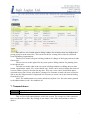
Here are list all the outcome documents (incl. non-public). If a document has status Ready for
Evaluation it is marked in blue.
A search engine is provided.
Here Control Body users can find outcome documents that expect evaluation and
evaluate them.
According to user’s rights one or more icons (View, Edit, Delete or Evaluate) are
shown for each document.
15.1 View Outcome
Address: http://gistandards.eu/bpc/outcomes/view/?outcome_id={OID}
Any user (incl. public and registered). If the document is public – any user; othUsers:
erwise: the author (Submitting Organization), Register Manager, Control Body,
Register Owner
This is the detailed view of an outcome document. All details are shown.
The author, Register Manager, Control Body, Register Owner can view a history of
the evaluation of the document outcome. Here, for example, can be found the reasons for rejecting a document.
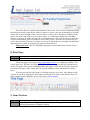
If the user has the necessary roles and/or rights, buttons for editing / deleting / submitting an outcome for evaluation are shown at the beginning of the page.
15.2 Edit Outcome
Address: http://gistandards.eu/bpc/outcomes/edit/?outcome_id={OID}
the author (Submitting Organization), Register Manager
Users:
Here the details of an outcome document can be edited.
An outcome document can be edited by its author (Submitting Organization) or by a
Register Manager user but only if the project associated with it has status Accepted.
The author can edit own document if it has status Submission or Revision Required.
The Register Manager can edit the outcome no matter of its status (however the project still
needs to be public!).
15.3 Delete Outcome
Address: http://gistandards.eu/bpc/outcomes/delete/?outcome_id={OID}
12