1
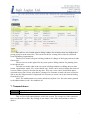
Now the values of a chosen nomenclature can be seen. A new value is added by filling
the dialog form that is open by the Add new button. A given value can be changed by clicking
on the edit icon on the right of the selected values. A value can be deleted by clicking on the
delete icon at the end of the row of a chosen value. A confirmation dialog will warn that a
deletion is about to be made and only after confirmation the value will be removed. Note that
if some nomenclature value is already in use in some project / outcome, the system will prevent it from deletion. This way if you try to remove eContent-plus, for example, but this funding programme is used in a project, the system will not delete it.
Important Note: New EU Funding Programmes can be added from Nomenclatures.
8. First Page
Address:
Users:
http://gistandards.eu/bpc/first-page-content/
Register Owner
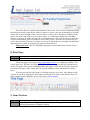
The home page of the system (http://gistandards.eu/bpc/) is completely editable. This
can be done here. With the aid of the WYSIWYG CKEditor you can add any formatted text
on the first page of the system (including tables and images). This can be used for customization of the first page of the system and / or quickly adding relevant information for all the
users.
You can preview the home page by clicking on the preview icon. Any changes to the
content are saved by clicking the Save button at the end of the form or the diskette icon. For
further details about CKEditor, please refer to the official manual.
9. Issue Tracker
Address:
Users:
http://gistandards.eu/bpc/issue-tracker/
Any non-public user (Registry Manager, Register Manager, Control Body, Submitting Organization or Register Owner)
7