1
GENERAL DESCRIPTION
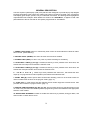
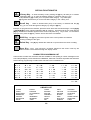
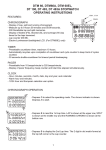
The DAS Liquid Crystal Display (LCD) code pad has been designed to provide step-by-step English
language information to the system user. When user action is required, the backlit, 2-line, 32 segment
LCD display gives simple, specific, easy to understand instructions. The drawing below highlights all
major elements of the code pad. When reference is made to the "SmartBuss", it applies to LCD code
pads attached to the DL-250 and DL-300 panels programmed for "SmartBuss".
1. ARMED LIGHT (RED): Stays on continuously when control is armed. Blinks to indicate an alarm
has occurred. (Alarm Memory)
2. SECURE LIGHT (GREEN): On when all zones are secured or isolated.
3. POWER LIGHT (RED): On when A.C power is present. Flashing for low battery.
4. AUXILIARY 1 KEYS [1] and [3]: If enabled, these keys, when pressed at the same time, will
activate the siren output and transmit the selected code.
5. AUXILIARY 2 KEYS [4] and [6]: If enabled, these keys, when pressed at the same time, will
activate the code pad sounder and transmit the selected code.
6 . P A N I C K E Y S [ These keys, when pressed at the same time , will activate the siren
output (if not programmed for silent operation) and transmit the selected code.
7. RESET KEY [#]: Used to power down smoke and/or auxiliary power for 10 seconds to allow for
reset. Provided other functions in the program mode. (page 11)
8 . S T A R K E Y [ Used before and after selected zones number keypress to isolate zones. Also
provides other functions in program mode. (page 11)
9. SPECIAL FUNCTION KEYS [A], [B], [C], [D]: The keys allow access to special functions in the
run mode. They also allow the installer to preform programming functions as detailed in the appropriate
sections of the booklet.
10. ADJUSTABLE SOUNDER: Provides an audible out when a key is pressed, during pre-alarm, and
when trouble or certain alarms occur.
2