1
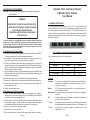
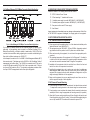
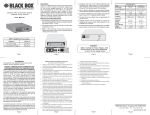
Dynamic Fiber Conversion System 5-Module Power Chassis User Manual 4.0 POWER SUPPLY REPLACEMENT CAUTION: To remove power from the chassis, remove power cord from all power supplies. WARNING!!! NEVER ATTEMPT TO OPEN THE CHASSIS OR SERVICE THE POWER SUPPLY OR FAN MODULE. OPENING THE CHASSIS MAY CAUSE SERIOUS INJURY OR DEATH. THERE ARE NO USER REPLACEABLE OR SERVICEABLE PARTS IN THIS UNIT. 1. 0 GENERAL DESCRIPTION The Dynamic Fiber Conversion System (DFCS) 1U (1.75 inch) 5-Module Power Chassis is powered by up to two (2) hot-swappable and redundant universal AC or DC power supplies and can accommodate up to 5 DFCS media converters. It is ideal for enterprise Local Area Network (LAN) or Metropolitan Area Network (MAN) applications where managed media converters with high density and a small rackfootprint are important. The power supplies are hot swappable and can be replaced without shutting the chassis down. However, when removing and replacing a power supply unit, the following steps must be strictly followed in order to prevent serious injury or death or serious damage to your equipment. Removal of power supplies or cards will result in access to hazardous electrical. 4.1 Hot Removal of AC Power Supply o Determine which power supply is faulty by observing the status LEDs on the DFCS MGT or viewing the status from the network management software. o Power Supply 1 (PS1) refers to the power supply on the right (as viewed from the front). Power Supply 2 (PS2) refers to the power supply on the left. o LED being ON indicates that the power supply is supplying power. LED being OFF indicates that the power supply is not present. Blinking LED indicates that a power supply is installed but does not supply power because it is not properly connected to a power source or because it is faulty. o Once you determine that your AC plug is connected properly to an AC wall outlet, and the power supply LED is still not ON, determine which is the failing power supply unit and proceed to the next step. o Remove the AC power cord of the faulty power supply from the wall outlet. o Remove the AC power cord of the faulty power supply from the power supply unit. o Using a screwdriver, loosen the 2 thumb screws securing the power supply to the main chassis (refer to Fig 5). o Remove the failing power supply. 4.2 Hot Attachment of AC Power Supply o Unpack the power supply carefully. Inspect for any damage. If any damage is observed, do not use the power supply and call 724-746-5500 to report the damage immediately and request a replacement unit. o Align the guide rails on the chassis with the rails on the bottom of the power supply; Slide the power supply in, ensuring that the power supply is seated firmly against the backplane and tighten the thumb screws securely with a screwdriver. o Plug the AC cord to the back of the power supply. o Plug the AC cord to the AC wall outlet. o Watch and listen to the fan in the rear of the power supply to ensure it is powered. Page 10 Fig. 1 5-Module Chassis (Shown without modules installed) This User Manual describes the following models: DFCS 5-Module Power Chassis Options Configuration 5-Module AC 5-Module DC One (1) Power Supply LMC3010A LMC3012A Two (2) Power Supply LMC3080A LMC3081A Spare Power Supply LMC3011P LMC3013P 1.1 Terms Backplane A printed circuit board which is permanently mounted inside the chassis and is populated with receptacle connectors into which modules are inserted. Module A DFCS plug-in card positioned into a slot location and inserted into a backplane connector. Module-Guide A mechanical channel, guiding module insertion into a backplane connector. Slot A single chassis position consisting of a backplane connector and its associated module-guides. A Link A backplane slot-to-slot connection that provides Ethernet connectivity between adjacent slots (sometimes referred to as A Backplane Link). A Port An interface on a module capable of Ethernet traffic via the backplanes A Link. Page 3