1
4.1.3 Batch Processing Subfolders
When your bracketed series are located in multiple folders, they can all be
processed in one run, provided they are in subfolders of the same parent
folder. To batch process multiple subfolders, check the Process subfolders
option at bottom of the Source frame on the Batch Processing dialog and
select sequentially. When “Process subfolders sequentially” is selected,
the batch will process the bracketed image files in one subfolder and then
move on to the next subfolder, all of which are contained in the main
parent folder.
Note
All of the subfolders must be
contained in the main parent folder
for this option to work properly.
Processing Series of Photos with Varying Numbers of Exposures
When your bracketed sets are composed of varying numbers of exposures, you can use “Process subfolders
sequentially” to combine the exposures in these sets in one batch run. Place each set in a separate subfolder,
group the subfolders under a parent folder, select Process subfolders sequentially and select All from the pulldown menu for the number of images to process at one time.
Grouped by Exposures Option
If you are processing bracketed photos that will be part of a panorama, you may find it useful to be able to
organize your photos in such a way that all exposures of the same levels are in the same folder. Let’s take as an
example a panorama composed of four views that need to be stitched, with each view having been taken under
three exposures: -2, 0, +2. You will then have 12 photos, and may need to place them in three separate subfolders
composed of four photos each as follows:
•
Subfolder1 contains the four photos for the panorama taken at EV -2
•
Subfolder2 contains the four photos for the panorama taken at EV 0
•
Subfolder3 contains the four photos for the panorama taken at EV +2
If you check “Process subfolders” and select “grouped by exposures”, the batch will combine the first file of
Subfolder1 with the first file of Subfolder2 and the first file of Subfolder3. The batch will then combine the second
file of Subfolder1 with the second file of Subfolder2 and the second file of Subfolder3, and so on for the third and
fourth file of each subfolder.
4.1.4 Advanced Options
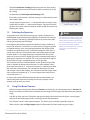
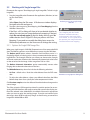
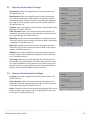
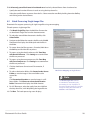
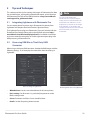
The following items are accessed when you click Advanced and click
Options to configure automatic selection of bracketed image files.
Click Automatically detect the number of bracketed frames when
processing a folder that contains files in addition to those in the set
of bracketed frames or when the number of frames in the set varies.
Photomatix Pro uses the metadata from the image files to perform
automatic detection.
•
Specify a range using the two drop-down lists to automatically detect
the number of bracketed frames.
•
Move the Maximum time between two bracketed frames slider right
or left to allow more or less time (read from the metadata). Min is ½
second and max is 64 seconds.
Advanced batch processing options
Photomatix Pro User Guide
19