1
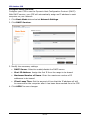
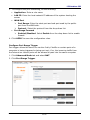
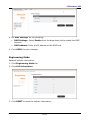
LTE Outdoor CPE 3. To configure the settings, do the following: Application Application: Enter a rule name. Protocol: Select the trigger port protocol from the drop-down list. Triggered Range: Enter the start-port and end-port that will trigger the device to open ports for incoming data. Forwarded Range: Enter the start-port and end-port used by the public port from the WAN side. Port Range Trigger Enabled/Disabled: Select Enable from the drop-down list to enable firewall. 4. Click APPLY to save the configuration rules. Enable UPnP Universal Plug and Play (UPnP) allows automatic discovery and control of services available on the network from other devices without user intervention. 1. Click Advanced Mode tab and select NAT. 2. Click UPnP. 3. On UPnP, select Enable from the drop-down list to enable the UPnP feature. 4. Click APPLY to save changes. Configure DMZ A DMZ (Demilitarized Zone) sets a single computer, called a DMZ host, on your network to receive unrestricted incoming traffic from the Internet. 1. Click Advanced Mode tab and select NAT. 2. Click DMZ. EN-42