1
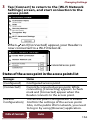
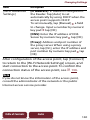
Changing Settings Item [Wi-Fi Advanced Settings] Description [IP Address]: IP address is assigned to the Reader. Tap [Auto] to set automatically by using DHCP when the access point supports DHCP. To set manually, tap [Manual] a field to change. Input a number by numeric key pad tap [OK]. [DNS]: Enter the IP address of DNS Server by numeric key pad tap [OK]. [Proxy]: Address and port number of the proxy server. When using a proxy server, tap [On], enter the IP address and port number by numeric key pad tap [OK]. After configuration of the access point, tap [Connect] to return to the [Wi-Fi Network Settings] screen, and start connection to the access point. To confirm the connection status of the access point, see 136. Note If you do not know the information of the access point, consult the administrator of the network or the public Internet access service provider. Table of Contents Index 140