1
AP08100
Configuration for Capacitive Touch-Sensing Application
Calibration Tool (U-SPY)
3.1
Compare-Calibration Tool
The Compare-Calibration Tool is used to get the calibrated SFR LTS_COMPARE values for all enabled pads, with
the corresponding SFR LTS_TSVAL values. Pass or fail flags are given to determine the calibration status.
There are three ini files for the Compare-Calibration Tool:
•
•
•
uspy_CompareCalibration_Compare.ini
uspy_CompareCalibration_TSVAL.ini
uspy_CompareCalibration_Result.ini
Different ini files means different GUI interfaces, and each ini file has a different usage.
uspy_CompareCalibration_Compare.ini is used to calibrate the compare values (SFR LTS_COMPARE).
uspy_CompareCalibration_TSVAL.ini provides the corresponding TS-counter values with respect to the calibrated
compare values. uspy_CompareCalibration_Result.ini is used to analyze the calibration results. Calibration for a
pad is successful when its fail flag is not set i.e., not highlighted in black. If there is no fail flag set in using
uspy_CompareCalibration_Compare.ini,
it
is
not
necessary
to
analyze
the
data
using
uspy_CompareCalibration_TSVAL.ini and uspy_CompareCalibration_Result.ini.
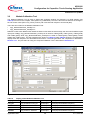
The user should disregard the respective SFR LTS_COMPARE and LTS_TSVAL values when a fail flag is set, as
indicated in the GUI interface. To analyze why the calibration process fails, and how to change the pad oscillation
frequency and the expected TS-counter value range, the uspy_CompareCalibration_Result.ini can be used. The
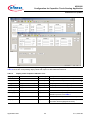
result parameters are described in Table 3.
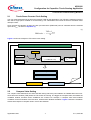
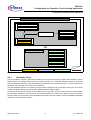
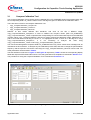
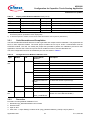
The GUI interfaces are shown in Figure 17 and Figure 18 respectively. Table 2 shows the corresponding display
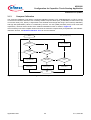
fields with respect to SFR fields and functions. The code generation and compilation is described in Section 3.1.1.
The procedure for using the Compare-Calibration Tool is described in Section 3.1.2.
Figure 17
Compare-Calibration Tool (Showing LTS_COMPARE)
Application Note
21
V1.0, 2010-06