1
AP08100
Configuration for Capacitive Touch-Sensing Application
Touch-Sense Parameter Setting Workflow
2
Touch-Sense Parameter Setting Workflow
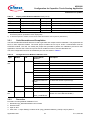
There are 5 major steps to configure the touch-sense parameter settings:
1.
2.
3.
4.
5.
Touch-Sense Counter Clock Setting
Compare Value Setting
Accumulation & Low Pass Filter (LPF) Gain Setting
Trip Point Setting
Valid Pad Touch Detection Period Setting
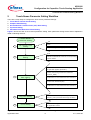
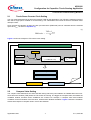
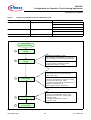
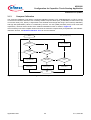
Figure 2 shows the flow of touch-sense parameter setting. Each parameter setting will be further explained in
detail in following sections.
Touch Sense
Parameter Setting
Determine time slice duration as per application
needs.
TS-Counter clock
setting
1
Calculate CLK_PS with appropriate CLKSEL.
Determine “LOWLIMIT” and “HIGHLIMIT”
. Get
calibrated COMPAREx values and corresponding
TSVALx values
Compare value
setting
2
Get minimum TS-counter value change without
any gain/filter applied (∆TSVALx)
Determine the Total Gain required based on Min.
counter value change needed for detection
(∆TSVAL_RQD).
3
Accumulation & LPF
Gain setting
Call “LEDTS ROMLIB” functions with different
combinations of AccumulatorCounter & Divisor n
Observe changes in AVERAGEx value during
touched and untouched (idle)
Compare sensitivity performance of different
combinations of AccumulatorCounter & Divisor n
Figure 2
4
Trip point setting
Calculate Subtraction m (OFFSET) from
∆TSVAL_AVG (recommended range: 40~80%)
5
Valid & Long pad
touch setting
Define valid & long pad touch detection period as
per application needs.
Overview Flowchart of Touch-Sense Parameter Setting
Application Note
6
V1.0, 2010-06