1
AP08100
Configuration for Capacitive Touch-Sensing Application
Touch-Sense Parameter Setting Workflow
2.1
Touch-Sense Counter Clock Setting
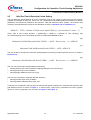
The user must first determine the time slice duration (TSD) for the application. The TSD is the maximum length of
time that a single pad is enabled for touch-sensing. The TSD defines the interval of the time slice/time frame
interrupt events.
Once the time slice duration is fixed, the clock pre-scale factor (PREscaler) can be calculated from the selected
input clock fCLK, as shown in Equation (1).
(1)
TSD × f CLK
PREscaler = ----------------------------8
2
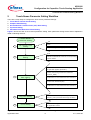
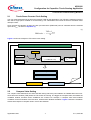
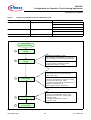
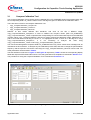
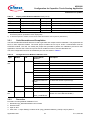
Figure 3 shows the example of TS-counter clock setting.
Example: Number of Touch pads = 3; Number of LED columns = 2; Covering plate = 2mm Glass
TSD = 1.5 ms
fCLK = 8MHz
+
PREscaler = (TSD * fCLK)/(2^8)
(1 ≤ PREscaler ≤ 63)
fCLK = 48MHz
PREscaler = 46
(fCLK = 8MHz)
LTS_GLOBCTL0.CLK_PS = 101110B
LTS_GLOBCTL1.CLKSEL = 1
User-defined Parameters
Registers to be configured
Figure 3
Touch-Sense Counter Clock Setting (Example)
2.2
Compare Value Setting
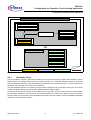
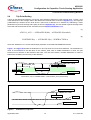
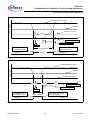
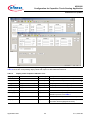
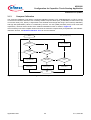
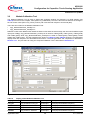
The compare value determines the active duration during which the pad oscillation is enabled within the touchsense time slice duration (TSD) where the TS-counter is counting. The bigger the compare value, the smaller the
oscillation window, therefore fewer oscillations are counted. For example, a compare value 0x00 enables
oscillation for the full duration of the time slice, whereas 0xFF disables oscillation. Figure 4 shows the oscillation
window with respect to compare value in a time slice duration.
Application Note
7
V1.0, 2010-06