1
TWINSYNC QUICKSTART GUIDE
This document describes a quick step-by-step procedure of how to setup and install the
TwinSync.
1. Setup your airplane’s throttles mechanically so that the throttle servos operate as
they should with the transmitter end points with at least 100% in both directions
(idle and full throttle).
2. If you are using the TwinSync with engines that do not already have crank shaft
mounted magnets the you need to install magnets into the spinner back plates
(3/16”x1/16” magnets) or into the prop hub (1/8”x1/4” diametric magnets)
3. To install spinner mounted magnets, dill a 3/16” hole near the outside of each
spinner just deep enough so that the magnet are flush when installed. Glue one
magnet into each spinner using slow curing epoxy.
4. To install magnets into the prop hub for airplanes without spinners, drill a 1/8”
hole into the prop hub parallel to the crankshaft. Follow the directions in section
3.2 of the “Users Guide” for aligning the magnets before epoxying them in place.
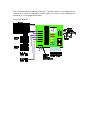
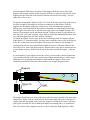
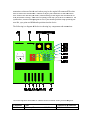
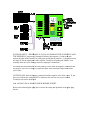
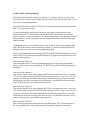
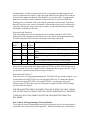
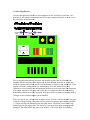
5. To install the RPM sensors, connect a sensor to the TwinSync (NOTE THE
CORRECT ORIENTATION of the connector on the diagram below). Turn on
power and move the sensor by a magnet. Only one side of the sensor will detect
the magnet. When the orientation of magnet and sensor is correct one of the
Green LEDs will turn on. Mount both sensors about 1/16” to 1/8” from the
magnet so that the Green LEDs turn on once per prop rotation.
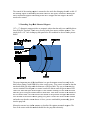
6. Now install the device into the airplane connecting everything as shown on the
diagram. The device can be wrapped with foam rubber or simply held to the
aircraft frame with tie wraps or double sided tape. The device is not sensitive to
vibration.
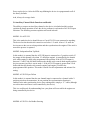
7. Turn on the transmitter and receiver with throttle channel from the receiver
connected to the Twinsync throttle input. Both yellow LEDs should be off at
either idle or full throttle. If one yellow LED stays on increase your end points
until both yellow LEDs are off at either idle or full throttle (this is temporary just
to get the direction correct). If the yellow LEDs go off at idle then your throttle
direction on your transmitter is correct. If the LEDs go off at full throttle then
reverse your throttle direction on the transmitter so that they go off at idle (we can
reverse the servos on the Twinsync so that this is not an issue).
8. At this point, both the yellow LEDs should go off at idle and one yellow LED
should come on as you advance the throttle. If you’re your throttle servos are
backwards the next step explains how to reverse them.
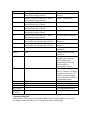
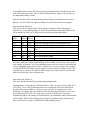
9. How to reverse the throttle servos: Turn the receiver and the Twinsync off. Move
the rotary switch to position “7”. Turn the receiver and Twinsync on. The LEDs
will flash several times indicating that you are in a programming mode. Now you
can press one button to reverse one servo and the other button reverses the other
servo. Just press the button for about a half of a second. A yellow LED will come
on when a servo is reversed and off when it is normal direction. After reversing
one or both servos move the rotary switch back to position “0” and turn power off
and back on. Check the servo direction and if not correct repeat this procedure.