1
Using the Client Application for the First Time
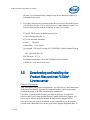
further information on using redundant servers, see the Intel FLEXlm user guide
and the information at http://software.intel.com/en-us/articles/redundancy-servernotes/
Instructions for Combining License Files
Combine multiple license server files into a single license file by performing
these steps:
1. Concatenate the files.
2. Remove the duplicate SERVER and VENDOR lines.
Note: The expiration dates can be different and the number of seats can be
different in license files but the lmhostid and hostname values in the license files
should be the same. If you are combining multiple counted license files for a
single product, you need to make sure that following additional requirements are
being met:
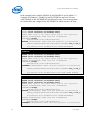
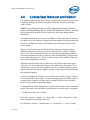
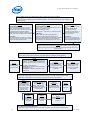
3. Only one license file has FEATURE line and all other license files have
INCREMENT lines (see example below on how File0001.lic and File0002.lic
were combined into a single license file File0003.lic).
If this requirement is being met, you can simply concatenate the license files and
remove the duplicate server and vendor lines by making sure that the license with
FEATURE line is the first key in the combined license file and licenses with
INCREMENT lines follow it (File0003.lic).
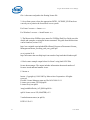
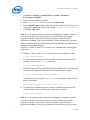
4. Or, all the license files of the same product have INCREMENT lines instead
of FEATURE lines (see below how File0004.lic and File0005.lic were
combined into a single license file File0006.lic).
If this requirement is met, you can simply concatenate the license files and
remove the duplicate server and vendor lines (File0006.lic). If you are combining
multiple counted license files where each counted license file is for a unique
product, you can simply concatenate them and remove the duplicate server and
vendor lines.
5. When you update your combined license file, make sure the license file on the
license host server and on the client systems are the same, and that you restart the
license host server after you complete your updates to the license file(s).
6. Make sure the INTEL_LICENSE_FILE environment variable is pointing to
the right license file.
Examples:
Examples are provided below for demonstration purposes only.
User's Guide
27