1
Leonardo Multimedia S.r.l.
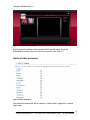
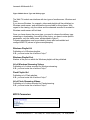
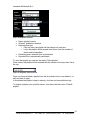
Figure 5 Media Server Type and Delivery type
The Web-TV module can interface with two types of media server: Windows and
Flash.
If you choose Windows, for example, videos and playlists will be published on
Windows media server, and will therefore be encoded for this purpose. With
regard to the viewing, only the videos and the channels encoded or created for
Windows media server will be listed.
Once you have chosen the server type, you need to choose the delivery type:
streaming or downloading. According to the choice, you have to enter specific
parameters, only the visible ones, as described in figure 5.
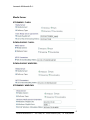
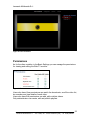
Following parameters must be provided by those who had installed and
configured MFCS (values in figure are explamples).
Windows Playlist Url
Publishing url of Windows playlists.
N.B.: you must enter the url without “http://”
Windows Playlist Port
Number of the port on which the Windows playlists will be published.
Url of Windows Streaming Videos
Publishing url of videos encoded for Windows streaming.
N.B.: you must enter the url without “http://”
Flash Playlist Url
Publishing url of Flash playlists.
N.B.: you must enter the url without “http://”
Url of Flash Streaming Videos
Publishing url of videos encoded for Flash streaming.
N.B.: you must enter the url without “http://”
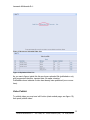
MFCS Parameters
Figure 6 MFCS Parameters
7
Leonardo Multimedia S.r.l. – via Trebbo, 88 – 41053 Maranello (MO) - Tel. 0536/944949